head-up VOLVO XC90 2015 Owner's Manual
[x] Cancel search | Manufacturer: VOLVO, Model Year: 2015, Model line: XC90, Model: VOLVO XC90 2015Pages: 570, PDF Size: 12.44 MB
Page 435 of 570
NAVIGATION*
* Option/accessory, for more information, see Introduction.
433
StepCenter dis- play/menuAction
5Start navi- gation is
displayed on thescreen.Tap Start navigation.
6A map showingthe route toyour desti-nation isdisplayed.Guidance will begin. Fol- low the directions on theinstrument panel.
Related information
• Using the center display (p. 46)
• Center display overview (p. 29)
Navigation displays and controls
Volvo Sensus Navigation is presented on the instrument panel and head-up display * and con-
trolled using center display on-screen buttons, the right-side steering wheel keypad and voicecommands.
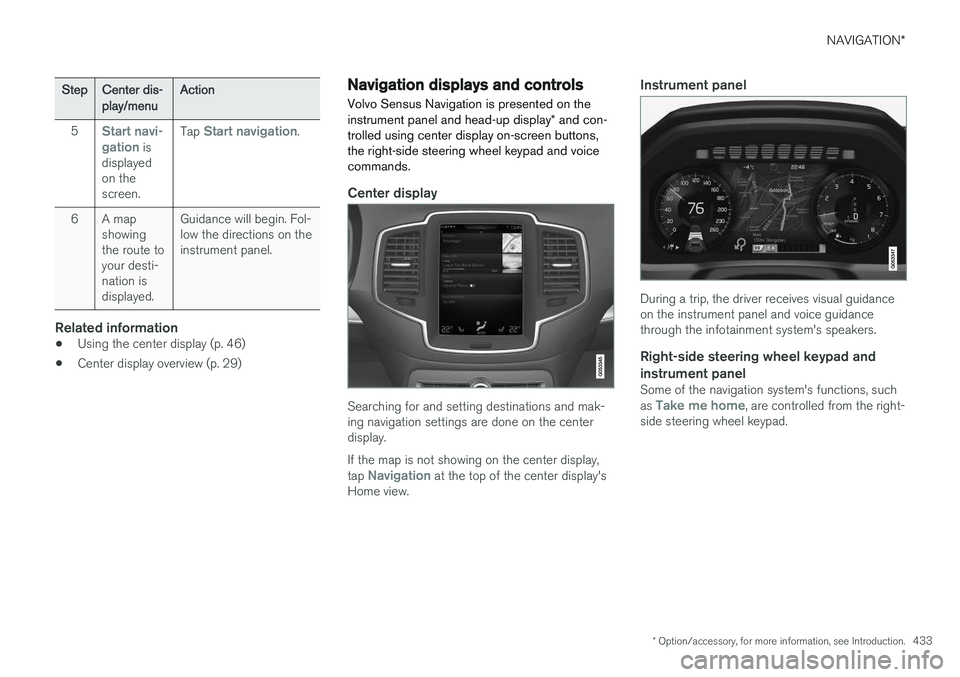
Center display
Searching for and setting destinations and mak- ing navigation settings are done on the centerdisplay. If the map is not showing on the center display, tap
Navigation at the top of the center display's
Home view.
Instrument panel
During a trip, the driver receives visual guidance on the instrument panel and voice guidancethrough the infotainment system's speakers.
Right-side steering wheel keypad and instrument panel
Some of the navigation system's functions, such as Take me home, are controlled from the right-
side steering wheel keypad.
Page 436 of 570
NAVIGATION*
* Option/accessory, for more information, see Introduction.
434
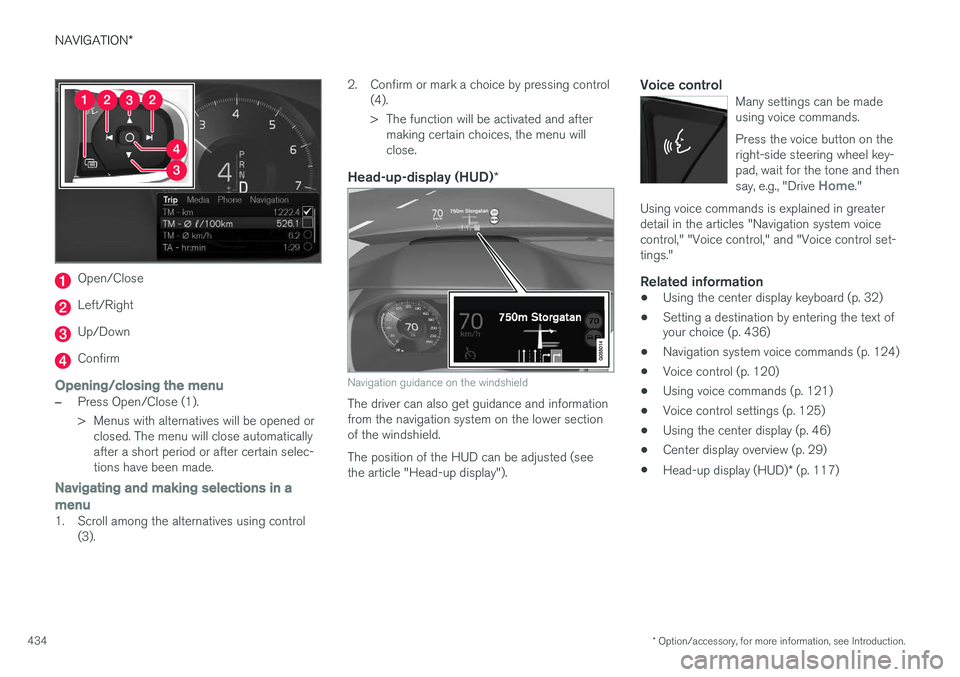
Open/Close
Left/Right
Up/Down
Confirm
Opening/closing the menu
–Press Open/Close (1).
> Menus with alternatives will be opened or
closed. The menu will close automatically after a short period or after certain selec-tions have been made.
Navigating and making selections in a menu
1. Scroll among the alternatives using control (3). 2. Confirm or mark a choice by pressing control
(4).
> The function will be activated and aftermaking certain choices, the menu will close.
Head-up-display (HUD) *
Navigation guidance on the windshield
The driver can also get guidance and information from the navigation system on the lower sectionof the windshield. The position of the HUD can be adjusted (see the article "Head-up display").
Voice controlMany settings can be madeusing voice commands. Press the voice button on the right-side steering wheel key-pad, wait for the tone and then say, e.g., "Drive
Home."
Using voice commands is explained in greater detail in the articles "Navigation system voicecontrol," "Voice control," and "Voice control set-tings."
Related information
•Using the center display keyboard (p. 32)
• Setting a destination by entering the text of your choice (p. 436)
• Navigation system voice commands (p. 124)
• Voice control (p. 120)
• Using voice commands (p. 121)
• Voice control settings (p. 125)
• Using the center display (p. 46)
• Center display overview (p. 29)
• Head-up display (HUD)
* (p. 117)
Page 508 of 570

MAINTENANCE AND SERVICING
* Option/accessory, for more information, see Introduction.
506
FunctionA
Steering wheel module5
Module for start knob and parking brake5
Heated steering wheel * module15
––
––
––
––
Climate system control module10
––
On-board diagnostics (OBDII)5
Center display5
Climate system blower module (front)40
––
Instrument lighting; Courtesy light- ing; Rearview mirror auto-dim func-tion; Rain and light sensor; Rear tunnel console keypad *; Power
front seats *7.5
FunctionA
Control module for driver support functions5
Panorama roof and sun shade *20
Head-up display*5
Courtesy lighting5
––
Ceiling console display (seat belt reminder, front passenger side air-bag indicator)5
––
Humidity sensor5
Rear passenger-side door module20
Fuses in the cargo compartment10
Internet connection control module; Volvo On Call control module5
Rear driver-side door module20
Infotainment control module (amplifier)40
Climate system blower module (rear)40
FunctionA
Multi-band antenna module5
––
––
Tailgate window wiper15
Fuel pump control module15
––
––
Driver side seat heating *15
Passenger side seat heating *15
Coolant pump10
––
Front driver-side door module20
Active chassis*20
––
Sensus control module10
––
––
Page 561 of 570
559
Head restraints, rear seat 167
Head-up display 117
Heated front seats 191
Heated oxygen sensors 349
Heated steering wheel 189
High beam bulb, replacing 513
High beams 140
active 141
Hill Descent Control 334
Hill Start Assist (HSA) 335
Hoisting the vehicle 516 HomeLink ®
Wireless Control System 94, 95
Home safe lighting 146
Hood, opening/closing 518
Horn, Keypad, Paddles, Signal 157
I
ID, Volvo 27
Ignition modes 355
Immobilizer (start inhibitor) 221
Indicator lights 134
Infant seats 67
Inflatable Curtain 87
Inflation pressure 473
Inflation pressure table 545
Information lights 134
Infotainment 412
Infotainment (Infotainment system) 376
Infotainment system 380, 381, 382 CD player 394
cell phone 387
general sound settings 376
Gracenote 399
introduction 376
media player 393, 395
media player sound settings 398
media search 397
radio 377
searching for radio stations 378
sound settings 376, 398
type approval 408
video 399
voice control 120
Inspection readiness 488
Instrument lighting 139
Instrument overview 98
Intellisafe 16
Interior Air Quality System 178
Interior lighting 146Internet connection 401 applications (apps) 403
bluetooth settings 404
booking service 491
establishing a connection 402
troubleshooting 405
ISOFIX/LATCH anchors 72 Itinerary Guidance points 444
J
Jack 476
location of 476, 478
Jump starting 345, 350
K
Key remote 110, 224
Key blade 227, 237
Keys 226