ECU VOLVO XC90 2015 Service Manual
[x] Cancel search | Manufacturer: VOLVO, Model Year: 2015, Model line: XC90, Model: VOLVO XC90 2015Pages: 570, PDF Size: 12.44 MB
Page 405 of 570
INFOTAINMENT
403
•
Connecting a device via the AUX/USB socket (p. 393)
• Wi-Fi technology and security (p. 407)
Apps (applications)
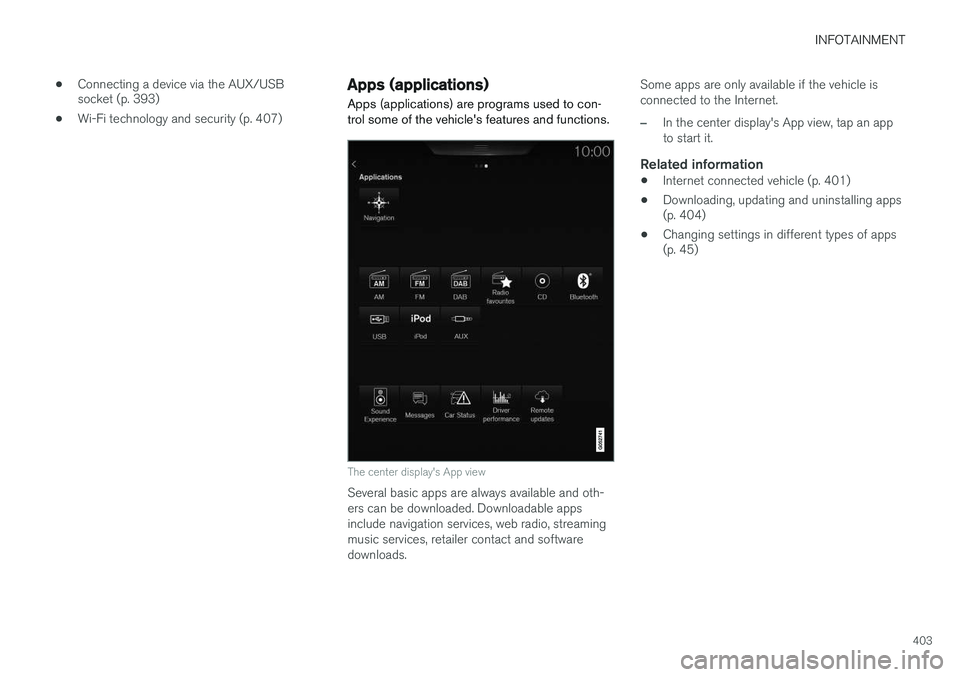
Apps (applications) are programs used to con- trol some of the vehicle's features and functions.
The center display's App view
Several basic apps are always available and oth- ers can be downloaded. Downloadable appsinclude navigation services, web radio, streamingmusic services, retailer contact and softwaredownloads. Some apps are only available if the vehicle isconnected to the Internet.
–In the center display's App view, tap an app to start it.
Related information
•
Internet connected vehicle (p. 401)
• Downloading, updating and uninstalling apps (p. 404)
• Changing settings in different types of apps(p. 45)
Page 408 of 570
INFOTAINMENT
406
Tethering (Wi-Fi sharing)When the vehicle is connected to the Internet, this connection can be shared (tethered) with other devices 5
.
The network service provider (the SIM card) must support tethering.
1. Open the center display's Top view.2. Tap
SettingsCommunicationVehicle Wi-Fi Hotspot.
3. Tap
Network name and assign a name to
the hotspot.
4. Tap
Password and create a password to be
used by devices trying to connect (tether) to the hotspot.
5. Tap
Frequency band and select a fre-
quency that the hotspot will use to transmit data. This may not be possible in all markets.
6. Activate/deactivate by tapping the
Vehicle
Wi-Fi Hotspot box.
7. If another connection has been used previ- ously, confirm the change of connections.
> It is now possible for external devices toconnect to the vehicle's Wi-Fi hotspot.
Connection status will be indicated in a symbol in the center display's status bar. Tap
Connected devices to see a list of con-
nected devices.
Related information
• Internet connected vehicle (p. 401)
• Wi-Fi technology and security (p. 407)
• Symbols in the center display status bar (p. 44)
• Internet connection troubleshooting (p. 405)
Deleting Wi-Fi networks
Networks that are not used can be deleted.
1. Tap Settings in the center display's Top
view.
2. Tap
Wi-FiSaved networks.
3. Tap
Forget to remove the network.
4. Confirm the selection. > The vehicle will no longer connect to thedeleted network.
Deleting all networksAll networks can be deleted at the same time by returning (resetting) to factory settings. If this is done, all user data and settings will be reset to their default settings.
Related information
• Internet connected vehicle (p. 401)
• Connecting to the Internet (p. 402)
5
Does not apply for a Wi-Fi connection.
Page 409 of 570
INFOTAINMENT
407
Wi-Fi technology and security
The following are types of networks can be con- nect to.
It is possible to connect to the following types of networks:
• Frequency: 2.4 or 5 GHz 6
.
• Standards: 802.11 a/b/g/n.
• Security type: WPA2-AES-CCMP.
The vehicle's Wi-Fi system is designed to man-age Wi-Fi devices in the vehicle. If several devices are using a frequency at the same time, this may result in poorer performance.
Related information
• Internet connected vehicle (p. 401)
• Connecting to the Internet (p. 402)
• Tethering (Wi-Fi sharing) (p. 406)
• Internet connection troubleshooting (p. 405)
Vehicle modem settings
The vehicle is equipped with a modem that can be used to connect the vehicle to the Internet. Itis also possible to share (tether) this connectionvia Wi-Fi.
1. Tap Settings in the center display's Top
view.
2. Tap
CommunicationVehicle Modem
Internet and choose among the following
settings:
•
Vehicle modem Internet: select to use the
vehicle's modem to connect to the Internet.
•
Data usage: %s: Tap Reset to restart
(reset) the counter for the amount of data sent/received.
•
Network Select carrier
: select a service provider automati-
cally or manually.
Data roaming: select to allow the vehicle to con-
nect to another network if the standard net- work is not available (e.g., if you are driving inanother country). This could entail additionalcharges, consult your service provider.
•
SIM card PIN Change PIN
: enter max. 4 digits.
Disable PIN: Allow access to the SIM card without
requiring a PIN code.
•
Send request code: this is used to down-
load the balance remaining on a SIM card. This is specific to your service provider.
Related information
• Internet connected vehicle (p. 401)
• Connecting to the Internet (p. 402)
6
Selecting a frequency is not possible in all markets.
Page 416 of 570
VOLVO ON CALL WITH SENSUS CONNECT *
* Option/accessory, for more information, see Introduction.
414
Volvo On Call (VOC) *
VOC is an integrated, subscription-based sys-
tem that provides emergency, roadside assis- tance and security services.
VOC is connected to the vehicle's airbag and alarm systems. The vehicle has an integratedGlobal System for Mobile Communications(GSM) module that handles communicationbetween the vehicle and the VOC customer serv-ice center.
AvailabilityVOC uses the Global Navigation Satellite System(GNSS) to locate the vehicle and its integratedGSM module to enable communication with theVOC customer service center and the VOCmobile app. From the time that the remote key has been removed from the vehicle, VOC's functionsremain available for 5 full days and subsequentlyonce an hour for the following 17 days. Afterthree weeks have elapsed, the system will remainswitched off until the engine is started.
WARNING
The system can only function in areas where there is adequate cellular network coverage. Just as in the case of cell phones, atmos- pheric disturbances or areas with relativelyfew GSM transmitters can make it impossiblefor VOC to make a connection, for example, inrural areas.
SubscriptionsA free, limited-time trial subscription is initiated when the vehicle is purchased and VOC is acti-vated. The subscription can be extended by con-tacting your Volvo retailer.
Information on the InternetFor additional information about Volvo On Call, goto: United States http://www.volvocars.com/us/support Canada English: http://support.volvocars.com/en-CA French: http://support.volvocars.com/fr-CA
Related information
• Volvo On Call convenience services (p. 416)
• Volvo On Call safety services (p. 424)
• Volvo On Call security services (p. 425)
• Using Volvo On Call (p. 414)
• Volvo ID (p. 27)
Using Volvo On Call
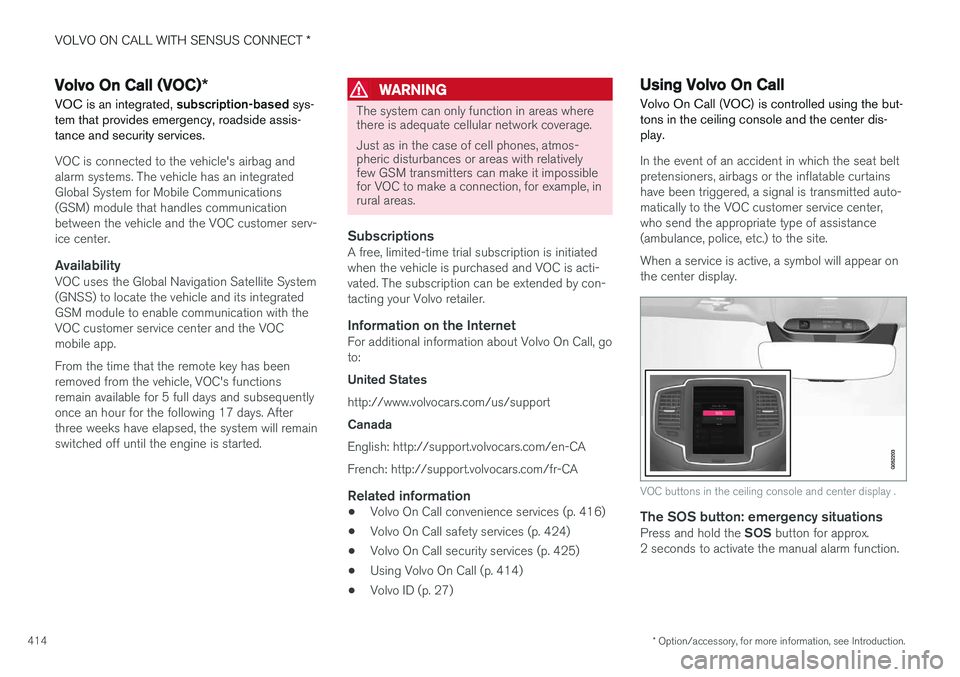
Volvo On Call (VOC) is controlled using the but- tons in the ceiling console and the center dis-play.
In the event of an accident in which the seat belt pretensioners, airbags or the inflatable curtainshave been triggered, a signal is transmitted auto-
matically to the VOC customer service center,who send the appropriate type of assistance(ambulance, police, etc.) to the site. When a service is active, a symbol will appear on the center display.
VOC buttons in the ceiling console and center display .
The SOS button: emergency situationsPress and hold the SOS button for approx.
2 seconds to activate the manual alarm function.
Page 418 of 570
VOLVO ON CALL WITH SENSUS CONNECT *
* Option/accessory, for more information, see Introduction.
416
FunctionCus-
tomer
service centerApp A
Engine remote start (ERS)X
Locating the vehicleXX
Instrument panel informa- tionX
Vehicle "checkup"X
Driving logbookX
Vehicle informationX
A
Some of these functions may not be available for all models.
Related information
• Volvo On Call (VOC)
* (p. 414)
• Volvo On Call mobile app (p. 416)
• Volvo On Call convenience services (p. 416)
• Volvo On Call safety services (p. 424)
• Volvo On Call security services (p. 425)
Volvo On Call convenience services
Convenience services are available by using the mobile app to e.g., remote-start the engine *, etc.
As a VOC user, a mobile app is available that enables you to have telephone contact from aniPhone or from Windows/Android phones withyour vehicle when it is parked. With it, you canlocate the vehicle, lock it from another location,check the fuel level and much more. Read moreabout this app in the following section.
Related information
• Volvo On Call (VOC)
* (p. 414)
• Volvo On Call mobile app (p. 416)
• Volvo On Call (VOC) functions (p. 415)
Volvo On Call mobile app
As a VOC user, you can download a mobile app that enables you to have telephone contact withyour vehicle when it is parked.
Certain functions may not be available in all mod- els. The mobile app is updated regularly, which may result in this information not being completelyup-to-date with respect to the functionality availa-ble. For additional information about the app, goto: United States http://www.volvocars.com/us/support Canada English: http://support.volvocars.com/en-CA French: http://support.volvocars.com/fr-CAThe Volvo On Call mobile app is available for the iPhone and for Windows/Android phones andcan be downloaded from Apple's AppStore, Win-dows Phone Store or Google Play. A personal Volvo ID is required in order to use the mobile app. For additional information about the Volvo ID, the features it offers and how to create it, see thearticle "Volvo ID".
Page 419 of 570
VOLVO ON CALL WITH SENSUS CONNECT *
* Option/accessory, for more information, see Introduction.
417
Locating the vehicleThe vehicle's location is shown on a map and directions to the vehicle can be provided. There isalso a digital compass to help show the ownerthe right direction. When you are within approx.100 yards/meters of the vehicle, you can activateits horn and turn signals to help locate it.
The vehicle's instrument panelThis function provides information such as: thefuel level, range on the remaining fuel, averagefuel consumption, average speed and odometer/trip odometer readings.
Vehicle "checkup"The mobile app monitors the vehicle's conditionand provides information about bulbs and the lev-els of brake fluid, coolant and engine oil.
Driving logbookDetailed information about each trip made duringthe past 40 days can be saved and downloaded.All or part of this information can be exportedfrom the mobile app to a spreadsheet format andsent to an email address. This is very useful fore.g., keeping track of business-related driving. This function can be deactivated, in which case the vehicle will not transmit logbook informationat the end of each trip.
Vehicle informationBasic information such as model, license platenumber and VIN number are readily accessible.
Theft notificationIf the vehicle's alarm is triggered, the owner willbe informed via his/her cell phone.
Remote door unlockThe status of all doors and windows is provided.The owner can lock/unlock the vehicle fromanother location but for security reasons, theapp's password is always required before thevehicle can be unlocked.
Engine remote start (ERS)*1ERS makes it possible to remotely start theengine using the remote key to enable the cli-mate system to cool or heat the passenger com-partment before driving. When the engine starts, the climate and infotain- ment systems will restart using the same settingsas when the engine was switched off. You can choose to let the engine run for between 1 and 15 minutes before it automati-cally switches off again. After 2 ERS starts, theengine must be started in the normal way beforeERS can be used again.
WARNING
Keep the following in mind before using ERS:
• The vehicle should be in view.
• The vehicle should be unoccupied.
• The vehicle must not be parked indoors or in an enclosed area. Exhaust fumes areharmful to the health.
NOTE
Always observe applicable state, province and/or local laws regarding engine idlingwhen using ERS.
Related information
•Volvo On Call convenience services (p. 416)
• Volvo On Call (VOC)
* (p. 414)
• Volvo ID (p. 27)
• Starting the engine (p. 356)
• Volvo On Call (VOC) functions (p. 415)
1
Certain models only.
Page 420 of 570
VOLVO ON CALL WITH SENSUS CONNECT *
* Option/accessory, for more information, see Introduction.
418
Volvo On Call PIN code The PIN code is used for security purposes to help identify those persons who are authorizedto use VOC services in a specific vehicle.
The 4-digit PIN code, which was sent to you when your Volvo retailer activated your subscrip-tion, is used for security reasons to help identifythose persons who are authorized to use certainVOC services such as remote door unlock or tocreate an account in the mobile app.
If you have forgotten or would like to
change your PIN code
If you have forgotten your PIN code or would liketo change it (e.g., if you have purchased a previ-ously owned Volvo with VOC), contact your Volvo retailer or press the On Call button in your vehi-
cle. The new code will be sent to you via email.
If an incorrect PIN code has been entered
in the app multiple times
If a PIN code has been entered incorrectly 10 times in a row, the account will be frozen. Inorder to use the app again, a new PIN code mustbe selected and a new app account will have tobe created.
Related information
• Unlocking the vehicle from the customer service center (p. 426)
• Volvo On Call mobile app (p. 416) •
Changing ownership of a vehicle with VolvoOn Call (p. 424)
• Volvo On Call (VOC)
* (p. 414)
Page 427 of 570
VOLVO ON CALL WITH SENSUS CONNECT *
* Option/accessory, for more information, see Introduction.
425
Roadside assistanceRequest help for e.g., flat tires, a discharged bat- tery, if you have run out of fuel, etc.
Emergency numberWhen an emergency call has been initiated, VOCattempts to contact the customer service center.If this is not possible, the call will be transferredto the emergency 911 number instead.
Related information
•Volvo On Call (VOC)
* (p. 414)
• Volvo On Call manual safety service (p. 424)
• Volvo On Call roadside assistance (p. 425)
• Using Volvo On Call (p. 414)
Volvo On Call roadside assistance
Use VOC to summon help in the event of a flat tire, an empty fuel tank, etc.
1. Press the ON CALL button for at least
2 seconds.
2. The VOC customer service center attempts to establish voice contact with the driver to determine the need for assistance.
Related information
•Volvo On Call (VOC)
* (p. 414)
• Volvo On Call safety services (p. 424)
• Volvo On Call manual safety service (p. 424)
• Using Volvo On Call (p. 414)
Volvo On Call security services The Volvo On Call (VOC) security services are intended to provide assistance, for instance, ifyou are locked out of your vehicle, if it has beenstolen, etc.
Volvo On Call's security services are primarily intended to help minimize the risk of the vehiclebeing stolen. If the vehicle's normal electrical system is not functioning properly, VOC's reserve battery pro-vides the system with current.
Theft notificationA signal will be sent automatically to the VolvoOn Call customer service center in the event of abreak-in or theft (if the vehicle's alarm has beentriggered). This service will be interrupted if the alarm is turned off using one of the vehicle's remote keys.
Remote door unlockIf the vehicle's remote key has been lost orlocked in the car, the doors can be unlockedremotely within the following 5 days with assis-tance from the VOC customer service centerafter the owner's identity has been verified byhis/her pin code.
Remote vehicle immobilizerIf the vehicle has been stolen, the owner or policecan contact the VOC customer service center to
Page 428 of 570
VOLVO ON CALL WITH SENSUS CONNECT *
* Option/accessory, for more information, see Introduction.
426 have the vehicle's remote keys immobilized (deactivated).
NOTE
This applies even if the vehicle has been unlocked and started with one of its remotekeys.
After contacting the owner/police, the VOC cus- tomer service center then deactivates the remotekeys. Once the engine has been switched off, itcan only be restarted if the owner/police hasgiven the VOC customer service center authori-zation to reactivate the remote keys. Once thisauthorization has been verified (using your PINcode), the VOC customer service center will reac-tivate the remote keys.
Related information
•
Volvo On Call (VOC)
* (p. 414)
• Unlocking the vehicle from the customer service center (p. 426)
• Service center phone number (p. 419)
• Volvo On Call PIN code (p. 418)
Unlocking the vehicle from the customer service center
The doors can be unlocked remotely with assis-
tance from the VOC customer service center.
1. Contact the VOC customer service center at 855-399-4691 (this number applies in both the United States and Canada).
2. After confirming that the caller is the vehi- cle's owner or other authorized person (usingyour PIN code), the VOC customer servicecenter sends a signal to the vehicle to unlockit.
3. The tailgate has to be opened to unlock the other doors. Press lightly on the rubberizedpressure plate under the outer tailgate han-dle.
NOTE
If the tailgate is not opened within the time period set by the VOC customer service cen-ter, it will relock.
NOTE
If the vehicle is parked in a garage or other covered area, remote unlocking may not bepossible due to poor signal reception.
Related information
• Volvo On Call security services (p. 425)
• Volvo On Call (VOC)
* (p. 414)
• Locking/unlocking the tailgate (p. 233)
Page 463 of 570
NAVIGATION*
* Option/accessory, for more information, see Introduction.
461
a particular purpose, usefulness, use or results to be obtained from this Data, or that the Data orserver will be uninterrupted or error free. Disclaimer of Warranty
: HERE AND ITS
LICENSORS (INCLUDING THEIR LICENSORS AND SUPPLIERS) DISCLAIM ANYWARRANTIES, EXPRESS OR IMPLIED, OFQUALITY, PERFORMANCE,MERCHANTABILITY, FITNESS FOR APARTICULAR PURPOSE ORNONINFRINGEMENT. Some States, Territoriesand Countries do not allow certain warrantyexclusions, so to that extent the above exclusionmay not apply to you. Disclaimer of Liability : HERE AND ITS
LICENSORS (INCLUDING THEIR LICENSORS AND SUPPLIERS) SHALL NOT BE LIABLE TOYOU IN RESPECT OF ANY CLAIM, DEMANDOR ACTION, IRRESPECTIVE OF THE NATUREOF THE CAUSE OF THE CLAIM, DEMAND ORACTION ALLEGING ANY LOSS, INJURY ORDAMAGES, DIRECT OR INDIRECT, WHICH MAYRESULT FROM THE USE OR POSSESSION OFTHIS DATA; OR FOR ANY LOSS OF PROFIT,REVENUE, CONTRACTS OR SAVINGS, OR ANYOTHER DIRECT, INDIRECT, INCIDENTAL,SPECIAL OR CONSEQUENTIAL DAMAGESARISING OUT OF YOUR USE OF OR INABILITYTO USE THIS DATA, ANY DEFECT IN THISDATA, OR THE BREACH OF THESE TERMS ORCON¬DITIONS, WHETHER IN AN ACTION INCONTRACT OR TORT OR BASED ON A WARRANTY, EVEN IF HERE OR ITSLICENSORS HAVE BEEN ADVISED OF THEPOSSIBILITY OF SUCH DAMAGES. SomeStates, Territories and Countries do not allowcertain liability exclusions or damages limitations,so to that extent the above may not apply to you. Export Control
: You agree not to export from
any¬where any part of the Data or any direct product thereof except in compliance with, andwith all licenses and ap¬provals required under,applicable export laws, rules and regulations,including but not limited to the laws, rules andregulations administered by the Office of ForeignAssets Control of the U.S. Department ofCommerce and the Bureau of Industry andSecurity of the U.S. De¬partment of Commerce.To the extent that any such export laws, rules orregulations prohibit HERE from complying withany of its obligations hereunder to deliver ordistribute Data, such failure shall be excused andshall not constitute a breach of this Agreement. Entire Agreement : These terms and conditions
constitute the entire agreement between HERE (and its licensors, including their licensors andsuppliers) and you pertaining to the subjectmatter hereof, and supersedes in their entiretyany and all written or oral agreements previouslyexisting between us with respect to such subjectmatter. Severability : You and HERE agree that if any
portion of this agreement is found illegal or unenforceable, that portion shall be severed and the remainder of the Agreement shall be givenfull force and effect. Governing Law
: The above terms and conditions
shall be governed by the laws of the State of Illinois (for Data for the Americas and/or the AsiaPacific region) or The Netherlands (for Data forEurope, the Middle East and Africa), withoutgiving effect to (i) its conflict of laws provisions,or (ii) the United Nations Convention forContracts for the International Sale of Goods,which is explicitly excluded. For any and alldisputes, claims and actions arising from or inconnection with the Data (