maintenance VOLVO XC90 2015 Repair Manual
[x] Cancel search | Manufacturer: VOLVO, Model Year: 2015, Model line: XC90, Model: VOLVO XC90 2015Pages: 570, PDF Size: 12.44 MB
Page 531 of 570
MAINTENANCE AND SERVICING
529
Cleaning the center display
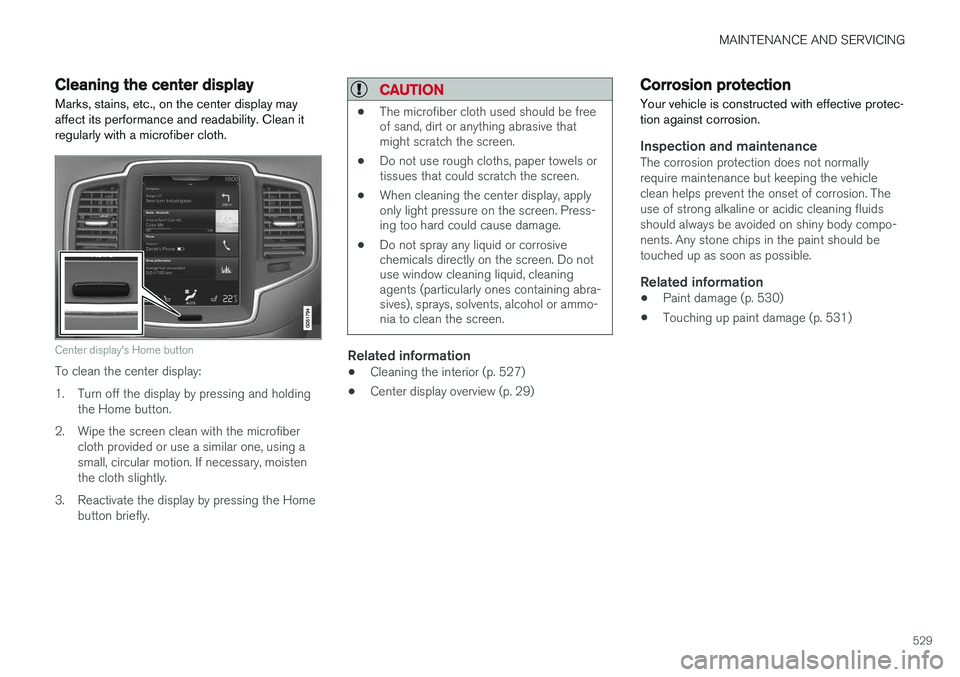
Marks, stains, etc., on the center display may affect its performance and readability. Clean itregularly with a microfiber cloth.
Center display's Home button
To clean the center display:
1. Turn off the display by pressing and holding the Home button.
2. Wipe the screen clean with the microfiber cloth provided or use a similar one, using a small, circular motion. If necessary, moistenthe cloth slightly.
3. Reactivate the display by pressing the Home button briefly.
CAUTION
• The microfiber cloth used should be free of sand, dirt or anything abrasive thatmight scratch the screen.
• Do not use rough cloths, paper towels ortissues that could scratch the screen.
• When cleaning the center display, applyonly light pressure on the screen. Press-ing too hard could cause damage.
• Do not spray any liquid or corrosivechemicals directly on the screen. Do notuse window cleaning liquid, cleaningagents (particularly ones containing abra-sives), sprays, solvents, alcohol or ammo-nia to clean the screen.
Related information
•Cleaning the interior (p. 527)
• Center display overview (p. 29)
Corrosion protection
Your vehicle is constructed with effective protec- tion against corrosion.
Inspection and maintenanceThe corrosion protection does not normally require maintenance but keeping the vehicleclean helps prevent the onset of corrosion. Theuse of strong alkaline or acidic cleaning fluidsshould always be avoided on shiny body compo-nents. Any stone chips in the paint should betouched up as soon as possible.
Related information
• Paint damage (p. 530)
• Touching up paint damage (p. 531)
Page 532 of 570
MAINTENANCE AND SERVICING
530
Paint damagePaint damage requires immediate attention to avoid rusting. Make it a habit to check the finishregularly, for instance washing the vehicle.Touch-up if necessary.
Paint repairs require special equipment and skill. Contact your Volvo retailer for any extensive dam-age. Minor scratches can be repaired by using Volvo touch-up paint.
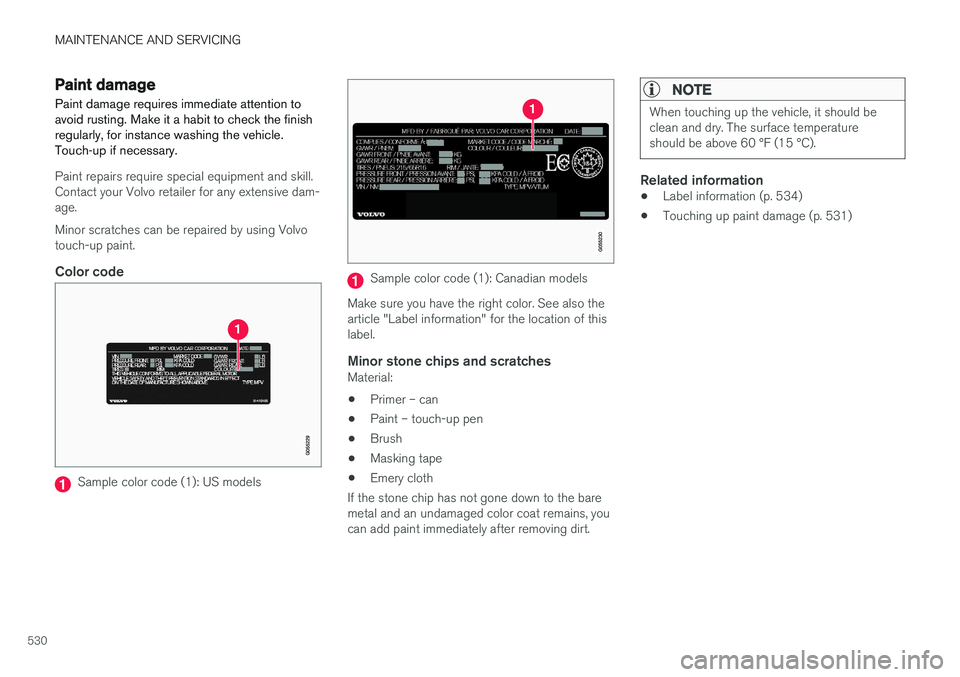
Color code
Sample color code (1): US models
Sample color code (1): Canadian models
Make sure you have the right color. See also the article "Label information" for the location of thislabel.
Minor stone chips and scratchesMaterial: • Primer – can
• Paint – touch-up pen
• Brush
• Masking tape
• Emery cloth
If the stone chip has not gone down to the bare metal and an undamaged color coat remains, youcan add paint immediately after removing dirt.
NOTE
When touching up the vehicle, it should be clean and dry. The surface temperatureshould be above 60 °F (15 °C).
Related information
• Label information (p. 534)
• Touching up paint damage (p. 531)
Page 533 of 570
MAINTENANCE AND SERVICING
531
Touching up paint damage
Stone chips or other minor paint damage can be repaired by the vehicle's owner.
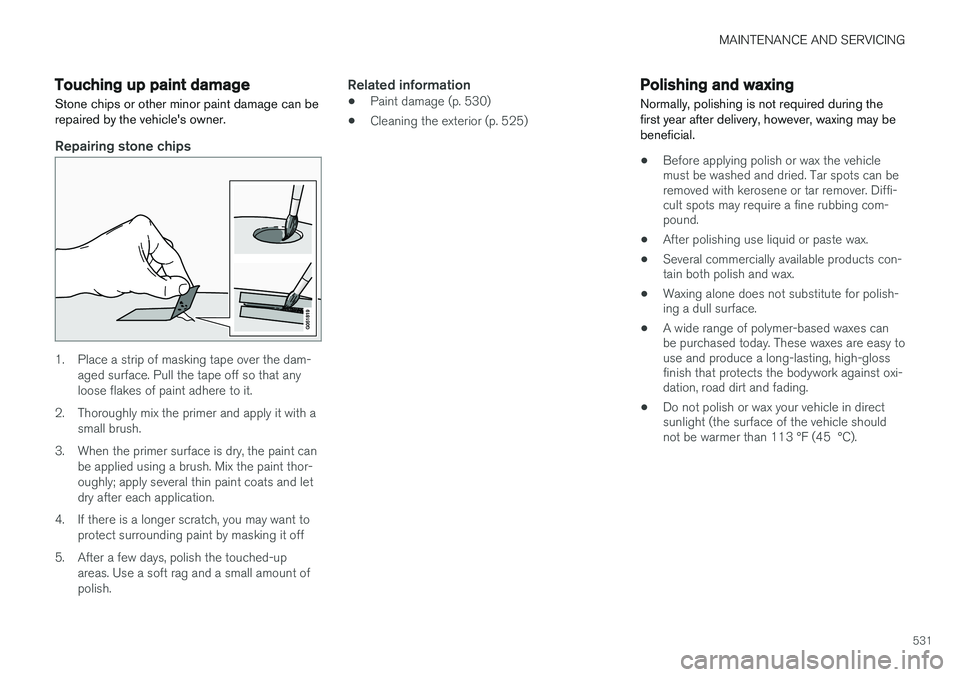
Repairing stone chips
1. Place a strip of masking tape over the dam- aged surface. Pull the tape off so that any loose flakes of paint adhere to it.
2. Thoroughly mix the primer and apply it with a small brush.
3. When the primer surface is dry, the paint can be applied using a brush. Mix the paint thor-oughly; apply several thin paint coats and letdry after each application.
4. If there is a longer scratch, you may want to protect surrounding paint by masking it off
5. After a few days, polish the touched-up areas. Use a soft rag and a small amount ofpolish.
Related information
• Paint damage (p. 530)
• Cleaning the exterior (p. 525)
Polishing and waxing
Normally, polishing is not required during the first year after delivery, however, waxing may bebeneficial.
• Before applying polish or wax the vehicle must be washed and dried. Tar spots can beremoved with kerosene or tar remover. Diffi-cult spots may require a fine rubbing com-pound.
• After polishing use liquid or paste wax.
• Several commercially available products con-tain both polish and wax.
• Waxing alone does not substitute for polish-ing a dull surface.
• A wide range of polymer-based waxes canbe purchased today. These waxes are easy touse and produce a long-lasting, high-glossfinish that protects the bodywork against oxi-dation, road dirt and fading.
• Do not polish or wax your vehicle in directsunlight (the surface of the vehicle shouldnot be warmer than 113 °F (45 °C).
Page 534 of 570
MAINTENANCE AND SERVICING
532
CAUTION
Volvo does not recommend the use of long- life or durable paint protection coatings, someof which may claim to prevent pitting, fading,oxidation, etc. These coatings have not beentested by Volvo for compatibility with yourvehicle's clear coat. Some of them may causethe clear coat to soften, crack, or cloud. Dam-age caused by application of paint protectioncoatings may not be covered under your vehi-cle's paint warranty.
Related information
•Paint damage (p. 530)
• Touching up paint damage (p. 531)
Page 562 of 570
560
L
Labelslist of 536
location of 535
Laminated panoramic roof 101, 102 Lane Departure Warning settings 325
Lane Departure Warning (LDW) 323, 327
Lane Keeping Aid 323, 325, 327 settings 325
LATCH anchors 72
Leather care 527Licence copyright 460
Lighting panel 138
Load anchoring eyelets 212
Loading the vehicle 200, 207, 471
Locking 231, 232
Locks and alarm 216
Low beam bulb, replacing 512
Low beams 139, 140
Low Speed Control 371
M
Maintenance 488 hoisting the vehicle 516
performed by the owner 488
Malfunction indicator light 126
Manual front seat adjustment 160Map buttons and information 428
Information cards 446
Map updates computer with USB flash drive 458
MapCare 456
Remote 457
Media player 393 compatible file formats 400
Media player (infotainment system) 395 Menus instrument panel 149, 151, 152, 153
Mirrors defroster 187
power door 100
retractable 100
Mirrors, rearview mirror 105
Modem 407Motor oil checking 520, 521
MP3 files 400
Multifunctional front seats 163, 164, 165
MY CAR 106
N
Navigationinstrument panel 448
Quick guidance 432
Sensus Navigation 432
Navigation displays controls 433
Navigation system features 429
voice commands 124, 433
Net cargo 209
O
Occupant safety 56
Occupant weight sensor 78
Octane recommendations 347
Odometer 92Oilchecking 520, 521
Page 566 of 570
564Trailer towing 351, 354
trailer hitch 353
Transmission gear shift indicator 370
general description 367
Hill Start Assist 335
oil 546
shifting with steering wheel paddles 370
shiftlock override 369
Tread wear indicator 471
Trip computer 92, 94 reset 92
Trip odometers 92
Trips, long distance 339
Trip statistics 94Troubleshooting Sensus Navigation 462
Turn signals 148 changing bulbs 514
U
Uniform Tire Quality Grading 472
Unlocking the tailgate 233
Unlocking the vehicle 231, 232
USB/AUX connection 393, 397
User profile 112
V
Vehicle Event Data 26
Vehicle information 14
Vehicle loading 207, 471
Vehicle maintenance 488
performed by the owner 488
Vehicle status 491
Vehicle weights 539Voice control cell phones 121
giving commands 121
introduction 120
multimedia devices 122
radio 122
settings 125
Volvo and the environment 15
Volvo ID 27
Volvo maintenance 488Volvo On Call areas of availability 422
convenience services 416
personal information 420
PIN code 418
remote door unlock 426
safety services 424, 425
security services 425
using 414
Volvo On Call Roadside Assistance 14
Volvo On Call with Sensus Connect 414, 415
Volvo programs 14
W
Warning flashers, hazard 144
Warning lights 134
Warning system, collision 274
Warranties 488
Washer fluid 524Washers headlight 156
windshield 154
Water, driving through 340
Waxing 531Weights trailer 351
Wheels changing 475, 478
storing 467
Whiplash Protection System 89
Wi-Fi 406, 407