cargo compartment VOLVO XC90 2015 Owners Manual
[x] Cancel search | Manufacturer: VOLVO, Model Year: 2015, Model line: XC90, Model: VOLVO XC90 2015Pages: 570, PDF Size: 12.44 MB
Page 7 of 570

5
Air distribution table196
LOADING AND STORAGE
Cargo space200
Passenger compartment storage spaces 200
Using the glove compartment 201
Tunnel console 202
Sun visors 203
Electrical sockets 204
Loading 207
Grocery bag holder 209
Cargo net 209
Steel cargo grid *
211
Load anchoring eyelets 212
Cargo compartment cover *
213
LOCKS AND ALARM
Locks and remote keys
216
Alarm 216
Automatically arming/disarming the alarm 218
Deactivating the alarm without afunctioning remote key 218
Child safety locks 218
Antenna locations for the start andlock system 220
Start and lock system type designations 220
Immobilizer 221
Changing the remote key's battery 222
Remote key's range 224
Remote key 224
Restricted key *
226
Detachable key blade 227
Foot movement tailgate operation *
228
Locking and unlocking confirmation 229
Locking/unlocking from inside thevehicle 231
Locking/unlocking from outside thevehicle 232
Locking/unlocking the tailgate 233
Power tailgate *
235
Locking/unlocking with the detacha-ble key blade 237
Page 11 of 570

9
NAVIGATION*
Sensus Navigation
428
Buttons and information on the map 428
Common navigation system features 429
Getting started with Sensus Navigation 432
Quick guidance to a destination 432
Navigation displays and controls 433
Entering a destination 435
Setting a destination by tapping the map 435
Setting a destination by entering the text of your choice 436
Setting a destination using Recent/Favorites/Library 438
Using a point of interest (POI) as adestination 440
Setting a destination by entering anaddress 441
Saving a destination with Send to Car 441
Viewing the itinerary and alternate routes 442
Guidance points in the itinerary 444
POIs along the route 445
Traffic problems along the route 445
Information cards on the map 446
Choosing a detour 447
Traffic information 448
Navigation in the instrument panel 448
Sensus Navigation settings 449
Map settings450
Route settings 452
Traffic information settings 454
Guidance settings 455
System settings 456
Map updates with MapCare 456
Remote map updates 457
Map updates from a computer with a USB flash drive 458
Navigation license agreements 460
Copyright 462
Sensus Navigation troubleshooting 462
WHEELS AND TIRES
Tires466
Tire sidewall designations 467
Wheel (rim) designations 469
Tire terminology 469
Tire direction of rotation 470
Tread wear indicator 471
Loading specifications 471
Uniform Tire Quality Grading 472
Snow tires and chains 473
Checking tire inflation pressure 473
Changing tires 475
Tools in the cargo compartment 475
Jack 476
Spare tire 476
Wheel bolts 477
Removing a wheel 478
Installing a wheel 479
Tire Pressure Monitoring System (TPMS) 480
Checking inflation pressure 482
Reinflating tires equipped with the Tire Pressure Monitoring System (TPMS) 483
Calibrating the Tire PressureMonitoring System (TPMS) 484
Tire Pressure Monitoring Systemtype approval 484
Page 12 of 570

10
MAINTENANCE AND SERVICING
Volvo's service program488
System updates 490
Remote updates 491
Vehicle status 491
Booking service and repairs 491
Wi-Fi connection to a workshop 494
Climate system service 495
Start battery 495
Support battery 498
Battery symbols 499
Fuses 500
Replacing fuses 500
Fuses in the engine compartment 501
Fuses in the passenger compartment 505
Fuses in the cargo compartment 508
Replacing bulbs 510
Removing the rectangular headlight cover 512
Replacing low beam headlight bulbs 512
Replacing High Beam headlight bulbs 513
Replacing parking light bulbs 514
Replacing front turn signal bulbs 514
Bulb specifications 515
Hoisting the vehicle 516
Opening and closing the hood 518
Engine compartment overview519
Engine oil 520
Checking and refilling engine oil 521
Windshield wipers in the service position 522
Replacing wiper blades 523
Refilling the windshield washer fluid reservoir 524
Cleaning the exterior 525
Cleaning the interior 527
Cleaning the center display 529
Corrosion protection 529
Paint damage 530
Touching up paint damage 531
Polishing and waxing 531
SPECIFICATIONS
Label information534
Dimensions 537
Weights 539
Air conditioning refrigerant 541
Brake fluid specification and volume 541
Coolant specifications and volumes 542
Engine specifications 543
Engine oil specifications and volume 544
Fuel tank volume 544
Tire inflation pressure table 545
Transmission fluid specification and volume 546
Page 150 of 570
INSTRUMENTS AND CONTROLS
* Option/accessory, for more information, see Introduction.
148
Cargo area lightingThe cargo area lighting comes on or goes off when the tailgate is opened or closed.
Ambience lighting1. In the center display's Top view, select
SettingsMy CarLightsAmbient
Lighting
2. Choose among the following settings:
•
Ambient Light Intensity: Off, Low orHigh.
•
Ambient Light Level: Reduced or Full.
Mood lighting *When the overhead courtesy lighting has gone out and the engine is running, several LEDslocated near the roof console illuminate to pro-vide faint lighting to help e.g., see objects in stor-age compartments. This lighting goes out justafter the overhead courtesy lighting when thevehicle is locked. The following settings can be made for the mood lighting in the center display:
Brightness1. In the center display's Top view, select
SettingsMy CarLightsInterior
Mood Lighting.
2. Press
Interior Mood Light Intensity and
choose Off, Low or High.
Change the color of the light1. In the center display's Top view, select
SettingsMy CarLightsInterior
Mood Lighting.
2. Choose
By Temperature, By Theme orTheme Colors.
Related information
• Lighting panel and controls (p. 138)
Using turn signals
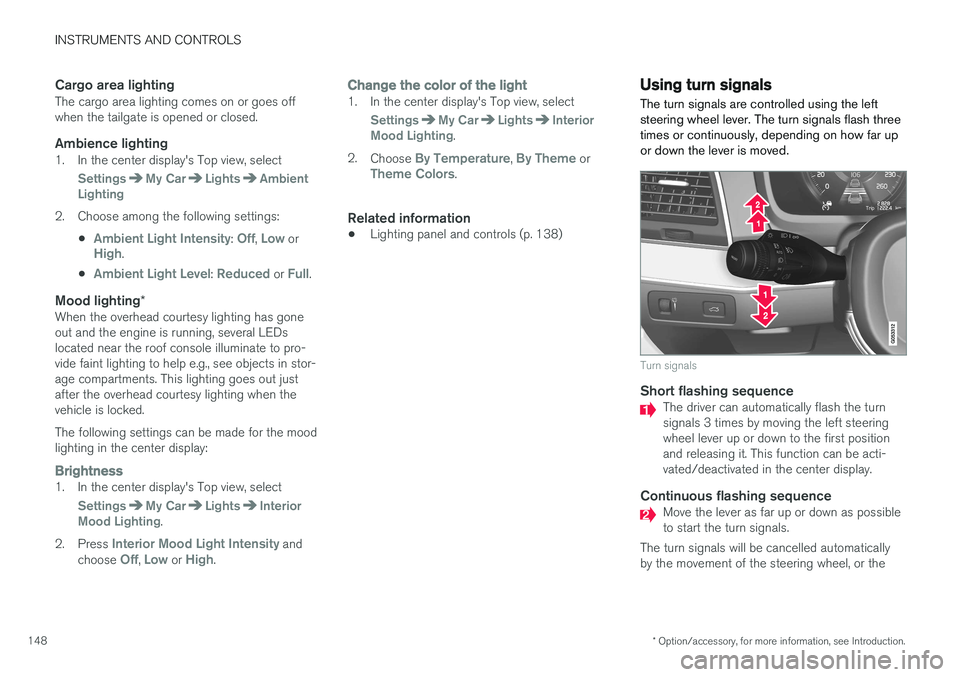
The turn signals are controlled using the left steering wheel lever. The turn signals flash threetimes or continuously, depending on how far upor down the lever is moved.
Turn signals
Short flashing sequenceThe driver can automatically flash the turn signals 3 times by moving the left steeringwheel lever up or down to the first positionand releasing it. This function can be acti-vated/deactivated in the center display.
Continuous flashing sequenceMove the lever as far up or down as possible to start the turn signals.
The turn signals will be cancelled automaticallyby the movement of the steering wheel, or the
Page 202 of 570
LOADING AND STORAGE
* Option/accessory, for more information, see Introduction.
200
Cargo space
The vehicle has flexible cargo capacity that makes it possible to load and secure largeobjects.
By folding down the backrests in the second and third rows * of seats, the cargo capacity of the
vehicle increases considerably. To make loading easier, the rear section of the vehicle can beraised and lowered using the pneumatic suspen- sion *. Use the load anchoring eyelets or the gro-
cery bag holder to secure objects and the cargo compartment cover helps conceal the load. The spare tire, jack and tools can be found under the cargo compartment's floor.
Related information
• Loading (p. 207)
• Cargo compartment cover
* (p. 213)
• Cargo net (p. 209)
• Grocery bag holder (p. 209)
• Load anchoring eyelets (p. 212)
• Steel cargo grid
* (p. 211)
Passenger compartment storage spaces
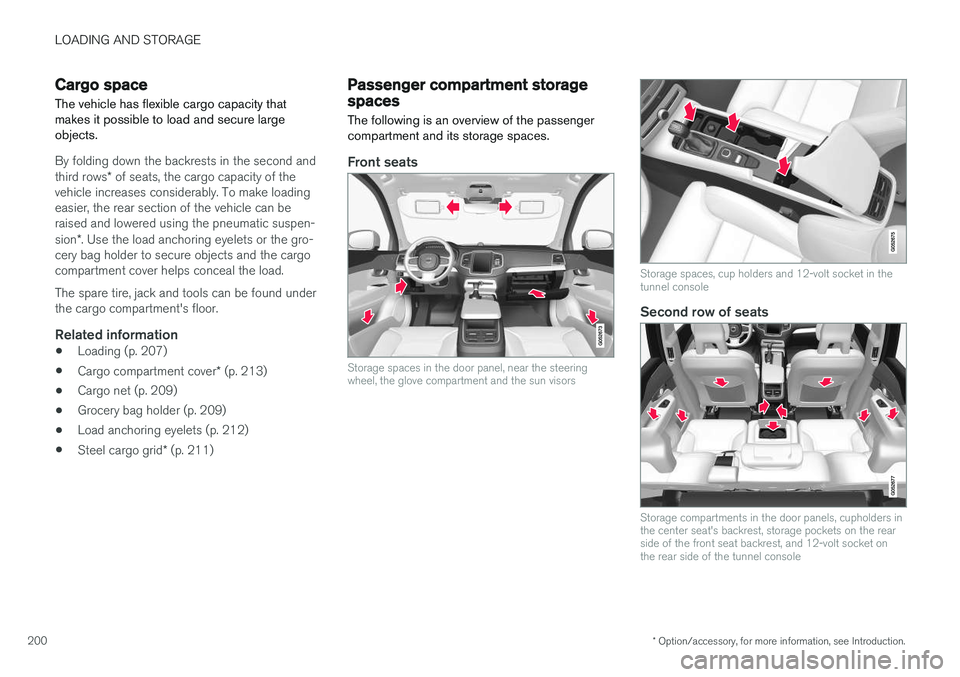
The following is an overview of the passenger compartment and its storage spaces.
Front seats
Storage spaces in the door panel, near the steering wheel, the glove compartment and the sun visors
Storage spaces, cup holders and 12-volt socket in the tunnel console
Second row of seats
Storage compartments in the door panels, cupholders in the center seat's backrest, storage pockets on the rearside of the front seat backrest, and 12-volt socket onthe rear side of the tunnel console
Page 208 of 570
LOADING AND STORAGE
206
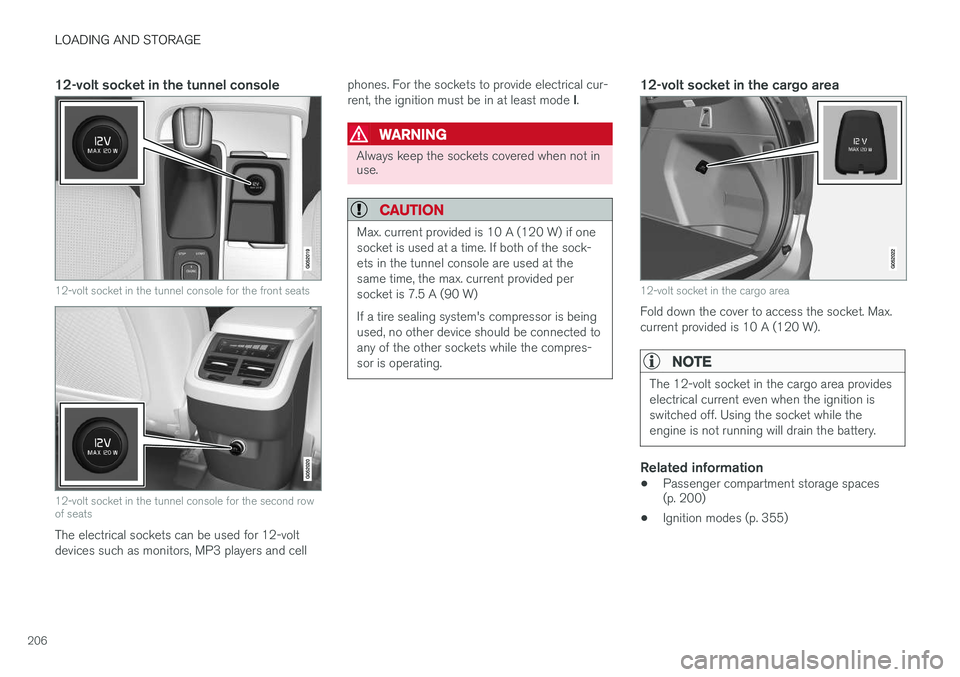
12-volt socket in the tunnel console
12-volt socket in the tunnel console for the front seats
12-volt socket in the tunnel console for the second row of seats
The electrical sockets can be used for 12-volt devices such as monitors, MP3 players and cellphones. For the sockets to provide electrical cur- rent, the ignition must be in at least mode
I.
WARNING
Always keep the sockets covered when not in use.
CAUTION
Max. current provided is 10 A (120 W) if one socket is used at a time. If both of the sock-ets in the tunnel console are used at thesame time, the max. current provided persocket is 7.5 A (90 W) If a tire sealing system's compressor is being used, no other device should be connected toany of the other sockets while the compres-sor is operating.
12-volt socket in the cargo area
12-volt socket in the cargo area
Fold down the cover to access the socket. Max. current provided is 10 A (120 W).
NOTE
The 12-volt socket in the cargo area provides electrical current even when the ignition isswitched off. Using the socket while theengine is not running will drain the battery.
Related information
• Passenger compartment storage spaces (p. 200)
• Ignition modes (p. 355)
Page 209 of 570

LOADING AND STORAGE
* Option/accessory, for more information, see Introduction.207
Loading
The load carrying capacity of your vehicle is determined by factors such as the number ofpassengers, the amount of cargo, the weight ofany accessories that may be installed, etc.
Tailgate opening button on the lighting panel
Open the tailgate by pressing the button on the lighting panel, pressing the
button on the
remote key or by using the optional foot move- ment sensor under the rear bumper.
Loading recommendations
• Load objects in the cargo compartment against the backrest whenever possible.
• If the backrests of the second row seats arefolded down, they should not be in contactthe front seat backrests. This could impede the function of the Whiplash ProtectionSystem (WHIPS).
• Unstable loads can be secured to the loadanchoring eyelets with straps or web lash-ings to help keep them from shifting.
• Stop the engine and apply the parking brakewhen loading or unloading long objects. Thegear selector can be knocked out of positionby long loads, which could set the vehicle inmotion.
WARNING
•
Stop the engine, put the gear selector in P
, and apply the parking brake when
loading or unloading long objects.
• The vehicle's driving characteristics may change depending on the weight and dis-tribution of the load.
• A 44-pound (20 kg) object produces aforce of 2,200 pounds (1,000 kg) in ahead-on collision at 30 mph (50 km/h).
• The cargo area and rear seat should notbe loaded to a level higher than 2 in.(5 cm) below the upper edge of the rearside windows. Objects placed higher thanthis level could impede the function ofthe Inflatable Curtain.
WARNING
•
Cover sharp edges on long loads to help prevent injury to occupants. Secure theload to help prevent shifting during sud-den stops.
• Always secure large and heavy objectswith a seat belt or cargo retaining straps.
• Always secure the load to help prevent itfrom moving in the event of sudden stops.
• Switch off the engine, apply the parking brake and put the gear selector in
P
when loading and unloading the vehicle.
Raising/lowering the rear-end of the vehicle *
Using the buttons on the read edge of the cargo compartment, the rear-end of the vehicle (thelevel of the cargo compartment floor) can beraised or lowered for easier loading or to make attaching a trailer 1
simpler.
1 An accessory trailer hitch can be purchased from a Volvo retailer.
Page 210 of 570
LOADING AND STORAGE
* Option/accessory, for more information, see Introduction.
208
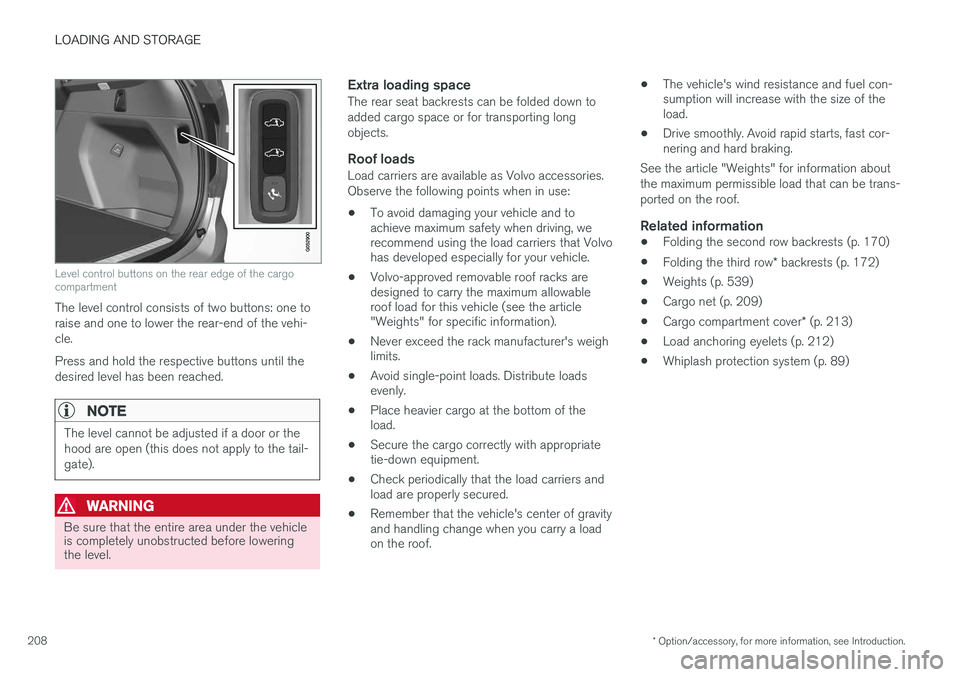
Level control buttons on the rear edge of the cargo compartment
The level control consists of two buttons: one to raise and one to lower the rear-end of the vehi-cle. Press and hold the respective buttons until the desired level has been reached.
NOTE
The level cannot be adjusted if a door or the hood are open (this does not apply to the tail-gate).
WARNING
Be sure that the entire area under the vehicle is completely unobstructed before loweringthe level.
Extra loading spaceThe rear seat backrests can be folded down to added cargo space or for transporting longobjects.
Roof loadsLoad carriers are available as Volvo accessories.Observe the following points when in use:
• To avoid damaging your vehicle and to achieve maximum safety when driving, werecommend using the load carriers that Volvohas developed especially for your vehicle.
• Volvo-approved removable roof racks aredesigned to carry the maximum allowableroof load for this vehicle (see the article"Weights" for specific information).
• Never exceed the rack manufacturer's weighlimits.
• Avoid single-point loads. Distribute loadsevenly.
• Place heavier cargo at the bottom of theload.
• Secure the cargo correctly with appropriatetie-down equipment.
• Check periodically that the load carriers andload are properly secured.
• Remember that the vehicle's center of gravityand handling change when you carry a loadon the roof. •
The vehicle's wind resistance and fuel con-sumption will increase with the size of theload.
• Drive smoothly. Avoid rapid starts, fast cor-nering and hard braking.
See the article "Weights" for information about the maximum permissible load that can be trans-ported on the roof.
Related information
• Folding the second row backrests (p. 170)
• Folding the third row
* backrests (p. 172)
• Weights (p. 539)
• Cargo net (p. 209)
• Cargo compartment cover
* (p. 213)
• Load anchoring eyelets (p. 212)
• Whiplash protection system (p. 89)
Page 211 of 570
LOADING AND STORAGE
* Option/accessory, for more information, see Introduction.209
Grocery bag holder
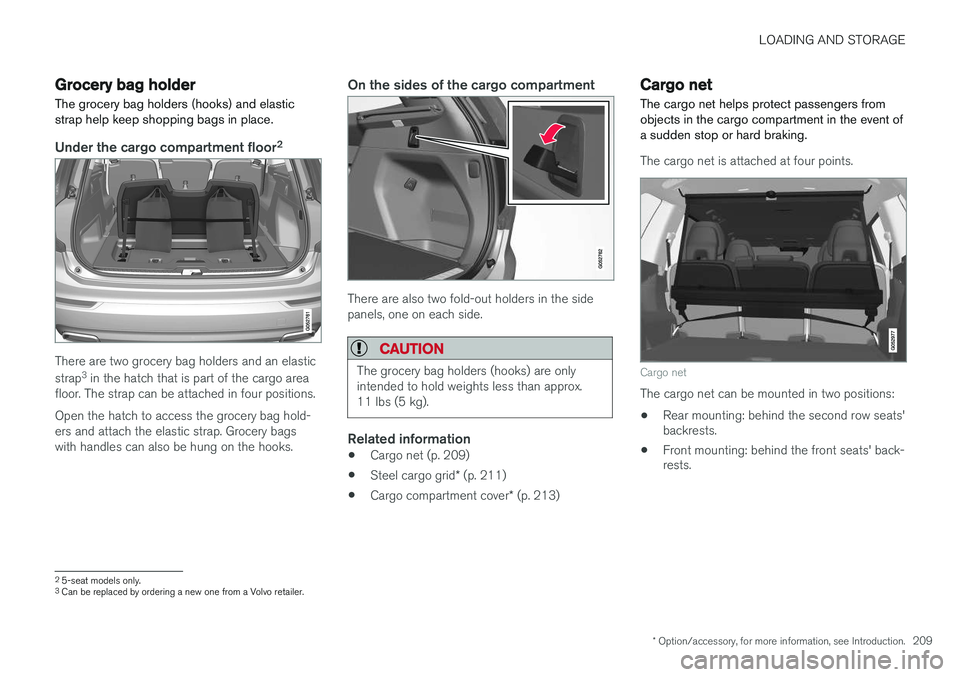
The grocery bag holders (hooks) and elastic strap help keep shopping bags in place.
Under the cargo compartment floor 2
There are two grocery bag holders and an elastic strap
3
in the hatch that is part of the cargo area
floor. The strap can be attached in four positions. Open the hatch to access the grocery bag hold- ers and attach the elastic strap. Grocery bagswith handles can also be hung on the hooks.
On the sides of the cargo compartment
There are also two fold-out holders in the side panels, one on each side.
CAUTION
The grocery bag holders (hooks) are only intended to hold weights less than approx.11 lbs (5 kg).
Related information
• Cargo net (p. 209)
• Steel cargo grid
* (p. 211)
• Cargo compartment cover
* (p. 213)
Cargo net
The cargo net helps protect passengers from objects in the cargo compartment in the event ofa sudden stop or hard braking.
The cargo net is attached at four points.
Cargo net
The cargo net can be mounted in two positions: • Rear mounting: behind the second row seats' backrests.
• Front mounting: behind the front seats' back-rests.
2
5-seat models only.3
Can be replaced by ordering a new one from a Volvo retailer.
Page 212 of 570
LOADING AND STORAGE
210
WARNING
•Objects in the cargo compartment should always be securely anchored.
• The nets upper hooks must be securelyinserted into the ceiling mounting pointsand the lower spring hooks must besecurely hooked onto the cargo anchor-ing eyelets.
• A damaged net must never be used.
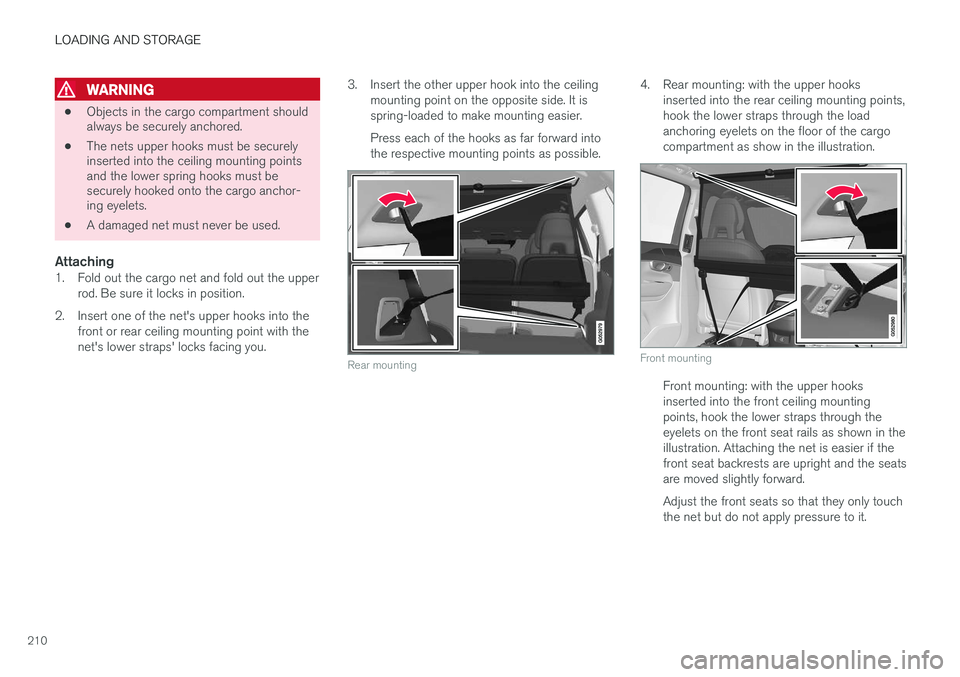
Attaching1. Fold out the cargo net and fold out the upper
rod. Be sure it locks in position.
2. Insert one of the net's upper hooks into the front or rear ceiling mounting point with the net's lower straps' locks facing you. 3. Insert the other upper hook into the ceiling
mounting point on the opposite side. It isspring-loaded to make mounting easier. Press each of the hooks as far forward into the respective mounting points as possible.
Rear mounting
4. Rear mounting: with the upper hooks inserted into the rear ceiling mounting points, hook the lower straps through the loadanchoring eyelets on the floor of the cargocompartment as show in the illustration.
Front mounting
Front mounting: with the upper hooks inserted into the front ceiling mountingpoints, hook the lower straps through theeyelets on the front seat rails as shown in theillustration. Attaching the net is easier if thefront seat backrests are upright and the seatsare moved slightly forward. Adjust the front seats so that they only touch the net but do not apply pressure to it.