park assist VOLVO XC90 2015 Owners Manual
[x] Cancel search | Manufacturer: VOLVO, Model Year: 2015, Model line: XC90, Model: VOLVO XC90 2015Pages: 570, PDF Size: 12.44 MB
Page 8 of 570

6
DRIVER SUPPORT
Driver support systems240
Driver support system camera 240
Camera limitations 241
Driver support system radar unit 244
Radar sensor limitations 245
Cruise Control (CC) 248
Starting and activating Cruise Control 248
Changing Cruise Control speed 249
Deactivating/resuming Cruise Control (CC) 250
Turning Cruise Control off 251
Adaptive Cruise Control (ACC) *
252
Starting and activating AdaptiveCruise Control (ACC) 254
Deactivating/resuming AdaptiveCruise Control (ACC) 255
Changing Adaptive Cruise Control(ACC) speed 257
Setting an Adaptive Cruise Controltime interval 258
Pilot Assist *
259
Starting and activating Pilot Assist 262
Deactivating/resuming Pilot Assist 263
Setting a Pilot Assist time interval 265
Pilot Assistauto-hold brake function 266
Pilot Assist limitations 266
Other Adaptive Cruise Control (ACC) functions268
Radar sensor 269
Radar sensor - type approval 270
Adaptive cruise control passingassistance 270
Adaptive Cruise Control (ACC) - faulttracing 271
Adaptive Cruise Control (ACC) sym-bols and messages 272
City Safety ™
273
City Safety warning level settings 275
Detecting cyclists and pedestrianswith City Safety 275
City Safety in crossing traffic 277
Rear Collision Warning (RCW) 277
City Safety limitations 278
City Safety ™ troubleshooting
280
City Safety symbols and messages 282
Speed limiter (SL) *
283
Starting and activating the Speed Limiter (SL) * 284
Changing a Speed Limiter (SL) *
maximum speed 285
Automatic Speed Limiter (ASL) *
285
Activating/deactivating theAutomatic Speed Limiter (ASL) *286
Changing tolerance for the Automatic Speed Limiter
287
Deactivating/reactivating the Speed Limiter * 288
Turning the Speed Limiter * off
290
Road Sign Information (RSI) *
290
Road Sign Assistance (RSI) * operation
291
Road Sign Assistance (RSI) * limitations
291
Park Assist *
292
Activating/deactivating Park Assist 293
Park Assist limitations 294
Park assist symbols and messages 295
Park Assist Camera (PAC) *
296
Park Assist Camera (PAC) * guiding
lines and fields 298
Starting the Park Assist Camera (PAC) *
300
Park Assist Camera (PAC) * limitations
300
Park Assist Pilot (PAP) *
301
Using Park Assist Pilot (PAP) *
302
Park Assist Pilot (PAP) * limitations
305
Park Assist Pilot (PAP) * symbols and
messages 307
Adjustable steering force *
308
Electronic Stability Control (ESC) 308
Electronic Stability Control (ESC) sport mode 309
Page 9 of 570

7
Electronic Stability Control (ESC) symbols and messages310
Driver Alert Control (DAC) 312
Driver Alert Control limitations 313
Using Driver Alert Control (DAC) 313
Distance Alert *
314
Using Distance Alert *
314
Distance Alert * limitations
315
Blind Spot Information (BLIS) *
315
Blind Spot Information (BLIS) * On/Off
317
Blind Spot Information (BLIS) * limitations
317
Cross Traffic Alert (CTA) *
318
Activating/deactivating Cross Traffic Alert (CTA) * 319
Cross Traffic Alert (CTA) * limitations
320
Blind Spot Information (BLIS) * with
Cross Traffic Alert (CTA) * symbols
and messages 322
Driving lane assistance 323
Activating/deactivating Lane Departure Warning (LDW) 325
Activating/deactivating Lane Keeping Aid (LKA) * 325
Driving lane assistance symbols and messages 327
STARTING AND DRIVING
Starting and driving
330
Brakes 330
Brake functions 332
Auto-hold brake function 332
Brake assist system 333
Braking effect after a collision 333
Emergency brake lights 334
Hill Descent Control (HDC) 334
Hill Start Assist 335
Parking brake 335
Using the parking brake 336
Parking brake malfunctions 338
Before a long distance trip 339
Driving economically 339
Driving through standing water 340
Overheating the engine and transmission 341
Winter driving 342
Towing eyelet 343
Towing recommendations 344
Fuel 346
Octane rating 347
Opening/closing the fuel filler door 348
Emission controls 349
Jump starting 350
Driving with a trailer351
Detachable trailer hitch 353
Trailer Stability Assist (TSA) 354
Ignition modes 355
Battery drain 356
Starting the engine 356
Turning the engine off 359
Drive modes *
359
ECO drive mode 362
Start/Stop 364
Using the Start/Stop function 364
Conditions for Start/Stop 365
Automatic transmission 367
Gear selector positions 367
Shiftlock 369
Gear shift indicator 370
Steering wheel paddles *
370
Low Speed Control (LSC) 371
All Wheel Drive (AWD) 372
Suspension and leveling control *
372
Page 18 of 570

INTRODUCTION
* Option/accessory, for more information, see Introduction.
16
Owner's manual and the environment
The wood pulp in Volvo's printed owner's infor- mation comes from FSC ®
(Forest Stewardship
Council ®
) certified forests and other responsible
sources.
FSC ®
The symbol above indicates that the wood pulp is FSC
®
certified.
Related information
• Volvo and the environment (p. 15)
IntelliSafe
—driver support
IntelliSafe is Volvo's philosophy regarding vehi- cle safety. It encompasses a number of systems,both standard and optional, that are designed tohelp make driving and traveling in a Volvo safer.
SupportSystems that help make driving safer are an inte- gral part of IntelliSafe. These include optional features such as Adaptive Cruise Control * that
helps maintain a set distance to a vehicle ahead,Park Assist Pilot *, which assists in parking the
vehicle, Cross Traffic Alert *, Blind Spot
Information *, etc.
Accident preventionSystems such as City Safety are designed to automatically apply the brakes in situations inwhich the driver does not have time to react. Lane Keeping Aid * alerts the drive if the vehicle
inadvertently crosses a lane's/road's side marker line.
ProtectionThe vehicle is equipped with e.g., seat belt pre-tensioners that pull the seat belts taut in criticalsituations when there is a collision risk andnumerous airbags designed to help provide cush-ioning if certain types of collisions should occur.
Related information
• Adaptive Cruise Control (ACC)
* (p. 252)
• Park Assist Pilot (PAP)
* (p. 301) •
Airbag system (p. 83)
• High and low beam headlights (p. 140)
• Cross Traffic Alert (CTA)
* (p. 318)
• Blind Spot Information (BLIS)
* (p. 315)
• City Safety
™ (p. 273)
• Driving lane assistance (p. 323)
• Rollover protection system (p. 89)
• Seat belts (p. 58)
• General safety information (p. 56)
Page 26 of 570
INTRODUCTION
24
Driver distraction
Please keep the following warnings in mind when operating/servicing your vehicle.
A driver has a responsibility to do everything pos- sible to ensure his or her own safety and thesafety of passengers in the vehicle and otherssharing the roadway. Avoiding distractions is partof that responsibility. Driver distraction results from driver activities that are not directly related to controlling the vehiclein the driving environment. Your new Volvo is, orcan be, equipped with many feature-rich enter-tainment and communication systems. Theseinclude hands-free cellular telephones, navigationsystems, and multipurpose audio systems. Youmay also own other portable electronic devicesfor your own convenience. When used properlyand safely, they enrich the driving experience.Improperly used, any of these could cause a dis-traction. For all of these systems, we want to provide the following warning that reflects the strong Volvoconcern for your safety. Never use these devicesor any feature of your vehicle in a way that dis-tracts you from the task of driving safely. Distrac-tion can lead to a serious accident. In addition tothis general warning, we offer the following guid-ance regarding specific newer features that maybe found in your vehicle:
WARNING
• Never use a hand-held cellular telephone while driving. Some jurisdictions prohibitcellular telephone use by a driver whilethe vehicle is moving.
• If your vehicle is equipped with a naviga-tion system, set and make changes toyour travel itinerary only with the vehicleparked.
• Never program your audio system whilethe vehicle is moving. Program radio pre-sets with the vehicle parked, and use yourprogrammed presets to make radio usequicker and simpler.
• Never use portable computers or per-sonal digital assistants while the vehicleis moving.
Accessory installation
•We strongly recommend that Volvo ownersinstall only genuine, Volvo-approved acces-sories, and that accessory installations beperformed only by a trained and qualifiedVolvo service technician.
• Genuine Volvo accessories are tested toensure compatibility with the performance,safety, and emission systems in your vehicle.Additionally, a trained and qualified Volvoservice technician knows where accessoriesmay and may not be safely installed in yourVolvo. In all cases, please consult a trained and qualified Volvo service technician beforeinstalling any accessory in or on your vehicle.
• Accessories that have not been approved byVolvo may or may not be specifically testedfor compatibility with your vehicle. Addition-ally, an inexperienced installer may not befamiliar with some of your car's systems.
• Any of your car's performance and safetysystems could be adversely affected if youinstall accessories that Volvo has not tested,or if you allow accessories to be installed bysomeone unfamiliar with your vehicle.
• Damage caused by unapproved or improperlyinstalled accessories may not be covered byyour new vehicle warranty. See your Warrantyand Service Records Information booklet formore warranty information. Volvo assumes noresponsibility for death, injury, or expensesthat may result from the installation of non-genuine accessories.WARNING
The driver is always responsible for operating the vehicle in a safe manner and for comply-ing with current statutes and regulations. It is also essential to maintain and service the vehicle according to Volvo's recommendationsas stated in the owner's information and theservice and warranty booklet. If the on-board information differs from the printed owner's manual, the printed informa-tion always takes precedence.
Page 45 of 570
INTRODUCTION
43
Swipe the screen from left to right to access Function view from Home view. From Functionview, you can activate/deactivate various vehicle functions such as
Drive Modes, Speed limit
adaptation and Park Assist.
When applicable, swipe upward to scroll in the list of functions (depending on the number of func-tions). Activate/deactivate a function by tapping its but- ton. Certain functions will open in their own win-dows. To move a function button, press and hold it. It will become slightly smaller and transparent andcan then be dragged to the desired position andreleased.
Related information
• Using the center display (p. 46)
• Center display overview (p. 29)
• Function view buttons (p. 37)
• Symbols in the center display status bar (p. 44)
• Changing settings in different types of apps(p. 45)
• Climate system controls (p. 180)
Page 108 of 570
INSTRUMENTS AND CONTROLS
* Option/accessory, for more information, see Introduction.
106
Using sun shades
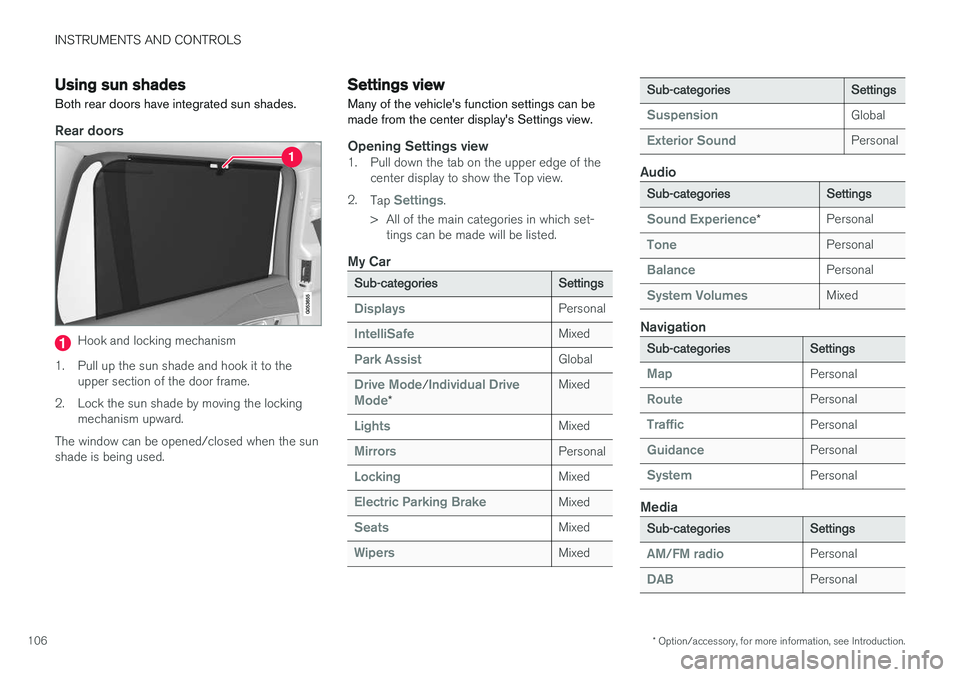
Both rear doors have integrated sun shades.
Rear doors
Hook and locking mechanism
1. Pull up the sun shade and hook it to the upper section of the door frame.
2. Lock the sun shade by moving the locking mechanism upward.
The window can be opened/closed when the sun shade is being used.
Settings view
Many of the vehicle's function settings can be made from the center display's Settings view.
Opening Settings view1. Pull down the tab on the upper edge of the center display to show the Top view.
2. Tap
Settings.
> All of the main categories in which set- tings can be made will be listed.
My Car
Sub-categoriesSettings
DisplaysPersonal
IntelliSafeMixed
Park AssistGlobal
Drive Mode/Individual Drive
Mode*
Mixed
LightsMixed
MirrorsPersonal
LockingMixed
Electric Parking BrakeMixed
SeatsMixed
WipersMixed
Sub-categoriesSettings
SuspensionGlobal
Exterior SoundPersonal
Audio
Sub-categoriesSettings
Sound Experience*Personal
TonePersonal
BalancePersonal
System VolumesMixed
Navigation
Sub-categoriesSettings
MapPersonal
RoutePersonal
TrafficPersonal
GuidancePersonal
SystemPersonal
Media
Sub-categoriesSettings
AM/FM radioPersonal
DABPersonal
Page 109 of 570
INSTRUMENTS AND CONTROLS
107
Sub-categoriesSettings
Gracenote®Personal
VideoPersonal
Communication
Sub-categoriesSettings
Phone–
Text Messages–
Bluetooth–
Wi-FiGlobal
Vehicle Wi-Fi HotspotGlobal
Vehicle Modem InternetGlobal
Volvo On Call–
Volvo Service NetworksGlobal
Climate
The main category Climate has no sub-catego-
ries. All settings in this category are personal.
System
Sub-categoriesSettings
Driver ProfilePersonal
Date & Time–
LanguagePersonal
Sub-categoriesSettings
Keyboard LayoutsGlobal
Voice ControlPersonal
UnitsPersonal
Storage–
Software Updates–
Global Reset–
Services–
Related information
• Center display overview (p. 29)
• Navigating in the center display's views (p. 39)
• Using the center display (p. 46)
Categories in Settings view
Settings view consists of a number of main cate- gories and sub-categories that contain settingsand information for many of the vehicle's fea-tures and functions.
The main categories in Settings view are: My
Car, Sound, Navigation, Media,Communication, Climate and System.
Each main category, in turn, contains several sub- categories with possible settings. The tableshows the first level of sub-categories. The possi-ble settings for a function or area are describedin greater detail in their respective articles in theowner's manual. For system settings not descri-bed in the respective articles, see "Changing sys-tem settings in Settings view." Certain settings are personal, which means that they can be saved in a driver profile. Other set-tings are global and are not linked to a driver pro-file. The table indicates if a category's settings are personal, global or a combination of the two.
My Car
Sub-categoriesSettings
DisplaysPersonal
IntelliSafeCombination
Park AssistGlobal
Page 242 of 570
DRIVER SUPPORT
* Option/accessory, for more information, see Introduction.
240
Driver support systems
The vehicle is equipped with a number of driver support systems that help provide the driver withactive/passive support.
Some of these systems are standard while others are optional and they are designed to e.g., helpthe driver maintain a set speed or a set distanceto a vehicle ahead, or warn the driver of a poten-tial collision situation and in certain cases applythe brakes if necessary. Certain optional systemscan also assist in various parking situations.
Related information
• Adjustable steering force
* (p. 308)
• Electronic Stability Control (ESC) (p. 308)
• Speed limiter (SL)
* (p. 283)
• Cruise Control (CC) (p. 248)
• Adaptive Cruise Control (ACC)
* (p. 252)
• Pilot Assist
* (p. 259)
• Distance Alert
* (p. 314)
• City Safety
™ (p. 273)
• Blind Spot Information (BLIS)
* (p. 315)
• Cross Traffic Alert (CTA)
* (p. 318)
• Driver Alert Control (DAC) (p. 312)
• Driving lane assistance (p. 323)
• Road Sign Information (RSI)
* (p. 290)
• Park Assist
* (p. 292)
• Park Assist Pilot (PAP)
* (p. 301) •
Park Assist Camera (PAC)
* (p. 296)
Driver support system camera
The camera is used by a number of driver sup- port systems to e.g., detect a driving lane's sidemarker lines or traffic signs.
The camera is used by the following driver sup- port systems:
• Lane Departure Warning/Lane Keeping Aid
*
• Driver Alert Control
*
• Pilot Assist
*
• City Safety
• Road sign information
*
• Active high beams
*
Related information
•High and low beam headlights (p. 140)
• Driving lane assistance (p. 323)
• Pilot Assist
* (p. 259)
• Road Sign Information (RSI)
* (p. 290)
• City Safety
™ (p. 273)
• Driver Alert Control (DAC) (p. 312)
Page 245 of 570
DRIVER SUPPORT
* Option/accessory, for more information, see Introduction.243
•
Road Sign Assistance (RSI)
* limitations
(p. 291)
• Park Assist Pilot (PAP)
* limitations (p. 305)
• City Safety limitations (p. 278)
• Driving lane assistance (p. 323)
• Adaptive Cruise Control (ACC)
* (p. 252)
Page 249 of 570

DRIVER SUPPORT
* Option/accessory, for more information, see Introduction.247
High temperaturesIf the temperature in the passenger compartment is very high, the camera and radar sensor may betemporarily turned off for approx. 15 minutesafter the engine has been started to protect theirelectronic components. When the temperaturehas cooled sufficiently, the camera and radarsensor will restart automatically.Damaged windshield
CAUTION
•Service and maintenance on City Safety may only be carried out by a trained andqualified Volvo service technician.
• If a crack, scratch or stone chip shouldoccur in the section of the windshield infront the camera/radar sensor, contact atrained and qualified Volvo service techni-cian to repair or replace the windshield.Failing to do so may result in reducedCity Safety functionality.
To help prevent limited or reduced functional- ity, please also observe the following:
• Volvo recommends that cracks, scratches or stone chips on the windshield in front of the camera/radar sensor should
not
be repaired; in such cases, the entire windshield should be replaced.
• Before the windshield is replaced, con-tact a Volvo retailer to ensure that thecorrect windshield is ordered and instal-led. If the wrong type of windshield isused, this may cause City Safety to func-tion improperly or not at all.
• Volvo recommends the use of only Genu-ine Volvo Replacement Windshields.
• When replacing windshield wipers, usethe same type or ones approved by Volvo.
After the windshield has been replaced, the camera/radar sensor will have to be recalibra-ted by a trained and qualified Volvo servicetechnician to help ensure proper function ofall of the vehicle's camera-/radar-based sys-tems.
MaintenanceIn order for camera and radar sensor to function properly, the area of the windshield must be keptfree of dirt, ice, snow, etc. and should be washedregularly with a suitable car washing detergent.
Related information
•
City Safety
™ (p. 273)
• Driver support systems (p. 240)
• Road Sign Assistance (RSI)
* limitations
(p. 291)
• Park Assist Pilot (PAP)
* limitations (p. 305)
• City Safety limitations (p. 278)
• Driving lane assistance (p. 323)
• Adaptive Cruise Control (ACC)
* (p. 252)