maintenance VOLVO XC90 2017 Owner´s Manual
[x] Cancel search | Manufacturer: VOLVO, Model Year: 2017, Model line: XC90, Model: VOLVO XC90 2017Pages: 560, PDF Size: 9.97 MB
Page 304 of 560
||
DRIVER SUPPORT
302
CauseAction
Water or snow on the surface of the road swirl up and block radar signals or the camera's view. No action. The driver should be extra alert in conditions of this type.
There is dirt between the inside of the windshield and the camera/radar sensor. Have the area of the windshield cleaned by a trained and qualified Volvo service technician.
Strong backlighting No action required. The came will reset automatically when lightingconditions improve.
High temperaturesIf the temperature in the passenger compartment is very high, the camera and radar sensor may betemporarily turned off for approx. 15 minutesafter the engine has been started to protect theirelectronic components. When the temperaturehas cooled sufficiently, the camera and radarsensor will restart automatically.
Damaged windshield
CAUTION
•Service and maintenance on City Safety may only be carried out by a trained andqualified Volvo service technician.
• If a crack, scratch or stone chip shouldoccur in the section of the windshield infront the camera/radar sensor, contact atrained and qualified Volvo service techni-cian to repair or replace the windshield.Failing to do so may result in reducedCity Safety functionality.
• This can also result in certain functionsbeing reduced or disabled, or they mayrespond incorrectly.
To help avoid the risk of incorrect, reduced ordisabled functionality for driver support sys-tems using the camera or radar sensors:
• Volvo recommends that cracks, scratchesor stone chips on the windshield in front of the camera/radar sensor should
not
be repaired; in such cases, the entire windshield should be replaced.
• Before the windshield is replaced, con-tact a Volvo retailer to ensure that thecorrect windshield is ordered and instal-led. If the wrong type of windshield isused, this may cause City Safety to func-tion improperly or not at all.
• Volvo recommends the use of only Genu-ine Volvo Replacement Windshields.
• When replacing windshield wipers, usethe same type or ones approved by Volvo.
After the windshield has been replaced, thecamera/radar sensor will have to be recalibra-ted by a trained and qualified Volvo servicetechnician to help ensure proper function ofall of the vehicle's camera-/radar-based sys-tems.
Page 305 of 560
DRIVER SUPPORT
* Option/accessory.303
MaintenanceIn order for camera and radar sensor to function properly, the area of the windshield must be keptfree of dirt, ice, snow, etc. and should be washedregularly with a suitable car washing detergent.
NOTE
Dirt, ice and/or snow covering the camera and radar sensors reduce functionality andmay disable the vehicle's camera-/radar-based systems. This can also result in certain functions being reduced or disabled, or they may respondincorrectly.
Related information
•Driver support system camera (p. 300)
• Radar sensor limitations (p. 297)
• Driving lane assistance (p. 328)
• Driver Alert Control limitations (p. 328)
• Pilot Assist limitations (p. 293)
• City Safety limitations (p. 312)
• Road Sign Information (RSI)
* limitations
(p. 326)
• Park Assist Pilot (PAP)
* limitations (p. 350)
Page 307 of 560
DRIVER SUPPORT
}}
305
WARNING
Warnings will only be provided if there is an imminent risk of a collision taking place. Thedriver should be aware of the system's limita-tions before operating the vehicle. Warnings and automatic braking for pedes- trians and cyclists are deactivated at speedsabove approx. 43 mph (70 km/h). City Safety's auto-brake function can help prevent a collision or reduce the speed atwhich a collision occurs. However, the drivershould always apply the brakes, even if auto-brake is operating. The driver is always responsible for maintain- ing the correct speed and distance in relationto the vehicle ahead. Never wait for a collisionwarning or for City Safety to intervene. City Safety does not activate the auto-brake function during fast acceleration. City Safety maintenance may only be carried out by a trained and qualified Volvo servicetechnician.
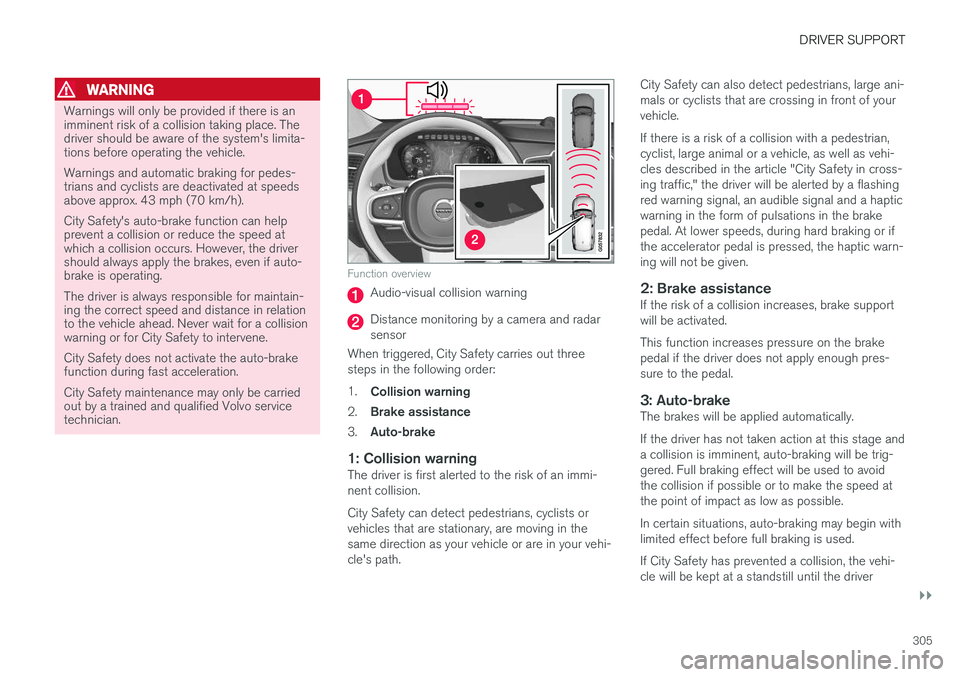
Function overview
Audio-visual collision warning
Distance monitoring by a camera and radar sensor
When triggered, City Safety carries out threesteps in the following order: 1. Collision warning
2. Brake assistance
3. Auto-brake
1: Collision warningThe driver is first alerted to the risk of an immi- nent collision. City Safety can detect pedestrians, cyclists or vehicles that are stationary, are moving in thesame direction as your vehicle or are in your vehi-cle's path. City Safety can also detect pedestrians, large ani-mals or cyclists that are crossing in front of yourvehicle. If there is a risk of a collision with a pedestrian, cyclist, large animal or a vehicle, as well as vehi-cles described in the article "City Safety in cross-ing traffic," the driver will be alerted by a flashingred warning signal, an audible signal and a hapticwarning in the form of pulsations in the brakepedal. At lower speeds, during hard braking or ifthe accelerator pedal is pressed, the haptic warn-ing will not be given.
2: Brake assistanceIf the risk of a collision increases, brake supportwill be activated. This function increases pressure on the brake pedal if the driver does not apply enough pres-sure to the pedal.
3: Auto-brakeThe brakes will be applied automatically. If the driver has not taken action at this stage and a collision is imminent, auto-braking will be trig-gered. Full braking effect will be used to avoidthe collision if possible or to make the speed atthe point of impact as low as possible. In certain situations, auto-braking may begin with limited effect before full braking is used. If City Safety has prevented a collision, the vehi- cle will be kept at a standstill until the driver
Page 313 of 560
DRIVER SUPPORT
}}
* Option/accessory.311
The following table shows some of the situations that can cause the message to be displayed andsuggested actions.
Cause
Action
The area of the wind- shield in front of thecamera/radar sensor isdirty or covered by ice orsnow. Clean the wind-shield or removethe ice/ snow.
Thick fog or heavy rain/snow blocks reduces thecamera/radar sensor'srange of visibility. No action. Thedriver should beextra alert in condi-tions of this type.
There is dirt betweenthe inside of the wind-shield and the camera/radar sensor. Have the area ofthe windshieldcleaned by atrained and quali-fied Volvo servicetechnician.
CAUTION
•
Service and maintenance on City Safety may only be carried out by a trained andqualified Volvo service technician.
• If a crack, scratch or stone chip shouldoccur in the section of the windshield infront the camera/radar sensor, contact atrained and qualified Volvo service techni-cian to repair or replace the windshield.Failing to do so may result in reducedCity Safety functionality.
• This can also result in certain functionsbeing reduced or disabled, or they mayrespond incorrectly.
To help avoid the risk of incorrect, reduced ordisabled functionality for driver support sys-tems using the camera or radar sensors:
• Volvo recommends that cracks, scratchesor stone chips on the windshield in front of the camera/radar sensor should
not
be repaired; in such cases, the entire windshield should be replaced.
• Before the windshield is replaced, con-tact a Volvo retailer to ensure that thecorrect windshield is ordered and instal-led. If the wrong type of windshield isused, this may cause City Safety to func-tion improperly or not at all.
• Volvo recommends the use of only Genu-ine Volvo Replacement Windshields.
• When replacing windshield wipers, use the same type or ones approved by Volvo.
After the windshield has been replaced, thecamera/radar sensor will have to be recalibra-ted by a trained and qualified Volvo servicetechnician to help ensure proper function ofall of the vehicle's camera-/radar-based sys-tems.
MaintenanceIn order for City Safety to function properly, the area of the windshield must be kept free of dirt,ice, snow, etc.
Other vehicle functionsIf a message is displayed in the instrument panel,this means that the other systems using the cam-era/radar sensor (see the list below) will not havefull functionality or may not function at all. The camera and radar sensor is used by the fol- lowing functions: • Distance Alert
*
• Driver Alert Control
*
• Adaptive Cruise Control
*
• Pilot Assist
*
• Run-off Mitigation
• Road Sign Information
*
• Active High Beams
*
• Lane Keeping Aid
*
Page 321 of 560
DRIVER SUPPORT
}}
* Option/accessory.319
Blind Spot Information (BLIS) *
limitations
Blind Spot Information functionality may be reduced in certain situations.
• Dirt, ice and snow on the sensors may reduce functionality and prevent the systemfrom providing warnings.
• Do not attach any objects, tape, decals, etc.,on the surface of the sensors.
• BLIS is deactivated if a trailer is attached tothe vehicle's electrical system.
Maintenance
The BLIS/CTA 5
sensors are located on the
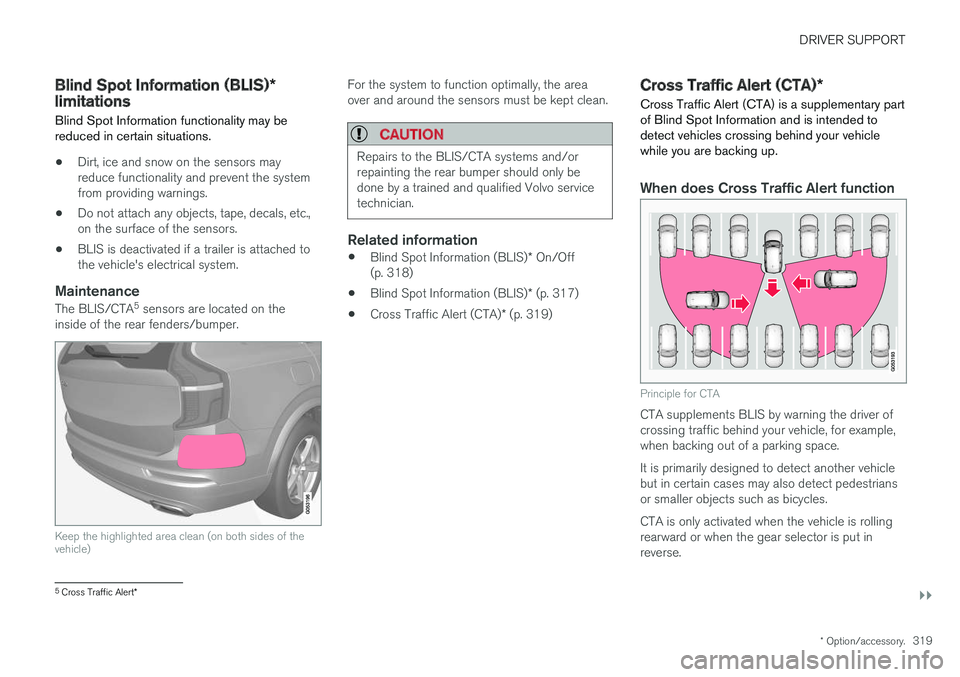
inside of the rear fenders/bumper.
Keep the highlighted area clean (on both sides of the vehicle)
For the system to function optimally, the area over and around the sensors must be kept clean.
CAUTION
Repairs to the BLIS/CTA systems and/or repainting the rear bumper should only bedone by a trained and qualified Volvo servicetechnician.
Related information
• Blind Spot Information (BLIS)
* On/Off
(p. 318)
• Blind Spot Information (BLIS)
* (p. 317)
• Cross Traffic Alert (CTA)
* (p. 319)
Cross Traffic Alert (CTA) *
Cross Traffic Alert (CTA) is a supplementary part of Blind Spot Information and is intended todetect vehicles crossing behind your vehiclewhile you are backing up.
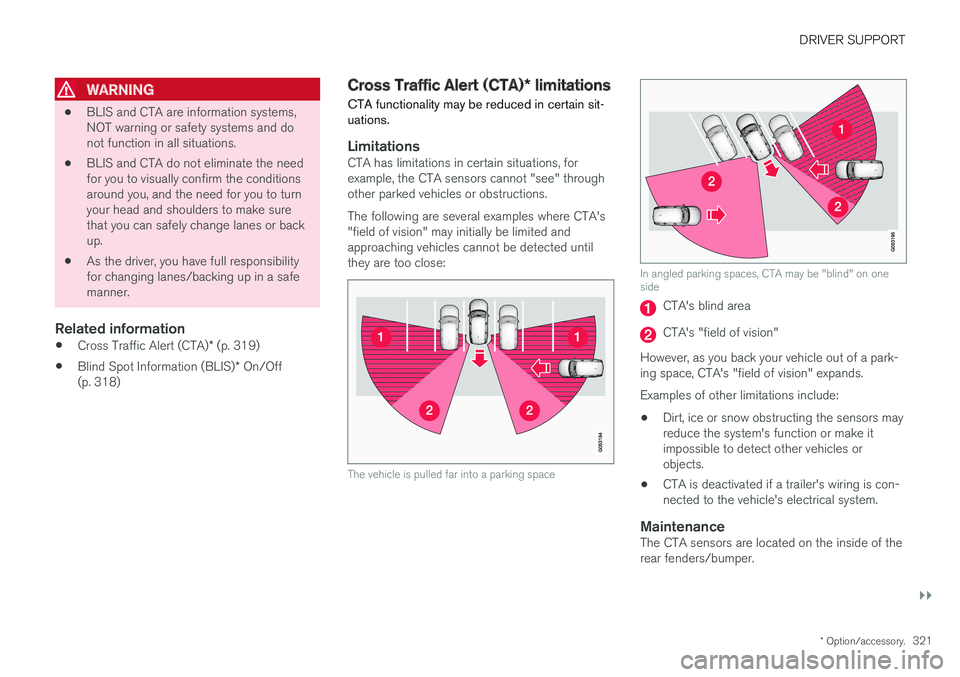
When does Cross Traffic Alert function
Principle for CTA
CTA supplements BLIS by warning the driver of crossing traffic behind your vehicle, for example,when backing out of a parking space. It is primarily designed to detect another vehicle but in certain cases may also detect pedestriansor smaller objects such as bicycles. CTA is only activated when the vehicle is rolling rearward or when the gear selector is put inreverse.
5 Cross Traffic Alert *
Page 323 of 560
DRIVER SUPPORT
}}
* Option/accessory.321
WARNING
•BLIS and CTA are information systems, NOT warning or safety systems and donot function in all situations.
• BLIS and CTA do not eliminate the needfor you to visually confirm the conditionsaround you, and the need for you to turnyour head and shoulders to make surethat you can safely change lanes or backup.
• As the driver, you have full responsibilityfor changing lanes/backing up in a safemanner.
Related information
•
Cross Traffic Alert (CTA)
* (p. 319)
• Blind Spot Information (BLIS)
* On/Off
(p. 318)
Cross Traffic Alert (CTA) * limitations
CTA functionality may be reduced in certain sit- uations.
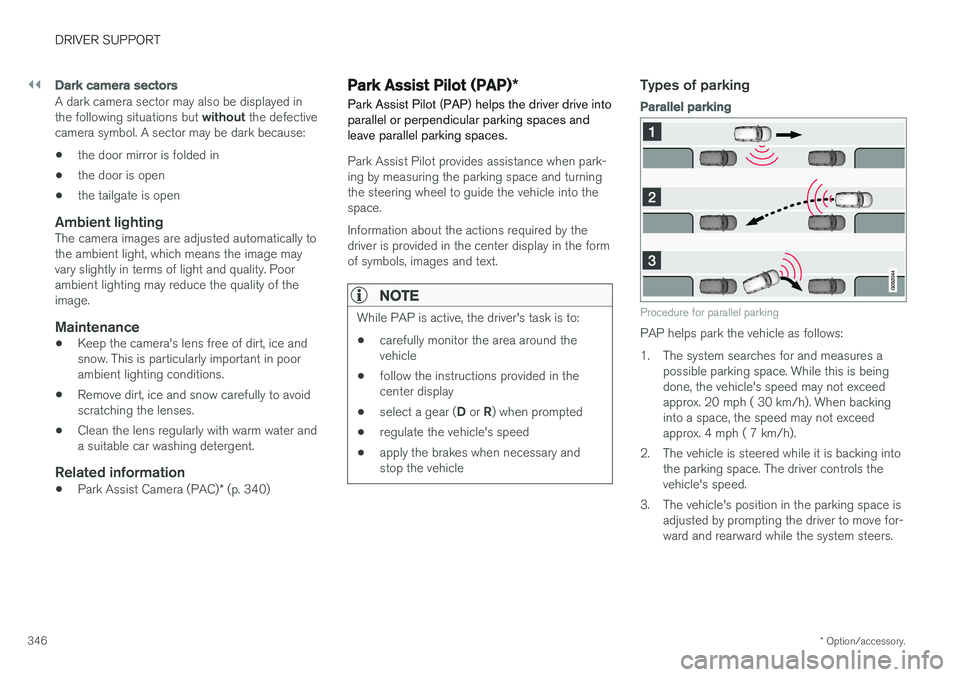
LimitationsCTA has limitations in certain situations, for example, the CTA sensors cannot "see" throughother parked vehicles or obstructions. The following are several examples where CTA's "field of vision" may initially be limited andapproaching vehicles cannot be detected untilthey are too close:
The vehicle is pulled far into a parking space
In angled parking spaces, CTA may be "blind" on one side
CTA's blind area
CTA's "field of vision"
However, as you back your vehicle out of a park- ing space, CTA's "field of vision" expands. Examples of other limitations include:
• Dirt, ice or snow obstructing the sensors may reduce the system's function or make itimpossible to detect other vehicles orobjects.
• CTA is deactivated if a trailer's wiring is con-nected to the vehicle's electrical system.
MaintenanceThe CTA sensors are located on the inside of therear fenders/bumper.
Page 348 of 560
||
DRIVER SUPPORT
* Option/accessory.
346
Dark camera sectors
A dark camera sector may also be displayed in the following situations but without the defective
camera symbol. A sector may be dark because: • the door mirror is folded in
• the door is open
• the tailgate is open
Ambient lightingThe camera images are adjusted automatically to the ambient light, which means the image mayvary slightly in terms of light and quality. Poorambient lighting may reduce the quality of theimage.
Maintenance
•Keep the camera's lens free of dirt, ice andsnow. This is particularly important in poorambient lighting conditions.
• Remove dirt, ice and snow carefully to avoidscratching the lenses.
• Clean the lens regularly with warm water anda suitable car washing detergent.
Related information
•
Park Assist Camera (PAC)
* (p. 340)
Park Assist Pilot (PAP) *
Park Assist Pilot (PAP) helps the driver drive into parallel or perpendicular parking spaces andleave parallel parking spaces.
Park Assist Pilot provides assistance when park- ing by measuring the parking space and turningthe steering wheel to guide the vehicle into thespace. Information about the actions required by the driver is provided in the center display in the formof symbols, images and text.
NOTE
While PAP is active, the driver's task is to:
• carefully monitor the area around the vehicle
• follow the instructions provided in thecenter display
• select a gear (
D or R) when prompted
• regulate the vehicle's speed
• apply the brakes when necessary andstop the vehicle
Types of parking
Parallel parking
Procedure for parallel parking
PAP helps park the vehicle as follows:
1. The system searches for and measures a
possible parking space. While this is being done, the vehicle's speed may not exceedapprox. 20 mph ( 30 km/h). When backinginto a space, the speed may not exceedapprox. 4 mph ( 7 km/h).
2. The vehicle is steered while it is backing into the parking space. The driver controls thevehicle's speed.
3. The vehicle's position in the parking space is adjusted by prompting the driver to move for-ward and rearward while the system steers.
Page 353 of 560
DRIVER SUPPORT
* Option/accessory.351
Points to keep in mindPAP is a parking aid only and the driver should always be prepared to take control and cancel aparking sequence. This can be due to one ormore of the following factors:
• PAP's function is based on the way that thevehicles are parked behind and in front ofyour parking space. If they are, for example,parked too close to the curb, there is a riskthat your vehicle's tires or wheel rims couldbe damaged by the curb during the parkingprocedure.
• PAP is intended to provide parking assis-tance on straight streets, not sections ofstreet with curved or irregular curbs. Be surethat your vehicle is parallel to the curb whenPAP measures the parking space.
• PAP may not be able to provide parkingassistance on narrow streets due to lack ofspace to maneuver the vehicle. In situationslike this, it may help to drive between1.5-5.0 ft (0.5-1.5 m) from the side of theroad where the parking space is located.
• Use only approved tires with the correct infla-tion pressure because this affects PAP'scapacity to provide parking assistance.Changing to a different approved tire sizemay affect PAP's parameters. Consult atrained and qualified Volvo service technician. •
Heavy rain or snow may inhibit PAP'scapacity to correctly measure a parkingspace.
• Do not use PAP when using snow chainsand/or a temporary spare tire.
• Do not use PAP if there are any objects pro-truding from the vehicle.
WARNING
•
The front end of your vehicle may turn out toward oncoming traffic during the park-ing procedure.
• Objects located above the parking sen-sors' field of vision are not included whenPAP measures a parking space. For thisreason, PAP may turn into the parkingspace too soon. Avoid parking spaces ofthis type.
• The driver is always responsible for deter-mining if PAP has selected a suitableparking space.
Maintenance
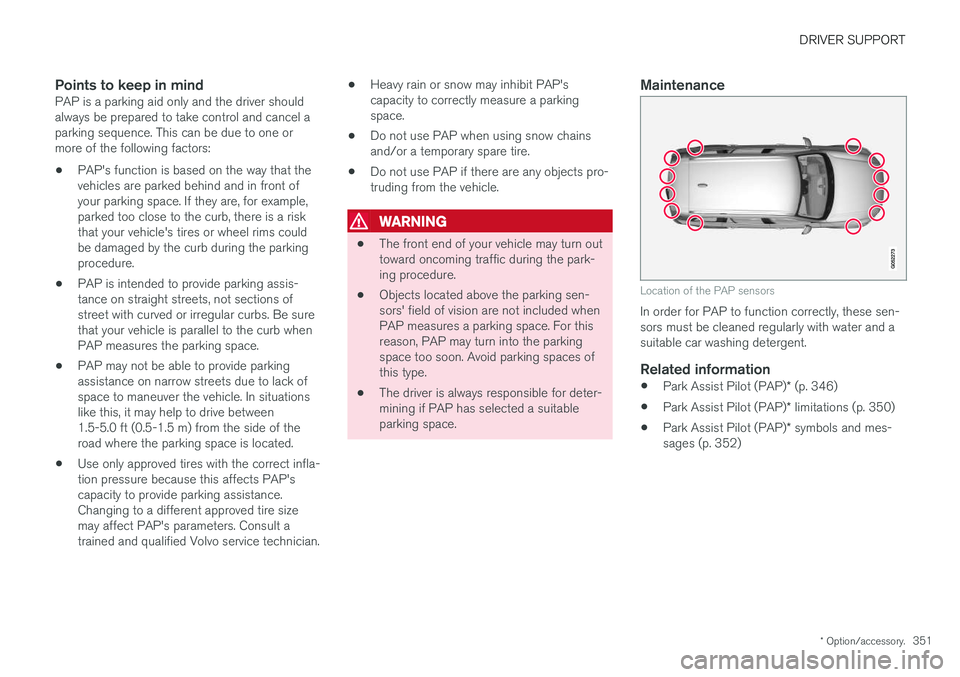
Location of the PAP sensors
In order for PAP to function correctly, these sen- sors must be cleaned regularly with water and asuitable car washing detergent.
Related information
•
Park Assist Pilot (PAP)
* (p. 346)
• Park Assist Pilot (PAP)
* limitations (p. 350)
• Park Assist Pilot (PAP)
* symbols and mes-
sages (p. 352)
Page 366 of 560
STARTING AND DRIVING
364in countries where it may be difficult to obtain the correct fuel.
• Consider your destination. If you will be driv-ing through an area where snow or ice arelikely to occur, consider using snow tires.
Driving economically
Better driving economy can be obtained by thinking ahead, avoiding rapid starts and stopsand adjusting the speed of your vehicle to imme-diate traffic conditions.
Economical driving conserves natural resources
Observe the following rules: • Bring the engine to normal operating tem- perature as soon as possible by driving witha light foot on the accelerator pedal for thefirst few minutes of operation. A cold engineuses more fuel and is subject to increasedwear.
• Whenever possible, avoid using the vehiclefor driving short distances. This does notallow the engine to reach normal operatingtemperature.
• Drive carefully and avoid rapid accelerationand hard braking.
• Use the transmission's Drive (
D) position as
often as possible and avoid using kick-down.
• Using the engine's Eco function can helpimprove fuel economy.
• Do not exceed posted speed limits.
• Avoid carrying unnecessary items (extra load)in the vehicle.
• Maintain correct tire pressure. Check tirepressure regularly (when the tires are cold). •
Use tires recommended by Volvo for yourvehicle.
• Remove snow tires when threat of snow orice has ended.
• Note that roof racks, ski racks, etc, increaseair resistance and also fuel consumption.
• At highway driving speeds, fuel consumptionwill be lower with the air conditioning on andthe windows closed than with the air condi-tioning off and the windows open.
• Using the onboard trip computer's fuel con-sumption modes can help you learn how todrive more economically.
Other factors that decrease gas mileage are:
• Dirty air cleaner
• Dirty engine oil and clogged oil filter
• Dragging brakes
• Incorrect front end alignment
Some of the above mentioned items and othersare checked at the standard maintenance inter-vals.
Handling and roadholding
• Vehicle load, tire design and inflation pres-sure all affect vehicle handling. Therefore,check that the tires are inflated to the rec-ommended pressure according to the vehicleload. Loads should be distributed so that
Page 378 of 560
STARTING AND DRIVING
376
Driving with a trailer
When towing a trailer, always observe the legal requirements of the state/province.
• All Volvo models are equipped with energy- absorbing shock-mounted bumpers. Trailerhitch installation should not interfere with theproper operation of this bumper system.
Trailer towing does not normally present any par-ticular problems, but take into consideration:
• Increase tire pressure to recommended fullpressure.
• When your vehicle is new, avoid towing heavytrailers during the first 620 miles (1,000 km).
• Maximum speed when towing a trailer:50 mph (80 km/h).
• Engine and transmission are subject toincreased loads. Therefore, engine coolanttemperature should be closely watched whendriving in hot climates or hilly terrain. Use alower gear and turn off the air conditioner ifthe temperature gauge needle enters the redrange.
• If the automatic transmission begins to over-heat, a message will be displayed in the textwindow.
• Avoid overload and other abusive operation.
• Hauling a trailer affects handling, durability,and economy. •
It is necessary to balance trailer brakes withthe towing vehicle brakes to provide a safestop (check and observe state/local regula-tions).
• Do not connect the trailer's brake systemdirectly to the vehicle's brake system.
• More frequent vehicle maintenance isrequired.
• Remove the ball holder when the hitch is notbeing used.
NOTE
•
When parking the vehicle with a trailer on a hill, apply the parking brake before put- ting the gear selector in
P. Always follow
the trailer manufacturer's recommenda- tions for wheel chocking.
• When starting on a hill, put the gear selector in
D before releasing the parking
brake.
• If you use the manual (Geartronic) shift positions while towing a trailer, make surethe gear you select does not put toomuch strain on the engine (using toohigh a gear).
• The drawbar assembly/trailer hitch maybe rated for trailers heavier than the vehi-cle is designed to tow. Please adhere toVolvo's recommended trailer weights.
• Avoid driving with a trailer on inclines ofmore than 15%.