warning lights VOLVO XC90 2017 Owner´s Manual
[x] Cancel search | Manufacturer: VOLVO, Model Year: 2017, Model line: XC90, Model: VOLVO XC90 2017Pages: 560, PDF Size: 9.97 MB
Page 308 of 560
||
DRIVER SUPPORT
306takes action. If the vehicle has slowed to avoid colliding with the vehicle ahead, your speed willbe reduced to that vehicle's speed. When auto-brake is triggered, the seat belt pre- tensioners may also be activated, see the article"Seat belts" for additional information. Auto-braking can be cancelled if the driver presses hard on the accelerator pedal. When City Safety applies the brakes, the brake lights will illuminate. When City Safety is triggered and applies the brakes, a text message will be displayed in theinstrument panel.
Related information
•
City Safety
™ troubleshooting (p. 310)
• City Safety in crossing traffic (p. 309)
• City Safety limitations (p. 312)
• City Safety symbols and messages (p. 315)
• Detecting obstructions with City Safety(p. 307)
• Rear Collision Warning (RCW) (p. 316)
• City Safety warning level settings (p. 306)
• City Safety in crossing traffic (p. 309)
• Seat belts (p. 60)
• City Safety when evasive action is not possi-ble (p. 310)
City Safety warning level settings
City Safety is always activated but the function's warning distance can be adjusted.
NOTE
City Safety cannot be turned off and activates automatically each time the engine is started.
Setting a warning level (distance)
The distance set for warnings determines the system's responsiveness and sets the distance atwhich visual, audible and tangible (haptic) warn-ings will be triggered. To do so:1. Tap
Settings in the center display's Top
view.
2. Tap
My CarIntelliSafeCity Safety
Warning.
3. Choose among
Earlier, Normal or Later.
Begin by choosing
Earlier. If too many warnings
are given, change to Normal.
If the driver feels that warnings are given too often, the warning level can be lowered. Thismeans that warnings will be provided later, result-ing in fewer warnings being given. The setting
Later should only used in exceptional
circumstances, e.g., for a more dynamic driving style.
WARNING
• No automatic system can be guaranteed to function 100% correctly in all situa-tions. For that reason, never test CitySafety by driving toward a person orobject. This could result in serious injuryor death.
• Even if the setting
Earlier has been
selected, warnings may be perceived as being given late, e.g., if the difference inspeed is great or if the vehicle aheadbrakes suddenly.
• City Safety can provide a warning for apotential collision but it can never shortenthe driver's reaction time.
• To help make City Safety as effective as possible, always using the setting
Earlieris recommended.
NOTE
•
Due to local traffic regulations in certain markets, Rear Collision Warning (RCW) will
not activate the rear turn signals.
That part of the function will be deacti- vated.
• The use of the rear turn signals will alsobe deactivated if the City Safety warning level is set at
Later. See also the section
Page 309 of 560
DRIVER SUPPORT
}}
307
"Setting a warning level (distance)" in the article "City Safety settings."
• If RCW detects a vehicle approachingfrom behind, the seat belt pretensionersand Whiplash Protection System will beactivated.
Related information
•City Safety limitations (p. 312)
• City Safety
™ (p. 304)
• Rear Collision Warning (RCW) (p. 316)
Detecting obstructions with City Safety
City Safety can detect vehicles, cyclists, large animals and pedestrians.
VehiclesCity Safety detects most types of vehicles that are either stationary, moving in the same direc-tion as your vehicle or those described in the arti-cle "City Safety in crossing traffic." In order for City Safety to detect a vehicle in darkness, its headlights and taillights must be onand clearly visible.
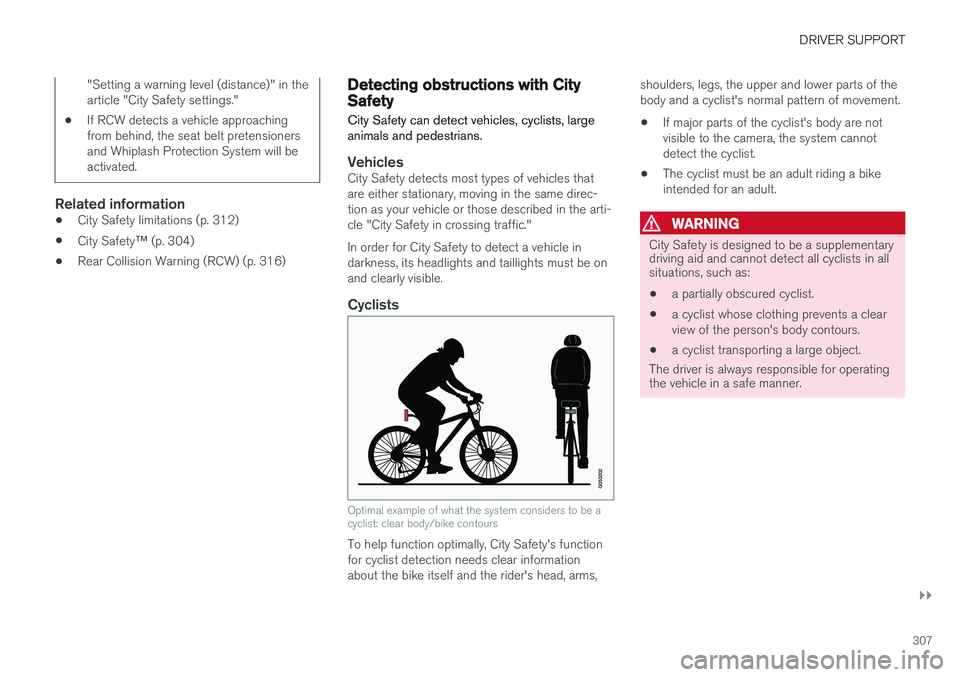
Cyclists
Optimal example of what the system considers to be a cyclist: clear body/bike contours
To help function optimally, City Safety's function for cyclist detection needs clear informationabout the bike itself and the rider's head, arms, shoulders, legs, the upper and lower parts of thebody and a cyclist's normal pattern of movement.
• If major parts of the cyclist's body are notvisible to the camera, the system cannotdetect the cyclist.
• The cyclist must be an adult riding a bikeintended for an adult.
WARNING
City Safety is designed to be a supplementary driving aid and cannot detect all cyclists in allsituations, such as:
• a partially obscured cyclist.
• a cyclist whose clothing prevents a clear view of the person's body contours.
• a cyclist transporting a large object.
The driver is always responsible for operating the vehicle in a safe manner.
Page 310 of 560
||
DRIVER SUPPORT
308
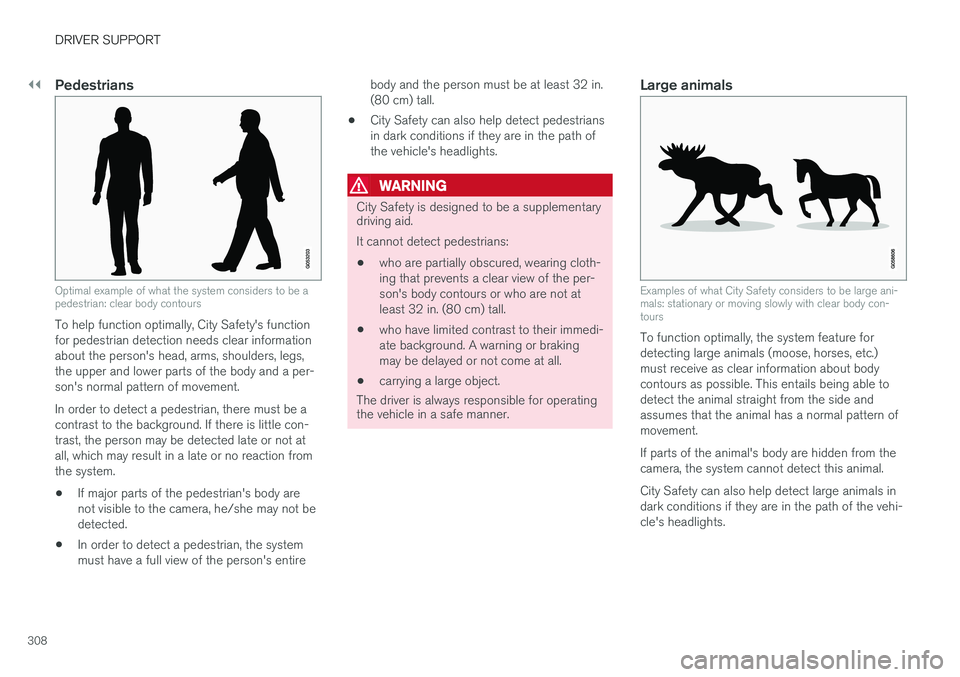
Pedestrians
Optimal example of what the system considers to be a pedestrian: clear body contours
To help function optimally, City Safety's function for pedestrian detection needs clear informationabout the person's head, arms, shoulders, legs,the upper and lower parts of the body and a per-son's normal pattern of movement. In order to detect a pedestrian, there must be a contrast to the background. If there is little con-trast, the person may be detected late or not atall, which may result in a late or no reaction fromthe system.• If major parts of the pedestrian's body arenot visible to the camera, he/she may not bedetected.
• In order to detect a pedestrian, the systemmust have a full view of the person's entire body and the person must be at least 32 in.(80 cm) tall.
• City Safety can also help detect pedestriansin dark conditions if they are in the path ofthe vehicle's headlights.
WARNING
City Safety is designed to be a supplementary driving aid. It cannot detect pedestrians:
• who are partially obscured, wearing cloth- ing that prevents a clear view of the per-son's body contours or who are not atleast 32 in. (80 cm) tall.
• who have limited contrast to their immedi-ate background. A warning or brakingmay be delayed or not come at all.
• carrying a large object.
The driver is always responsible for operating
the vehicle in a safe manner.
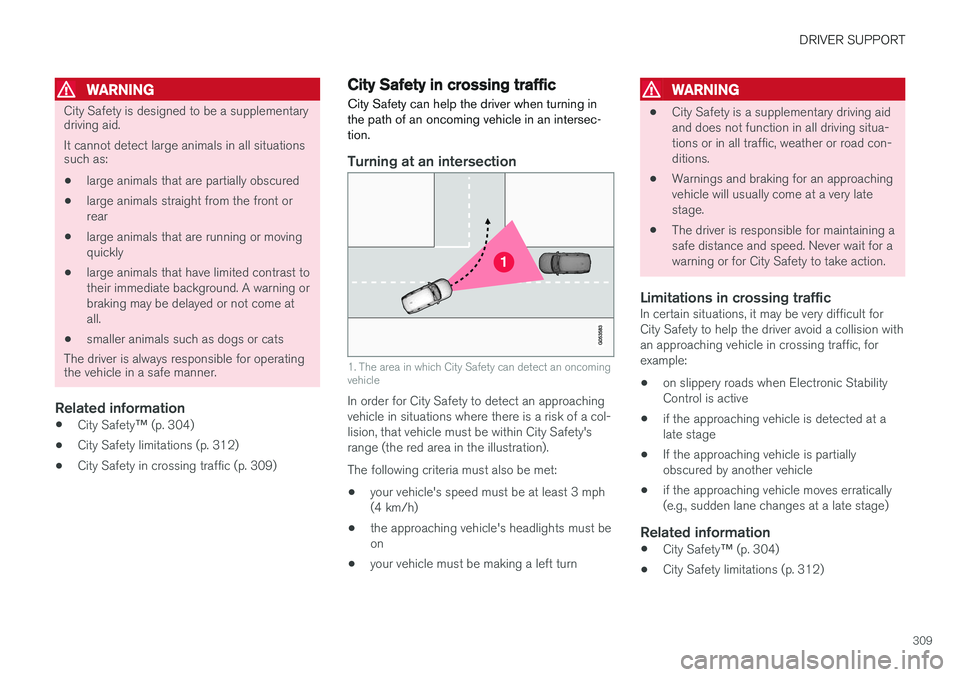
Large animals
Examples of what City Safety considers to be large ani- mals: stationary or moving slowly with clear body con-tours
To function optimally, the system feature for detecting large animals (moose, horses, etc.)must receive as clear information about bodycontours as possible. This entails being able todetect the animal straight from the side andassumes that the animal has a normal pattern ofmovement. If parts of the animal's body are hidden from the camera, the system cannot detect this animal. City Safety can also help detect large animals in dark conditions if they are in the path of the vehi-cle's headlights.
Page 311 of 560
DRIVER SUPPORT
309
WARNING
City Safety is designed to be a supplementary driving aid. It cannot detect large animals in all situations such as:• large animals that are partially obscured
• large animals straight from the front or rear
• large animals that are running or movingquickly
• large animals that have limited contrast totheir immediate background. A warning orbraking may be delayed or not come atall.
• smaller animals such as dogs or cats
The driver is always responsible for operating the vehicle in a safe manner.
Related information
• City Safety
™ (p. 304)
• City Safety limitations (p. 312)
• City Safety in crossing traffic (p. 309)
City Safety in crossing traffic
City Safety can help the driver when turning in the path of an oncoming vehicle in an intersec-tion.
Turning at an intersection
1. The area in which City Safety can detect an oncoming vehicle
In order for City Safety to detect an approaching vehicle in situations where there is a risk of a col-lision, that vehicle must be within City Safety'srange (the red area in the illustration). The following criteria must also be met:
• your vehicle's speed must be at least 3 mph (4 km/h)
• the approaching vehicle's headlights must beon
• your vehicle must be making a left turn
WARNING
•City Safety is a supplementary driving aid and does not function in all driving situa-tions or in all traffic, weather or road con-ditions.
• Warnings and braking for an approachingvehicle will usually come at a very latestage.
• The driver is responsible for maintaining asafe distance and speed. Never wait for awarning or for City Safety to take action.
Limitations in crossing trafficIn certain situations, it may be very difficult forCity Safety to help the driver avoid a collision withan approaching vehicle in crossing traffic, forexample:
• on slippery roads when Electronic StabilityControl is active
• if the approaching vehicle is detected at alate stage
• If the approaching vehicle is partiallyobscured by another vehicle
• if the approaching vehicle moves erratically(e.g., sudden lane changes at a late stage)
Related information
•
City Safety
™ (p. 304)
• City Safety limitations (p. 312)
Page 315 of 560
DRIVER SUPPORT
}}
313
Camera and radar sensor's field of vision
The camera and radar sensor have limited fields of vision. In some situations they may detect avehicle, large animal, pedestrian or cyclist laterthan expected or not detect them at all. Other vehicles that are dirty may be detected later than others and in dark conditions, motorcy-cles may be detected late or not at all. If a text message is displayed in the instrument panel indicates that the camera or radar sensorare blocked, it may be difficult for City Safety todetect a vehicle, pedestrian or cyclist and thesystem's functionality may be reduced.
WARNING
Text messages may not be displayed in all sit- uations in which the camera and/or radarsensor are blocked. It is therefore essential tokeep the windshield in front the camera/radarsensor clean and free from snow, ice, etc. Camera and radar sensor components should only be serviced or replaced by a trained andqualified Volvo service technician.
Action by the driver
Backing up
City Safety is temporarily deactivated while the vehicle is backing up.
Low speed
City Safety is not activated at very low speeds (under approx. 3 mph (4 km/h). This means thatthe system will not be triggered if your vehicleapproaches a vehicle ahead at very low speed,such as when parking.
Active driver
Action by the driver always has priority. For this reason, City Safety may not react or react laterthan expected in situations in which the driver isactively operating the vehicle, even if a collision isimminent. This is also done to help eliminateexcessive warnings.
Other limitations
City Safety uses the vehicle's camera and radar sensor, which have certain general limitations.See the articles "Camera limitations" and "Radarsensor limitations" for additional information.
WARNING
•
Warnings and braking may be delayed or not occur at all if traffic, weather or otherconditions prevent the camera and/orradar sensor from detecting pedestrians,cyclists, large animals or other vehiclescorrectly.
• Other vehicles can only be detected indarkness if their headlights and taillightsare clearly visible.
• The sensors have a limited range forpedestrians and cyclists. The systemfunctions best at relative speeds up to30 mph (50 km/h). For stationary orslow-moving vehicles, the system func-tions best at speeds up to approx.43 mph (70 km/h).
• If there is a risk of colliding with a largeanimal, City Safety can reduce the vehi-cle's speed by up to 9 mph (15 km/h).Warnings and braking are most effectiveat speeds above 43 mph (70 km/h) andless effective at lower speeds.
Page 319 of 560
DRIVER SUPPORT
}}
* Option/accessory.317
Blind Spot Information (BLIS) *
Blind Spot Information is a system designed to alert the driver to the presence of other vehiclesmoving in the same direction as your vehicle onroads with several lanes.
Blind Spot Information is a driving aid intended to:
• detect other vehicles in your door mirrors'"blind area"
• detect vehicles that are about to pass yourvehicle or are approaching your vehiclequickly from behind in the left and/or rightlanes
WARNING
•
Blind Spot Information is an information system, NOT a warning or safety systemand does not function in all situations.
• Blind Spot Information does not eliminatethe need for you to visually confirm theconditions around you, and the need foryou to turn your head and shoulders tomake sure that you can safely changelanes or back up.
• As the driver, you have full responsibilityfor changing lanes/backing up in a safemanner.
Overview
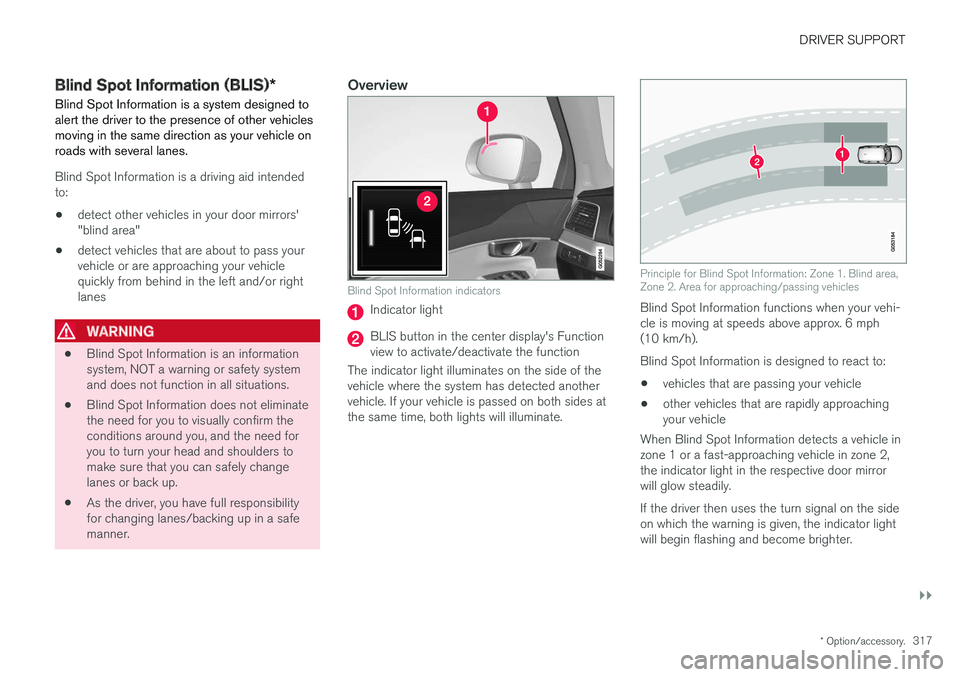
Blind Spot Information indicators
Indicator light
BLIS button in the center display's Function view to activate/deactivate the function
The indicator light illuminates on the side of thevehicle where the system has detected anothervehicle. If your vehicle is passed on both sides atthe same time, both lights will illuminate.
Principle for Blind Spot Information: Zone 1. Blind area, Zone 2. Area for approaching/passing vehicles
Blind Spot Information functions when your vehi- cle is moving at speeds above approx. 6 mph(10 km/h). Blind Spot Information is designed to react to:
• vehicles that are passing your vehicle
• other vehicles that are rapidly approaching your vehicle
When Blind Spot Information detects a vehicle inzone 1 or a fast-approaching vehicle in zone 2,the indicator light in the respective door mirrorwill glow steadily. If the driver then uses the turn signal on the side on which the warning is given, the indicator lightwill begin flashing and become brighter.
Page 320 of 560
||
DRIVER SUPPORT
* Option/accessory.
318
WARNING
• Blind Spot Information does not function in sharp curves.
• Blind Spot Information does not functionwhen your vehicle is backing up.
Related information
•
Blind Spot Information (BLIS)
* On/Off
(p. 318)
• Blind Spot Information (BLIS)
* limitations
(p. 319)
• Cross Traffic Alert (CTA)
* (p. 319)
Blind Spot Information (BLIS) *
On/Off The Blind Spot Information function can be acti- vated/deactivated.
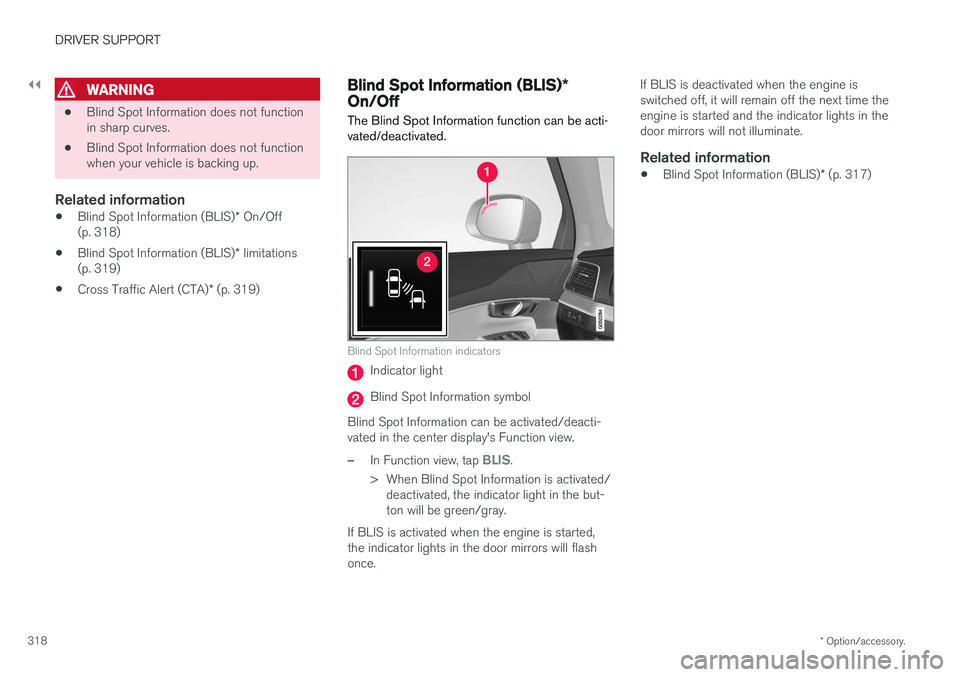
Blind Spot Information indicators
Indicator light
Blind Spot Information symbol
Blind Spot Information can be activated/deacti- vated in the center display's Function view.
–In Function view, tap BLIS.
> When Blind Spot Information is activated/ deactivated, the indicator light in the but- ton will be green/gray.
If BLIS is activated when the engine is started,the indicator lights in the door mirrors will flashonce. If BLIS is deactivated when the engine isswitched off, it will remain off the next time theengine is started and the indicator lights in thedoor mirrors will not illuminate.
Related information
•
Blind Spot Information (BLIS)
* (p. 317)
Page 339 of 560
DRIVER SUPPORT
* Option/accessory.337
Side park assist
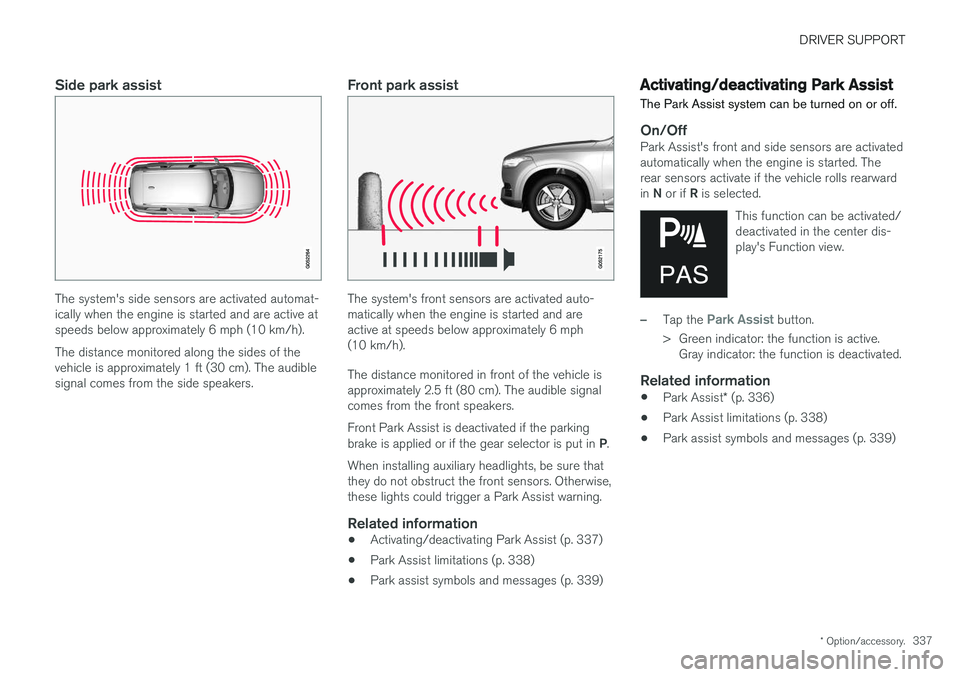
The system's side sensors are activated automat- ically when the engine is started and are active atspeeds below approximately 6 mph (10 km/h). The distance monitored along the sides of the vehicle is approximately 1 ft (30 cm). The audiblesignal comes from the side speakers.
Front park assist
The system's front sensors are activated auto- matically when the engine is started and areactive at speeds below approximately 6 mph(10 km/h). The distance monitored in front of the vehicle is approximately 2.5 ft (80 cm). The audible signalcomes from the front speakers. Front Park Assist is deactivated if the parking brake is applied or if the gear selector is put in P.
When installing auxiliary headlights, be sure that they do not obstruct the front sensors. Otherwise,these lights could trigger a Park Assist warning.
Related information
• Activating/deactivating Park Assist (p. 337)
• Park Assist limitations (p. 338)
• Park assist symbols and messages (p. 339)
Activating/deactivating Park Assist
The Park Assist system can be turned on or off.
On/OffPark Assist's front and side sensors are activated automatically when the engine is started. Therear sensors activate if the vehicle rolls rearward in N or if R is selected.
This function can be activated/ deactivated in the center dis-play's Function view.
–Tap the Park Assist button.
> Green indicator: the function is active. Gray indicator: the function is deactivated.
Related information
• Park Assist
* (p. 336)
• Park Assist limitations (p. 338)
• Park assist symbols and messages (p. 339)
Page 358 of 560
||
STARTING AND DRIVING
* Option/accessory.
356
WARNING
If both symbols illuminate at the same time and the brake level is below the MIN mark in
the reservoir or if a brake system-related mes-sage is shown in the instrument panel: DO
NOT DRIVE . Have the vehicle towed to a
trained and qualified Volvo service technician and have the brake system inspected. If both symbols illuminate at the same time and the brake level is normal (not below the
MIN mark in the reservoir) or if a brake sys-
tem-related message is shown in the instru- ment panel: drive the vehicle carefully to anauthorized Volvo workshop and have thebrake system inspected by a trained andqualified Volvo service technician.
Related information
• Brake functions (p. 356)
• Brake assist system (p. 357)
• Emergency brake lights (p. 358)
Brake functions
The vehicle's standard braking features are aug- mented by a number of auxiliary help functions.
In addition to the wheel brakes and the parking brake, the vehicle is equipped with several auto-matic brake assist functions. These systems helpthe driver by e.g., keeping the vehicle stationarywhen the brake pedal is not depressed (at a traf-fic light or intersection), when starting up a hill orwhen driving down a hill. These systems include: • Auto-hold brakes
• Hill Start Assist
• Braking assist after a collision
• Hill Descent Control
*
Related information
•Brakes (p. 354)
• Parking brake (p. 360)
• Hill Descent Control (HDC) (p. 358)
• Auto-hold brake function (p. 356)
Auto-hold brake function
With the Auto-hold brake function, the driver can release the brake pedal and the brakes willremain applied, for example, when the vehiclehas stopped at a traffic light or intersection.
When the vehicle is no longer moving forward, Auto-hold applies the brakes automatically, eitherusing the normal brakes or the parking brake.The brakes will be released when the acceleratorpedal is depressed. If the driver's door is opened or the engine is turned off, the parking brake will be applied auto-matically. Auto-hold is deactivated when the transmission is in neutral or if the driver's door is open and theseat belt is unbuckled.
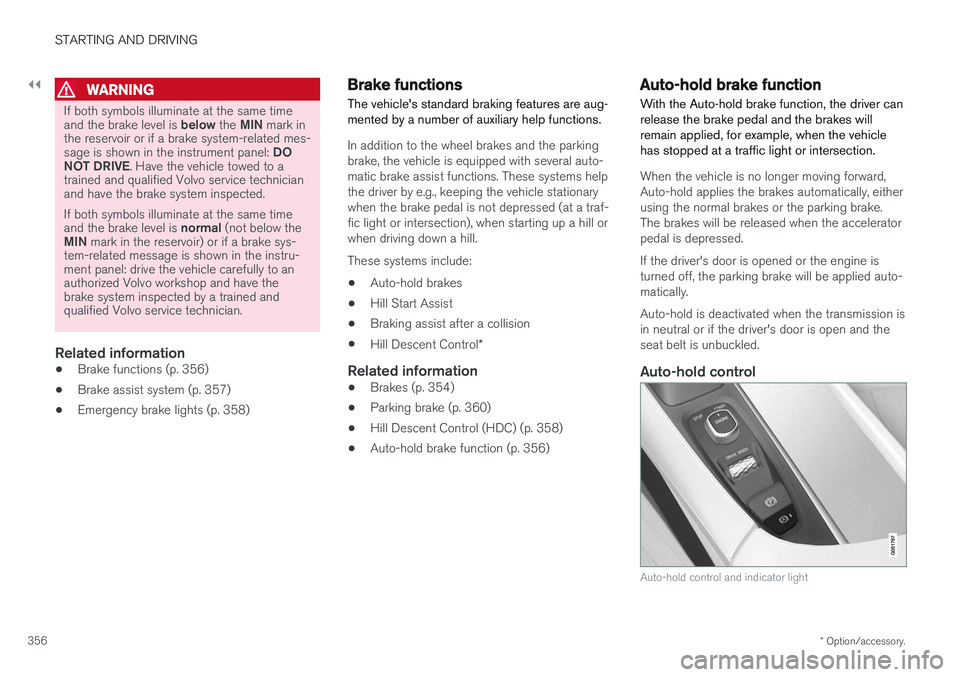
Auto-hold control
Auto-hold control and indicator light
Page 359 of 560
STARTING AND DRIVING
357
Turn Auto-hold on or off by pressing the control in the tunnel console. The indicator light illumi-nates when the function is on. When Auto-hold is off, Hill Start Assist (HSA) will be activated to help prevent the vehicle from roll-ing backwards when starting up a hill.
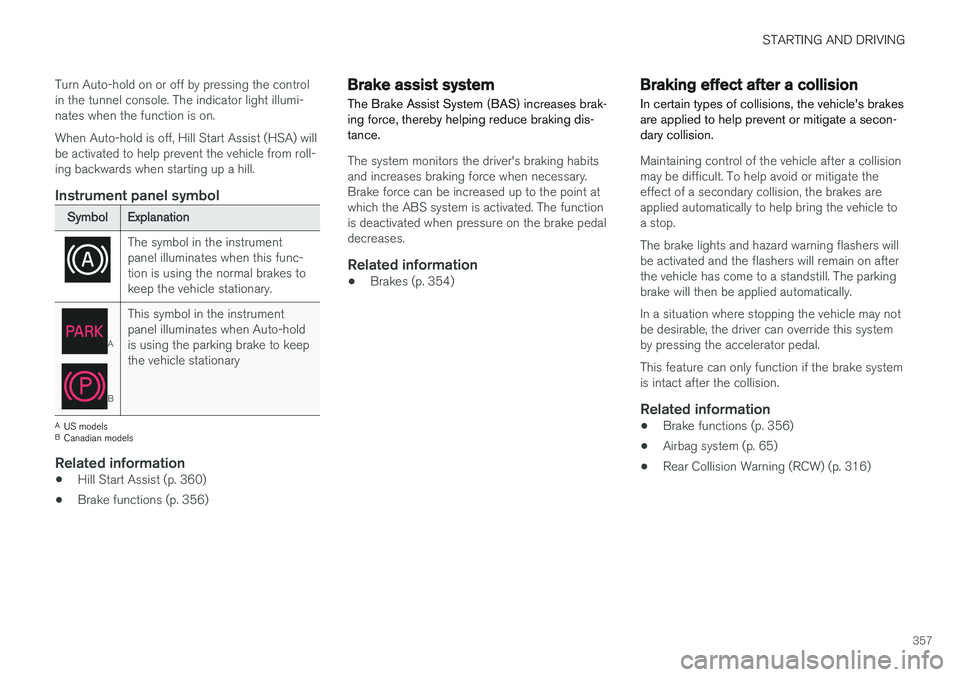
Instrument panel symbol
Symbol
Explanation
The symbol in the instrument panel illuminates when this func-tion is using the normal brakes tokeep the vehicle stationary.
A
BThis symbol in the instrument panel illuminates when Auto-holdis using the parking brake to keepthe vehicle stationary
A
US models
B Canadian models
Related information
• Hill Start Assist (p. 360)
• Brake functions (p. 356)
Brake assist system The Brake Assist System (BAS) increases brak- ing force, thereby helping reduce braking dis-tance.
The system monitors the driver's braking habits and increases braking force when necessary.Brake force can be increased up to the point atwhich the ABS system is activated. The functionis deactivated when pressure on the brake pedaldecreases.
Related information
•Brakes (p. 354)
Braking effect after a collision
In certain types of collisions, the vehicle's brakes are applied to help prevent or mitigate a secon-dary collision.
Maintaining control of the vehicle after a collision may be difficult. To help avoid or mitigate theeffect of a secondary collision, the brakes areapplied automatically to help bring the vehicle toa stop. The brake lights and hazard warning flashers will be activated and the flashers will remain on afterthe vehicle has come to a standstill. The parkingbrake will then be applied automatically. In a situation where stopping the vehicle may not be desirable, the driver can override this systemby pressing the accelerator pedal. This feature can only function if the brake system is intact after the collision.
Related information
• Brake functions (p. 356)
• Airbag system (p. 65)
• Rear Collision Warning (RCW) (p. 316)