remote control VOLVO XC90 2017 Owner´s Manual
[x] Cancel search | Manufacturer: VOLVO, Model Year: 2017, Model line: XC90, Model: VOLVO XC90 2017Pages: 560, PDF Size: 9.97 MB
Page 386 of 560
||
STARTING AND DRIVING
* Option/accessory.
384
CAUTION
• When starting in cold weather, the auto- matic transmission may shift up at slightlyhigher engine speeds than normal untilthe automatic transmission fluid reachesnormal operating temperature.
• Do not race a cold engine immediatelyafter starting. Oil flow may not reachsome lubrication points fast enough toprevent engine damage.
• The engine should be idling when youmove the gear selector. Never accelerateuntil after you feel the transmissionengage. Accelerating immediately afterselecting a gear will cause harsh engage-ment and premature transmission wear.
• Selecting
P or N when idling at a stand-
still for prolonged periods of time will helpprevent overheating of the automatictransmission fluid.
Related information
• Ignition modes (p. 380)
• Turning the engine off (p. 384)
• Changing the remote key's battery (p. 225)
• Jump starting (p. 374)
Turning the engine off
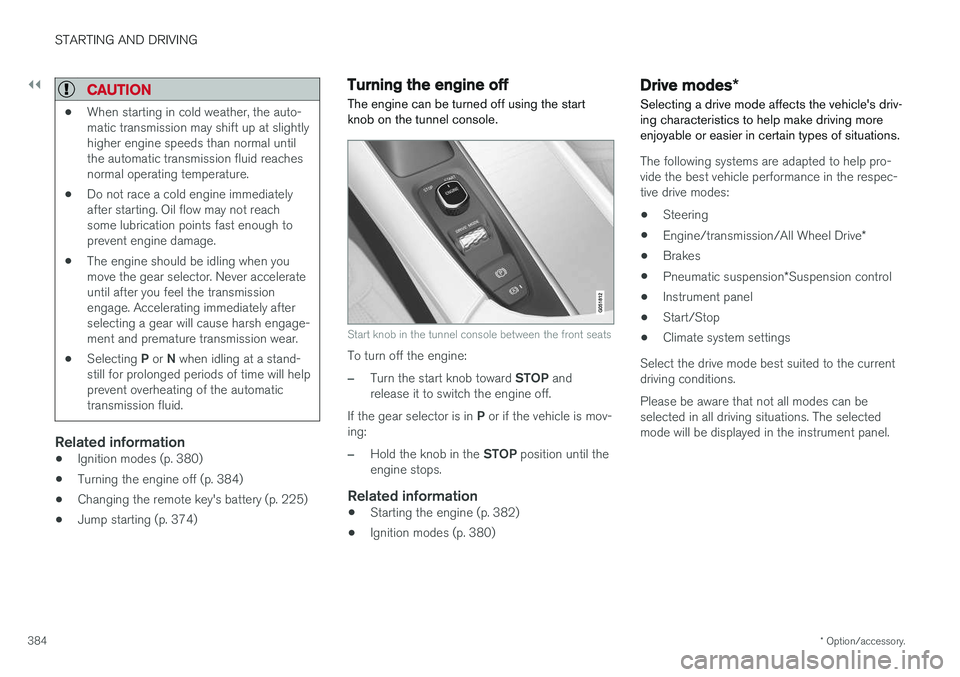
The engine can be turned off using the start knob on the tunnel console.
Start knob in the tunnel console between the front seats
To turn off the engine:
–Turn the start knob toward STOP and
release it to switch the engine off.
If the gear selector is in P or if the vehicle is mov-
ing:
–Hold the knob in the STOP position until the
engine stops.
Related information
• Starting the engine (p. 382)
• Ignition modes (p. 380)
Drive modes
*
Selecting a drive mode affects the vehicle's driv- ing characteristics to help make driving moreenjoyable or easier in certain types of situations.
The following systems are adapted to help pro- vide the best vehicle performance in the respec-tive drive modes: • Steering
• Engine/transmission/All Wheel Drive
*
• Brakes
• Pneumatic suspension
*Suspension control
• Instrument panel
• Start/Stop
• Climate system settings
Select the drive mode best suited to the current driving conditions. Please be aware that not all modes can be selected in all driving situations. The selectedmode will be displayed in the instrument panel.
Page 421 of 560
INFOTAINMENT
419
Phone
A Bluetooth-enabled cell phone can be paired and connected to the vehicle's integrated hands-free system.
The infotainment system offers hands-free func- tionality for remote-controlling a number of a cellphone's features. The phone's integrated controlscan also be used, even when it is connected tothe vehicle. When the phone has been paired and connected to the infotainment system, it can be used tomake or receive calls, send or receive text mes-sages, to stream music, etc., or as an Internetconnection.
The phone is controlled fromthe center display but the Appmenu (accessed using theright-side steering wheel key-pad) and voice commands canalso be used to control certainfunctions.
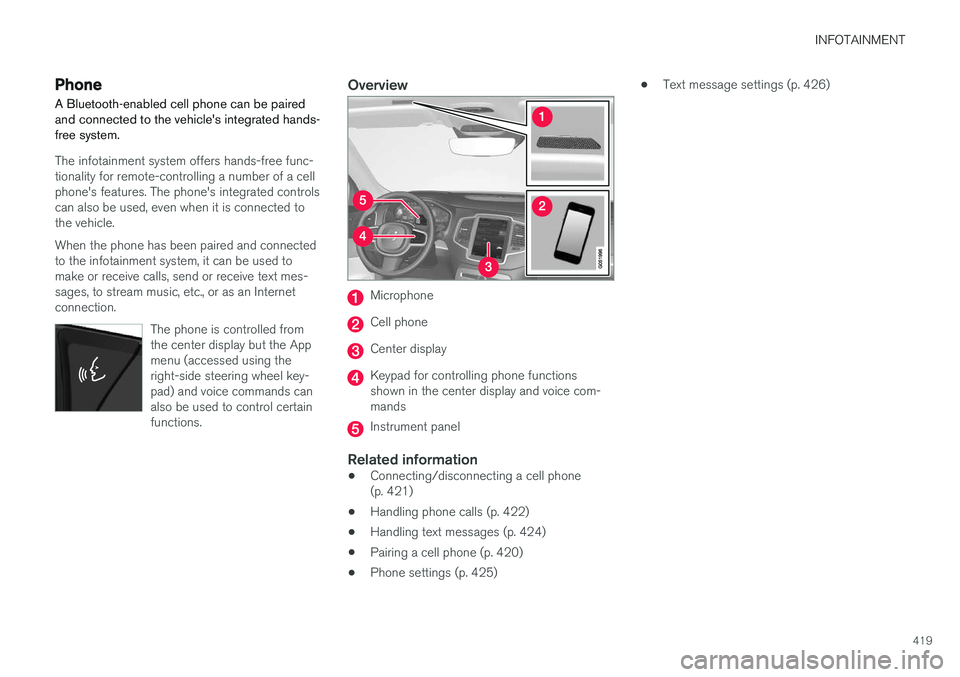
Overview
Microphone
Cell phone
Center display
Keypad for controlling phone functions shown in the center display and voice com-mands
Instrument panel
Related information
•Connecting/disconnecting a cell phone (p. 421)
• Handling phone calls (p. 422)
• Handling text messages (p. 424)
• Pairing a cell phone (p. 420)
• Phone settings (p. 425) •
Text message settings (p. 426)
Page 553 of 560
INDEX
551
Head restraints, rear seat 170
Head-up display 116
Heated front seats 198
Heated oxygen sensors 374
Heated steering wheel 197
High beam bulb, replacing 509
High beams 142
active 142
Hill Descent Control 358
Hill Start Assist (HSA) 360
Hoisting the vehicle 512 HomeLink ®
Wireless Control System 98, 99
Home safe lighting 150
Hood, opening/closing 514
Horn, Keypad, Paddles, Signal 160
I
ID, Volvo 27
Ignition modes 380
Immobilizer (start inhibitor) 224
Indicator lights 135
Infant seats 79
Inflatable Curtain 73
Inflation pressure 460
Inflation pressure table 545
Information lights 135
Infotainment 449
Infotainment (Infotainment system) 402
Infotainment system 406, 408, 409 CD player 432
cell phone 419
general sound settings 403
Gracenote 436
introduction 402
media player 426, 432
media player sound settings 436
media search 434
radio 404
searching for radio stations 405
sound settings 403, 436
type approval 445
video 437
voice control 119
Inspection readiness 480
Instrument lighting 139
Instrument overview 94
Instrument panel 124 settings 126
Intellisafe 16
Interior Air Quality System 185Interior lighting 147
Internet connection 439 applications (apps) 402
bluetooth settings 441
booking service 484
establishing a connection 439
troubleshooting 442
ISOFIX/LATCH anchors 84
J
Jack 462 location of 462, 465
Jump starting 370, 374
K
Key remote 177, 227
Key blade 231, 243
Keys 230