remote start VOLVO XC90 2017 Owner´s Manual
[x] Cancel search | Manufacturer: VOLVO, Model Year: 2017, Model line: XC90, Model: VOLVO XC90 2017Pages: 560, PDF Size: 9.97 MB
Page 485 of 560
MAINTENANCE AND SERVICING
483
Keep in mind that a download can be cancelled but an installation that has already begun cannotbe interrupted.
Allowing background searches or
software updates
This function can be deactivated from the centerdisplay:
1. Go to the Settings in the center display's Top view and select
Download Center.
2. Tap
SystemDownload Center.
3. Tap to deselect
Auto Software Update.
If an update is available,
New software updates
available will appear in the center display's sta-
tus bar. Tap the message to start a download app in Home view's lower sub-view. As soon as the download app has started, an icon in the
System
updates button will indicate the number of
downloads available.
Related information
• Center display overview (p. 28)
• Navigating in the center display's views (p. 38)
Remote updates With the vehicle connected to the Internet, updates for a number of the vehicle's systemscan be downloaded from the center display.
The Download Center app is
started from the center dis- play's App view and makes itpossible to:
• search for and update system software
• update the Sensus Navigation maps
• download, update and uninstall apps
Related information
•Downloading, updating and uninstalling apps (p. 441)
• System updates (p. 482)
Vehicle status
The vehicle's general status can be displayed in the center display along with the possibility to book service 1
The Car status app is started
in the center display's App view and has three tabs:
•Messages: stored messages
•
Status: tire pressure and engine oil level
•
Appointments: booking service or repairs 1
Related information
•
Using the center display (p. 44)
• Booking service and repairs (p. 484)
• Checking and refilling engine oil (p. 517)
1
Certain markets only.
Page 517 of 560
MAINTENANCE AND SERVICING
}}
515
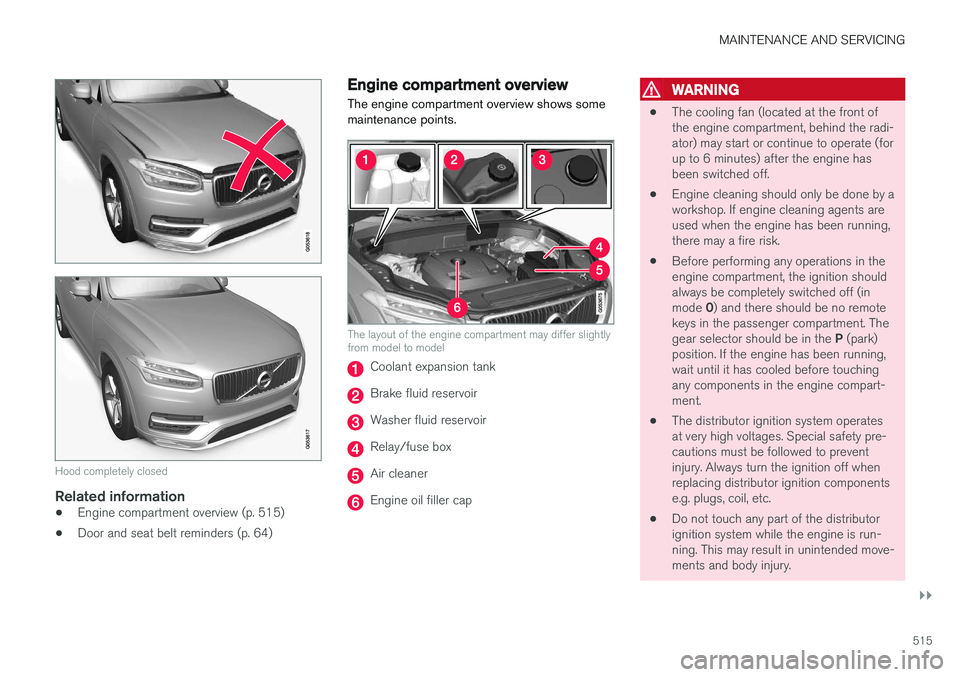
Hood completely closed
Related information
•Engine compartment overview (p. 515)
• Door and seat belt reminders (p. 64)
Engine compartment overview
The engine compartment overview shows some maintenance points.
The layout of the engine compartment may differ slightly from model to model
Coolant expansion tank
Brake fluid reservoir
Washer fluid reservoir
Relay/fuse box
Air cleaner
Engine oil filler cap
WARNING
• The cooling fan (located at the front of the engine compartment, behind the radi-ator) may start or continue to operate (forup to 6 minutes) after the engine hasbeen switched off.
• Engine cleaning should only be done by aworkshop. If engine cleaning agents areused when the engine has been running,there may a fire risk.
• Before performing any operations in theengine compartment, the ignition shouldalways be completely switched off (in mode
0) and there should be no remote
keys in the passenger compartment. Thegear selector should be in the P (park)
position. If the engine has been running, wait until it has cooled before touchingany components in the engine compart-ment.
• The distributor ignition system operatesat very high voltages. Special safety pre-cautions must be followed to preventinjury. Always turn the ignition off whenreplacing distributor ignition componentse.g. plugs, coil, etc.
• Do not touch any part of the distributorignition system while the engine is run-ning. This may result in unintended move-ments and body injury.
Page 553 of 560
INDEX
551
Head restraints, rear seat 170
Head-up display 116
Heated front seats 198
Heated oxygen sensors 374
Heated steering wheel 197
High beam bulb, replacing 509
High beams 142
active 142
Hill Descent Control 358
Hill Start Assist (HSA) 360
Hoisting the vehicle 512 HomeLink ®
Wireless Control System 98, 99
Home safe lighting 150
Hood, opening/closing 514
Horn, Keypad, Paddles, Signal 160
I
ID, Volvo 27
Ignition modes 380
Immobilizer (start inhibitor) 224
Indicator lights 135
Infant seats 79
Inflatable Curtain 73
Inflation pressure 460
Inflation pressure table 545
Information lights 135
Infotainment 449
Infotainment (Infotainment system) 402
Infotainment system 406, 408, 409 CD player 432
cell phone 419
general sound settings 403
Gracenote 436
introduction 402
media player 426, 432
media player sound settings 436
media search 434
radio 404
searching for radio stations 405
sound settings 403, 436
type approval 445
video 437
voice control 119
Inspection readiness 480
Instrument lighting 139
Instrument overview 94
Instrument panel 124 settings 126
Intellisafe 16
Interior Air Quality System 185Interior lighting 147
Internet connection 439 applications (apps) 402
bluetooth settings 441
booking service 484
establishing a connection 439
troubleshooting 442
ISOFIX/LATCH anchors 84
J
Jack 462 location of 462, 465
Jump starting 370, 374
K
Key remote 177, 227
Key blade 231, 243
Keys 230