brake VOLVO XC90 2017 Owner´s Manual
[x] Cancel search | Manufacturer: VOLVO, Model Year: 2017, Model line: XC90, Model: VOLVO XC90 2017Pages: 560, PDF Size: 9.97 MB
Page 276 of 560
||
DRIVER SUPPORT
* Option/accessory.
274
WARNING
When ACC is in standby mode, the driver has to control the vehicle's speed and distance toa vehicle ahead. When ACC is in standby mode, the driver will be alerted if the distance to the vehicle aheadis too short by the Distance Alert function.See the article "Distance Alert" for additionalinformation.
Standby mode due to action by the driver
ACC is temporarily deactivated and put in standby mode if:
• the brakes are applied
• The gear selector is moved to
N
• the vehicle is driven faster than the setspeed for more than 1 minute.
In these cases, the driver will have to regulate thevehicle's speed. A temporary increase in speed, such as when passing another vehicle, does not affect the ACCset speed. The vehicle will return to the set speedwhen the accelerator pedal is released.
Automatic standby mode
ACC interacts with other systems, such as Electronic Stability Control. If any of these othersystems are not functioning properly, ACC willturn off automatically.
WARNING
If this happens, the driver will be alerted by an audible signal and a message in the instru-ment panel. The driver will have to adapt thevehicle's speed, apply the brakes when nec-essary and keep a safe distance to the vehicleahead.
ACC switches automatically to standby mode if: • the vehicle's speed goes below approx. 3 mph (5 km/h) and ACC cannot determineif the vehicle ahead is stationary or is anobject such as a speed bump, etc
• the vehicle's speed goes below approx.3 mph (5 km/h) and the vehicle aheadchanges lanes or turns so that ACC nolonger has a target vehicle to follow
• the driver opens the door
• the driver unbuckles the seat belt
• the engine speed (rpm) is too high/low
• the wheels lose traction
• the brake temperature is too high
• the parking brake is applied
• the stability system's
ESC Sport Mode is
activated
• the
Off Road drive mode is selected
• The radar sensor is covered by e.g., wet snow or if heavy rain interferes with radar waves
Reactivating ACC from standby mode
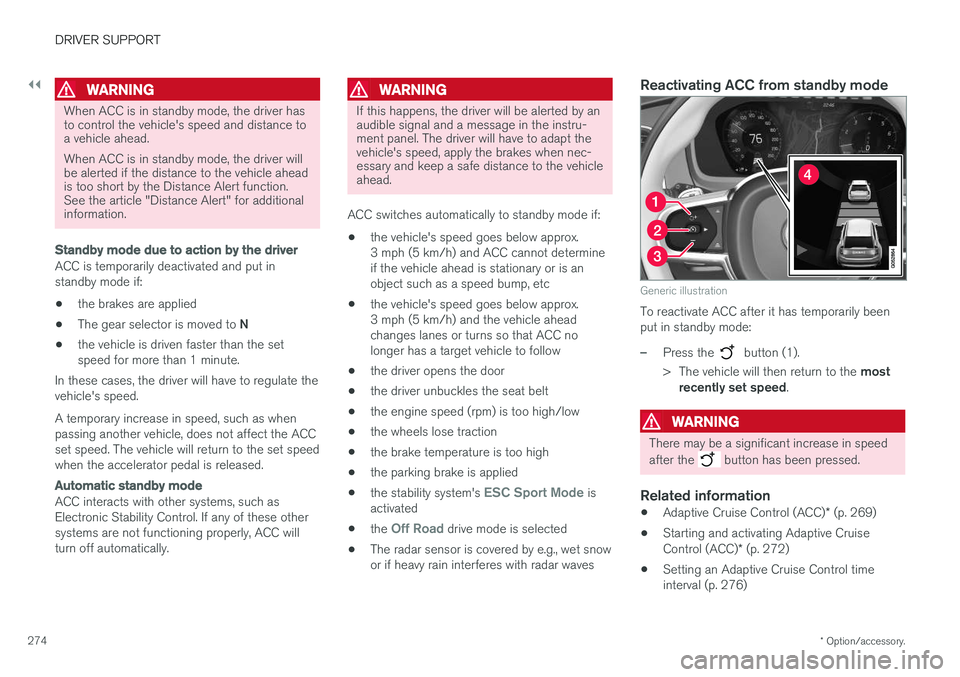
Generic illustration
To reactivate ACC after it has temporarily been put in standby mode:
–Press the button (1).
> The vehicle will then return to the most
recently set speed .
WARNING
There may be a significant increase in speed after the
button has been pressed.
Related information
•Adaptive Cruise Control (ACC)
* (p. 269)
• Starting and activating Adaptive Cruise Control (ACC)
* (p. 272)
• Setting an Adaptive Cruise Control time interval (p. 276)
Page 279 of 560
DRIVER SUPPORT
}}
* Option/accessory.277
Passing Assistance with Adaptive Cruise Control or Pilot Assist
ACC or Pilot Assist can assist the driver when passing other vehicles.
How passing assistance worksWhen ACC or Pilot Assist is following another vehicle and the driver indicates that he/she isabout to pass that vehicle by using the left turnsignal, ACC or Pilot Assist will begin acceleratingtoward the vehicle ahead before your vehicle hasmoved into the passing lane. The function will then delay a speed reduction to avoid early braking as your vehicle approachesthe slower-moving vehicle. The function is active until your vehicle has passed the other vehicle.
WARNING
Be aware that this function may be activated in situations other than when passing a vehi-cle, such as if the turn signal is used to indi-cate a lane change or to indicate a turn. Thevehicle will accelerate briefly.
Using passing assistanceTo activate passing assistance:
• Your vehicle (ACC or Pilot Assist) must be following another vehicle (the target vehicle).
• Current speed must be at least approx.45 mph (70 km/h ). •
The speed set for ACC or Pilot Assist mustbe high enough to safely pass the vehicleahead.
Starting passing assistanceTo start a passing assistance sequence:
• Activate the left turn signal.
Passing assistance limitations
WARNING
The driver should be prepared for sudden changes when passing assistance is used. Incertain cases, there may be undesired accel-eration. Certain situations should be avoided, such as: • If the vehicle is approaching an exit to the left or a left turn.
• If the vehicle ahead slows down beforeyour vehicle has moved into the passinglane.
• Traffic in the passing lane slows down.
Passing assistance in these situations can bedeactivated by putting ACC or Pilot Assist instandby mode.
Related information
• Pilot Assist
* (p. 283)
• Adaptive Cruise Control (ACC)
* (p. 269)
Changing target vehicles and automatic braking with AdaptiveCruise Control (ACC)
At certain speeds, Adaptive Cruise Control can change target vehicles and automatically applythe brakes.
Changing target vehicles
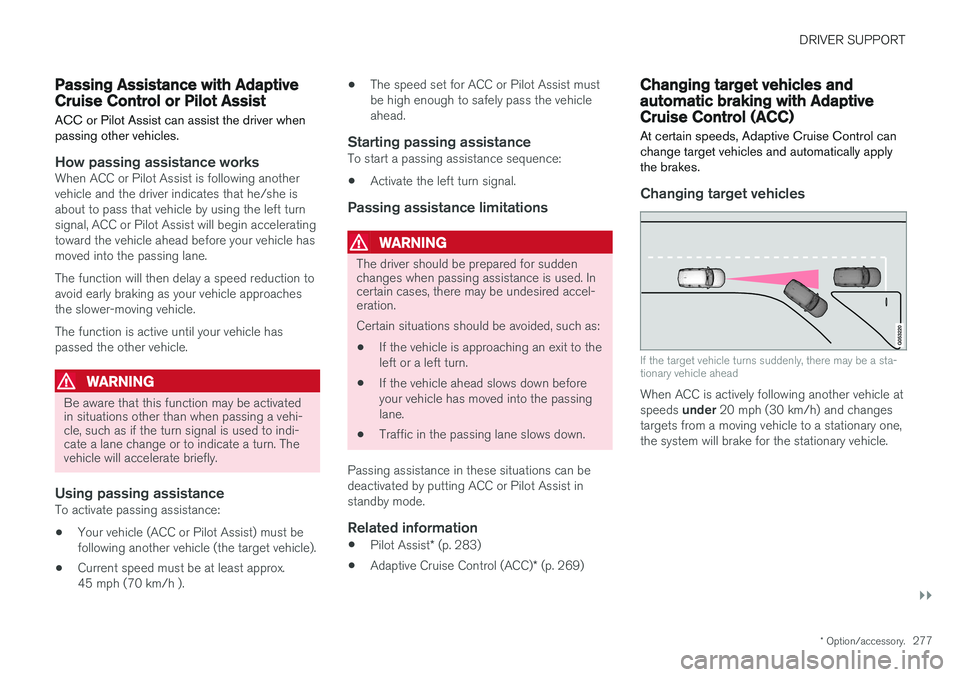
If the target vehicle turns suddenly, there may be a sta- tionary vehicle ahead
When ACC is actively following another vehicle at speeds under 20 mph (30 km/h) and changes
targets from a moving vehicle to a stationary one, the system will brake for the stationary vehicle.
Page 280 of 560
||
DRIVER SUPPORT
* Option/accessory.
278
WARNING
At speeds above 20 mph (30 km/h), if ACC
changes targets from a moving vehicle to a stationary one, the system will not react to the
stationary vehicle and will accelerate to the previously set speed. The driver must actively apply the brakes to slow/stop the vehicle.
Automatic standby mode when changing targets
ACC disengages and goes into standby mode if:
• your vehicle's speed goes below approx. 3 mph (5 km/h) and ACC cannot determineif the target object is a stationary vehicle orsome other type of object such as a speedbump, etc
• the vehicle's speed goes below approx.3 mph (5 km/h) and the vehicle aheadchanges lanes or turns so that ACC nolonger has a target vehicle to follow.
Auto-hold brake functionIn slow-moving, stop-and-go traffic or when stop-ped at a traffic light, driving will resume automati-cally if the vehicle is not stopped for more thanapprox. 3 seconds. If it takes more than3 seconds for the vehicle ahead to begin movingagain, ACC will go into standby mode and theauto-hold brake function will activate.
–The driver will then have to reactivate ACC in one of the following ways:
• Press the
button on the left-side
steering wheel keypad.
• Press the accelerator pedal.
> ACC will resume following the vehicle ahead (target vehicle) if it begins to move within approx. 6 seconds.
NOTE
ACC can keep the vehicle at a standstill for up to 5 minutes, after which the parking brakewill be set and ACC will go into standbymode. The parking brake has to be released before ACC can be reactivated.
Deactivation of the auto-hold brake function
In certain situations, auto-hold will be deactivated when the vehicle is at a standstill and ACC will gointo standby mode. This means that the brakes will be released and the vehicle can begin to roll. The driver must actively apply the brakes to keep the vehicle at a standstill. This can occur in the following situations: • the driver presses the brake pedal
• the parking brake is set •
the gear selector is moved to the
P, N or R
positions
• the driver puts ACC in standby mode.
Automatically setting the parking brakeIn certain situations, the parking brake is set automatically to help keep the vehicle at a stand-still. This occurs if ACC keeps the vehicle at a stand- still with the brakes and:
• the driver unbuckles the seat belt or opensthe door
• ACC has kept the vehicle at a standstill formore than approx. 5 minutes
• the brakes overheat
• the engine is turned off.
Related information
•
Adaptive Cruise Control (ACC)
* (p. 269)
• Auto-hold brake function (p. 356)
• Parking brake (p. 360)
Page 282 of 560
DRIVER SUPPORT
* Option/accessory.
280
Adaptive Cruise Control (ACC) - limitations
Adaptive Cruise Control (ACC) functionality may be limited in certain situations.
Steep roads and/or heavy loadsAdaptive Cruise Control is primarily intended for use on relatively level roads. The function may notbe able to maintain the correct time interval tothe vehicle ahead when driving down steep hills.The driver should be attentive and prepared toapply the brakes in these situations. Do not use Adaptive Cruise Control when the vehicle is transporting a heavy load or if it is tow-ing a trailer.
Additional information
• The Off Road drive mode cannot be
selected if Adaptive Cruise Control is acti- vated.
• Adaptive Cruise Control uses the vehicle'scamera and radar sensor, which have certaingeneral limitations. See the articles "Cameralimitations" and "Radar sensor limitations"for additional information.
Related information
•
Adaptive Cruise Control (ACC)
* (p. 269)
• Radar sensor limitations (p. 297)
• Camera limitations (p. 301)
Page 285 of 560
DRIVER SUPPORT
}}
* Option/accessory.283
Pilot Assist*
The Pilot Assist feature helps keep the vehicle in its current traffic lane by providing steeringassistance and maintaining an even speed and aset time interval to the vehicle ahead.
FunctionPilot Assist helps provide more relaxed driving on long trips on highways or other major roads in aneven flow of traffic.
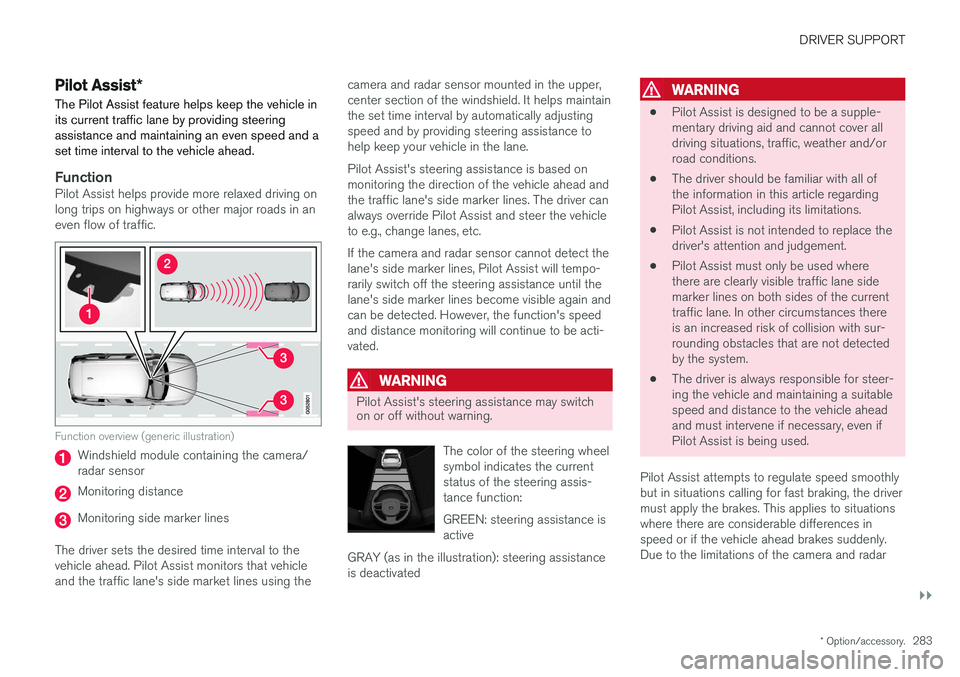
Function overview (generic illustration)
Windshield module containing the camera/ radar sensor
Monitoring distance
Monitoring side marker lines
The driver sets the desired time interval to the vehicle ahead. Pilot Assist monitors that vehicleand the traffic lane's side market lines using the camera and radar sensor mounted in the upper,center section of the windshield. It helps maintainthe set time interval by automatically adjustingspeed and by providing steering assistance tohelp keep your vehicle in the lane. Pilot Assist's steering assistance is based on monitoring the direction of the vehicle ahead andthe traffic lane's side marker lines. The driver canalways override Pilot Assist and steer the vehicleto e.g., change lanes, etc. If the camera and radar sensor cannot detect the lane's side marker lines, Pilot Assist will tempo-rarily switch off the steering assistance until thelane's side marker lines become visible again andcan be detected. However, the function's speedand distance monitoring will continue to be acti-vated.
WARNING
Pilot Assist's steering assistance may switch on or off without warning.
The color of the steering wheel symbol indicates the currentstatus of the steering assis-tance function: GREEN: steering assistance is active
GRAY (as in the illustration): steering assistanceis deactivated
WARNING
• Pilot Assist is designed to be a supple- mentary driving aid and cannot cover alldriving situations, traffic, weather and/orroad conditions.
• The driver should be familiar with all ofthe information in this article regardingPilot Assist, including its limitations.
• Pilot Assist is not intended to replace thedriver's attention and judgement.
• Pilot Assist must only be used wherethere are clearly visible traffic lane sidemarker lines on both sides of the currenttraffic lane. In other circumstances thereis an increased risk of collision with sur-rounding obstacles that are not detectedby the system.
• The driver is always responsible for steer-ing the vehicle and maintaining a suitablespeed and distance to the vehicle aheadand must intervene if necessary, even ifPilot Assist is being used.
Pilot Assist attempts to regulate speed smoothlybut in situations calling for fast braking, the drivermust apply the brakes. This applies to situationswhere there are considerable differences inspeed or if the vehicle ahead brakes suddenly.Due to the limitations of the camera and radar
Page 286 of 560
||
DRIVER SUPPORT
284sensor, the system may apply the brakes in your vehicle suddenly or not at all. Pilot Assist is designed to follow a vehicle ahead in the same traffic lane at a preset time intervalset by the driver. If the radar sensor does notdetect a vehicle ahead, the vehicle will insteadmaintain the speed set by the driver. This will alsobe the case if a vehicle ahead accelerates andexceeds the set speed.
• Pilot Assist can follow another vehicle from astandstill up to a speed of approx. 125 mph(200 km/h)
• Pilot Assist can provide steering assistancefrom very low speeds up to approx. 87 mph(140 km/h).
Never exceed posted speed limits.
WARNING
• Pilot Assist is not a collision avoidance system. The driver must react if the sys-tem does not detect another vehicle.
• Pilot Assist does not react to people, ani-mals, stationary objects, small vehicles(such as bicycles and motorcycles), lowtrailers and slow moving, parked orapproaching vehicles.
• Do not use Pilot Assist in demandingdriving conditions such as city driving orother heavy traffic situations, in areas withintersections, in slippery conditions, whenthere is a great deal of water or slush onthe road, during heavy rain or snow, inpoor visibility, on winding roads, on high-way on- or off-ramps or if the vehicle istowing a trailer, boat, etc.
NOTE
•Pilot Assist maintenance should only be carried out by a trained and qualifiedVolvo service technician.
• Pilot Assist regulates your vehicle'sspeed using the accelerator pedal andthe brakes. Please be aware that theremay be a faint sound from the brakeswhen the system is using them.
Pilot Assist overview
Controls
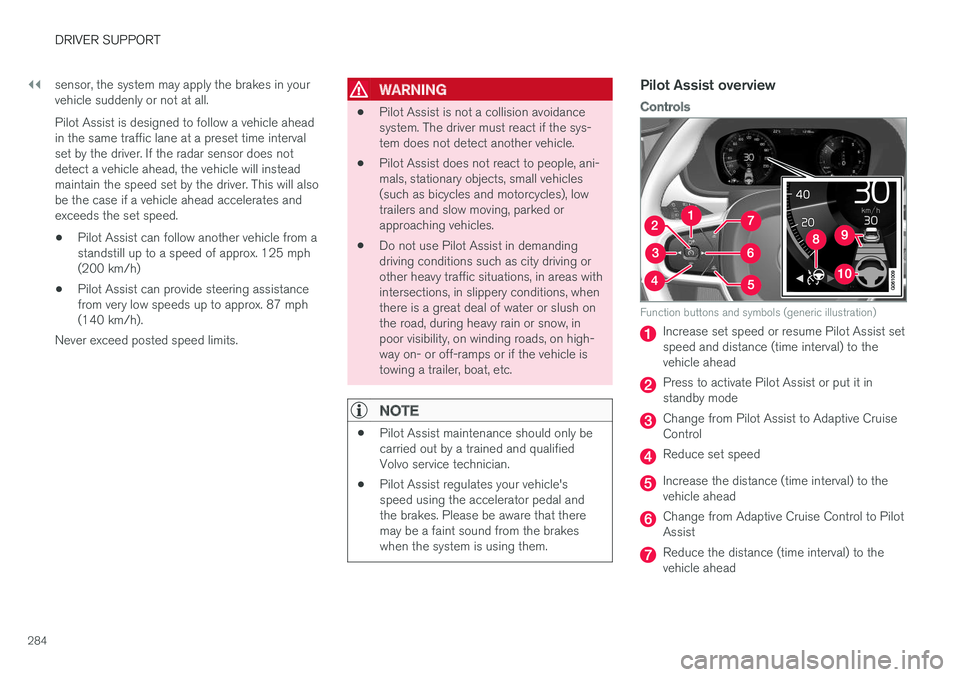
Function buttons and symbols (generic illustration)
Increase set speed or resume Pilot Assist set speed and distance (time interval) to thevehicle ahead
Press to activate Pilot Assist or put it in standby mode
Change from Pilot Assist to Adaptive Cruise Control
Reduce set speed
Increase the distance (time interval) to the vehicle ahead
Change from Adaptive Cruise Control to Pilot Assist
Reduce the distance (time interval) to the vehicle ahead
Page 287 of 560
DRIVER SUPPORT
}}
285
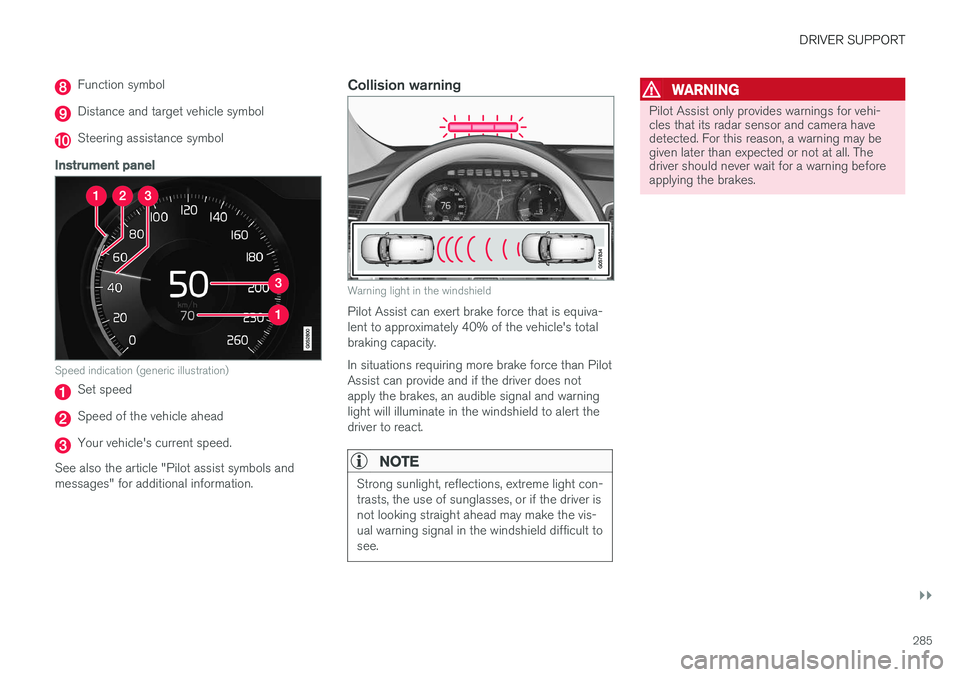
Function symbol
Distance and target vehicle symbol
Steering assistance symbol
Instrument panel
Speed indication (generic illustration)
Set speed
Speed of the vehicle ahead
Your vehicle's current speed.
See also the article "Pilot assist symbols and messages" for additional information.
Collision warning
Warning light in the windshield
Pilot Assist can exert brake force that is equiva- lent to approximately 40% of the vehicle's totalbraking capacity. In situations requiring more brake force than Pilot Assist can provide and if the driver does notapply the brakes, an audible signal and warninglight will illuminate in the windshield to alert thedriver to react.
NOTE
Strong sunlight, reflections, extreme light con- trasts, the use of sunglasses, or if the driver isnot looking straight ahead may make the vis-ual warning signal in the windshield difficult tosee.
WARNING
Pilot Assist only provides warnings for vehi- cles that its radar sensor and camera havedetected. For this reason, a warning may begiven later than expected or not at all. Thedriver should never wait for a warning beforeapplying the brakes.
Page 289 of 560
DRIVER SUPPORT
}}}}
287
Prerequisites
The prerequisites for activating Pilot Assist are:• The driver's seat belt must be buckled and the driver's door must be closed.
• There must be a vehicle ahead (a target vehi-cle) within a reasonable distance or yourvehicle's current speed must be at least9 mph (15 km/h).
With ACC in standby mode: 1. Tap
▶ (6).
> The symbol
will change to Pilot
Assist in standby mode (8).
2. Press the
button (2) on the left-side
steering wheel keypad.
> Pilot Assist will go into active mode and the current speed will be stored and dis- played in the center of the speedometer. or
If Adaptive Cruise Control has been started:
–Tap ▶ (6).
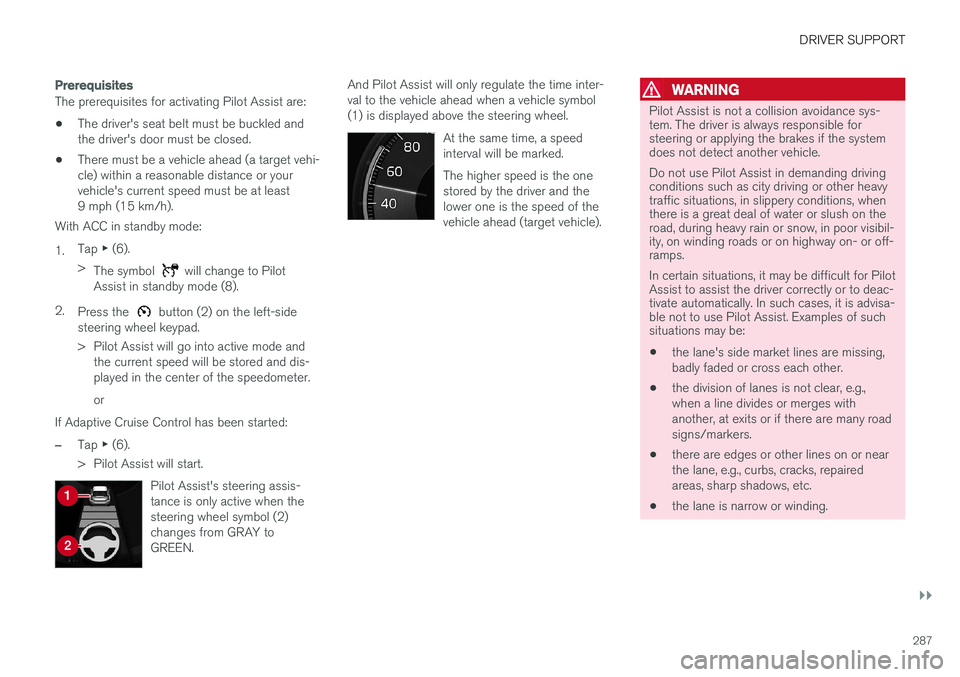
> Pilot Assist will start.
Pilot Assist's steering assis- tance is only active when thesteering wheel symbol (2)changes from GRAY toGREEN.
And Pilot Assist will only regulate the time inter- val to the vehicle ahead when a vehicle symbol(1) is displayed above the steering wheel. At the same time, a speedinterval will be marked. The higher speed is the one stored by the driver and thelower one is the speed of thevehicle ahead (target vehicle).WARNING
Pilot Assist is not a collision avoidance sys- tem. The driver is always responsible forsteering or applying the brakes if the systemdoes not detect another vehicle. Do not use Pilot Assist in demanding driving conditions such as city driving or other heavytraffic situations, in slippery conditions, whenthere is a great deal of water or slush on theroad, during heavy rain or snow, in poor visibil-ity, on winding roads or on highway on- or off-ramps. In certain situations, it may be difficult for Pilot Assist to assist the driver correctly or to deac-tivate automatically. In such cases, it is advisa-ble not to use Pilot Assist. Examples of suchsituations may be:
• the lane's side market lines are missing, badly faded or cross each other.
• the division of lanes is not clear, e.g.,when a line divides or merges withanother, at exits or if there are many roadsigns/markers.
• there are edges or other lines on or nearthe lane, e.g., curbs, cracks, repairedareas, sharp shadows, etc.
• the lane is narrow or winding.
Page 293 of 560
DRIVER SUPPORT
}}
* Option/accessory.291
In standby mode, the driver will have to regulate the vehicle's speed and the distance to the vehi-cle ahead. When Pilot Assist is in standby mode and your vehicle comes too close to another vehicle, thedriver will be alerted by the Distance Alert func-tion.
Standby mode due to action by the driver
Pilot Assist is temporarily deactivated and put in standby mode if:
• the brakes are applied
• The gear selector is moved to
N
• the turn signals are used for more than1 minute
• the vehicle is driven faster than the setspeed for more than 1 minute.
A temporary increase in speed, such as whenpassing another vehicle, does not affect the PilotAssist set speed. The vehicle will return to the setspeed when the accelerator pedal is released. When the turn signals are used, Pilot Assist's steering function will be temporarily deactivated.When this is no longer the case, the steeringfunction will reactivate if the traffic lane's sidemarker lines can still be detected.
Automatic standby mode
Pilot Assist interacts with other systems, such as Electronic Stability Control. If any of these other systems are not functioning properly, Pilot Assistwill automatically be deactivated.
WARNING
If this happens, the driver will be alerted by an audible signal and a message in the instru-ment panel. The driver will have to adapt thevehicle's speed, apply the brakes when nec-essary and keep a safe distance to the vehicleahead.
Pilot Assist switches automatically to standby mode if: • the vehicle's speed is below approx. 3 mph(5 km/h) and Pilot Assist cannot determine ifa vehicle ahead is a stationary vehicle or anobject.
• the vehicle's speed is below approx. 3 mph(5 km/h) and the vehicle ahead turns so thatPilot Assist no longer has a vehicle to follow(target vehicle).
• the driver's hands are not on the steeringwheel
• the driver's door is opened
• the driver unbuckles the seat belt
• engine speed (rpm) is too high/low
• the wheels lose traction
• brake temperature is too high
• the parking brake is set •
The camera lens/radar sensor is covered bye.g., snow or if heavy rain interferes withradar wavesReactivating Pilot Assist from standby
mode
Generic illustration
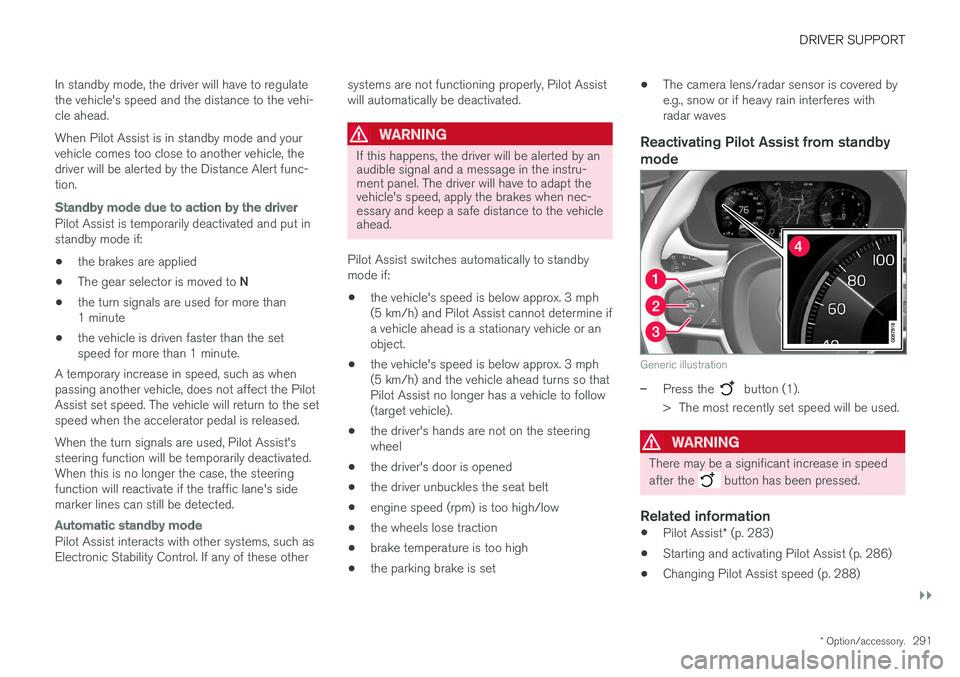
–Press the button (1).
> The most recently set speed will be used.
WARNING
There may be a significant increase in speed after the
button has been pressed.
Related information
• Pilot Assist
* (p. 283)
• Starting and activating Pilot Assist (p. 286)
• Changing Pilot Assist speed (p. 288)
Page 294 of 560
DRIVER SUPPORT
* Option/accessory.
292 •
Setting a Pilot Assist time interval (p. 289)
• Changing target vehicles and automatic braking with Pilot Assist (p. 292)
• Passing Assistance with Adaptive CruiseControl or Pilot Assist (p. 277)
• Pilot Assist limitations (p. 293)
• Pilot Assist symbols and messages (p. 295)
• Distance Alert
* (p. 267)
Changing target vehicles and automatic braking with Pilot Assist
At certain speeds, Pilot Assist can change target vehicles and automatically apply the brakes.
Changing target vehicles
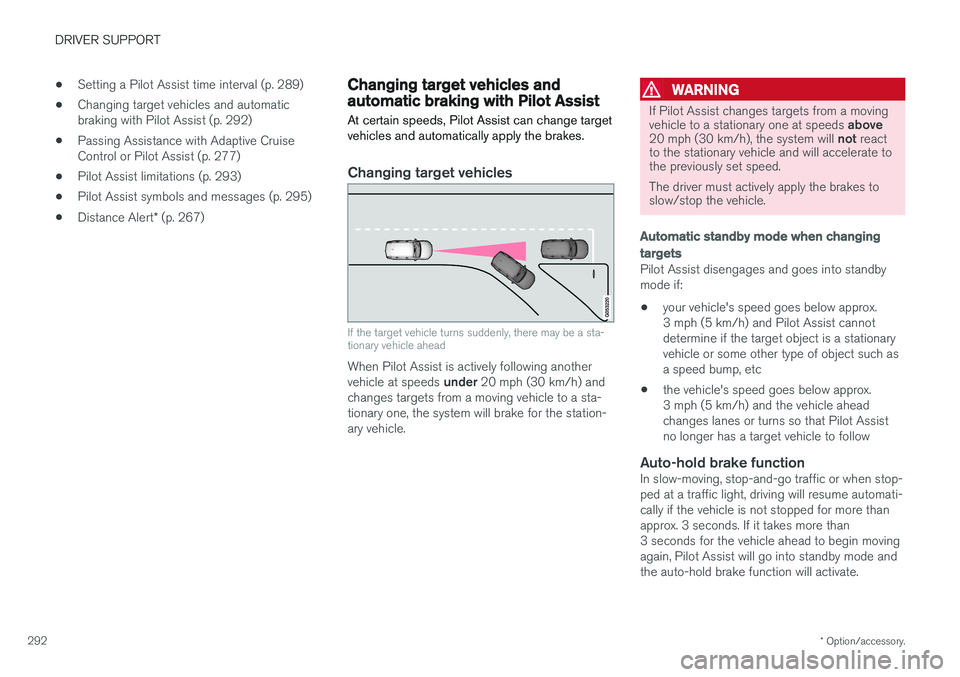
If the target vehicle turns suddenly, there may be a sta- tionary vehicle ahead
When Pilot Assist is actively following another vehicle at speeds under 20 mph (30 km/h) and
changes targets from a moving vehicle to a sta- tionary one, the system will brake for the station-ary vehicle.
WARNING
If Pilot Assist changes targets from a moving vehicle to a stationary one at speeds above
20 mph (30 km/h), the system will not react
to the stationary vehicle and will accelerate to the previously set speed. The driver must actively apply the brakes to slow/stop the vehicle.
Automatic standby mode when changing targets
Pilot Assist disengages and goes into standby mode if:
• your vehicle's speed goes below approx.3 mph (5 km/h) and Pilot Assist cannotdetermine if the target object is a stationaryvehicle or some other type of object such asa speed bump, etc
• the vehicle's speed goes below approx.3 mph (5 km/h) and the vehicle aheadchanges lanes or turns so that Pilot Assistno longer has a target vehicle to follow
Auto-hold brake functionIn slow-moving, stop-and-go traffic or when stop-ped at a traffic light, driving will resume automati-cally if the vehicle is not stopped for more thanapprox. 3 seconds. If it takes more than3 seconds for the vehicle ahead to begin movingagain, Pilot Assist will go into standby mode andthe auto-hold brake function will activate.