brake light VOLVO XC90 2017 Owner´s Manual
[x] Cancel search | Manufacturer: VOLVO, Model Year: 2017, Model line: XC90, Model: VOLVO XC90 2017Pages: 560, PDF Size: 9.97 MB
Page 383 of 560
STARTING AND DRIVING
* Option/accessory.381
ModeFunctions available
0 •The odometer, clock and tem- perature gauge are illuminated
• Power seats
* can be adjusted
• The power windows can be oper-ated
• The 12-volt socket in the cargocompartment can be used
• The center display is activatedand can be used
• The infotainment system can beused for a limited time
In this mode, certain functions canonly be used for a limited time to helpminimize battery drain
I •The laminated panoramic roof
*,
power seats */windows,12-volt
sockets in the passenger com-partment, Bluetooth, navigation system *, climate system blower,
windshield wipers can be oper- ated
• The infotainment system will start(if it was started when the ignitionwas switched off)Mode
Functions available
II •The headlights illuminate
• Warning/indicator lights illumi- nate for 5 seconds
• A number of other functions willalso be activated. However, the heated seats
* and heated rear
window functions can only be activated when the engine is run-ning.
This mode should only be used forvery short periods to help avoiddraining the battery.
Selecting an ignition mode
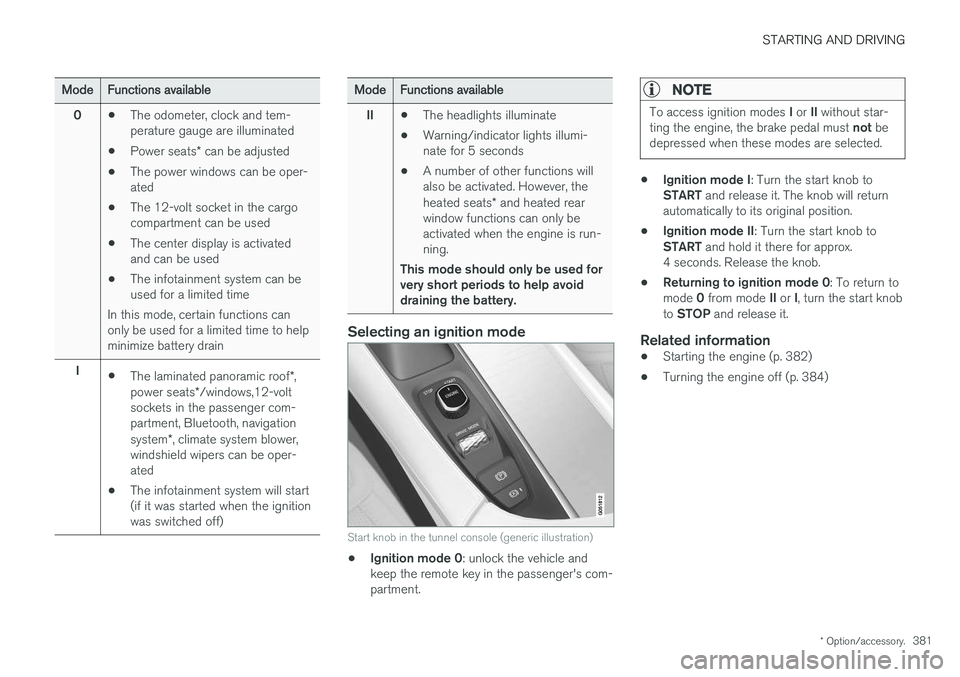
Start knob in the tunnel console (generic illustration)
• Ignition mode 0
: unlock the vehicle and
keep the remote key in the passenger's com- partment.
NOTE
To access ignition modes I or II without star-
ting the engine, the brake pedal must not be
depressed when these modes are selected.
• Ignition mode I
: Turn the start knob to
START and release it. The knob will return
automatically to its original position.
• Ignition mode II
: Turn the start knob to
START and hold it there for approx.
4 seconds. Release the knob.
• Returning to ignition mode 0
: To return to
mode 0 from mode II or I, turn the start knob
to STOP and release it.
Related information
•Starting the engine (p. 382)
• Turning the engine off (p. 384)
Page 384 of 560
STARTING AND DRIVING
382
Battery drain Your vehicle's electrical functions drain the bat- tery to varying extents.
Avoid using ignition mode II as much as posssi-
ble, or electrical functions that require a great deal of electrical current when the engine is notrunning. Using ignition mode I whenever possible con-
sumes less electrical current. Functions that require a great deal of electrical current include:
• the climate system blower
• headlights
• wipers
• infotainment system (especially at high vol-ume).
If the battery's charge level is low, a text messagewill appear in the instrument panel. The vehicle'senergy-saving function will then turn off orreduce certain functions that are currently con-suming electrical current. If the battery needs to be recharged, start the engine and let it idle for at least 15 minutes ordrive the vehicle (driving charges the batteryfaster than letting the engine idle).
Related information
• Ignition modes (p. 380)
Starting the engine
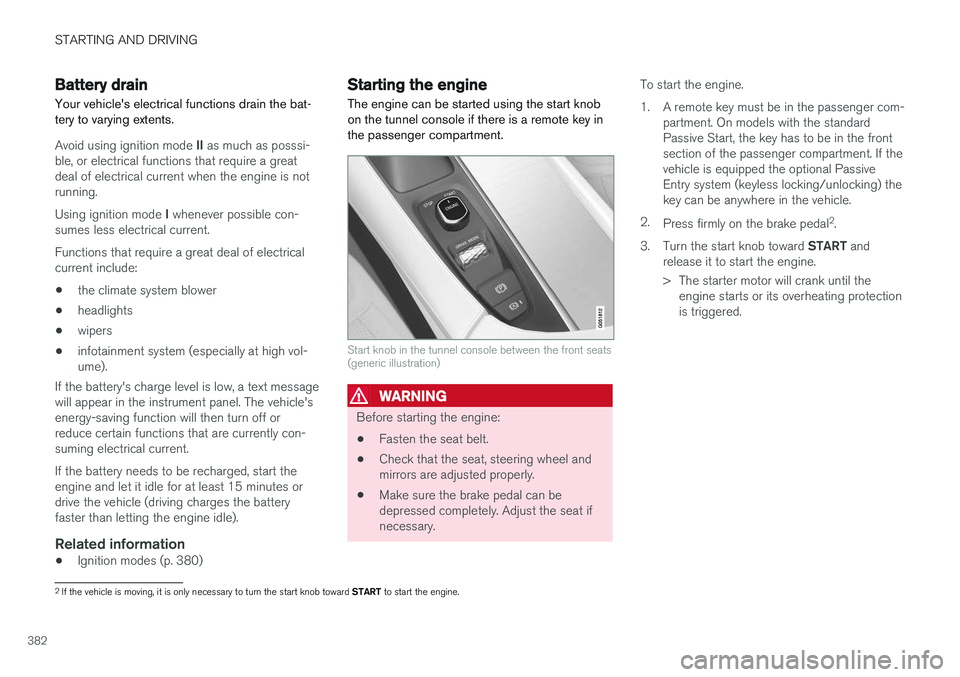
The engine can be started using the start knob on the tunnel console if there is a remote key inthe passenger compartment.
Start knob in the tunnel console between the front seats (generic illustration)
WARNING
Before starting the engine:
• Fasten the seat belt.
• Check that the seat, steering wheel and mirrors are adjusted properly.
• Make sure the brake pedal can bedepressed completely. Adjust the seat ifnecessary. To start the engine.
1. A remote key must be in the passenger com-
partment. On models with the standard Passive Start, the key has to be in the frontsection of the passenger compartment. If thevehicle is equipped the optional PassiveEntry system (keyless locking/unlocking) thekey can be anywhere in the vehicle.
2. Press firmly on the brake pedal 2
.
3. Turn the start knob toward START and
release it to start the engine.
> The starter motor will crank until the engine starts or its overheating protection is triggered.
2If the vehicle is moving, it is only necessary to turn the start knob toward START to start the engine.
Page 386 of 560
||
STARTING AND DRIVING
* Option/accessory.
384
CAUTION
• When starting in cold weather, the auto- matic transmission may shift up at slightlyhigher engine speeds than normal untilthe automatic transmission fluid reachesnormal operating temperature.
• Do not race a cold engine immediatelyafter starting. Oil flow may not reachsome lubrication points fast enough toprevent engine damage.
• The engine should be idling when youmove the gear selector. Never accelerateuntil after you feel the transmissionengage. Accelerating immediately afterselecting a gear will cause harsh engage-ment and premature transmission wear.
• Selecting
P or N when idling at a stand-
still for prolonged periods of time will helpprevent overheating of the automatictransmission fluid.
Related information
• Ignition modes (p. 380)
• Turning the engine off (p. 384)
• Changing the remote key's battery (p. 225)
• Jump starting (p. 374)
Turning the engine off
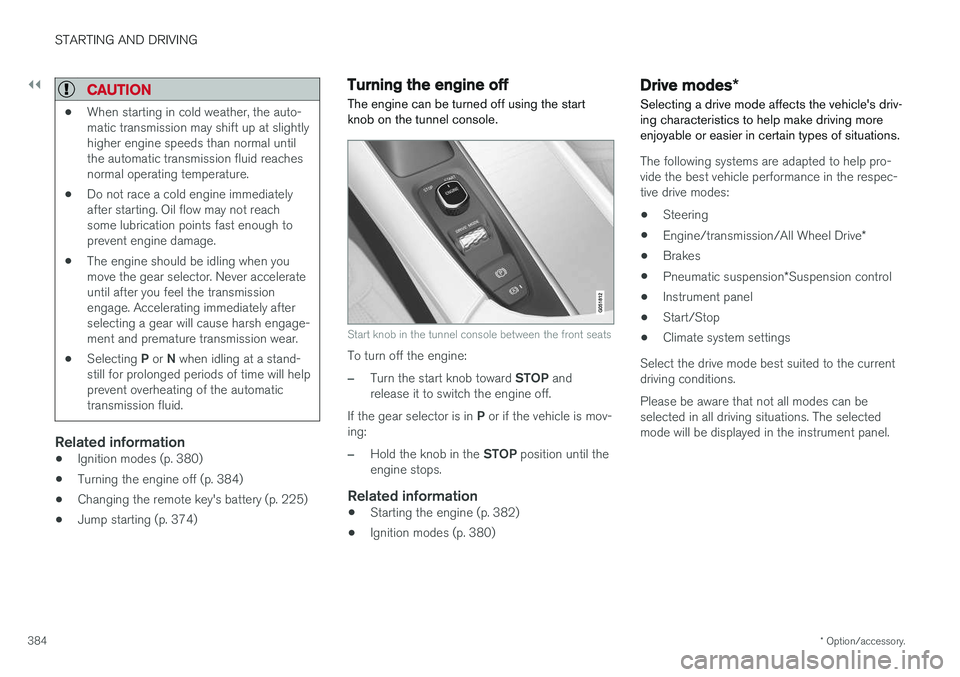
The engine can be turned off using the start knob on the tunnel console.
Start knob in the tunnel console between the front seats
To turn off the engine:
–Turn the start knob toward STOP and
release it to switch the engine off.
If the gear selector is in P or if the vehicle is mov-
ing:
–Hold the knob in the STOP position until the
engine stops.
Related information
• Starting the engine (p. 382)
• Ignition modes (p. 380)
Drive modes
*
Selecting a drive mode affects the vehicle's driv- ing characteristics to help make driving moreenjoyable or easier in certain types of situations.
The following systems are adapted to help pro- vide the best vehicle performance in the respec-tive drive modes: • Steering
• Engine/transmission/All Wheel Drive
*
• Brakes
• Pneumatic suspension
*Suspension control
• Instrument panel
• Start/Stop
• Climate system settings
Select the drive mode best suited to the current driving conditions. Please be aware that not all modes can be selected in all driving situations. The selectedmode will be displayed in the instrument panel.
Page 391 of 560
STARTING AND DRIVING
}}
* Option/accessory.389
•
A low reading in the green area indicates economical driving.
• A higher reading indicates higher fuel con-sumption.
The ECO gauge also has an indicator showinghow a "reference" driver would drive in the samesituation. This is indicated by a diamond in thegauge.
Eco climate
In the Eco drive mode, eco climate is automati-
cally activated in the passenger compartment to help minimize energy consumption. To restart the climate system functions that may have been reduced, press the
AUTO or defroster
buttons. In order to return to full functionality for all of the systems that may have been reduced to helpimprove economical driving, select another drivemode or adapt the climate system functions using the
Individual mode to full functionality.
Related information
• Driving economically (p. 364)
• Drive modes
* (p. 384)
• Start/Stop (p. 389)
Start/Stop
Start/Stop is a function that temporarily switches off the engine when the vehicle is not moving,for instance in heavy traffic or at a traffic light, tohelp reduce fuel consumption. The engine startsagain automatically when the brake pedal isreleased.
Start/Stop is one of several fuel-conserving fea- tures that also help reduce emissions. This feature helps make it possible to drive more economically by allowing the engine to auto-stopin certain situations.
Related information
• Conditions for Start/Stop (p. 391)
• Using the Start/Stop function (p. 389)
• ECO drive mode (p. 387)
Using the Start/Stop function Start/Stop is a function that temporarily switches off the engine when the vehicle is not moving,for instance in heavy traffic or at a traffic light, tohelp reduce fuel consumption. The engine startsagain automatically when the brake pedal isreleased.
Start/Stop is available when the engine has been started. The instrument panel will indicate if thefunction is available/unavailable/active. All of the vehicle's normal systems such as light- ing, infotainment, etc., function normally when theengine has auto-stopped. However, certain func-tions, such as climate system blower speed orvery high infotainment system volume, will betemporarily reduced.
Auto-stopThe following conditions must be met for theengine to auto-stop:
• Stop the vehicle by applying the brakes andkeep the brake pedal depressed. The engine will auto-stop. If the COMFORT 4
or ECO driv-
ing modes are activated, the engine can auto-stop before the vehicle has come to astandstill.
If the
Adaptive cruise or Pilot Assist functions
are activated, the engine will auto-stop after
4 The default driving mode.
Page 392 of 560
||
STARTING AND DRIVING
390approx. 3 seconds. See also the article "Condi- tions for Start/Stop."
Auto-startThe following conditions must be met for theengine to auto-start:
• Release the brake pedal; the engine willautomatically restart. When starting on anuphill incline, the Hill Start Assist (HSA)function will be activated to help prevent thevehicle from rolling backward.
• When the brake system's Auto Hold functionis activated, the engine will not auto-startuntil the accelerator pedal is pressed.
• When
Adaptive cruise or Pilot Assist are
activated, the engine will auto-start when the accelerator pedal is pressed or if the
button is pressed on the left-side steering wheel keypad.
• Keep the brake pedal depressed but pressthe accelerator pedal. The engine will auto-start.
• On a downhill incline, release the brake pedalso that the vehicle begins to roll. The enginewill auto-start after a slight increase in speed.
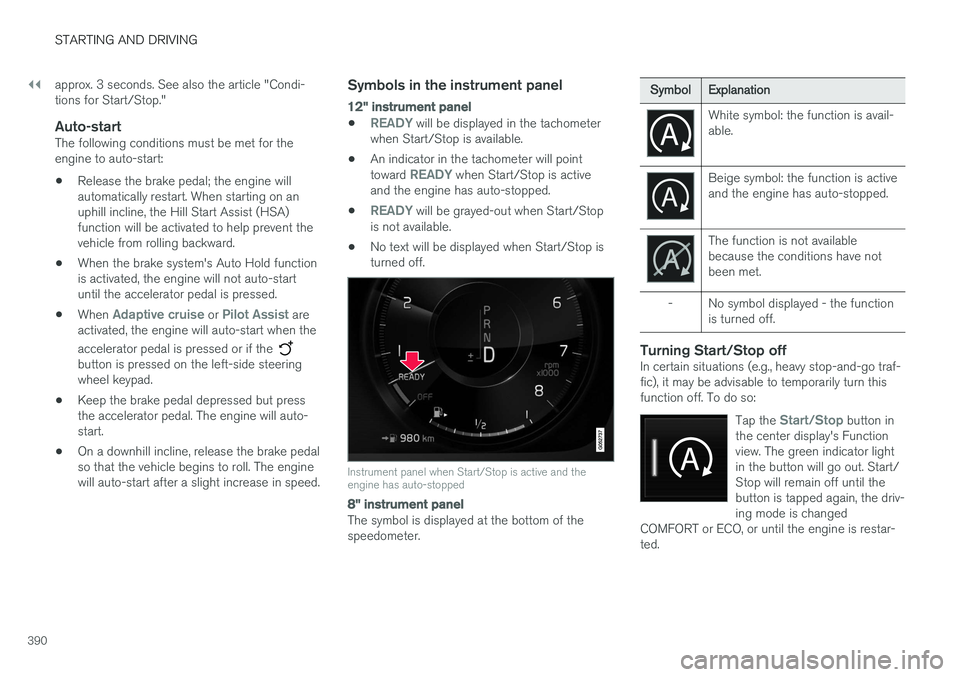
Symbols in the instrument panel
12" instrument panel
•READY will be displayed in the tachometer
when Start/Stop is available.
• An indicator in the tachometer will point toward
READY when Start/Stop is active
and the engine has auto-stopped.
•
READY will be grayed-out when Start/Stop
is not available.
• No text will be displayed when Start/Stop is turned off.
Instrument panel when Start/Stop is active and the engine has auto-stopped
8" instrument panel
The symbol is displayed at the bottom of the speedometer.
Symbol
Explanation
White symbol: the function is avail- able.
Beige symbol: the function is active and the engine has auto-stopped.
The function is not available because the conditions have notbeen met.
- No symbol displayed - the function is turned off.
Turning Start/Stop offIn certain situations (e.g., heavy stop-and-go traf- fic), it may be advisable to temporarily turn thisfunction off. To do so:
Tap the
Start/Stop button in
the center display's Function view. The green indicator lightin the button will go out. Start/Stop will remain off until thebutton is tapped again, the driv-ing mode is changed
COMFORT or ECO, or until the engine is restar-ted.
Page 394 of 560
||
STARTING AND DRIVING
392•
condensation forms on the inside of the win- dows.
• the climate system cannot keep the desiredsettings in the passenger compartment.
• electrical current consumption is temporarilyhigh or the main battery's charge is belowthe minimum level.
• the brake pedal is pumped repeatedly.
• the hood is opened.
• the vehicle begins to move or increasesspeed slightly (if the engine auto-stoppedbefore the vehicle was at a standstill).
• the driver's seat belt is unbuckled while the gear selector is in the
D or N positions.
• the gear selector is moved from
D to R or ±.
• the driver's door is opened with the gearselector in
D: an audible signal and a text
message will inform the driver that the igni- tion is on.
WARNING
Do not open the hood if the engine has auto- stopped. The engine could suddenly auto-start. Before opening the hood:
• Switch off the ignition by turning the start knob in the tunnel console toward
STOP.
• Be aware that if the engine has been run- ning, components in the engine compart-ment will be very hot.
Related information
• Using the Start/Stop function (p. 389)
Automatic transmission
The automatic transmission has 8 forward gears and shifts up or down based on the level ofacceleration, speed and engine speed (meas-ured in revolutions per minute - rpm). Manualshifting is also possible. The gear indicator in theinstrument panel shows the gear currently beingused or gear shift mode.
CAUTION
The transmission
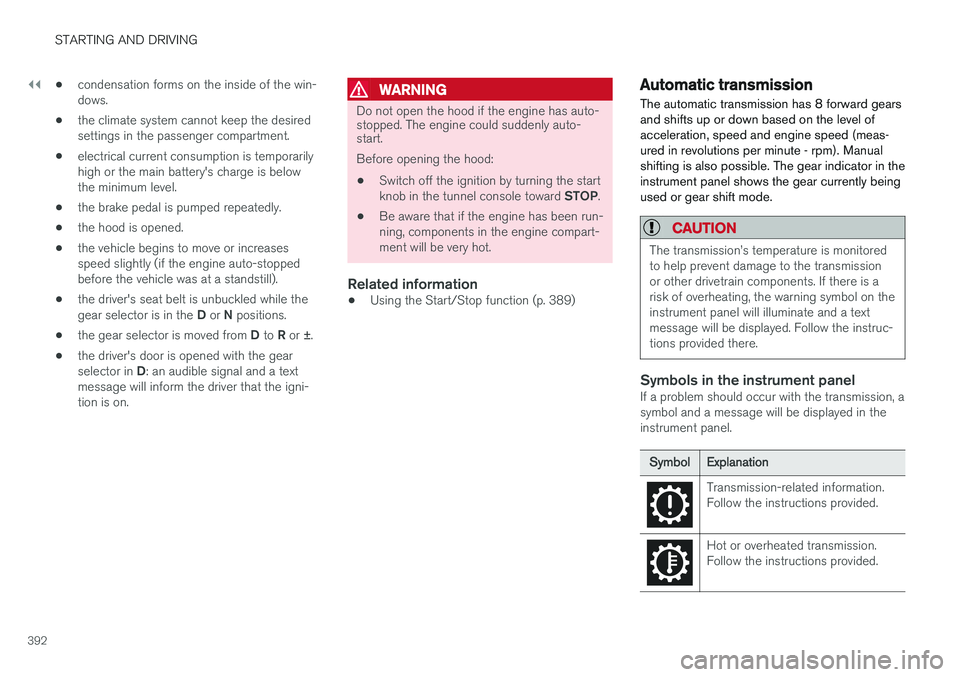
Page 498 of 560
||
MAINTENANCE AND SERVICING
* Option/accessory.
496 •
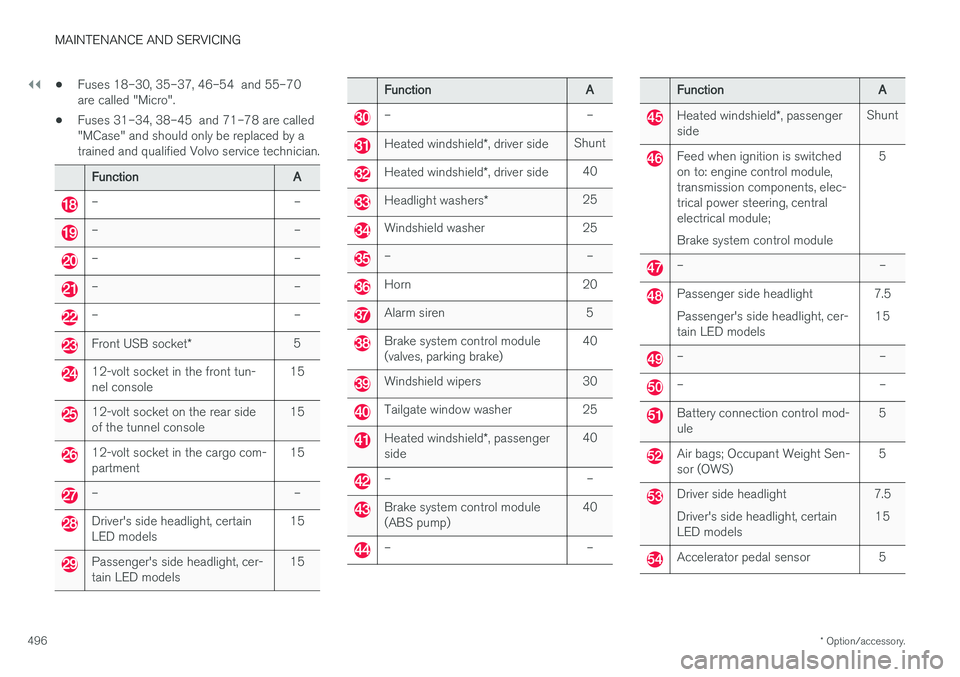
Fuses 18–30, 35–37, 46–54 and 55–70 are called "Micro".
• Fuses 31–34, 38–45 and 71–78 are called"MCase" and should only be replaced by atrained and qualified Volvo service technician.
Function
A
– –
– –
– –
– –
– –
Front USB socket* 5
12-volt socket in the front tun- nel console 15
12-volt socket on the rear side of the tunnel console15
12-volt socket in the cargo com- partment15
– –
Driver's side headlight, certain LED models15
Passenger's side headlight, cer- tain LED models15
Function
A
– –
Heated windshield*, driver side Shunt
Heated windshield
*, driver side 40
Headlight washers
*25
Windshield washer 25
– –
Horn 20
Alarm siren 5
Brake system control module (valves, parking brake) 40
Windshield wipers 30
Tailgate window washer 25
Heated windshield
*, passenger
side 40
– –
Brake system control module (ABS pump)
40
– –
Function
A
Heated windshield*, passenger
side Shunt
Feed when ignition is switched on to: engine control module,transmission components, elec-trical power steering, centralelectrical module; Brake system control module 5
– –
Passenger side headlight Passenger's side headlight, cer- tain LED models
7.5
15
– –
– –
Battery connection control mod- ule 5
Air bags; Occupant Weight Sen- sor (OWS)5
Driver side headlight Driver's side headlight, certain LED models7.5
15
Accelerator pedal sensor 5
Page 502 of 560
||
MAINTENANCE AND SERVICING
* Option/accessory.
500
Positions
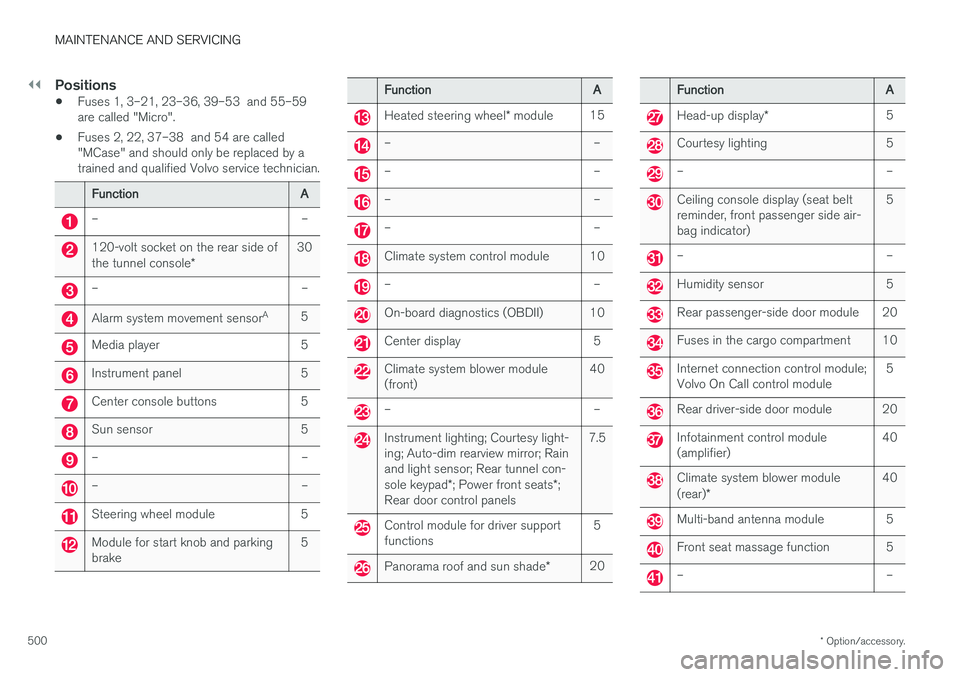
• Fuses 1, 3–21, 23–36, 39–53 and 55–59 are called "Micro".
• Fuses 2, 22, 37–38 and 54 are called"MCase" and should only be replaced by atrained and qualified Volvo service technician.
Function
A
– –
120-volt socket on the rear side of the tunnel console* 30
– –
Alarm system movement sensor
A
5
Media player 5
Instrument panel 5
Center console buttons 5
Sun sensor 5
– –
– –
Steering wheel module 5
Module for start knob and parking brake 5
Function
A
Heated steering wheel* module 15
– –
– –
– –
– –
Climate system control module 10
– –
On-board diagnostics (OBDII) 10
Center display 5
Climate system blower module (front) 40
– –
Instrument lighting; Courtesy light- ing; Auto-dim rearview mirror; Rainand light sensor; Rear tunnel con- sole keypad
*; Power front seats *;
Rear door control panels 7.5
Control module for driver support functions
5
Panorama roof and sun shade
*20
Function
A
Head-up display* 5
Courtesy lighting 5
– –
Ceiling console display (seat belt reminder, front passenger side air-bag indicator) 5
– –
Humidity sensor 5
Rear passenger-side door module 20
Fuses in the cargo compartment 10
Internet connection control module; Volvo On Call control module
5
Rear driver-side door module 20
Infotainment control module (amplifier)40
Climate system blower module (rear)
* 40
Multi-band antenna module 5
Front seat massage function 5
– –
Page 509 of 560
MAINTENANCE AND SERVICING
}}
507
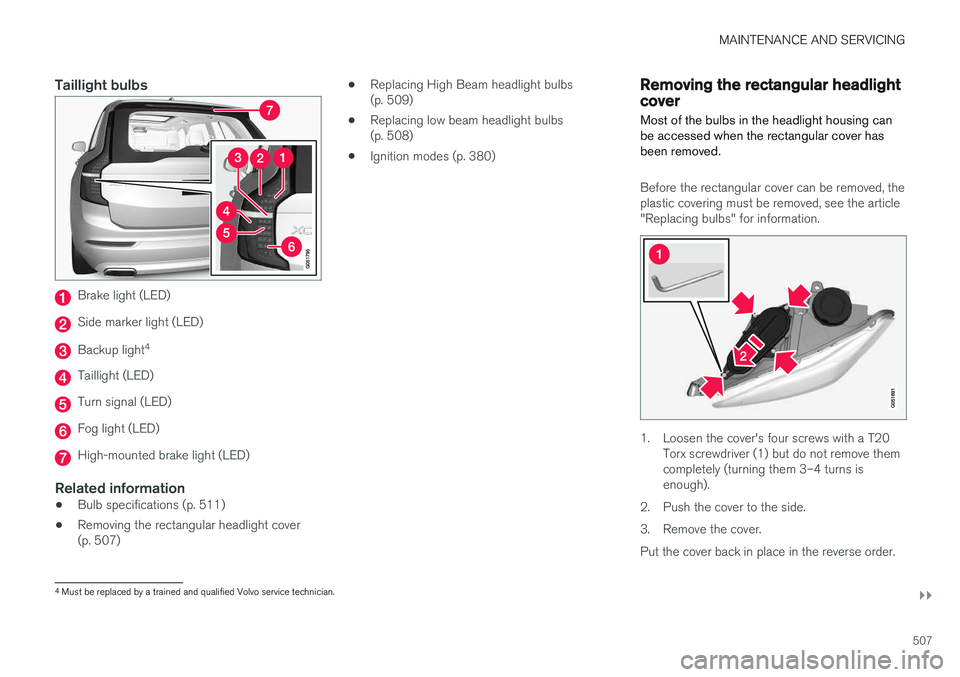
Taillight bulbs
Brake light (LED)
Side marker light (LED)
Backup light4
Taillight (LED)
Turn signal (LED)
Fog light (LED)
High-mounted brake light (LED)
Related information
•
Bulb specifications (p. 511)
• Removing the rectangular headlight cover (p. 507) •
Replacing High Beam headlight bulbs(p. 509)
• Replacing low beam headlight bulbs(p. 508)
• Ignition modes (p. 380)
Removing the rectangular headlight cover
Most of the bulbs in the headlight housing can be accessed when the rectangular cover hasbeen removed.
Before the rectangular cover can be removed, the plastic covering must be removed, see the article"Replacing bulbs" for information.
1. Loosen the cover's four screws with a T20 Torx screwdriver (1) but do not remove them completely (turning them 3–4 turns isenough).
2. Push the cover to the side.
3. Remove the cover.Put the cover back in place in the reverse order.
4 Must be replaced by a trained and qualified Volvo service technician.
Page 517 of 560
MAINTENANCE AND SERVICING
}}
515
Hood completely closed
Related information
•Engine compartment overview (p. 515)
• Door and seat belt reminders (p. 64)
Engine compartment overview
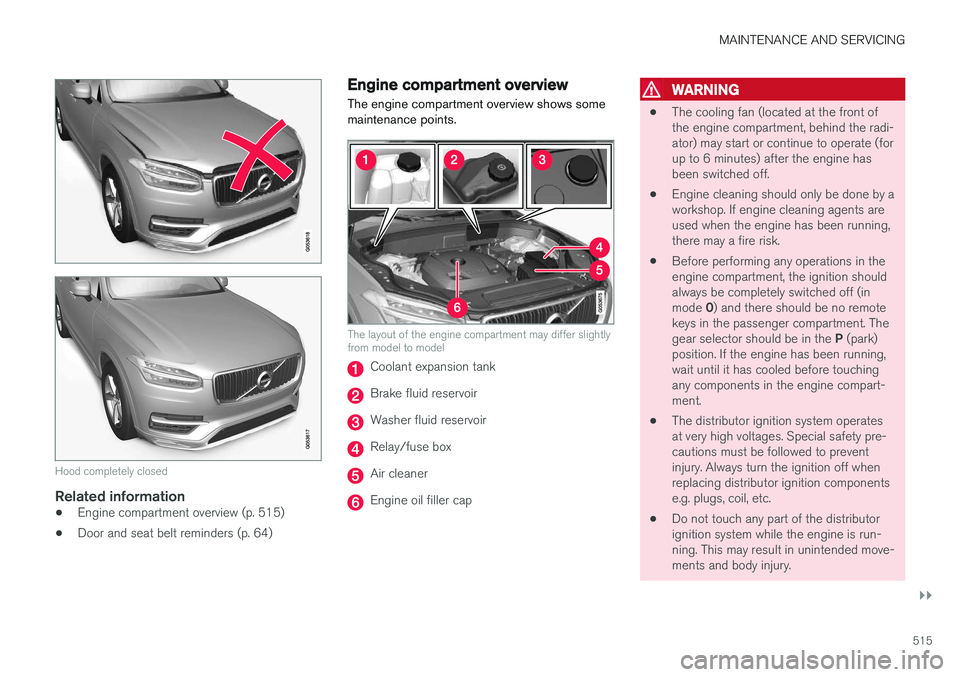
The engine compartment overview shows some maintenance points.
The layout of the engine compartment may differ slightly from model to model
Coolant expansion tank
Brake fluid reservoir
Washer fluid reservoir
Relay/fuse box
Air cleaner
Engine oil filler cap
WARNING
• The cooling fan (located at the front of the engine compartment, behind the radi-ator) may start or continue to operate (forup to 6 minutes) after the engine hasbeen switched off.
• Engine cleaning should only be done by aworkshop. If engine cleaning agents areused when the engine has been running,there may a fire risk.
• Before performing any operations in theengine compartment, the ignition shouldalways be completely switched off (in mode
0) and there should be no remote
keys in the passenger compartment. Thegear selector should be in the P (park)
position. If the engine has been running, wait until it has cooled before touchingany components in the engine compart-ment.
• The distributor ignition system operatesat very high voltages. Special safety pre-cautions must be followed to preventinjury. Always turn the ignition off whenreplacing distributor ignition componentse.g. plugs, coil, etc.
• Do not touch any part of the distributorignition system while the engine is run-ning. This may result in unintended move-ments and body injury.