ignition VOLVO XC90 2017 Owner´s Manual
[x] Cancel search | Manufacturer: VOLVO, Model Year: 2017, Model line: XC90, Model: VOLVO XC90 2017Pages: 560, PDF Size: 9.97 MB
Page 167 of 560
INSTRUMENTS AND CONTROLS
* Option/accessory.165
Using the power seat memory function*
The memory function can be used to store the settings (positions) of the power front seats *,
door mirrors and the head-up display *.
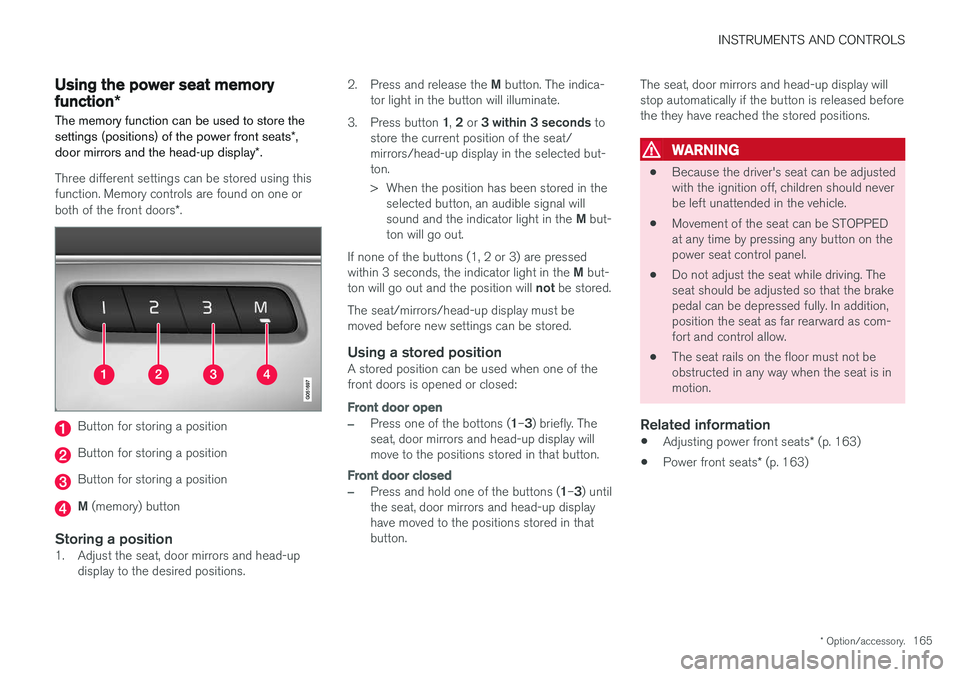
Three different settings can be stored using this function. Memory controls are found on one or both of the front doors *.
Button for storing a position
Button for storing a position
Button for storing a position
M (memory) button
Storing a position1. Adjust the seat, door mirrors and head-up
display to the desired positions. 2.
Press and release the M button. The indica-
tor light in the button will illuminate.
3. Press button 1, 2 or 3 within 3 seconds to
store the current position of the seat/ mirrors/head-up display in the selected but-ton.
> When the position has been stored in the selected button, an audible signal will sound and the indicator light in the M but-
ton will go out.
If none of the buttons (1, 2 or 3) are pressedwithin 3 seconds, the indicator light in the M but-
ton will go out and the position will not be stored.
The seat/mirrors/head-up display must be moved before new settings can be stored.
Using a stored positionA stored position can be used when one of thefront doors is opened or closed:
Front door open
–Press one of the bottons ( 1–3 ) briefly. The
seat, door mirrors and head-up display will move to the positions stored in that button.
Front door closed
–Press and hold one of the buttons ( 1–3 ) until
the seat, door mirrors and head-up display have moved to the positions stored in thatbutton. The seat, door mirrors and head-up display willstop automatically if the button is released beforethe they have reached the stored positions.
WARNING
•
Because the driver's seat can be adjusted with the ignition off, children should neverbe left unattended in the vehicle.
• Movement of the seat can be STOPPEDat any time by pressing any button on thepower seat control panel.
• Do not adjust the seat while driving. Theseat should be adjusted so that the brakepedal can be depressed fully. In addition,position the seat as far rearward as com-fort and control allow.
• The seat rails on the floor must not beobstructed in any way when the seat is inmotion.
Related information
•
Adjusting power front seats
* (p. 163)
• Power front seats
* (p. 163)
Page 173 of 560
INSTRUMENTS AND CONTROLS
* Option/accessory.171
Via settings
The ignition has to be in at least mode II.
1. In the center display's Top view, tap
Settings.
2. Tap
My CarSeats
3.Select Fold Headrest On Second Row
Seats to fold down the outboard head
restraints.
The head restraints must be returned to the upright position manually until they click intoposition.
WARNING
For safety reasons, the outboard head restraints in the rear seats must be in theupright (fixed) position if these seating posi- tions are occupied or if the third row seats *
are occupied. The head restraint must be locked in the upright position after it has been folded up.
Related information
• Folding the second row backrests (p. 173)
• Center display overview (p. 28)
Moving the second row seats forward/rearward
In 7-seat models *, the second row seats can be
moved forward/rearward individually to help opti- mize legroom for the passengers. The second row seats cannot be moved in 5- seat models.
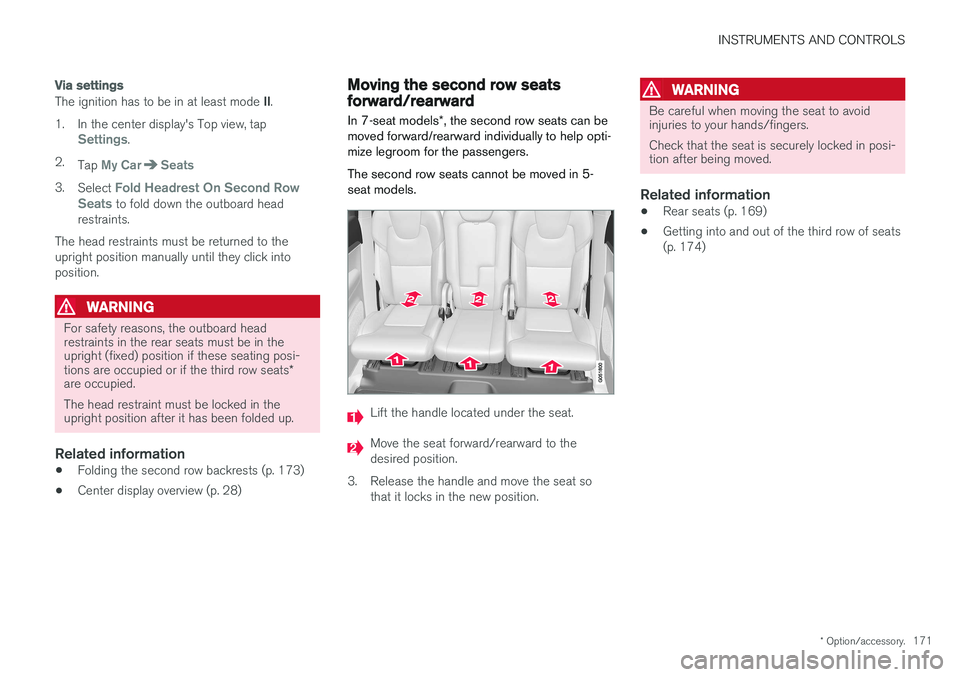
Lift the handle located under the seat.
Move the seat forward/rearward to the desired position.
3. Release the handle and move the seat so that it locks in the new position.
WARNING
Be careful when moving the seat to avoid injuries to your hands/fingers. Check that the seat is securely locked in posi- tion after being moved.
Related information
• Rear seats (p. 169)
• Getting into and out of the third row of seats (p. 174)
Page 214 of 560
||
LOADING AND STORAGE
* Option/accessory.
212
Using the glove compartment as a cooler *
The glove compartment can be used to cool drinks or food and the cooling feature functionswhen the climate system is active (i.e., when the ignition is in mode II or when the engine is run-
ning).
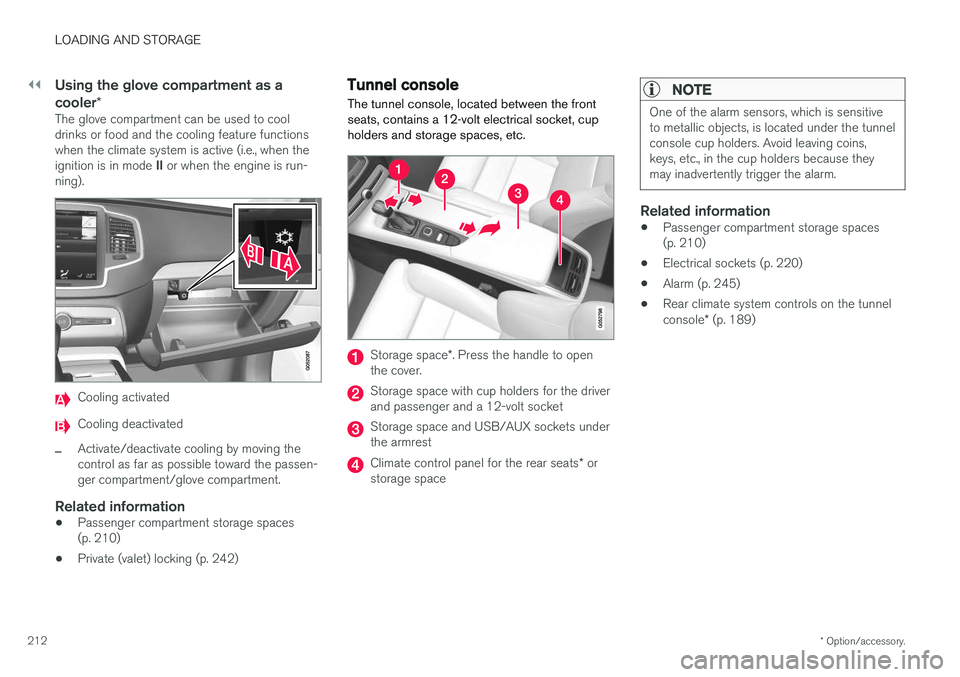
Cooling activated
Cooling deactivated
–Activate/deactivate cooling by moving the control as far as possible toward the passen-ger compartment/glove compartment.
Related information
• Passenger compartment storage spaces(p. 210)
• Private (valet) locking (p. 242)
Tunnel console The tunnel console, located between the front seats, contains a 12-volt electrical socket, cupholders and storage spaces, etc.
Storage space
*. Press the handle to open
the cover.
Storage space with cup holders for the driver and passenger and a 12-volt socket
Storage space and USB/AUX sockets under the armrest
Climate control panel for the rear seats * or
storage space
NOTE
One of the alarm sensors, which is sensitive to metallic objects, is located under the tunnelconsole cup holders. Avoid leaving coins,keys, etc., in the cup holders because theymay inadvertently trigger the alarm.
Related information
• Passenger compartment storage spaces (p. 210)
• Electrical sockets (p. 220)
• Alarm (p. 245)
• Rear climate system controls on the tunnel console
* (p. 189)
Page 223 of 560
LOADING AND STORAGE
}}
221
trained and qualified Volvo service techni- cian.
Failure to follow the points above could result in electrical shock and/or serious injury.Status indication
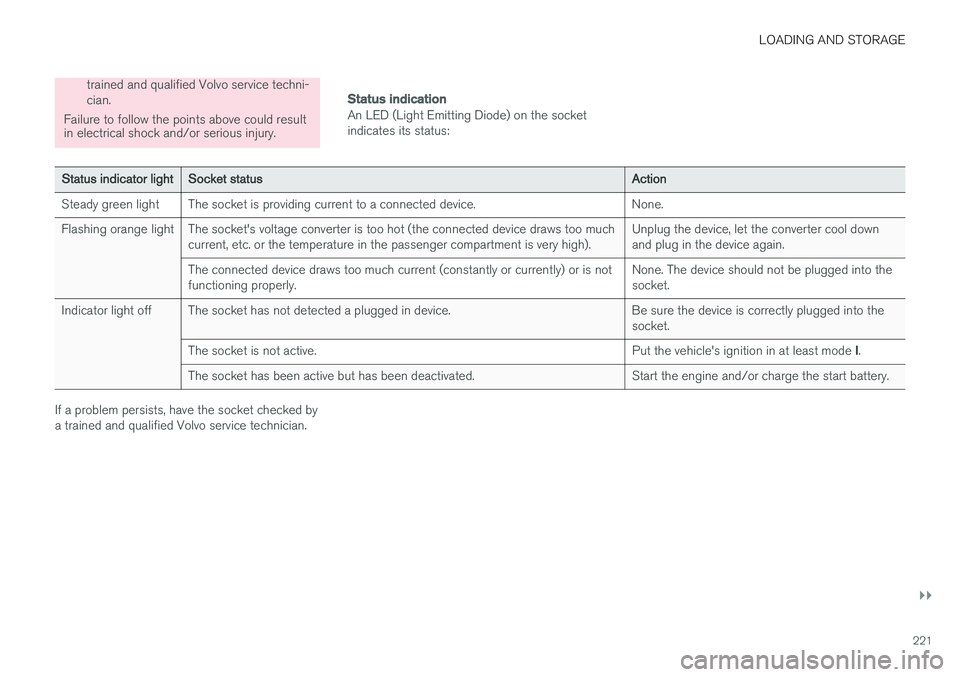
An LED (Light Emitting Diode) on the socket indicates its status:
Status indicator light Socket status Action
Steady green light The socket is providing current to a connected device. None.
Flashing orange light The socket's voltage converter is too hot (the connected device draws too much current, etc. or the temperature in the passenger compartment is very high). Unplug the device, let the converter cool down and plug in the device again.
The connected device draws too much current (constantly or currently) or is notfunctioning properly. None. The device should not be plugged into thesocket.
Indicator light off The socket has not detected a plugged in device. Be sure the device is correctly plugged into the socket.
The socket is not active. Put the vehicle's ignition in at least mode I.
The socket has been active but has been deactivated. Start the engine and/or charge the start battery.
If a problem persists, have the socket checked by a trained and qualified Volvo service technician.
Page 224 of 560
||
LOADING AND STORAGE
222
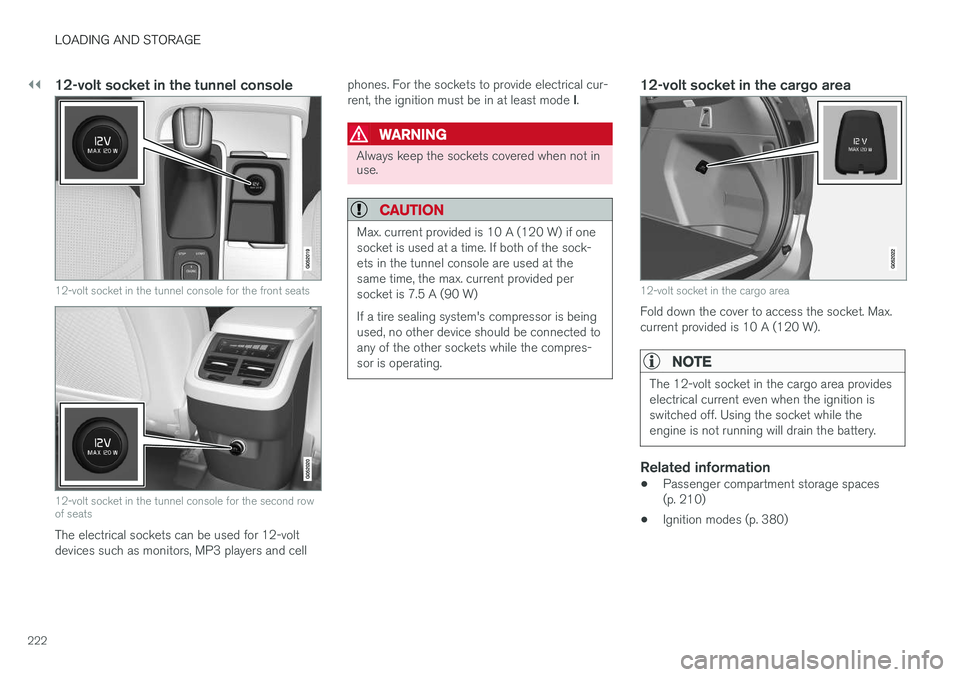
12-volt socket in the tunnel console
12-volt socket in the tunnel console for the front seats
12-volt socket in the tunnel console for the second row of seats
The electrical sockets can be used for 12-volt devices such as monitors, MP3 players and cellphones. For the sockets to provide electrical cur- rent, the ignition must be in at least mode
I.
WARNING
Always keep the sockets covered when not in use.
CAUTION
Max. current provided is 10 A (120 W) if one socket is used at a time. If both of the sock-ets in the tunnel console are used at thesame time, the max. current provided persocket is 7.5 A (90 W) If a tire sealing system's compressor is being used, no other device should be connected toany of the other sockets while the compres-sor is operating.
12-volt socket in the cargo area
12-volt socket in the cargo area
Fold down the cover to access the socket. Max. current provided is 10 A (120 W).
NOTE
The 12-volt socket in the cargo area provides electrical current even when the ignition isswitched off. Using the socket while theengine is not running will drain the battery.
Related information
• Passenger compartment storage spaces (p. 210)
• Ignition modes (p. 380)
Page 226 of 560
LOCKS AND ALARM
* Option/accessory.
224
Locks and remote keys
The vehicle can be locked and unlocked in vari- ous ways and there are several types of remotekeys that can be used.
Locking/unlocking/opening/closingThe vehicle can be locked/unlocked from the passenger compartment, using the buttons onthe remote key or by using the optional PassiveEntry system where it is only necessary to have akey in your possession to lock or unlock thedoors. On models equipped with a power tailgate *, it can
also be opened/closed by moving your foot under a sensor * beneath the rear bumper.
If for any reason a remote key does not function properly, it may be necessary to replace its bat-teries but the vehicle can always be locked orunlocked manually using the remote key'sdetachable key blade.
Remote keyThe remote key does not have to be physicallyhandled in order to start the engine because thevehicle is equipped with the standard PassiveStart system (the key only needs to be in thefront part of the passenger compartment). If thevehicle is equipped with the optional PassiveEntry system that enables keyless entry and start,the key can be anywhere in the vehicle when theengine is started. Models with Passive Entry
* also have an extra,
smaller key without buttons called a Key Tag. Additional keys can be ordered from a Volvo retailer.
Related information
• Immobilizer (p. 224)
• Alarm (p. 245)
• Child safety locks (p. 246)
• Remote key (p. 227)
• Foot movement tailgate operation
* (p. 232)
• Locking/unlocking from inside the vehicle(p. 235)
• Locking/unlocking from outside the vehicle(p. 233)
• Locking/unlocking the tailgate (p. 238)
• Starting the engine (p. 382)
Immobilizer
The immobilizer is a start inhibitor that helps pre- vent unauthorized persons from starting theengine.
Each of the keys supplied with your vehicle con- tains a unique coded transponder. The vehiclecode in the key is transmitted to the vehicle'signition system where it is compared to the codestored in the start inhibitor module. The following message (which may appear in the instrument panel) is related to the immobilizer:
Symbol Message Explanation
Vehicle key not found See Owner'smanualRemote key not recognized duringstart. Place theremote key on thekey symbol in thetunnel console cupholder and try tostart the vehicleagain.
Related information
•Remote key's range (p. 229)
• Remote key (p. 227)
Page 230 of 560
||
LOCKS AND ALARM
* Option/accessory.
228 Each of the remote keys provided with the vehicle can be linked to a driver profile containing uniquepersonal settings that will be applied when thatparticular key is used. See also the article "Driverprofile" for additional information.
NOTE
Avoid placing the remote key closer than approx. (4-6 in.) (10-15 cm) to any metallicobjects or electronic devices such as cellphones, tablets, laptops or chargers.
If interference persists, unlock the vehicle with the detachable key blade and place the remotekey in the backup key reader in the tunnel con-sole cup holder to disarm the alarm.
WARNING
Always remove the remote key from the pas- senger compartment when leaving the vehicle and ensure that the ignition in mode
0, espe-
cially if there are children in the vehicle.
Key TagIn addition to the two remote keys provided, a smaller third key, called a Key Tag, is also provi-ded for vehicles equipped with the optionalPassive Entry system. This key functions in the same way as a standardremote key but does not have a detachable keyblade and its battery cannot be replaced; a newKey Tag has to be ordered.
Ordering new keysTwo remote keys are provided with the vehicle (a Key Tag
2
is also included for vehicles equipped
with the optional Passive Entry system). Addi- tional keys (a total of 12) can be ordered andused with the vehicle.
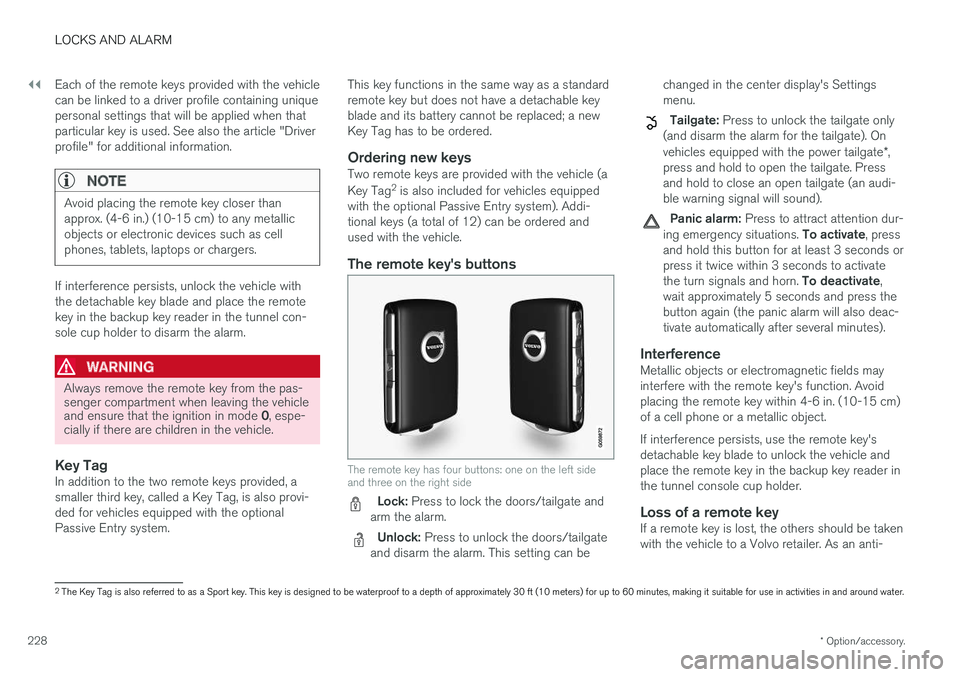
The remote key's buttons
The remote key has four buttons: one on the left side and three on the right side
Lock: Press to lock the doors/tailgate and
arm the alarm.
Unlock: Press to unlock the doors/tailgate
and disarm the alarm. This setting can be changed in the center display's Settings menu.
Tailgate: Press to unlock the tailgate only
(and disarm the alarm for the tailgate). On vehicles equipped with the power tailgate *,
press and hold to open the tailgate. Press and hold to close an open tailgate (an audi-ble warning signal will sound).
Panic alarm: Press to attract attention dur-
ing emergency situations. To activate, press
and hold this button for at least 3 seconds or press it twice within 3 seconds to activate the turn signals and horn. To deactivate,
wait approximately 5 seconds and press the button again (the panic alarm will also deac-tivate automatically after several minutes).
InterferenceMetallic objects or electromagnetic fields mayinterfere with the remote key's function. Avoidplacing the remote key within 4-6 in. (10-15 cm)of a cell phone or a metallic object. If interference persists, use the remote key's detachable key blade to unlock the vehicle andplace the remote key in the backup key reader inthe tunnel console cup holder.
Loss of a remote keyIf a remote key is lost, the others should be takenwith the vehicle to a Volvo retailer. As an anti-
2 The Key Tag is also referred to as a Sport key. This key is designed to be waterproof to a depth of approximately 30 ft (10 meters) for up to 60 minutes, making it suitable for use in activities in and around water.
Page 244 of 560
||
LOCKS AND ALARM
* Option/accessory.
242
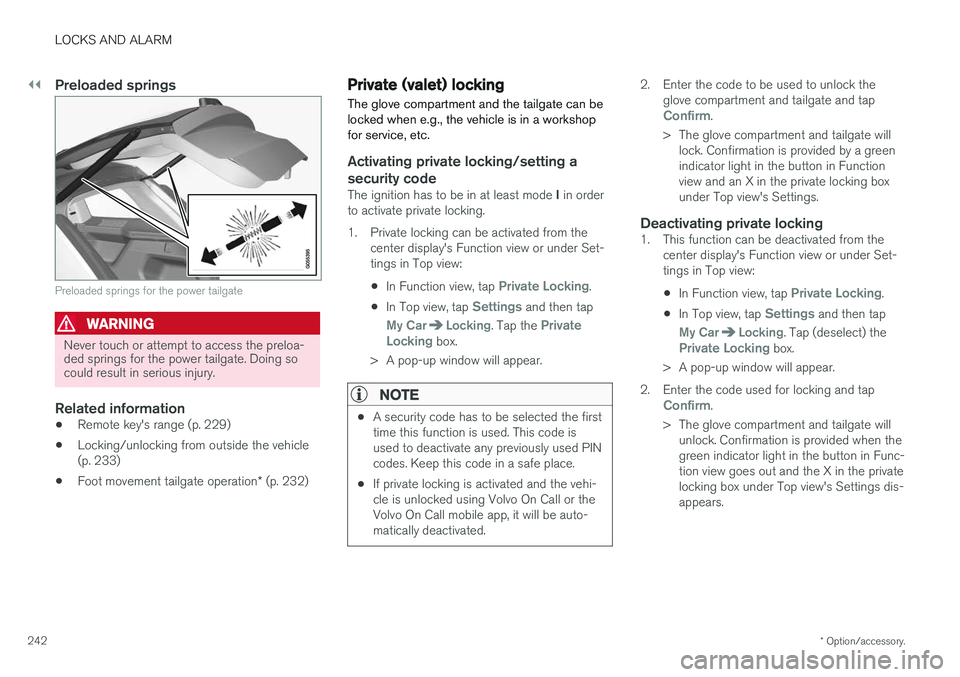
Preloaded springs
Preloaded springs for the power tailgate
WARNING
Never touch or attempt to access the preloa- ded springs for the power tailgate. Doing socould result in serious injury.
Related information
• Remote key's range (p. 229)
• Locking/unlocking from outside the vehicle (p. 233)
• Foot movement tailgate operation
* (p. 232)
Private (valet) locking
The glove compartment and the tailgate can be locked when e.g., the vehicle is in a workshopfor service, etc.
Activating private locking/setting a
security code
The ignition has to be in at least mode I in order
to activate private locking.
1. Private locking can be activated from the center display's Function view or under Set- tings in Top view:
• In Function view, tap
Private Locking.
• In Top view, tap
Settings and then tap
My CarLocking. Tap the Private
Locking box.
> A pop-up window will appear.
NOTE
• A security code has to be selected the first time this function is used. This code isused to deactivate any previously used PINcodes. Keep this code in a safe place.
• If private locking is activated and the vehi-cle is unlocked using Volvo On Call or theVolvo On Call mobile app, it will be auto-matically deactivated.
2. Enter the code to be used to unlock the
glove compartment and tailgate and tap
Confirm.
> The glove compartment and tailgate will lock. Confirmation is provided by a green indicator light in the button in Functionview and an X in the private locking boxunder Top view's Settings.
Deactivating private locking1. This function can be deactivated from the center display's Function view or under Set-tings in Top view:
• In Function view, tap
Private Locking.
• In Top view, tap
Settings and then tap
My CarLocking. Tap (deselect) thePrivate Locking box.
> A pop-up window will appear.
2. Enter the code used for locking and tap
Confirm.
> The glove compartment and tailgate will unlock. Confirmation is provided when the green indicator light in the button in Func-tion view goes out and the X in the privatelocking box under Top view's Settings dis-appears.
Page 247 of 560
LOCKS AND ALARM
}}
* Option/accessory.245
Alarm
The alarm system provides a warning if an attempt is made to break into the vehicle.
The following conditions will trigger the alarm:
• a door/hood/tailgate are opened
• the battery is disconnected
• the alarm siren is disconnected
If a problem is detected in the alarm system, this symbol and
Alarm
system failure Service required will
be displayed in the instrument panel.
Do not attempt to repair any of the components in the alarm system yourself; this could affect theinsurance policy on the vehicle. Contact a trainedand qualified Volvo service technician.
NOTE
One of the alarm sensors, which is sensitive to metallic objects, is located under the tunnelconsole cup holders. Avoid leaving coins,keys, etc., in the cup holders because theymay inadvertently trigger the alarm.
Arming the alarm
–Lock the vehicle by pressing the remote key's lock button. On models with theoptional Passive Entry system, the vehiclecan also be locked by pressing the outerindentation for locking on one of the doorhandles or by pressing the tailgate's rubber-ized pressure plate. If the vehicle is equipped with a power tail- gate *, the button on the lower edge of the
tailgate can also be used to lock the vehicle and arm the alarm.
Disarming the alarmThe alarm can be disarmed by: • Unlock the vehicle by pressing the remote key's unlock button
• Pressing the pressure-sensitive area on theinside of one of the door handles on modelswith the optional Passive Entry system.
• Pressing the tailgate's rubberized pressureplate on models with the optional PassiveEntry system.
Turning off a triggered (sounding)
alarm
–Press the remote key's unlock button or put the ignition in mode I by turning the start
knob to START and releasing it.
Alarm signalsThe following occurs if the alarm has been trig- gered:
• A siren will sound for 30 seconds or until thealarm is turned off
• All turn signals flash for 5 minutes or untilthe alarm is turned off
If the door that triggered the alarm is left open,
the alarm cycle will be repeated 10 times.
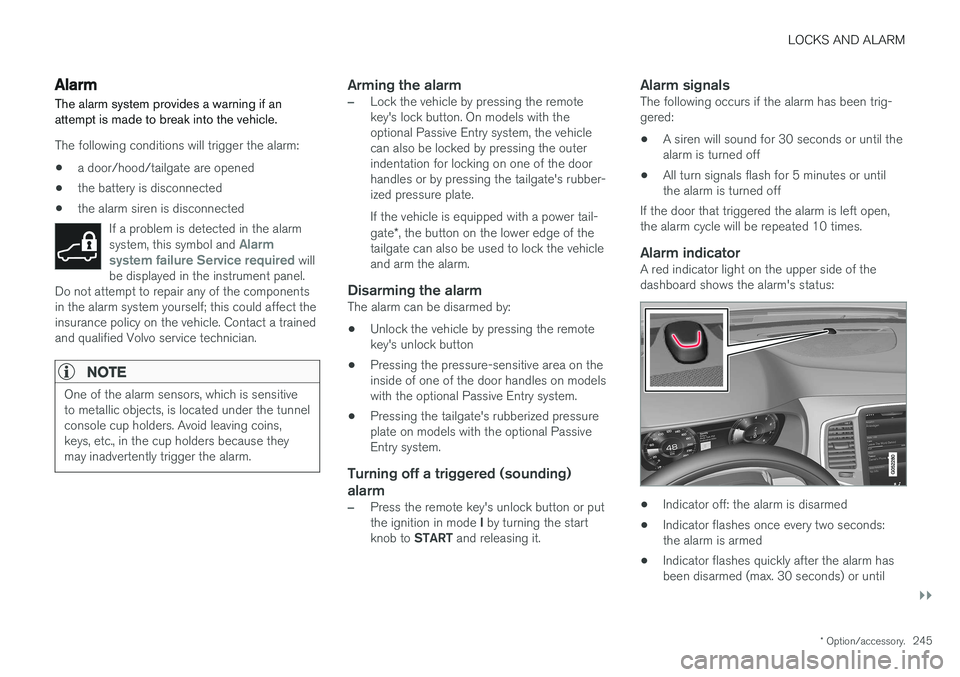
Alarm indicatorA red indicator light on the upper side of thedashboard shows the alarm's status:
• Indicator off: the alarm is disarmed
• Indicator flashes once every two seconds: the alarm is armed
• Indicator flashes quickly after the alarm hasbeen disarmed (max. 30 seconds) or until
Page 248 of 560
||
LOCKS AND ALARM
* Option/accessory.
246 the ignition has been put in mode
I (turn the
start knob to START and release it): the
alarm has been triggered
Related information
• Automatically arming/disarming the alarm (p. 244)
• Deactivating the alarm without a functioningremote key (p. 246)
Deactivating the alarm without a functioning remote key
If the remote key is not functioning properly, the alarm can be turned off and the vehicle can bestarted as follows:
1. Unlock and open the driver's door with the detachable key blade.
> This will trigger the alarm.
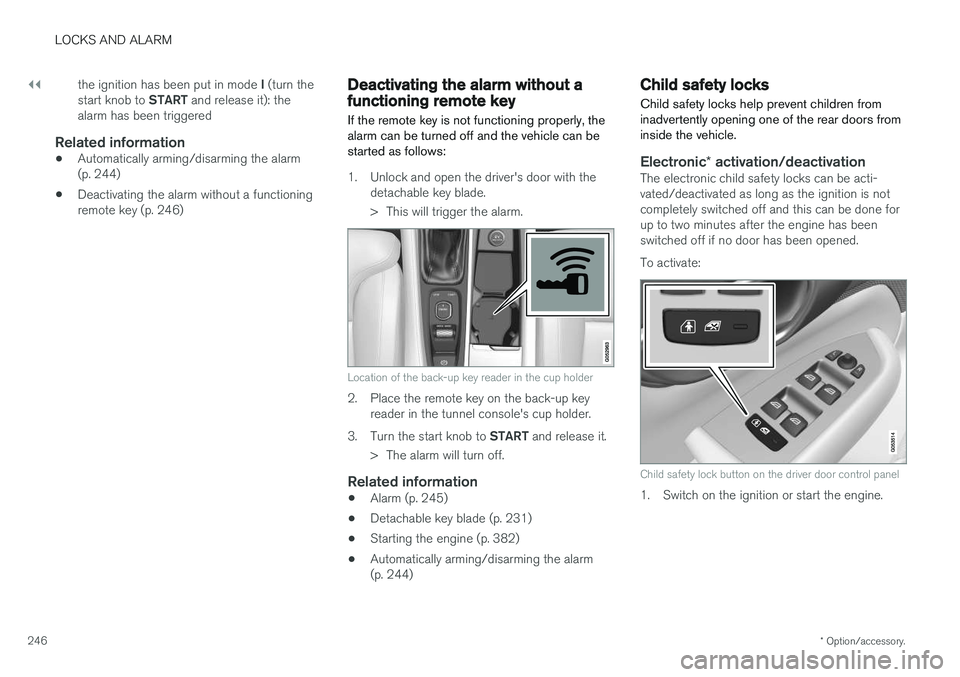
Location of the back-up key reader in the cup holder
2. Place the remote key on the back-up keyreader in the tunnel console's cup holder.
3. Turn the start knob to START and release it.
> The alarm will turn off.
Related information
• Alarm (p. 245)
• Detachable key blade (p. 231)
• Starting the engine (p. 382)
• Automatically arming/disarming the alarm (p. 244)
Child safety locks
Child safety locks help prevent children from inadvertently opening one of the rear doors frominside the vehicle.
Electronic * activation/deactivationThe electronic child safety locks can be acti- vated/deactivated as long as the ignition is notcompletely switched off and this can be done forup to two minutes after the engine has beenswitched off if no door has been opened. To activate:
Child safety lock button on the driver door control panel
1. Switch on the ignition or start the engine.