belt VOLVO XC90 2017 Owner´s Manual
[x] Cancel search | Manufacturer: VOLVO, Model Year: 2017, Model line: XC90, Model: VOLVO XC90 2017Pages: 560, PDF Size: 9.97 MB
Page 166 of 560
||
INSTRUMENTS AND CONTROLS
* Option/accessory.
164
Related information
• Power front seats
* (p. 163)
• Using the power seat memory function
*
(p. 165)
• Multifunctional front seats
* (p. 166)
• Seat belts (p. 60)
Adjusting the passenger's seat from the driver's seat
*
Using the controls on the side of the driver's seat, the driver can adjust the position of thefront passenger's seat.
Activating the function in the center
display
From the center display, the function can be acti- vated in two ways. After activating the function, adjust the passeng- er's seat within 10 seconds . If no adjustments
are made in that time span, the function deacti- vates automatically.
Activating from Function view
1. Go to the center display's Function view. 2. Activate the function by tapping
Adjust
passenger seat.
Activating from Settings
–In the center display, select SettingsMy
Car
SeatsAdjust Passenger Seat
From Driver Position.
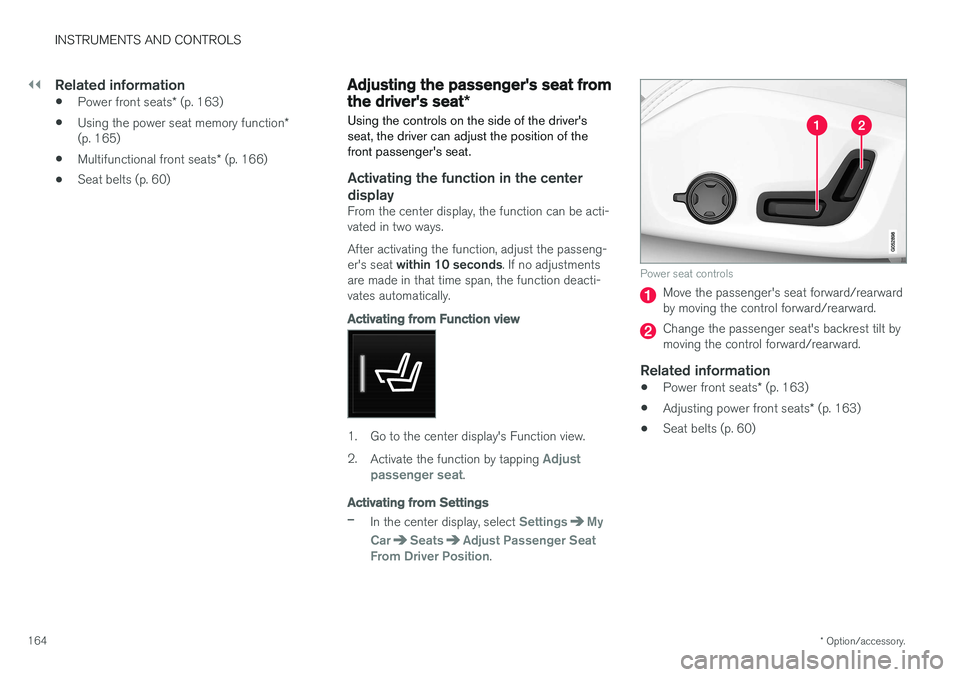
Power seat controls
Move the passenger's seat forward/rearward by moving the control forward/rearward.
Change the passenger seat's backrest tilt by moving the control forward/rearward.
Related information
• Power front seats
* (p. 163)
• Adjusting power front seats
* (p. 163)
• Seat belts (p. 60)
Page 174 of 560
INSTRUMENTS AND CONTROLS
172
Adjusting the second row backrest tiltBackrest tilt can be adjusted separately for each of the second row seats.
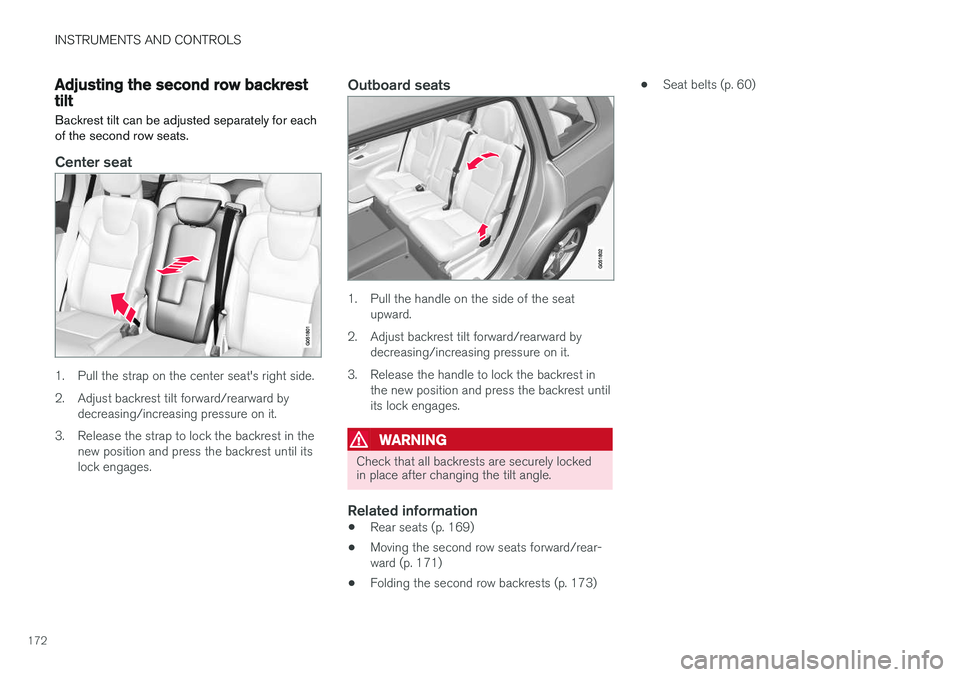
Center seat
1. Pull the strap on the center seat's right side.
2. Adjust backrest tilt forward/rearward by decreasing/increasing pressure on it.
3. Release the strap to lock the backrest in the new position and press the backrest until its lock engages.
Outboard seats
1. Pull the handle on the side of the seatupward.
2. Adjust backrest tilt forward/rearward by decreasing/increasing pressure on it.
3. Release the handle to lock the backrest in the new position and press the backrest until its lock engages.
WARNING
Check that all backrests are securely locked in place after changing the tilt angle.
Related information
• Rear seats (p. 169)
• Moving the second row seats forward/rear- ward (p. 171)
• Folding the second row backrests (p. 173) •
Seat belts (p. 60)
Page 175 of 560
INSTRUMENTS AND CONTROLS
}}
* Option/accessory.173
Folding the second row backrests
The second row of seats has three individual seating positions whose backrests can befolded down separately.
CAUTION
• To help avoid damage to the seat uphols- tery, before a rear seat backrest is foldeddown, remove any objects from the seatand ensure that the seat belts are notbuckled.
• The integrated booster cushion
* in the
center position must be stowed (foldeddown) before the backrest is foldeddown.
• The center seating position armrest mustbe folded up before the backrest isfolded down.
NOTE
•It may be necessary to adjust the front seat backrests and/or move these seatsforward in order to fold down the rearseat backrests completely.
• It may also be necessary to move thesecond row of seats rearward.
WARNING
Adjust the seat and be sure it is locked in the new position before driving.
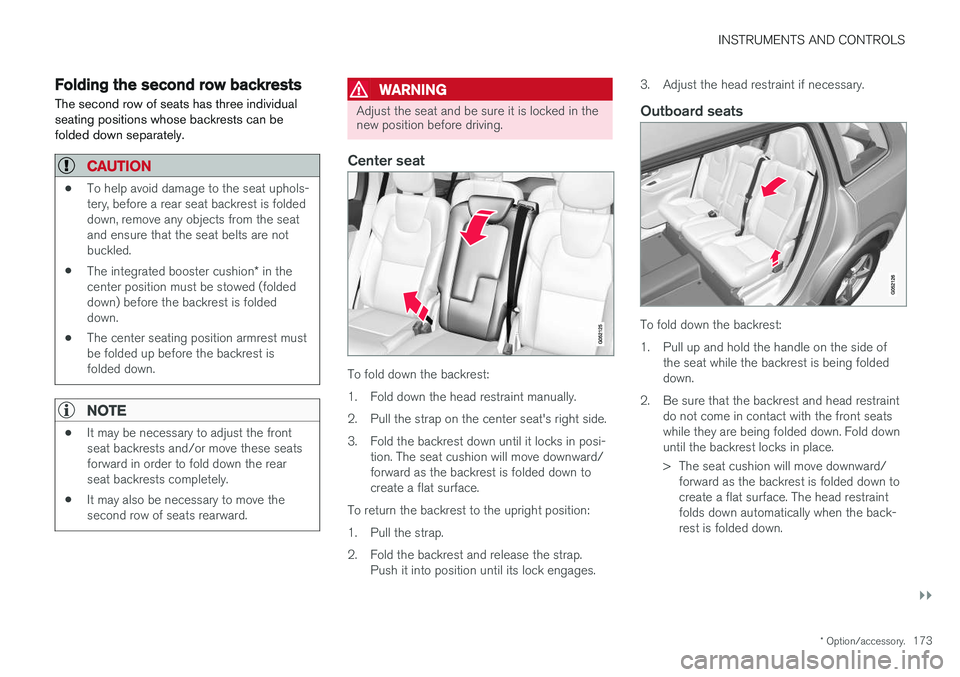
Center seat
To fold down the backrest:
1. Fold down the head restraint manually.
2. Pull the strap on the center seat's right side.
3. Fold the backrest down until it locks in posi-
tion. The seat cushion will move downward/ forward as the backrest is folded down tocreate a flat surface.
To return the backrest to the upright position:
1. Pull the strap.
2. Fold the backrest and release the strap. Push it into position until its lock engages. 3. Adjust the head restraint if necessary.
Outboard seats
To fold down the backrest:
1. Pull up and hold the handle on the side of
the seat while the backrest is being folded down.
2. Be sure that the backrest and head restraint do not come in contact with the front seatswhile they are being folded down. Fold downuntil the backrest locks in place.
> The seat cushion will move downward/forward as the backrest is folded down to create a flat surface. The head restraintfolds down automatically when the back-rest is folded down.
Page 210 of 560
LOADING AND STORAGE
* Option/accessory.
208
Cargo space
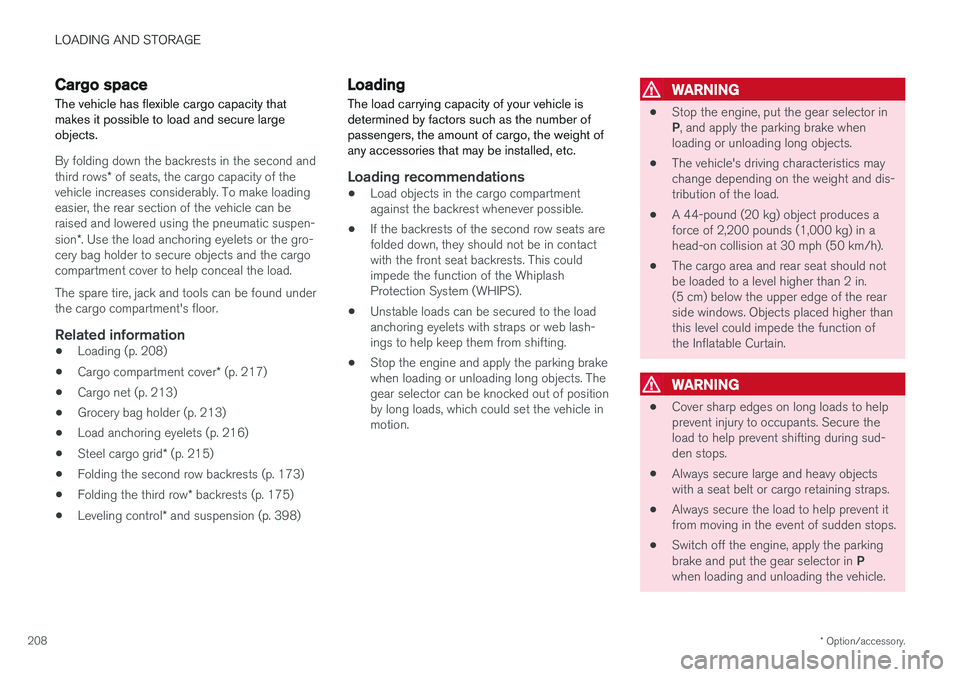
The vehicle has flexible cargo capacity that makes it possible to load and secure largeobjects.
By folding down the backrests in the second and third rows * of seats, the cargo capacity of the
vehicle increases considerably. To make loading easier, the rear section of the vehicle can beraised and lowered using the pneumatic suspen- sion *. Use the load anchoring eyelets or the gro-
cery bag holder to secure objects and the cargo compartment cover to help conceal the load. The spare tire, jack and tools can be found under the cargo compartment's floor.
Related information
• Loading (p. 208)
• Cargo compartment cover
* (p. 217)
• Cargo net (p. 213)
• Grocery bag holder (p. 213)
• Load anchoring eyelets (p. 216)
• Steel cargo grid
* (p. 215)
• Folding the second row backrests (p. 173)
• Folding the third row
* backrests (p. 175)
• Leveling control
* and suspension (p. 398)
Loading
The load carrying capacity of your vehicle is determined by factors such as the number ofpassengers, the amount of cargo, the weight ofany accessories that may be installed, etc.
Loading recommendations
• Load objects in the cargo compartment against the backrest whenever possible.
• If the backrests of the second row seats arefolded down, they should not be in contactwith the front seat backrests. This couldimpede the function of the WhiplashProtection System (WHIPS).
• Unstable loads can be secured to the loadanchoring eyelets with straps or web lash-ings to help keep them from shifting.
• Stop the engine and apply the parking brakewhen loading or unloading long objects. Thegear selector can be knocked out of positionby long loads, which could set the vehicle inmotion.
WARNING
•
Stop the engine, put the gear selector in P
, and apply the parking brake when
loading or unloading long objects.
• The vehicle's driving characteristics may change depending on the weight and dis-tribution of the load.
• A 44-pound (20 kg) object produces aforce of 2,200 pounds (1,000 kg) in ahead-on collision at 30 mph (50 km/h).
• The cargo area and rear seat should notbe loaded to a level higher than 2 in.(5 cm) below the upper edge of the rearside windows. Objects placed higher thanthis level could impede the function ofthe Inflatable Curtain.
WARNING
• Cover sharp edges on long loads to help prevent injury to occupants. Secure theload to help prevent shifting during sud-den stops.
• Always secure large and heavy objectswith a seat belt or cargo retaining straps.
• Always secure the load to help prevent itfrom moving in the event of sudden stops.
• Switch off the engine, apply the parking brake and put the gear selector in
P
when loading and unloading the vehicle.
Page 211 of 560
LOADING AND STORAGE
}}
* Option/accessory.209
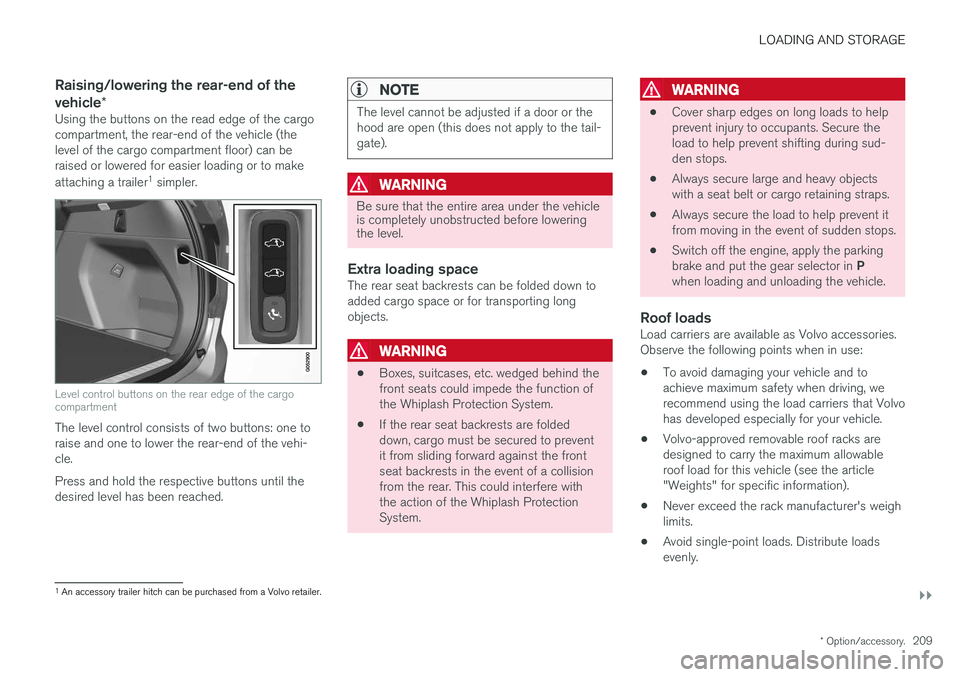
Raising/lowering the rear-end of the vehicle*
Using the buttons on the read edge of the cargo compartment, the rear-end of the vehicle (thelevel of the cargo compartment floor) can beraised or lowered for easier loading or to make attaching a trailer 1
simpler.
Level control buttons on the rear edge of the cargo compartment
The level control consists of two buttons: one to raise and one to lower the rear-end of the vehi-cle. Press and hold the respective buttons until the desired level has been reached.
NOTE
The level cannot be adjusted if a door or the hood are open (this does not apply to the tail-gate).
WARNING
Be sure that the entire area under the vehicle is completely unobstructed before loweringthe level.
Extra loading spaceThe rear seat backrests can be folded down to added cargo space or for transporting longobjects.
WARNING
• Boxes, suitcases, etc. wedged behind the front seats could impede the function ofthe Whiplash Protection System.
• If the rear seat backrests are foldeddown, cargo must be secured to preventit from sliding forward against the frontseat backrests in the event of a collisionfrom the rear. This could interfere withthe action of the Whiplash ProtectionSystem.
WARNING
• Cover sharp edges on long loads to help prevent injury to occupants. Secure theload to help prevent shifting during sud-den stops.
• Always secure large and heavy objectswith a seat belt or cargo retaining straps.
• Always secure the load to help prevent itfrom moving in the event of sudden stops.
• Switch off the engine, apply the parking brake and put the gear selector in
P
when loading and unloading the vehicle.
Roof loadsLoad carriers are available as Volvo accessories. Observe the following points when in use:
• To avoid damaging your vehicle and toachieve maximum safety when driving, werecommend using the load carriers that Volvohas developed especially for your vehicle.
• Volvo-approved removable roof racks aredesigned to carry the maximum allowableroof load for this vehicle (see the article"Weights" for specific information).
• Never exceed the rack manufacturer's weighlimits.
• Avoid single-point loads. Distribute loadsevenly.
1
An accessory trailer hitch can be purchased from a Volvo retailer.
Page 218 of 560
||
LOADING AND STORAGE
* Option/accessory.
216
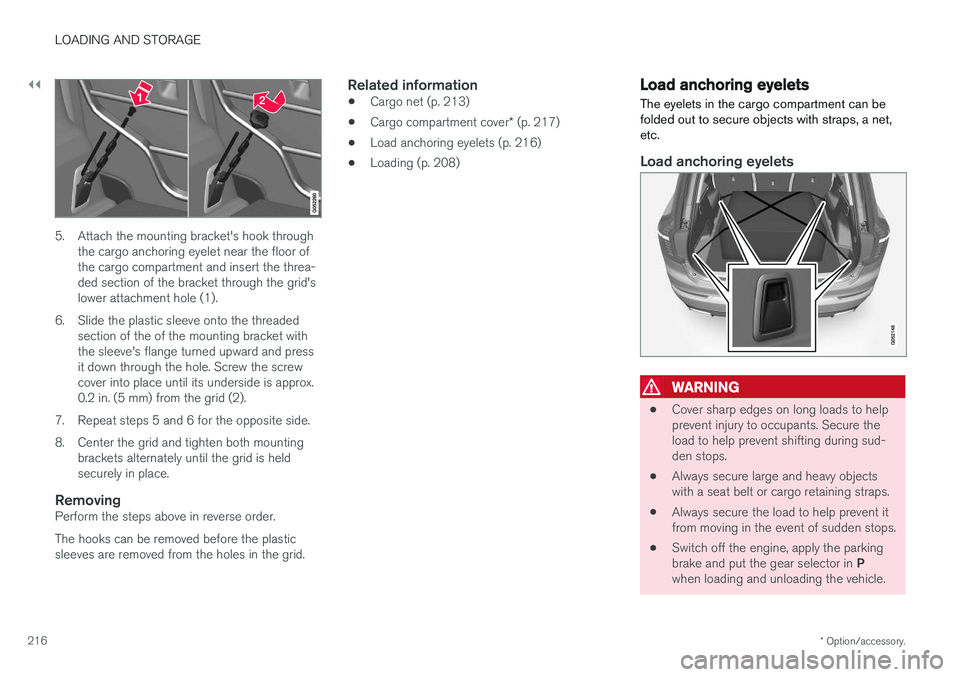
5. Attach the mounting bracket's hook through
the cargo anchoring eyelet near the floor of the cargo compartment and insert the threa-ded section of the bracket through the grid'slower attachment hole (1).
6. Slide the plastic sleeve onto the threaded section of the of the mounting bracket withthe sleeve's flange turned upward and pressit down through the hole. Screw the screwcover into place until its underside is approx.0.2 in. (5 mm) from the grid (2).
7. Repeat steps 5 and 6 for the opposite side.
8. Center the grid and tighten both mounting brackets alternately until the grid is held securely in place.
RemovingPerform the steps above in reverse order. The hooks can be removed before the plastic sleeves are removed from the holes in the grid.
Related information
• Cargo net (p. 213)
• Cargo compartment cover
* (p. 217)
• Load anchoring eyelets (p. 216)
• Loading (p. 208)
Load anchoring eyelets
The eyelets in the cargo compartment can be folded out to secure objects with straps, a net,etc.
Load anchoring eyelets
WARNING
• Cover sharp edges on long loads to help prevent injury to occupants. Secure theload to help prevent shifting during sud-den stops.
• Always secure large and heavy objectswith a seat belt or cargo retaining straps.
• Always secure the load to help prevent itfrom moving in the event of sudden stops.
• Switch off the engine, apply the parking brake and put the gear selector in
P
when loading and unloading the vehicle.
Page 220 of 560
||
LOADING AND STORAGE
218
Fully open
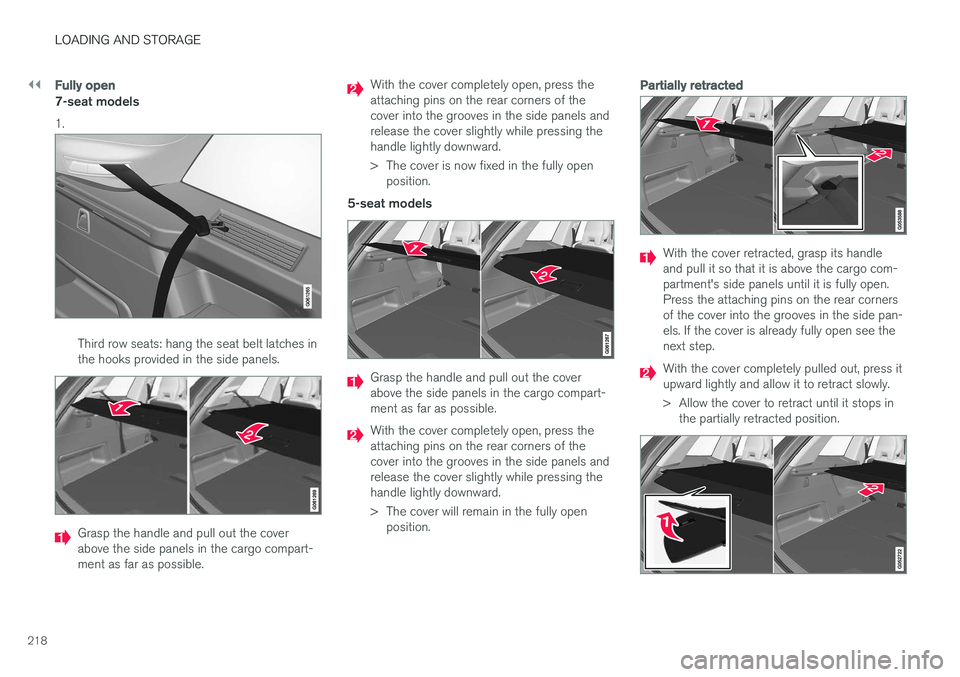
7-seat models 1.
Third row seats: hang the seat belt latches in the hooks provided in the side panels.
Grasp the handle and pull out the cover above the side panels in the cargo compart-ment as far as possible.
With the cover completely open, press the attaching pins on the rear corners of thecover into the grooves in the side panels andrelease the cover slightly while pressing thehandle lightly downward.
> The cover is now fixed in the fully openposition.
5-seat models
Grasp the handle and pull out the cover above the side panels in the cargo compart-ment as far as possible.
With the cover completely open, press the attaching pins on the rear corners of thecover into the grooves in the side panels andrelease the cover slightly while pressing thehandle lightly downward.
> The cover will remain in the fully open position.
Partially retracted
With the cover retracted, grasp its handle and pull it so that it is above the cargo com-partment's side panels until it is fully open.Press the attaching pins on the rear cornersof the cover into the grooves in the side pan-els. If the cover is already fully open see thenext step.
With the cover completely pulled out, press it upward lightly and allow it to retract slowly.
> Allow the cover to retract until it stops inthe partially retracted position.
Page 221 of 560
LOADING AND STORAGE
* Option/accessory.219
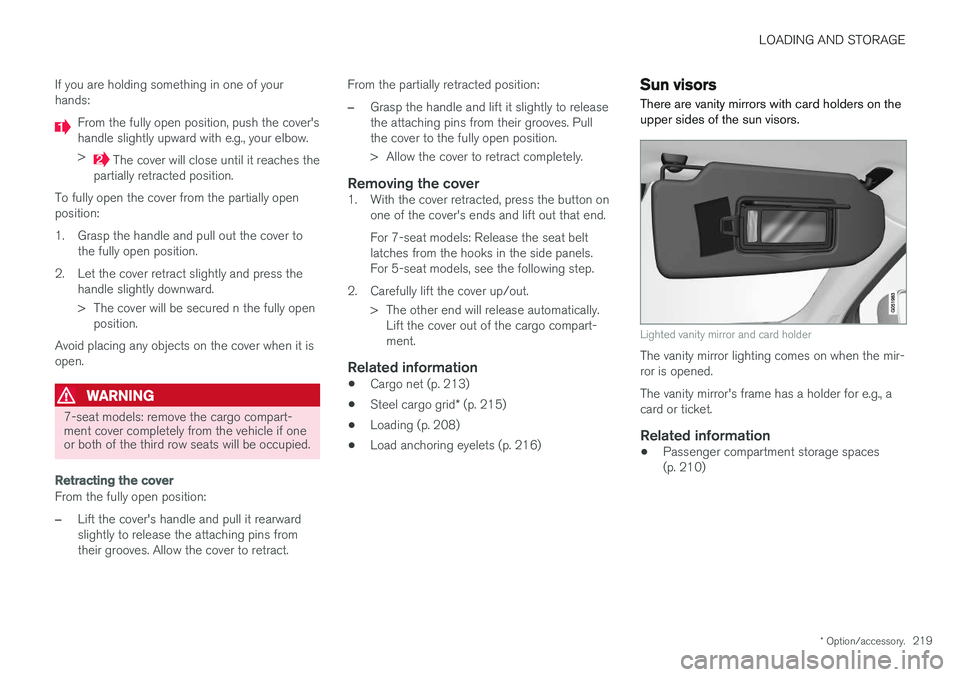
If you are holding something in one of your hands:
From the fully open position, push the cover's handle slightly upward with e.g., your elbow. >
The cover will close until it reaches the
partially retracted position.
To fully open the cover from the partially open position:
1. Grasp the handle and pull out the cover to the fully open position.
2. Let the cover retract slightly and press the handle slightly downward.
> The cover will be secured n the fully openposition.
Avoid placing any objects on the cover when it is open.
WARNING
7-seat models: remove the cargo compart- ment cover completely from the vehicle if oneor both of the third row seats will be occupied.
Retracting the cover
From the fully open position:
–Lift the cover's handle and pull it rearward slightly to release the attaching pins fromtheir grooves. Allow the cover to retract. From the partially retracted position:
–Grasp the handle and lift it slightly to release the attaching pins from their grooves. Pullthe cover to the fully open position.
> Allow the cover to retract completely.
Removing the cover1. With the cover retracted, press the button on
one of the cover's ends and lift out that end. For 7-seat models: Release the seat belt latches from the hooks in the side panels.For 5-seat models, see the following step.
2. Carefully lift the cover up/out. > The other end will release automatically.Lift the cover out of the cargo compart-ment.
Related information
• Cargo net (p. 213)
• Steel cargo grid
* (p. 215)
• Loading (p. 208)
• Load anchoring eyelets (p. 216)
Sun visors There are vanity mirrors with card holders on the upper sides of the sun visors.
Lighted vanity mirror and card holder
The vanity mirror lighting comes on when the mir- ror is opened. The vanity mirror's frame has a holder for e.g., a card or ticket.
Related information
•Passenger compartment storage spaces(p. 210)
Page 275 of 560
DRIVER SUPPORT
}}
* Option/accessory.273
Activating ACC (putting it in active mode and setting a speed)
Before ACC can be put in active mode:
• The driver's seat belt must be buckled and the driver's door must be closed.
• There must be a vehicle ahead (a target vehi-cle) within a reasonable distance or yourvehicle's current speed must be at least9 mph (15 km/h).
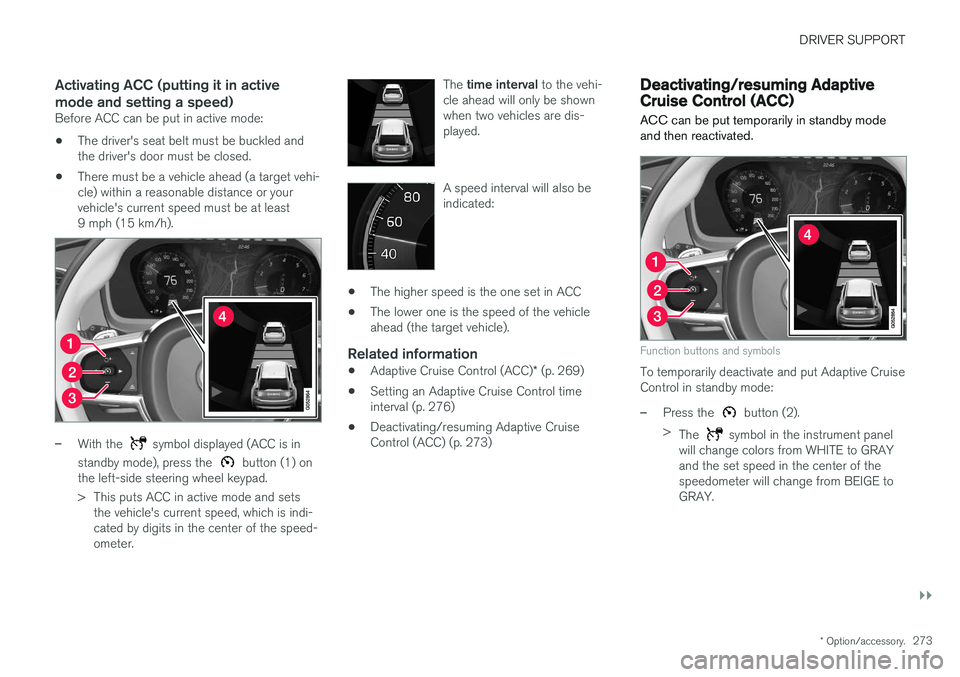
–With the symbol displayed (ACC is in
standby mode), press the
button (1) on
the left-side steering wheel keypad.
> This puts ACC in active mode and sets the vehicle's current speed, which is indi- cated by digits in the center of the speed-ometer. The
time interval to the vehi-
cle ahead will only be shownwhen two vehicles are dis-played.
A speed interval will also be indicated:
• The higher speed is the one set in ACC
• The lower one is the speed of the vehicle ahead (the target vehicle).
Related information
•
Adaptive Cruise Control (ACC)
* (p. 269)
• Setting an Adaptive Cruise Control timeinterval (p. 276)
• Deactivating/resuming Adaptive CruiseControl (ACC) (p. 273)
Deactivating/resuming Adaptive Cruise Control (ACC)
ACC can be put temporarily in standby mode and then reactivated.
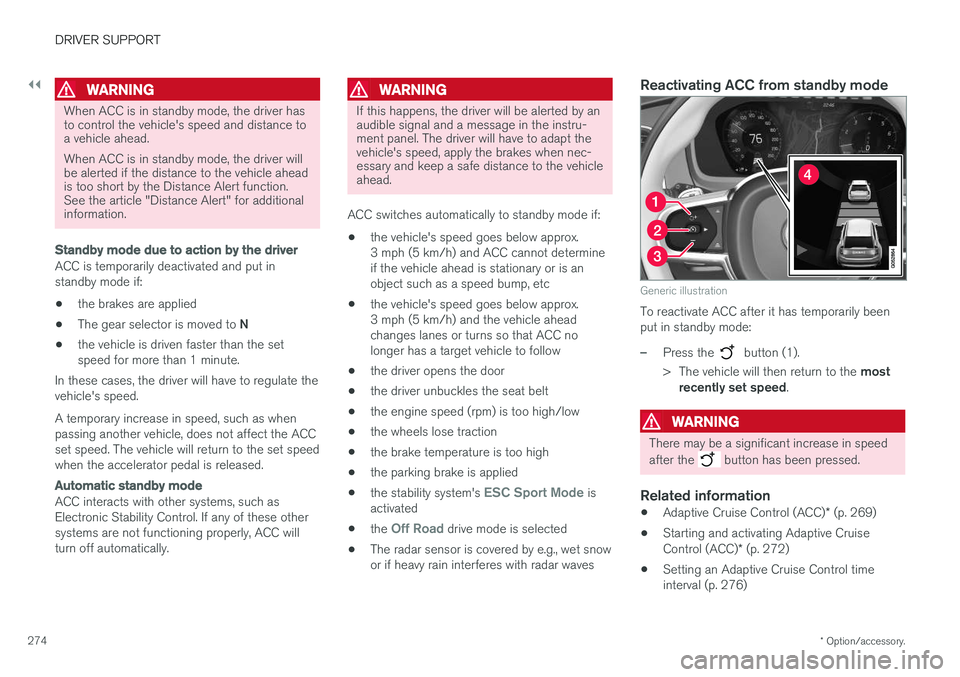
Function buttons and symbols
To temporarily deactivate and put Adaptive Cruise Control in standby mode:
–Press the button (2).
> The
symbol in the instrument panel
will change colors from WHITE to GRAY and the set speed in the center of thespeedometer will change from BEIGE toGRAY.
Page 276 of 560
||
DRIVER SUPPORT
* Option/accessory.
274
WARNING
When ACC is in standby mode, the driver has to control the vehicle's speed and distance toa vehicle ahead. When ACC is in standby mode, the driver will be alerted if the distance to the vehicle aheadis too short by the Distance Alert function.See the article "Distance Alert" for additionalinformation.
Standby mode due to action by the driver
ACC is temporarily deactivated and put in standby mode if:
• the brakes are applied
• The gear selector is moved to
N
• the vehicle is driven faster than the setspeed for more than 1 minute.
In these cases, the driver will have to regulate thevehicle's speed. A temporary increase in speed, such as when passing another vehicle, does not affect the ACCset speed. The vehicle will return to the set speedwhen the accelerator pedal is released.
Automatic standby mode
ACC interacts with other systems, such as Electronic Stability Control. If any of these othersystems are not functioning properly, ACC willturn off automatically.
WARNING
If this happens, the driver will be alerted by an audible signal and a message in the instru-ment panel. The driver will have to adapt thevehicle's speed, apply the brakes when nec-essary and keep a safe distance to the vehicleahead.
ACC switches automatically to standby mode if: • the vehicle's speed goes below approx. 3 mph (5 km/h) and ACC cannot determineif the vehicle ahead is stationary or is anobject such as a speed bump, etc
• the vehicle's speed goes below approx.3 mph (5 km/h) and the vehicle aheadchanges lanes or turns so that ACC nolonger has a target vehicle to follow
• the driver opens the door
• the driver unbuckles the seat belt
• the engine speed (rpm) is too high/low
• the wheels lose traction
• the brake temperature is too high
• the parking brake is applied
• the stability system's
ESC Sport Mode is
activated
• the
Off Road drive mode is selected
• The radar sensor is covered by e.g., wet snow or if heavy rain interferes with radar waves
Reactivating ACC from standby mode
Generic illustration
To reactivate ACC after it has temporarily been put in standby mode:
–Press the button (1).
> The vehicle will then return to the most
recently set speed .
WARNING
There may be a significant increase in speed after the
button has been pressed.
Related information
•Adaptive Cruise Control (ACC)
* (p. 269)
• Starting and activating Adaptive Cruise Control (ACC)
* (p. 272)
• Setting an Adaptive Cruise Control time interval (p. 276)