wheel VOLVO XC90 2017 Owner´s Manual
[x] Cancel search | Manufacturer: VOLVO, Model Year: 2017, Model line: XC90, Model: VOLVO XC90 2017Pages: 560, PDF Size: 9.97 MB
Page 204 of 560
CLIMATE
202
Opening/closing/directing air vents
Some of the passenger compartment air vents can be open/closed/directed individually.
Direct the dashboard and door pillar outer air vents toward the side windows to demist/defrost. Direct the vents into the passenger compartment to help maintain a comfortable temperature inwarm weather.
Opening/closing air vents
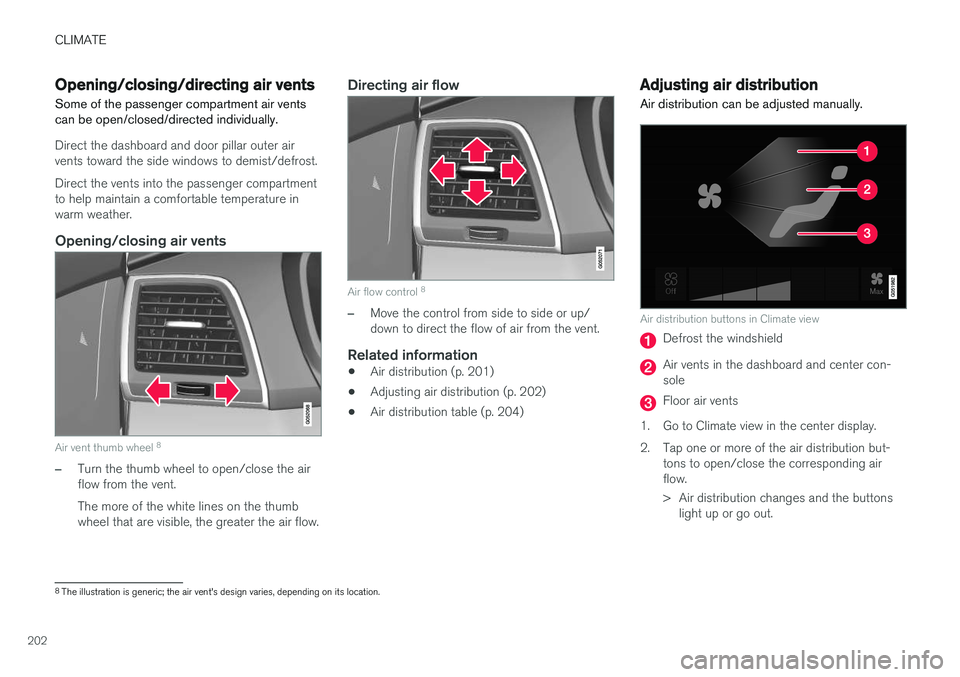
Air vent thumb wheel 8
–Turn the thumb wheel to open/close the air flow from the vent. The more of the white lines on the thumb wheel that are visible, the greater the air flow.
Directing air flow
Air flow control 8
–Move the control from side to side or up/ down to direct the flow of air from the vent.
Related information
•
Air distribution (p. 201)
• Adjusting air distribution (p. 202)
• Air distribution table (p. 204)
Adjusting air distribution
Air distribution can be adjusted manually.
Air distribution buttons in Climate view
Defrost the windshield
Air vents in the dashboard and center con- sole
Floor air vents
1. Go to Climate view in the center display.
2. Tap one or more of the air distribution but- tons to open/close the corresponding air flow.
> Air distribution changes and the buttonslight up or go out.
8The illustration is generic; the air vent's design varies, depending on its location.
Page 212 of 560
||
LOADING AND STORAGE
* Option/accessory.
210 •
Place heavier cargo at the bottom of the load.
• Secure the cargo correctly with appropriatetie-down equipment.
• Check periodically that the load carriers andload are properly secured.
• Remember that the vehicle's center of gravityand handling change when you carry a loadon the roof.
• The vehicle's wind resistance and fuel con-sumption will increase with the size of theload.
• Drive smoothly. Avoid rapid starts, fast cor-nering and hard braking.
CAUTION
The optional panoramic roof should not be opened while load carriers are installed onthe vehicle.
See the article "Weights" for information about the maximum permissible load that can be trans-ported on the roof.
Related information
•
Folding the second row backrests (p. 173)
• Folding the third row
* backrests (p. 175)
• Weights (p. 537)
• Cargo net (p. 213) •
Cargo compartment cover
* (p. 217)
• Steel cargo grid
* (p. 215)
• Load anchoring eyelets (p. 216)
• Whiplash protection system (p. 59)
• Locking/unlocking the tailgate (p. 238)
Passenger compartment storage spaces
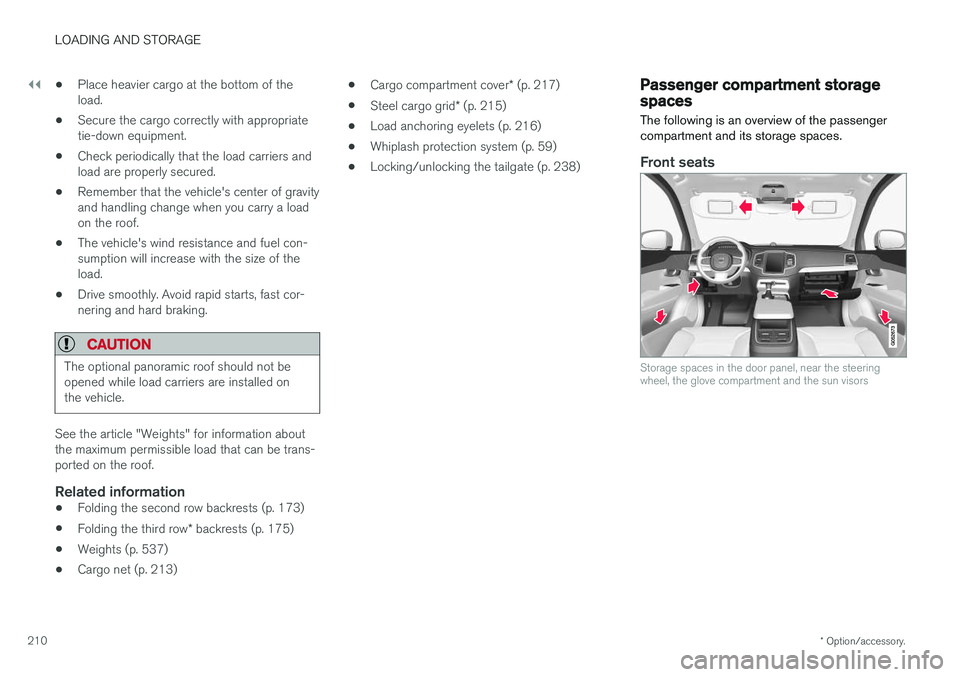
The following is an overview of the passenger compartment and its storage spaces.
Front seats
Storage spaces in the door panel, near the steering wheel, the glove compartment and the sun visors
Page 231 of 560
LOCKS AND ALARM
229
theft measure, the code of the lost remote key must be erased from the system. The number ofregistered keys for the vehicle can be found inthe center display's Top view.
NOTE
Additional or duplicate remote control keys can be obtained from any authorized Volvoretailer. You can also obtain additional or duplicate remote control keys from certain independentrepair facilities and locksmiths that are quali-fied to make remote control keys. Each keymust be programmed to work with your vehi-cle. A list of independent repair facilities and/or locksmiths known to Volvo that can cut andcode replacement keys can be found: •
on the Volvo website, www.volvocars.com/us
• by calling Volvo Customer Care at1-800-458-1552.
Related information
•
Remote key's range (p. 229)
• Detachable key blade (p. 231)
• Changing the remote key's battery (p. 225)
• Driver profiles (p. 175)
Remote key's range
In order to function correctly, the remote key must be within a certain distance of the vehicle.
Manual useThe remote key's functions, such as locking and unlocking the vehicle, which are activated by pressing the
or buttons, have a range of
approx. 65 feet (20 meters) from the vehicle. Buildings or other obstacles may interfere with the function of the remote key. The vehicle canalso be locked or unlocked with the key blade. If the vehicle's locks do not react, move closer and try again.
Keyless use 3
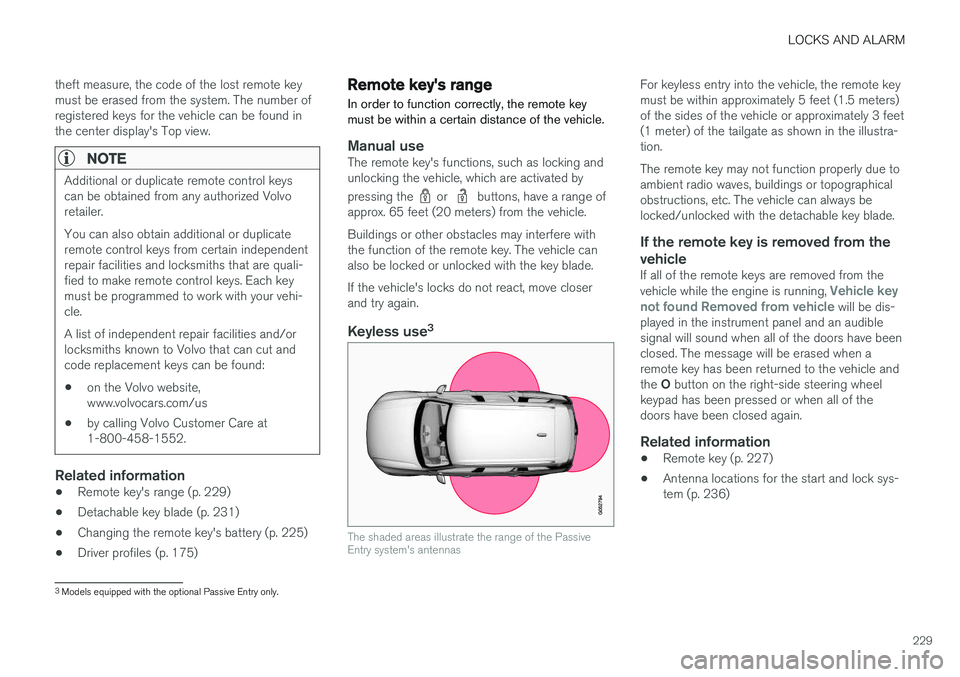
The shaded areas illustrate the range of the Passive Entry system's antennas
For keyless entry into the vehicle, the remote key must be within approximately 5 feet (1.5 meters)of the sides of the vehicle or approximately 3 feet(1 meter) of the tailgate as shown in the illustra-tion. The remote key may not function properly due to ambient radio waves, buildings or topographicalobstructions, etc. The vehicle can always belocked/unlocked with the detachable key blade.
If the remote key is removed from the vehicle
If all of the remote keys are removed from the vehicle while the engine is running, Vehicle key
not found Removed from vehicle will be dis-
played in the instrument panel and an audible signal will sound when all of the doors have beenclosed. The message will be erased when aremote key has been returned to the vehicle and the O button on the right-side steering wheel
keypad has been pressed or when all of the doors have been closed again.
Related information
• Remote key (p. 227)
• Antenna locations for the start and lock sys-tem (p. 236)
3
Models equipped with the optional Passive Entry only.
Page 252 of 560
DRIVER SUPPORT
* Option/accessory.
250
Driver support systems
The vehicle is equipped with a number of driver support systems that help provide the driver withactive/passive support.
Some of these systems are standard while others are optional and they are designed to e.g., helpthe driver maintain a set speed or a set distanceto a vehicle ahead, or warn the driver of a poten-tial collision situation and in certain cases applythe brakes if necessary. Certain optional systemscan also assist in various parking situations.
Related information
• Adjustable steering force
* (p. 250)
• Electronic Stability Control (ESC) (p. 251)
• Roll stability control (RSC) (p. 255)
• Speed limiter (SL)
* (p. 255)
• Distance Alert
* (p. 267)
• Cruise Control (CC) (p. 262)
• Adaptive Cruise Control (ACC)
* (p. 269)
• Pilot Assist
* (p. 283)
• Driver support system radar sensor (p. 296)
• Driver support system camera (p. 300)
• City Safety
™ (p. 304)
• Blind Spot Information (BLIS)
* (p. 317)
• Cross Traffic Alert (CTA)
* (p. 319)
• Road Sign Information (RSI)
* (p. 324) •
Driver Alert Control (DAC) (p. 326)
• Driving lane assistance (p. 328)
• Run-off Mitigation (p. 333)
• Park Assist
* (p. 336)
• Park Assist Camera (PAC)
* (p. 340)
• Park Assist Pilot (PAP)
* (p. 346)
Adjustable steering force *
Steering force increases with the speed of the vehicle to give the driver an enhanced sense ofcontrol and stability. At low speed the vehicle iseasier to steer in order to facilitate parking, etc.
Changing the steering force levelTo change the level of steering force, see theinformation under the heading "individual" in arti-cle "Drive modes" for additional information. On models not equipped with the drive mode control in the center console, the selection ismade in the center display's Top view under:
SettingsMy CarDrive ModesSteering force
NOTE
•This steering force level menu function cannot be accessed when the vehicle isin motion.
• In certain situations, the power steeringfunction may become too hot and mustbe temporarily cooled. During cooling,power steering effect will be reduced andmore force may be necessary to turn thesteering wheel and a message will bedisplayed in the instrument panel.
Page 253 of 560
DRIVER SUPPORT
}}
* Option/accessory.251
Related information
•Driver support systems (p. 250)
• Drive modes
* (p. 384)
Electronic Stability Control (ESC)
Electronic Stability Control (ESC) helps reduce wheel spin, counteract skidding and to generallyhelp improve directional stability.
A pulsating sound will be audi- ble when the system is activelyoperating and is normal. Accel-eration may also be slightlyslower than normal.
WARNING
ESC is a supplementary aid and cannot deal with all situations or road conditions. The driver is always responsible for operating the vehicle in a safe manner in accordancewith current traffic regulations.
ESC consists of the following functions: • Traction control
• Spin control
• Active Yaw Control
• Engine Drag Control
• Trailer Stability Assist
Traction controlThis function is designed to help reduce wheel spin by transferring power from a drive wheel that begins to lose traction to the wheel on the oppo-site side of the vehicle (on the same axle).
Spin controlThis function is designed to help prevent thedrive wheels from spinning while the vehicle isaccelerating.
Active Yaw ControlAt low speeds, this function helps maintain direc-tional stability by braking one or more of thewheels if the vehicle shows a tendency to skid orslide laterally.
Engine Drag Control EDCEDC helps keep the engine running if the wheelsshow a tendency to lock, e.g., when shifting downin the manual shifting mode or while using theengine's braking function on a slippery surface. Ifthe wheels were to lock, the vehicle wouldbecome more difficult to steer.
Trailer Stability Assist
*1TSA helps stabilize a vehicle that is towing atrailer when the vehicle and trailer have begun tosway. This system is automatically deactivated if the driver selects
Sport mode.
1
This function is included if the vehicle is equipped with a Volvo original trailer hitch.
Page 254 of 560
||
DRIVER SUPPORT
* Option/accessory.
252
Related information
• Detachable trailer hitch
* (p. 378)
• Driving with a trailer (p. 376)
• Trailer Stability Assist (TSA) (p. 379)
• Electronic Stability Control (ESC) sport mode (p. 252)
• Electronic Stability Control (ESC) symbolsand messages (p. 253)
Electronic Stability Control (ESC) sport mode
ESC is always activated and cannot be switched off.
However, the driver can select Sport mode,
which offers more active driving characteristics. In Sport mode, the engine management system
monitors movement of the accelerator pedal and steering wheel for sportier driving and allowsmore lateral movement of the rear wheels beforeESC is triggered. Under certain circumstances, such as when driv- ing with snow chains, or driving in deep snow orloose sand, it may be advisable to temporarily use Sport mode for maximum tractive force.
If the driver releases pressure on the accelerator pedal, ETC will also activate to help stabilize thevehicle.
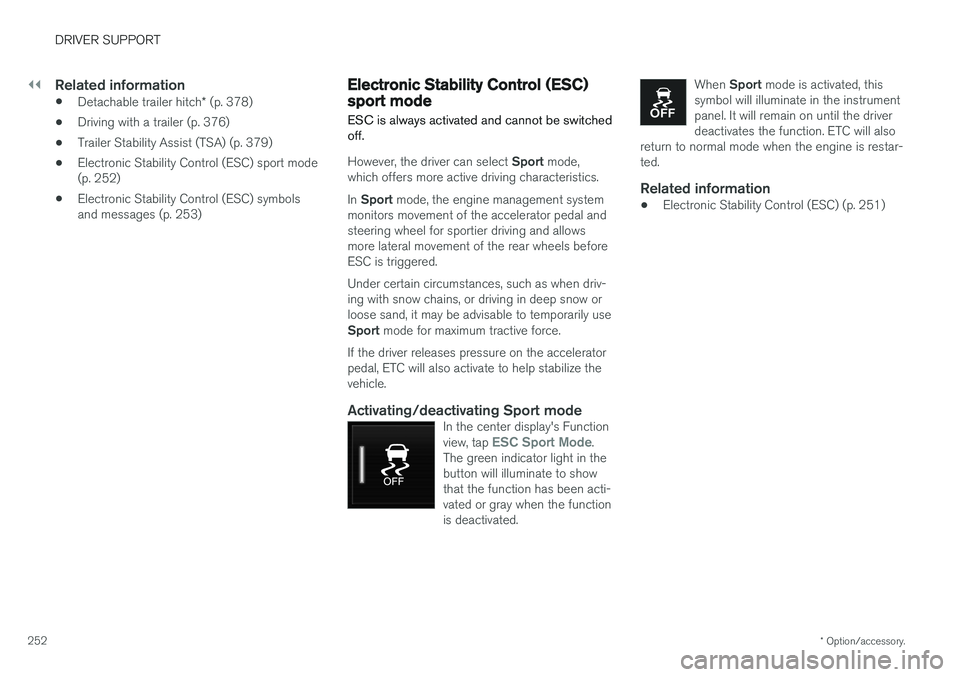
Activating/deactivating Sport modeIn the center display's Function view, tap ESC Sport Mode.
The green indicator light in the button will illuminate to showthat the function has been acti-vated or gray when the functionis deactivated.
When Sport mode is activated, this
symbol will illuminate in the instrument panel. It will remain on until the driverdeactivates the function. ETC will also
return to normal mode when the engine is restar-ted.
Related information
• Electronic Stability Control (ESC) (p. 251)
Page 255 of 560
DRIVER SUPPORT
}}
253
Electronic Stability Control (ESC) symbols and messages
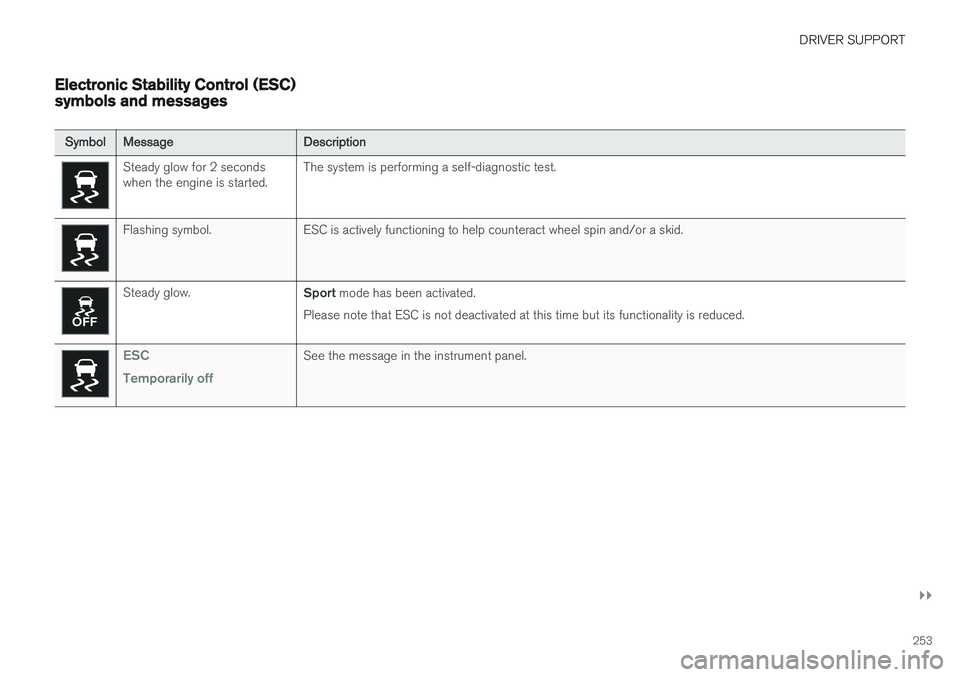
SymbolMessage Description
Steady glow for 2 seconds when the engine is started.The system is performing a self-diagnostic test.
Flashing symbol. ESC is actively functioning to help counteract wheel spin and/or a skid.
Steady glow.
Sport mode has been activated.
Please note that ESC is not deactivated at this time but its functionality is reduced.
ESC Temporarily offSee the message in the instrument panel.
Page 257 of 560
DRIVER SUPPORT
}}
* Option/accessory.255
Roll stability control (RSC)
Volvo's Roll Stability Control (RSC) is a stability system designed to help minimize the risk of arollover in emergency maneuvers or if a skidshould occur.
RSC registers the amount of change in the lat- eral angle at which the vehicle is leaning. Usingthis information, RSC calculates the likelihood ofa rollover. If there is an imminent risk of a rollover,the stability system is activated, power to theengine is cut and the brakes are applied to oneor more of the wheels until the vehicle regainsstability.
WARNING
The vehicle
Page 261 of 560
DRIVER SUPPORT
}}
* Option/accessory.259
Activating/deactivating the Automatic Speed Limiter (ASL) *
The function Automatic Speed Limiter (ASL) is a
supplement to the Speed Limiter (SL) and can be activated/deactivated.
ASL is activated/deactivated in the center display's Functionview.
Activating ASL
With SL activated: 1.
Tap the
Speed Sign Assist button in the
center display's Function view.
> ASL will go into standby mode and a green indicator light in the button will illu- minate. A road sign symbol will be dis-played in center of the speedometer.
2. Press the
button on the left-side steer-
ing wheel keypad.
> ASL will be activated with the vehicle's current speed.
Deactivating ASL
–Tap the Speed Sign Assist button in the
center display's Function view.
> ASL will be deactivated, the indicator will be GRAY and the Speed limiter (SL) will be activated.
WARNING
After switching from ASL to SL, the vehicle will no longer adapt speed to posted speedlimits. It will only limit the vehicle's maximumspeed.
Related information
• Speed limiter (SL)
* (p. 255)
• Automatic Speed Limiter (ASL)
* (p. 257)
Changing tolerance for the Automatic Speed Limiter
Automatic Speed Limiter can be set to different tolerance levels.
Posted speed limit toleranceASL can be set to allow the vehicle to drive above or below the posted speed limit. For exam-ple, if the current posted speed limit is 43 mph(70 km/h), the driver can opt to allow the vehicleto drive at a speed of 47 mph (75 km/h).
Page 265 of 560
DRIVER SUPPORT
* Option/accessory.263
NOTE
Before CC can be activated, the vehicle's speed must be at least 20 mph (30 km/h).This is also the lowest speed that can be set.
Activating CC (putting it in active mode and setting a speed)
–With the symbol displayed (CC is in
standby mode), press the
button (2) on
the left-side steering wheel keypad.
> This puts CC in active mode and will maintain the vehicle's current speed.
Related information
• Cruise Control (CC) (p. 262)
• Switching between Cruise Control and Adaptive Cruise Control
* (p. 266)
• Deactivating/resuming Cruise Control (CC) (p. 264)
• Turning Cruise Control off (p. 265)
Changing Cruise Control speed
Changing a set speed
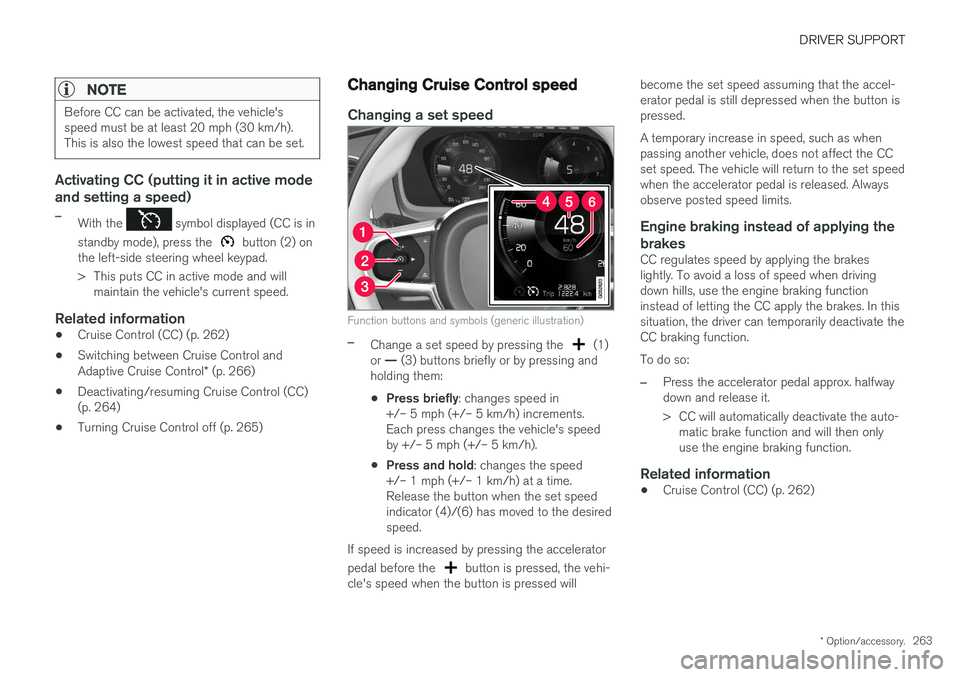
Function buttons and symbols (generic illustration)
–Change a set speed by pressing the (1)
or — (3) buttons briefly or by pressing and
holding them:
• Press briefly
: changes speed in
+/– 5 mph (+/– 5 km/h) increments. Each press changes the vehicle's speedby +/– 5 mph (+/– 5 km/h).
• Press and hold
: changes the speed
+/– 1 mph (+/– 1 km/h) at a time.Release the button when the set speedindicator (4)/(6) has moved to the desiredspeed.
If speed is increased by pressing the accelerator pedal before the
button is pressed, the vehi-
cle's speed when the button is pressed will become the set speed assuming that the accel- erator pedal is still depressed when the button ispressed. A temporary increase in speed, such as when passing another vehicle, does not affect the CCset speed. The vehicle will return to the set speedwhen the accelerator pedal is released. Alwaysobserve posted speed limits.
Engine braking instead of applying the
brakes
CC regulates speed by applying the brakeslightly. To avoid a loss of speed when drivingdown hills, use the engine braking functioninstead of letting the CC apply the brakes. In thissituation, the driver can temporarily deactivate theCC braking function. To do so:
–Press the accelerator pedal approx. halfway down and release it.
> CC will automatically deactivate the auto- matic brake function and will then only use the engine braking function.
Related information
• Cruise Control (CC) (p. 262)