steering VOLVO XC90 2017 Owner´s Manual
[x] Cancel search | Manufacturer: VOLVO, Model Year: 2017, Model line: XC90, Model: VOLVO XC90 2017Pages: 560, PDF Size: 9.97 MB
Page 296 of 560
||
DRIVER SUPPORT
* Option/accessory.
294
WARNING
Pilot Assist is not a collision avoidance sys- tem. The driver is always responsible forsteering or applying the brakes if the systemdoes not detect another vehicle. Do not use Pilot Assist in demanding driving conditions such as city driving or other heavytraffic situations, in slippery conditions, whenthere is a great deal of water or slush on theroad, during heavy rain or snow, in poor visibil-ity, on winding roads or on highway on- or off-ramps. In certain situations, it may be difficult for Pilot Assist to assist the driver correctly or to deac-tivate automatically. In such cases, it is advisa-ble not to use Pilot Assist. Examples of suchsituations may be:
• the lane's side market lines are missing, badly faded or cross each other.
• the division of lanes is not clear, e.g.,when a line divides or merges withanother, at exits or if there are many roadsigns/markers.
• there are edges or other lines on or nearthe lane, e.g., curbs, cracks, repairedareas, sharp shadows, etc.
• the lane is narrow or winding.
• the lane is at the top of a hill, on anuneven road surface or over a bump.
•bad weather conditions (rain, snow, fog, slush, poor visibility, backlighting, etc).
The driver should also be aware that Pilot Assist has the following limitations: • High curbs, barriers and temporary obsta- cles (cones, barriers etc) may not bedetected or could be detected incorrectlyas side marker lines, which may create arisk of collision. The driver must ensure asafe distance to these obstacles.
• The camera or radar sensor may not beable to detect objects if there are pot-holes or if there are stationary objectspartially or completely blocking the road.
• Pilot Assist does not "see" pedestrians,animals, etc.
• Pilot Assist's steering capacity is limitedand may not always be able to help thedriver keep the vehicle in the lane.
The driver can always take action to override PilotAssist.
Steep roads and/or heavy loadsPilot Assist is primarily intended for use on rela-tively level roads. The function may not be able tomaintain the correct time interval to the vehicleahead on when driving down steep hills. Thedriver should be attentive and prepared to applythe brakes in these situations. Do not use Pilot Assist when the vehicle is trans-porting a heavy load or if it is towing a trailer.
Additional information
•
The Off Road drive mode cannot be
selected if Pilot Assist is activated.
• Pilot Assist uses the vehicle's camera and radar sensor, which have certain general limi-tations. See the articles "Camera limitations"and "Radar sensor limitations" for additionalinformation.
Related information
•
Pilot Assist
* (p. 283)
• Starting and activating Pilot Assist (p. 286)
• Changing Pilot Assist speed (p. 288)
• Setting a Pilot Assist time interval (p. 289)
• Changing target vehicles and automaticbraking with Pilot Assist (p. 292)
• Deactivating/resuming Pilot Assist (p. 290)
• Passing Assistance with Adaptive CruiseControl or Pilot Assist (p. 277)
• Pilot Assist symbols and messages (p. 295)
• Radar sensor limitations (p. 297)
• Camera limitations (p. 301)
Page 312 of 560
DRIVER SUPPORT
310
City Safety when evasive action is not possible
City Safety can help the driver by automatically braking the vehicle sooner if it is not possible tosteer out of a potential collision situation.
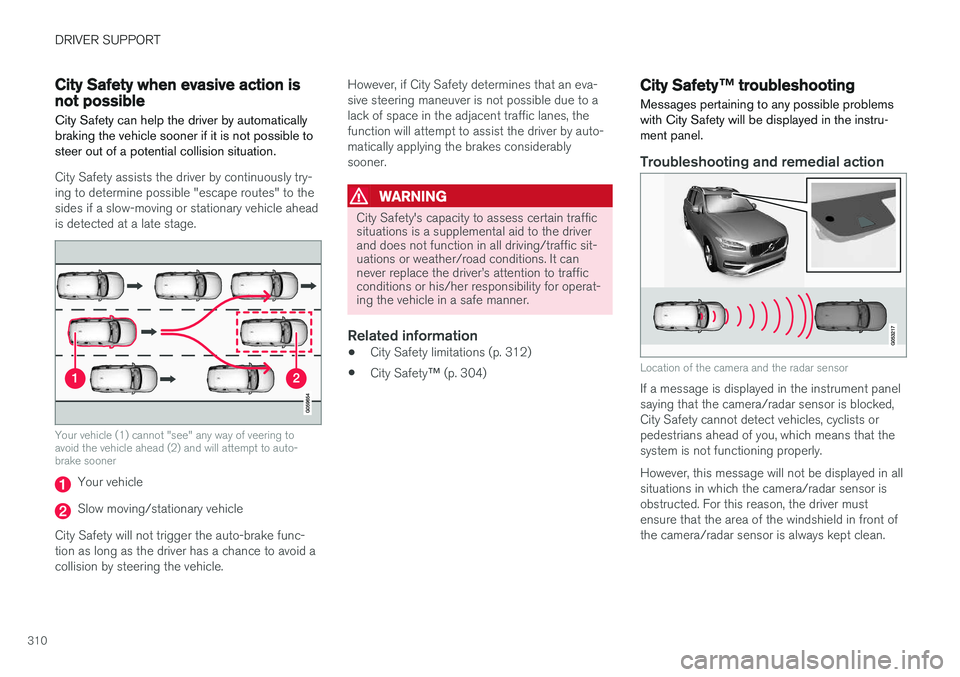
City Safety assists the driver by continuously try- ing to determine possible "escape routes" to thesides if a slow-moving or stationary vehicle aheadis detected at a late stage.
Your vehicle (1) cannot "see" any way of veering to avoid the vehicle ahead (2) and will attempt to auto-brake sooner
Your vehicle
Slow moving/stationary vehicle
City Safety will not trigger the auto-brake func- tion as long as the driver has a chance to avoid acollision by steering the vehicle. However, if City Safety determines that an eva-sive steering maneuver is not possible due to alack of space in the adjacent traffic lanes, thefunction will attempt to assist the driver by auto-matically applying the brakes considerablysooner.
WARNING
City Safety's capacity to assess certain traffic situations is a supplemental aid to the driverand does not function in all driving/traffic sit-uations or weather/road conditions. It cannever replace the driver
Page 317 of 560
DRIVER SUPPORT
315
City Safety symbols and messages
A number of City Safety-related messages may be displayed in the instrument panel.
Several examples are provided in the following table:
Message Explanation
Automatic intervention City SafetyWhen City Safety is braking or has applied the brakes, one of more symbols may illuminate in the instrument panel and a text message will be displayed.
City Safety Reduced functionality Service requiredThe system is not functioning properly. Contact a trained and authorized Volvo service technician.
A text message can be erased by briefly pressing the O button on the right-side steering wheel
keypad. If the message recurs, contact a trained and authorized Volvo service technician orretailer.
Related information
• City Safety
™ (p. 304)
Page 325 of 560
DRIVER SUPPORT
* Option/accessory.323
Blind Spot Information (BLIS) * with
Cross Traffic Alert (CTA) * symbols
and messages
In situations where Blind Spot Information and/or Cross Traffic Alert are not functioning properly or if the function is interrupted, a sym-bol and a text message may be displayed in theinstrument panel. Follow the instructions provi-ded.
The following table lists several symbols and messages:
Message
Explanation
Blind spot sensor Service requiredThe system is not functioning properly. Contact a trained and qualified Volvo service technician
Blind spot system off Trailer attachedBLIS and CTA have been deactivated because a trailer has been connected to teh vehicle's electrical system.
A text message can be erased by briefly pressing the O button on the right-side steering wheel
keypad. If the message recurs, contact a trained and authorized Volvo service technician orretailer.
Related information
• Cross Traffic Alert (CTA)
* (p. 319)
• Blind Spot Information (BLIS)
* (p. 317)
Page 331 of 560
DRIVER SUPPORT
}}
329
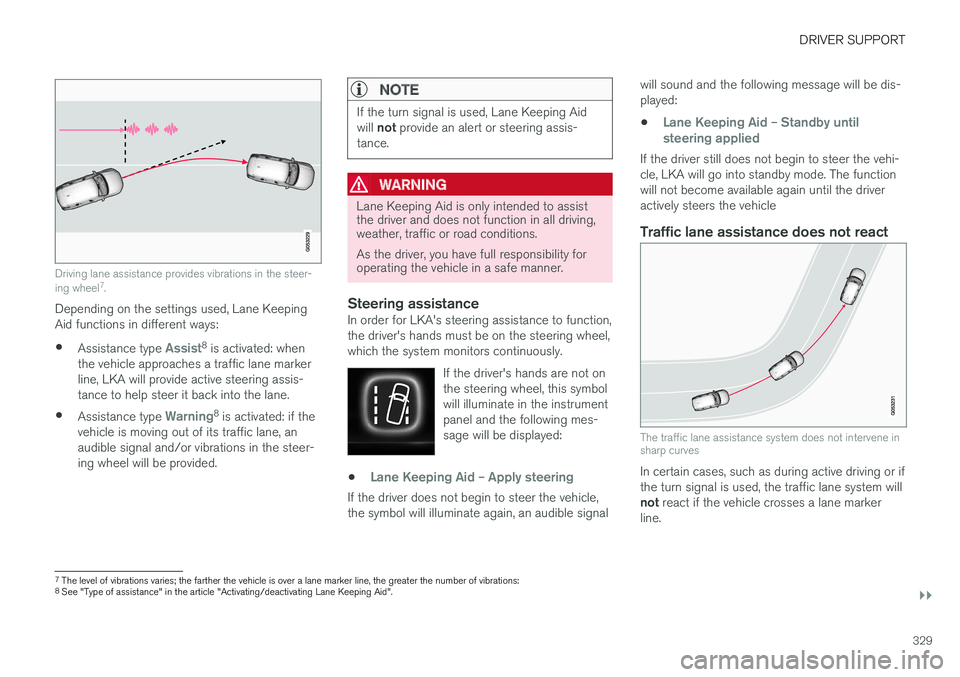
Driving lane assistance provides vibrations in the steer- ing wheel7
.
Depending on the settings used, Lane Keeping Aid functions in different ways:
• Assistance type
Assist8
is activated: when
the vehicle approaches a traffic lane marker line, LKA will provide active steering assis-tance to help steer it back into the lane.
• Assistance type
Warning8
is activated: if the
vehicle is moving out of its traffic lane, an audible signal and/or vibrations in the steer-ing wheel will be provided.
NOTE
If the turn signal is used, Lane Keeping Aid will not provide an alert or steering assis-
tance.
WARNING
Lane Keeping Aid is only intended to assist the driver and does not function in all driving,weather, traffic or road conditions. As the driver, you have full responsibility for operating the vehicle in a safe manner.
Steering assistanceIn order for LKA's steering assistance to function, the driver's hands must be on the steering wheel,which the system monitors continuously.
If the driver's hands are not onthe steering wheel, this symbolwill illuminate in the instrumentpanel and the following mes-sage will be displayed:
•Lane Keeping Aid – Apply steering
If the driver does not begin to steer the vehicle, the symbol will illuminate again, an audible signal will sound and the following message will be dis-played:
•
Lane Keeping Aid – Standby until
steering applied
If the driver still does not begin to steer the vehi- cle, LKA will go into standby mode. The functionwill not become available again until the driveractively steers the vehicle
Traffic lane assistance does not react
The traffic lane assistance system does not intervene in sharp curves
In certain cases, such as during active driving or if the turn signal is used, the traffic lane system will not react if the vehicle crosses a lane marker
line.
7 The level of vibrations varies; the farther the vehicle is over a lane marker line, the greater the number of vibrations:
8 See "Type of assistance" in the article "Activating/deactivating Lane Keeping Aid".
Page 332 of 560
||
DRIVER SUPPORT
330
LimitationsIn certain demanding driving situations, the driv- ing lane assistance functions may not be able toassist the driver. In these situations, it may beadvisable to turn the function off. Examples of such situations: •road construction
• winter driving conditions
• poor road surfaces
• a very active driving style
• bad weather with reduced visibility
• edges or lines other than the lane's marker lines
• roads with indistinct or no lane marker lines
The driving lane assistance function use the vehi-cle's camera, which has general limitations. Seethe article "Camera limitations."
Related information
• Activating/deactivating Lane Keeping Aid(LKA) (p. 330)
• Camera limitations (p. 301)
• Run-off Mitigation (p. 333)
Activating/deactivating Lane Keeping Aid (LKA) LKA can be activated/deactivated.
Activating/deactivating
The function can be activated/deactivated in the center display's Function view.
–Tap Lane Keeping Aid.
> LKA is activated (GREEN indicator light in the button), or is deactivated (GRAY indi- cator light in the button).
Type of warningChoose the type of warning that the driver willreceive if the vehicle starts to leave its drivinglane. 1. Tap
Settings in the center display's Top
view.
2. Tap
My CarIntelliSafeLane
Assistance. 3.
Under
Lane Keeping Aid Warning
Feedback, select:
•
Sound: an audible warning signal will be
provided
•
Vibrations: the driver will be warned by
vibrations in the steering wheel
Type of assistanceSelect the type of assistance LKA should provide: 1. Tap
Settings in the center display's Top
view.
2. Tap
My CarIntelliSafeLane
Assistance.
3. Under
Lane Keeping Aid Mode, select:
•
Assist: the system will provide steering
assistance but no warning.
•
Both: the system will provide steering
assistance and warning
•
Warning: the system will provide warning
but no steering assistance
Related information
• Driving lane assistance (p. 328)
• Driving lane assistance symbols and mes- sages (p. 331)
Page 333 of 560
DRIVER SUPPORT
}}
331
Driving lane assistance symbols and messages
A number of symbols and messages relating to Lane Keeping Aid (LKA) may appear in theinstrument panel.
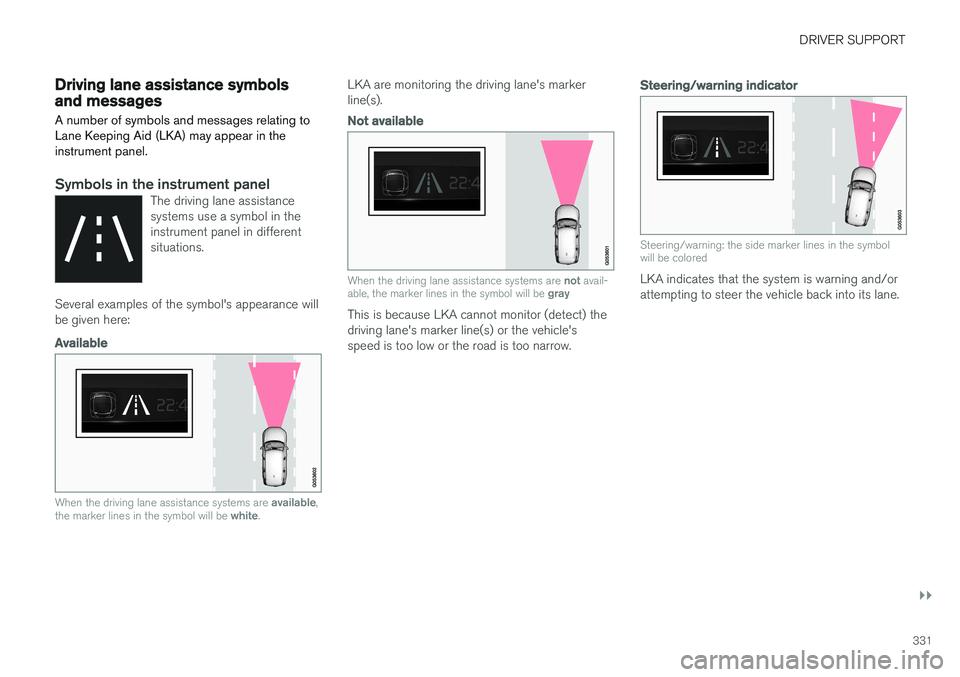
Symbols in the instrument panelThe driving lane assistance systems use a symbol in theinstrument panel in differentsituations.
Several examples of the symbol's appearance will be given here:
Available
When the driving lane assistance systems are available,
the marker lines in the symbol will be white.
LKA are monitoring the driving lane's marker line(s).
Not available
When the driving lane assistance systems are not avail-
able, the marker lines in the symbol will be gray
This is because LKA cannot monitor (detect) the driving lane's marker line(s) or the vehicle'sspeed is too low or the road is too narrow.
Steering/warning indicator
Steering/warning: the side marker lines in the symbol will be colored
LKA indicates that the system is warning and/or attempting to steer the vehicle back into its lane.
Page 334 of 560
||
DRIVER SUPPORT
332
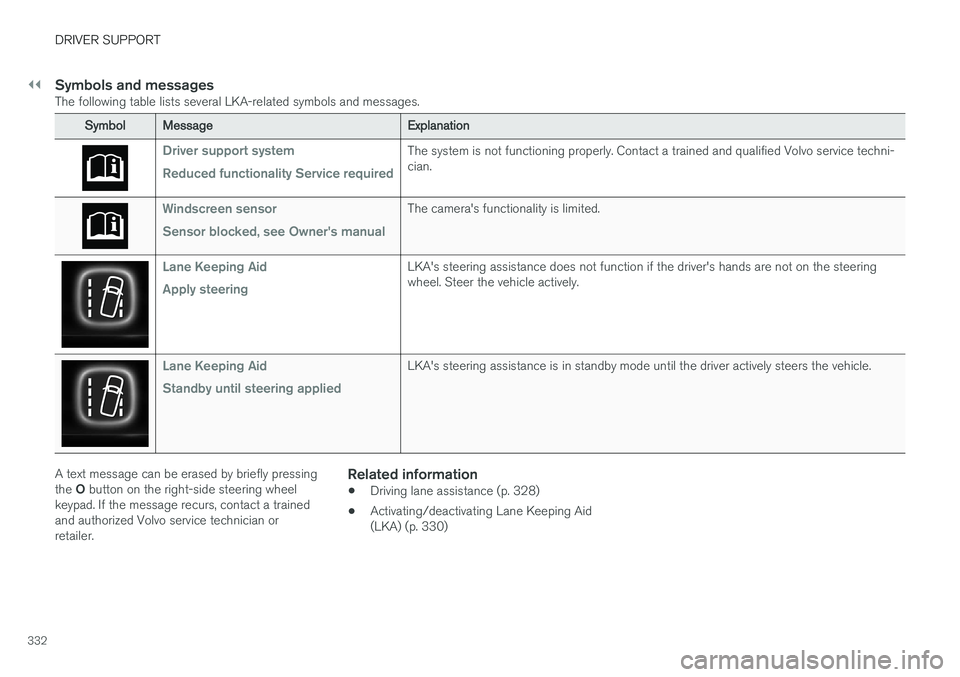
Symbols and messagesThe following table lists several LKA-related symbols and messages.
SymbolMessage Explanation
Driver support system Reduced functionality Service requiredThe system is not functioning properly. Contact a trained and qualified Volvo service techni- cian.
Windscreen sensor Sensor blocked, see Owner's manualThe camera's functionality is limited.
Lane Keeping Aid Apply steeringLKA's steering assistance does not function if the driver's hands are not on the steering wheel. Steer the vehicle actively.
Lane Keeping Aid Standby until steering appliedLKA's steering assistance is in standby mode until the driver actively steers the vehicle.
A text message can be erased by briefly pressing the O button on the right-side steering wheel
keypad. If the message recurs, contact a trained and authorized Volvo service technician orretailer.Related information
• Driving lane assistance (p. 328)
• Activating/deactivating Lane Keeping Aid(LKA) (p. 330)
Page 335 of 560
DRIVER SUPPORT
}}
333
Run-off Mitigation
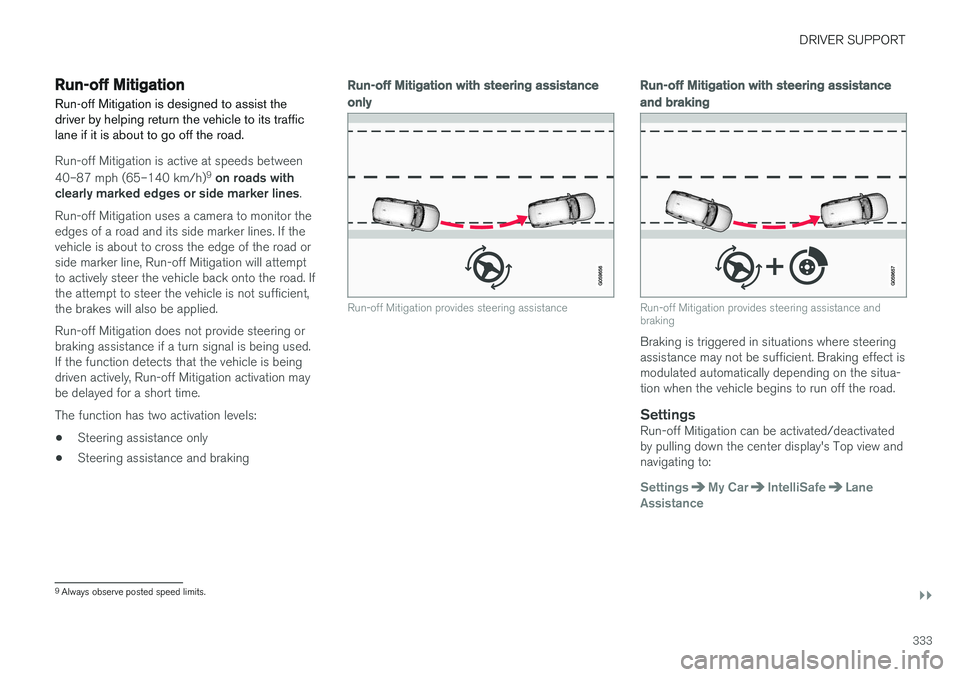
Run-off Mitigation is designed to assist the driver by helping return the vehicle to its trafficlane if it is about to go off the road.
Run-off Mitigation is active at speeds between 40–87 mph (65–140 km/h) 9
on roads with
clearly marked edges or side marker lines .
Run-off Mitigation uses a camera to monitor the edges of a road and its side marker lines. If thevehicle is about to cross the edge of the road orside marker line, Run-off Mitigation will attemptto actively steer the vehicle back onto the road. Ifthe attempt to steer the vehicle is not sufficient,the brakes will also be applied. Run-off Mitigation does not provide steering or braking assistance if a turn signal is being used.If the function detects that the vehicle is beingdriven actively, Run-off Mitigation activation maybe delayed for a short time. The function has two activation levels: • Steering assistance only
• Steering assistance and braking
Run-off Mitigation
with steering assistance
only
Run-off Mitigation provides steering assistance
Run-off Mitigation with steering assistance
and braking
Run-off Mitigation provides steering assistance and braking
Braking is triggered in situations where steering assistance may not be sufficient. Braking effect ismodulated automatically depending on the situa-tion when the vehicle begins to run off the road.
SettingsRun-off Mitigation can be activated/deactivatedby pulling down the center display's Top view andnavigating to:
SettingsMy CarIntelliSafeLane
Assistance
9 Always observe posted speed limits.
Page 336 of 560
||
DRIVER SUPPORT
* Option/accessory.
334 To activate Run-off Mitigation:
• Select (tap) the box for
Collision
Avoidance Assistance, Steering aid
during increased collision risk.
The setting selected when the engine was switched off will be used the next time theengine is started.
LimitationsIn certain situations, it may be difficult for Run-offMitigation to assist the driver. In such cases, it isadvisable to deactivate the function. Examples of these situations include:
• road construction
• winter driving conditions
• poor road surfaces
• narrow roads
• a very active driving style
• bad weather with reduced visibility
• edges or lines other than the lane's marker lines
• roads with indistinct or no lane marker lines
The Run-off Mitigation function use the vehicle'scamera, which has general limitations. See thearticle "Camera limitations".
WARNING
• Run-off Mitigation is only intended to assist the driver and does not function inall driving, weather, traffic or road condi-tions.
• This function cannot detect barriers, railsor similar obstructions at the side of aroad or traffic lane.
• As the driver, you have full responsibilityfor operating the vehicle in a safe man-ner.
Related information
•
Run-off Mitigation
* symbols and messages
(p. 335)
• Driving lane assistance (p. 328)
• Camera limitations (p. 301)