tow VOLVO XC90 2017 Owner´s Manual
[x] Cancel search | Manufacturer: VOLVO, Model Year: 2017, Model line: XC90, Model: VOLVO XC90 2017Pages: 560, PDF Size: 9.97 MB
Page 527 of 560
MAINTENANCE AND SERVICING
}}
* Option/accessory.525
Cleaning the interior
Only use cleaning agents and car care products recommended by Volvo. Clean regularly and fol-low the instructions included with the car careproduct.
CAUTION
• Under no circumstances should gasoline, naphtha or similar cleaning agents beused on the plastic or the leather sincethese can cause damage.
• Take extra care when removing stainssuch as ink or lipstick since the coloringcan spread.
• Use solvents sparingly. Too much solventcan damage the seat padding.
• Start from the outside of the stain andwork toward the center.
• Sharp objects (e.g. pencils or pens in apocket) or Velcro fasteners on clothingmay damage the textile upholstery.
• Clothing that is not colorfast, such asnew jeans or suede garments, may stainthe upholstery.
Fabric upholstery and ceiling linerClean with soapy water or a detergent. For more difficult spots caused by oil, ice cream, shoe pol-ish, grease, etc., use a clothing/fabric stainremover. Consult your Volvo retailer.
Leather
* careVolvo's leather upholstery is manufactured with aprotectant to repel soiling. Over time, sunlight,grease and dirt can break down the protection.Staining, cracking, scuffing, and fading can result. Volvo offers an easy-to-use, non-greasy leather care kit formulated to clean and beautify yourvehicle's leather, and to renew the protectivequalities of its finish. The cleaner removes dirtand oil buildup. The light cream protectantrestores a barrier against soil and sunlight. Volvo also offers a special leather softener that should be applied after the cleaner and protec-tant. It leaves leather soft and smooth, andreduces friction between leather and other fin-ishes in the vehicle. Volvo recommends cleaning, protecting and con- ditioning your vehicle's leather two to four times ayear. Ask your Volvo retailer about Leather CareKit 951 0251 and Leather Softener 943 7429.
Cleaning leather upholstery
1. Pour leather cleaner on a damp sponge and
squeeze it until the cleaner foams.
2. Apply the foam to the stain by moving the sponge with circular movements.
3. Dampen the stain thoroughly with the sponge. Let the sponge absorb the stain, do not rub.
4. Dry the stain with soft paper towels or a towel, and allow the leather to dry completely.
Protecting leather upholstery
1. Put a small amount of protectant cream on a cloth and apply a thin coating of cream to the upholstery with light circular movements.
2. Allow the leather to dry for 20 minutes. This will help the leather resist staining and pro- tect against sunlight's harmful UV rays.
Cleaning a leather-covered steering
wheel
• Remove soil, dust, etc., with a damp spongeand a neutral soap solution.
• Leather should be allowed to breath. Nevercover the steering wheel with a plastic pro-tector.
• Volvo recommends cleaning, protecting andconditioning the steering wheel with Volvo'sLeather Care Kit 951 0251 and LeatherSoftener 943 7429.
If there are stains on the steering wheel: Type 1 (ink, wine, coffee, milk, sweat or blood)
–Use a soft cloth or sponge. Wipe the wheel with a solution with 5% ammonia. For bloodstains, mix approx. 1 cup (2 dl) of water andone ounce (25g) of salt and wipe the stain.
Type 2 (fat, oil, sauces, or chocolate)
1. Same procedure as for type I stains.
Page 528 of 560
||
MAINTENANCE AND SERVICING
* Option/accessory.
526 2. Finish by rubbing the wheel with absorbent
paper or a towel.
Type 3 (dry soil or dust)
1. Remove the soil/dust with a soft brush.
2. Same procedure as for type I stains.
CAUTION
Sharp objects, such as rings, could damage the leather on the steering wheel.
Leather panels *Leather should be allowed to breath. Never cover the upper side of the dashboard or door panelswith a plastic protector. Ask your Volvo retailerabout Leather Care Kit 951 0251 and LeatherSoftener 943 7429.
Spots on interior plastic, metal, or wood
surfaces
Cleaning interior plastic components should bedone with a moist microfiber cloth. Consult yourVolvo retailer.
CAUTION
• Do not use cleaning agents with high alcohol content such as washer fluid toclean instrument panel glass.
• Never spray cleaning agents or waterdirectly onto components with electricalbuttons or controls. Clean components ofthis type by applying the cleaning agent/water sparingly to a cloth and wiping thecomponents so that no liquid penetratesinto these components.
Cleaning the seat beltsClean only with lukewarm water and a mild soap solution.
Cleaning floor matsThe floor mats should be vacuumed or brushedclean regularly, especially during winter whenthey should be taken out for drying. Spots on tex-tile mats can be removed with a mild detergent.For best protection in winter, Volvo recommendsthe use of Volvo rubber floor mats. Consult yourVolvo retailer.
WARNING
•
Never use more than one floor mat at a time on the driver's floor. Before driving,remove the original mat from the driver'sseat floor before using any other type offloor mat. Any mat used in this positionshould be securely and properly anchoredin the attaching pins. An extra mat on thedriver's floor can cause the acceleratorand/or brake pedal to catch. Check thatthe movement of these pedals is notimpeded.
• Volvo's floor mats are specially manufac-tured for your car. They must be firmlysecured in the clips on the floor so thatthey cannot slide and become trappedunder the pedals on the driver's side.
Related information
• Cleaning the center display (p. 527)
Page 529 of 560
MAINTENANCE AND SERVICING
527
Cleaning the center display
Marks, stains, etc., on the center display may affect its performance and readability. Clean itregularly with a microfiber cloth.
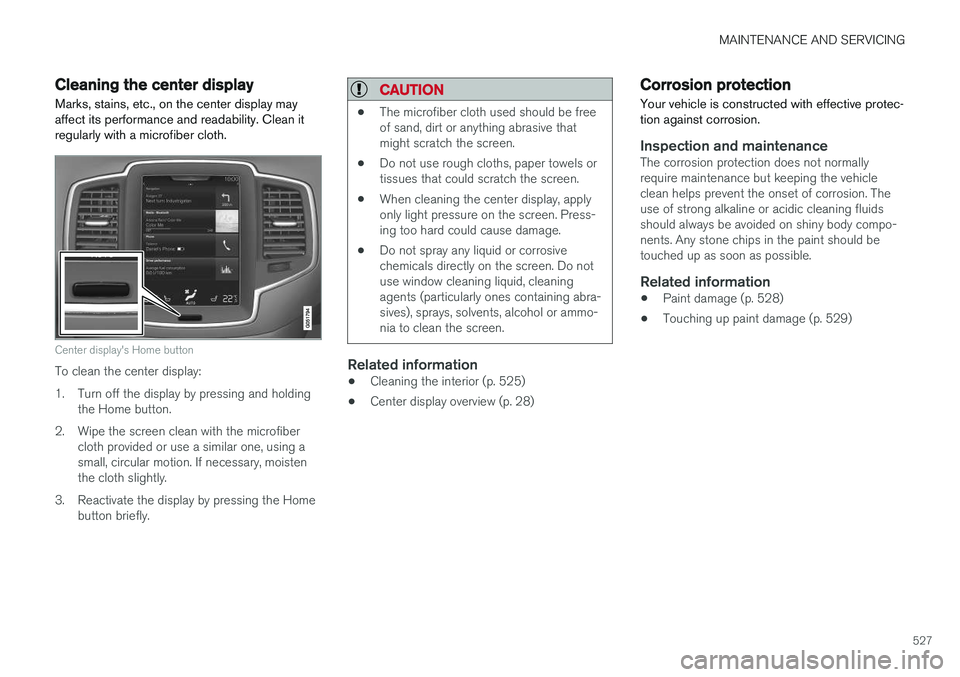
Center display's Home button
To clean the center display:
1. Turn off the display by pressing and holding the Home button.
2. Wipe the screen clean with the microfiber cloth provided or use a similar one, using a small, circular motion. If necessary, moistenthe cloth slightly.
3. Reactivate the display by pressing the Home button briefly.
CAUTION
• The microfiber cloth used should be free of sand, dirt or anything abrasive thatmight scratch the screen.
• Do not use rough cloths, paper towels ortissues that could scratch the screen.
• When cleaning the center display, applyonly light pressure on the screen. Press-ing too hard could cause damage.
• Do not spray any liquid or corrosivechemicals directly on the screen. Do notuse window cleaning liquid, cleaningagents (particularly ones containing abra-sives), sprays, solvents, alcohol or ammo-nia to clean the screen.
Related information
•Cleaning the interior (p. 525)
• Center display overview (p. 28)
Corrosion protection
Your vehicle is constructed with effective protec- tion against corrosion.
Inspection and maintenanceThe corrosion protection does not normally require maintenance but keeping the vehicleclean helps prevent the onset of corrosion. Theuse of strong alkaline or acidic cleaning fluidsshould always be avoided on shiny body compo-nents. Any stone chips in the paint should betouched up as soon as possible.
Related information
• Paint damage (p. 528)
• Touching up paint damage (p. 529)
Page 552 of 560
INDEX
550Engine
overheating 366
Start/Stop 389, 391
starting 382
turning off 384
Engine compartment fuses 494
Engine compartment overview 515
Engine oil 544 checking 516, 517
Engine specifications 542
Environment 15Eyelet towing 367
Eyelets for anchoring loads 216
F
Federal Clean Air Act 480 Flat tires repairing with tire sealing system 471, 473 , 477
Floor mats placing correctly 382
Fluid specifications 540, 541, 546
Fog lights front 144
rear 145
Front airbags 65, 66 disconnecting passenger
Page 557 of 560

INDEX
555
Sun visor 219
Suspension 398
System updates 482
T
Tailgate
locking/unlocking 238
locking/unlocking (private locking) 242operating with the foot movement sen-
sor 232
power operated 240
wiper/washer 159
Tailgate wipers 519
Technician certification 53Temperature perceived 182
Temperature sensor ambient 114
Temporary spare tire 463Tethering wi-fi sharing 443
Three-way catalytic converter 374
Tire inflation pressure 545
Tire Pressure Monitoring System 467, 469 calibrating 470
Tire Pressure Monitoring System (TPMS) 470
Tires 452, 462 changing 462
changing from summer to winter 457
glossary of terms 456
improving economy 452
inflation pressure 460
inflation pressure table 545installing (mounting) a wheel on the
vehicle 466
rotation 453
snow 459
spare 463
specifications 454
storing 453
studded 459
tire pressure monitoring system 467, 469
tire sealing system 471, 473, 477
tread wear indicator 457
uniform tire quality grading 459
wheel bolts 464
Tire sealing system 471, 473, 477 Top tether anchors (child restraint sys- tems) 86
Touching up paint 528, 529
Towbar 378
Towing a trailer 376, 379 trailer hitch 378
Towing eyelet 367Towing the vehicle 369
Traction control 251
Trailer hitch 378
Trailer towing 376, 379 trailer hitch 378
Transmission gear shift indicator 394
general description 392, 394
Hill Start Assist 360
oil 546
shifting with steering wheel paddles 396
shiftlock override 393
Travel Link 413 Alerts 416
Fuel 417
Sports 418
weather 415
Tread wear indicator 457
Trip computer 95, 96, 97 reset 96
Trip odometers 95
Trips, long distance 363
Trip statistics 97
Turn signals 146 changing bulbs 509