light VOLVO XC90 2018 Owner´s Manual
[x] Cancel search | Manufacturer: VOLVO, Model Year: 2018, Model line: XC90, Model: VOLVO XC90 2018Pages: 666, PDF Size: 11.32 MB
Page 597 of 666
MAINTENANCE AND SERVICE
}}
595
Replacing the low beam headlightbulbs
The low beam bulbs in the halogen headlights can be changed without the help of a workshop.
CAUTION
Never touch the bulb glass with your bare fin- gers. Grease and oils from your fingers vapor-ize in the heat and will leave a deposit on thereflector, which may damage it.
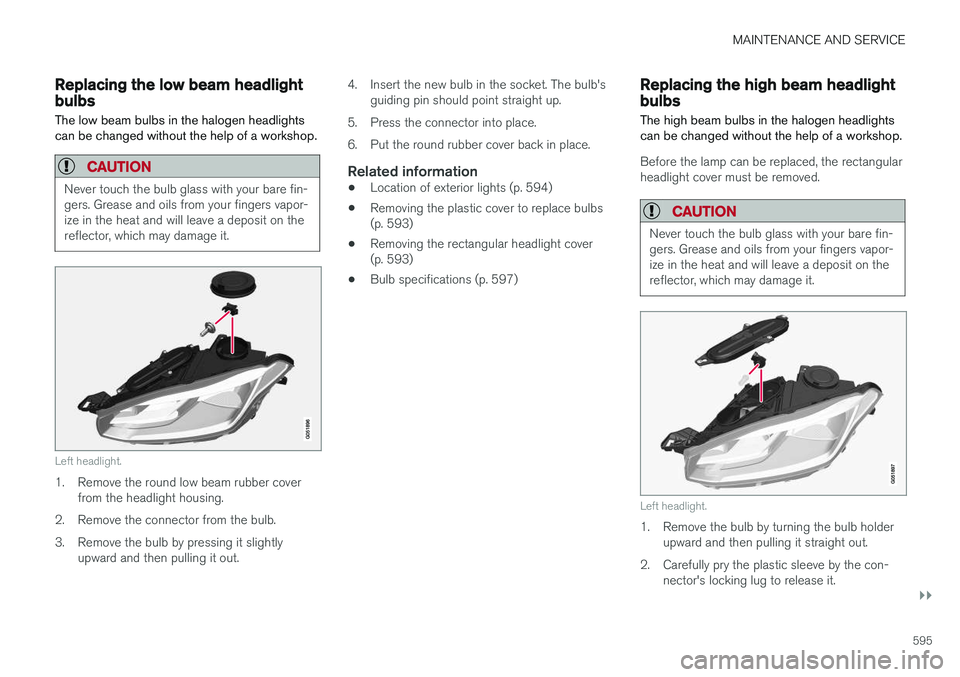
Left headlight.
1. Remove the round low beam rubber cover from the headlight housing.
2. Remove the connector from the bulb.
3. Remove the bulb by pressing it slightly upward and then pulling it out. 4. Insert the new bulb in the socket. The bulb's
guiding pin should point straight up.
5. Press the connector into place.
6. Put the round rubber cover back in place.
Related information
• Location of exterior lights (p. 594)
• Removing the plastic cover to replace bulbs (p. 593)
• Removing the rectangular headlight cover(p. 593)
• Bulb specifications (p. 597)
Replacing the high beam headlightbulbs
The high beam bulbs in the halogen headlights can be changed without the help of a workshop.
Before the lamp can be replaced, the rectangular headlight cover must be removed.
CAUTION
Never touch the bulb glass with your bare fin- gers. Grease and oils from your fingers vapor-ize in the heat and will leave a deposit on thereflector, which may damage it.
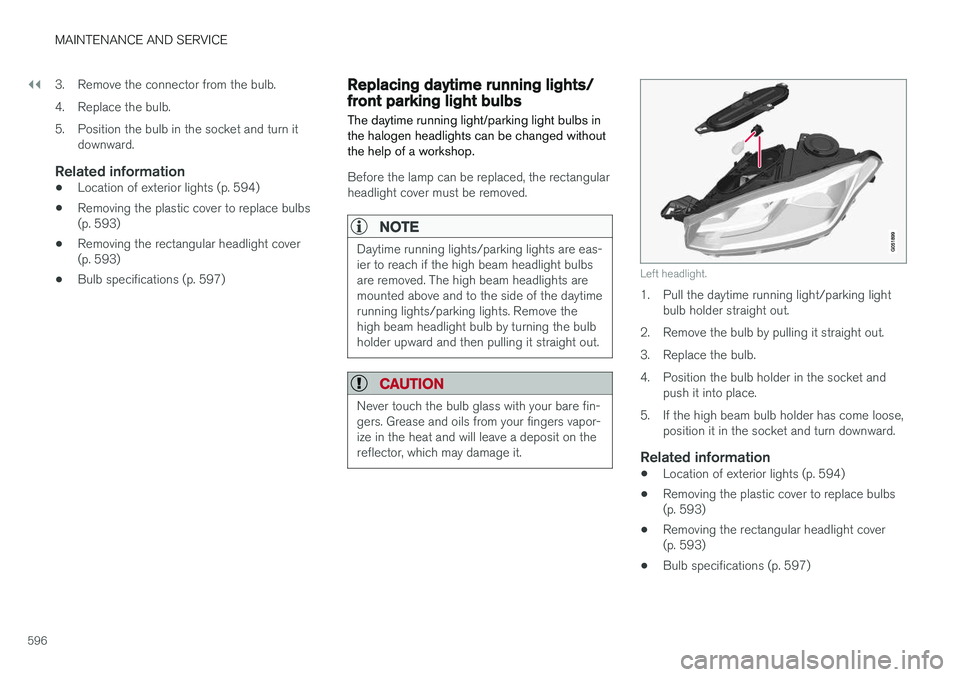
Left headlight.
1. Remove the bulb by turning the bulb holder upward and then pulling it straight out.
2. Carefully pry the plastic sleeve by the con- nector's locking lug to release it.
Page 598 of 666
||
MAINTENANCE AND SERVICE
5963. Remove the connector from the bulb.
4. Replace the bulb.
5. Position the bulb in the socket and turn it
downward.
Related information
• Location of exterior lights (p. 594)
• Removing the plastic cover to replace bulbs (p. 593)
• Removing the rectangular headlight cover(p. 593)
• Bulb specifications (p. 597)
Replacing daytime running lights/front parking light bulbs
The daytime running light/parking light bulbs in the halogen headlights can be changed withoutthe help of a workshop.
Before the lamp can be replaced, the rectangular headlight cover must be removed.
NOTE
Daytime running lights/parking lights are eas- ier to reach if the high beam headlight bulbsare removed. The high beam headlights aremounted above and to the side of the daytimerunning lights/parking lights. Remove thehigh beam headlight bulb by turning the bulbholder upward and then pulling it straight out.
CAUTION
Never touch the bulb glass with your bare fin- gers. Grease and oils from your fingers vapor-ize in the heat and will leave a deposit on thereflector, which may damage it.
Left headlight.
1. Pull the daytime running light/parking light bulb holder straight out.
2. Remove the bulb by pulling it straight out.
3. Replace the bulb.
4. Position the bulb holder in the socket and push it into place.
5. If the high beam bulb holder has come loose, position it in the socket and turn downward.
Related information
• Location of exterior lights (p. 594)
• Removing the plastic cover to replace bulbs (p. 593)
• Removing the rectangular headlight cover(p. 593)
• Bulb specifications (p. 597)
Page 599 of 666
MAINTENANCE AND SERVICE
597
Replacing front turn signal bulbs The turn signal bulbs in the halogen headlights can be changed without the help of a workshop.
Before the lamp can be replaced, the rectangular headlight cover must be removed.
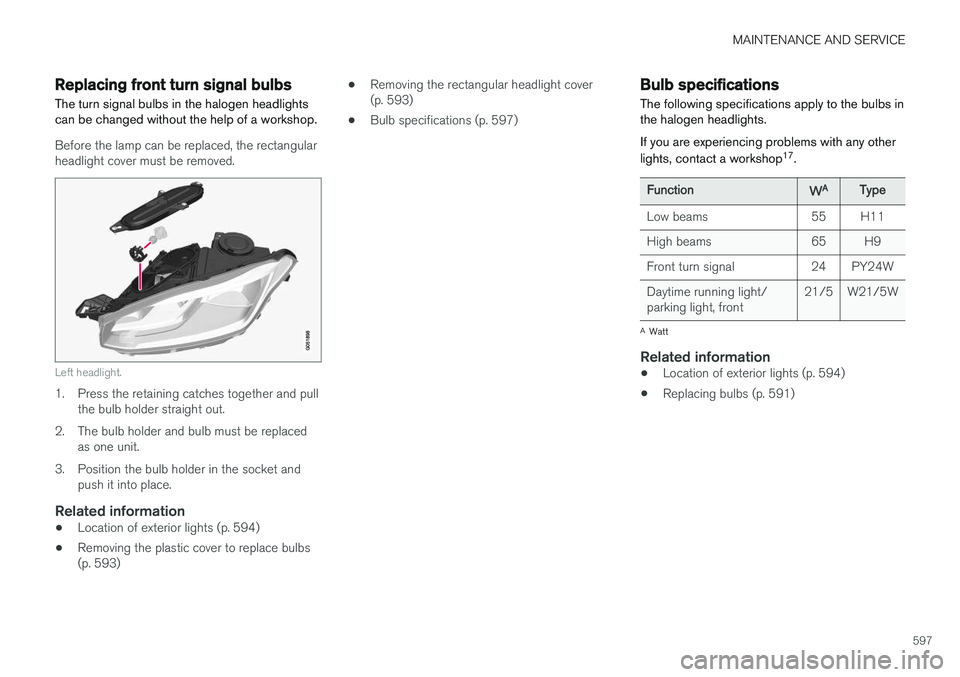
Left headlight.
1. Press the retaining catches together and pullthe bulb holder straight out.
2. The bulb holder and bulb must be replaced as one unit.
3. Position the bulb holder in the socket and push it into place.
Related information
• Location of exterior lights (p. 594)
• Removing the plastic cover to replace bulbs (p. 593) •
Removing the rectangular headlight cover(p. 593)
• Bulb specifications (p. 597)
Bulb specifications The following specifications apply to the bulbs in the halogen headlights. If you are experiencing problems with any other lights, contact a workshop 17
.
FunctionWAType
Low beams 55 H11
High beams 65 H9
Front turn signal 24 PY24WDaytime running light/ parking light, front 21/5 W21/5W
A
Watt
Related information
• Location of exterior lights (p. 594)
• Replacing bulbs (p. 591)
Page 609 of 666
MAINTENANCE AND SERVICE
* Option/accessory.607
FunctionAA
– –
Heated windshield *, left side Shunt
Heated windshield
*, left side 40
Headlight washers
*25
Windshield washer 25
Transmission control module 15
Horn 20
Alarm siren
* 5
Brake system control module (valves, parking brake) 40
Wipers 30
Rear window washer 25
Heated windshield
*, right side 40
20
Brake system control module (ABS pump) 40
– –
Heated windshield
*, right side Shunt
FunctionAA
Fed when ignition is on: engine control module, transmissioncomponents, electrical powersteering, central electrical mod-ule, brake system control mod-ule 5
– –
Right-side headlight 7.5 Right-side headlight, some mod- els with LED
B 15
– –
– –
Battery connection control mod- ule 5
Airbags 5
Left-side headlight 7.5 Left-side headlight, some mod- els with LED
B 15
Accelerator pedal sensor 5
A
Ampere
B LED (Light Emitting Diode)
Related information
• Fuses and fuseboxes (p. 603)
• Replacing fuses (p. 604)
Page 611 of 666
MAINTENANCE AND SERVICE
}}
* Option/accessory.609
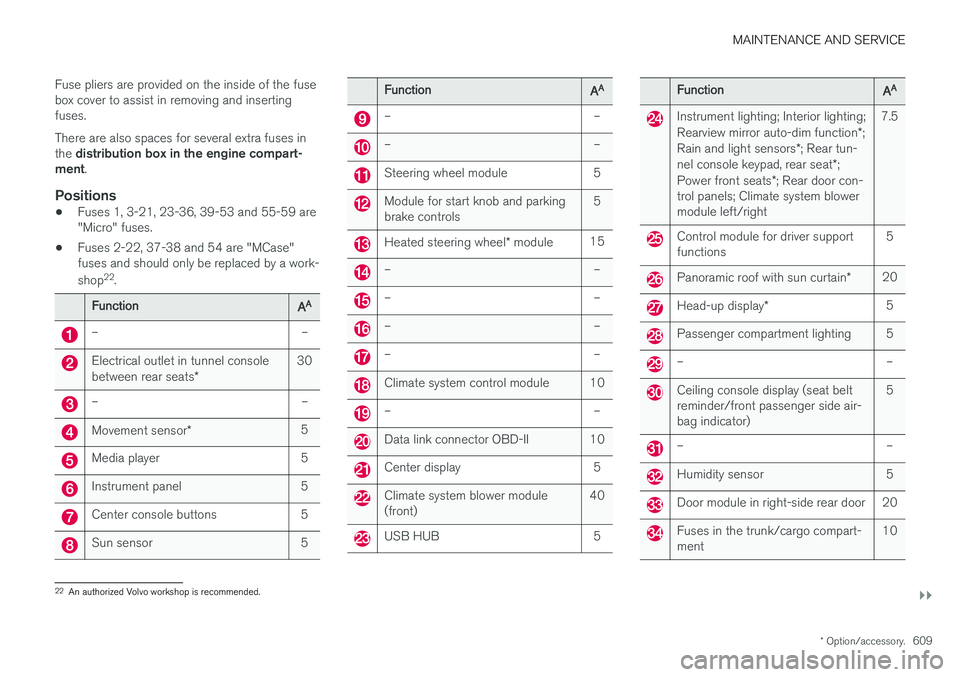
Fuse pliers are provided on the inside of the fuse box cover to assist in removing and insertingfuses. There are also spaces for several extra fuses in the
distribution box in the engine compart-
ment .
Positions
•Fuses 1, 3-21, 23-36, 39-53 and 55-59 are "Micro" fuses.
• Fuses 2-22, 37-38 and 54 are "MCase"fuses and should only be replaced by a work- shop 22
.
FunctionAA
– –
Electrical outlet in tunnel console between rear seats * 30
– –
Movement sensor
* 5
Media player 5
Instrument panel 5
Center console buttons 5
Sun sensor 5
FunctionAA
– –
– –
Steering wheel module 5
Module for start knob and parking brake controls 5
Heated steering wheel
* module 15
– –
– –
– –
– –
Climate system control module 10
– –
Data link connector OBD-II 10
Center display 5
Climate system blower module (front) 40
USB HUB 5
FunctionAA
Instrument lighting; Interior lighting; Rearview mirror auto-dim function
*;
Rain and light sensors *; Rear tun-
nel console keypad, rear seat *;
Power front seats *; Rear door con-
trol panels; Climate system blower module left/right 7.5
Control module for driver support functions
5
Panoramic roof with sun curtain
*20
Head-up display
* 5
Passenger compartment lighting 5
– –
Ceiling console display (seat belt reminder/front passenger side air-bag indicator) 5
– –
Humidity sensor 5
Door module in right-side rear door 20
Fuses in the trunk/cargo compart- ment
10
22
An authorized Volvo workshop is recommended.
Page 617 of 666
MAINTENANCE AND SERVICE
}}
615
Cleaning the interiorOnly use cleaning agents and car care products recommended by Volvo. Clean regularly andtreat stains immediately for best results. It isimportant to vacuum before using a cleaningagent.
CAUTION
• Some colored clothing (for example, dark jeans and suede garments) may stain theupholstery. If this occurs, it is important toclean and treat these parts of the uphols-tery as soon as possible.
• Never use strong solvents such aswasher fluid, gasoline, mineral spirit orconcentrated alcohol to clean the interioras this can damage the upholstery aswell as other interior materials.
• Never spray cleaning agent directly ontocomponents that have electrical buttonsand controls. Wipe instead with a dampcloth with cleaning agent.
• Sharp objects and Velcro can damagethe car's textile upholstery.
Related information
• Cleaning the center display (p. 615)
• Cleaning fabric upholstery and ceiling liner (p. 617)
• Cleaning the seat belt (p. 617) •
Cleaning floor mats and inlay mats (p. 617)
• Cleaning leather upholstery (p. 618)
• Cleaning the leather steering wheel(p. 619)
• Cleaning interior plastic, metal and wood sur-faces (p. 620)
Cleaning the center display
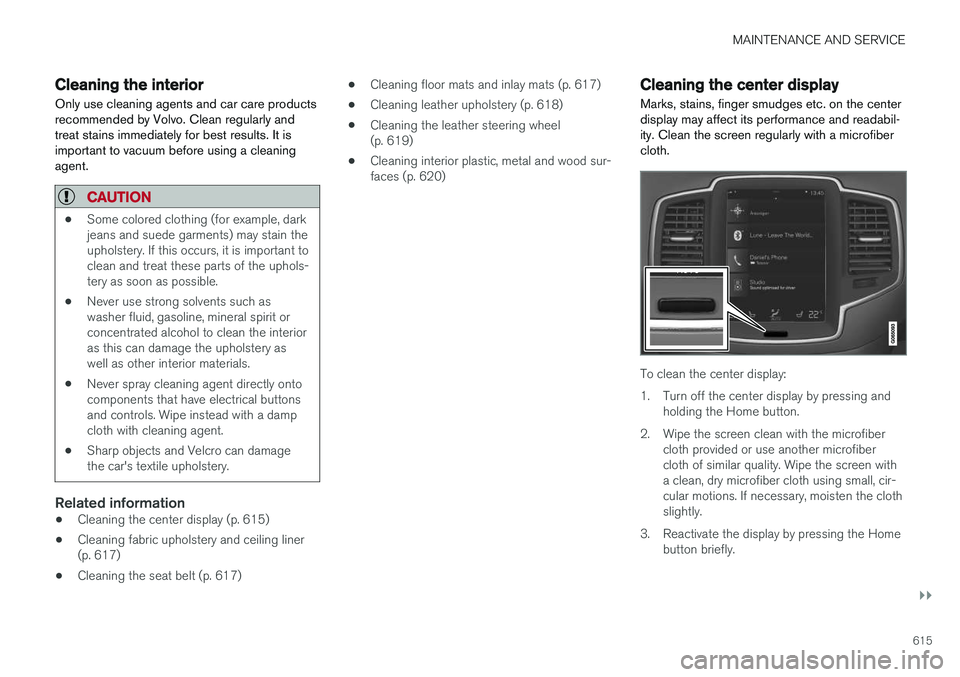
Marks, stains, finger smudges etc. on the center display may affect its performance and readabil-ity. Clean the screen regularly with a microfibercloth.
To clean the center display:
1. Turn off the center display by pressing and holding the Home button.
2. Wipe the screen clean with the microfiber cloth provided or use another microfiber cloth of similar quality. Wipe the screen witha clean, dry microfiber cloth using small, cir-cular motions. If necessary, moisten the clothslightly.
3. Reactivate the display by pressing the Home button briefly.
Page 618 of 666
||
MAINTENANCE AND SERVICE
* Option/accessory.
616
CAUTION
The microfiber cloth must be free of sand and dirt when cleaning the center display.
CAUTION
When cleaning the center display, apply only light pressure to the screen. Pressing toohard could damage the screen.
CAUTION
Do not spray liquid or corrosive chemicals directly onto the center display. Do not usewindow cleaners, cleaning agents, aerosolsprays, solvents, alcohol, ammonia or deter-gents that contain abrasives. Never use abrasive cloths, paper towels or tis- sue paper, as these may scratch the centerdisplay.
Related information
• Cleaning the interior (p. 615)
• Cleaning fabric upholstery and ceiling liner (p. 617)
• Cleaning the seat belt (p. 617)
• Cleaning floor mats and inlay mats (p. 617)
• Cleaning leather upholstery (p. 618) •
Cleaning the leather steering wheel(p. 619)
• Cleaning interior plastic, metal and wood sur-faces (p. 620)
Cleaning the head-up display
*
Carefully wipe the glass covering the head-up display unit with a clean and dry microfiber cloth.If necessary, the cloth may be slightly moistened.
Never use strong stain removers. For difficult cleaning conditions, a special cleaning agent canbe purchased at a Volvo retailer.
Related information
• Activating and deactivating the head-up dis- play
* (p. 146)
• Head-up display
* (p. 144)
Page 620 of 666
||
MAINTENANCE AND SERVICE
* Option/accessory.
618
WARNING
• Never use more than one inlay mat at a time on the driver's floor. If any other typeof floor mat is used, remove the originalmat from the driver's seat floor beforedriving. All types of mats must be securelyanchored in the attachment points in thefloor. Make sure the floor mat does notimpede the movement of the brake pedalor accelerator pedal in any way, as thiscould be a serious safety hazard.
• Volvo's floor mats are specially manufac-tured for your vehicle. They must be prop-erly secured in the attachment points inthe floor to help ensure they cannot slideand become trapped under the pedals.
After vacuuming, a specially designed textilecleaning agent should be used to remove stainson floor mats. Floor mats should be cleaned withproducts recommended by Volvo retailers.
Related information
• Cleaning the interior (p. 615)
• Cleaning the center display (p. 615)
• Cleaning fabric upholstery and ceiling liner(p. 617)
• Cleaning the seat belt (p. 617)
• Cleaning leather upholstery (p. 618) •
Cleaning the leather steering wheel(p. 619)
• Cleaning interior plastic, metal and wood sur-faces (p. 620)
Cleaning leather upholstery
Only use cleaning agents and car care products recommended by Volvo. Clean regularly andtreat stains immediately for best results. It isimportant to vacuum before using a cleaningagent.
Leather upholstery *Volvo's leather upholstery is treated to protect its original appearance. Over time, sunlight, grease,dirt, etc. could break down the protective layer.This could result in scratches and cracking. Leather upholstery is a natural product that changes and acquires a beautiful patina overtime. Regular cleaning and treatments arerequired to preserve the qualities and color of theleather. Volvo offers a comprehensive product,Volvo Leather Care Kit/Wipes, for cleaning andtreating leather upholstery that, when used asdirected, preserves the leather's protective coa-ting. For best results, Volvo recommends cleaning and applying protective cream one to four times ayear (or more as needed). Volvo Leather Care Kit951 0251 and Volvo Leather Softener 9437429 are available for purchase at Volvo retailers.
Page 621 of 666
MAINTENANCE AND SERVICE
619
Cleaning the leather upholstery
1. Apply the leather cleaner to a damp spongeand squeeze it until the cleaner foams.
2. Move the sponge in circular motions to apply the foam to the stain.
3. Dampen the stain thoroughly with the sponge. Let the sponge absorb the stain and do not rub.
4. Dry the stain using a soft towel and let the leather dry completely.
Protecting the leather upholstery
1. Apply a small amount of leather protector toa cloth and then apply the protector to the leather using light circular movements.
2. Let it dry for approximately 20 minutes. Protecting the leather upholstery makes it better able to withstand sunlight's harmful UV rays.
Related information
• Cleaning the interior (p. 615)
• Cleaning the center display (p. 615)
• Cleaning fabric upholstery and ceiling liner(p. 617)
• Cleaning the seat belt (p. 617)
• Cleaning floor mats and inlay mats (p. 617)
• Cleaning the leather steering wheel(p. 619)
• Cleaning interior plastic, metal and wood sur-faces (p. 620)
Cleaning the leather steering wheel
Only use cleaning agents and car care products recommended by Volvo. Clean regularly andtreat stains immediately for best results. It isimportant to vacuum before using a cleaningagent.
Leather steering wheelLeather needs to breathe. Never cover the leather steering wheel with a plastic protector.Volvo Leather Care Kit 951 0251 and LeatherSoftener 943 7429 are recommended for clean-ing the leather steering wheel. First, remove dirt,dust, etc. with a damp sponge or cloth.
CAUTION
Sharp objects such as rings could damage the leather on the steering wheel.
If there are stains on the steering wheel:
Type 1 (ink, wine, coffee, milk, sweat or blood)
–Use a soft cloth or sponge. Wipe the steering wheel using a solution of 5% ammonia. Forblood stains, mix approximately 2 dl(1 cup) ofwater with 25 g (one ounce) of salt and wipethe stain.
Type 2 (grease, oil, sauces or chocolate)
1. Same procedure as for Type 1 stains.
2. Finish by wiping the wheel with an absorbent paper or towel. Type 3
(dry dirt or dust)
1. Remove the dirt/dust using a soft brush.
2. Same procedure as for Type 1 stains.
Related information
• Cleaning the interior (p. 615)
• Cleaning the center display (p. 615)
• Cleaning fabric upholstery and ceiling liner (p. 617)
• Cleaning the seat belt (p. 617)
• Cleaning floor mats and inlay mats (p. 617)
• Cleaning leather upholstery (p. 618)
• Cleaning interior plastic, metal and wood sur-faces (p. 620)
Page 622 of 666
MAINTENANCE AND SERVICE
620
Cleaning interior plastic, metal andwood surfaces Only use cleaning agents and car care products recommended by Volvo. Clean regularly andtreat stains immediately for best results.
Interior plastic, metal and wood surfaces
A lightly dampened microfiber cloth is recom- mended for cleaning interior details and surfaces.These cloths are available for purchase at Volvoretailers. Never scrape or rub a stain. Never use strong stain removers.
CAUTION
Do not use solvent containing alcohol to clean the instrument panel glass.
CAUTION
Keep in mind that glossy surfaces can be easily scratched. Wipe these surfaces with aclean and dry microfiber cloth using small, cir-cular motions. If necessary, moisten the clothlightly with clean water.
Related information
•Cleaning the interior (p. 615)
• Cleaning the center display (p. 615) •
Cleaning fabric upholstery and ceiling liner (p. 617)
• Cleaning the seat belt (p. 617)
• Cleaning floor mats and inlay mats (p. 617)
• Cleaning leather upholstery (p. 618)
• Cleaning the leather steering wheel (p. 619)
Cleaning the exterior
The vehicle should be washed as soon as it becomes dirty. This makes the vehicle easier toclean because dirt does not attach as strongly. Italso reduces the risk of scratches and keeps thevehicle looking new. Wash the vehicle in a carwash or garage with an oil separator. Use a carwashing detergent.
Related information
• Cleaning the exterior (p. 620)
• Polishing and waxing (p. 621)
• Hand washing (p. 621)
• Automatic car washes (p. 623)
• High-pressure washing (p. 624)
• Cleaning the wiper blades (p. 624)
• Cleaning exterior plastic, rubber and trim components (p. 625)
• Cleaning rims (p. 626)
• Corrosion protection (p. 626)