brake VOLVO XC90 2018 Owner´s Manual
[x] Cancel search | Manufacturer: VOLVO, Model Year: 2018, Model line: XC90, Model: VOLVO XC90 2018Pages: 666, PDF Size: 11.32 MB
Page 97 of 666
DISPLAYS AND VOICE CONTROL
}}
95
To change the measurement standard for the temperature sensor and other readings, go tosystem settings in the center display's Top view.
Related information
•
Instrument panel (p. 84)
• Changing system units of measurement(p. 134)
Indicator symbols in the instrumentpanel
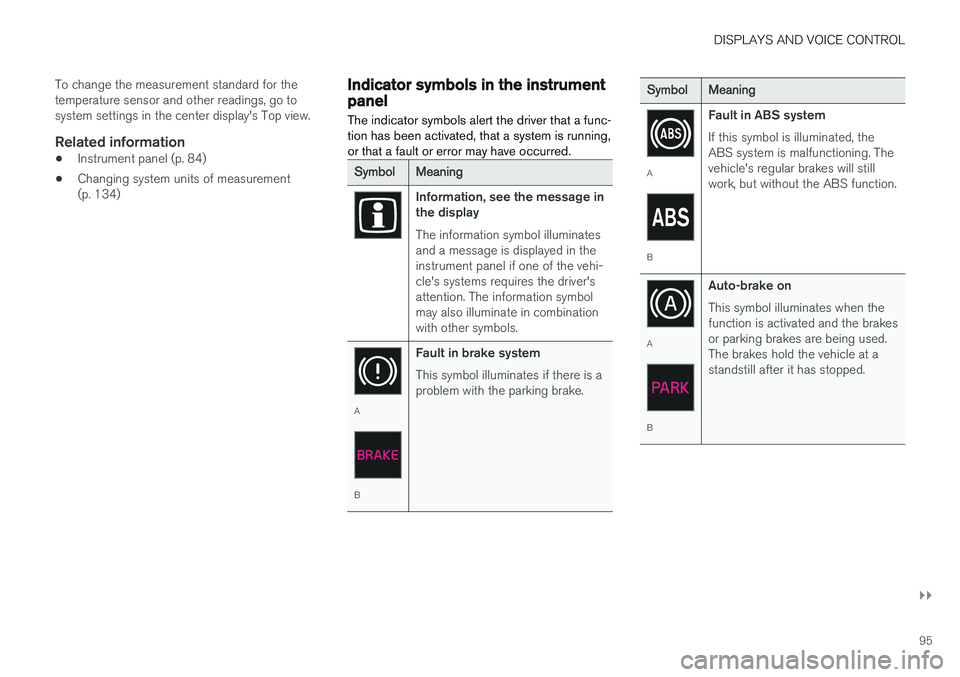
The indicator symbols alert the driver that a func- tion has been activated, that a system is running,or that a fault or error may have occurred.
SymbolMeaning
Information, see the message in the display The information symbol illuminates and a message is displayed in theinstrument panel if one of the vehi-cle's systems requires the driver'sattention. The information symbolmay also illuminate in combinationwith other symbols.
A
B Fault in brake system This symbol illuminates if there is a problem with the parking brake.
SymbolMeaning
A
BFault in ABS system If this symbol is illuminated, the ABS system is malfunctioning. Thevehicle's regular brakes will stillwork, but without the ABS function.
A
BAuto-brake on This symbol illuminates when the function is activated and the brakesor parking brakes are being used.The brakes hold the vehicle at astandstill after it has stopped.
Page 100 of 666
||
DISPLAYS AND VOICE CONTROL
98
SymbolMeaning
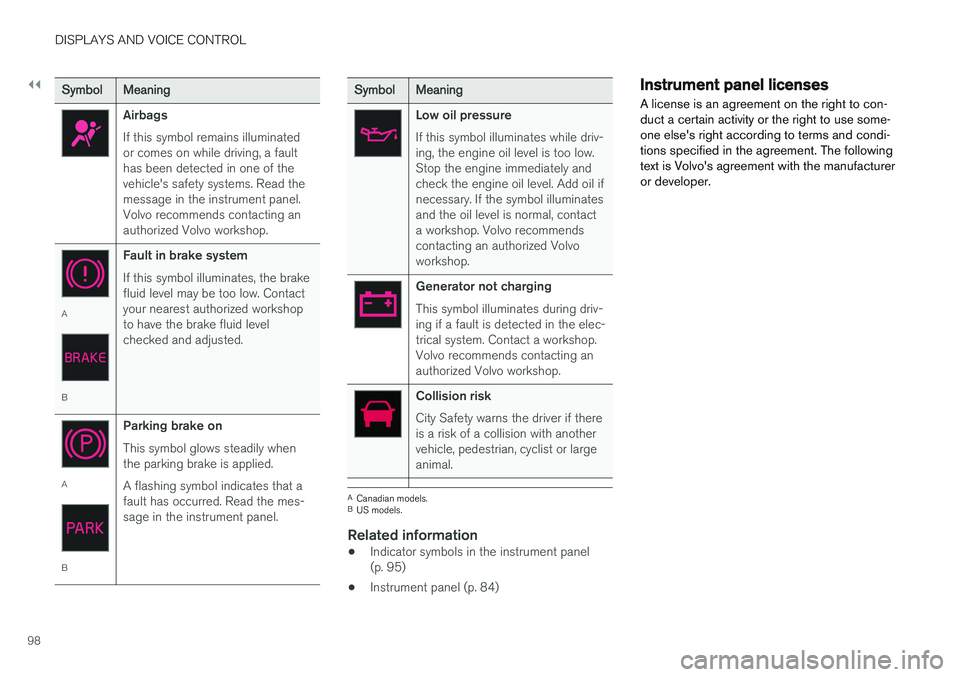
Airbags If this symbol remains illuminated or comes on while driving, a faulthas been detected in one of thevehicle's safety systems. Read themessage in the instrument panel.Volvo recommends contacting anauthorized Volvo workshop.
A
BFault in brake system If this symbol illuminates, the brake fluid level may be too low. Contactyour nearest authorized workshopto have the brake fluid levelchecked and adjusted.
A
BParking brake on This symbol glows steadily when the parking brake is applied. A flashing symbol indicates that a fault has occurred. Read the mes-sage in the instrument panel.
SymbolMeaning
Low oil pressure If this symbol illuminates while driv- ing, the engine oil level is too low.Stop the engine immediately andcheck the engine oil level. Add oil ifnecessary. If the symbol illuminatesand the oil level is normal, contacta workshop. Volvo recommendscontacting an authorized Volvoworkshop.
Generator not charging This symbol illuminates during driv- ing if a fault is detected in the elec-trical system. Contact a workshop.Volvo recommends contacting anauthorized Volvo workshop.
Collision risk City Safety warns the driver if there is a risk of a collision with anothervehicle, pedestrian, cyclist or largeanimal.
A
Canadian models.
B US models.
Related information
• Indicator symbols in the instrument panel (p. 95)
• Instrument panel (p. 84)
Instrument panel licenses
A license is an agreement on the right to con- duct a certain activity or the right to use some-one else's right according to terms and condi-tions specified in the agreement. The followingtext is Volvo's agreement with the manufactureror developer.
Page 140 of 666
||
DISPLAYS AND VOICE CONTROL
* Option/accessory.
138
Type ofsettingDescription
Slider Select a level for a function by pressing and dragging the slider control, e.g. to set volume level.
Informa-tion dis-play This is not an actual setting, butinstead displays information suchas the vehicle's VIN number.
Related information
•
Center display overview (p. 111)
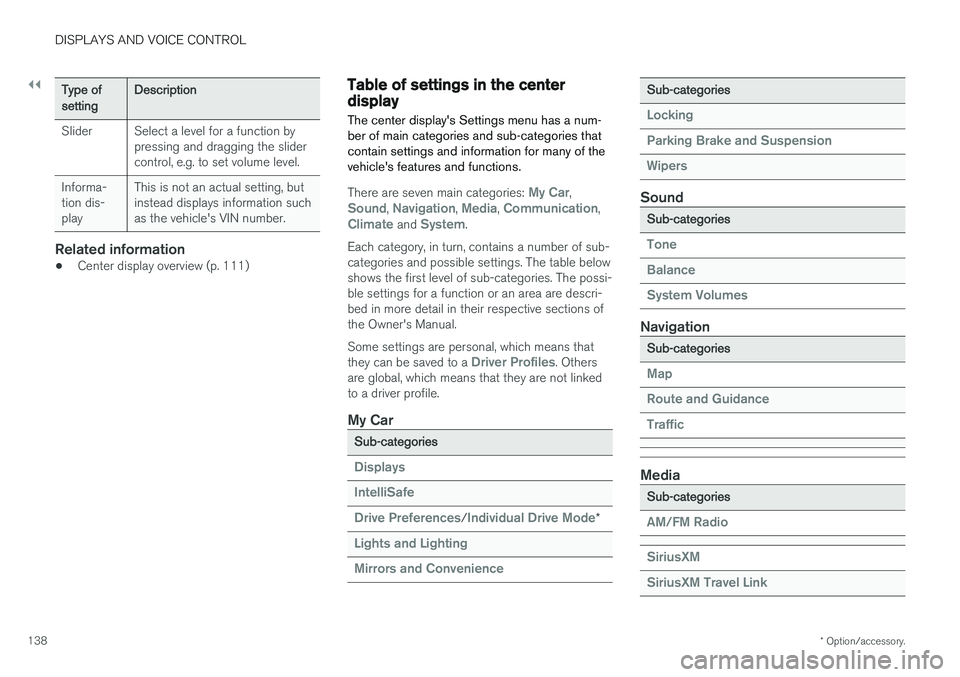
Table of settings in the centerdisplay The center display's Settings menu has a num- ber of main categories and sub-categories thatcontain settings and information for many of thevehicle's features and functions.
There are seven main categories: My Car,Sound, Navigation, Media, Communication,Climate and System.
Each category, in turn, contains a number of sub- categories and possible settings. The table belowshows the first level of sub-categories. The possi-ble settings for a function or an area are descri-bed in more detail in their respective sections ofthe Owner's Manual. Some settings are personal, which means that they can be saved to a
Driver Profiles. Others
are global, which means that they are not linked to a driver profile.
My Car
Sub-categories
Displays IntelliSafe Drive Preferences
/Individual Drive Mode*
Lights and Lighting Mirrors and Convenience
Sub-categories
Locking Parking Brake and SuspensionWipers
Sound
Sub-categories
Tone BalanceSystem Volumes
Navigation
Sub-categories
Map Route and GuidanceTraffic
Media
Sub-categories
AM/FM Radio SiriusXM SiriusXM Travel Link
Page 157 of 666
LIGHTING
* Option/accessory.155
WARNING
The vehicle lighting system cannot in all situa- tions determine when the daylight is too weakor not strong enough, e.g. when there is fogor rain. The driver is always responsible for driving the vehicle with lighting that is safe for the trafficconditions and as specified by applicable traf-fic regulations.
Thumbwheel in instrument panel
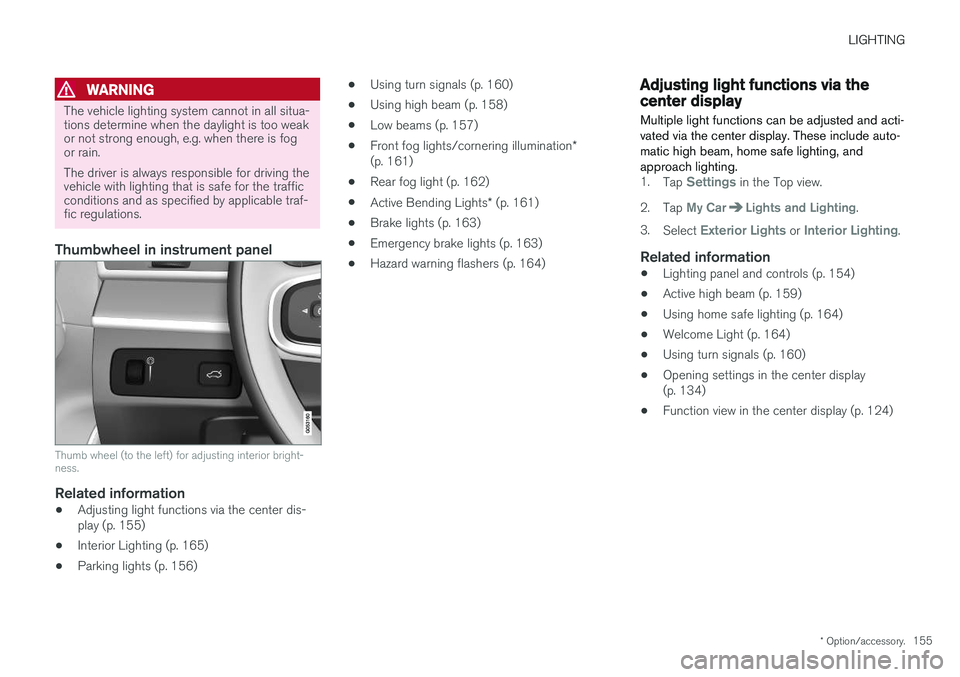
Thumb wheel (to the left) for adjusting interior bright- ness.
Related information
•Adjusting light functions via the center dis- play (p. 155)
• Interior Lighting (p. 165)
• Parking lights (p. 156) •
Using turn signals (p. 160)
• Using high beam (p. 158)
• Low beams (p. 157)
• Front fog lights/cornering illumination
*
(p. 161)
• Rear fog light (p. 162)
• Active Bending Lights
* (p. 161)
• Brake lights (p. 163)
• Emergency brake lights (p. 163)
• Hazard warning flashers (p. 164)
Adjusting light functions via thecenter display
Multiple light functions can be adjusted and acti- vated via the center display. These include auto-matic high beam, home safe lighting, andapproach lighting.
1. Tap Settings in the Top view.
2. Tap
My CarLights and Lighting.
3. Select
Exterior Lights or Interior Lighting.
Related information
• Lighting panel and controls (p. 154)
• Active high beam (p. 159)
• Using home safe lighting (p. 164)
• Welcome Light (p. 164)
• Using turn signals (p. 160)
• Opening settings in the center display (p. 134)
• Function view in the center display (p. 124)
Page 165 of 666
LIGHTING
* Option/accessory.163
Press the button for On/Off. The
symbol in
the instrument panel illuminates when the rear fog light is on. The rear fog light turns off automatically when:
• the start knob is turned clockwise to turn off the ignition or when the lighting ring is turned to the
position.
• the lighting ring is in the
position and
the front fog lights are turned off.
NOTE
Regulations concerning rear fog light use vary from country to country.
Related information
• Lighting panel and controls (p. 154)
• Front fog lights/cornering illumination
*
(p. 161)
• Ignition modes (p. 407)
Brake lights The brake lights are automatically illuminated when braking.
The brake lights illuminate when the brake pedal is depressed. They also illuminate when thebrakes are automatically applied by one of thedriver support systems.
Related information
• Emergency brake lights (p. 163)
• Brake functions (p. 408)
Emergency brake lights
The emergency brake lights are activated to warn following vehicles of hard braking. This function causes an additional taillight on each side of the vehicle to illuminate.
The emergency brake lights are activated in the event of hard braking or if the ABS system isactivated and the vehicle is traveling at a highspeed. After the driver decelerates to a low speed and then releases the brake, the brake lights resumetheir normal brightness.
Related information
• Brake lights (p. 163)
• Brakes (p. 409)
• Hazard warning flashers (p. 164)
Page 166 of 666
LIGHTING
* Option/accessory.
164
Hazard warning flashers
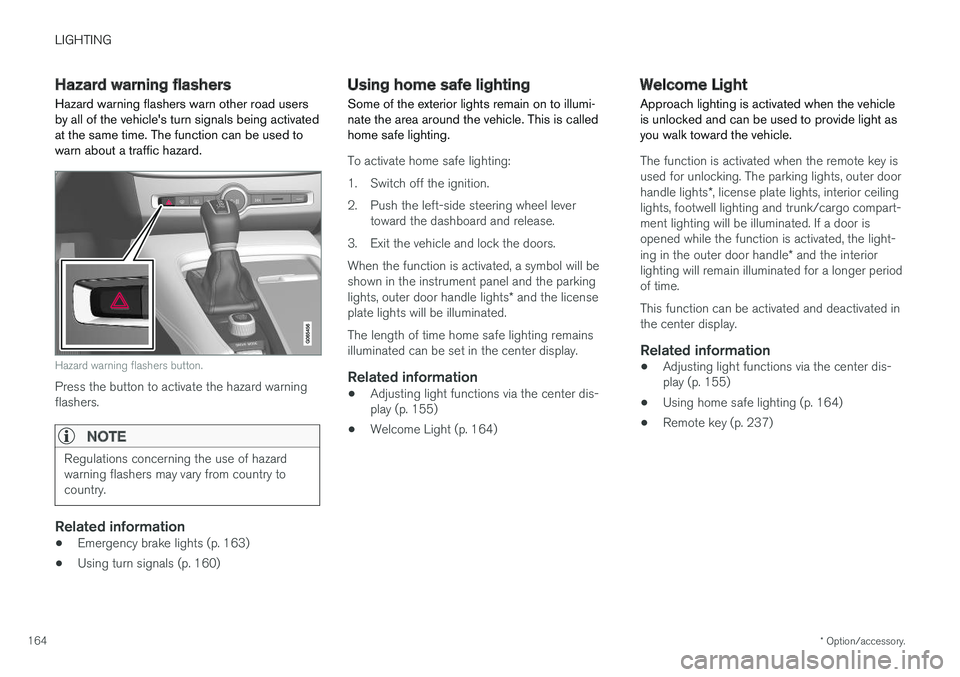
Hazard warning flashers warn other road users by all of the vehicle's turn signals being activatedat the same time. The function can be used towarn about a traffic hazard.
Hazard warning flashers button.
Press the button to activate the hazard warning flashers.
NOTE
Regulations concerning the use of hazard warning flashers may vary from country tocountry.
Related information
• Emergency brake lights (p. 163)
• Using turn signals (p. 160)
Using home safe lighting
Some of the exterior lights remain on to illumi- nate the area around the vehicle. This is calledhome safe lighting.
To activate home safe lighting:
1. Switch off the ignition.
2. Push the left-side steering wheel lever toward the dashboard and release.
3. Exit the vehicle and lock the doors.When the function is activated, a symbol will be shown in the instrument panel and the parking lights, outer door handle lights * and the license
plate lights will be illuminated. The length of time home safe lighting remains illuminated can be set in the center display.
Related information
• Adjusting light functions via the center dis-play (p. 155)
• Welcome Light (p. 164)
Welcome Light Approach lighting is activated when the vehicle is unlocked and can be used to provide light asyou walk toward the vehicle.
The function is activated when the remote key is used for unlocking. The parking lights, outer door handle lights
*, license plate lights, interior ceiling
lights, footwell lighting and trunk/cargo compart- ment lighting will be illuminated. If a door isopened while the function is activated, the light- ing in the outer door handle * and the interior
lighting will remain illuminated for a longer period of time. This function can be activated and deactivated in the center display.
Related information
• Adjusting light functions via the center dis-play (p. 155)
• Using home safe lighting (p. 164)
• Remote key (p. 237)
Page 193 of 666
SEATS AND STEERING WHEEL
* Option/accessory.191
Using stored memory in a poweredfront seat
The memory function can be used to store the settings for the seat, door mirrors and head-up display *.
Using a stored positionA stored position can be used with the front door open or closed:
Front door open
–Briefly press one of the memory buttons (1 -3 ). The seat, door mirrors and head-up
display will move and stop at the positions stored in that button.
Front door closed
–Press and hold one of the memory buttons ( 1 -3 ) until the seat, door mirrors and head-
up display stop in the positions stored in that memory button.
If the memory button is released, the seat, doormirrors and head-up display will stop moving.
WARNING
• Because the front seats can be adjusted with the ignition off, children should neverbe left unattended in the vehicle.
• Movement of the seat can be STOPPEDat any time by pressing any button on thepower seat control panel.
• Do not adjust the seat while driving.
• The seat should be adjusted so that thebrake pedal can be depressed fully. Inaddition, position the seat as far rearwardas comfort and control allow.
• The seat rails on the floor must not beobstructed in any way when the seat is inmotion.
Related information
• Manual front seats (p. 188)
• Power front seats
* (p. 189)
• Adjusting the power front seats
* (p. 189)
• Storing memory settings in power front seats
* (p. 190)
• Adjusting front seat massage settings
*
(p. 192)
• Adjusting front seat cushion length (p. 193)
• Front seat massage settings
* (p. 192)
• Adjusting front seat side bolster settings
*
(p. 194) •
Adjusting front seat lumbar support
* (p. 194)
• Adjusting the passenger seat from the driv-er's seat
* (p. 195)
Page 198 of 666
SEATS AND STEERING WHEEL
* Option/accessory.
196 •
Adjusting front seat side bolster settings
*
(p. 194)
• Adjusting front seat lumbar support
* (p. 194)
Folding the second row backrests
The second row of seats has three individual seating positions. The backrests can be foldeddown separately.
WARNING
• Adjust the seat and ensure it locks into position before driving. Use caution whenadjusting the seat. Uncontrolled or care-less adjustments could lead to injury.
• Long objects must always be securelytied down to help prevent injury or dam-age in the event of sudden braking.
• Always turn off the engine and apply theparking brake when loading or unloadingthe vehicle.
• Put the gear selector in
P to help prevent
the gear selector from being inadvertentlymoved.
CAUTION
When the backrest is folded down, make sure there are no objects in the rear seat, and theseat belts are not buckled. Otherwise there isa risk of damage to the upholstery.
CAUTION
The seat cushion of the integrated child restraint * must be in the stowed position
before the center seat backrest can be folded down. The armrest * in the center seat must be
raised before the seat backrest is folded down. If the vehicle has private locking *, the ski
hatch must be closed before the seat back- rest is folded down.
NOTE
The front seats may need to be pushed for- ward and/or the backrest adjusted so that therear seat backrests can be fully lowered. The rear seats may also need to be moved rearward. The seats in the second row must be in the upright position before they can be foldeddown completely. They should not be foldeddown when they are tilted forward to accessthe third row of seats.
Page 202 of 666
||
SEATS AND STEERING WHEEL
* Option/accessory.
200
WARNING
• Adjust the seat and ensure it locks into position before driving. Use caution whenadjusting the seat. Uncontrolled or care-less adjustments could lead to injury.
• Long objects must always be securelytied down to help prevent injury or dam-age in the event of sudden braking.
• Always turn off the engine and apply theparking brake when loading or unloadingthe vehicle.
• Put the gear selector in
P to help prevent
the gear selector from being inadvertentlymoved.
Related information
• Folding the second row backrests (p. 196)
• Adjusting the second row head restraints(p. 198)
• Adjusting the second row backrest tilt(p. 200)
• Getting into and out of the third row of seats
* (p. 201)
• Folding the third row backrests
* (p. 202)
Adjusting the second row backresttilt
Backrest tilt can be adjusted separately for each seat in the second row.
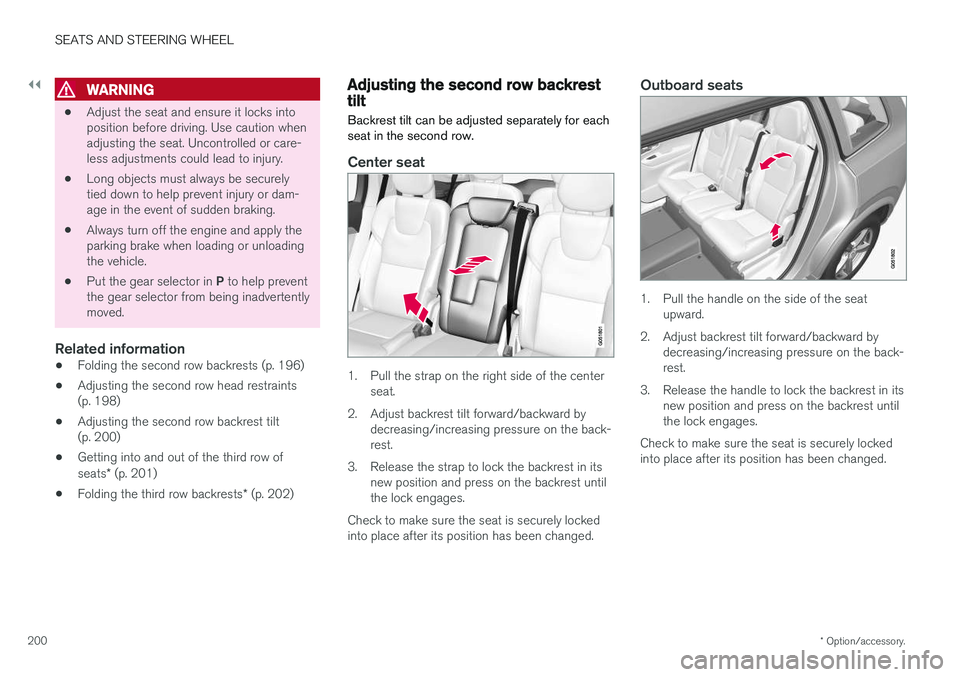
Center seat
1. Pull the strap on the right side of the center seat.
2. Adjust backrest tilt forward/backward by decreasing/increasing pressure on the back- rest.
3. Release the strap to lock the backrest in its new position and press on the backrest untilthe lock engages.
Check to make sure the seat is securely lockedinto place after its position has been changed.
Outboard seats
1. Pull the handle on the side of the seat upward.
2. Adjust backrest tilt forward/backward by decreasing/increasing pressure on the back- rest.
3. Release the handle to lock the backrest in its new position and press on the backrest untilthe lock engages.
Check to make sure the seat is securely lockedinto place after its position has been changed.
Page 203 of 666
SEATS AND STEERING WHEEL
* Option/accessory.201
WARNING
•Adjust the seat and ensure it locks into position before driving. Use caution whenadjusting the seat. Uncontrolled or care-less adjustments could lead to injury.
• Long objects must always be securelytied down to help prevent injury or dam-age in the event of sudden braking.
• Always turn off the engine and apply theparking brake when loading or unloadingthe vehicle.
• Put the gear selector in
P to help prevent
the gear selector from being inadvertentlymoved.
Related information
• Folding the second row backrests (p. 196)
• Adjusting the second row head restraints(p. 198)
• Moving the second row seats forward/rear- ward
* (p. 199)
• Getting into and out of the third row ofseats
* (p. 201)
• Folding the third row backrests
* (p. 202)
Getting into and out of the third row
of seats *
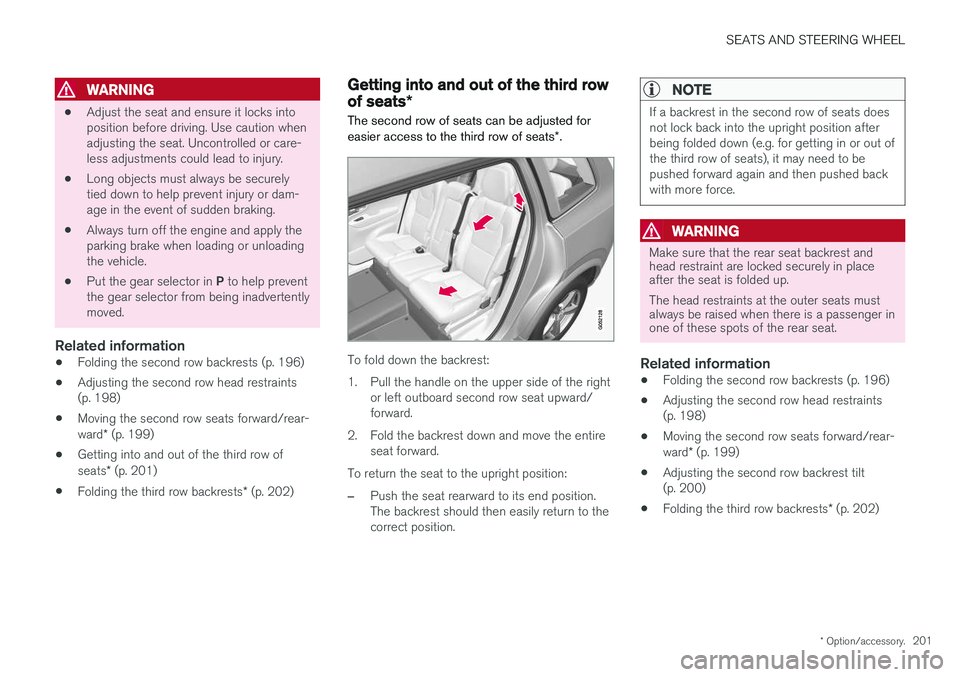
The second row of seats can be adjusted for easier access to the third row of seats *.
To fold down the backrest:
1. Pull the handle on the upper side of the right
or left outboard second row seat upward/ forward.
2. Fold the backrest down and move the entire seat forward.
To return the seat to the upright position:
–Push the seat rearward to its end position. The backrest should then easily return to thecorrect position.
NOTE
If a backrest in the second row of seats does not lock back into the upright position afterbeing folded down (e.g. for getting in or out ofthe third row of seats), it may need to bepushed forward again and then pushed backwith more force.
WARNING
Make sure that the rear seat backrest and head restraint are locked securely in placeafter the seat is folded up. The head restraints at the outer seats must always be raised when there is a passenger inone of these spots of the rear seat.
Related information
• Folding the second row backrests (p. 196)
• Adjusting the second row head restraints (p. 198)
• Moving the second row seats forward/rear- ward
* (p. 199)
• Adjusting the second row backrest tilt (p. 200)
• Folding the third row backrests
* (p. 202)