tow VOLVO XC90 2018 Owner´s Manual
[x] Cancel search | Manufacturer: VOLVO, Model Year: 2018, Model line: XC90, Model: VOLVO XC90 2018Pages: 666, PDF Size: 11.32 MB
Page 173 of 666
WINDOWS, GLASS AND MIRRORS
}}
* Option/accessory.171
Related information
•Reset procedure for pinch protection (p. 171)
• Operating the power windows (p. 172)
• Using sun curtains
* (p. 173)
• Panoramic roof
* (p. 176)
Reset procedure for pinchprotection
If the power windows are not operating properly, you can try a reset procedure.
WARNING
If the starter battery is disconnected, the func- tion for automatic opening and closing mustbe reset to function correctly. A reset isrequired in order for the pinch protection towork.
If the problem persists or if it affects the panor- amic roof or sunroof, contact a workshop. 2
Resetting a power window
1. Start with the window in the closed position.
2. Then operate the window in manual mode
three times upward toward the closed posi- tion.
> The system will be automatically initiated.
Related information
• Pinch protection for windows and sun cur- tains (p. 170)
• Operating the power windows (p. 172)
• Using sun curtains
* (p. 173)
Power windows
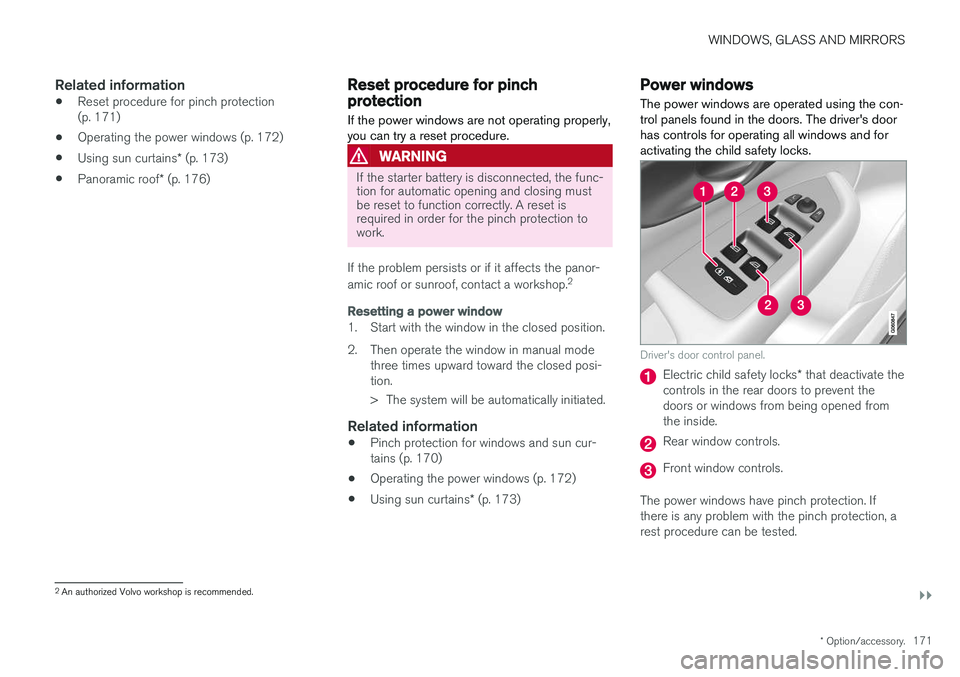
The power windows are operated using the con- trol panels found in the doors. The driver's doorhas controls for operating all windows and foractivating the child safety locks.
Driver's door control panel.
Electric child safety locks * that deactivate the
controls in the rear doors to prevent the doors or windows from being opened fromthe inside.
Rear window controls.
Front window controls.
The power windows have pinch protection. If there is any problem with the pinch protection, arest procedure can be tested.
2 An authorized Volvo workshop is recommended.
Page 185 of 666
WINDOWS, GLASS AND MIRRORS
}}
* Option/accessory.183
•
Windshield wipers in the service position (p. 631)
• Replacing windshield wiper blades (p. 630)
• Changing rear window wipers (p. 629)
• Using the windshield wipers (p. 180)
Using the windshield and headlightwashers
The windshield and headlight washers clean the windshield and headlights. Use the right-sidesteering wheel lever to start the windshield andheadlight washers.
Starting the windshield and headlight washers
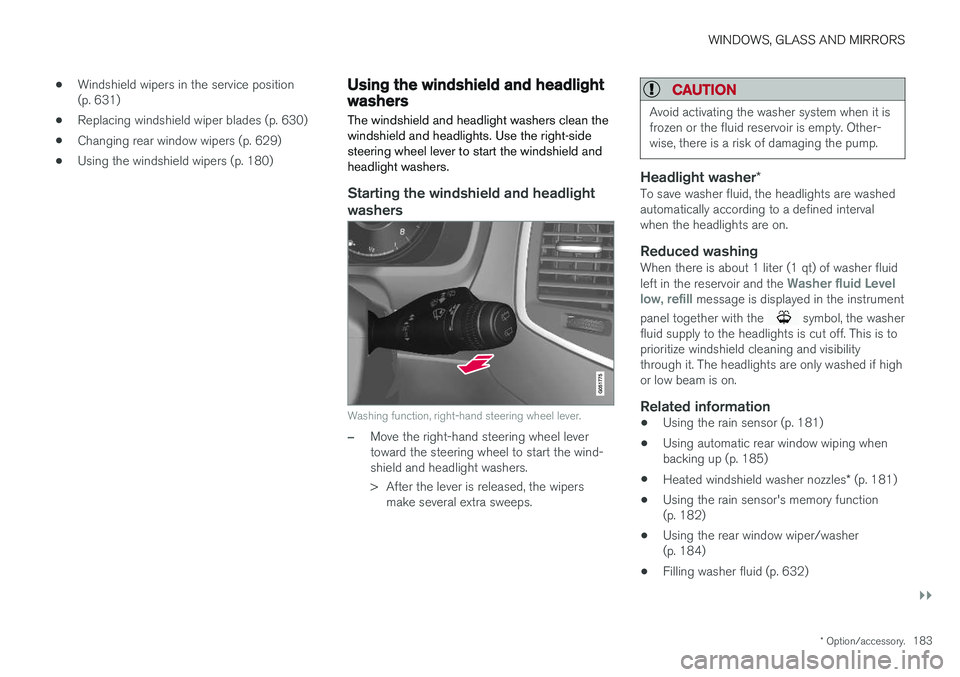
Washing function, right-hand steering wheel lever.
–Move the right-hand steering wheel lever toward the steering wheel to start the wind-shield and headlight washers.
> After the lever is released, the wipers make several extra sweeps.
CAUTION
Avoid activating the washer system when it is frozen or the fluid reservoir is empty. Other-wise, there is a risk of damaging the pump.
Headlight washer *To save washer fluid, the headlights are washed automatically according to a defined intervalwhen the headlights are on.
Reduced washingWhen there is about 1 liter (1 qt) of washer fluid left in the reservoir and the Washer fluid Level
low, refill message is displayed in the instrument
panel together with the
symbol, the washer
fluid supply to the headlights is cut off. This is to prioritize windshield cleaning and visibilitythrough it. The headlights are only washed if highor low beam is on.
Related information
• Using the rain sensor (p. 181)
• Using automatic rear window wiping whenbacking up (p. 185)
• Heated windshield washer nozzles
* (p. 181)
• Using the rain sensor's memory function(p. 182)
• Using the rear window wiper/washer(p. 184)
• Filling washer fluid (p. 632)
Page 198 of 666
SEATS AND STEERING WHEEL
* Option/accessory.
196 •
Adjusting front seat side bolster settings
*
(p. 194)
• Adjusting front seat lumbar support
* (p. 194)
Folding the second row backrests
The second row of seats has three individual seating positions. The backrests can be foldeddown separately.
WARNING
• Adjust the seat and ensure it locks into position before driving. Use caution whenadjusting the seat. Uncontrolled or care-less adjustments could lead to injury.
• Long objects must always be securelytied down to help prevent injury or dam-age in the event of sudden braking.
• Always turn off the engine and apply theparking brake when loading or unloadingthe vehicle.
• Put the gear selector in
P to help prevent
the gear selector from being inadvertentlymoved.
CAUTION
When the backrest is folded down, make sure there are no objects in the rear seat, and theseat belts are not buckled. Otherwise there isa risk of damage to the upholstery.
CAUTION
The seat cushion of the integrated child restraint * must be in the stowed position
before the center seat backrest can be folded down. The armrest * in the center seat must be
raised before the seat backrest is folded down. If the vehicle has private locking *, the ski
hatch must be closed before the seat back- rest is folded down.
NOTE
The front seats may need to be pushed for- ward and/or the backrest adjusted so that therear seat backrests can be fully lowered. The rear seats may also need to be moved rearward. The seats in the second row must be in the upright position before they can be foldeddown completely. They should not be foldeddown when they are tilted forward to accessthe third row of seats.
Page 215 of 666
CLIMATE CONTROL
213
Related information
•Air distribution (p. 212)
• Opening, closing and directing air vents (p. 213)
• Air distribution options (p. 214)
Opening, closing and directing airvents Some of the air vents in the passenger compart- ment can be individually opened, closed anddirected.
Misting can be eliminated by directing the outer air vents towards the door windows. Direct the outer air vents into the passenger compartment to maintain a comfortable tempera-ture in warm weather.
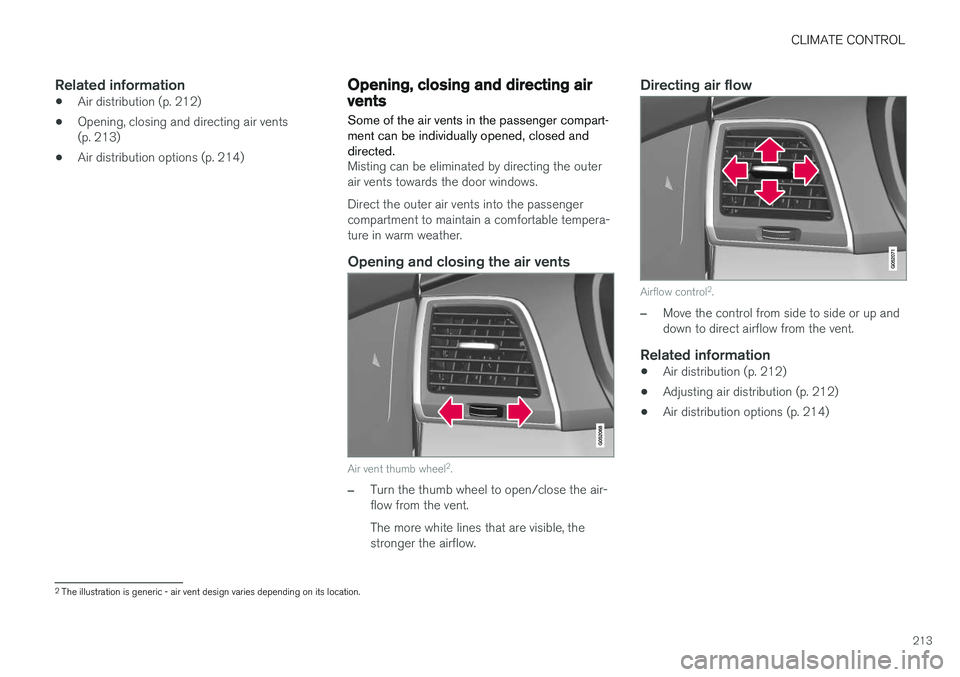
Opening and closing the air vents
Air vent thumb wheel 2
.
–Turn the thumb wheel to open/close the air- flow from the vent. The more white lines that are visible, the stronger the airflow.
Directing air flow
Airflow control 2
.
–Move the control from side to side or up and down to direct airflow from the vent.
Related information
• Air distribution (p. 212)
• Adjusting air distribution (p. 212)
• Air distribution options (p. 214)
2
The illustration is generic - air vent design varies depending on its location.
Page 265 of 666
KEY, LOCKS AND ALARM
}}
* Option/accessory.263
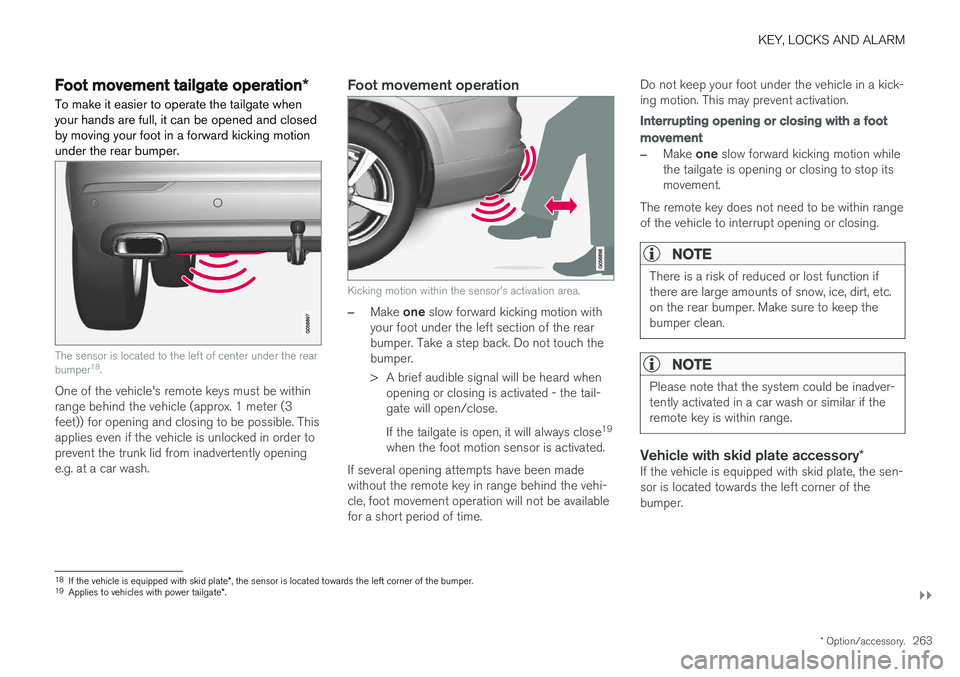
Foot movement tailgate operation *
To make it easier to operate the tailgate when your hands are full, it can be opened and closedby moving your foot in a forward kicking motionunder the rear bumper.
The sensor is located to the left of center under the rear bumper 18
.
One of the vehicle's remote keys must be within range behind the vehicle (approx. 1 meter (3feet)) for opening and closing to be possible. Thisapplies even if the vehicle is unlocked in order toprevent the trunk lid from inadvertently openinge.g. at a car wash.
Foot movement operation
Kicking motion within the sensor's activation area.
–Make one slow forward kicking motion with
your foot under the left section of the rear bumper. Take a step back. Do not touch thebumper.
> A brief audible signal will be heard when opening or closing is activated - the tail- gate will open/close. If the tailgate is open, it will always close 19
when the foot motion sensor is activated.
If several opening attempts have been made without the remote key in range behind the vehi-cle, foot movement operation will not be availablefor a short period of time. Do not keep your foot under the vehicle in a kick-ing motion. This may prevent activation.
Interrupting opening or closing with a foot
movement
–Make
one slow forward kicking motion while
the tailgate is opening or closing to stop its movement.
The remote key does not need to be within rangeof the vehicle to interrupt opening or closing.
NOTE
There is a risk of reduced or lost function if there are large amounts of snow, ice, dirt, etc.on the rear bumper. Make sure to keep thebumper clean.
NOTE
Please note that the system could be inadver- tently activated in a car wash or similar if theremote key is within range.
Vehicle with skid plate accessory *If the vehicle is equipped with skid plate, the sen- sor is located towards the left corner of thebumper.
18
If the vehicle is equipped with skid plate *, the sensor is located towards the left corner of the bumper.
19 Applies to vehicles with power tailgate *.
Page 274 of 666
DRIVER SUPPORT
* Option/accessory.
272
Electronic Stability Control
The Electronic Stability Control (ESC 2
) function
helps the driver avoid skidding and improves the vehicle's directional stability.
This symbol will be displayed in the instrument panel when theESC system is intervening. When the ESC has intervened to apply the brakes, a pulsingsound may be heard and the
vehicle may accelerate more slowly than expec-ted when the accelerator pedal is depressed.
The ESC system consists of the following sub- functions: • Stability control 3
• Spin control and active yaw control
• Engine drag control
• Trailer Stability Assist
WARNING
•The Electronic Stability Control system ESC is supplementary driver supportintended to facilitate driving and make itsafer – it cannot handle all situations inall traffic, weather and road conditions.
• ESC is not a substitute for the driver'sattention and judgment. The driver isalways responsible for ensuring the vehi-cle is driven in a safe manner, at theappropriate speed, with an appropriatedistance to other vehicles, and in accord-ance with current traffic rules and regula-tions.
Stability control 3This function helps control the driving and brak-ing force of each individual wheel in an attemptto stabilize the vehicle.
Spin control and active yaw controlThis function is active at low speeds and brakesthe wheels that are spinning to transfer additionalpower from wheels that are not spinning. This function also helps prevent the wheels from spinning while the vehicle is accelerating.
Engine drag control
Engine drag control (EDC
4
) helps prevent inad-
vertent wheel lock, e.g. after downshifting orusing engine braking when driving at low speedson a slippery surface. Inadvertent wheel lock while driving could impair the driver's ability to steer the vehicle.
Trailer Stability Assist *5
Trailer Stability Assist (TSA
6
) is designed to help
stabilize a vehicle that is towing a trailer if thevehicle and trailer have begun to sway. For moreinformation, see "Trailer Stability Assist".
NOTE
The TSA function is deactivated if ESC Sport
Mode is activated.
Related information
• Electronic Stability Control Sport mode (p. 273)
• Activating/deactivating Sport mode in Elec-tronic Stability Control (p. 273)
1
Roll Stability Control
2 Electronic Stability Control
3 Also called traction control.
4 Engine Drag Control
5Trailer Stability Assist is included if the vehicle is equipped with a Volvo original towbar.6
Trailer Stability Assist
Page 304 of 666
||
DRIVER SUPPORT
* Option/accessory.
302 To reactivate ACC from standby mode:
–Press the button on the steering wheel
(1).
> Speed will be set to the most recently stored speed.
WARNING
A noticeable increase in speed may follow when the speed is resumed with the
steering wheel button.
Related information
• Adaptive Cruise Control
* (p. 293)
Passing assistance with AdaptiveCruise Control Adaptive Cruise Control (ACC 51
) can assist the
driver when passing other vehicles.
How passing assistance worksWhen ACC is following another vehicle and you indicate that you intend to pass that vehicle by using the turn signal 52
, Adaptive Cruise Control
will begin accelerating toward the vehicle ahead before your vehicle has moved into the passing
lane. The function will then delay a speed reduction to avoid early braking as your vehicle approaches aslower-moving vehicle. The function remains active until your vehicle has passed the other vehicle.
WARNING
Please note that this function can be acti- vated in more situations than just passinganother vehicle, such as when a direction indi-cator is used to indicate a lane change orbefore exiting to another road – the vehiclewill then briefly accelerate.
Related information
• Adaptive Cruise Control
* (p. 293)
Starting passing assistance withAdaptive Cruise Control
Requirements for passing assistanceIn order to activate passing assistance:
• your vehicle must be following a vehicle ahead (target vehicle)
• your vehicle's
current speed must be
at least 70 km/h (43 mph)
• the set speed
for ACC must be high
enough to safely pass another vehicle.
Starting parking assistanceTo start passing assistance:
–Turn on the left turn signal.
> Passing assistance will start.
Related information
• Adaptive Cruise Control
* (p. 293)
51
Adaptive Cruise Control
52 Only the left-hand turn signal for left-hand drive vehicles, or right-hand turn signal for right-hand drive vehicles.
Page 307 of 666
DRIVER SUPPORT
}}
* Option/accessory.305
Adaptive Cruise Control limitations
Adaptive Cruise Control (ACC 56
) may have lim-
ited functionality in certain situations.
Steep roads and/or heavy loadsAdaptive Cruise Control is primarily intended to be driven on flat roads. The function may not beable to maintain the correct time interval to thevehicle ahead when driving down steep hills. Thedriver should be extra attentive and prepared toapply the brakes.
• Do not use Adaptive Cruise Control if thevehicle is carrying a heavy load or towing atrailer.
Other limitations
•
The Off Road drive mode cannot be
selected if Adaptive Cruise Control is acti- vated.
NOTE
The function uses the vehicle's camera unit, which has some general limitations – see thesection "Camera unit limitations".
NOTE
The function uses the vehicle's radar unit, which has some general limitations – see thesection "Radar unit limitations".
Related information
• Adaptive Cruise Control
* (p. 293)
Switching between Cruise Controland Adaptive Cruise Control
In vehicles equipped with Adaptive Cruise Con- trol (ACC 57
), the driver can switch between
Cruise Control (CC 58
) and ACC.
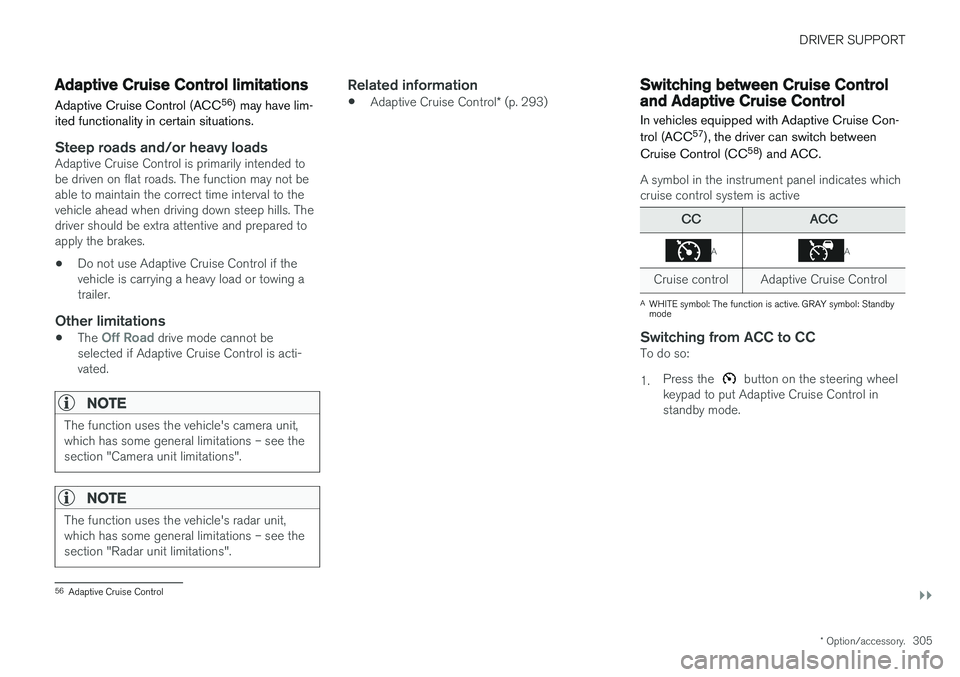
A symbol in the instrument panel indicates which cruise control system is active
CCACC
AA
Cruise control Adaptive Cruise Control
A WHITE symbol: The function is active. GRAY symbol: Standby mode
Switching from ACC to CCTo do so: 1. Press the
button on the steering wheel
keypad to put Adaptive Cruise Control in standby mode.
56 Adaptive Cruise Control
Page 313 of 666
DRIVER SUPPORT
}}
311
When the vehicle is approaching an off-ramp or a fork in the road, the driver should steer towardthe desired lane to indicate to Pilot Assist thedesired direction of travel.
Pilot Assist strives to keep the vehicle
in the center of the lane
When Pilot Assist provides steering assistance, itstrives to position the vehicle in the center of thelane between the lane markings. For the smooth-est driving experience possible, the driver shouldpermit the vehicle to find the optimal positioning.The driver should check that the vehicle is posi-tioned safely in the lane and can always adjustthe vehicle's position by applying more force tothe steering wheel. If Pilot Assist does not position the vehicle appro- priately in the lane, the driver should turn off PilotAssist or switch to Adaptive Cruise Control.
Overview
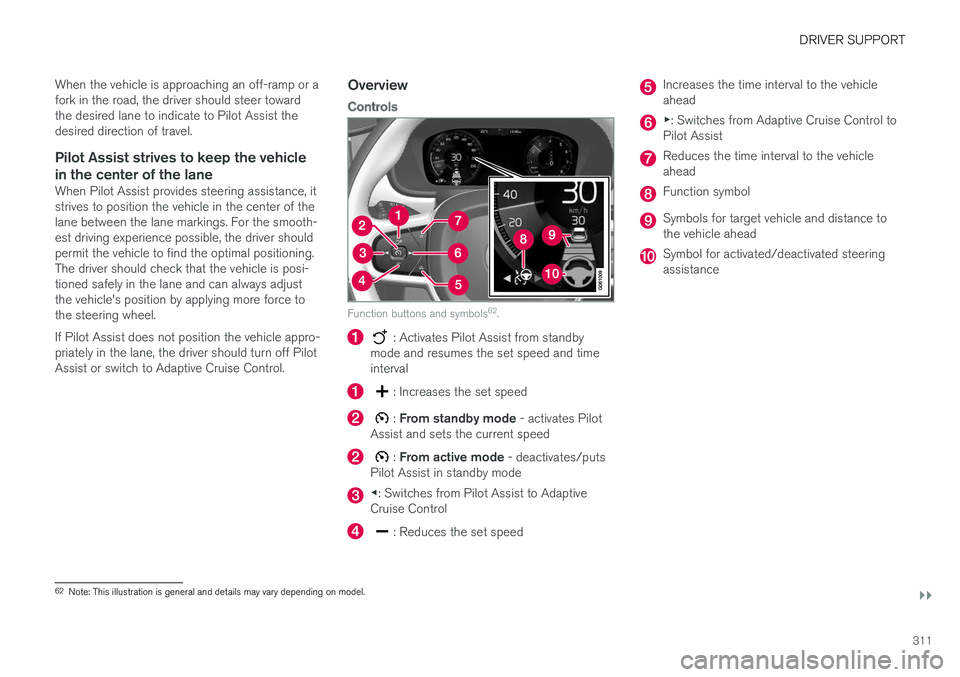
Controls
Function buttons and symbols 62
.
: Activates Pilot Assist from standby
mode and resumes the set speed and time interval
: Increases the set speed
: From standby mode - activates Pilot
Assist and sets the current speed
: From active mode - deactivates/puts
Pilot Assist in standby mode
◀ : Switches from Pilot Assist to Adaptive
Cruise Control
: Reduces the set speed
Increases the time interval to the vehicle ahead
▶ : Switches from Adaptive Cruise Control to
Pilot Assist
Reduces the time interval to the vehicle ahead
Function symbol
Symbols for target vehicle and distance to the vehicle ahead
Symbol for activated/deactivated steering assistance
62 Note: This illustration is general and details may vary depending on model.
Page 321 of 666
DRIVER SUPPORT
319
Passing assistance with Pilot Assist
Pilot Assist can assist the driver when passing other vehicles.
How passing assistance worksWhen Pilot Assist is following another vehicle and you indicate that you intend to pass that vehicle by using the turn signal 67
, Pilot Assist will
begin accelerating toward the vehicle ahead before your vehicle has moved into the passing
lane. The function will then delay a speed reduction to avoid early braking as your vehicle approaches aslower-moving vehicle. The function remains active until your vehicle has passed the other vehicle.
WARNING
Please note that this function can be acti- vated in more situations than just passinganother vehicle, such as when a direction indi-cator is used to indicate a lane change orbefore exiting to another road – the vehiclewill then briefly accelerate.
Related information
• Pilot Assist (p. 309)
Starting passing assistance withPilot Assist
Requirements for passing assistanceIn order to activate passing assistance:
• your vehicle must be following a vehicle ahead (target vehicle)
• your vehicle's
current speed must be
at least 70 km/h (43 mph)
• the set speed
for Pilot Assist must be high
enough to safely pass another vehicle.
Starting parking assistanceTo start passing assistance:
–Turn on the left turn signal.
> Passing assistance will start.
Related information
• Pilot Assist (p. 309)
Passing assistance with Pilot Assistlimitations
Passing assistance functionality may be reduced in certain situations.
WARNING
The driver should be aware that if conditions suddenly change when using Parking Assis-tance, the function may implement an unde-sired acceleration in certain conditions. Some situations should be avoided, e.g. if: • the vehicle is approaching an exit in the same direction as passing would normallyoccur
• the vehicle ahead slows before your vehi-cle has had time to switch to the passinglane
• traffic in the passing lane slows down
• a vehicle for right-hand traffic is driven ina country with left-hand traffic (or viceversa).
Situations of this type can be avoided by tempo-rarily putting Pilot Assist in standby mode.
Related information
• Pilot Assist (p. 309)
67
Only the left-hand turn signal for left-hand drive vehicles, or right-hand turn signal for right-hand drive vehicles.