height VOLVO XC90 2018 Owner´s Manual
[x] Cancel search | Manufacturer: VOLVO, Model Year: 2018, Model line: XC90, Model: VOLVO XC90 2018Pages: 666, PDF Size: 11.32 MB
Page 437 of 666
STARTING AND DRIVING
}}
* Option/accessory.435
Leveling control settings *
The vehicle can be lowered or raised to make it easier to load or for passengers to get in andout. Turn off leveling control before lifting the vehicle with a jack to help avoid problems with thepneumatic suspension.
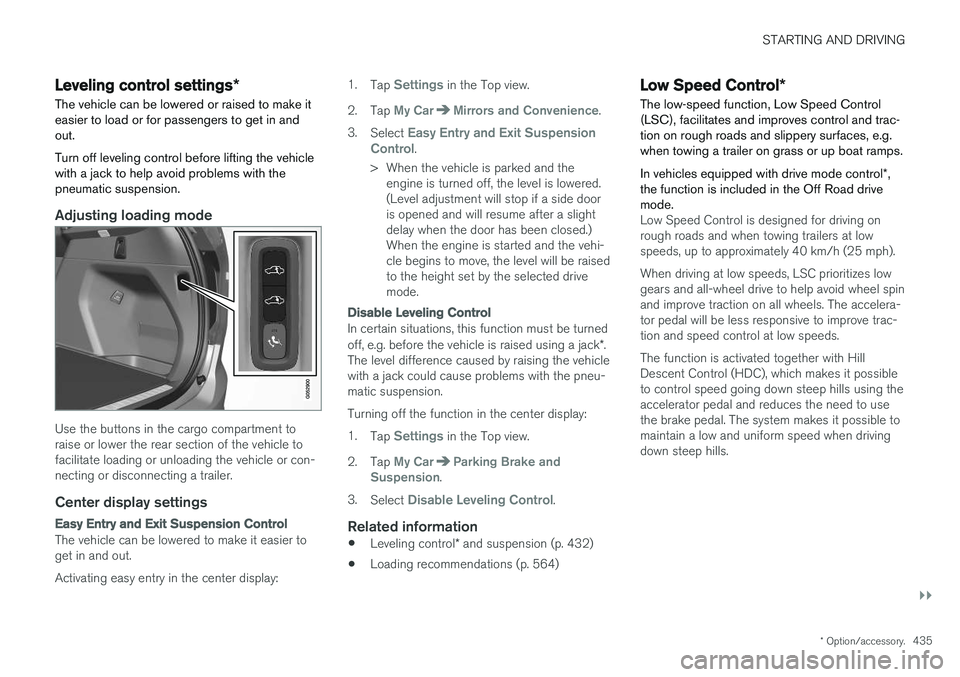
Adjusting loading mode
Use the buttons in the cargo compartment to raise or lower the rear section of the vehicle tofacilitate loading or unloading the vehicle or con-necting or disconnecting a trailer.
Center display settings
Easy Entry and Exit Suspension Control
The vehicle can be lowered to make it easier to get in and out. Activating easy entry in the center display: 1.
Tap
Settings in the Top view.
2. Tap
My CarMirrors and Convenience.
3. Select
Easy Entry and Exit Suspension
Control.
> When the vehicle is parked and the engine is turned off, the level is lowered. (Level adjustment will stop if a side dooris opened and will resume after a slightdelay when the door has been closed.)When the engine is started and the vehi-cle begins to move, the level will be raisedto the height set by the selected drivemode.
Disable Leveling Control
In certain situations, this function must be turned off, e.g. before the vehicle is raised using a jack *.
The level difference caused by raising the vehicle with a jack could cause problems with the pneu-matic suspension. Turning off the function in the center display:1. Tap
Settings in the Top view.
2. Tap
My CarParking Brake and
Suspension.
3. Select
Disable Leveling Control.
Related information
• Leveling control
* and suspension (p. 432)
• Loading recommendations (p. 564)
Low Speed Control
*
The low-speed function, Low Speed Control (LSC), facilitates and improves control and trac-tion on rough roads and slippery surfaces, e.g.when towing a trailer on grass or up boat ramps. In vehicles equipped with drive mode control *,
the function is included in the Off Road drive mode.
Low Speed Control is designed for driving on rough roads and when towing trailers at lowspeeds, up to approximately 40 km/h (25 mph). When driving at low speeds, LSC prioritizes low gears and all-wheel drive to help avoid wheel spinand improve traction on all wheels. The accelera-tor pedal will be less responsive to improve trac-tion and speed control at low speeds. The function is activated together with Hill Descent Control (HDC), which makes it possibleto control speed going down steep hills using theaccelerator pedal and reduces the need to usethe brake pedal. The system makes it possible tomaintain a low and uniform speed when drivingdown steep hills.
Page 441 of 666
STARTING AND DRIVING
}}
439
•
Fuel consumption is increased at high speeds - air resistance increases with speed.
• Remove unnecessary items from the vehicle- the heavier the load, the higher the fuelconsumption.
• Maintain the correct pressure in the tires andcheck pressure regularly.
• The type of tires used could affect fuel con-sumption - consult a retailer for advice onsuitable tires.
• Do not use winter tires after the winter sea-son has ended.
• Roof loads increase air resistance andincrease fuel consumption. Remove roofboxes, ski racks, etc. that are not in use.
• Avoid driving with the windows open.
• Using the trip computer's fuel consumptionindicators can help you learn how to drivemore economically.
Other factors that decrease fuel
consumption
• Dirty air cleaner.
• Dirty engine oil and clogged oil filter.
• Incorrect front-end alignment.
• Incorrect wheel alignment.
Some of the above items and others are checked as part of Volvo's standard maintenance sched-ule.
Related information
• Drive-E
‒ purer driving pleasure (p. 27)
• ECO drive mode (p. 426)
• Checking tire pressure (p. 535)
Preparing for a long trip
It is important to have the vehicle's systems and equipment checked carefully before driving longdistances.
Check that:
• the engine is running properly and that fuel consumption is normal
• there are no leaks (fuel, oil or other fluid)
• the brake pedal is functioning optimally
• all lights are working
‒
adjust the headlight
height if the vehicle is carrying a heavy load
• tire tread depth and air pressure are at cor-rect levels. Change to snow tires when driv-ing in areas where there is a risk of snowy oricy roads.
• the start battery is sufficiently charged
• the wiper blades are in good condition
Related information
• Checking tire pressure (p. 535)
• Filling washer fluid (p. 632)
• Winter driving (p. 440)
• Economical driving (p. 438)
• Vehicle modem settings (p. 511)
• Loading recommendations (p. 564)
• Driving with a trailer (p. 449)
• Pilot Assist (p. 309)
Page 533 of 666
WHEELS AND TIRES
}}
531
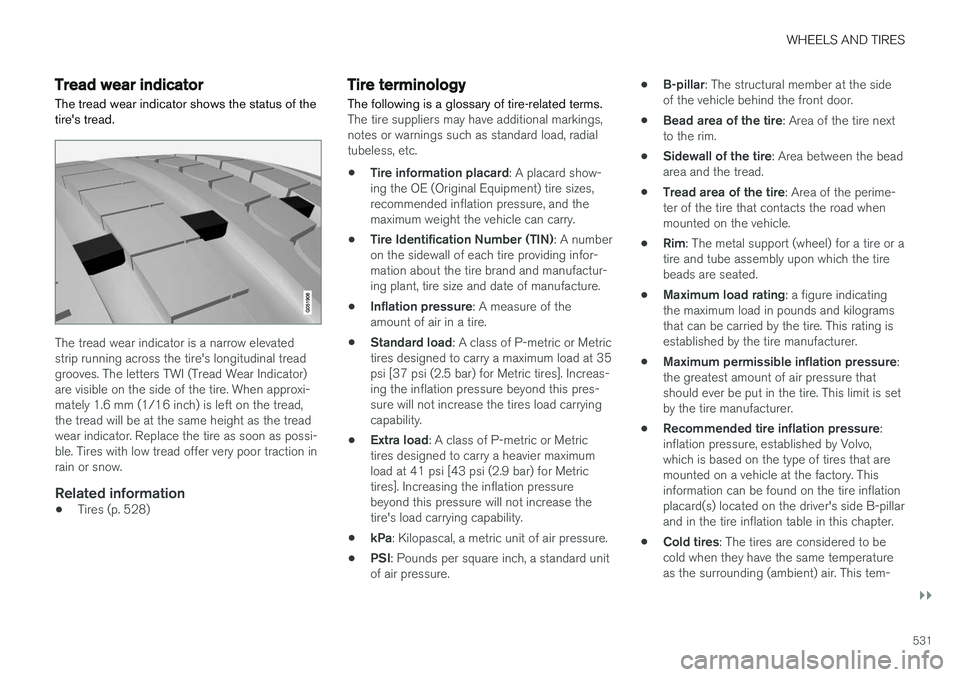
Tread wear indicatorThe tread wear indicator shows the status of the tire's tread.
The tread wear indicator is a narrow elevated strip running across the tire's longitudinal treadgrooves. The letters TWI (Tread Wear Indicator)are visible on the side of the tire. When approxi-mately 1.6 mm (1/16 inch) is left on the tread,the tread will be at the same height as the treadwear indicator. Replace the tire as soon as possi-ble. Tires with low tread offer very poor traction inrain or snow.
Related information
• Tires (p. 528)
Tire terminology The following is a glossary of tire-related terms.
The tire suppliers may have additional markings, notes or warnings such as standard load, radialtubeless, etc.
• Tire information placard
: A placard show-
ing the OE (Original Equipment) tire sizes,recommended inflation pressure, and themaximum weight the vehicle can carry.
• Tire Identification Number (TIN)
: A number
on the sidewall of each tire providing infor-mation about the tire brand and manufactur-ing plant, tire size and date of manufacture.
• Inflation pressure
: A measure of the
amount of air in a tire.
• Standard load
: A class of P-metric or Metric
tires designed to carry a maximum load at 35psi [37 psi (2.5 bar) for Metric tires]. Increas-ing the inflation pressure beyond this pres-sure will not increase the tires load carryingcapability.
• Extra load
: A class of P-metric or Metric
tires designed to carry a heavier maximumload at 41 psi [43 psi (2.9 bar) for Metrictires]. Increasing the inflation pressurebeyond this pressure will not increase thetire's load carrying capability.
• kPa
: Kilopascal, a metric unit of air pressure.
• PSI
: Pounds per square inch, a standard unit
of air pressure. •
B-pillar
: The structural member at the side
of the vehicle behind the front door.
• Bead area of the tire
: Area of the tire next
to the rim.
• Sidewall of the tire
: Area between the bead
area and the tread.
• Tread area of the tire
: Area of the perime-
ter of the tire that contacts the road whenmounted on the vehicle.
• Rim
: The metal support (wheel) for a tire or a
tire and tube assembly upon which the tirebeads are seated.
• Maximum load rating
: a figure indicating
the maximum load in pounds and kilogramsthat can be carried by the tire. This rating isestablished by the tire manufacturer.
• Maximum permissible inflation pressure
:
the greatest amount of air pressure thatshould ever be put in the tire. This limit is setby the tire manufacturer.
• Recommended tire inflation pressure
:
inflation pressure, established by Volvo,which is based on the type of tires that aremounted on a vehicle at the factory. Thisinformation can be found on the tire inflationplacard(s) located on the driver's side B-pillarand in the tire inflation table in this chapter.
• Cold tires
: The tires are considered to be
cold when they have the same temperatureas the surrounding (ambient) air. This tem-
Page 534 of 666
||
WHEELS AND TIRES
532perature is normally reached after the vehicle has been parked for at least 3 hours.
Related information
•
Tires (p. 528)
Tire sidewall designations
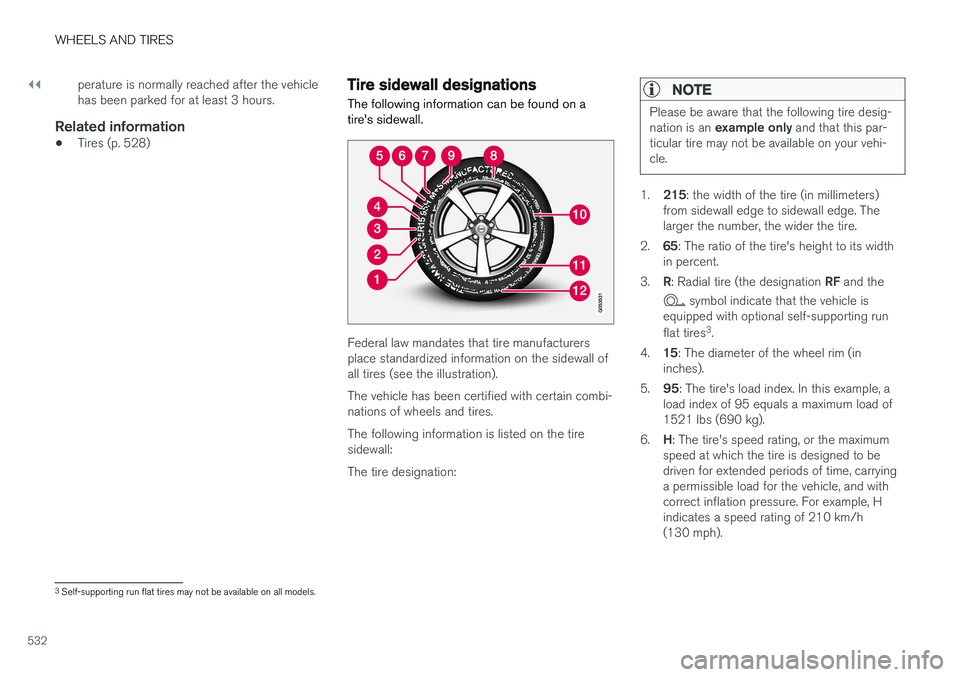
The following information can be found on a tire's sidewall.
Federal law mandates that tire manufacturers place standardized information on the sidewall ofall tires (see the illustration). The vehicle has been certified with certain combi- nations of wheels and tires. The following information is listed on the tire sidewall: The tire designation:
NOTE
Please be aware that the following tire desig- nation is an example only and that this par-
ticular tire may not be available on your vehi- cle.
1. 215 : the width of the tire (in millimeters)
from sidewall edge to sidewall edge. The larger the number, the wider the tire.
2. 65: The ratio of the tire's height to its width
in percent.
3. R: Radial tire (the designation RF and the
symbol indicate that the vehicle is
equipped with optional self-supporting run flat tires 3
.
4. 15: The diameter of the wheel rim (in
inches).
5. 95: The tire's load index. In this example, a
load index of 95 equals a maximum load of 1521 lbs (690 kg).
6. H: The tire's speed rating, or the maximum
speed at which the tire is designed to bedriven for extended periods of time, carryinga permissible load for the vehicle, and withcorrect inflation pressure. For example, Hindicates a speed rating of 210 km/h(130 mph).
3 Self-supporting run flat tires may not be available on all models.
Page 567 of 666
LOADING, STORAGE AND PASSENGER COMPARTMENT
* Option/accessory.565
WARNING
In a head-on collision at a speed of 50 km/h (30 mph), an unsecured object weighing 20kg (44 pounds) can reach a projectile weightequivalent to 1000 kg (2200 pounds).
WARNING
If objects are loaded higher than the upper edge of the side windows, leave a 10 cm (4in.) space between the objects and the win-dow. Objects placed closer to this couldimpede the function of the inflatable curtainconcealed inside the headlining.
WARNING
Always secure the load. Otherwise, it may shift during heavy braking and injure people in thevehicle. Cover sharp edges and sharp corners with something soft. Turn off the engine and apply the parking brake when loading/unloading long objects.Otherwise, it is possible for the load to reachthe gear lever or gear selector and move it toa drive position – which could cause the vehi-cle to begin rolling.
Extra cargo space
The rear seat backrests can be folded down to increase cargo compartment space and simplifyloading. If the rear seat backrests are folded down, make sure that no objects loaded into thevehicle prevent the WHIPS system for the frontseats from functioning correctly.
Raising/lowering the rear end of the vehicle
*
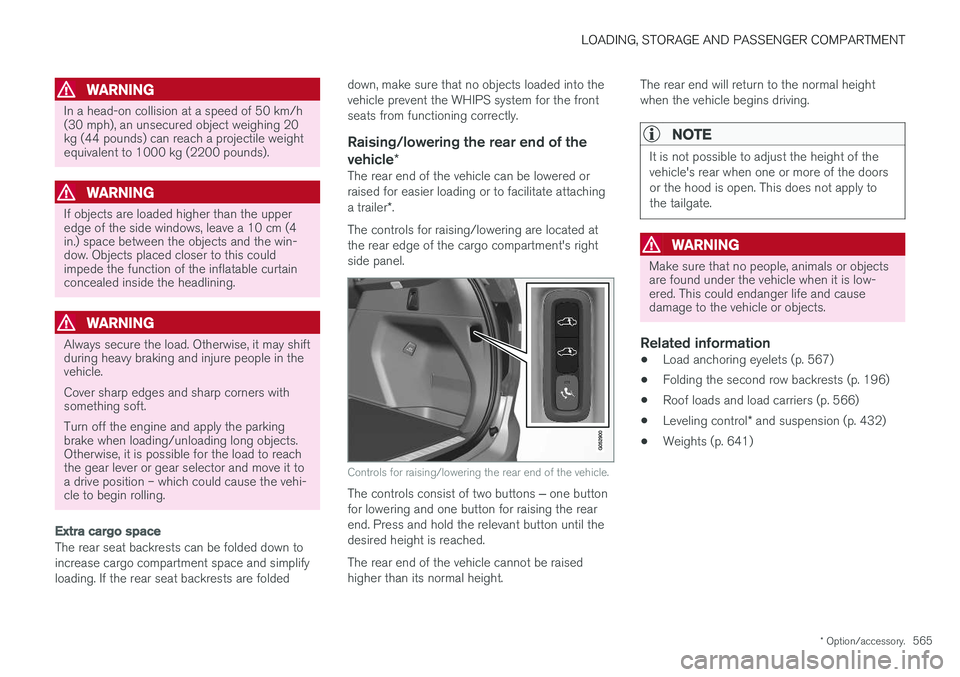
The rear end of the vehicle can be lowered or raised for easier loading or to facilitate attaching a trailer*.
The controls for raising/lowering are located at the rear edge of the cargo compartment's rightside panel.
Controls for raising/lowering the rear end of the vehicle.
The controls consist of two buttons ‒ one button
for lowering and one button for raising the rear end. Press and hold the relevant button until thedesired height is reached. The rear end of the vehicle cannot be raised higher than its normal height. The rear end will return to the normal heightwhen the vehicle begins driving.
NOTE
It is not possible to adjust the height of the vehicle's rear when one or more of the doorsor the hood is open. This does not apply tothe tailgate.
WARNING
Make sure that no people, animals or objects are found under the vehicle when it is low-ered. This could endanger life and causedamage to the vehicle or objects.
Related information
•
Load anchoring eyelets (p. 567)
• Folding the second row backrests (p. 196)
• Roof loads and load carriers (p. 566)
• Leveling control
* and suspension (p. 432)
• Weights (p. 641)
Page 641 of 666
SPECIFICATIONS
}}
* Option/accessory.639
Dimensions
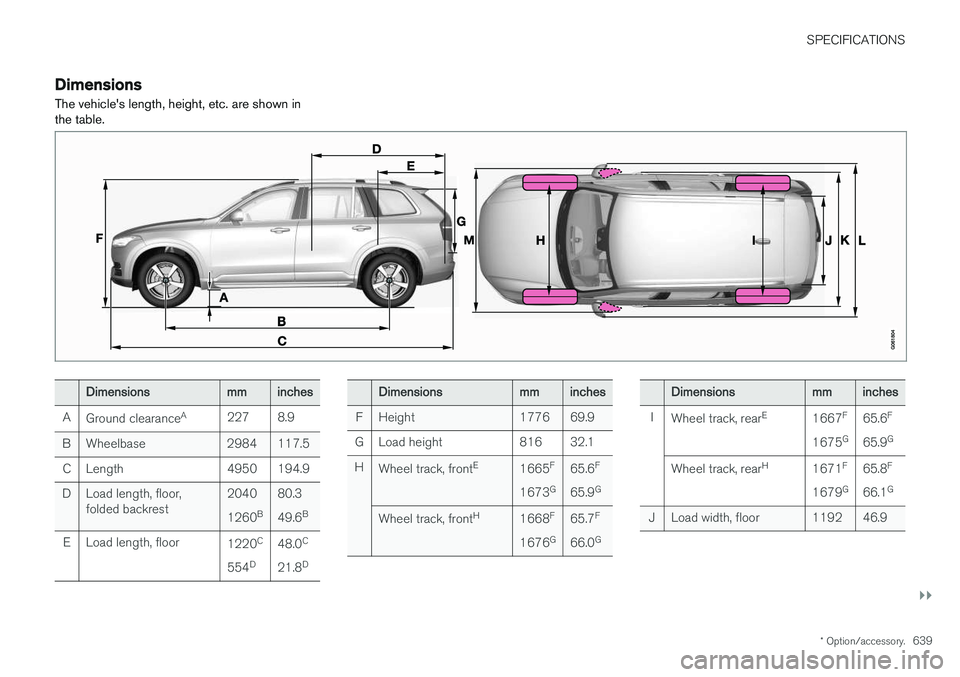
The vehicle's length, height, etc. are shown in the table.
Dimensionsmminches
A Ground clearance A
227 8.9
B Wheelbase 2984 117.5 C Length 4950 194.9
D Load length, floor, folded backrest 2040 1260
B80.349.6
B
E Load length, floor 1220C
554 D 48.0
C
21.8 DDimensionsmminches
F Height 1776 69.9
G Load height 816 32.1
H Wheel track, front E
1665F
1673 G65.6
F
65.9 G
Wheel track, front H
1668F
1676 G65.7
F
66.0 GDimensionsmminches
I Wheel track, rear E
1667F
1675 G65.6
F
65.9 G
Wheel track, rear H
1671F
1679 G65.8
F
66.1 G
J Load width, floor 1192 46.9
Page 656 of 666
INDEX
654
H
Handbrake 411, 412
Hand wash 621Hard diskspace 516
Hazard warning flashers 164
HDC 437
HD radio 472 Headlights cover 593
Head restraint 198
Head-up display 144 activate and deactivate 146
cleaning 616
replacing windshield 586
settings 146
Heated washer nozzles 181 Heating Seats 219, 220
steering wheel 222, 223
windows 226, 227
Height adjustment 432, 435
high beams 158, 159
High engine temperature 446
Hill Descent Control 436, 437, 438 activate with function button 438
Hill Start Assist 416
Hill Start Assist (HSA) 416
Hoisting the vehicle 583 HomeLink ® 456
programming 457
use 458
HomeLink ® remote control
programmable 456
Home safe lighting 164
Honk 203
Hood, opening 585
Horn 203
I
IAQS (Interior Air Quality System) 210
IC (Inflatable Curtain) 60
ID, Volvo 26
Identification number 38
Ignition mode 407, 408
Immobilizer 250 Electronic immobilizer 250
Indicator symbols 95
Individual drive mode 423
Infant seats 67
Inflatable curtain 60
Inflatable Curtain 60
Inflating tires 555Inflation pressure adjusting 536
Checking 535
recommended 537
Inflation pressure monitoring 537 action 541
Status 540
Inflation pressure table 647
Information display 84, 88
Infotainment (Audio and media) 464
Instrument cluster 84 settings 88
Instrument illumination 167
Instrument lighting 167Instrument panel App menu 104, 105
messages 106
Instruments and controls 82 Instruments overview left-hand drive vehicle 82
Integrated booster cushion 76 folding down 78
folding up 77