rear view mirror VOLVO XC90 2018 Owner´s Manual
[x] Cancel search | Manufacturer: VOLVO, Model Year: 2018, Model line: XC90, Model: VOLVO XC90 2018Pages: 666, PDF Size: 11.32 MB
Page 392 of 666
||
DRIVER SUPPORT
* Option/accessory.
390
Blind sectors
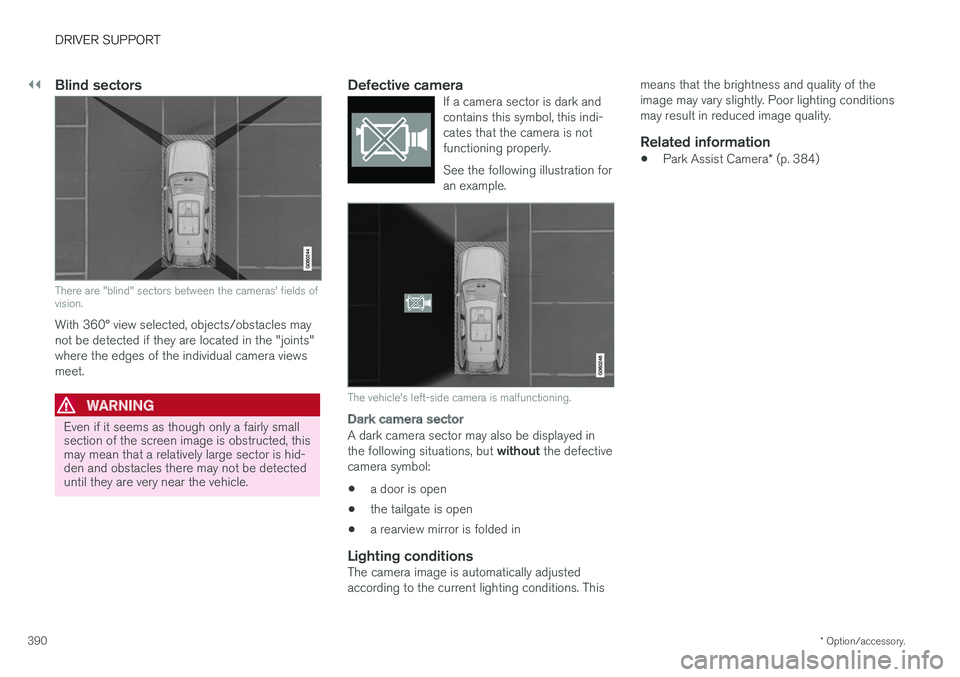
There are "blind" sectors between the cameras' fields of vision.
With 360° view selected, objects/obstacles may not be detected if they are located in the "joints"where the edges of the individual camera viewsmeet.
WARNING
Even if it seems as though only a fairly small section of the screen image is obstructed, thismay mean that a relatively large sector is hid-den and obstacles there may not be detecteduntil they are very near the vehicle.
Defective cameraIf a camera sector is dark and contains this symbol, this indi-cates that the camera is notfunctioning properly. See the following illustration for an example.
The vehicle's left-side camera is malfunctioning.
Dark camera sector
A dark camera sector may also be displayed in the following situations, but without the defective
camera symbol:
• a door is open
• the tailgate is open
• a rearview mirror is folded in
Lighting conditionsThe camera image is automatically adjusted according to the current lighting conditions. This means that the brightness and quality of theimage may vary slightly. Poor lighting conditionsmay result in reduced image quality.
Related information
•
Park Assist Camera
* (p. 384)
Page 437 of 666
STARTING AND DRIVING
}}
* Option/accessory.435
Leveling control settings *
The vehicle can be lowered or raised to make it easier to load or for passengers to get in andout. Turn off leveling control before lifting the vehicle with a jack to help avoid problems with thepneumatic suspension.
Adjusting loading mode
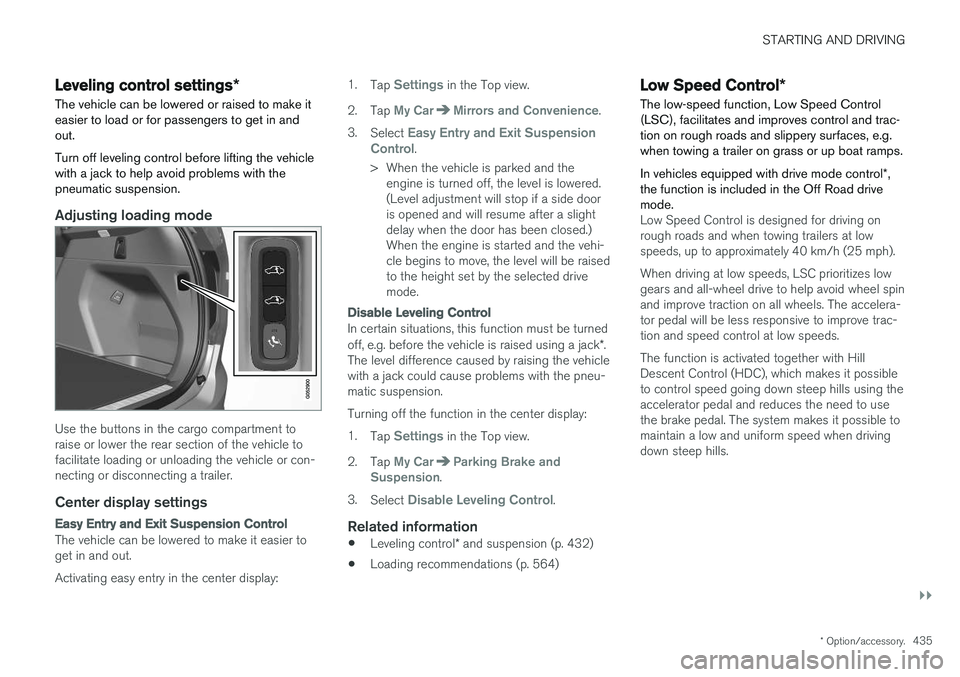
Use the buttons in the cargo compartment to raise or lower the rear section of the vehicle tofacilitate loading or unloading the vehicle or con-necting or disconnecting a trailer.
Center display settings
Easy Entry and Exit Suspension Control
The vehicle can be lowered to make it easier to get in and out. Activating easy entry in the center display: 1.
Tap
Settings in the Top view.
2. Tap
My CarMirrors and Convenience.
3. Select
Easy Entry and Exit Suspension
Control.
> When the vehicle is parked and the engine is turned off, the level is lowered. (Level adjustment will stop if a side dooris opened and will resume after a slightdelay when the door has been closed.)When the engine is started and the vehi-cle begins to move, the level will be raisedto the height set by the selected drivemode.
Disable Leveling Control
In certain situations, this function must be turned off, e.g. before the vehicle is raised using a jack *.
The level difference caused by raising the vehicle with a jack could cause problems with the pneu-matic suspension. Turning off the function in the center display:1. Tap
Settings in the Top view.
2. Tap
My CarParking Brake and
Suspension.
3. Select
Disable Leveling Control.
Related information
• Leveling control
* and suspension (p. 432)
• Loading recommendations (p. 564)
Low Speed Control
*
The low-speed function, Low Speed Control (LSC), facilitates and improves control and trac-tion on rough roads and slippery surfaces, e.g.when towing a trailer on grass or up boat ramps. In vehicles equipped with drive mode control *,
the function is included in the Off Road drive mode.
Low Speed Control is designed for driving on rough roads and when towing trailers at lowspeeds, up to approximately 40 km/h (25 mph). When driving at low speeds, LSC prioritizes low gears and all-wheel drive to help avoid wheel spinand improve traction on all wheels. The accelera-tor pedal will be less responsive to improve trac-tion and speed control at low speeds. The function is activated together with Hill Descent Control (HDC), which makes it possibleto control speed going down steep hills using theaccelerator pedal and reduces the need to usethe brake pedal. The system makes it possible tomaintain a low and uniform speed when drivingdown steep hills.
Page 458 of 666
||
STARTING AND DRIVING
* Option/accessory.
456
CAUTION
The towing eyelet is only intended for towing on roads, and must not be used to pull vehi-
cles from ditches or any similar purpose involving severe strain. Call a tow truck forprofessional assistance.
CAUTION
Note that the vehicle must always be towed with the wheels rolling forward.
Related information
• Attaching and removing the towing eyelet (p. 454)
HomeLink®
*10
HomeLink ®
11
is a programmable remote control,
integrated in the vehicle electrical system, that can control up to three different devices (e.g.garage door opener, alarm system, outdoor andindoor lighting, etc.) and thereby replace theremote controls for these.
General
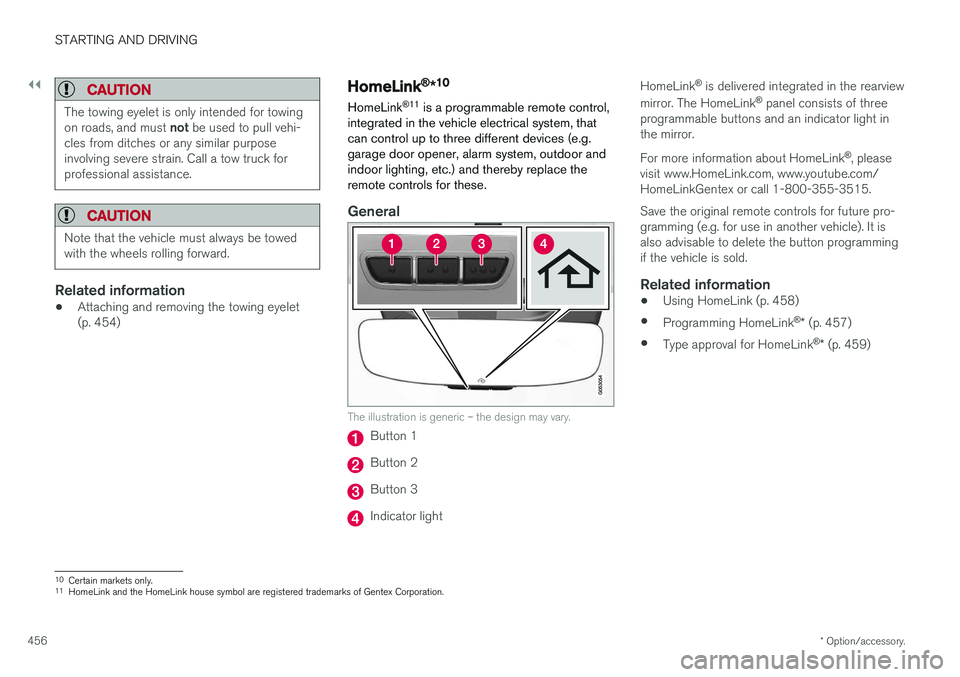
The illustration is generic – the design may vary.
Button 1
Button 2
Button 3
Indicator light HomeLink
®
is delivered integrated in the rearview
mirror. The HomeLink ®
panel consists of three
programmable buttons and an indicator light in the mirror. For more information about HomeLink ®
, please
visit www.HomeLink.com, www.youtube.com/ HomeLinkGentex or call 1-800-355-3515. Save the original remote controls for future pro- gramming (e.g. for use in another vehicle). It isalso advisable to delete the button programmingif the vehicle is sold.
Related information
• Using HomeLink (p. 458)
• Programming HomeLink ®
* (p. 457)
• Type approval for HomeLink ®
* (p. 459)
10
Certain markets only.
11 HomeLink and the HomeLink house symbol are registered trademarks of Gentex Corporation.
Page 461 of 666
STARTING AND DRIVING
* Option/accessory.459
Type approval for HomeLink®
*14
FCC (USA) and IC (Canada)This device complies with FCC rules part 15 and Industry Canada RSS-210. Operation is subjectto the following two conditions: (1) This devicemay not cause harmful interference, and (2) Thisdevice must accept any interference that may bereceived including interference that may causeundesired operation.
WARNING
The transmitter has been tested and complies with FCC and IC rules. Changes or modifica-tions not expressly approved by the partyresponsible for compliance could void the user's authority to operate the device. 15
Type approval for EUGentex Corporation hereby declares that HomeLink®
Model UAHL5 complies with the
Radio equipment directive 2014/53/EU. Wavelengths within which the radio equipment operates:
• 433.05MHz-434.79MHz <10mW E.R.P.
• 868.00MHz-868.60MHz <25mW E.R.P.
• 868.70MHz-868.20MHz <25mW E.R.P.
• 869.40MHz-869.65MHz <25mW E.R.P. •
869.70MHz-870.00MHz <25mW E.R.P.
Certificate holder address: Gentex Corporation,600 North Centennial Street, Zeeland MI 49464,USA For more information, see support.volvocars.com.
Related information
• HomeLink ®
* (p. 456)
Compass
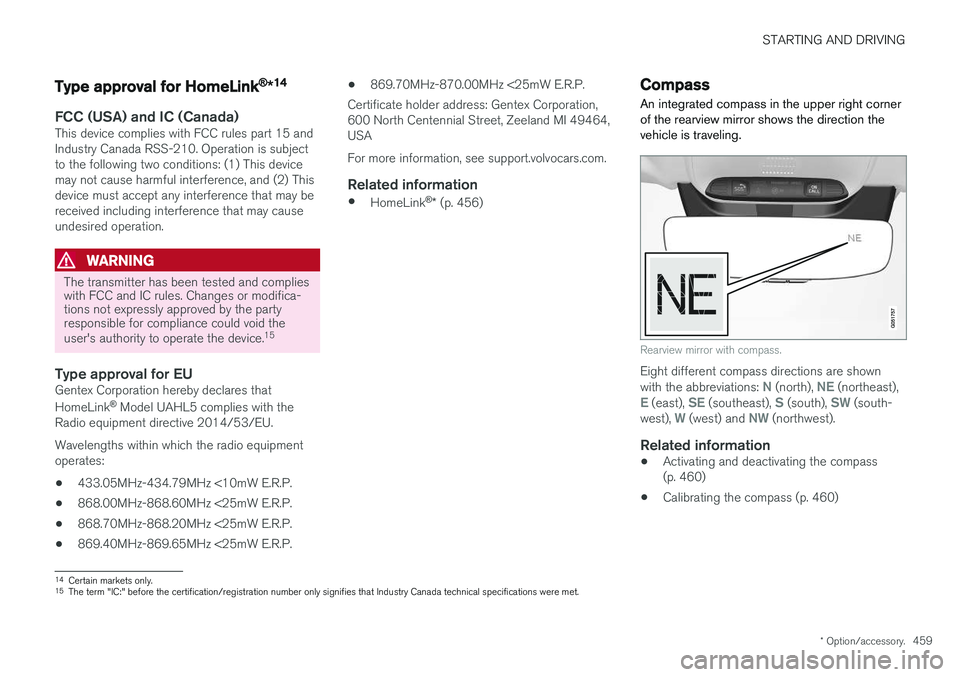
An integrated compass in the upper right corner of the rearview mirror shows the direction thevehicle is traveling.
Rearview mirror with compass.
Eight different compass directions are shown with the abbreviations: N (north), NE (northeast),E (east), SE (southeast), S (south), SW (south-
west), W (west) and NW (northwest).
Related information
• Activating and deactivating the compass (p. 460)
• Calibrating the compass (p. 460)
14
Certain markets only.
15 The term "IC:" before the certification/registration number only signifies that Industry Canada technical specifications were met.
Page 462 of 666
STARTING AND DRIVING
* Option/accessory.
460
Activating and deactivating thecompass
An integrated compass in the upper right corner of the rearview mirror shows the direction thevehicle is traveling.
Activating and deactivating the compass
The compass is automatically activated when the vehicle is started. To deactivate/activate the compass manually:
–Use a paper clip or similar object to press the button on the bottom of the mirror.
Related information
• Compass (p. 459)
• Calibrating the compass (p. 460)
Calibrating the compass
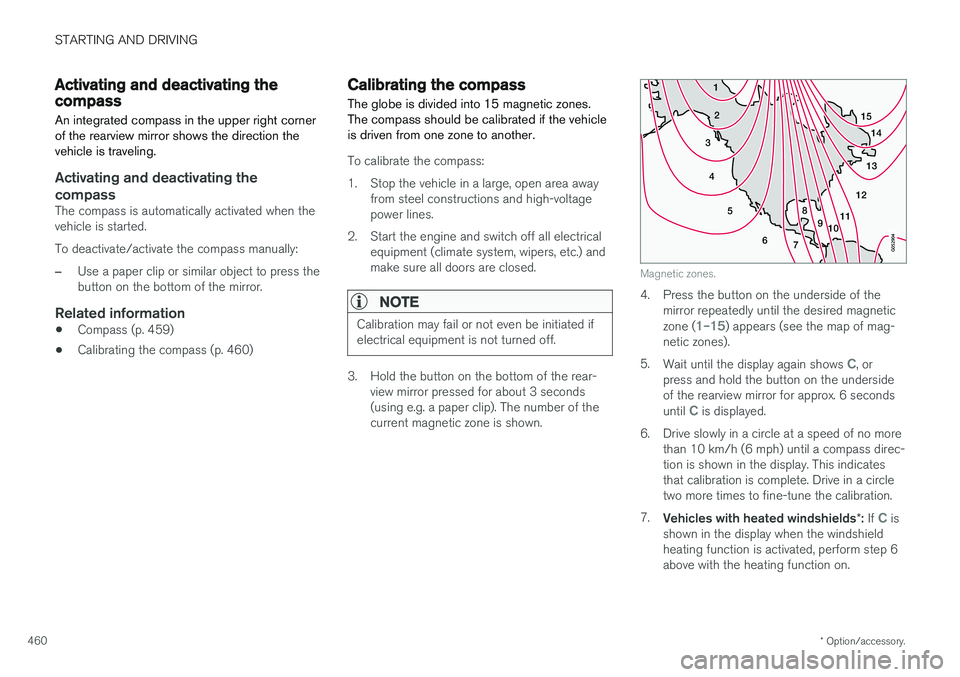
The globe is divided into 15 magnetic zones. The compass should be calibrated if the vehicleis driven from one zone to another.
To calibrate the compass:
1. Stop the vehicle in a large, open area away from steel constructions and high-voltage power lines.
2. Start the engine and switch off all electrical equipment (climate system, wipers, etc.) andmake sure all doors are closed.
NOTE
Calibration may fail or not even be initiated if electrical equipment is not turned off.
3. Hold the button on the bottom of the rear-view mirror pressed for about 3 seconds (using e.g. a paper clip). The number of thecurrent magnetic zone is shown.
15
14
13
12
11
9
8
7
6
5
4
3
2
1
10
Magnetic zones.
4. Press the button on the underside of themirror repeatedly until the desired magnetic zone (
1–15) appears (see the map of mag-
netic zones).
5. Wait until the display again shows
C, or
press and hold the button on the underside of the rearview mirror for approx. 6 seconds until
C is displayed.
6. Drive slowly in a circle at a speed of no more than 10 km/h (6 mph) until a compass direc- tion is shown in the display. This indicatesthat calibration is complete. Drive in a circletwo more times to fine-tune the calibration.
7. Vehicles with heated windshields *: If
C is
shown in the display when the windshield heating function is activated, perform step 6above with the heating function on.
Page 611 of 666
MAINTENANCE AND SERVICE
}}
* Option/accessory.609
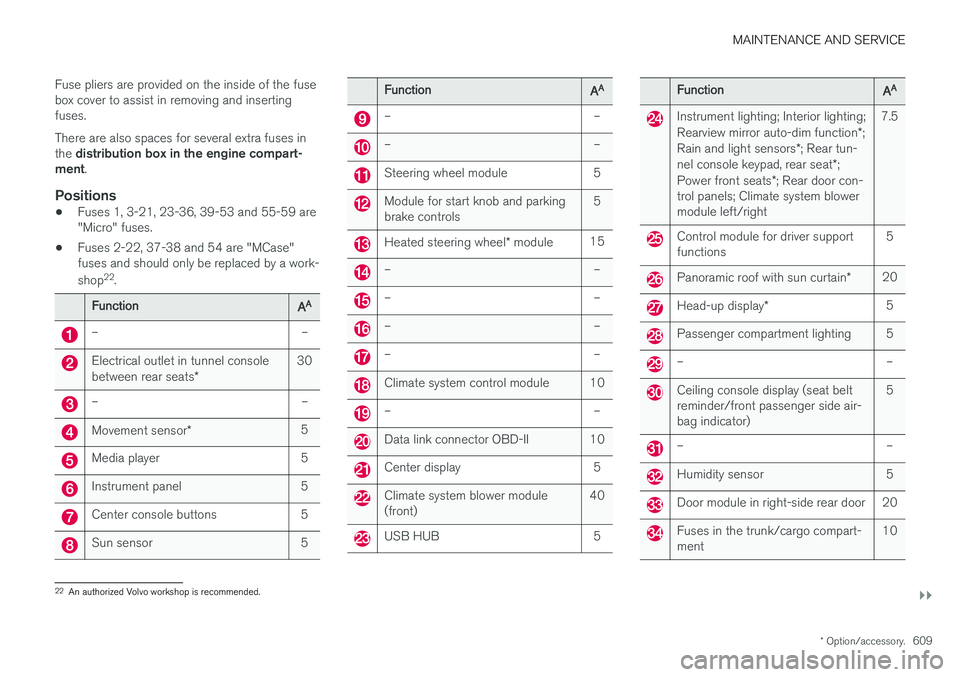
Fuse pliers are provided on the inside of the fuse box cover to assist in removing and insertingfuses. There are also spaces for several extra fuses in the
distribution box in the engine compart-
ment .
Positions
•Fuses 1, 3-21, 23-36, 39-53 and 55-59 are "Micro" fuses.
• Fuses 2-22, 37-38 and 54 are "MCase"fuses and should only be replaced by a work- shop 22
.
FunctionAA
– –
Electrical outlet in tunnel console between rear seats * 30
– –
Movement sensor
* 5
Media player 5
Instrument panel 5
Center console buttons 5
Sun sensor 5
FunctionAA
– –
– –
Steering wheel module 5
Module for start knob and parking brake controls 5
Heated steering wheel
* module 15
– –
– –
– –
– –
Climate system control module 10
– –
Data link connector OBD-II 10
Center display 5
Climate system blower module (front) 40
USB HUB 5
FunctionAA
Instrument lighting; Interior lighting; Rearview mirror auto-dim function
*;
Rain and light sensors *; Rear tun-
nel console keypad, rear seat *;
Power front seats *; Rear door con-
trol panels; Climate system blower module left/right 7.5
Control module for driver support functions
5
Panoramic roof with sun curtain
*20
Head-up display
* 5
Passenger compartment lighting 5
– –
Ceiling console display (seat belt reminder/front passenger side air-bag indicator) 5
– –
Humidity sensor 5
Door module in right-side rear door 20
Fuses in the trunk/cargo compart- ment
10
22
An authorized Volvo workshop is recommended.
Page 642 of 666
||
SPECIFICATIONS
640
Dimensionsmminches
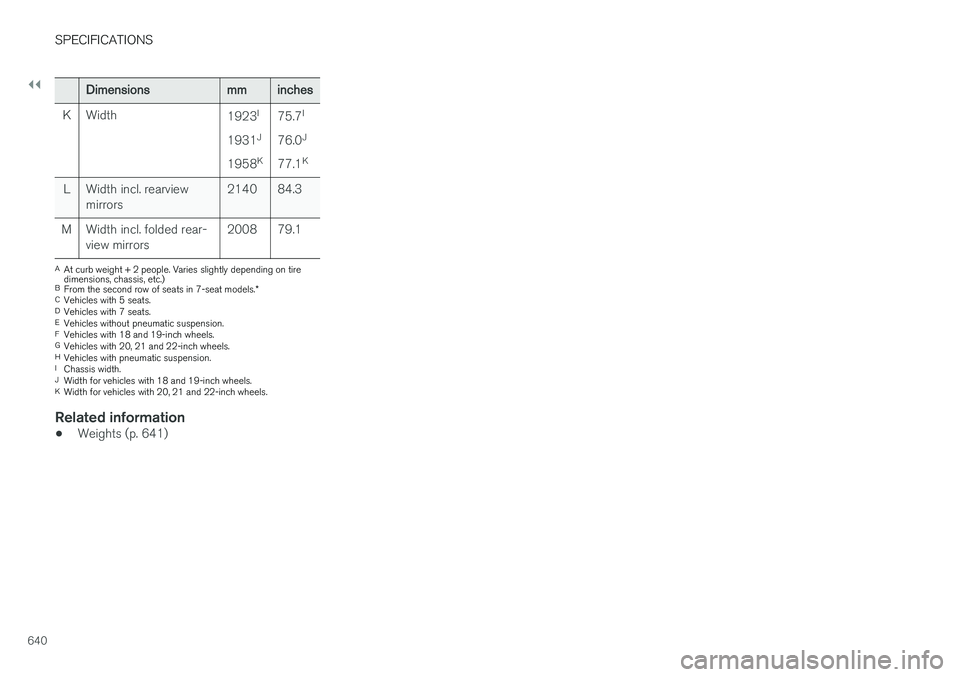
K Width 1923I
1931 J
1958 K75.7
I
76.0 J
77.1 K
L Width incl. rearview mirrors 2140 84.3
M Width incl. folded rear- view mirrors 2008 79.1
A
At curb weight + 2 people. Varies slightly depending on tire dimensions, chassis, etc.)
B From the second row of seats in 7-seat models. *
C Vehicles with 5 seats.
D Vehicles with 7 seats.
E Vehicles without pneumatic suspension.
F Vehicles with 18 and 19-inch wheels.
G Vehicles with 20, 21 and 22-inch wheels.
H Vehicles with pneumatic suspension.
I Chassis width.
J Width for vehicles with 18 and 19-inch wheels.
K Width for vehicles with 20, 21 and 22-inch wheels.
Related information
• Weights (p. 641)
Page 660 of 666
INDEX
658
R
Radar sensor 296, 324limitations 325
Radar unit 324
Radio 468 changing radio waveband and radio sta-
tion 469
HD radio 472
RBDS 472
search radio station 470
settings 471 SiriusXM ®
Satellite radio 476, 477, 478
start 469
voice control 150
Radio favorites 471
Rain sensor 181, 182
Rain sensor's memory function 182
Raise the rear end 565
Rear camera 384, 385, 386, 388, 389, 391, 392
Rear door sun shade 173
Rear seat adjusting backrest tilt 200
blower 229
climate 217
folding backrest 196, 202
getting in/getting out 201
head restraint 198
heating 220
moving forward/rearward 199
temperature 231
Rear sensors 379, 380, 381, 382, 383 Rearview/door mirrors dimming 174
heating 227
interior 173
Rearview mirror 173 dimming 174
Rear window heating 227
washers 184, 185
wipers 184, 185
Recalls 45
Recommendations when driving 439
Recommendations when loading 564
Recovery 455
Red Key 246 settings 247
Refrigerant 586 climate system 646
Refueling filling 442
fuel filler door, fuel flap 441Remote immobilizer 250
Remote key 237battery replacement 242
connecting to driver profile 141
detachable key blade 248
loss 246
Range 241
Remote updates 579
Reporting safety defects 44
Resetting door mirrors 175
Resetting settings 137 change of owner 136
Driver profile 141
Resetting trip odometer 92
Road Sign Information 355, 356, 357 limitations 359
operation 356, 357, 358, 359
Road trip 439
Roll Stability Control 271
Roof load, max. weight 641
RSC (Roll Stability Control) 271
Run-off Mitigation 371, 372
Page 662 of 666
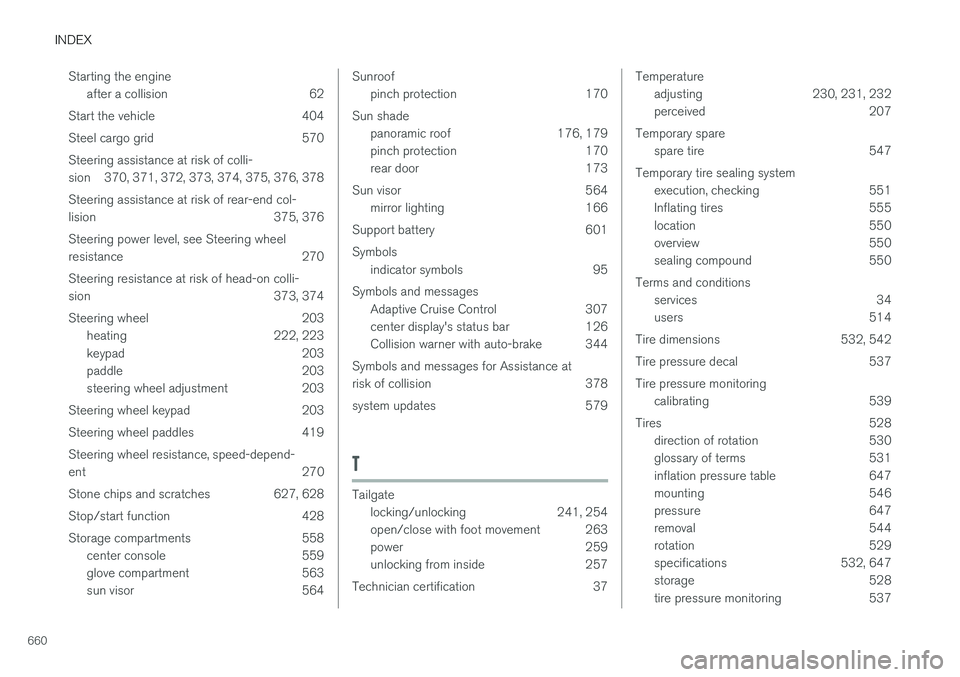
INDEX
660Starting the engine
after a collision 62
Start the vehicle 404
Steel cargo grid 570Steering assistance at risk of colli-
sion 370, 371, 372, 373, 374, 375, 376, 378 Steering assistance at risk of rear-end col-
lision 375, 376 Steering power level, see Steering wheel
resistance 270 Steering resistance at risk of head-on colli-
sion 373, 374
Steering wheel 203 heating 222, 223
keypad 203
paddle 203
steering wheel adjustment 203
Steering wheel keypad 203
Steering wheel paddles 419Steering wheel resistance, speed-depend- ent 270
Stone chips and scratches 627, 628
Stop/start function 428
Storage compartments 558 center console 559
glove compartment 563
sun visor 564
Sunroof
pinch protection 170
Sun shade panoramic roof 176, 179
pinch protection 170
rear door 173
Sun visor 564 mirror lighting 166
Support battery 601 Symbols indicator symbols 95
Symbols and messages Adaptive Cruise Control 307
center display's status bar 126
Collision warner with auto-brake 344
Symbols and messages for Assistance at
risk of collision 378
system updates 579
T
Tailgate locking/unlocking 241, 254
open/close with foot movement 263
power 259
unlocking from inside 257
Technician certification 37
Temperature adjusting 230, 231, 232
perceived 207
Temporary spare spare tire 547
Temporary tire sealing system execution, checking 551
Inflating tires 555
location 550
overview 550
sealing compound 550
Terms and conditions services 34
users 514
Tire dimensions 532, 542
Tire pressure decal 537 Tire pressure monitoring calibrating 539
Tires 528 direction of rotation 530
glossary of terms 531
inflation pressure table 647
mounting 546
pressure 647
removal 544
rotation 529
specifications 532, 647
storage 528
tire pressure monitoring 537