Seat VOLVO XC90 2018 Owner´s Manual
[x] Cancel search | Manufacturer: VOLVO, Model Year: 2018, Model line: XC90, Model: VOLVO XC90 2018Pages: 666, PDF Size: 11.32 MB
Page 77 of 666
SAFETY
75
To access the anchors
1. Put the child restraint in position.
2. Kneel on the child restraint to press downthe seat cushion and locate the anchors by feel.
3. Fasten the attachment on the child restraint's lower straps to the ISOFIX/LATCHlower anchors.
4. Firmly tension the lower child seat straps according to the manufacturer's instructions.
WARNING
Volvo's ISOFIX/LATCH anchors conform to FMVSS/CMVSS standards. Always refer tothe child restraint system's manual for weightand size ratings.
NOTE
• The rear center seat is not equipped with ISOFIX/LATCH lower tether anchors. If achild restraint is used in this seat, attachthe restraint's upper anchor strap (ifequipped with these) to the top tetheranchor point for this strap and secure thechild restraint with the vehicle's centerseat belt.
• Always follow your child seat manufactur-er's installation instructions, and use bothISOFIX/LATCH lower anchors and toptethers whenever possible.
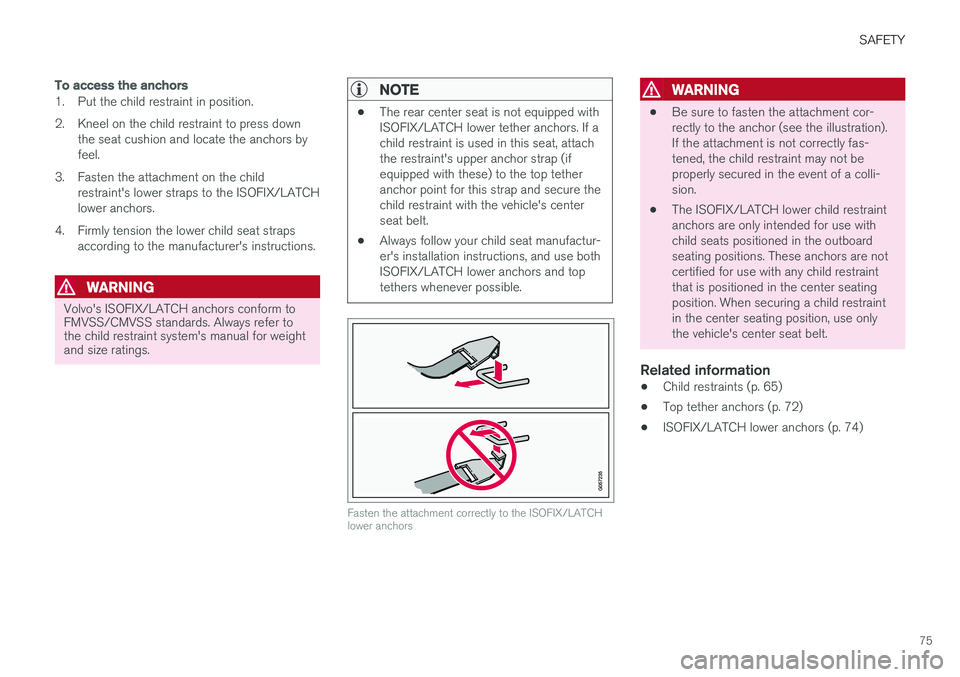
Fasten the attachment correctly to the ISOFIX/LATCH lower anchors
WARNING
• Be sure to fasten the attachment cor- rectly to the anchor (see the illustration).If the attachment is not correctly fas-tened, the child restraint may not beproperly secured in the event of a colli-sion.
• The ISOFIX/LATCH lower child restraintanchors are only intended for use withchild seats positioned in the outboardseating positions. These anchors are notcertified for use with any child restraintthat is positioned in the center seatingposition. When securing a child restraintin the center seating position, use onlythe vehicle's center seat belt.
Related information
• Child restraints (p. 65)
• Top tether anchors (p. 72)
• ISOFIX/LATCH lower anchors (p. 74)
Page 78 of 666
SAFETY
* Option/accessory.
76
Integrated booster cushion *1
The integrated booster cushion in the second row center seating position helps ensure that achild can sit comfortably and safely.
The integrated booster cushion has been spe- cially designed to help safeguard children in therear seat when used with the vehicle's seat belts. If using a booster cushion does not result in proper positioning of the shoulder strap, then thechild should be placed in a properly secured childrestraint. The shoulder belt must never be placedbehind the child's back or under the arm. Only used for children in the weight range 15-36 kg (33-80 lbs) and height range97-137 cm (38-54 inches). In Canada : 18 kg (40 lbs) is the minimum
weight requirement for a child using booster cushions according to the Canadian regulationCMVSS 213.4
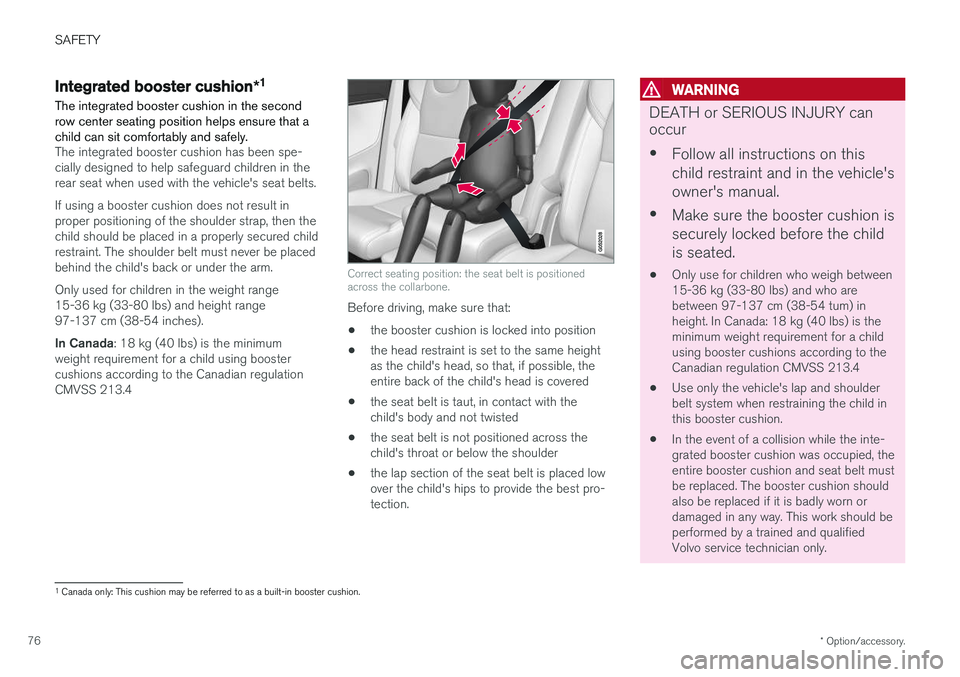
Correct seating position: the seat belt is positioned across the collarbone.
Before driving, make sure that:
• the booster cushion is locked into position
• the head restraint is set to the same height as the child's head, so that, if possible, theentire back of the child's head is covered
• the seat belt is taut, in contact with thechild's body and not twisted
• the seat belt is not positioned across thechild's throat or below the shoulder
• the lap section of the seat belt is placed lowover the child's hips to provide the best pro-tection.
WARNING
DEATH or SERIOUS INJURY can occur •
Follow all instructions on this child restraint and in the vehicle'sowner's manual.
• Make sure the booster cushion issecurely locked before the childis seated.
• Only use for children who weigh between 15-36 kg (33-80 lbs) and who arebetween 97-137 cm (38-54 tum) inheight. In Canada: 18 kg (40 lbs) is theminimum weight requirement for a childusing booster cushions according to theCanadian regulation CMVSS 213.4
• Use only the vehicle's lap and shoulderbelt system when restraining the child inthis booster cushion.
• In the event of a collision while the inte-grated booster cushion was occupied, theentire booster cushion and seat belt mustbe replaced. The booster cushion shouldalso be replaced if it is badly worn ordamaged in any way. This work should beperformed by a trained and qualifiedVolvo service technician only.
1
Canada only: This cushion may be referred to as a built-in booster cushion.
Page 80 of 666
||
SAFETY
* Option/accessory.
78
WARNING
DEATH or SERIOUS INJURY can occur •
Follow all instructions on this child restraint and in the vehicle'sowner's manual.
• Make sure the booster cushion issecurely locked before the childis seated.
• Only use for children who weigh between 15-36 kg (33-80 lbs) and who arebetween 97-137 cm (38-54 tum) inheight. In Canada: 18 kg (40 lbs) is theminimum weight requirement for a childusing booster cushions according to theCanadian regulation CMVSS 213.4
• Use only the vehicle's lap and shoulderbelt system when restraining the child inthis booster cushion.
• In the event of a collision while the inte-grated booster cushion was occupied, theentire booster cushion and seat belt mustbe replaced. The booster cushion shouldalso be replaced if it is badly worn ordamaged in any way. This work should beperformed by a trained and qualifiedVolvo service technician only.
Related information
•
Integrated booster cushion
* (p. 76)
• Folding down the integrated booster cush- ion
* (p. 78)
Folding down the integrated
booster cushion *
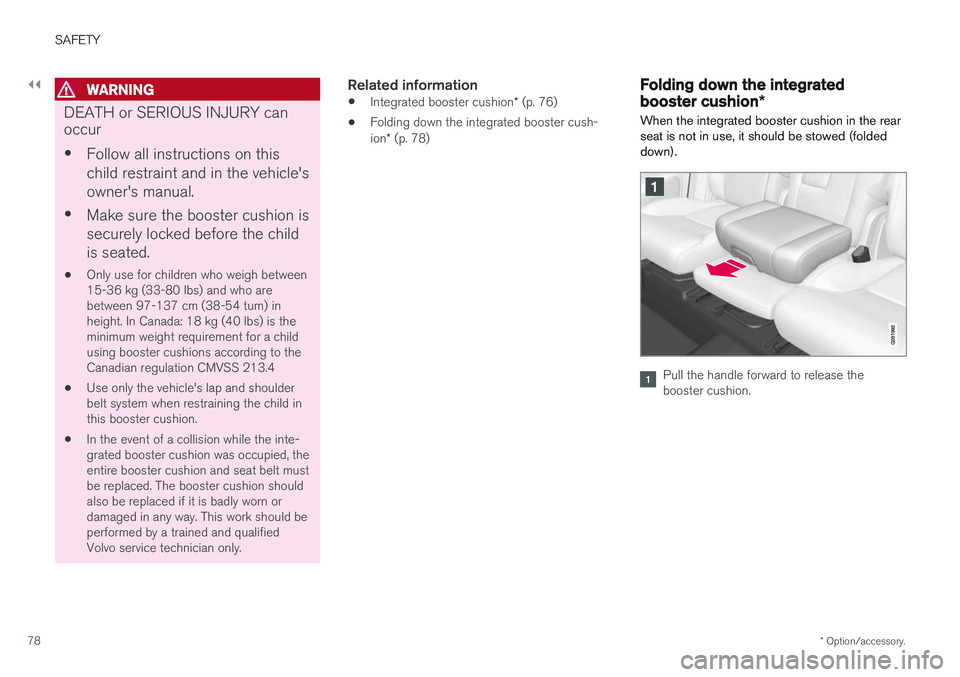
When the integrated booster cushion in the rear seat is not in use, it should be stowed (foldeddown).
Pull the handle forward to release the booster cushion.
Page 81 of 666
SAFETY
* Option/accessory.79
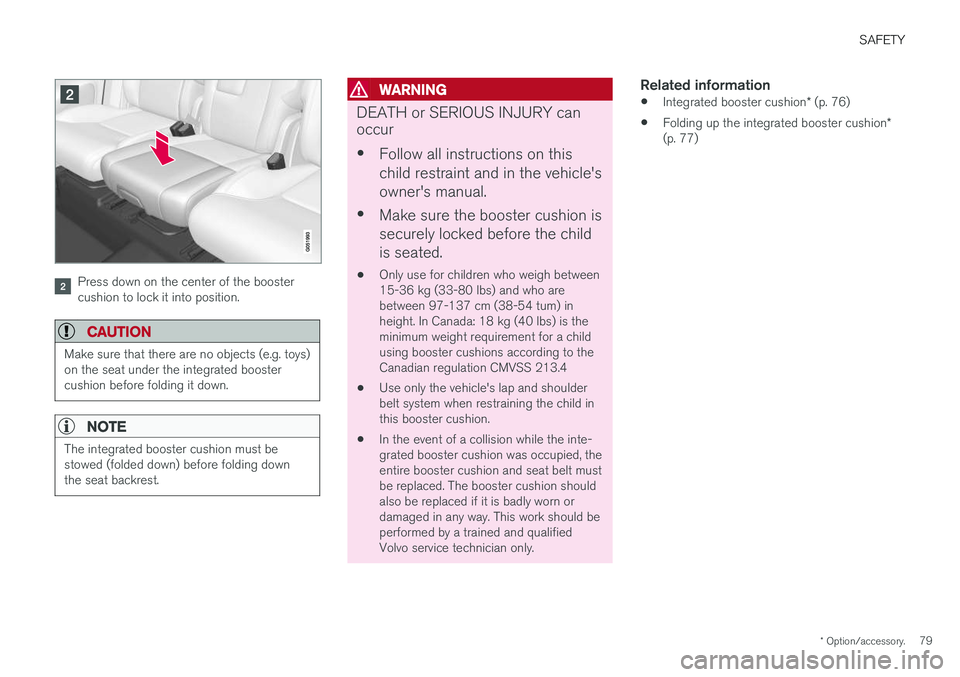
Press down on the center of the booster cushion to lock it into position.
CAUTION
Make sure that there are no objects (e.g. toys) on the seat under the integrated boostercushion before folding it down.
NOTE
The integrated booster cushion must be stowed (folded down) before folding downthe seat backrest.
WARNING
DEATH or SERIOUS INJURY can occur •
Follow all instructions on this child restraint and in the vehicle'sowner's manual.
• Make sure the booster cushion issecurely locked before the childis seated.
• Only use for children who weigh between 15-36 kg (33-80 lbs) and who arebetween 97-137 cm (38-54 tum) inheight. In Canada: 18 kg (40 lbs) is theminimum weight requirement for a childusing booster cushions according to theCanadian regulation CMVSS 213.4
• Use only the vehicle's lap and shoulderbelt system when restraining the child inthis booster cushion.
• In the event of a collision while the inte-grated booster cushion was occupied, theentire booster cushion and seat belt mustbe replaced. The booster cushion shouldalso be replaced if it is badly worn ordamaged in any way. This work should beperformed by a trained and qualifiedVolvo service technician only.
Related information
•
Integrated booster cushion
* (p. 76)
• Folding up the integrated booster cushion
*
(p. 77)
Page 85 of 666
DISPLAYS AND VOICE CONTROL
* Option/accessory.83
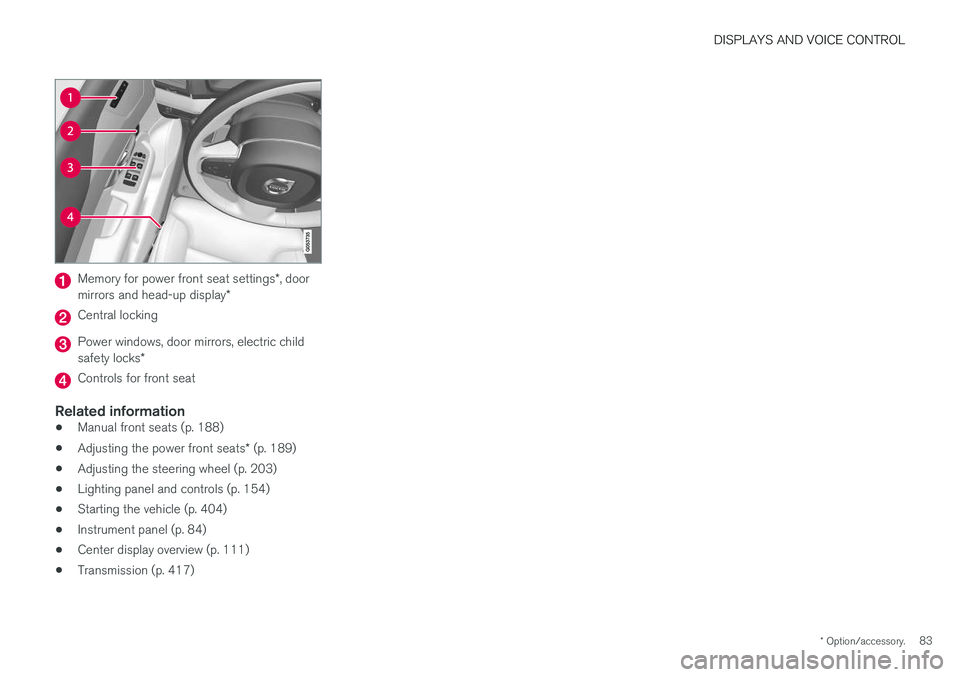
Memory for power front seat settings *, door
mirrors and head-up display *
Central locking
Power windows, door mirrors, electric child safety locks*
Controls for front seat
Related information
•Manual front seats (p. 188)
• Adjusting the power front seats
* (p. 189)
• Adjusting the steering wheel (p. 203)
• Lighting panel and controls (p. 154)
• Starting the vehicle (p. 404)
• Instrument panel (p. 84)
• Center display overview (p. 111)
• Transmission (p. 417)
Page 86 of 666
DISPLAYS AND VOICE CONTROL
* Option/accessory.
84
Instrument panel
The instrument panel displays information rela- ted to the vehicle and driving.
The instrument panel contains gauges, indicators and monitoring and warning symbols. What isshown in the instrument panel varies dependingon the equipment, settings and functions cur-rently active. The instrument panel is activated as soon as a door is opened, i.e. in ignition mode 0. The panel
will power down after a short period of time if it is not used. To reactivate it, do one of the following:
• Depress the brake pedal.
• Activate ignition mode
I.
• Open one of the doors. The instrument panel is available in two versions: 12"
* and 8".WARNING
If the instrument panel is not functioning properly, information about brakes, airbags orother safety-related systems may not be dis-played. The driver will then not be able tocheck the status of the vehicle systems orreceive relevant warnings and information.
WARNING
If the instrument panel turns off, does not activate when the ignition is switched on, orpart/all of the panel cannot be read, do notdrive the vehicle. Consult a workshop immedi-ately. Volvo recommends an authorized Volvoworkshop.
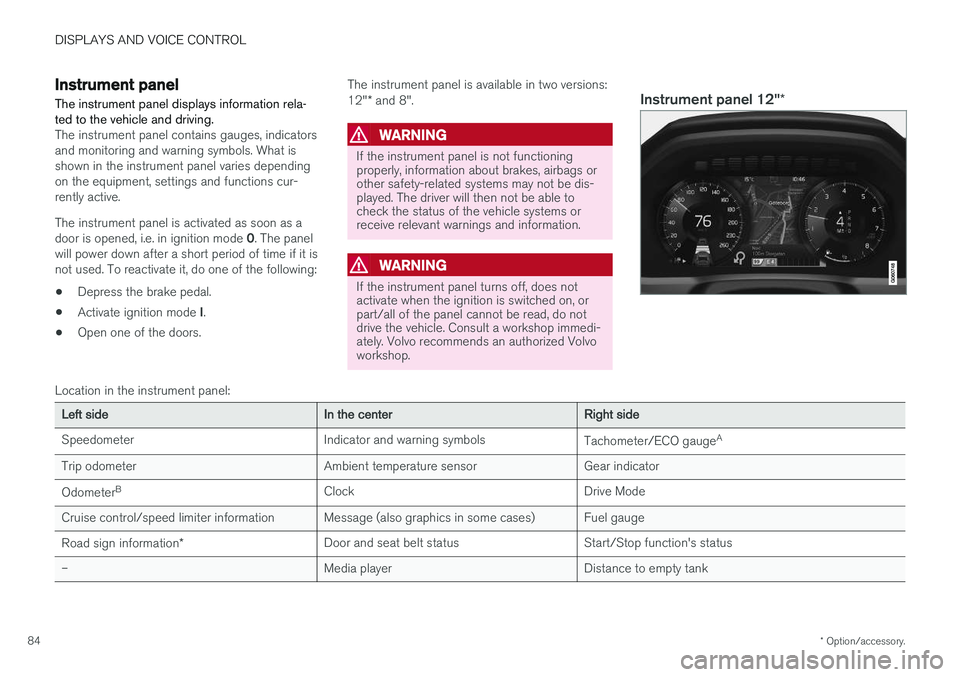
Instrument panel 12" *
Location in the instrument panel:
Left sideIn the centerRight side
Speedometer Indicator and warning symbols Tachometer/ECO gaugeA
Trip odometer Ambient temperature sensor Gear indicator Odometer B
Clock Drive Mode
Cruise control/speed limiter information Message (also graphics in some cases) Fuel gauge
Road sign information * Door and seat belt status Start/Stop function's status
– Media player Distance to empty tank
Page 88 of 666
||
DISPLAYS AND VOICE CONTROL
86
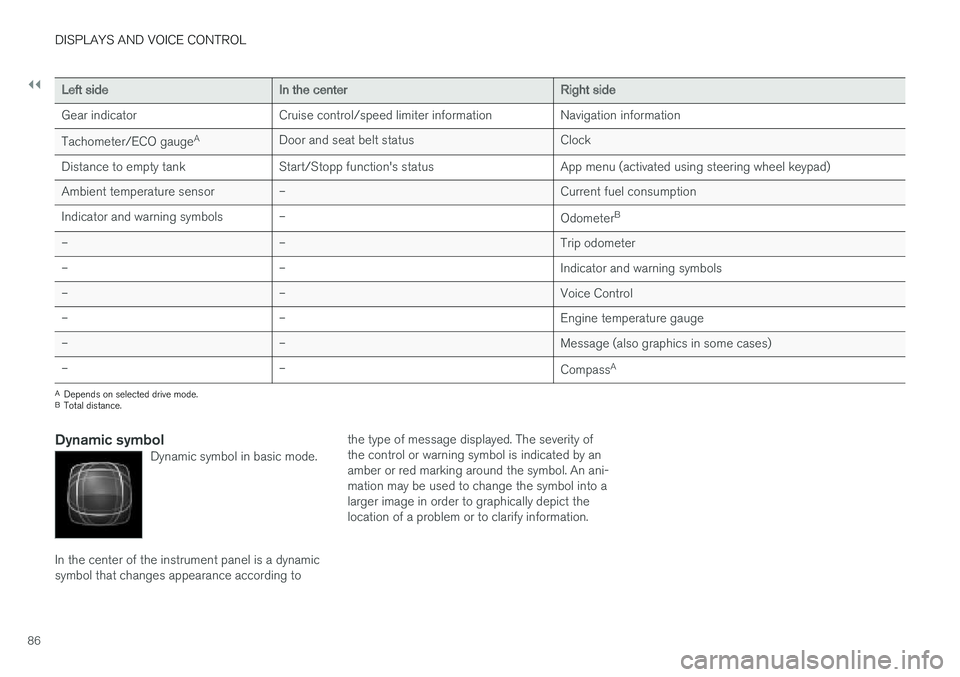
Left sideIn the centerRight side
Gear indicator Cruise control/speed limiter information Navigation information Tachometer/ECO gauge A
Door and seat belt status Clock
Distance to empty tank Start/Stopp function's status App menu (activated using steering wheel keypad) Ambient temperature sensor – Current fuel consumption
Indicator and warning symbols – OdometerB
– – Trip odometer
– – Indicator and warning symbols
– – Voice Control
– – Engine temperature gauge
– – Message (also graphics in some cases)
– –
CompassA
A
Depends on selected drive mode.
B Total distance.
Dynamic symbolDynamic symbol in basic mode.
In the center of the instrument panel is a dynamic symbol that changes appearance according to the type of message displayed. The severity ofthe control or warning symbol is indicated by anamber or red marking around the symbol. An ani-mation may be used to change the symbol into alarger image in order to graphically depict thelocation of a problem or to clarify information.
Page 99 of 666
DISPLAYS AND VOICE CONTROL
}}
97
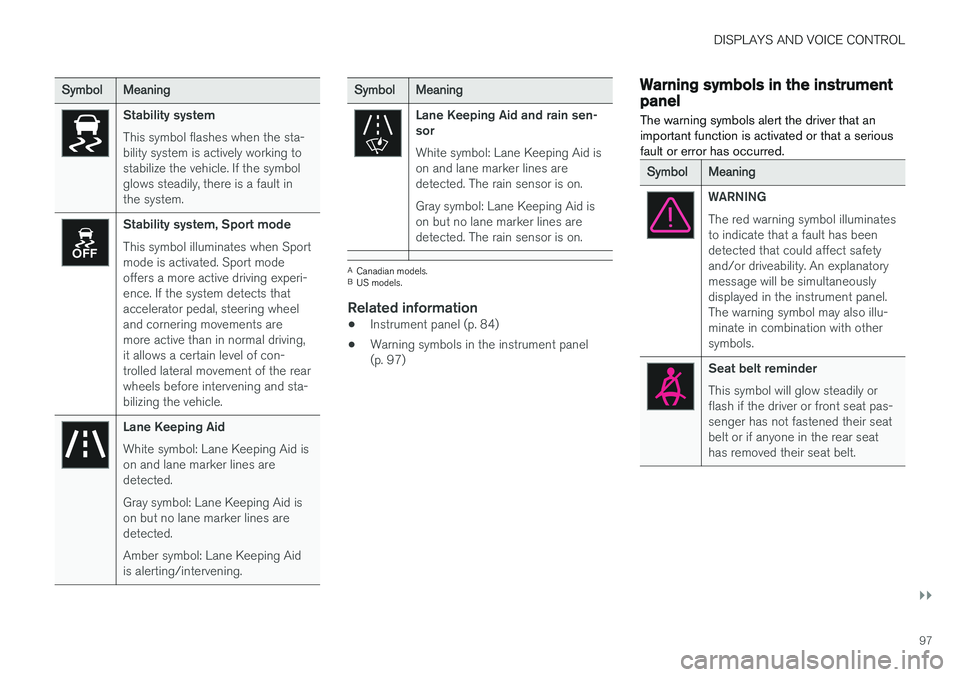
SymbolMeaning
Stability system This symbol flashes when the sta- bility system is actively working tostabilize the vehicle. If the symbolglows steadily, there is a fault inthe system.
Stability system, Sport mode This symbol illuminates when Sport mode is activated. Sport modeoffers a more active driving experi-ence. If the system detects thataccelerator pedal, steering wheeland cornering movements aremore active than in normal driving,it allows a certain level of con-trolled lateral movement of the rearwheels before intervening and sta-bilizing the vehicle.
Lane Keeping Aid White symbol: Lane Keeping Aid is on and lane marker lines aredetected. Gray symbol: Lane Keeping Aid is on but no lane marker lines aredetected. Amber symbol: Lane Keeping Aid is alerting/intervening.
SymbolMeaning
Lane Keeping Aid and rain sen- sor White symbol: Lane Keeping Aid is on and lane marker lines aredetected. The rain sensor is on. Gray symbol: Lane Keeping Aid is on but no lane marker lines aredetected. The rain sensor is on.
ACanadian models.
B US models.
Related information
• Instrument panel (p. 84)
• Warning symbols in the instrument panel (p. 97)
Warning symbols in the instrumentpanel
The warning symbols alert the driver that an important function is activated or that a seriousfault or error has occurred.
SymbolMeaning
WARNING The red warning symbol illuminates to indicate that a fault has beendetected that could affect safetyand/or driveability. An explanatorymessage will be simultaneouslydisplayed in the instrument panel.The warning symbol may also illu-minate in combination with othersymbols.
Seat belt reminder This symbol will glow steadily or flash if the driver or front seat pas-senger has not fastened their seatbelt or if anyone in the rear seathas removed their seat belt.
Page 115 of 666
DISPLAYS AND VOICE CONTROL
* Option/accessory.113
adjusted using the right-side steering wheel keypad.
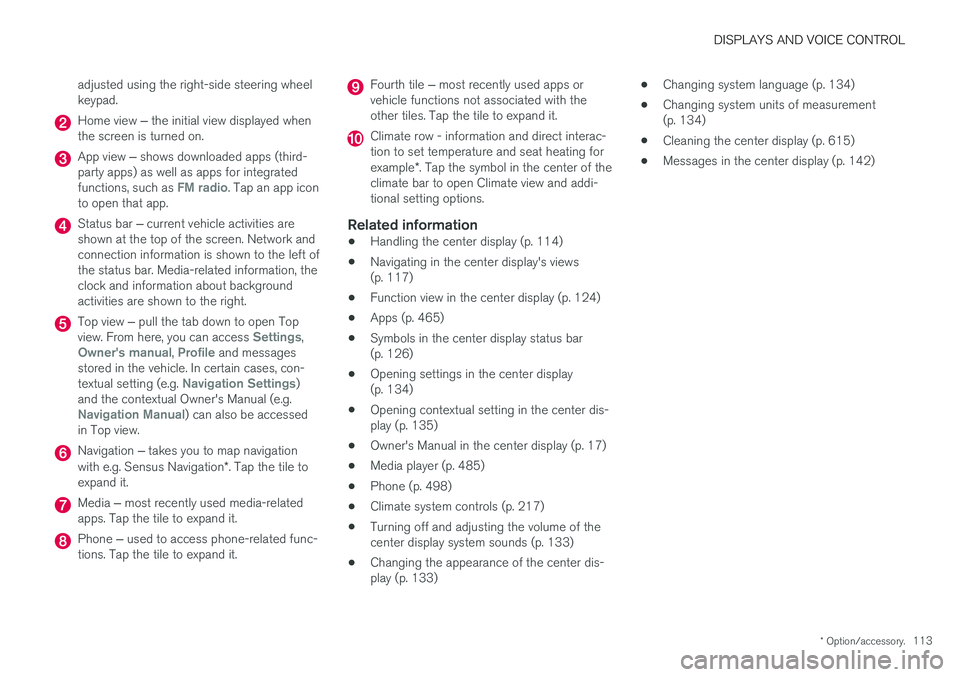
Home view
‒ the initial view displayed when
the screen is turned on.
App view ‒ shows downloaded apps (third-
party apps) as well as apps for integrated functions, such as
FM radio. Tap an app icon
to open that app.
Status bar ‒ current vehicle activities are
shown at the top of the screen. Network and connection information is shown to the left ofthe status bar. Media-related information, theclock and information about backgroundactivities are shown to the right.
Top view ‒ pull the tab down to open Top
view. From here, you can access Settings,Owner's manual, Profile and messages
stored in the vehicle. In certain cases, con- textual setting (e.g.
Navigation Settings)
and the contextual Owner's Manual (e.g.
Navigation Manual) can also be accessed
in Top view.
Navigation ‒ takes you to map navigation
with e.g. Sensus Navigation *. Tap the tile to
expand it.
Media ‒ most recently used media-related
apps. Tap the tile to expand it.
Phone ‒ used to access phone-related func-
tions. Tap the tile to expand it.
Fourth tile ‒ most recently used apps or
vehicle functions not associated with the other tiles. Tap the tile to expand it.
Climate row - information and direct interac- tion to set temperature and seat heating for example *. Tap the symbol in the center of the
climate bar to open Climate view and addi- tional setting options.
Related information
• Handling the center display (p. 114)
• Navigating in the center display's views(p. 117)
• Function view in the center display (p. 124)
• Apps (p. 465)
• Symbols in the center display status bar(p. 126)
• Opening settings in the center display(p. 134)
• Opening contextual setting in the center dis-play (p. 135)
• Owner's Manual in the center display (p. 17)
• Media player (p. 485)
• Phone (p. 498)
• Climate system controls (p. 217)
• Turning off and adjusting the volume of thecenter display system sounds (p. 133)
• Changing the appearance of the center dis-play (p. 133) •
Changing system language (p. 134)
• Changing system units of measurement(p. 134)
• Cleaning the center display (p. 615)
• Messages in the center display (p. 142)
Page 120 of 666
||
DISPLAYS AND VOICE CONTROL
* Option/accessory.
118
NOTE
In Home view's standard mode – short press on the Home button. An animation describingaccess to the various views is shown on thescreen.
NOTE
When the vehicle is moving:
• Certain functions (e.g. using the center display's keyboard) may be deactivated.
• Certain texts (e.g. those generated byapps) will be shortened to three rows. Tap the
Read out button to have the
entire message read aloud.
• The message will be shortened to one row. Tap the
Read out button to have
the entire message read aloud.
Status barCurrent vehicle activities are shown at the top of the screen in the status bar. Network and con-nection information is shown to the left of thestatus bar. Media-related information, the clockand information about background activities areshown to the right.
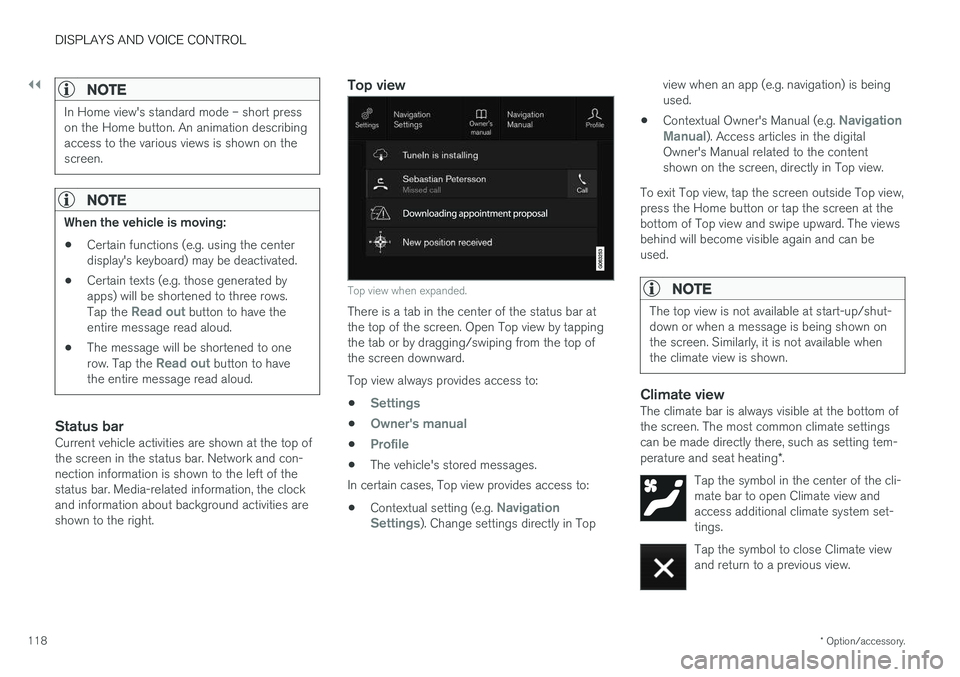
Top view
Top view when expanded.
There is a tab in the center of the status bar at the top of the screen. Open Top view by tappingthe tab or by dragging/swiping from the top ofthe screen downward. Top view always provides access to:
•
Settings
•Owner's manual
•Profile
• The vehicle's stored messages.
In certain cases, Top view provides access to:
• Contextual setting (e.g.
Navigation
Settings). Change settings directly in Top view when an app (e.g. navigation) is being used.
• Contextual Owner's Manual (e.g.
Navigation
Manual). Access articles in the digital
Owner's Manual related to the content shown on the screen, directly in Top view.
To exit Top view, tap the screen outside Top view,press the Home button or tap the screen at thebottom of Top view and swipe upward. The viewsbehind will become visible again and can beused.
NOTE
The top view is not available at start-up/shut- down or when a message is being shown onthe screen. Similarly, it is not available whenthe climate view is shown.
Climate viewThe climate bar is always visible at the bottom of the screen. The most common climate settingscan be made directly there, such as setting tem- perature and seat heating *.
Tap the symbol in the center of the cli- mate bar to open Climate view andaccess additional climate system set-tings.
Tap the symbol to close Climate view and return to a previous view.