belt VOLVO XC90 2018 Owner´s Manual
[x] Cancel search | Manufacturer: VOLVO, Model Year: 2018, Model line: XC90, Model: VOLVO XC90 2018Pages: 666, PDF Size: 11.32 MB
Page 99 of 666
DISPLAYS AND VOICE CONTROL
}}
97
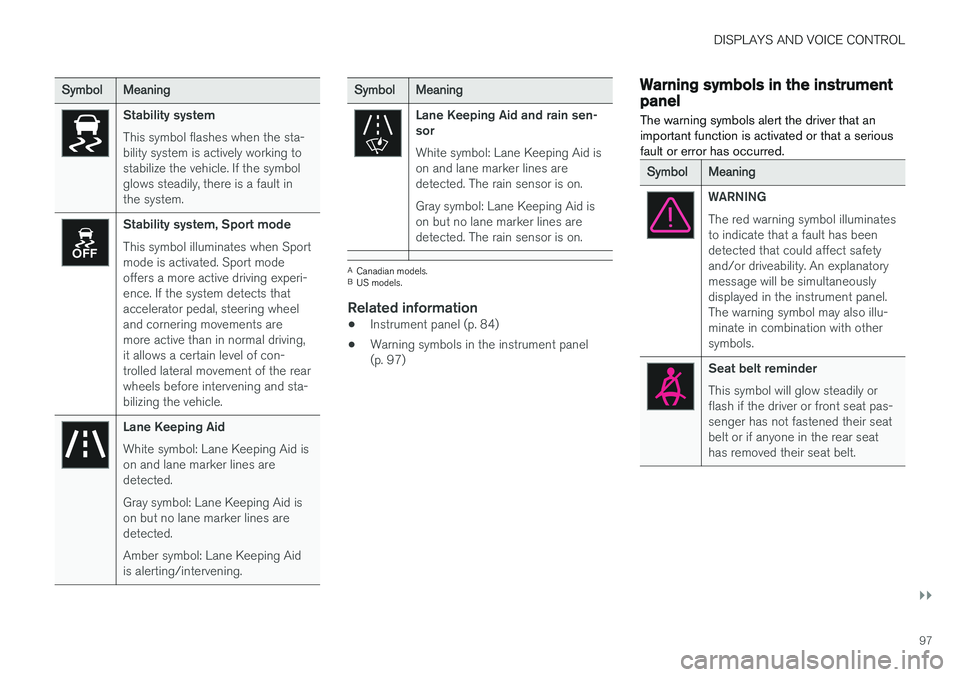
SymbolMeaning
Stability system This symbol flashes when the sta- bility system is actively working tostabilize the vehicle. If the symbolglows steadily, there is a fault inthe system.
Stability system, Sport mode This symbol illuminates when Sport mode is activated. Sport modeoffers a more active driving experi-ence. If the system detects thataccelerator pedal, steering wheeland cornering movements aremore active than in normal driving,it allows a certain level of con-trolled lateral movement of the rearwheels before intervening and sta-bilizing the vehicle.
Lane Keeping Aid White symbol: Lane Keeping Aid is on and lane marker lines aredetected. Gray symbol: Lane Keeping Aid is on but no lane marker lines aredetected. Amber symbol: Lane Keeping Aid is alerting/intervening.
SymbolMeaning
Lane Keeping Aid and rain sen- sor White symbol: Lane Keeping Aid is on and lane marker lines aredetected. The rain sensor is on. Gray symbol: Lane Keeping Aid is on but no lane marker lines aredetected. The rain sensor is on.
ACanadian models.
B US models.
Related information
• Instrument panel (p. 84)
• Warning symbols in the instrument panel (p. 97)
Warning symbols in the instrumentpanel
The warning symbols alert the driver that an important function is activated or that a seriousfault or error has occurred.
SymbolMeaning
WARNING The red warning symbol illuminates to indicate that a fault has beendetected that could affect safetyand/or driveability. An explanatorymessage will be simultaneouslydisplayed in the instrument panel.The warning symbol may also illu-minate in combination with othersymbols.
Seat belt reminder This symbol will glow steadily or flash if the driver or front seat pas-senger has not fastened their seatbelt or if anyone in the rear seathas removed their seat belt.
Page 198 of 666
SEATS AND STEERING WHEEL
* Option/accessory.
196 •
Adjusting front seat side bolster settings
*
(p. 194)
• Adjusting front seat lumbar support
* (p. 194)
Folding the second row backrests
The second row of seats has three individual seating positions. The backrests can be foldeddown separately.
WARNING
• Adjust the seat and ensure it locks into position before driving. Use caution whenadjusting the seat. Uncontrolled or care-less adjustments could lead to injury.
• Long objects must always be securelytied down to help prevent injury or dam-age in the event of sudden braking.
• Always turn off the engine and apply theparking brake when loading or unloadingthe vehicle.
• Put the gear selector in
P to help prevent
the gear selector from being inadvertentlymoved.
CAUTION
When the backrest is folded down, make sure there are no objects in the rear seat, and theseat belts are not buckled. Otherwise there isa risk of damage to the upholstery.
CAUTION
The seat cushion of the integrated child restraint * must be in the stowed position
before the center seat backrest can be folded down. The armrest * in the center seat must be
raised before the seat backrest is folded down. If the vehicle has private locking *, the ski
hatch must be closed before the seat back- rest is folded down.
NOTE
The front seats may need to be pushed for- ward and/or the backrest adjusted so that therear seat backrests can be fully lowered. The rear seats may also need to be moved rearward. The seats in the second row must be in the upright position before they can be foldeddown completely. They should not be foldeddown when they are tilted forward to accessthe third row of seats.
Page 236 of 666
||
CLIMATE CONTROL
* Option/accessory.
234
NOTE
The air conditioning for the third row of seats is automatically activated if any of the thirdrow seat belts are buckled. It is not possible to manually activate air con- ditioning for the third row of seats if the mainair conditioning system is deactivated or the climate system * for the second row of seats is
deactivated.
Related information
• Climate system controls (p. 217)
• Activating and deactivating auto-start of third-row climate control
* (p. 234)
Activating and deactivating auto-
start of third-row climate control *
The air conditioning cools and dehumidifies incoming air as needed.
On models with a 4-zone climate *, the air condi-
tioning for the third row of seats can be set to start automatically when the engine is started. 1. Tap
Settings in the Top view in the center
display.
2. Tap
Climate.
3. Select
Auto Third Row Climate to acti-
vate/deactivate the air conditioning for the third row of seats when the engine is started.
Related information
• Activating and deactivating climate control for the third-row seats
* (p. 233)
Page 299 of 666
DRIVER SUPPORT
}}
* Option/accessory.297
Head-up display for Adaptive CruiseControl with collision warning
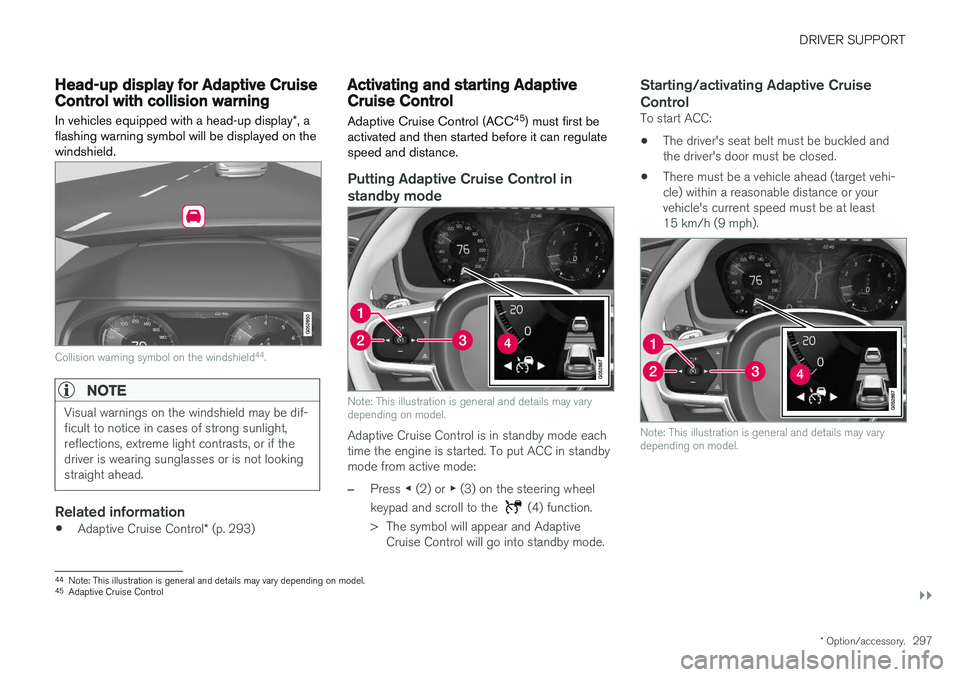
In vehicles equipped with a head-up display *, a
flashing warning symbol will be displayed on the windshield.
Collision warning symbol on the windshield 44
.
NOTE
Visual warnings on the windshield may be dif- ficult to notice in cases of strong sunlight,reflections, extreme light contrasts, or if thedriver is wearing sunglasses or is not lookingstraight ahead.
Related information
• Adaptive Cruise Control
* (p. 293)
Activating and starting AdaptiveCruise Control Adaptive Cruise Control (ACC 45
) must first be
activated and then started before it can regulate speed and distance.
Putting Adaptive Cruise Control in standby mode
Note: This illustration is general and details may vary depending on model.
Adaptive Cruise Control is in standby mode each time the engine is started. To put ACC in standbymode from active mode:
–Press ◀ (2) or ▶ (3) on the steering wheel
keypad and scroll to the
(4) function.
> The symbol will appear and Adaptive Cruise Control will go into standby mode.
Starting/activating Adaptive Cruise Control
To start ACC:
• The driver's seat belt must be buckled and the driver's door must be closed.
• There must be a vehicle ahead (target vehi-cle) within a reasonable distance or yourvehicle's current speed must be at least15 km/h (9 mph).
Note: This illustration is general and details may vary depending on model.
44
Note: This illustration is general and details may vary depending on model.
45 Adaptive Cruise Control
Page 303 of 666
DRIVER SUPPORT
}}
301
To temporarily deactivate Adaptive Cruise Control and put it in standby mode:
–Press the button on the steering wheel
(2). > The
symbol in the instrument panel
changes color from WHITE to GRAY and the set speed in the center of the speed-ometer will change from BEIGE to GRAY.
WARNING
• If Adaptive Cruise Control is in standby mode, the driver must intervene and regu-late both speed and distance to the vehicleahead.
• If the vehicle comes too close to a vehicleahead when Adaptive Cruise Control is instandby mode, the driver is instead warnedof the short distance by the Distance Alertfunction.
Standby mode due to action by the driver
Adaptive Cruise Control will be temporarily deac- tivated and put in standby mode if:
• the brakes are applied.
• the gear selector is moved to
N
• the vehicle is driven faster than the setspeed for more than 1 minute Temporarily increasing speed using the accelera-
tor pedal, e.g. when passing another vehicle, willnot affect the setting. The vehicle will return tothe set speed when the accelerator pedal isreleased.
Automatic standby mode
Adaptive Cruise Control is dependent on other systems, such as Electronic Stability Control (ESC 50
). If any of these other systems stops
working, Adaptive Cruise Control will automati- cally switch off.
WARNING
With automatic standby mode, the driver is warned by an acoustic signal and a messageon the instrument panel. • The driver must then regulate vehicle speed, apply the brakes if necessary, andmaintain a safe distance to other vehicles.
Adaptive Cruise Control may go into standbymode if: • your vehicle's speed goes below 5 km/h(3 mph) and ACC cannot determine if thevehicle ahead is stationary or if it is anotherobject, e.g. a speed bump.
• your vehicle's speed goes under 5 km/h(3 mph) and the vehicle ahead turns so thatACC no longer has a vehicle to follow. •
the driver opens the door.
• the driver unbuckles the seat belt.
• the engine speed (rpm) is too low/high.
• one or more of the wheels lose traction.
• the brake temperature is high.
• the parking brake is applied.
• the camera/radar sensor is covered by snowor heavy rain (the camera lens/radar wavesare blocked)
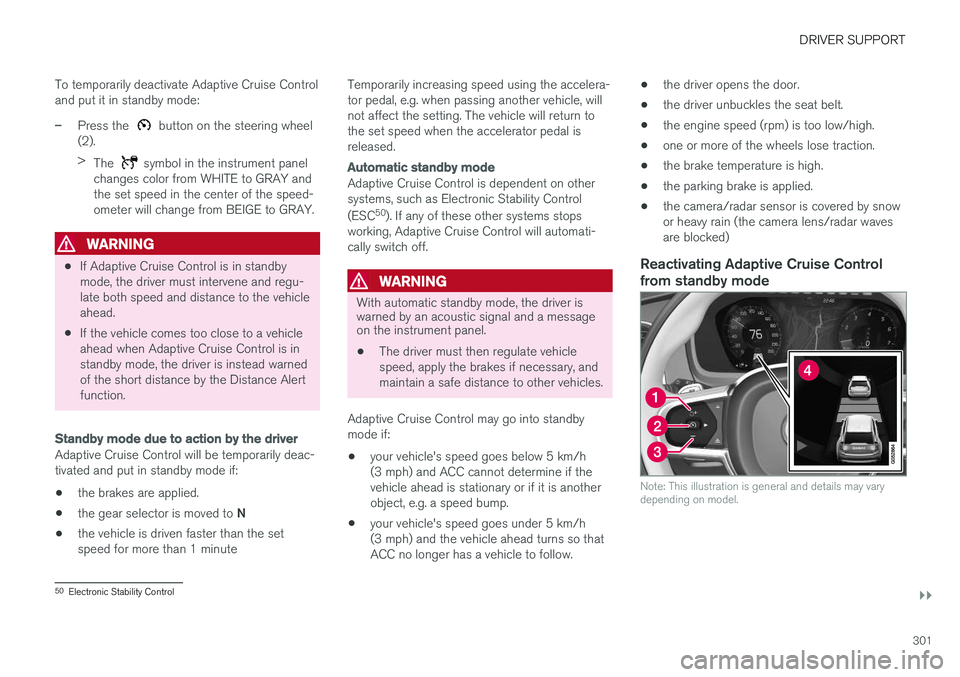
Reactivating Adaptive Cruise Control
from standby mode
Note: This illustration is general and details may vary depending on model.
50 Electronic Stability Control
Page 306 of 666
DRIVER SUPPORT
* Option/accessory.
304
Automatic braking with AdaptiveCruise Control The Adaptive cruise control (ACC 55
) has a spe-
cial brake function in slow traffic and while sta- tionary.
Braking function in slow traffic and at a standstill
In slow-moving, stop-and-go traffic or when stop- ped at a traffic light, driving will resume automati-cally if the vehicle is stopped for less thanapprox. 3 seconds. If it takes more than 3 sec-onds for the vehicle ahead to begin moving again,Adaptive Cruise Control will go into standbymode and the Auto-hold brake function will acti-vate.
–Adaptive Cruise Control can be reactivated in one of the following ways:
• Pressing the
button on the steering
wheel keypad.
• Pressing the accelerator pedal.
> Adaptive Cruise Control will resume fol- lowing the vehicle ahead if it begins to move within approx. 6 seconds.
NOTE
ACC can keep the vehicle stationary for no more than 5 minutes – after that time theparking brake is applied and Adaptive CruiseControl is deactivated. The parking brake must be released before Adaptive Cruise Control can be reactivated.
Deactivation of the Auto-hold brake function
In certain situations, Auto-hold will be deactivated when the vehicle is at a standstill and AdaptiveCruise Control will go into standby mode. Thismeans that the brakes will be released and thevehicle could begin to roll. The driver mustactively apply the brakes to keep the vehicle sta-tionary. This can occur if:
• the driver depresses the brake pedal
• the parking brake is applied
• the gear selector is moved to the
P
, N
or R
positions
• the driver puts Adaptive Cruise Control in standby mode.
Auto Activate Parking BrakeIn certain situations, the parking brake will beapplied to keep the vehicle at a standstill. This occurs if Adaptive Cruise Control is keepingthe vehicle stationary using the brakes and:
• the driver opens the door or unbuckleshis/her seat belt
• ACC has kept the vehicle at a standstill formore than approx. 5 minutes
• the brakes overheat
• the driver switches off the engine manually.
Related information
•
Adaptive Cruise Control
* (p. 293)
55
Adaptive Cruise Control
Page 315 of 666
DRIVER SUPPORT
}}
* Option/accessory.313
NOTE
Visual warnings on the windshield may be dif- ficult to notice in cases of strong sunlight,reflections, extreme light contrasts, or if thedriver is wearing sunglasses or is not lookingstraight ahead.
WARNING
Pilot Assist only issues a warning for vehicles detected by its camera and radar unit – thus,a warning may come after a delay or not at all. •Never wait for a warning. Apply the brakes when necessary!
Related information
• Pilot Assist (p. 309)
Head-up display for Pilot Assistduring collision risks
In vehicles equipped with a head-up display *, a
flashing warning symbol will be displayed on the windshield.
Collision warning symbol on the windshield 64
.
NOTE
Visual warnings on the windshield may be dif- ficult to notice in cases of strong sunlight,reflections, extreme light contrasts, or if thedriver is wearing sunglasses or is not lookingstraight ahead.
Related information
• Pilot Assist (p. 309)
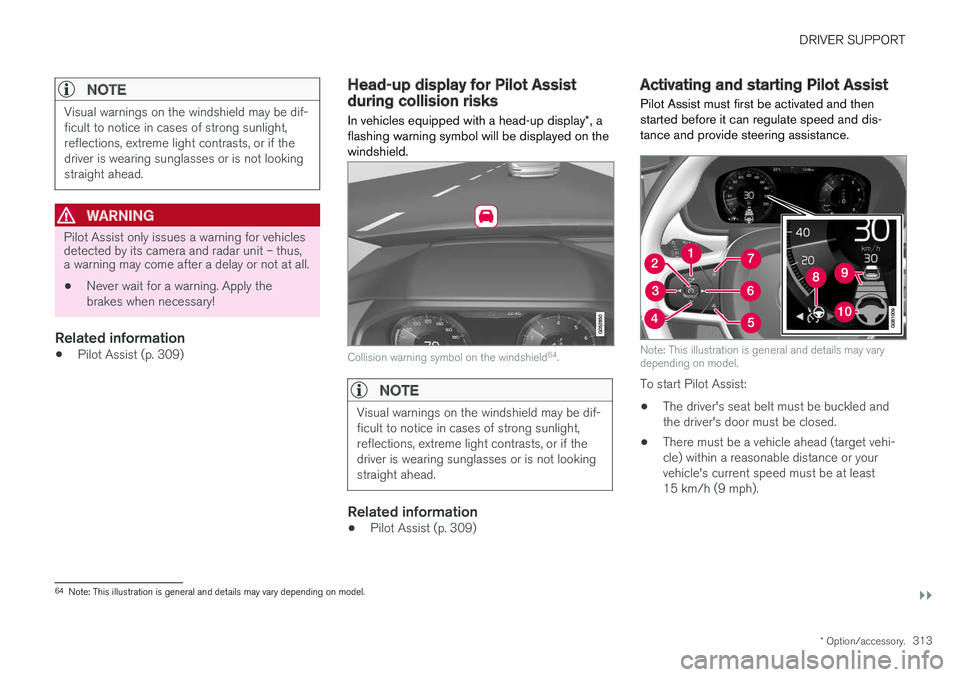
Activating and starting Pilot Assist Pilot Assist must first be activated and then started before it can regulate speed and dis-tance and provide steering assistance.
Note: This illustration is general and details may vary depending on model.
To start Pilot Assist: •
The driver's seat belt must be buckled and the driver's door must be closed.
• There must be a vehicle ahead (target vehi-cle) within a reasonable distance or yourvehicle's current speed must be at least15 km/h (9 mph).
64
Note: This illustration is general and details may vary depending on model.
Page 320 of 666
||
DRIVER SUPPORT
318
Automatic standby mode
Pilot Assist is dependent on other systems, such as Electronic Stability Control (ESC66
). If any of
these other systems stops working, Pilot Assist will automatically switch off.
WARNING
With automatic standby mode, the driver is warned by an acoustic signal and a messageon the instrument panel. • The driver must then regulate vehicle speed, apply the brakes if necessary, andmaintain a safe distance to other vehicles.
Adaptive Cruise Control may go into standbymode if, e.g.: • the driver opens the door.
• the brake temperature is high.
• the driver's hands are not on the steering wheel.
• the parking brake is applied.
• the engine speed (rpm) is too low/high.
• the driver unbuckles the seat belt.
• one or more of the wheels lose traction.
• the camera/radar sensor is covered by snowor heavy rain (the camera lens/radar wavesare blocked) •
your vehicle's speed goes below 5 km/h(3 mph) and Pilot Assist cannot determine ifthe vehicle ahead is stationary or if it isanother object, e.g. a speed bump.
• your vehicle's speed goes under 5 km/h(3 mph) and the vehicle ahead turns so thatPilot Assist no longer has a vehicle to follow.Reactivating Pilot Assist from standby
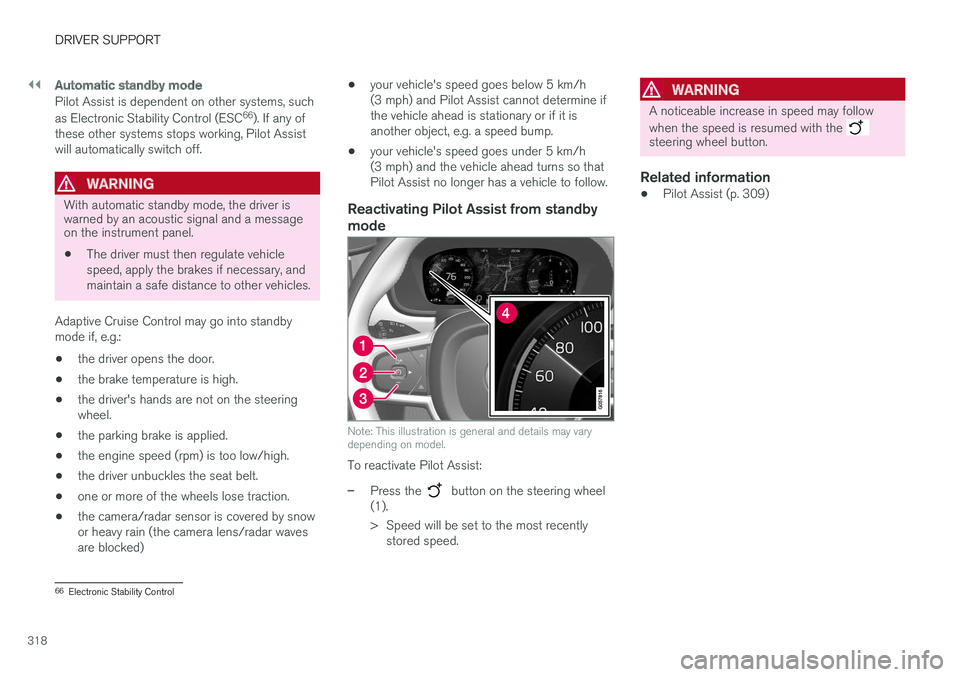
mode
Note: This illustration is general and details may vary depending on model.
To reactivate Pilot Assist:
–Press the button on the steering wheel
(1).
> Speed will be set to the most recently stored speed.
WARNING
A noticeable increase in speed may follow when the speed is resumed with the
steering wheel button.
Related information
• Pilot Assist (p. 309)
66
Electronic Stability Control
Page 323 of 666
DRIVER SUPPORT
}}}}
321
Deactivation of the Auto-hold brake function
In certain situations, Auto-hold will be deactivated when the vehicle is at a standstill and Pilot Assistwill go into standby mode. This means that thebrakes will be released and the vehicle couldbegin to roll. The driver must actively apply thebrakes to keep the vehicle stationary. This can occur if:
• the driver depresses the brake pedal
• the parking brake is applied
• the gear selector is moved to the
P, N or R
positions
• the driver puts Pilot Assist in standby mode.
Auto Activate Parking BrakeIn certain situations, the parking brake will be applied to keep the vehicle at a standstill. This occurs if Pilot Assist is keeping the vehicle stationary using the brakes and:
• the driver opens the door or unbuckleshis/her seat belt
• Pilot Assist has kept the vehicle at a stand-still for more than approx. 5 minutes
• the brakes overheat
• the driver switches off the engine manually.
Related information
•Pilot Assist (p. 309)
Pilot Assist limitations
Pilot Assist functionality may be reduced in cer- tain situations.
Pilot Assist is a driver support function designed to simplify driving and assist the driver in manysituations. However, the driver is always responsi-ble for maintaining a suitable distance to vehiclesor objects around it and ensuring that the vehicleis correctly positioned in the traffic lane.
WARNING
In some situations, Pilot Assist may have trou- ble helping the driver properly or may bedeactivated automatically – we advise againstusing Pilot Assist in such cases. Examples ofsuch situations include:
• the lane markings are worn, missing or cross each other.
• lane division is unclear, for example, whenthe lanes divide or merge or at exits orwhen there are multiple sets of markings.
• edges or other lines than lane markingsare present on or near the road, e.g.curbs, joints or repairs to the road sur-face, edges of barriers, roadside edges orstrong shadows.
• the lane is narrow or winding.
• the lane contains ridges or holes.
• weather conditions are poor, e.g. rain,snow or fog or slush or reduced visibilitywith poor light conditions, backlighting,wet road surface, etc.
The driver should also note that Pilot Assist has the following limitations: • High curbs, roadside barriers, temporary obstacles (traffic cones, safety barriers,etc.) are not detected. Alternatively, theymay be detected incorrectly as lane mark-ings, with a subsequent risk of contactbetween the vehicle and such obstacles.
Page 338 of 666
||
DRIVER SUPPORT
336
3 - Auto-brake
The automatic braking function is activated at the last moment. If the driver has not taken evasive action by this stage and a collision is imminent, the automaticbraking function will be triggered. This occurswhether or not the driver is pressing the brakepedal. Full braking force will be applied to reducethe speed at impact or reduced braking effect willbe applied if this is sufficient to avoid the colli-sion. The seat belt tensioners may be activated along with the automatic braking function. See "Seatbelt tensioners" for more information. In certain situations, auto-braking may begin with a limited braking force before applying full brak- ing force. If City Safety has prevented a collision, the vehi- cle will be kept at a standstill until the drivertakes action. If the vehicle has slowed to avoidcolliding with a slower-moving vehicle ahead, yourspeed will be reduced to that vehicle's speed. Auto-braking can always be cancelled if the driver presses hard on the accelerator pedal.
NOTE
When City Safety activates the brakes, the brake lights come on.
When City Safety applies the brakes, a text mes- sage will appear in the instrument panel to notifythe driver that the function is/was activated.
WARNING
City Safety may not be used to change how the driver operates the vehicle. The drivermust not only rely on City Safety to brake thevehicle.
Related information
•City Safety
™ (p. 333)
Setting a warning distance for CitySafety
City Safety is always active, but the function's warning distance can be adjusted.
NOTE
The City Safety function cannot be deacti- vated. It is activated automatically each timethe engine/electric motor is started.
The alert distance determines the sensitivity of the system and regulates the distance at whichthe light, sound and brake pulsations will be acti-vated. To select warning distance:
1. Select
SettingsMy CarIntelliSafe in
the center display's Top view.
2. Under
City Safety Warning, tap Late,Normal or Early to set the desired warning
distance.
If the driver feels that the
Early setting is giving
too many warnings or finds them irritating, the
Normal or Late warning distance settings can
be selected instead. If the driver feels that the warnings are too fre- quent and distracting, the warning distance canbe reduced. This will reduce the total number ofwarnings, but it will also result in City Safety pro-viding warnings at a later stage.