parking brake VOLVO XC90 2018 Owner´s Manual
[x] Cancel search | Manufacturer: VOLVO, Model Year: 2018, Model line: XC90, Model: VOLVO XC90 2018Pages: 666, PDF Size: 11.32 MB
Page 6 of 666
4
Setting types in the center display137
Table of settings in the center display 138
Driver profiles 139
Selecting a driver profile 140
Changing a driver profile's name 141
Resetting driver profile settings 141
Linking a remote key to a driver profile 141
Messages in the center display 142
Handling messages in the center display 143
Handling messages saved from the center display 144
Head-up display *
144
Activating and deactivating the head- up display * 146
Head-up display settings *
146
Voice control 147
Using voice commands 148
Voice control for cellular phones 149
Voice control for radio and media 150
Voice control settings 150
LIGHTING
Lighting panel and controls154
Adjusting light functions via the cen- ter display 155
Parking lights 156
Daytime running lights 156
Low beams 157
Using high beam 158
Active high beam 159
Using turn signals 160
Active Bending Lights *
161
Front fog lights/cornering illumination *
161
Rear fog light 162
Brake lights 163
Emergency brake lights 163
Hazard warning flashers 164
Using home safe lighting 164
Welcome Light 164
Interior Lighting 165
Adjusting interior lighting 167
WINDOWS, GLASS AND MIRRORS
Windows, glass and mirrors170
Pinch protection for windows and sun curtains 170
Reset procedure for pinch protection 171
Power windows 171
Operating the power windows 172
Using sun curtains *
173
Rearview/door mirrors 173
Adjusting the rearview mirror dim-ming function 174
Adjusting the door mirrors 175
Panoramic roof *
176
Operating the panoramic roof *
177
Auto closing the panoramic roof * sun
curtain 179
Using the windshield wipers 180
Heated windshield washer nozzles *
181
Using the rain sensor 181
Using the rain sensor's memory function 182
Using the windshield and headlightwashers 183
Using the rear window wiper/washer 184
Using automatic rear window wipingwhen backing up 185
Page 11 of 666
9
Activating/deactivating Steering assistance during collision risks withoncoming vehicles374
Limitations of steering assistanceduring collision risks from oncomingtraffic 374
Steering assistance during collision risks from behind * 375
Activating/deactivating Steering assistance during collision risks from behind * 376
Limitations of steering assistance during collision risks from behind 376
Symbols and messages for steeringassistance during collision risks 378
Park Assist *
379
Park Assist front, rear and sides 380
Activating/deactivating Park Assist 381
Park Assist limitations 381
Recommended maintenance forPark Assist 382
Park Assist symbols and messages 383
Park Assist Camera *
384
Park Assist Camera views 385
Park Assist Camera trajectory lines 386
Sensor field from Park Assist forPark Assist Camera 388
Starting the Park Assist Camera 389
Park Assist Camera limitations389
Recommended maintenance of the Park Assist Camera 391
Park Assist Camera symbols andmessages 392
Park Assist Pilot *
393
Types of parking with Park Assist Pilot 393
Parking with Park Assist Pilot 394
Leaving a parking space with ParkAssist Pilot 397
Park Assist Pilot * limitations
398
Recommended maintenance forPark Assist Pilot 400
Park Assist Pilot * messages
401
STARTING AND DRIVING
Starting the vehicle
404
Switching off the vehicle 406
Ignition modes 407
Selecting ignition mode 408
Brake functions 408
Brakes 409
Brake Assist System 410
Braking on wet roads 410
Braking on salted roads 411
Maintenance of the brake system 411
Parking brake 411
Activating and deactivating the park- ing brake 412
Settings for automatically activatingthe parking brake 413
Parking on a hill 414
Parking brake malfunction 414
Auto-hold brakes 415
Activating and deactivating Auto-hold at a standstill 416
Hill Start Assist 416
Braking assist after a collision 417
Transmission 417
Gear selector positions for automatictransmissions 418
Page 30 of 666
||
YOUR VOLVO
* Option/accessory.
28 goal. In addition to continuous environmental refinement of conventional gasoline-poweredinternal combustion engines, Volvo is activelylooking at advanced technology alternative-fuelvehicles. When you drive a Volvo, you become our partner in the work to lessen the vehicle's impact on theenvironment. To reduce your vehicle's environ-mental impact, you can:
• Maintain proper air pressure in your tires.Tests have shown decreased fuel economywith improperly inflated tires.
• Follow the recommended maintenanceschedule in your Warranty and ServiceRecords Information booklet.
• Drive at a constant speed whenever possible.
• See a trained and qualified Volvo servicetechnician as soon as possible for inspectionif the check engine (malfunction indicator)light illuminates, or stays on after the vehiclehas started.
• Properly dispose of any vehicle-related wastesuch as used motor oil, used batteries, brakepads, etc.
• When cleaning your vehicle, please use gen-uine Volvo car care products. All Volvo carcare products are formulated to be environ-mentally friendly.
Related information
•Economical driving (p. 438)
• The Owner's Manual and the environment(p. 23)
• Air quality (p. 209)
IntelliSafe - driver support
IntelliSafe is Volvo Cars' philosophy regarding vehicle safety. IntelliSafe consists of a number ofsystems, both standard and optional, that aredesigned to help make driving safer, preventaccidents and protect passengers and otherroad users.
SupportIntelliSafe includes driver support functions such as Adaptive cruise control * which helps the driver
to maintain an even speed combined with a pre- selected time interval to the vehicle ahead. Pilot Assist 4
helps the driver keep the vehicle in
the current traffic lane by providing steering assistance and maintaining an even speed and aset time interval to the vehicle ahead. Park Assist Pilot * helps the driver pull into and
out of parking spaces. Other examples of systems that can help the driver are the Active main beam, Cross Traffic Alert (CTA) * and Blind Spot Information (BLIS) *
systems.
PreventionCity Safety is a function intended to help prevent accidents. The function can help prevent or miti-gate a collision with pedestrians, cyclists, largeanimals or other vehicles. Light, sound and pulsa-tions in the brake pedal are provided to alert of a
4 Depending on market, this function can be either standard or optional.
Page 84 of 666
DISPLAYS AND VOICE CONTROL
* Option/accessory.
82
Instruments and controls in left-hand drive vehicles
The overviews show the location of the vehicle's
displays and controls.
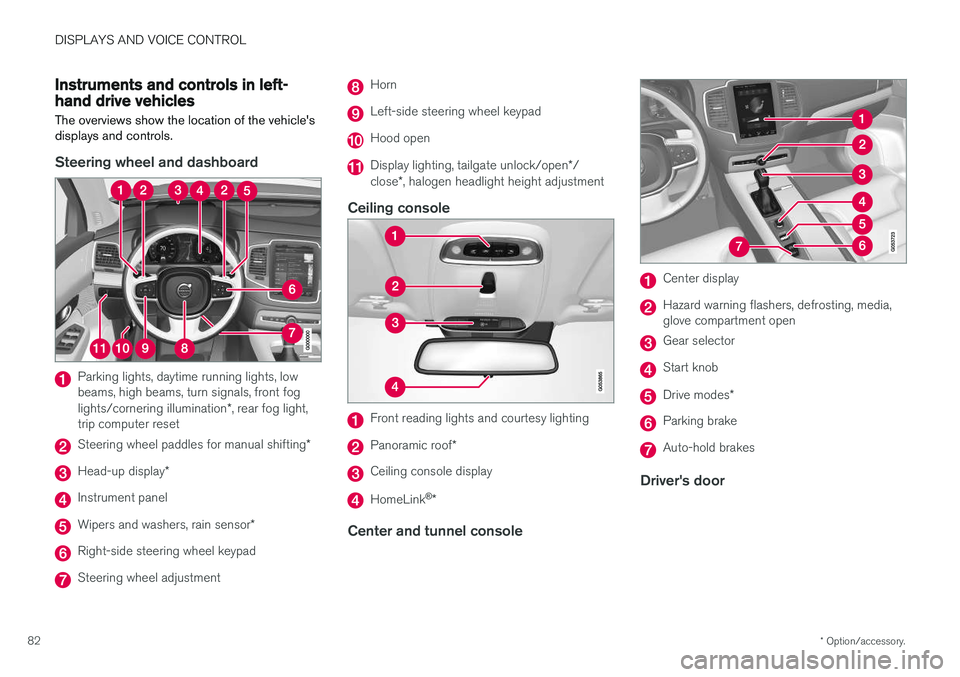
Steering wheel and dashboard
Parking lights, daytime running lights, low beams, high beams, turn signals, front fog lights/cornering illumination *, rear fog light,
trip computer reset
Steering wheel paddles for manual shifting *
Head-up display*
Instrument panel
Wipers and washers, rain sensor *
Right-side steering wheel keypad
Steering wheel adjustment
Horn
Left-side steering wheel keypad
Hood open
Display lighting, tailgate unlock/open */
close *, halogen headlight height adjustment
Ceiling console
Front reading lights and courtesy lighting
Panoramic roof *
Ceiling console display
HomeLink®
*
Center and tunnel console
Center display
Hazard warning flashers, defrosting, media, glove compartment open
Gear selector
Start knob
Drive modes *
Parking brake
Auto-hold brakes
Driver's door
Page 97 of 666
DISPLAYS AND VOICE CONTROL
}}
95
To change the measurement standard for the temperature sensor and other readings, go tosystem settings in the center display's Top view.
Related information
•
Instrument panel (p. 84)
• Changing system units of measurement(p. 134)
Indicator symbols in the instrumentpanel
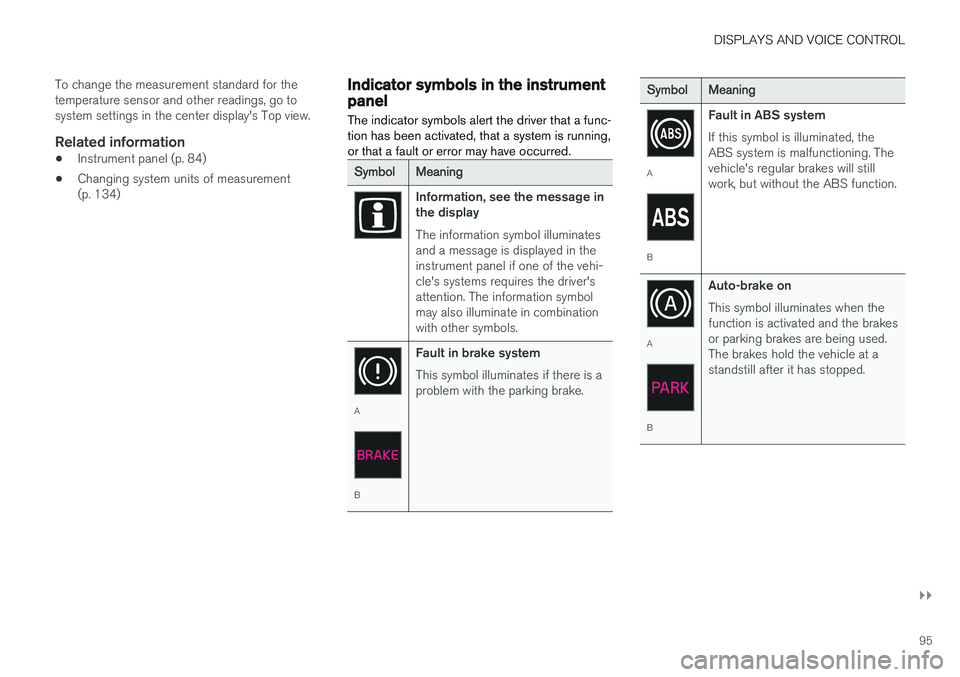
The indicator symbols alert the driver that a func- tion has been activated, that a system is running,or that a fault or error may have occurred.
SymbolMeaning
Information, see the message in the display The information symbol illuminates and a message is displayed in theinstrument panel if one of the vehi-cle's systems requires the driver'sattention. The information symbolmay also illuminate in combinationwith other symbols.
A
B Fault in brake system This symbol illuminates if there is a problem with the parking brake.
SymbolMeaning
A
BFault in ABS system If this symbol is illuminated, the ABS system is malfunctioning. Thevehicle's regular brakes will stillwork, but without the ABS function.
A
BAuto-brake on This symbol illuminates when the function is activated and the brakesor parking brakes are being used.The brakes hold the vehicle at astandstill after it has stopped.
Page 100 of 666
||
DISPLAYS AND VOICE CONTROL
98
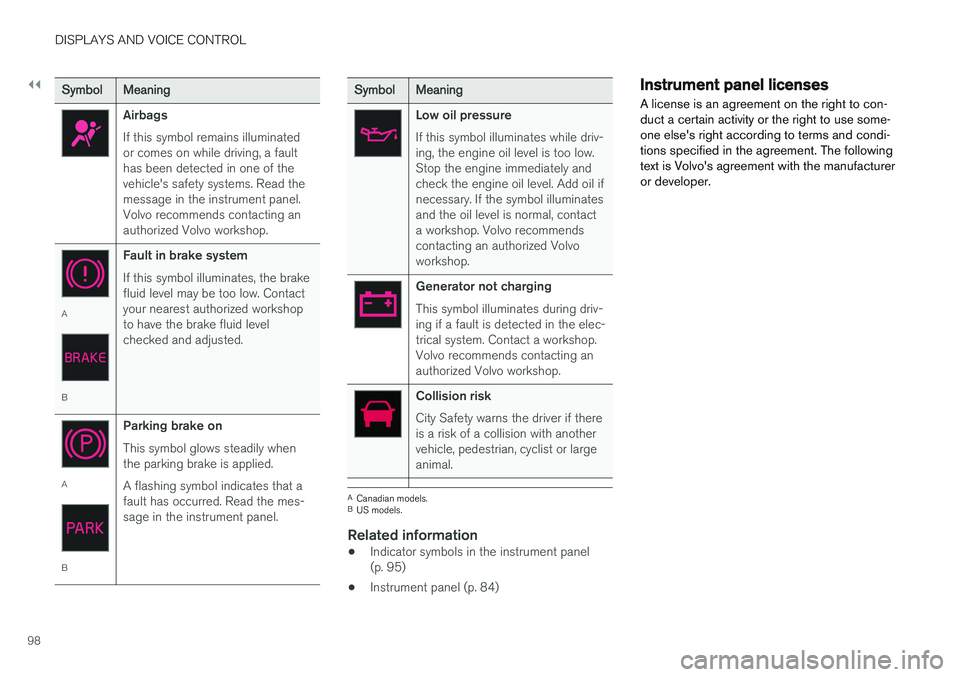
SymbolMeaning
Airbags If this symbol remains illuminated or comes on while driving, a faulthas been detected in one of thevehicle's safety systems. Read themessage in the instrument panel.Volvo recommends contacting anauthorized Volvo workshop.
A
BFault in brake system If this symbol illuminates, the brake fluid level may be too low. Contactyour nearest authorized workshopto have the brake fluid levelchecked and adjusted.
A
BParking brake on This symbol glows steadily when the parking brake is applied. A flashing symbol indicates that a fault has occurred. Read the mes-sage in the instrument panel.
SymbolMeaning
Low oil pressure If this symbol illuminates while driv- ing, the engine oil level is too low.Stop the engine immediately andcheck the engine oil level. Add oil ifnecessary. If the symbol illuminatesand the oil level is normal, contacta workshop. Volvo recommendscontacting an authorized Volvoworkshop.
Generator not charging This symbol illuminates during driv- ing if a fault is detected in the elec-trical system. Contact a workshop.Volvo recommends contacting anauthorized Volvo workshop.
Collision risk City Safety warns the driver if there is a risk of a collision with anothervehicle, pedestrian, cyclist or largeanimal.
A
Canadian models.
B US models.
Related information
• Indicator symbols in the instrument panel (p. 95)
• Instrument panel (p. 84)
Instrument panel licenses
A license is an agreement on the right to con- duct a certain activity or the right to use some-one else's right according to terms and condi-tions specified in the agreement. The followingtext is Volvo's agreement with the manufactureror developer.
Page 140 of 666
||
DISPLAYS AND VOICE CONTROL
* Option/accessory.
138
Type ofsettingDescription
Slider Select a level for a function by pressing and dragging the slider control, e.g. to set volume level.
Informa-tion dis-play This is not an actual setting, butinstead displays information suchas the vehicle's VIN number.
Related information
•
Center display overview (p. 111)
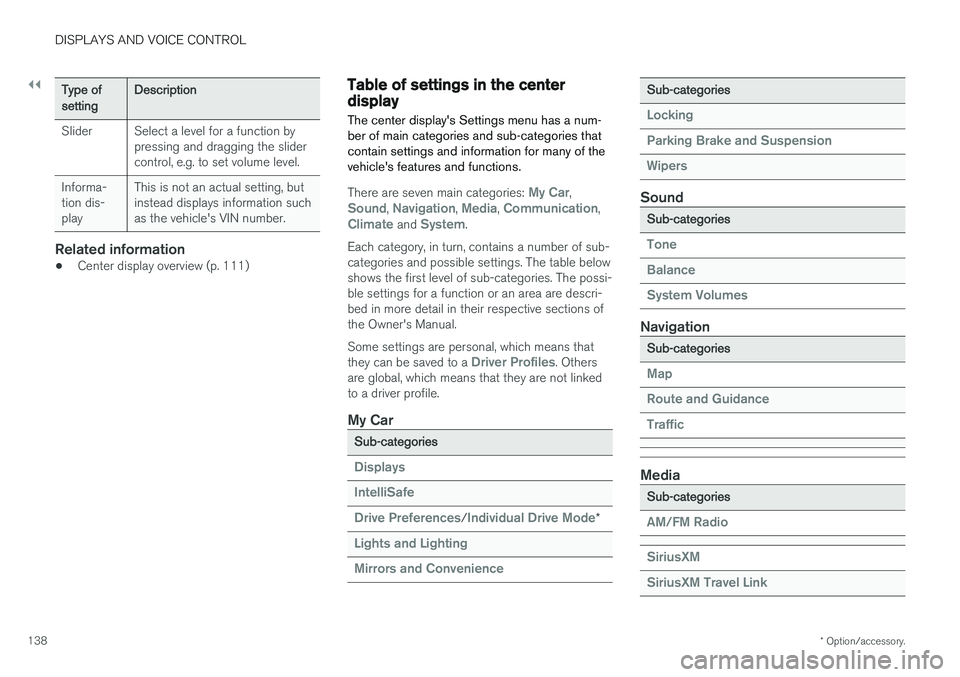
Table of settings in the centerdisplay The center display's Settings menu has a num- ber of main categories and sub-categories thatcontain settings and information for many of thevehicle's features and functions.
There are seven main categories: My Car,Sound, Navigation, Media, Communication,Climate and System.
Each category, in turn, contains a number of sub- categories and possible settings. The table belowshows the first level of sub-categories. The possi-ble settings for a function or an area are descri-bed in more detail in their respective sections ofthe Owner's Manual. Some settings are personal, which means that they can be saved to a
Driver Profiles. Others
are global, which means that they are not linked to a driver profile.
My Car
Sub-categories
Displays IntelliSafe Drive Preferences
/Individual Drive Mode*
Lights and Lighting Mirrors and Convenience
Sub-categories
Locking Parking Brake and SuspensionWipers
Sound
Sub-categories
Tone BalanceSystem Volumes
Navigation
Sub-categories
Map Route and GuidanceTraffic
Media
Sub-categories
AM/FM Radio SiriusXM SiriusXM Travel Link
Page 157 of 666
LIGHTING
* Option/accessory.155
WARNING
The vehicle lighting system cannot in all situa- tions determine when the daylight is too weakor not strong enough, e.g. when there is fogor rain. The driver is always responsible for driving the vehicle with lighting that is safe for the trafficconditions and as specified by applicable traf-fic regulations.
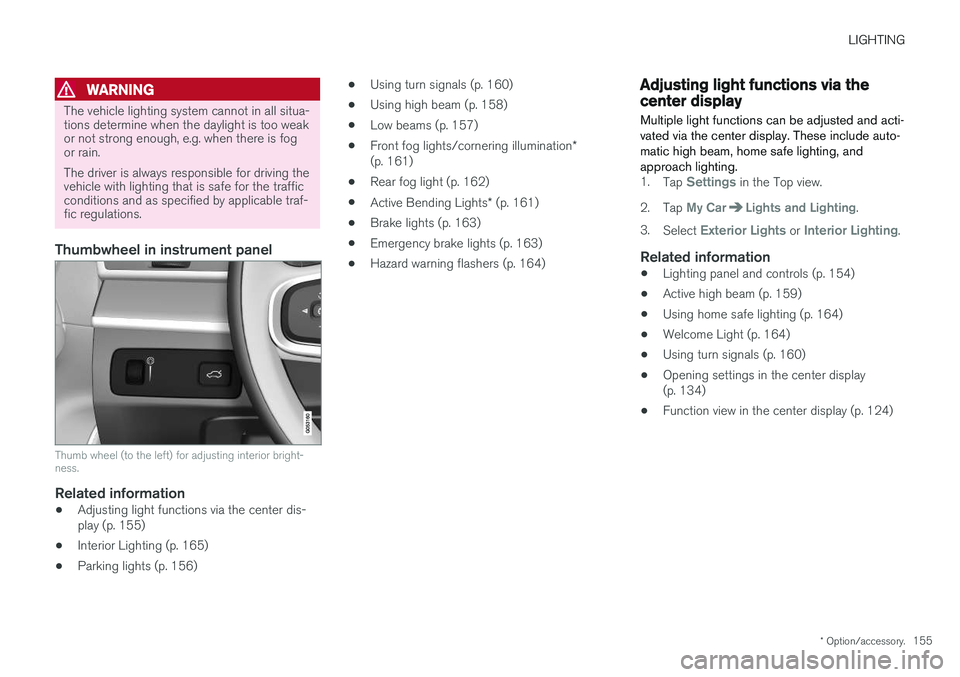
Thumbwheel in instrument panel
Thumb wheel (to the left) for adjusting interior bright- ness.
Related information
•Adjusting light functions via the center dis- play (p. 155)
• Interior Lighting (p. 165)
• Parking lights (p. 156) •
Using turn signals (p. 160)
• Using high beam (p. 158)
• Low beams (p. 157)
• Front fog lights/cornering illumination
*
(p. 161)
• Rear fog light (p. 162)
• Active Bending Lights
* (p. 161)
• Brake lights (p. 163)
• Emergency brake lights (p. 163)
• Hazard warning flashers (p. 164)
Adjusting light functions via thecenter display
Multiple light functions can be adjusted and acti- vated via the center display. These include auto-matic high beam, home safe lighting, andapproach lighting.
1. Tap Settings in the Top view.
2. Tap
My CarLights and Lighting.
3. Select
Exterior Lights or Interior Lighting.
Related information
• Lighting panel and controls (p. 154)
• Active high beam (p. 159)
• Using home safe lighting (p. 164)
• Welcome Light (p. 164)
• Using turn signals (p. 160)
• Opening settings in the center display (p. 134)
• Function view in the center display (p. 124)
Page 166 of 666
LIGHTING
* Option/accessory.
164
Hazard warning flashers
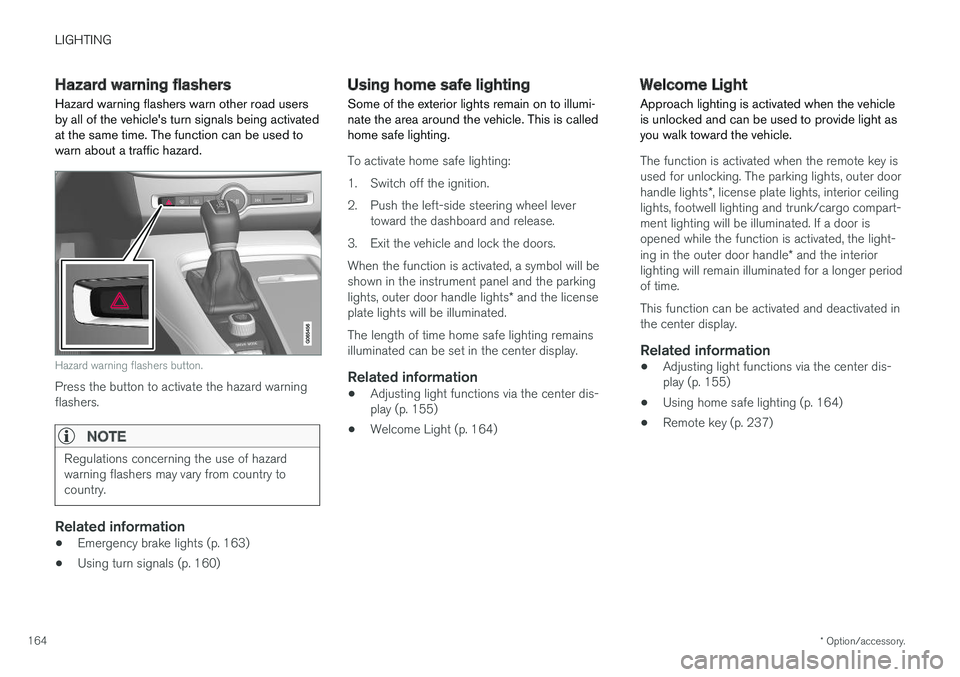
Hazard warning flashers warn other road users by all of the vehicle's turn signals being activatedat the same time. The function can be used towarn about a traffic hazard.
Hazard warning flashers button.
Press the button to activate the hazard warning flashers.
NOTE
Regulations concerning the use of hazard warning flashers may vary from country tocountry.
Related information
• Emergency brake lights (p. 163)
• Using turn signals (p. 160)
Using home safe lighting
Some of the exterior lights remain on to illumi- nate the area around the vehicle. This is calledhome safe lighting.
To activate home safe lighting:
1. Switch off the ignition.
2. Push the left-side steering wheel lever toward the dashboard and release.
3. Exit the vehicle and lock the doors.When the function is activated, a symbol will be shown in the instrument panel and the parking lights, outer door handle lights * and the license
plate lights will be illuminated. The length of time home safe lighting remains illuminated can be set in the center display.
Related information
• Adjusting light functions via the center dis-play (p. 155)
• Welcome Light (p. 164)
Welcome Light Approach lighting is activated when the vehicle is unlocked and can be used to provide light asyou walk toward the vehicle.
The function is activated when the remote key is used for unlocking. The parking lights, outer door handle lights
*, license plate lights, interior ceiling
lights, footwell lighting and trunk/cargo compart- ment lighting will be illuminated. If a door isopened while the function is activated, the light- ing in the outer door handle * and the interior
lighting will remain illuminated for a longer period of time. This function can be activated and deactivated in the center display.
Related information
• Adjusting light functions via the center dis-play (p. 155)
• Using home safe lighting (p. 164)
• Remote key (p. 237)
Page 198 of 666
SEATS AND STEERING WHEEL
* Option/accessory.
196 •
Adjusting front seat side bolster settings
*
(p. 194)
• Adjusting front seat lumbar support
* (p. 194)
Folding the second row backrests
The second row of seats has three individual seating positions. The backrests can be foldeddown separately.
WARNING
• Adjust the seat and ensure it locks into position before driving. Use caution whenadjusting the seat. Uncontrolled or care-less adjustments could lead to injury.
• Long objects must always be securelytied down to help prevent injury or dam-age in the event of sudden braking.
• Always turn off the engine and apply theparking brake when loading or unloadingthe vehicle.
• Put the gear selector in
P to help prevent
the gear selector from being inadvertentlymoved.
CAUTION
When the backrest is folded down, make sure there are no objects in the rear seat, and theseat belts are not buckled. Otherwise there isa risk of damage to the upholstery.
CAUTION
The seat cushion of the integrated child restraint * must be in the stowed position
before the center seat backrest can be folded down. The armrest * in the center seat must be
raised before the seat backrest is folded down. If the vehicle has private locking *, the ski
hatch must be closed before the seat back- rest is folded down.
NOTE
The front seats may need to be pushed for- ward and/or the backrest adjusted so that therear seat backrests can be fully lowered. The rear seats may also need to be moved rearward. The seats in the second row must be in the upright position before they can be foldeddown completely. They should not be foldeddown when they are tilted forward to accessthe third row of seats.