climate settings VOLVO XC90 T8 2016 Owner´s Manual
[x] Cancel search | Manufacturer: VOLVO, Model Year: 2016, Model line: XC90 T8, Model: VOLVO XC90 T8 2016Pages: 546, PDF Size: 10.26 MB
Page 202 of 546
||
CLIMATE
* Option/accessory, for more information, see Introduction.
200
Automatically activating/deactivating the seat heating function when theengine is started
The seat heating * can be set to start automati-
cally when the engine is started. The automatic function starts heating the seats when the ambient temperature is sufficiently cold. 1. Tap
Settings in the center display's Top
view.
2. Tap
Climate.
3. Under
Auto Driver Seat Heating Level andAuto Passenger Seat Heating Level,
select Off, Low, Middle or High to activate/
deactivate the automatic function and select a level for the driver's and passenger's seats.
Related information
• Climate system controls (p. 188)
• Climate system controls in the center display (p. 189)
• Rear climate system controls on the tunnelconsole (p. 190)
Turning front seat ventilation
* on
and off
Seat ventilation can be used e.g., to help remove dampness from the seat occupant's clothing.
The ventilation system consists of fans in the seats and backrests that draw air through theseat upholstery. The cooling effect increases asthe air in the passenger compartment becomescooler. This feature can be activated when theengine is running and it monitors the seat's tem-perature, sunlight in the passenger compartmentand the ambient temperature.
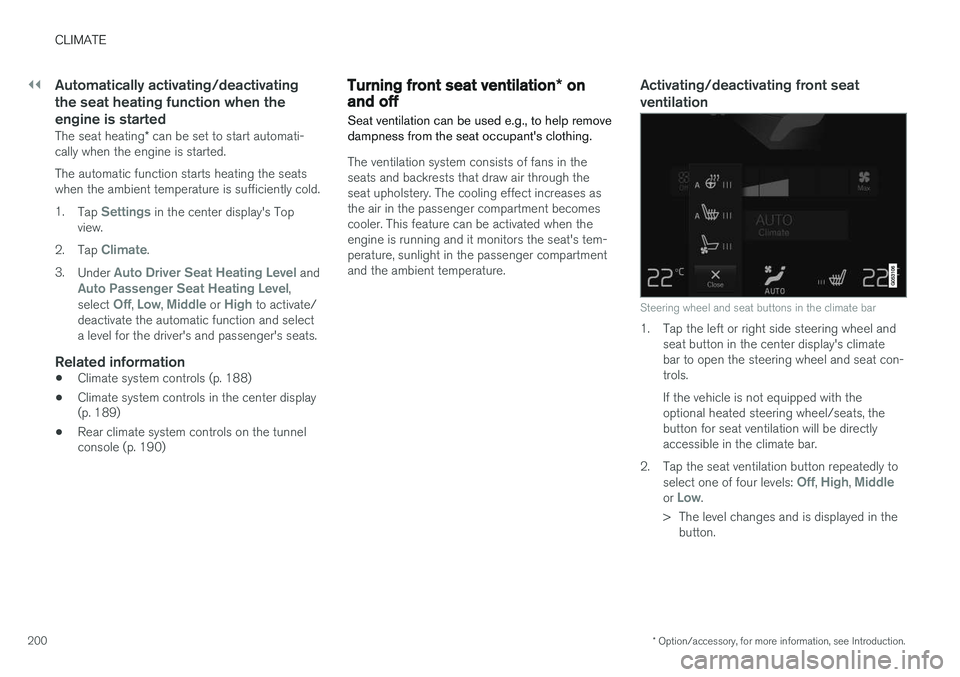
Activating/deactivating front seat ventilation
Steering wheel and seat buttons in the climate bar
1. Tap the left or right side steering wheel and seat button in the center display's climate bar to open the steering wheel and seat con-trols. If the vehicle is not equipped with the optional heated steering wheel/seats, thebutton for seat ventilation will be directlyaccessible in the climate bar.
2. Tap the seat ventilation button repeatedly to select one of four levels:
Off, High, Middleor Low.
> The level changes and is displayed in the button.
Page 212 of 546
||
LOADING AND STORAGE
* Option/accessory, for more information, see Introduction.
210 Unlocking the glove compartment
1. This function can be deactivated from the
center display's Function or Settings view:
• Go to Function view and tap
Private
locking locked.
• Go to settings and select
My CarLocking and Unlocking Feedback.
Deselect the Private Locking box.
> A pop-up window will appear.
2. Specify the code to be used to lock the glove compartment and tap
Confirm.
> The glove compartment will be unlocked.
Using the glove compartment as a cooler *
The glove compartment can be used to cool drinks or food and the cooling feature functionswhen the climate system is active (i.e., when the ignition is in mode II or when the engine is run-
ning).
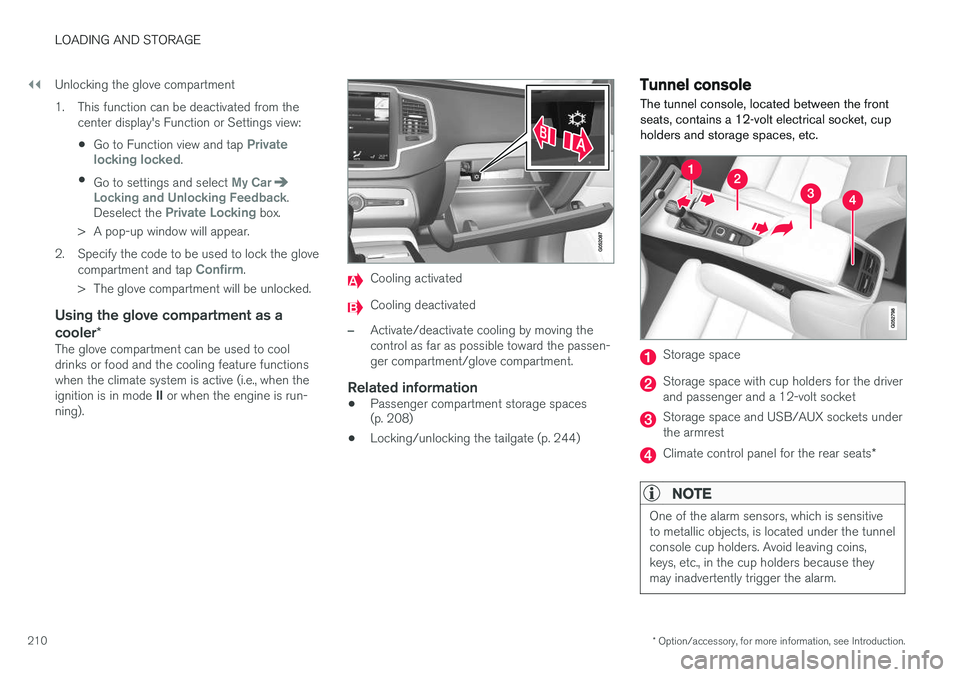
Cooling activated
Cooling deactivated
–Activate/deactivate cooling by moving the control as far as possible toward the passen-ger compartment/glove compartment.
Related information
• Passenger compartment storage spaces (p. 208)
• Locking/unlocking the tailgate (p. 244)
Tunnel console The tunnel console, located between the front seats, contains a 12-volt electrical socket, cupholders and storage spaces, etc.
Storage space
Storage space with cup holders for the driver and passenger and a 12-volt socket
Storage space and USB/AUX sockets under the armrest
Climate control panel for the rear seats
*
NOTE
One of the alarm sensors, which is sensitive to metallic objects, is located under the tunnelconsole cup holders. Avoid leaving coins,keys, etc., in the cup holders because theymay inadvertently trigger the alarm.
Page 391 of 546
STARTING AND DRIVING
389
Using the electric motor in city driving A number of factors affect the electric motor's driving range.
The driver can affect some of these factors while others depend on outside conditions such astemperature, road surface, etc.
Factors that determine the electric motor's driving range
Factors outside of the driver's control
The following are examples of factors that the driver cannot control:
• The current traffic situation
• Driving short distances
• Topography
• Ambient temperature and headwinds
• Road conditions/road surface
The following table shows the approximate rela-
tionship between ambient temperature and driv-ing range using the electric motor (with reducedclimate system functionality). Warmer tempera-tures increase driving range.
77 °F (25 °C)105%
68 °F (20 °C)100%
50 °F (10 °C)90%
40 °F (5 °C)85%
32 °F (0 °C)80%
23 °F (-5 °C)75%
14 °F (-10 °C)70%
Factors in the driver's control
The driver should be aware of the following fac- tors in order to utilize the vehicle's electric motormost efficiently:
• Charge the hybrid battery regularly
• Preconditioning
• The
Pure drive mode
• Climate system settings
• Speed and acceleration
• The
Save drive mode
• Tires and inflation pressure
The following table shows the approximate rela-
tionship between constant speed and driving range where driving at a lower constant speedhelps increase the electric motor's driving range.
62 mph (100 km/h)70%
55 mph (90 km/h)80%
50 mph(80 km/h)90%
43 mph (70 km/h)100%
37 mph (60 km/h)110%
30 mph(50 km/h)120%
NOTE
• The figures in the preceding tables per- tain to a new vehicle.
• None of the figures are absolute and areaffected by e.g., driving style, weather,traffic conditions, etc.
Driving with the electric motorUse the Pure drive mode for the most energy-
efficient driving to help maximize driving range using the electric motor only. Use the
Save drive mode for higher speeds
when driving farther than is possible using the electric motor only.
Related information
• Driving economically (p. 355)
• Drive modes (p. 390)
Page 392 of 546
STARTING AND DRIVING
390
Drive modes
Selecting a drive mode affects the vehicle's driv- ing characteristics to help make driving moreenjoyable or easier in certain types of situations.
The following systems are adapted to help pro- vide the best vehicle performance in the respec-tive drive modes: • Steering
• Engine/transmission/All Wheel Drive
• Brakes
• Suspension control
• Instrument panel
• Climate system settings
Select the drive mode best suited to the current driving conditions. Please be aware that not all modes can be selected in all driving situations. The selectedmode will be displayed in the instrument panel.
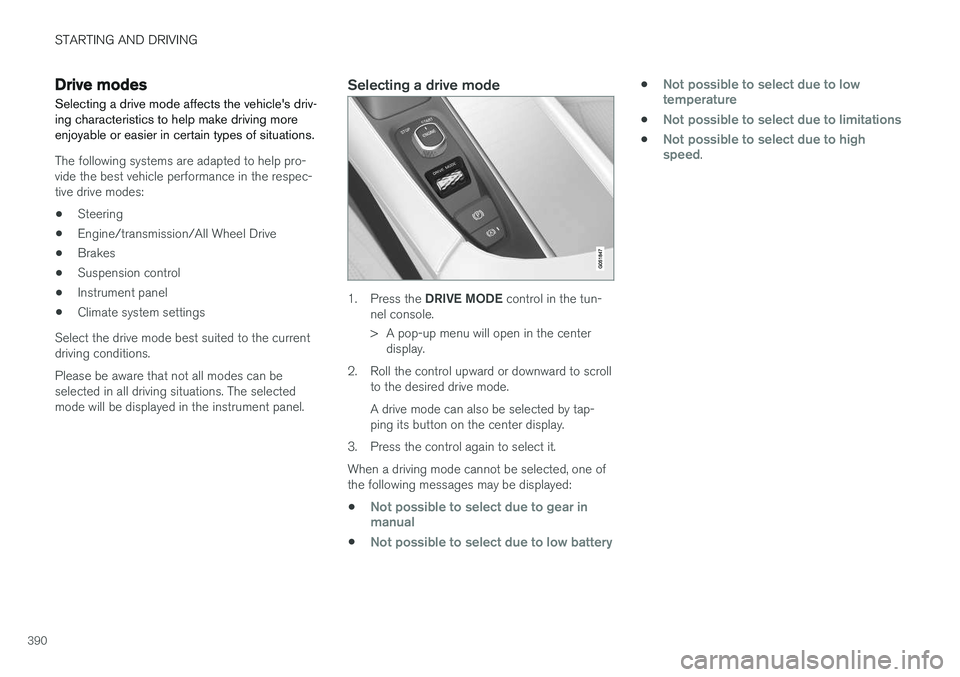
Selecting a drive mode
1. Press the DRIVE MODE control in the tun-
nel console.
> A pop-up menu will open in the center display.
2. Roll the control upward or downward to scroll to the desired drive mode. A drive mode can also be selected by tap- ping its button on the center display.
3. Press the control again to select it. When a driving mode cannot be selected, one of the following messages may be displayed:
•
Not possible to select due to gear in manual
•Not possible to select due to low battery
•Not possible to select due to low temperature
•Not possible to select due to limitations
•Not possible to select due to high speed.
Page 396 of 546
STARTING AND DRIVING
* Option/accessory, for more information, see Introduction.
394
ECO drive mode
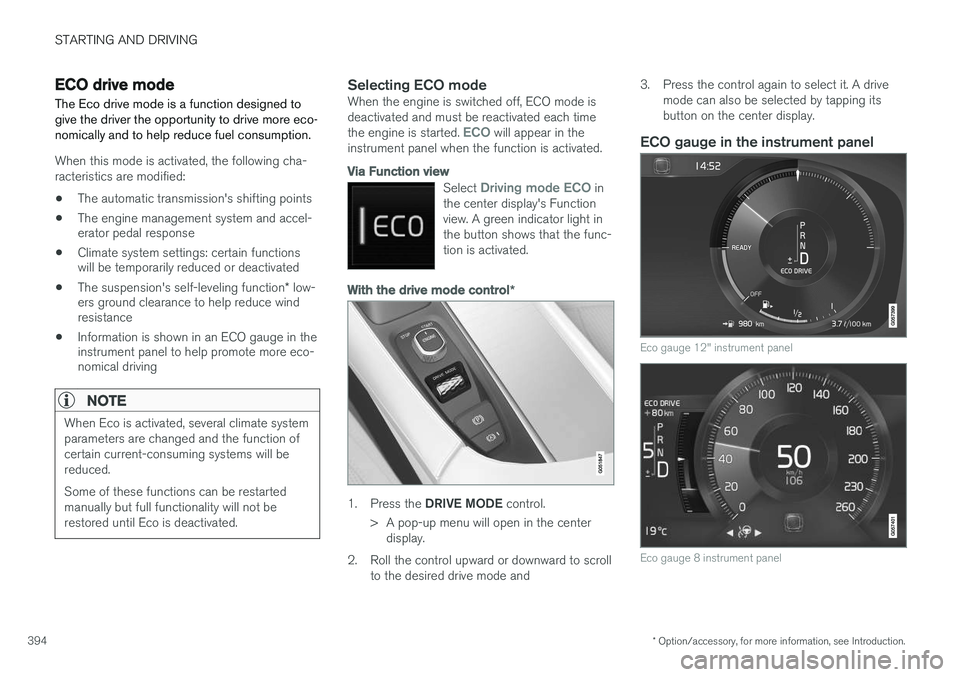
The Eco drive mode is a function designed to give the driver the opportunity to drive more eco-nomically and to help reduce fuel consumption.
When this mode is activated, the following cha- racteristics are modified:
• The automatic transmission's shifting points
• The engine management system and accel- erator pedal response
• Climate system settings: certain functionswill be temporarily reduced or deactivated
• The suspension's self-leveling function
* low-
ers ground clearance to help reduce windresistance
• Information is shown in an ECO gauge in theinstrument panel to help promote more eco-nomical driving
NOTE
When Eco is activated, several climate system parameters are changed and the function ofcertain current-consuming systems will bereduced. Some of these functions can be restarted manually but full functionality will not berestored until Eco is deactivated.
Selecting ECO modeWhen the engine is switched off, ECO mode is deactivated and must be reactivated each time the engine is started.
ECO will appear in the
instrument panel when the function is activated.
Via Function view
Select Driving mode ECO in
the center display's Function view. A green indicator light inthe button shows that the func-tion is activated.
With the drive mode control *
1.
Press the DRIVE MODE control.
> A pop-up menu will open in the center display.
2. Roll the control upward or downward to scroll to the desired drive mode and 3. Press the control again to select it. A drive
mode can also be selected by tapping its button on the center display.
ECO gauge in the instrument panel
Eco gauge 12" instrument panel
Eco gauge 8 instrument panel
Page 536 of 546
INDEX
534Brake system
Brake pad inspection 347
fluid 528
general information 346, 348, 350
Bulbs 500 replacing 496
specifications 501
C
Cameradriver support systems 252
limitations 254
Camera, Park Assist 311, 313, 315, 316
Capacity weight 449, 525
Cargo area, steel grid 219
Cargo area cover 221Cargo compartment fuses 493
raising/lowering the level 215
Cargo net 217
Cargo space 208
Car wash 511
Catalytic converter 364CD, USB, iPod, AUX, Bluetooth, Recents, Library, Shuffle, Similar, Change device, Pri-
mary Audio Default Language, Subtitle, Pri- mary Subtitle Default Language, Video, DivX ® VOD 424
CD player 424 Cell phone hands-free 414
Pairing 415
Cell phone voice control 122 Center display changing settings 34
cleaning 515
keyboard 35
navigating in 42
overview 32
screen in the center console 49
symbols in the status bar 47
Chains 451
Changing a wheel 453Charging cable hybrid battery 375
Child restraints recalls and registration 70
Child restraint systems 70 booster cushions 77
convertible seats 74
infant seats 72
ISOFIX/LATCH anchors 78
top tether anchors 80Child safety 68booster cushions 77
child restraint systems 70, 79
convertible seats 74
infant seats 72
Child safety locks 228 Child seats lower attachment points 79
City safety 287, 293City Safety crossing traffic 291
detecting objects 290
limitations 293
rear collision warning 292
symbols and messages 297
troubleshooting 295
City Safety, On/Off 289 Cleaning exterior 511
interior 513
Clean Zone Interior Package 186
Climate system 188 air distribution 201, 202, 204
air filter 187
air vents 202
auto mode 187
blower 191
center display controls 189
Page 541 of 546
INDEX
539
Owner's information
mobile applications 25
Owner's manual 21
Ownership, changing 116
Oxygen sensors, heated 364
P
Paint, touching up 516, 517
Park assist 306, 308, 310
Park Assist Camera 311, 313, 315, 316 settings 311, 315
Park Assist Pilot 316, 318, 320, 322Parking brake electric, applying/releasing 352, 354
Parking light bulb, replacing 500Passenger compartment fuses 489
Passive Entry system location of antennas 230
Permissible axle weight 525Phone receiving calls 417
text messages 418, 420
Pilot Assist 273, 276, 277, 278, 279, 280
Plug-in hybrid general information 16
Polishing 518 Power front seat memory function 164
Power mirrors 105 defroster 195
Power steering adjustable 323
Power tailgate 246
Power windows 109
Preconditioning 179, 181 starting/stopping 184
symbols and messages 185
timer 182
Preconditioning, retaining climate comfort 181
Pregnancy, using seat belts during 62
PROPOSITION 65 WARNING 365
R
Radar driver support systems 257
Radar sensor limitations 258, 283
Radio
RBDS 406
settings 405 SiriusXM ®
Satellite radio 411, 412, 413
Radio functions HD digital radio 407, 409, 410
Rain sensor 157
Rear Collision Warning 292
Rear fog lights 146
Rear park assist 306, 308, 310
Rear seat head restraints 170
Rear seats 169 accessing the third row 174
adjusting backrest tilt 171
center head restraint 170
folding 172, 174, 175
moving forward/rearward 174
Rearview mirror compass 139
Rear window defroster 195
Recalls 62
Recalls, child restraints 70
Recirculation (climate system) 194
Refrigerant (A/C system) 527
Refueling 361, 362 fuel filler door 363