power steering VOLVO XC90 T8 2016 Owner´s Manual
[x] Cancel search | Manufacturer: VOLVO, Model Year: 2016, Model line: XC90 T8, Model: VOLVO XC90 T8 2016Pages: 546, PDF Size: 10.26 MB
Page 6 of 546
4
Approach lighting148
Home safe lighting 148
Passenger compartment lighting 148
Using turn signals 151
Messages in the instrument panel and center display 151
Handling messages in the instru-ment panel and center display 153
Handling messages stored from theinstrument panel and center display 154
Using the instrument panel App menu 156
Using the windshield wipers 156
Activating/deactivating the rain sensor 157
Windshield and headlight washers 158
Tailgate window wiper and washer 159
Steering wheel 160
Adjusting the steering wheel 161
Seats 161
Manually operated front seats 162
Power front seats *
163
Adjusting power front seats *
163
Adjusting the passenger's seat from the driver's seat * 164
Using the power seat memory function *
164
Multifunctional front seats *
165
Adjusting function settings in the multifunctional front seats *166
Rear seats 169
Easy access to and from the driver seat 169
Adjusting the second row head restraints 170
Adjusting the second row backrest tilt 171
Folding the second row backrests 172
Moving the second row seats for- ward/rearward 174
Getting into and out of the third rowof seats 174
Folding the third row backrests 175
CLIMATE
Climate control system178
Perceived temperature 178
Climate system sensors 179
Parking climate (preconditioning) 179
Activating/deactivating the parking climate timer 181
Activating/deactivating the climate comfort retaining function *181
Preconditioning timer 182
Setting the parking climate (precon- ditioning) timer 182
Starting and stopping preconditioning 184
Preconditioning symbols and messages 185
Air quality 186
Clean Zone Interior Package (CZIP) *
186
Interior Air Quality System (IAQS) *
186
Passenger compartment air filter 187
Automatic climate control 187
Climate system controls 188
Climate system controls in the centerdisplay 189
Rear climate system controls on thetunnel console 190
Setting the blower speed 191
Setting the temperature 192
Turning recirculation on and off 194
Page 7 of 546
5
Defrosting windows and mirrors195
Turning steering wheel heating * on
and off 197
Air conditioning 198
Turning seat heating * on and off
199
Turning front seat ventilation * on and off
200
Air distribution 201
Opening/closing/directing air vents 202
Adjusting air distribution 202
Air distribution table 204
LOADING AND STORAGE
Cargo space208
Passenger compartment storage spaces 208
Using the glove compartment 209
Tunnel console 210
Sun visors 211
Electrical sockets 212
Loading 215
Grocery bag holder 217
Cargo net 217
Steel cargo grid *
219
Load anchoring eyelets 220
Cargo compartment cover *
221
LOCKS AND ALARM
Locks and remote keys
226
Alarm 226
Automatically arming/disarming the alarm 228
Deactivating the alarm without afunctioning remote key 228
Child safety locks 228
Antenna locations for the start andlock system 230
Start and lock system type designations 230
Immobilizer 231
Changing the remote key's battery 232
Remote key's range 235
Remote key 235
Detachable key blade 237
Foot movement tailgate operation *
238
Locking and unlocking confirmation 240
Locking/unlocking from inside thevehicle 242
Locking/unlocking from outside thevehicle 243
Locking/unlocking the tailgate 244
Power tailgate *
246
Locking/unlocking with the detacha-ble key blade 248
Page 22 of 546
INTRODUCTION
20
Volvo and the environment Volvo is committed to the well-being of its cus- tomers. As a natural part of this commitment, wecare about the environment in which we all live.Concern for the environment means an everydayinvolvement in reducing our environmentalimpact.
Volvo's environmental activities are based on a holistic view, which means we consider the over-all environmental impact of a product throughoutits complete life cycle. In this context, design, pro-duction, product use, and recycling are all impor-tant considerations. In production, Volvo haspartly or completely phased out several chemicalsincluding CFCs, lead chromates, asbestos, andcadmium; and reduced the number of chemicalsused in our plants 50% since 1991. Volvo was the first in the world to introduce into production a three-way catalytic converter with aLambda sond, now called the heated oxygen sen-sor, in 1976. The current version of this highlyefficient system reduces emissions of harmfulsubstances (CO, HC, NOx) from the exhaust pipeby approximately 95 – 99% and the search toeliminate the remaining emissions continues.Volvo is the only automobile manufacturer tooffer CFC-free retrofit kits for the air conditioningsystem of all models as far back as the 1975model 240. Advanced electronic engine controlsand cleaner fuels are bringing us closer to ourgoal. In addition to continuous environmentalrefinement of conventional gasoline-poweredinternal combustion engines, Volvo is activelylooking at advanced technology alternative-fuelvehicles. When you drive a Volvo, you become our partner in the work to lessen the car's impact on theenvironment. To reduce your vehicle's environ-mental impact, you can:
• Maintain proper air pressure in your tires. Tests have shown decreased fuel economywith improperly inflated tires.
• Follow the recommended maintenanceschedule in your Warranty and ServiceRecords Information booklet.
• Drive at a constant speed whenever possible.
• See a trained and qualified Volvo servicetechnician as soon as possible for inspectionif the check engine (malfunction indicator)light illuminates, or stays on after the vehiclehas started.
• Properly dispose of any vehicle-related wastesuch as used motor oil, used batteries, brakepads, etc.
• When cleaning your vehicle, please use gen-uine Volvo car care products. All Volvo carcare products are formulated to be environ-mentally friendly.
Volvo XC90 T8 Twin Engine Plug-in Hybrid
• If possible, precondition the vehicle with the charging cable before driving.
• If preconditioning is not possible in coldweather, use the seat and steering wheelheating primarily. Avoid heating the entirepassenger compartment, which reduces thehybrid battery's charge level.
• Choose the
Pure drive mode to help mini-
mize electric power consumption.
• In hilly terrain, put the gear selector in mode B
to utilize the electric motor's braking func-
tion when the accelerator pedal is released. This helps charge the hybrid battery.
• Select the
Save drive mode for higher
speeds when driving farther than is possible using the electric motor only.
Related information
• Driving economically (p. 355)
Page 26 of 546
||
INTRODUCTION
* Option/accessory, for more information, see Introduction.
24 that is currently playing. It is controlled using both steering wheel keypads.
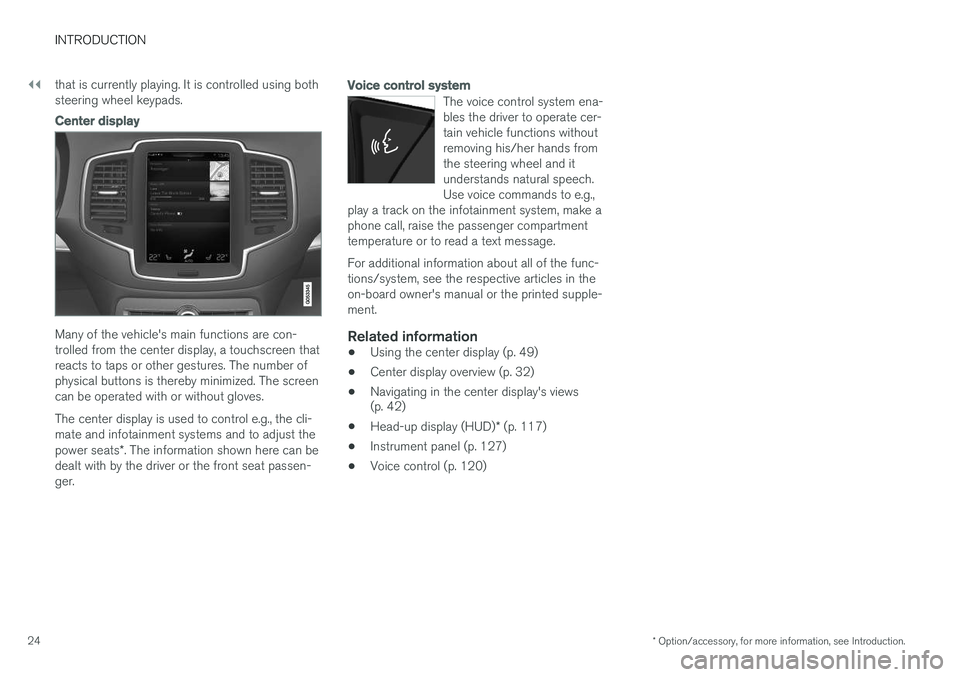
Center display
Many of the vehicle's main functions are con- trolled from the center display, a touchscreen thatreacts to taps or other gestures. The number ofphysical buttons is thereby minimized. The screencan be operated with or without gloves. The center display is used to control e.g., the cli- mate and infotainment systems and to adjust the power seats
*. The information shown here can be
dealt with by the driver or the front seat passen- ger.
Voice control system
The voice control system ena- bles the driver to operate cer-tain vehicle functions withoutremoving his/her hands fromthe steering wheel and itunderstands natural speech.Use voice commands to e.g.,
play a track on the infotainment system, make aphone call, raise the passenger compartmenttemperature or to read a text message.
For additional information about all of the func- tions/system, see the respective articles in theon-board owner's manual or the printed supple-ment.
Related information
• Using the center display (p. 49)
• Center display overview (p. 32)
• Navigating in the center display's views (p. 42)
• Head-up display (HUD)
* (p. 117)
• Instrument panel (p. 127)
• Voice control (p. 120)
Page 121 of 546
INSTRUMENTS AND CONTROLS
}}
* Option/accessory, for more information, see Introduction.119
Via settings
1.
Tap Settings in Top view.
2. Tap
My CarDisplays.
3. Select/deselect
Head-Up Display.
Selecting display alternatives1.Tap Settings in Top view.
2. Tap
My CarDisplaysHead-Up
Display Options.
Tap Go to the center display's Settings view and select
Driver Display & Head-up
Display.
3. Select :
Show Navigation In Head-Up
Display, Road Sign Information In Head-
Up Display, Show Driver Support In
Head-Up Display or Show Phone In
Head-Up Display.
Adjusting HUD brightness and height position
1. Tap Head-up display adjustments in the
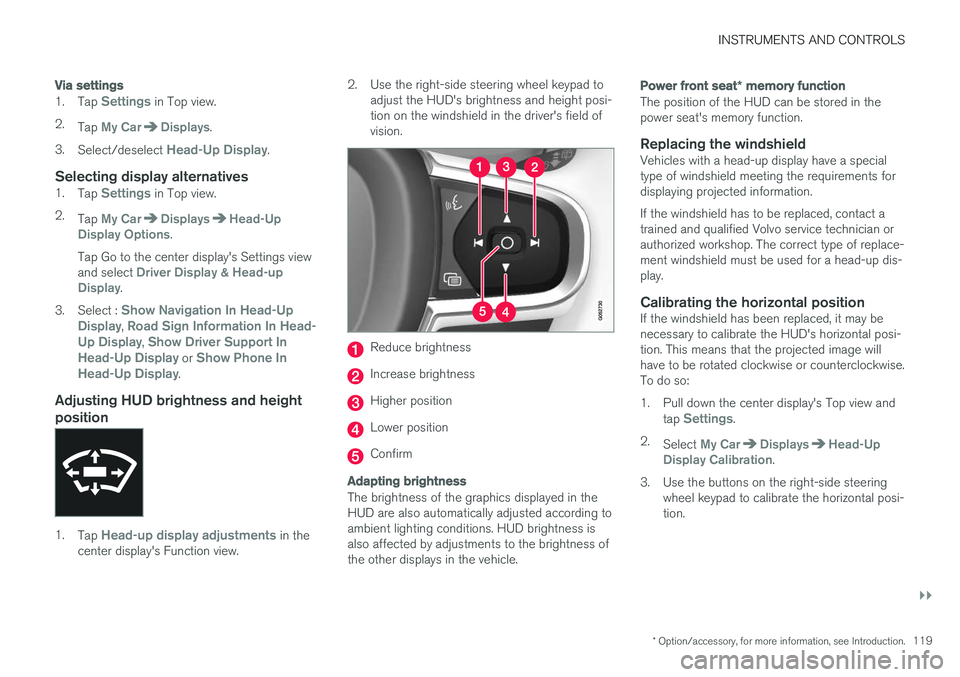
center display's Function view. 2. Use the right-side steering wheel keypad to
adjust the HUD's brightness and height posi- tion on the windshield in the driver's field ofvision.
Reduce brightness
Increase brightness
Higher position
Lower position
Confirm
Adapting brightness
The brightness of the graphics displayed in the HUD are also automatically adjusted according toambient lighting conditions. HUD brightness isalso affected by adjustments to the brightness ofthe other displays in the vehicle.
Power front seat * memory function
The position of the HUD can be stored in the power seat's memory function.
Replacing the windshieldVehicles with a head-up display have a specialtype of windshield meeting the requirements fordisplaying projected information. If the windshield has to be replaced, contact a trained and qualified Volvo service technician orauthorized workshop. The correct type of replace-ment windshield must be used for a head-up dis-play.
Calibrating the horizontal positionIf the windshield has been replaced, it may benecessary to calibrate the HUD's horizontal posi-tion. This means that the projected image willhave to be rotated clockwise or counterclockwise.To do so:
1. Pull down the center display's Top view and
tap
Settings.
2. Select
My CarDisplaysHead-Up
Display Calibration.
3. Use the buttons on the right-side steering wheel keypad to calibrate the horizontal posi- tion.
Page 130 of 546
||
INSTRUMENTS AND CONTROLS
128
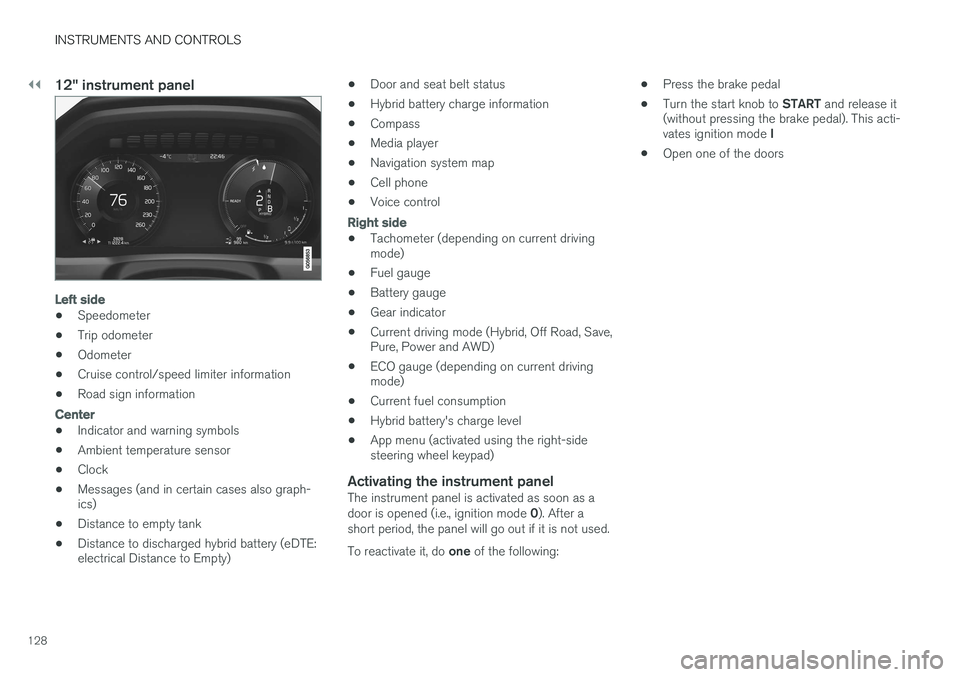
12" instrument panel
Left side
•Speedometer
• Trip odometer
• Odometer
• Cruise control/speed limiter information
• Road sign information
Center
•Indicator and warning symbols
• Ambient temperature sensor
• Clock
• Messages (and in certain cases also graph- ics)
• Distance to empty tank
• Distance to discharged hybrid battery (eDTE:electrical Distance to Empty) •
Door and seat belt status
• Hybrid battery charge information
• Compass
• Media player
• Navigation system map
• Cell phone
• Voice control
Right side
• Tachometer (depending on current driving mode)
• Fuel gauge
• Battery gauge
• Gear indicator
• Current driving mode (Hybrid, Off Road, Save,Pure, Power and AWD)
• ECO gauge (depending on current drivingmode)
• Current fuel consumption
• Hybrid battery's charge level
• App menu (activated using the right-sidesteering wheel keypad)
Activating the instrument panelThe instrument panel is activated as soon as a door is opened (i.e., ignition mode
0). After a
short period, the panel will go out if it is not used. To reactivate it, do one of the following: •
Press the brake pedal
• Turn the start knob to
START and release it
(without pressing the brake pedal). This acti- vates ignition mode I
• Open one of the doors
Page 163 of 546
INSTRUMENTS AND CONTROLS
}}
* Option/accessory, for more information, see Introduction.161
Adjusting the steering wheel
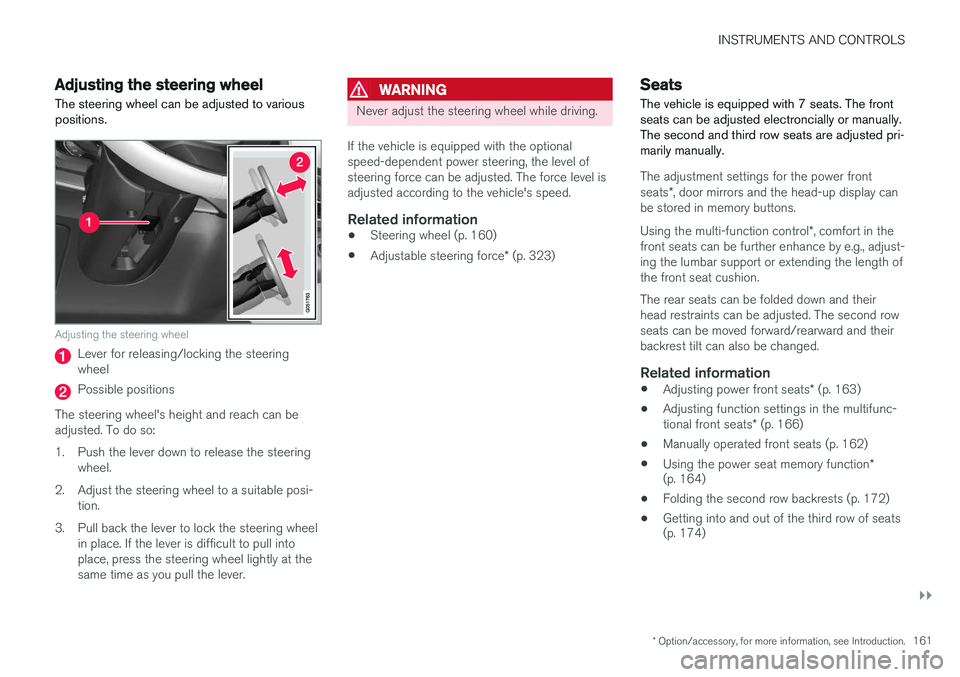
The steering wheel can be adjusted to various positions.
Adjusting the steering wheel
Lever for releasing/locking the steering wheel
Possible positions
The steering wheel's height and reach can be adjusted. To do so:
1. Push the lever down to release the steering wheel.
2. Adjust the steering wheel to a suitable posi- tion.
3. Pull back the lever to lock the steering wheel in place. If the lever is difficult to pull into place, press the steering wheel lightly at thesame time as you pull the lever.
WARNING
Never adjust the steering wheel while driving.
If the vehicle is equipped with the optional speed-dependent power steering, the level ofsteering force can be adjusted. The force level isadjusted according to the vehicle's speed.
Related information
• Steering wheel (p. 160)
• Adjustable steering force
* (p. 323)
Seats
The vehicle is equipped with 7 seats. The front seats can be adjusted electroncially or manually.The second and third row seats are adjusted pri-marily manually.
The adjustment settings for the power front seats *, door mirrors and the head-up display can
be stored in memory buttons. Using the multi-function control *, comfort in the
front seats can be further enhance by e.g., adjust- ing the lumbar support or extending the length ofthe front seat cushion. The rear seats can be folded down and their head restraints can be adjusted. The second rowseats can be moved forward/rearward and theirbackrest tilt can also be changed.
Related information
• Adjusting power front seats
* (p. 163)
• Adjusting function settings in the multifunc- tional front seats
* (p. 166)
• Manually operated front seats (p. 162)
• Using the power seat memory function
*
(p. 164)
• Folding the second row backrests (p. 172)
• Getting into and out of the third row of seats (p. 174)
Page 295 of 546
DRIVER SUPPORT
}}
293
Related information
•City Safety
™ (p. 287)
• Whiplash protection system (p. 63)
• Seat belts (p. 64)
• City Safety warning level settings (p. 289)
City Safety limitations
City Safety ™ may have limited or reduced func-
tionality in certain situations.
The function has several limitations that the driver should be familiar with:
Low objects
Hanging objects, such as flags for overhanging loads or accessories such as auxiliary lights orfront protective grids that extend beyond theheight of the hood may limit City Safety's func-tion.
Slippery driving conditions
The extended braking distance on slippery roads may reduce City Safety's capacity to help avoid acollision. In situations of this type, the ABSbrakes and Electronic Stability Control will helpprovide braking power and stability.
Backlighting
Strong sunlight, reflections, extreme light con- trasts, the use of sunglasses, or if the driver is notlooking straight ahead may make the visual warn-ing signal in the windshield difficult to see.
Heat
If the temperature in the passenger compartment is very high, the camera and radar sensor may betemporarily turned off for approx. 15 minutesafter the engine has been started to protect theirelectronic components. When the temperaturehas cooled sufficiently, the camera and radarsensor will restart automatically. The visual warning signal may also be temporarilydisabled due to high passenger compartmenttemperatures caused by strong sunlight. Warnings may not be given if the distance to the vehicle ahead is short and the driver is activelyoperating the vehicle (clearly depressing a pedalor turning the steering wheel).
Reduced visibility
City Safety's functions may be greatly impeded or deactivated by e.g., intense snowfall or rain, indense fog, in very dusty conditions or if there isblowing snow in front of the vehicle. Condensa-tion, ice, snow or dirt on the windshield may alsoreduce the system's functionality.
NOTE
•
Keep the windshield in front of the radar sensor free of ice, snow, dirt, etc.
• Snow or ice on the hood deeper than2 inches (5 cm) may obstruct the sensor.Keep the hood free of ice and snow.
• Do not mount or in any way attach any-thing on the windshield that couldobstruct the radar sensor.
Page 325 of 546
DRIVER SUPPORT
}}
* Option/accessory, for more information, see Introduction.323
Adjustable steering force*
Steering force increases with the speed of the vehicle to give the driver an enhanced sense ofcontrol and stability. At low speed the vehicle iseasier to steer in order to facilitate parking, etc.
Changing the steering force levelTo change the level of steering force, see theinformation under the heading "individual" in arti-cle "Drive modes" for additional information.
NOTE
•This steering force level menu function cannot be accessed when the vehicle isin motion.
• In certain situations, the power steeringfunction may become too hot and mustbe temporarily cooled. During cooling,power steering effect will be reduced andmore force may be necessary to turn thesteering wheel and a message will bedisplayed in the instrument panel.
Related information
• Driver support systems (p. 252)
• Drive modes (p. 390)
Electronic Stability Control (ESC)
Electronic Stability Control (ESC) helps reduce wheel spin, counteract skidding and to generallyhelp improve directional stability.
A pulsating sound will be audi- ble when the system is activelyoperating and is normal. Accel-eration may also be slightlyslower than normal.
WARNING
ESC is a supplementary aid and cannot deal with all situations or road conditions. The driver is always responsible for operating the vehicle in a safe manner in accordancewith current traffic regulations.
ESC consists of the following functions: • Traction control
• Spin control
• Active Yaw Control
• Engine Drag Control
• Trailer Stability Assist
Traction controlThis function is designed to help reduce wheel spin by transferring power from a drive wheel that begins to lose traction to the wheel on the oppo-site side of the vehicle (on the same axle).
Spin controlThis function is designed to help prevent thedrive wheels from spinning while the vehicle isaccelerating.
Active Yaw ControlAt low speeds, this function helps maintain direc-tional stability by braking one or more of thewheels if the vehicle shows a tendency to skid orslide laterally.
Engine Drag Control EDCEDC helps keep the engine running if the wheelsshow a tendency to lock, e.g., when shifting downin the manual shifting mode or while using theengine's braking function on a slippery surface. Ifthe wheels were to lock, the vehicle wouldbecome more difficult to steer.
Trailer Stability Assist
*4TSA helps stabilize a vehicle that is towing atrailer when the vehicle and trailer have begun tosway. This system is automatically deactivated if the driver selects
Sport mode.
Related information
•Detachable trailer hitch (p. 368)
• Driving with a trailer (p. 367)
4
This function is included if the vehicle is equipped with a Volvo original trailer hitch.
Page 348 of 546
STARTING AND DRIVING
* Option/accessory, for more information, see Introduction.
346
Starting and driving
The vehicle is equipped with an automatic trans- mission that also makes it possible to shift gearsmanually. Certain functions can also be used when the engine is not running, depending on the ignitionmode being used.
Related information
• Starting the engine (p. 372)
• Ignition modes (p. 370)
• Automatic transmission (p. 395)
• Opening/closing the fuel filler door (p. 363)
• Parking brake (p. 352)
Brakes The brake system is a hydraulic system consist- ing of two separate brake circuits. If a problemshould occur in one of these circuits, it is stillpossible to stop the vehicle with the other brakecircuit.
Brake systemIf one of the brake circuits is not functioning, more pressure will be needed on the brake pedal(and the pedal will go down farther) for normalbraking effect. If the brake pedal must be depressed farther than normal and requires greater foot pressure,the stopping distance will be longer. Pressure on the brake pedal is enhanced by the power braking function.
WARNING
If vehicle does not have electrical current and both the electric motor and gasoline engineare switched off, the brakes cannot be usedto stop the vehicle.
When the Hill Start Assist function is being used, it will take slightly longer for the brake pedal toreturn to its normal position if the vehicle isparked on an incline or uneven surface. When driving in very hilly areas or if the vehicle is carrying a heavy load, using brake mode B to augment the brakes or the
Off Road* drive mode can also be used to increase the engine braking effect at low speeds.
Anti-lock Braking System
ABS
The ABS system helps to improve vehicle control (stopping and steering) during severe brakingconditions by limiting brake lockup. When ABS is operating, there may be some vibration in the brake pedal, which is normal. The system performs a brief self-diagnostic test when the engine has been started and driverreleases the brake pedal. Another automatic testmay be performed when the vehicle first reachesa speed of approximately 6 mph (10 km/h). Thebrake pedal will pulsate several times and asound may be audible from the ABS controlmodule, which is normal.
Function check when the engine is
started
A Plug-in Hybrid is equipped with a "brake bywire" brake system. A function check is per-formed each time the engine is started and thedriver depresses the brake pedal to move the gear selector from P.
In certain cases, a message may appear in the instrument panel saying that pressure on thebrake pedal is too low. Press harder on the pedal.
Light braking charges the hybrid batteryWhen the brakes are applied lightly, the electricmotor's braking function is used, which converts