engine VOLVO XC90 T8 2017 Owner´s Manual
[x] Cancel search | Manufacturer: VOLVO, Model Year: 2017, Model line: XC90 T8, Model: VOLVO XC90 T8 2017Pages: 580, PDF Size: 10.37 MB
Page 503 of 580
MAINTENANCE AND SERVICING
501
Keep in mind that a download can be cancelled but an installation that has already begun cannotbe interrupted.
Allowing background searches or
software updates
This function can be deactivated from the centerdisplay:
1. Go to the Settings in the center display's Top view and select
Download Center.
2. Tap
SystemDownload Center.
3. Tap to deselect
Auto Software Update.
If an update is available,
New software updates
available will appear in the center display's sta-
tus bar. Tap the message to start a download app in Home view's lower sub-view. As soon as the download app has started, an icon in the
System
updates button will indicate the number of
downloads available.
Related information
• Center display overview (p. 33)
• Navigating in the center display's views (p. 43)
Remote updates With the vehicle connected to the Internet, updates for a number of the vehicle's systemscan be downloaded from the center display.
The Download Center app is
started from the center dis- play's App view and makes itpossible to:
• search for and update system software
• update the Sensus Navigation maps
• download, update and uninstall apps
Related information
•Downloading, updating and uninstalling apps (p. 461)
• System updates (p. 500)
Vehicle status
The vehicle's general status can be displayed in the center display along with the possibility to book service 1
The Car status app is started
in the center display's App view and has three tabs:
•Messages: stored messages
•
Status: tire pressure and engine oil level
•
Appointments: booking service or repairs 1
Related information
•
Using the center display (p. 49)
• Booking service and repairs (p. 502)
• Checking tire inflation pressure (p. 487)
• Checking and refilling engine oil (p. 536)
1
Certain markets only.
Page 504 of 580
MAINTENANCE AND SERVICING
502
Booking service and repairs Connected Service Booking (CSB) makes it possible to use the vehicle's Internet connectionto set up a time for service, maintenance and/orrepairs.
The information is handled through the Car
status app, which can be opened from the cen-
ter display's App view. Information about your vehicle is sent to your retailer and you can book your workshop appoint-ment directly in your retailer's workshop planningsystem using the Volvo On-Line Service Schedu-ler with your smart phone. The system will alsosend a reminder as the appointment approachesand the Sensus Navigation system will providedirections to the workshop if necessary. This feature makes it convenient to book a work- shop appointment directly from your vehicle.Vehicle-related information is sent to yourretailer, who prepares your visit to the workshop.After you have requested a workshop appoint-ment, your retailer will send you an email includ-ing a link enabling you to connect directly to yourretailer's booking system, where you can bookthe appointment at a convenient time. Informationabout your retailer is also available in the vehicleso that you can contact the retailer/workshop at any time using the
Call my retailer menu option.
NOTE
My Volvo can be found by going to www.vol- vocars.com and selecting the United States orCanada.
Before the service can be used
Volvo ID
• The owner (primary driver) must create or have a Volvo ID (see the article "Volvo ID").
• You must enter your Volvo ID (your emailaddress) in the vehicle as explained in thearticle "Volvo ID". If you have already regis-tered a Volvo ID, use the same email addressthat you used to create the Volvo ID.
Changing a
Volvo ID email address
If you would like to register a different email address, open the Volvo ID app in the center dis- play's App view and tap
Change Volvo ID. Fol-
low the instructions provided. See also the article "Volvo ID" for additional information.
Selecting a Volvo retailer on the My Volvo
website
By default, the retailer where you purchased your vehicle will be your preferred retailer/Volvoauthorized workshop who will perform serviceand repairs on your vehicle. To change the pre-ferred retailer, go to your personalized My Volvowebsite.
Prerequisites for booking service from the vehicle
In order to request an appointment from the vehi- cle:
• The engine must be running
• The vehicle must be connected to the Inter-net (see the article "Internet connected vehi-cle")
Using the serviceWhen it is time for service or in certain cases ifrepairs are necessary, a message will appear inthe instrument panel and in the center display.This message is triggered by: • the amount of time that has elapsed since the last service
• the number of hours the engine has runsince the last service
• mileage since the last service.
• Specific alerts or fault codes in the vehicle
Booking service or repairs
Submit a booking request whenever you need a workshop appointment or when a messageregarding the need for service or repairs hasbeen displayed in the instrument panel and in thecenter display. This can be done directly from thevehicle as follows or alternatively by using the MyVolvo personal website booking tab.
Page 507 of 580
MAINTENANCE AND SERVICING
505
Automatically connecting to a workshop
Without driver confirmation
This is the most convenient way to transmit trou- ble-shooting data. The driver does not need toconfirm that the vehicle will establish a connec-tion. If the vehicle stops at a workshop and the engine is switched off using the start knob, a messagewill appear above the status bar in the center dis-play. The vehicle will be automatically connectedwhen the driver's door is opened if the driver does not tap the
Cancel button in the message.
To help prevent the driver from being disturbed by unwanted requests to connect (e.g., if thevehicle is often parked near a workshop with anauthorized Volvo network), the vehicle will switchto manual connection if the driver cancels a con-nection request twice within 5 days.
With driver confirmation
With this alternative, the driver must confirm a connection. If the vehicle stops at a workshop and the engine is switched off using the start knob, a pop-upwindow will open in the center display. The vehi-cle will be automatically connected when the driv- er's door is opened if the driver taps
Connect in
the pop-up window. If the driver does nothing or taps the pop-up window's
Abort button, no
attempt will be made to establish a connection.
NOTE
To help prevent the driver from being distur- bed by unwanted requests to connect (e.g., ifthe vehicle is often parked near a workshopwith an authorized Volvo network), the vehiclewill switch to manual connection if the drivercancels a connection request twice within5 days.
Manually connecting to a workshopManual connections are handled by the service technician.
Changing the way a connection is madeThe type of connection (manual or automatic)can be changed in the center display's Settingsmenu.
1. Pull down the center display's Top view and
tap
Settings.
2. Tap
CommunicationVolvo Service
Networks.
3. Select
Automatically connect when I
arrive, Ask before connecting or Never
connect and never ask (manual connec-
tions).
Related information
• Internet connected vehicle (p. 458)
• Settings view (p. 113)
Climate system service
Service and repairs on the air conditioning sys- tem should only be done by a trained and quali-fied Volvo service technician.
Troubleshooting and repairsThe air conditioning system contains a floures- cent tracer substance. Ultraviolet light is used tosearch for leaks in the system.
Refrigerant R134a
WARNING
The air conditioning system contains the refrigerant R134a under pressure. Serviceand repairs on the system should only bedone by a trained and qualified Volvo servicetechnician.
Related information
• Climate control system (p. 186)
Page 508 of 580
MAINTENANCE AND SERVICING
506
Start battery
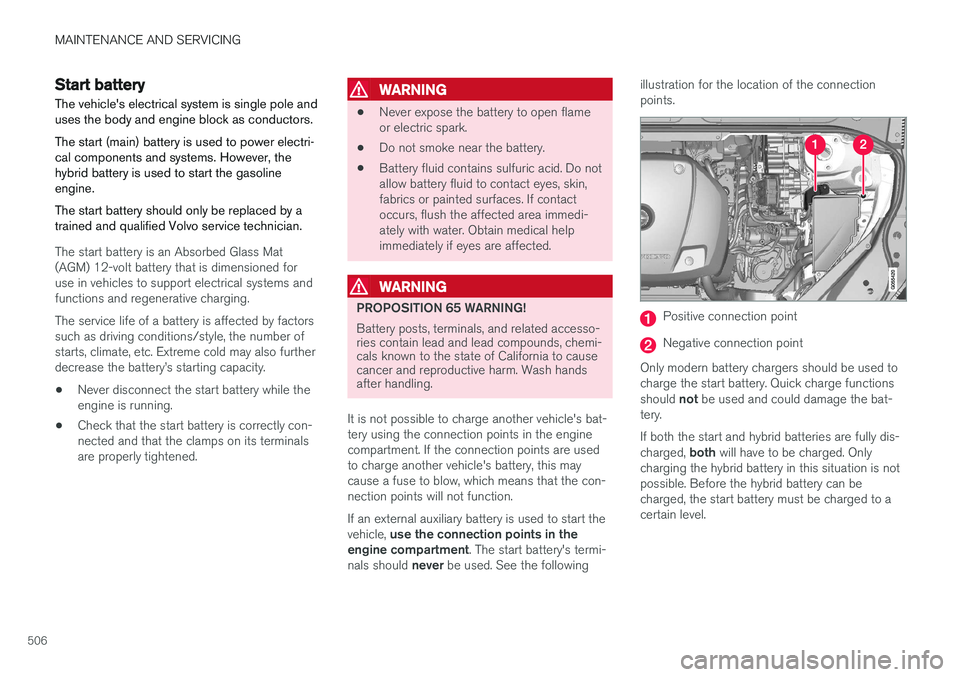
The vehicle's electrical system is single pole and uses the body and engine block as conductors. The start (main) battery is used to power electri- cal components and systems. However, thehybrid battery is used to start the gasolineengine. The start battery should only be replaced by a trained and qualified Volvo service technician.
The start battery is an Absorbed Glass Mat (AGM) 12-volt battery that is dimensioned foruse in vehicles to support electrical systems andfunctions and regenerative charging. The service life of a battery is affected by factors such as driving conditions/style, the number ofstarts, climate, etc. Extreme cold may also furtherdecrease the battery
Page 512 of 580
||
MAINTENANCE AND SERVICING
510
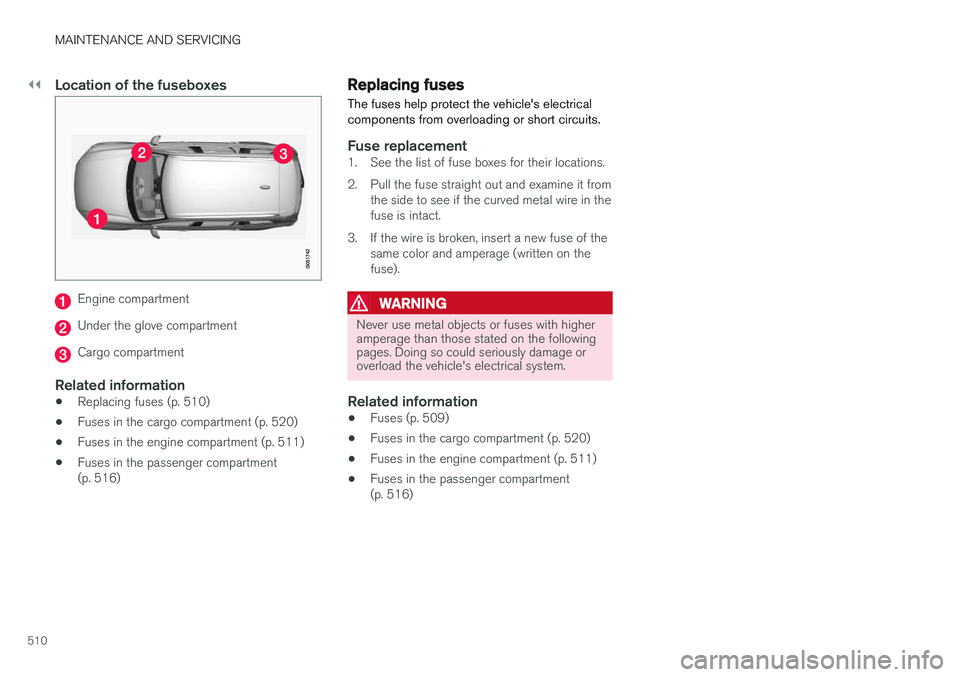
Location of the fuseboxes
Engine compartment
Under the glove compartment
Cargo compartment
Related information
•Replacing fuses (p. 510)
• Fuses in the cargo compartment (p. 520)
• Fuses in the engine compartment (p. 511)
• Fuses in the passenger compartment (p. 516)
Replacing fuses The fuses help protect the vehicle's electrical components from overloading or short circuits.
Fuse replacement1. See the list of fuse boxes for their locations.
2. Pull the fuse straight out and examine it from
the side to see if the curved metal wire in the fuse is intact.
3. If the wire is broken, insert a new fuse of the same color and amperage (written on thefuse).
WARNING
Never use metal objects or fuses with higher amperage than those stated on the followingpages. Doing so could seriously damage oroverload the vehicle's electrical system.
Related information
• Fuses (p. 509)
• Fuses in the cargo compartment (p. 520)
• Fuses in the engine compartment (p. 511)
• Fuses in the passenger compartment (p. 516)
Page 513 of 580
MAINTENANCE AND SERVICING
}}
511
Fuses in the engine compartment
The fuses in the engine compartment help pro- tect electrical components such as engine andbrake functions.
Page 516 of 580
![VOLVO XC90 T8 2017 Owner´s Manual ||
MAINTENANCE AND SERVICING
* Option/accessory.
514
Function [A]
– –
Horn 20
Alarm siren* 5
Brake system control module (valves, parking brake) 40
Windshield wipers 30
Tailgate window washer 25
H](/img/45/36380/w960_36380-515.png "VOLVO XC90 T8 2017 Owner´s Manual ||
MAINTENANCE AND SERVICING
* Option/accessory.
514
Function [A]
– –
Horn 20
Alarm siren* 5
Brake system control module (valves, parking brake) 40
Windshield wipers 30
Tailgate window washer 25
H")
||
MAINTENANCE AND SERVICING
* Option/accessory.
514
Function [A]
– –
Horn 20
Alarm siren* 5
Brake system control module (valves, parking brake) 40
Windshield wipers 30
Tailgate window washer 25
Heated windshield
*, passenger
side 40
– –
Brake system control module (ABS pump)
40
– –
Heated windshield
*, passenger
side Shunt
Feed when ignition is switched on to: engine control module,transmission components, elec-trical power steering, centralelectrical module 5
Exterior vehicle sound (certain markets)
5
Function
[A]
Passenger side headlight 7,5
– –
– –
– –
Air bags; Occupant Weight Sen- sor (OWS) 5
Driver side headlight Driver's side headlight, certain LED models7.5
15
Accelerator pedal sensor 5
Transmission control module; Gear selector control module 15
Engine control module 5
– –
– –
– –
– –
Engine control module; Actuator; Turbo-charger valve20
Function
[A]
Solenoids; Valves; Engine cool- ing system thermostat 10
Vacuum regulators; Valve 7.5
Spoiler shutter control module; Radiator shutter control module;Fuel leakage detection 5
– –
Heated oxygen sensors (front and rear)
15
Oil pump solenoid; A/C mag- netic coupling; heated oxygensensor (center)15
– –
Engine control module 20
Ignition coils; Spark plugs 15
– –
– –
Transmission oil pump control module
30
Vacuum pump control module 40
Transmission actuator 25
Page 521 of 580
MAINTENANCE AND SERVICING
* Option/accessory.519
Function A
– –
Tailgate window wiper 15
Fuel pump control module 15
Relay windings for engine compart- ment electrical module; Relay wind-ing for transmission oil pump 5
– –
Driver side front seat heating
*15
Passenger side front seat heating
*15
Coolant pump 10
– –
Front driver-side front door module 20
Active chassis control module
*20
– –
Sensus control module 10
– –
– –
Function
A
Front passenger-side front door module20
Display for rear seat convenience functions; On-board diagnostics (OBDII)
C
; Extra movement sensor
(certain markets only) C5
C
– –
Circuit breaker for fuses 53 and 58 15
A
Certain markets only.
B Not Excellence
C Excellence only
Related information
• Fuses (p. 509)
• Replacing fuses (p. 510)
• Fuses in the engine compartment (p. 511)
• Fuses in the cargo compartment (p. 520)
Page 525 of 580
MAINTENANCE AND SERVICING
523
•
Fuses in the passenger compartment (p. 516)
• Fuses in the engine compartment (p. 511)
Page 526 of 580
MAINTENANCE AND SERVICING
524
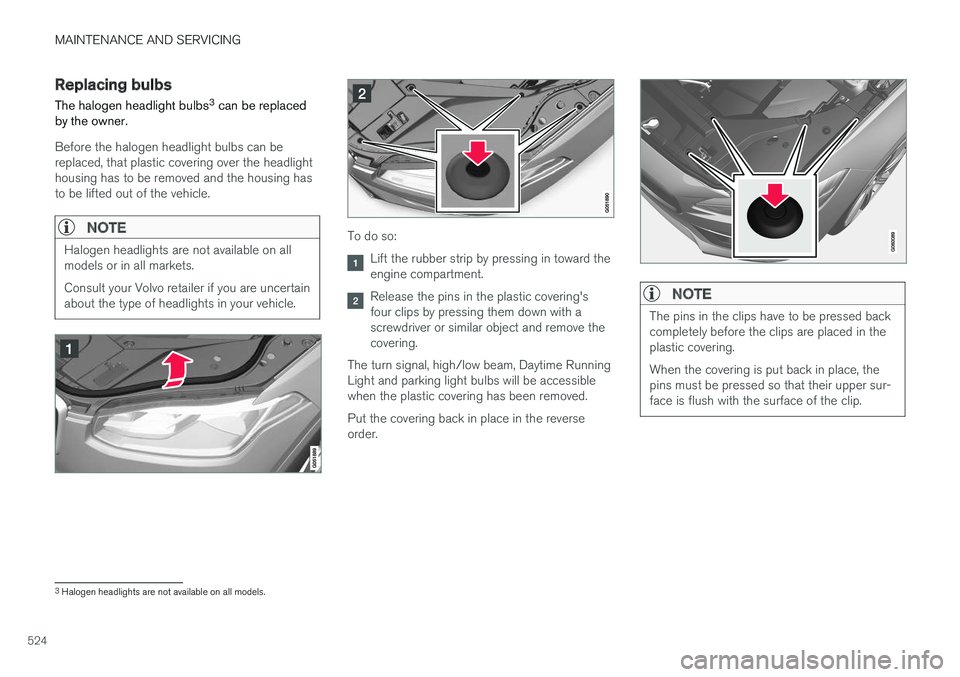
Replacing bulbs
The halogen headlight bulbs 3
can be replaced
by the owner.
Before the halogen headlight bulbs can be replaced, that plastic covering over the headlighthousing has to be removed and the housing hasto be lifted out of the vehicle.
NOTE
Halogen headlights are not available on all models or in all markets. Consult your Volvo retailer if you are uncertain about the type of headlights in your vehicle.To do so:
Lift the rubber strip by pressing in toward the engine compartment.
Release the pins in the plastic covering's four clips by pressing them down with ascrewdriver or similar object and remove thecovering.
The turn signal, high/low beam, Daytime RunningLight and parking light bulbs will be accessiblewhen the plastic covering has been removed. Put the covering back in place in the reverse order.NOTE
The pins in the clips have to be pressed back completely before the clips are placed in theplastic covering. When the covering is put back in place, the pins must be pressed so that their upper sur-face is flush with the surface of the clip.
3 Halogen headlights are not available on all models.