auto pilot VOLVO XC90 T8 2017 Owner´s Manual
[x] Cancel search | Manufacturer: VOLVO, Model Year: 2017, Model line: XC90 T8, Model: VOLVO XC90 T8 2017Pages: 580, PDF Size: 10.37 MB
Page 300 of 580
||
DRIVER SUPPORT
* Option/accessory.
298
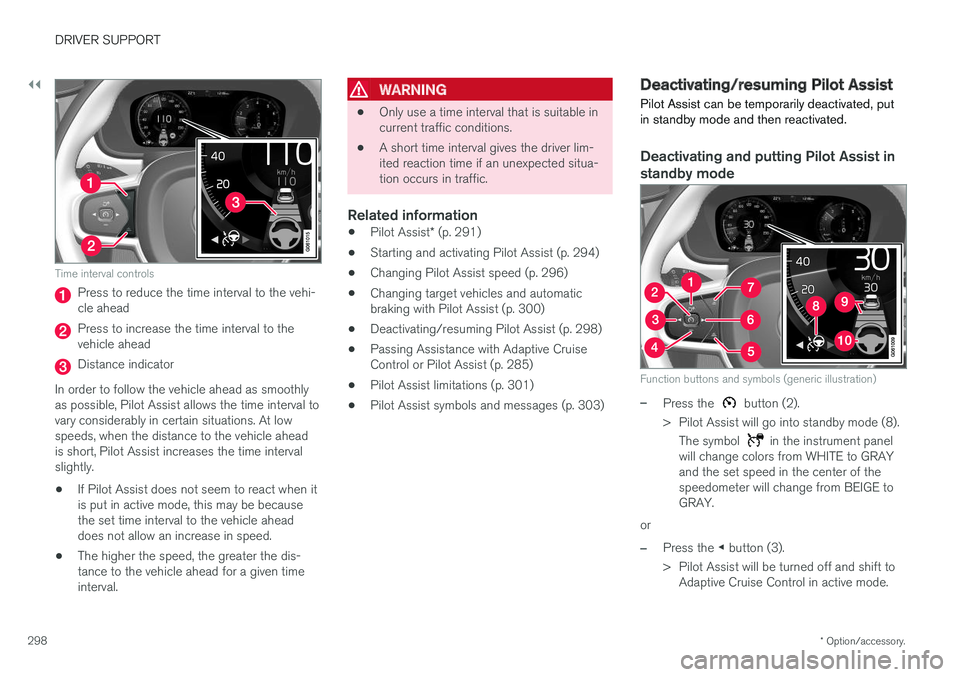
Time interval controls
Press to reduce the time interval to the vehi- cle ahead
Press to increase the time interval to the vehicle ahead
Distance indicator
In order to follow the vehicle ahead as smoothly as possible, Pilot Assist allows the time interval tovary considerably in certain situations. At lowspeeds, when the distance to the vehicle aheadis short, Pilot Assist increases the time intervalslightly.
• If Pilot Assist does not seem to react when itis put in active mode, this may be becausethe set time interval to the vehicle aheaddoes not allow an increase in speed.
• The higher the speed, the greater the dis-tance to the vehicle ahead for a given timeinterval.
WARNING
• Only use a time interval that is suitable in current traffic conditions.
• A short time interval gives the driver lim-ited reaction time if an unexpected situa-tion occurs in traffic.
Related information
•
Pilot Assist
* (p. 291)
• Starting and activating Pilot Assist (p. 294)
• Changing Pilot Assist speed (p. 296)
• Changing target vehicles and automaticbraking with Pilot Assist (p. 300)
• Deactivating/resuming Pilot Assist (p. 298)
• Passing Assistance with Adaptive CruiseControl or Pilot Assist (p. 285)
• Pilot Assist limitations (p. 301)
• Pilot Assist symbols and messages (p. 303)
Deactivating/resuming Pilot Assist Pilot Assist can be temporarily deactivated, put in standby mode and then reactivated.
Deactivating and putting Pilot Assist in standby mode
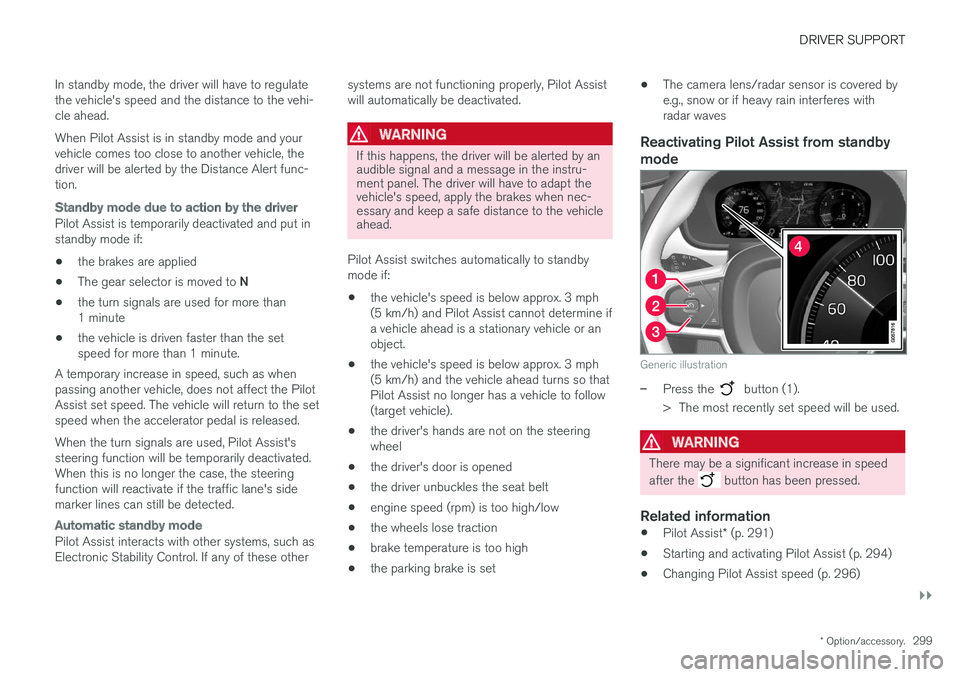
Function buttons and symbols (generic illustration)
–Press the button (2).
> Pilot Assist will go into standby mode (8). The symbol
in the instrument panel
will change colors from WHITE to GRAY and the set speed in the center of thespeedometer will change from BEIGE toGRAY.
or
–Press the ◀ button (3).
> Pilot Assist will be turned off and shift to Adaptive Cruise Control in active mode.
Page 301 of 580
DRIVER SUPPORT
}}
* Option/accessory.299
In standby mode, the driver will have to regulate the vehicle's speed and the distance to the vehi-cle ahead. When Pilot Assist is in standby mode and your vehicle comes too close to another vehicle, thedriver will be alerted by the Distance Alert func-tion.
Standby mode due to action by the driver
Pilot Assist is temporarily deactivated and put in standby mode if:
• the brakes are applied
• The gear selector is moved to
N
• the turn signals are used for more than1 minute
• the vehicle is driven faster than the setspeed for more than 1 minute.
A temporary increase in speed, such as whenpassing another vehicle, does not affect the PilotAssist set speed. The vehicle will return to the setspeed when the accelerator pedal is released. When the turn signals are used, Pilot Assist's steering function will be temporarily deactivated.When this is no longer the case, the steeringfunction will reactivate if the traffic lane's sidemarker lines can still be detected.
Automatic standby mode
Pilot Assist interacts with other systems, such as Electronic Stability Control. If any of these other systems are not functioning properly, Pilot Assistwill automatically be deactivated.
WARNING
If this happens, the driver will be alerted by an audible signal and a message in the instru-ment panel. The driver will have to adapt thevehicle's speed, apply the brakes when nec-essary and keep a safe distance to the vehicleahead.
Pilot Assist switches automatically to standby mode if: • the vehicle's speed is below approx. 3 mph(5 km/h) and Pilot Assist cannot determine ifa vehicle ahead is a stationary vehicle or anobject.
• the vehicle's speed is below approx. 3 mph(5 km/h) and the vehicle ahead turns so thatPilot Assist no longer has a vehicle to follow(target vehicle).
• the driver's hands are not on the steeringwheel
• the driver's door is opened
• the driver unbuckles the seat belt
• engine speed (rpm) is too high/low
• the wheels lose traction
• brake temperature is too high
• the parking brake is set •
The camera lens/radar sensor is covered bye.g., snow or if heavy rain interferes withradar wavesReactivating Pilot Assist from standby
mode
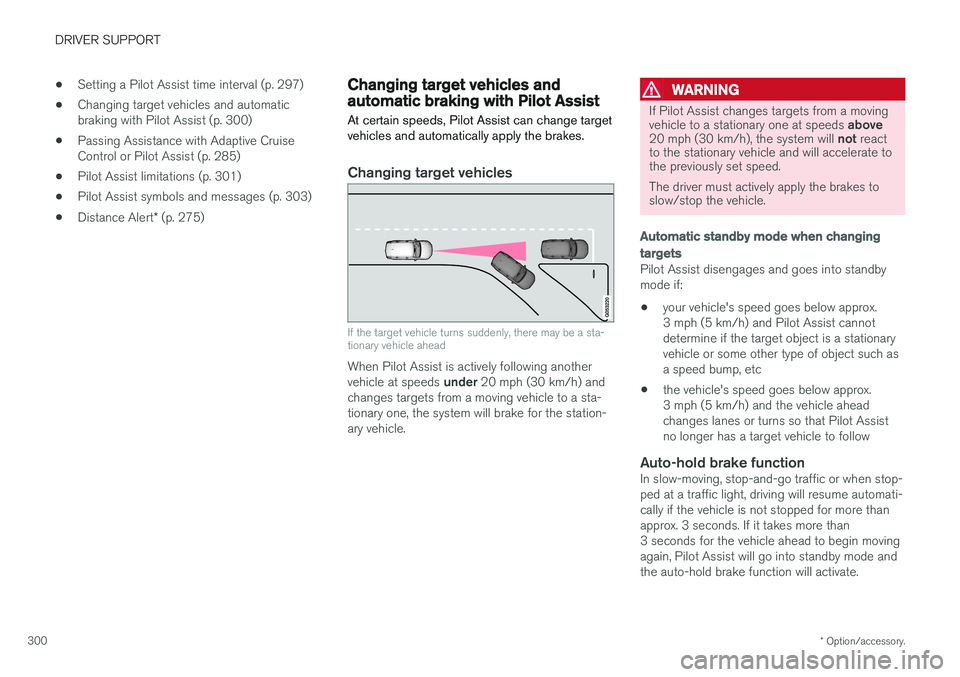
Generic illustration
–Press the button (1).
> The most recently set speed will be used.
WARNING
There may be a significant increase in speed after the
button has been pressed.
Related information
• Pilot Assist
* (p. 291)
• Starting and activating Pilot Assist (p. 294)
• Changing Pilot Assist speed (p. 296)
Page 302 of 580
DRIVER SUPPORT
* Option/accessory.
300 •
Setting a Pilot Assist time interval (p. 297)
• Changing target vehicles and automatic braking with Pilot Assist (p. 300)
• Passing Assistance with Adaptive CruiseControl or Pilot Assist (p. 285)
• Pilot Assist limitations (p. 301)
• Pilot Assist symbols and messages (p. 303)
• Distance Alert
* (p. 275)
Changing target vehicles and automatic braking with Pilot Assist
At certain speeds, Pilot Assist can change target vehicles and automatically apply the brakes.
Changing target vehicles
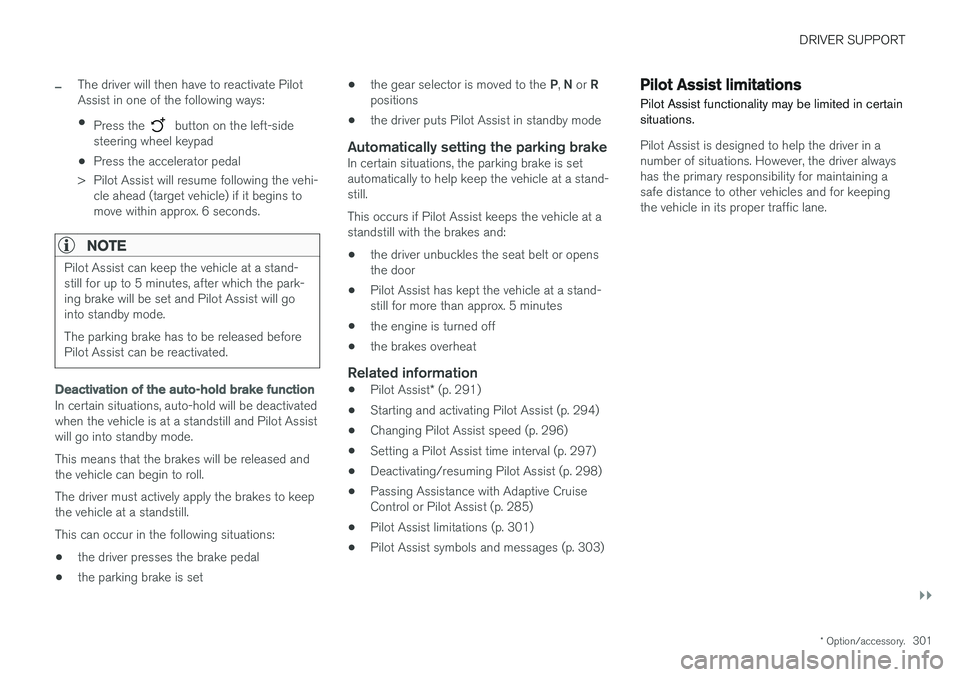
If the target vehicle turns suddenly, there may be a sta- tionary vehicle ahead
When Pilot Assist is actively following another vehicle at speeds under 20 mph (30 km/h) and
changes targets from a moving vehicle to a sta- tionary one, the system will brake for the station-ary vehicle.
WARNING
If Pilot Assist changes targets from a moving vehicle to a stationary one at speeds above
20 mph (30 km/h), the system will not react
to the stationary vehicle and will accelerate to the previously set speed. The driver must actively apply the brakes to slow/stop the vehicle.
Automatic standby mode when changing targets
Pilot Assist disengages and goes into standby mode if:
• your vehicle's speed goes below approx.3 mph (5 km/h) and Pilot Assist cannotdetermine if the target object is a stationaryvehicle or some other type of object such asa speed bump, etc
• the vehicle's speed goes below approx.3 mph (5 km/h) and the vehicle aheadchanges lanes or turns so that Pilot Assistno longer has a target vehicle to follow
Auto-hold brake functionIn slow-moving, stop-and-go traffic or when stop-ped at a traffic light, driving will resume automati-cally if the vehicle is not stopped for more thanapprox. 3 seconds. If it takes more than3 seconds for the vehicle ahead to begin movingagain, Pilot Assist will go into standby mode andthe auto-hold brake function will activate.
Page 303 of 580
DRIVER SUPPORT
}}
* Option/accessory.301
–The driver will then have to reactivate Pilot Assist in one of the following ways:
• Press the
button on the left-side
steering wheel keypad
• Press the accelerator pedal
> Pilot Assist will resume following the vehi- cle ahead (target vehicle) if it begins to move within approx. 6 seconds.
NOTE
Pilot Assist can keep the vehicle at a stand- still for up to 5 minutes, after which the park-ing brake will be set and Pilot Assist will gointo standby mode. The parking brake has to be released before Pilot Assist can be reactivated.
Deactivation of the auto-hold brake function
In certain situations, auto-hold will be deactivated when the vehicle is at a standstill and Pilot Assistwill go into standby mode. This means that the brakes will be released and the vehicle can begin to roll. The driver must actively apply the brakes to keep the vehicle at a standstill. This can occur in the following situations: • the driver presses the brake pedal
• the parking brake is set •
the gear selector is moved to the
P, N or R
positions
• the driver puts Pilot Assist in standby mode
Automatically setting the parking brakeIn certain situations, the parking brake is set automatically to help keep the vehicle at a stand-still. This occurs if Pilot Assist keeps the vehicle at a standstill with the brakes and:
• the driver unbuckles the seat belt or opensthe door
• Pilot Assist has kept the vehicle at a stand-still for more than approx. 5 minutes
• the engine is turned off
• the brakes overheat
Related information
•
Pilot Assist
* (p. 291)
• Starting and activating Pilot Assist (p. 294)
• Changing Pilot Assist speed (p. 296)
• Setting a Pilot Assist time interval (p. 297)
• Deactivating/resuming Pilot Assist (p. 298)
• Passing Assistance with Adaptive CruiseControl or Pilot Assist (p. 285)
• Pilot Assist limitations (p. 301)
• Pilot Assist symbols and messages (p. 303)
Pilot Assist limitations
Pilot Assist functionality may be limited in certain situations.
Pilot Assist is designed to help the driver in a number of situations. However, the driver alwayshas the primary responsibility for maintaining asafe distance to other vehicles and for keepingthe vehicle in its proper traffic lane.
Page 304 of 580
||
DRIVER SUPPORT
* Option/accessory.
302
WARNING
Pilot Assist is not a collision avoidance sys- tem. The driver is always responsible forsteering or applying the brakes if the systemdoes not detect another vehicle. Do not use Pilot Assist in demanding driving conditions such as city driving or other heavytraffic situations, in slippery conditions, whenthere is a great deal of water or slush on theroad, during heavy rain or snow, in poor visibil-ity, on winding roads or on highway on- or off-ramps. In certain situations, it may be difficult for Pilot Assist to assist the driver correctly or to deac-tivate automatically. In such cases, it is advisa-ble not to use Pilot Assist. Examples of suchsituations may be:
• the lane's side market lines are missing, badly faded or cross each other.
• the division of lanes is not clear, e.g.,when a line divides or merges withanother, at exits or if there are many roadsigns/markers.
• there are edges or other lines on or nearthe lane, e.g., curbs, cracks, repairedareas, sharp shadows, etc.
• the lane is narrow or winding.
• the lane is at the top of a hill, on anuneven road surface or over a bump.
•bad weather conditions (rain, snow, fog, slush, poor visibility, backlighting, etc).
The driver should also be aware that Pilot Assist has the following limitations: • High curbs, barriers and temporary obsta- cles (cones, barriers etc) may not bedetected or could be detected incorrectlyas side marker lines, which may create arisk of collision. The driver must ensure asafe distance to these obstacles.
• The camera or radar sensor may not beable to detect objects if there are pot-holes or if there are stationary objectspartially or completely blocking the road.
• Pilot Assist does not "see" pedestrians,animals, etc.
• Pilot Assist's steering capacity is limitedand may not always be able to help thedriver keep the vehicle in the lane.
The driver can always take action to override PilotAssist.
Steep roads and/or heavy loadsPilot Assist is primarily intended for use on rela-tively level roads. The function may not be able tomaintain the correct time interval to the vehicleahead on when driving down steep hills. Thedriver should be attentive and prepared to applythe brakes in these situations. Do not use Pilot Assist when the vehicle is trans-porting a heavy load or if it is towing a trailer.
Additional information
•
The Off Road drive mode cannot be
selected if Pilot Assist is activated.
• Pilot Assist uses the vehicle's camera and radar sensor, which have certain general limi-tations. See the articles "Camera limitations"and "Radar sensor limitations" for additionalinformation.
Related information
•
Pilot Assist
* (p. 291)
• Starting and activating Pilot Assist (p. 294)
• Changing Pilot Assist speed (p. 296)
• Setting a Pilot Assist time interval (p. 297)
• Changing target vehicles and automaticbraking with Pilot Assist (p. 300)
• Deactivating/resuming Pilot Assist (p. 298)
• Passing Assistance with Adaptive CruiseControl or Pilot Assist (p. 285)
• Pilot Assist symbols and messages (p. 303)
• Radar sensor limitations (p. 305)
• Camera limitations (p. 309)
Page 306 of 580
||
DRIVER SUPPORT
* Option/accessory.
304
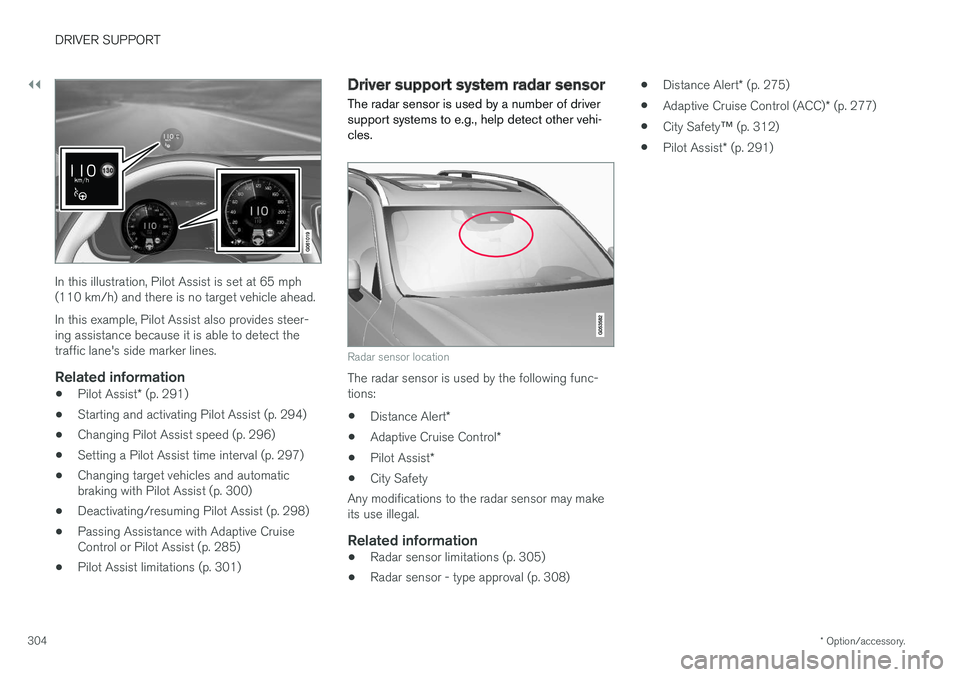
In this illustration, Pilot Assist is set at 65 mph (110 km/h) and there is no target vehicle ahead. In this example, Pilot Assist also provides steer- ing assistance because it is able to detect thetraffic lane's side marker lines.
Related information
• Pilot Assist
* (p. 291)
• Starting and activating Pilot Assist (p. 294)
• Changing Pilot Assist speed (p. 296)
• Setting a Pilot Assist time interval (p. 297)
• Changing target vehicles and automaticbraking with Pilot Assist (p. 300)
• Deactivating/resuming Pilot Assist (p. 298)
• Passing Assistance with Adaptive CruiseControl or Pilot Assist (p. 285)
• Pilot Assist limitations (p. 301)
Driver support system radar sensor
The radar sensor is used by a number of driver support systems to e.g., help detect other vehi-cles.
Radar sensor location
The radar sensor is used by the following func- tions:
• Distance Alert
*
• Adaptive Cruise Control
*
• Pilot Assist
*
• City Safety
Any modifications to the radar sensor may makeits use illegal.
Related information
• Radar sensor limitations (p. 305)
• Radar sensor - type approval (p. 308) •
Distance Alert
* (p. 275)
• Adaptive Cruise Control (ACC)
* (p. 277)
• City Safety
™ (p. 312)
• Pilot Assist
* (p. 291)
Page 356 of 580
||
DRIVER SUPPORT
* Option/accessory.
354
Dark camera sectors
A dark camera sector may also be displayed in the following situations but without the defective
camera symbol. A sector may be dark because: • the door mirror is folded in
• the door is open
• the tailgate is open
Ambient lightingThe camera images are adjusted automatically to the ambient light, which means the image mayvary slightly in terms of light and quality. Poorambient lighting may reduce the quality of theimage.
Maintenance
•Keep the camera's lens free of dirt, ice andsnow. This is particularly important in poorambient lighting conditions.
• Remove dirt, ice and snow carefully to avoidscratching the lenses.
• Clean the lens regularly with warm water anda suitable car washing detergent.
Related information
•
Park Assist Camera (PAC)
* (p. 348)
Park Assist Pilot (PAP) *
Park Assist Pilot (PAP) helps the driver drive into parallel or perpendicular parking spaces andleave parallel parking spaces.
Park Assist Pilot provides assistance when park- ing by measuring the parking space and turningthe steering wheel to guide the vehicle into thespace. Information about the actions required by the driver is provided in the center display in the formof symbols, images and text.
NOTE
While PAP is active, the driver's task is to:
• carefully monitor the area around the vehicle
• follow the instructions provided in thecenter display
• select a gear (
D or R) when prompted
• regulate the vehicle's speed
• apply the brakes when necessary andstop the vehicle
Types of parking
Parallel parking
Procedure for parallel parking
PAP helps park the vehicle as follows:
1. The system searches for and measures a
possible parking space. While this is being done, the vehicle's speed may not exceedapprox. 20 mph ( 30 km/h). When backinginto a space, the speed may not exceedapprox. 4 mph ( 7 km/h).
2. The vehicle is steered while it is backing into the parking space. The driver controls thevehicle's speed.
3. The vehicle's position in the parking space is adjusted by prompting the driver to move for-ward and rearward while the system steers.
Page 360 of 580
||
DRIVER SUPPORT
* Option/accessory.
358 adjusted by driving slightly forward and backing up. 1.
Put the gear selector in D, wait until the
steering wheel has turned and drive forward slowly.
2. Stop the vehicle when you are instructed by PAP to do so.
3. Put the gear selector in R, back up slowly
and stop when you are instructed by PAP todo so.
When the parking procedure is finished (this willbe indicated by a text message and a graphicimage), PAP switches off automatically. If neces-sary, the driver may need to make minor adjust-ments to ensure that the vehicle is parked cor-rectly.
CAUTION
The warning distance is shorter when PAP is using the sensors than when Park Assist isusing them.
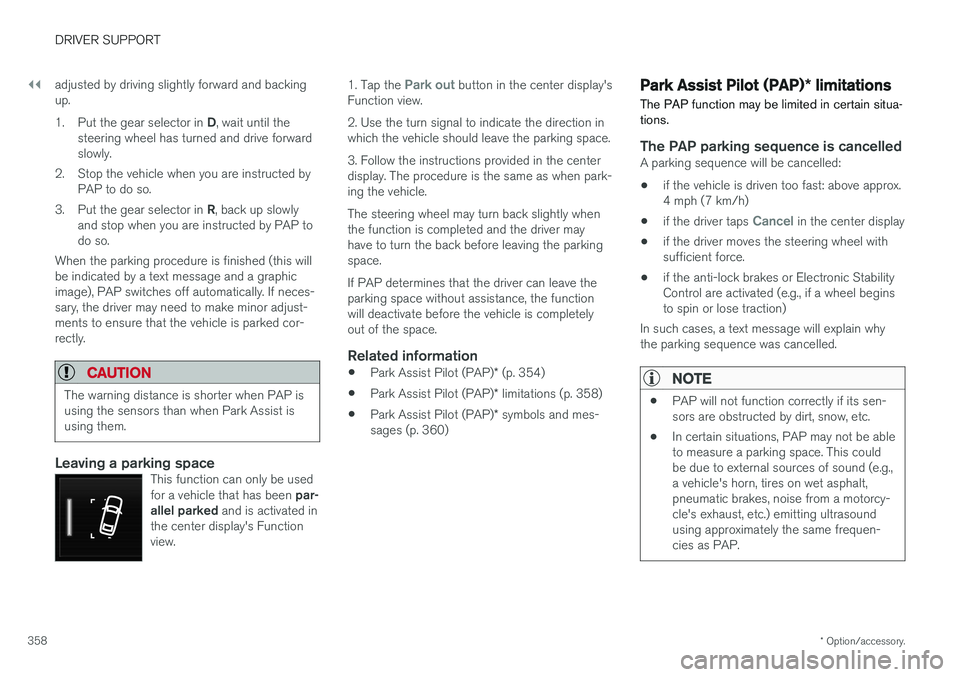
Leaving a parking spaceThis function can only be used for a vehicle that has been par-
allel parked and is activated in
the center display's Function view.
1. Tap the Park out button in the center display's
Function view. 2. Use the turn signal to indicate the direction in which the vehicle should leave the parking space. 3. Follow the instructions provided in the center display. The procedure is the same as when park-ing the vehicle. The steering wheel may turn back slightly when the function is completed and the driver mayhave to turn the back before leaving the parkingspace. If PAP determines that the driver can leave the parking space without assistance, the functionwill deactivate before the vehicle is completelyout of the space.
Related information
• Park Assist Pilot (PAP)
* (p. 354)
• Park Assist Pilot (PAP)
* limitations (p. 358)
• Park Assist Pilot (PAP)
* symbols and mes-
sages (p. 360)
Park Assist Pilot (PAP) * limitations
The PAP function may be limited in certain situa- tions.
The PAP parking sequence is cancelledA parking sequence will be cancelled:
• if the vehicle is driven too fast: above approx. 4 mph (7 km/h)
• if the driver taps
Cancel in the center display
• if the driver moves the steering wheel with sufficient force.
• if the anti-lock brakes or Electronic StabilityControl are activated (e.g., if a wheel beginsto spin or lose traction)
In such cases, a text message will explain whythe parking sequence was cancelled.
NOTE
• PAP will not function correctly if its sen- sors are obstructed by dirt, snow, etc.
• In certain situations, PAP may not be ableto measure a parking space. This couldbe due to external sources of sound (e.g.,a vehicle's horn, tires on wet asphalt,pneumatic brakes, noise from a motorcy-cle's exhaust, etc.) emitting ultrasoundusing approximately the same frequen-cies as PAP.