climate settings VOLVO XC90 T8 2017 Owner´s Manual
[x] Cancel search | Manufacturer: VOLVO, Model Year: 2017, Model line: XC90 T8, Model: VOLVO XC90 T8 2017Pages: 580, PDF Size: 10.37 MB
Page 411 of 580
STARTING AND DRIVING
409
Factors that determine the electric motor's driving range
Factors outside of the driver's control
The following are examples of factors that the driver cannot control:
• The current traffic situation
• Driving short distances
• Topography
• Ambient temperature and headwinds
• Road conditions/road surface
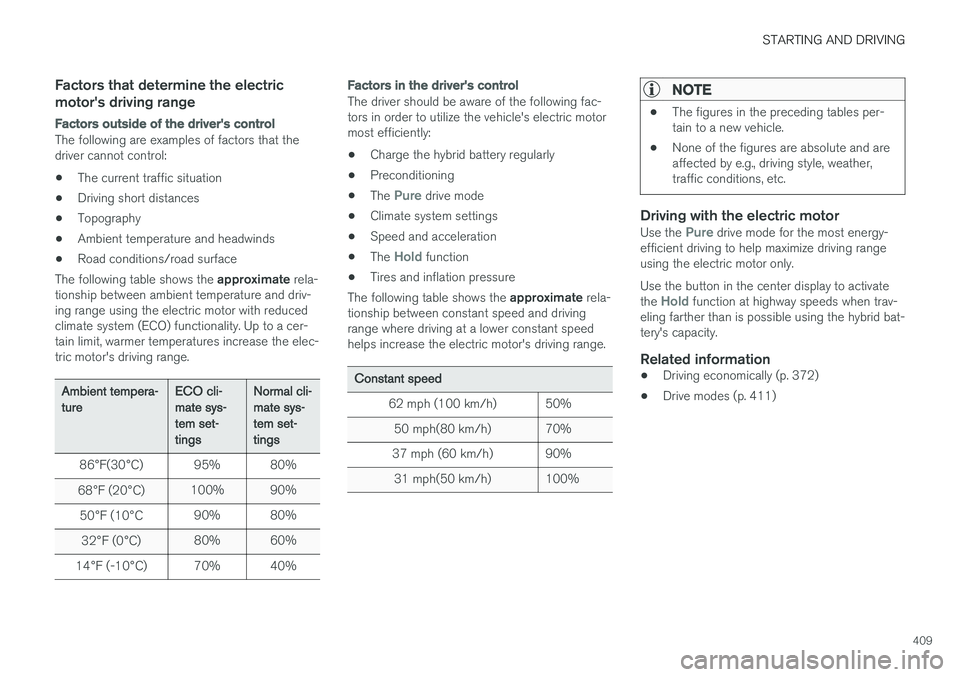
The following table shows the approximate rela-
tionship between ambient temperature and driv-ing range using the electric motor with reducedclimate system (ECO) functionality. Up to a cer-tain limit, warmer temperatures increase the elec-tric motor's driving range.
Ambient tempera- ture ECO cli-mate sys-tem set-tingsNormal cli-mate sys-tem set-tings
86 °F(30 °C) 95% 80%
68 °F (20 °C) 100% 90%
50 °F (10 °C 90% 80%
32 °F (0 °C) 80% 60%
14 °F (-10 °C) 70% 40%
Factors in the driver's control
The driver should be aware of the following fac- tors in order to utilize the vehicle's electric motormost efficiently:
• Charge the hybrid battery regularly
• Preconditioning
• The
Pure drive mode
• Climate system settings
• Speed and acceleration
• The
Hold function
• Tires and inflation pressure
The following table shows the approximate rela-
tionship between constant speed and driving range where driving at a lower constant speedhelps increase the electric motor's driving range.
Constant speed
62 mph (100 km/h) 50%50 mph(80 km/h) 70%
37 mph (60 km/h) 90%
31 mph(50 km/h) 100%
NOTE
• The figures in the preceding tables per- tain to a new vehicle.
• None of the figures are absolute and areaffected by e.g., driving style, weather,traffic conditions, etc.
Driving with the electric motorUse the Pure drive mode for the most energy-
efficient driving to help maximize driving range using the electric motor only. Use the button in the center display to activate the
Hold function at highway speeds when trav-
eling farther than is possible using the hybrid bat- tery's capacity.
Related information
• Driving economically (p. 372)
• Drive modes (p. 411)
Page 413 of 580
STARTING AND DRIVING
}}
* Option/accessory.411
Drive modes
Selecting a drive mode affects the vehicle's driv- ing characteristics to help make driving moreenjoyable or easier in certain types of situations.
The following systems are adapted to help pro- vide the best vehicle performance in the respec-tive drive modes: • Steering
• Engine/transmission/All Wheel Drive
*
• Brakes
• Pneumatic suspensionSuspension control
• Instrument panel
• Climate system settings
Select the drive mode best suited to the current driving conditions. Please be aware that not all modes can be selected in all driving situations. The selectedmode will be displayed in the instrument panel.
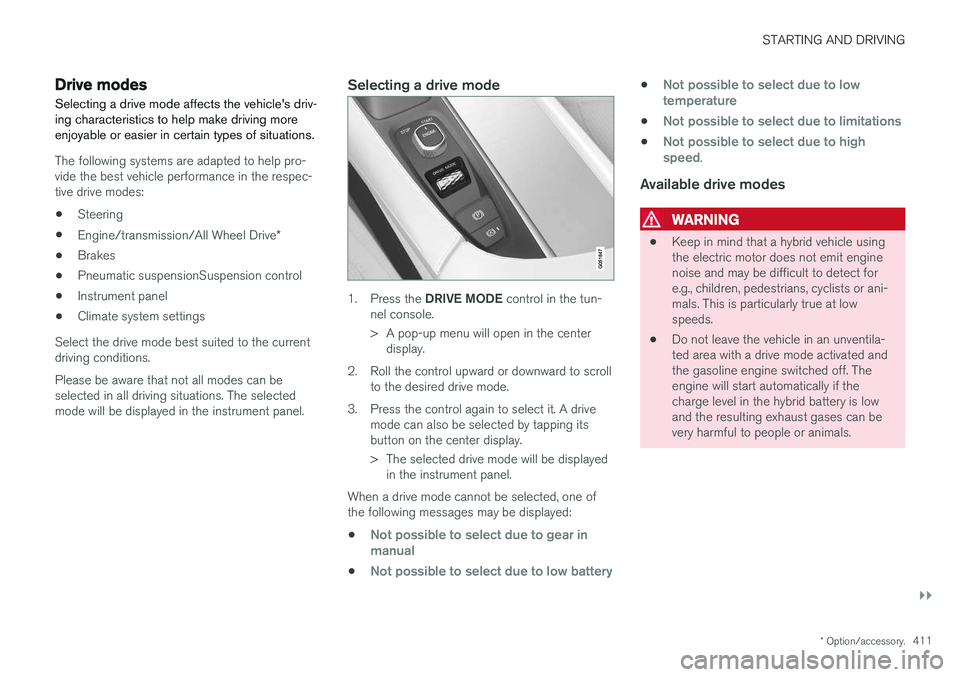
Selecting a drive mode
1. Press the DRIVE MODE control in the tun-
nel console.
> A pop-up menu will open in the center display.
2. Roll the control upward or downward to scroll to the desired drive mode.
3. Press the control again to select it. A drive mode can also be selected by tapping its button on the center display.
> The selected drive mode will be displayedin the instrument panel.
When a drive mode cannot be selected, one of the following messages may be displayed:
•
Not possible to select due to gear in manual
•Not possible to select due to low battery
•Not possible to select due to low temperature
•Not possible to select due to limitations
•Not possible to select due to high speed.
Available drive modes
WARNING
• Keep in mind that a hybrid vehicle using the electric motor does not emit enginenoise and may be difficult to detect fore.g., children, pedestrians, cyclists or ani-mals. This is particularly true at lowspeeds.
• Do not leave the vehicle in an unventila-ted area with a drive mode activated andthe gasoline engine switched off. Theengine will start automatically if thecharge level in the hybrid battery is lowand the resulting exhaust gases can bevery harmful to people or animals.
Page 415 of 580
STARTING AND DRIVING
}}
413
•
If the vehicle's speed goes above approx. 78 mph (125 km/h)
• If the driver wants more response than theelectric motor alone can provide
• If factors such as cold weather, etc., affectthe system or components
ECO climate
In the Pure drive mode, ECO climate in the pas-
senger compartment is activated automatically to help reduce energy consumption.
NOTE
When the Pure drive mode is activated, set-
tings for certain climate system/electricity- consuming functions are reduced. Some ofthese settings can be reset manually but fullfunctionality will only be restored by leaving the
Pure drive mode or by adapting the set-
tings in the Individual drive mode to full cli-
mate system functionality.
If condensation forms on the windows, tap the max. defroster button, which will function nor-mally.
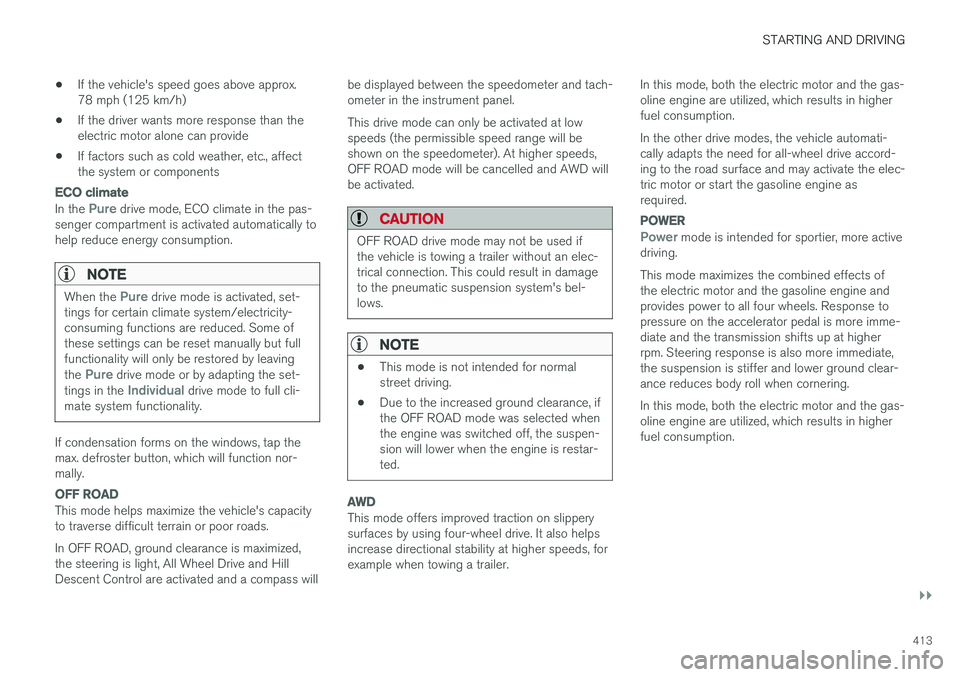
OFF ROAD
This mode helps maximize the vehicle's capacity to traverse difficult terrain or poor roads. In OFF ROAD, ground clearance is maximized, the steering is light, All Wheel Drive and HillDescent Control are activated and a compass will be displayed between the speedometer and tach-ometer in the instrument panel. This drive mode can only be activated at low speeds (the permissible speed range will beshown on the speedometer). At higher speeds,OFF ROAD mode will be cancelled and AWD willbe activated.
CAUTION
OFF ROAD drive mode may not be used if the vehicle is towing a trailer without an elec-trical connection. This could result in damageto the pneumatic suspension system's bel-lows.
NOTE
•
This mode is not intended for normal street driving.
• Due to the increased ground clearance, ifthe OFF ROAD mode was selected whenthe engine was switched off, the suspen-sion will lower when the engine is restar-ted.
AWD
This mode offers improved traction on slippery surfaces by using four-wheel drive. It also helpsincrease directional stability at higher speeds, forexample when towing a trailer. In this mode, both the electric motor and the gas-oline engine are utilized, which results in higherfuel consumption. In the other drive modes, the vehicle automati- cally adapts the need for all-wheel drive accord-ing to the road surface and may activate the elec-tric motor or start the gasoline engine asrequired.
POWER
Power mode is intended for sportier, more active
driving. This mode maximizes the combined effects of the electric motor and the gasoline engine andprovides power to all four wheels. Response topressure on the accelerator pedal is more imme-diate and the transmission shifts up at higherrpm. Steering response is also more immediate,the suspension is stiffer and lower ground clear-ance reduces body roll when cornering. In this mode, both the electric motor and the gas- oline engine are utilized, which results in higherfuel consumption.
Page 416 of 580
||
STARTING AND DRIVING
* Option/accessory.
414
INDIVIDUAL
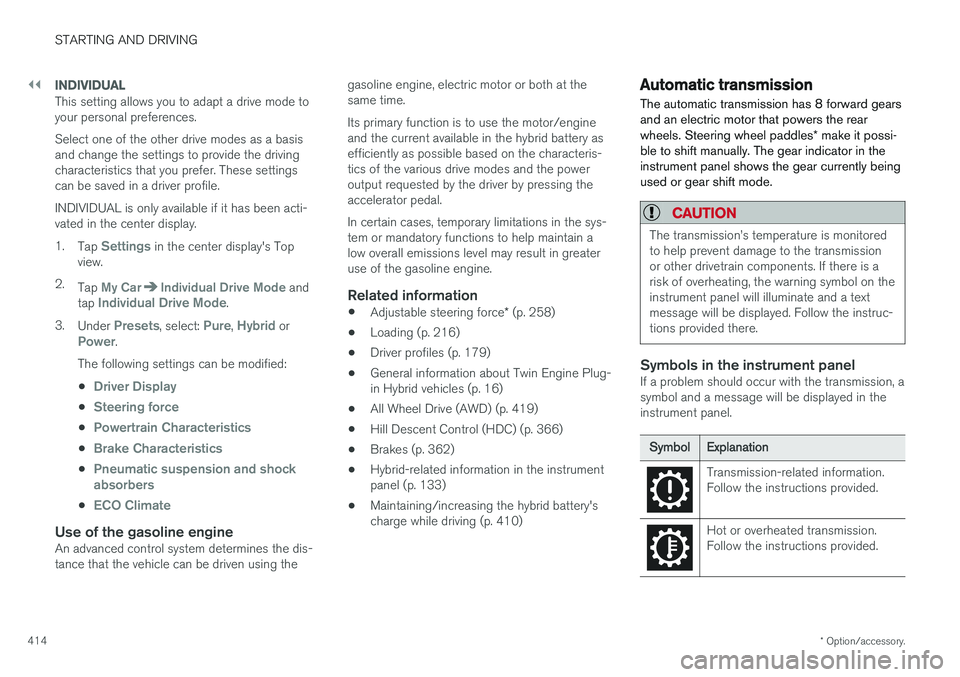
This setting allows you to adapt a drive mode to your personal preferences. Select one of the other drive modes as a basis and change the settings to provide the drivingcharacteristics that you prefer. These settingscan be saved in a driver profile. INDIVIDUAL is only available if it has been acti- vated in the center display. 1.
Tap
Settings in the center display's Top
view.
2. Tap
My CarIndividual Drive Mode and
tap Individual Drive Mode.
3. Under
Presets, select: Pure, Hybrid orPower.
The following settings can be modified: •
Driver Display
•Steering force
•Powertrain Characteristics
•Brake Characteristics
•Pneumatic suspension and shock absorbers
•ECO Climate
Use of the gasoline engineAn advanced control system determines the dis- tance that the vehicle can be driven using the gasoline engine, electric motor or both at thesame time. Its primary function is to use the motor/engine and the current available in the hybrid battery asefficiently as possible based on the characteris-tics of the various drive modes and the poweroutput requested by the driver by pressing theaccelerator pedal. In certain cases, temporary limitations in the sys- tem or mandatory functions to help maintain alow overall emissions level may result in greateruse of the gasoline engine.
Related information
•
Adjustable steering force
* (p. 258)
• Loading (p. 216)
• Driver profiles (p. 179)
• General information about Twin Engine Plug-in Hybrid vehicles (p. 16)
• All Wheel Drive (AWD) (p. 419)
• Hill Descent Control (HDC) (p. 366)
• Brakes (p. 362)
• Hybrid-related information in the instrumentpanel (p. 133)
• Maintaining/increasing the hybrid battery'scharge while driving (p. 410)
Automatic transmission
The automatic transmission has 8 forward gears and an electric motor that powers the rear wheels. Steering wheel paddles * make it possi-
ble to shift manually. The gear indicator in the instrument panel shows the gear currently beingused or gear shift mode.
CAUTION
The transmission
Page 507 of 580
MAINTENANCE AND SERVICING
505
Automatically connecting to a workshop
Without driver confirmation
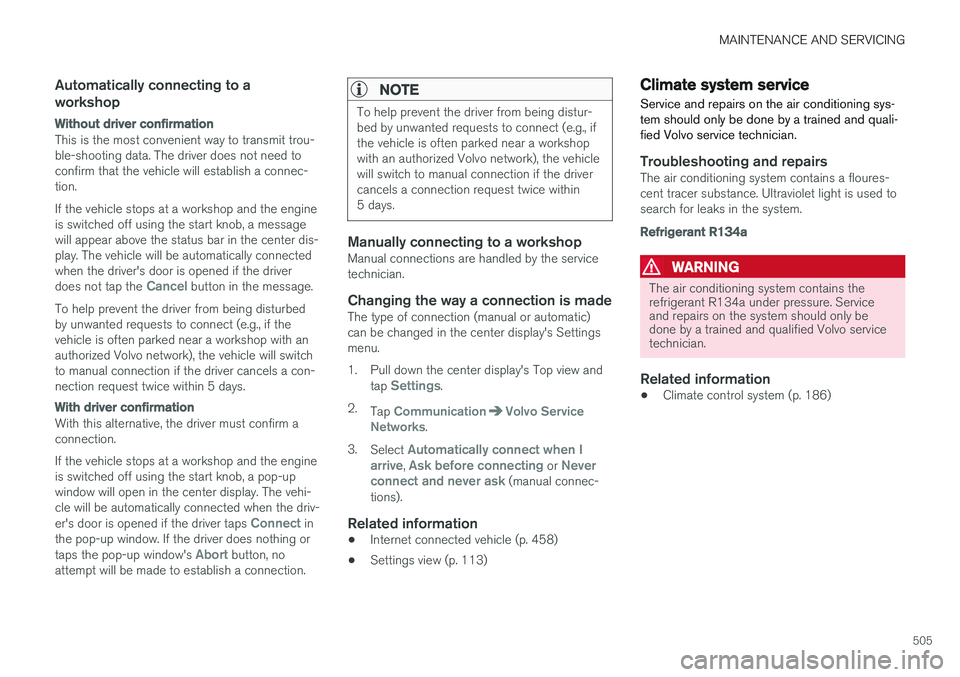
This is the most convenient way to transmit trou- ble-shooting data. The driver does not need toconfirm that the vehicle will establish a connec-tion. If the vehicle stops at a workshop and the engine is switched off using the start knob, a messagewill appear above the status bar in the center dis-play. The vehicle will be automatically connectedwhen the driver's door is opened if the driver does not tap the
Cancel button in the message.
To help prevent the driver from being disturbed by unwanted requests to connect (e.g., if thevehicle is often parked near a workshop with anauthorized Volvo network), the vehicle will switchto manual connection if the driver cancels a con-nection request twice within 5 days.
With driver confirmation
With this alternative, the driver must confirm a connection. If the vehicle stops at a workshop and the engine is switched off using the start knob, a pop-upwindow will open in the center display. The vehi-cle will be automatically connected when the driv- er's door is opened if the driver taps
Connect in
the pop-up window. If the driver does nothing or taps the pop-up window's
Abort button, no
attempt will be made to establish a connection.
NOTE
To help prevent the driver from being distur- bed by unwanted requests to connect (e.g., ifthe vehicle is often parked near a workshopwith an authorized Volvo network), the vehiclewill switch to manual connection if the drivercancels a connection request twice within5 days.
Manually connecting to a workshopManual connections are handled by the service technician.
Changing the way a connection is madeThe type of connection (manual or automatic)can be changed in the center display's Settingsmenu.
1. Pull down the center display's Top view and
tap
Settings.
2. Tap
CommunicationVolvo Service
Networks.
3. Select
Automatically connect when I
arrive, Ask before connecting or Never
connect and never ask (manual connec-
tions).
Related information
• Internet connected vehicle (p. 458)
• Settings view (p. 113)
Climate system service
Service and repairs on the air conditioning sys- tem should only be done by a trained and quali-fied Volvo service technician.
Troubleshooting and repairsThe air conditioning system contains a floures- cent tracer substance. Ultraviolet light is used tosearch for leaks in the system.
Refrigerant R134a
WARNING
The air conditioning system contains the refrigerant R134a under pressure. Serviceand repairs on the system should only bedone by a trained and qualified Volvo servicetechnician.
Related information
• Climate control system (p. 186)
Page 573 of 580
INDEX
571
Options 26
Outside temperature sensor 118
Overhead courtesy lighting 151
Overheating, engine 375Owner's information
mobile applications 25
Owner's manual 21
Ownership, changing 118
Oxygen sensors, heated 381
P
Paint, touching up 547, 548
Park assist 344, 345, 346, 347
Park Assist Camera 348, 350, 352, 353 settings 348, 352
Park Assist Pilot 354, 355, 358, 360Parking brake electric, applying/releasing 369, 371
Parking light bulb, replacing 529Passenger compartment fuses 516
Passive Entry system location of antennas 244
Permissible axle weight 557
Phone phone book 443
receiving calls 441
text messages 444, 445
Pilot Assist 285, 291, 294, 297, 298, 300, 301
Plug-in hybrid general information 16
Polishing 549 Power front seat memory function 168
Power mirrors 106 defroster 204
Power steering adjustable 258
Power tailgate 248
Power windows 111
Preconditioning 187, 189 starting/stopping 192
symbols and messages 193
timer 190
Preconditioning, retaining climate comfort 189
Pregnancy, using seat belts during 62
PROPOSITION 65 WARNING 382R
Radar driver support systems 304, 308
Radar sensor limitations 305
Radio RBDS 424
settings 424 SiriusXM ®
Satellite radio 429, 430, 432
Radio functions HD digital radio 426, 427, 428, 429
Rain sensor 161
Rear Collision Warning 324
Rear fog lights 149
Rear park assist 344, 345, 346, 347
Rear seat head restraints 173
Rear seats 173 accessing the third row 178
adjusting backrest tilt 175
center head restraint 173
folding 176, 178
moving forward/rearward 175
Rearview mirror compass 141, 142
Rear window defroster 204
Recalls 62
Page 574 of 580
INDEX
572Recalls, child restraints 81
Recirculation (climate system) 203
Refrigerant (A/C system) 559
Refueling 378, 379
fuel filler door 380
Registering child restraints 81
Remote key 235, 238, 245 immobilizer 232
linking to a driver profile 181
range 237
replacing the battery 233
restricted (red) key 238
Remote updates 501
Replacing bulbs 524
Replacing fuses 510, 511, 516, 520
Reporting safety defects 61
Roadside Assistance 14
Road sign information (RSI) 332, 334
Rollover Protection System (ROPS) 263
Roll Stability Control (RSC) 263
Run-off mitigation 341, 343
S
Safety, occupant 60
Safety defects, reporting 61
Safety locks, child 254
Safety mode 78Seat adjusting the passenger's seat from the
driver's seat 168
Seat belt reminder 68
Seat belts Automatic locking retractor/Emergency
locking retractor 81
buckling 66
pretensioners 64, 65
reminder 68
securing child restraint systems 83, 85, 88
unbuckling 66
use during pregnancy 62
using 64
Seats rear 173
Sensus 22 Service connected service booking 502
Settings view
categories 114
resetting 117
system settings 116
Shiftlock override 415
Side door mirrors 106
Side impact airbags 76Sirius Satellite radio Travel link 433
SiriusXM ®
Satellite radio
traffic information 429, 430, 432
Snow chains 479
Snow tires 479Sound settings media 455
ringtones 445
Sound settings, audio system 423, 455 Specifications bulbs 530
Speed camera alert 332
Speed limiter 263, 265, 269 automatic 265, 267
deactivating/reactivating 268
starting/activating 264
Spin control 259