brakes VOLVO XC90 T8 2017 Owner´s Manual
[x] Cancel search | Manufacturer: VOLVO, Model Year: 2017, Model line: XC90 T8, Model: VOLVO XC90 T8 2017Pages: 580, PDF Size: 10.37 MB
Page 390 of 580
STARTING AND DRIVING
* Option/accessory.
388
Trailer Stability Assist (TSA)
Trailer Stability Assist is a system designed to help stabilize a vehicle that is towing a trailerwhen the vehicle and trailer have begun to swayand is part of the Electronic Stability Control sys-tem.
FunctionA vehicle towing a trailer may begin to sway for various reasons. Normally this only occurs at highspeeds but, for example, if the trailer is overloa-ded or if the load is unevenly distributed in thetrailer, there is risk of swaying. Swaying may be caused by factors such as:
• The vehicle and trailer are hit by a sudden, strong crosswind
• The vehicle and trailer are traveling on anuneven road surface or drive over a bump
• Sudden movements of the steering wheel
Facts about TSA
• The stability system symbol in the instrumentpanel will flash when TSA is working
• If the driver switches off the stability system'sSpin Control function, TSA will also beswitched off (but will be on again the nexttime the engine is started)
• TSA may not intervene when the vehicle andtrailer begin to sway if the driver tries to com-pensate for the swaying motion by movingthe steering wheel rapidly
How TSA worksOnce swaying has begun, it can be very difficultto stop, which makes it difficult to control thevehicle and trailer. The TSA system continuously monitors the vehi- cle's movements, particularly lateral movement. Ifthe system detects a tendency to sway, thebrakes are applied individually on the frontwheels, which has a stabilizing effect on the vehi-cle and trailer. This is often enough to enable thedriver to regain control of the vehicle. If this is not adequate to stop the swaying motion, the brakes are applied to all of the wheels on thevehicle and on the trailer if it is equipped withbrakes, and engine power is temporarily reduced.As the swaying motion begins to decrease andthe vehicle-trailer have once again become sta-ble, TSA will now stop regulating the brakes/engine power and the driver regains control ofthe vehicle. TSA is deactivated if the driver deactivates
ESCin the center display's menu system.
When the ESC symbol in the
instrument panel flashes, TSA is active.
Related information
• Detachable trailer hitch
* (p. 387)
• Driving with a trailer (p. 384)
• Electronic Stability Control (ESC) (p. 259)
Page 413 of 580
STARTING AND DRIVING
}}
* Option/accessory.411
Drive modes
Selecting a drive mode affects the vehicle's driv- ing characteristics to help make driving moreenjoyable or easier in certain types of situations.
The following systems are adapted to help pro- vide the best vehicle performance in the respec-tive drive modes: • Steering
• Engine/transmission/All Wheel Drive
*
• Brakes
• Pneumatic suspensionSuspension control
• Instrument panel
• Climate system settings
Select the drive mode best suited to the current driving conditions. Please be aware that not all modes can be selected in all driving situations. The selectedmode will be displayed in the instrument panel.
Selecting a drive mode
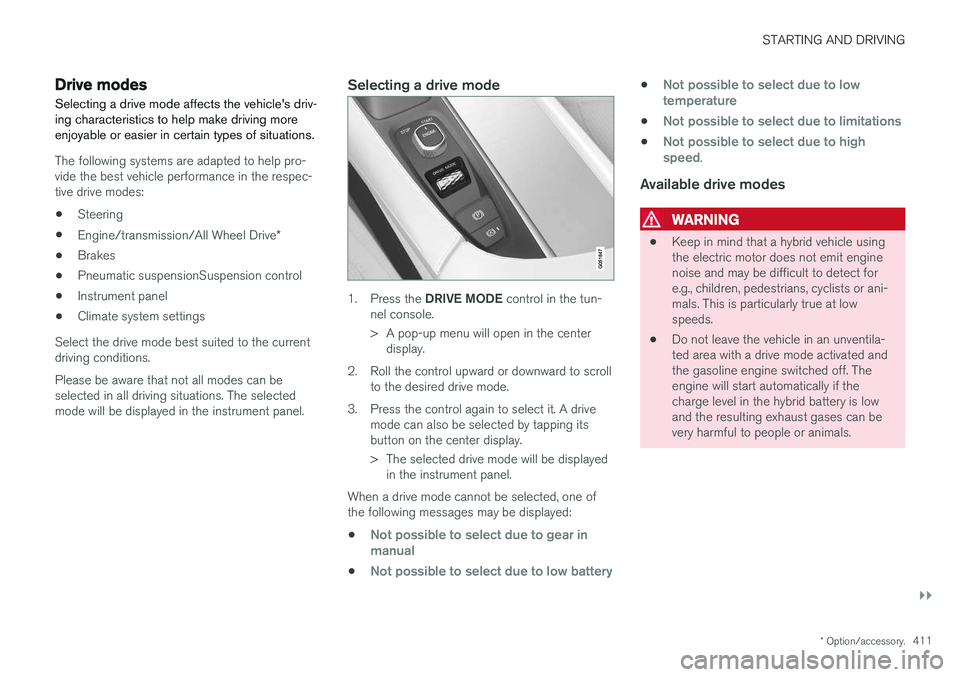
1. Press the DRIVE MODE control in the tun-
nel console.
> A pop-up menu will open in the center display.
2. Roll the control upward or downward to scroll to the desired drive mode.
3. Press the control again to select it. A drive mode can also be selected by tapping its button on the center display.
> The selected drive mode will be displayedin the instrument panel.
When a drive mode cannot be selected, one of the following messages may be displayed:
•
Not possible to select due to gear in manual
•Not possible to select due to low battery
•Not possible to select due to low temperature
•Not possible to select due to limitations
•Not possible to select due to high speed.
Available drive modes
WARNING
• Keep in mind that a hybrid vehicle using the electric motor does not emit enginenoise and may be difficult to detect fore.g., children, pedestrians, cyclists or ani-mals. This is particularly true at lowspeeds.
• Do not leave the vehicle in an unventila-ted area with a drive mode activated andthe gasoline engine switched off. Theengine will start automatically if thecharge level in the hybrid battery is lowand the resulting exhaust gases can bevery harmful to people or animals.
Page 414 of 580
||
STARTING AND DRIVING
412
HYBRID
This is the default mode in which the electric motor and gasoline engine are both utilized. The vehicle starts in
Hybrid mode. The control
system uses the electric motor and the gasoline engine, separately or in tandem, and calculatesoptimal use with respect to performance, fuelconsumption and comfort. At higher speeds,ground clearance is lowered automatically to helpreduce wind resistance. Driving capacity on theelectric motor alone is determined by the hybridbattery's charge level and e.g., the need for heat-ing/cooling in the passenger compartment. If sufficient electrical energy is available, only the electric motor will be activated when the driverpresses the accelerator pedal up to a certainlevel. Above this level, the gasoline engine willstart. Charge the hybrid battery using the charg- ing cable or activate the vehicle's
Charge func-
tion in the center display's Top view in order to drive using the electric motor only. See also thearticle "Maintaining/increasing hybrid batterycharge while driving" for additional information. Information in the instrument panel When driving in
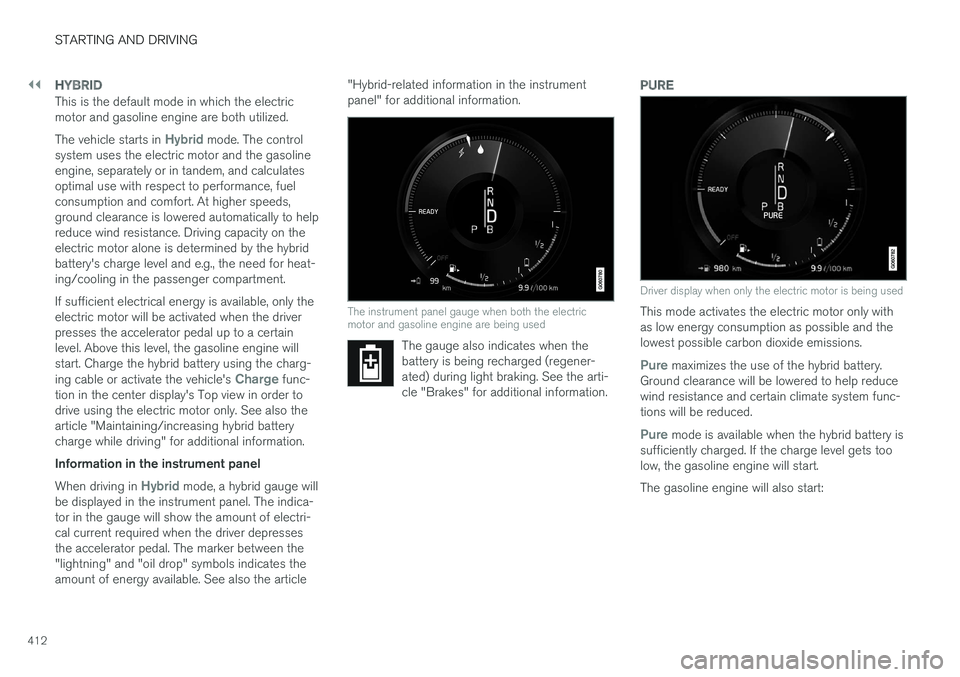
Hybrid mode, a hybrid gauge will
be displayed in the instrument panel. The indica- tor in the gauge will show the amount of electri-cal current required when the driver depressesthe accelerator pedal. The marker between the"lightning" and "oil drop" symbols indicates theamount of energy available. See also the article "Hybrid-related information in the instrumentpanel" for additional information.
The instrument panel gauge when both the electric motor and gasoline engine are being used
The gauge also indicates when the battery is being recharged (regener-ated) during light braking. See the arti-cle "Brakes" for additional information.
PURE
Driver display when only the electric motor is being used
This mode activates the electric motor only with as low energy consumption as possible and thelowest possible carbon dioxide emissions.
Pure maximizes the use of the hybrid battery.
Ground clearance will be lowered to help reduce wind resistance and certain climate system func-tions will be reduced.
Pure mode is available when the hybrid battery is
sufficiently charged. If the charge level gets too low, the gasoline engine will start. The gasoline engine will also start:
Page 416 of 580
||
STARTING AND DRIVING
* Option/accessory.
414
INDIVIDUAL
This setting allows you to adapt a drive mode to your personal preferences. Select one of the other drive modes as a basis and change the settings to provide the drivingcharacteristics that you prefer. These settingscan be saved in a driver profile. INDIVIDUAL is only available if it has been acti- vated in the center display. 1.
Tap
Settings in the center display's Top
view.
2. Tap
My CarIndividual Drive Mode and
tap Individual Drive Mode.
3. Under
Presets, select: Pure, Hybrid orPower.
The following settings can be modified: •
Driver Display
•Steering force
•Powertrain Characteristics
•Brake Characteristics
•Pneumatic suspension and shock absorbers
•ECO Climate
Use of the gasoline engineAn advanced control system determines the dis- tance that the vehicle can be driven using the gasoline engine, electric motor or both at thesame time. Its primary function is to use the motor/engine and the current available in the hybrid battery asefficiently as possible based on the characteris-tics of the various drive modes and the poweroutput requested by the driver by pressing theaccelerator pedal. In certain cases, temporary limitations in the sys- tem or mandatory functions to help maintain alow overall emissions level may result in greateruse of the gasoline engine.
Related information
•
Adjustable steering force
* (p. 258)
• Loading (p. 216)
• Driver profiles (p. 179)
• General information about Twin Engine Plug-in Hybrid vehicles (p. 16)
• All Wheel Drive (AWD) (p. 419)
• Hill Descent Control (HDC) (p. 366)
• Brakes (p. 362)
• Hybrid-related information in the instrumentpanel (p. 133)
• Maintaining/increasing the hybrid battery'scharge while driving (p. 410)
Automatic transmission
The automatic transmission has 8 forward gears and an electric motor that powers the rear wheels. Steering wheel paddles * make it possi-
ble to shift manually. The gear indicator in the instrument panel shows the gear currently beingused or gear shift mode.
CAUTION
The transmission
Page 481 of 580
WHEELS AND TIRES
}}
479
Uniform Tire Quality Grading
ALL PASSENGER VEHICLE TIRES MUST CONFORM TO FEDERAL SAFETY REQUIRE-MENTS IN ADDITION TO THESE GRADES .
Quality grades can be found, where applica- ble, on the tire sidewall between the treadshoulder and maximum section width. Forexample: Treadwear 200 Traction AA Temperature A
TREADWEARThe treadwear grade is a comparative rating based on the wear rate of the tire when testedunder controlled conditions on a specified gov-ernment test course. For example, a tire graded150 would wear one and one half (1 ½) times aswell on the government course as a tire graded100. The relative performance of tires dependsupon the actual conditions of their use, however,and many depart significantly from the norm dueto variation in driving habits, maintenance practi-ces and differences in road characteristics andclimate.
TRACTIONThe traction grades, from highest to lowest, areAA, A, B, and C, as measured under controlledconditions on specified government test surfacesof asphalt and concrete. A tire marked C mayhave poor traction performance. The tractiongrade assigned to this tire is based on braking (straight-ahead) traction tests and is not a meas-ure of cornering (turning) traction.
WARNING
The traction grade assigned to this tire is based on braking (straight-ahead) tractiontests and is not a measure of cornering (turn-ing) traction.
TEMPERATUREThe temperature grades are A (the highest), B, and C, representing the tire's resistance to thegeneration of heat and its ability to dissipate heatwhen tested under controlled conditions on aspecified indoor laboratory test wheel. Sustainedhigh temperature can cause the material of thetire to degenerate and reduce tire life, and exces-sive temperature can lead to sudden tire failure.The grade C corresponds to a minimum level ofperformance that all passenger vehicle tires mustmeet under the Federal Motor Safety StandardNo. 109. Grades B and A represent higher levelsof performance on the laboratory test wheel thanthe minimum required by law.
WARNING
The temperature grade for this tire is estab- lished for a tire that is properly inflated andnot overloaded. Excessive speed, under-infla-tion, or excessive loading, either separately orin combination, can cause heat buildup andtire failure.
Snow tires and chains
The use of snow chains and/or winter tires can help improve traction in winter driving conditions.
Snow chains can be used on your Volvo with the following restrictions:
• Snow chains should be installed on frontwheels only. Use only Volvo approved snowchains.
• If accessory, aftermarket or "custom" tiresand wheels are installed and are of a size dif-ferent than the original tires and wheels,chains in some cases CANNOT be used.Sufficient clearances between chains andbrakes, suspension and body componentsmust be maintained.
• Some strap-on type chains will interfere withbrake components and therefore CANNOTbe used.
• All Wheel Drive models
: Snow chains
should only be installed on the front wheels.
• Certain size tires may not allow the assemblyof snow chains/traction devices.
Consult your Volvo retailer for additional snowchain information.
Page 545 of 580
MAINTENANCE AND SERVICING
}}
* Option/accessory.543
CAUTION
When using an automatic car wash in which the vehicle has to be able to roll freely, theauto-hold brake function must be deactivated.If this is not done, the brakes will automati-cally be applied when the vehicle is stationary. To deactivate this function:
1. Drive the vehicle into the car wash
2. Turn off the auto-hold function using the
control on the center console
3. Turn off the parking brake's automatic function in the center display's Top view (tap
Settings, tap My CarParking
Brake and Suspension and deselectAuto Activate Parking Brake)
4. Put the gear selector in N
5. Switch off the ignition by turning the start knob to STOP and holding it in this posi-
tion for at least 4 seconds
The vehicle will then be able to roll freely.
CAUTION
• Before driving into an automatic car wash, turn off the optional rain sensor toavoid damaging the windshield wipers.
• Make sure that side view mirrors, auxiliarylamps, etc, are secure, and that anyantenna(s) are retracted or removed. Oth-erwise there is risk of the machine dis-lodging them.
• Chromed wheels:
Clean chrome-plated
wheels using the same detergents usedfor the body of the vehicle. Aggressivewheel-cleaning agents can permanentlystain chrome-plated wheels.
WARNING
• When the vehicle is driven immediately after being washed, apply the brakes,including the parking brake, several timesin order to remove any moisture from thebrake linings.
• Engine cleaning agents should not beused when the engine is warm. This con-stitutes a fire risk.
Exterior componentsVolvo recommends the use of special cleaningproducts, available at your Volvo retailer, forcleaning colored plastic, rubber, or ornamental components such as chromed strips on the exte-rior of your vehicle. The instructions for usingthese products should be followed carefully. Sol-vents or stain removers should not be used. The frames around the side windows, roof rails and door frames near the windows
* are made of
anodized aluminum and should only be washed with a cleaning product with a pH value between3.5 till 11.5.
Components that should be washed with a cleaning product with a pH value between 3.5 till 11.5 (genericillustration)
Page 560 of 580
||
SPECIFICATIONS
558
CategoryUSACanada
Max. trailer weights Without brakes: 1,650 lbs With brakes (AWD): 5,000 lbsWith brakes (FWD): 4,000 lbsWithout brakes: 750 kgWith brakes (AWD): 2,250 kgWith brakes (FWD): 1,800 kg
Max. tongue weight AWD: 500 lbsFWD: 400 lbsAWD: 225 kgFWD: 180 kg
CAUTION
•
When loading the vehicle, the maximum gross vehicle weight and permissible axleweights may not be exceeded.
• The maximum trailer weights listed areonly applicable for altitudes up to 3280 ft(1,000 m) above sea level. With increas-ing altitude the engine power and there-fore the car's climbing ability are impairedbecause of the reduced air density, sothe maximum trailer weight has to bereduced accordingly. The weight of thecar and trailer must be reduced by 10%for every further 3280 ft (1,000 m) (orpart thereof).
Page 568 of 580
INDEX
566Booster cushions 88
Brake assist system 365
Brake lights 150, 366Brakes
auto-hold 365
Brake system Brake pad inspection 363
fluid 560
general information 362, 364, 366
Bulbs 529 replacing 524
specifications 530
C
Cameradriver support systems 308
limitations 309
Camera, Park Assist 348, 350, 352, 353
Capacity weight 478, 557
Cargo area, steel grid 223
Cargo area cover 225Cargo compartment fuses 520
raising/lowering the level 216
Cargo net 221
Cargo space 216
Car wash 541
Catalytic converter 381CD, USB, iPod, AUX, Bluetooth, Recents, Library, Shuffle, Similar, Change device,Audio Language, Off, Subtitle Language, Video, DivX ® VOD 452
CD player 451 Cell phone hands-free 438
Pairing 439
Cell phone voice control 124 Center display changing settings 35
cleaning 546
keyboard 36
navigating in 43
overview 33
screen in the center console 49
symbols in the status bar 48
Chains 479
Changing a wheel 481Charging cable hybrid battery 394
Child restraints recalls and registration 81Child restraint systems 81booster cushions 88
convertible seats 85
infant seats 83
ISOFIX/LATCH anchors 89
top tether anchors 91
Child safety 79 booster cushions 88
child restraint systems 81, 90
convertible seats 85
infant seats 83
Child safety locks 254 Child seats lower attachment points 90
City safety 312, 320City Safety crossing traffic 317
detecting objects 315
limitations 320
rear collision warning 324
symbols and messages 323
troubleshooting 318
City Safety, On/Off 314 City Safety ™
Multi Target 318
Cleaning exterior 541
interior 544