cruise control VOLVO XC90 T8 2017 Owner´s Manual
[x] Cancel search | Manufacturer: VOLVO, Model Year: 2017, Model line: XC90 T8, Model: VOLVO XC90 T8 2017Pages: 580, PDF Size: 10.37 MB
Page 8 of 580
6
Start and lock system type designations256
DRIVER SUPPORT
Driver support systems258
Adjustable steering force *
258
Electronic Stability Control (ESC) 259
Electronic Stability Control (ESC) sport mode 260
Electronic Stability Control (ESC)symbols and messages 261
Roll stability control (RSC) 263
Speed limiter (SL) *
263
Starting and activating the Speed Limiter (SL) * 264
Changing a Speed Limiter (SL) *
maximum speed 265
Automatic Speed Limiter (ASL) *
265
Activating/deactivating theAutomatic Speed Limiter (ASL) *267
Changing tolerance for the Automatic Speed Limiter 267
Deactivating/reactivating the Speed Limiter * 268
Turning the Speed Limiter * off
269
Cruise Control (CC) 270
Starting and activating Cruise Control 270
Changing Cruise Control speed 271
Deactivating/resuming Cruise Control (CC) 272
Turning Cruise Control off 273
Switching between Cruise Control and Adaptive Cruise Control*274
Distance Alert *
275
Using Distance Alert *
276
Distance Alert * limitations
277
Adaptive Cruise Control (ACC) *
277
Starting and activating AdaptiveCruise Control (ACC) * 280
Deactivating/resuming Adaptive Cruise Control (ACC) 281
Changing Adaptive Cruise Control(ACC) speed 283
Setting an Adaptive Cruise Controltime interval 284
Passing Assistance with AdaptiveCruise Control or Pilot Assist 285
Changing target vehicles and auto-matic braking with Adaptive CruiseControl (ACC) 285
Adaptive Cruise Control (ACC) -troubleshooting 287
Adaptive Cruise Control (ACC) - limi-tations 288
Adaptive Cruise Control (ACC) sym-bols and messages 289
Pilot Assist *
291
Starting and activating Pilot Assist 294
Changing Pilot Assist speed 296
Page 23 of 580
INTRODUCTION
* Option/accessory.21
Owner's manual and the environment
The wood pulp in Volvo's printed owner's infor- mation comes from FSC ®
(Forest Stewardship
Council ®
) certified forests and other responsible
sources.
FSC ®
The symbol above indicates that the wood pulp is FSC
®
certified.
Related information
• Volvo and the environment (p. 20)
IntelliSafe
—driver support
IntelliSafe is Volvo's philosophy regarding vehi- cle safety. It encompasses a number of systems,both standard and optional, that are designed tohelp make driving and traveling in a Volvo safer.
SupportSystems that help make driving safer are an inte- gral part of IntelliSafe. These include optional features such as Adaptive Cruise Control * that
helps maintain a set distance to a vehicle ahead,Park Assist Pilot *, which assists in parking the
vehicle, Cross Traffic Alert *, Blind Spot
Information *, etc.
Accident preventionSystems such as City Safety are designed to automatically apply the brakes in situations inwhich the driver does not have time to react. Lane Keeping Aid * alerts the driver if the vehicle
inadvertently crosses a lane's/road's side marker line.
ProtectionThe vehicle is equipped with e.g., seat belt pre-tensioners that pull the seat belts taut in criticalsituations when there is a collision risk andnumerous airbags designed to help provide cush-ioning if certain types of collisions should occur.
Related information
• Adaptive Cruise Control (ACC)
* (p. 277)
• Park Assist Pilot (PAP)
* (p. 354) •
High and low beam headlights (p. 147)
• Cross Traffic Alert (CTA)
* (p. 327)
• Blind Spot Information (BLIS)
* (p. 325)
• City Safety
™ (p. 312)
• Driving lane assistance (p. 336)
• Airbag system (p. 69)
• Roll stability control (RSC) (p. 263)
• Seat belts (p. 64)
• General safety information (p. 60)
Page 122 of 580
INSTRUMENTS AND CONTROLS
* Option/accessory.
120
Head-up display (HUD) *
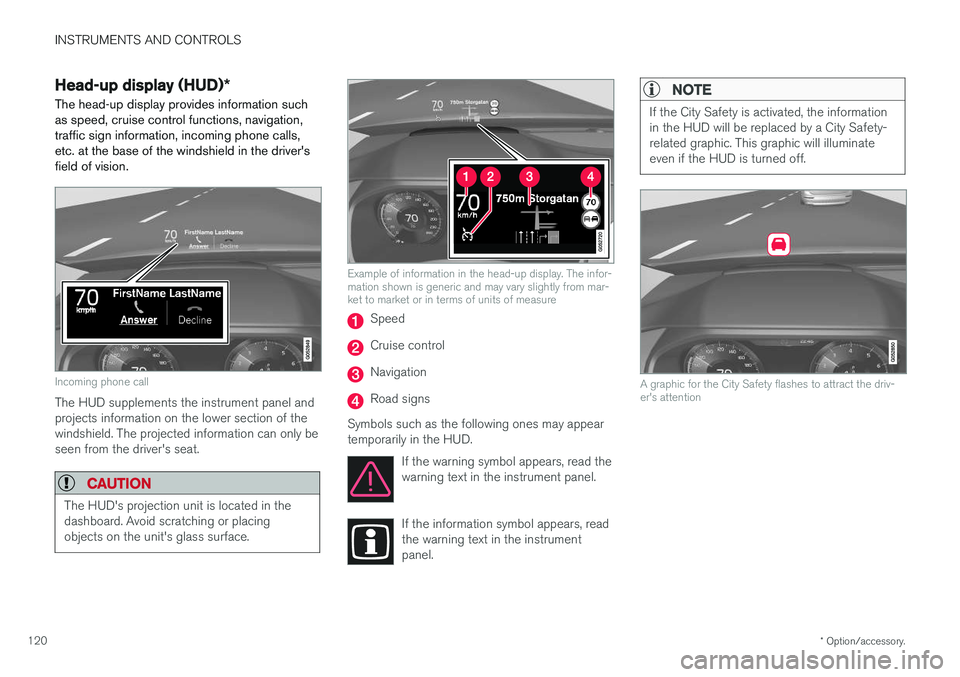
The head-up display provides information such as speed, cruise control functions, navigation,traffic sign information, incoming phone calls,etc. at the base of the windshield in the driver'sfield of vision.
Incoming phone call
The HUD supplements the instrument panel and projects information on the lower section of thewindshield. The projected information can only beseen from the driver's seat.
CAUTION
The HUD's projection unit is located in the dashboard. Avoid scratching or placingobjects on the unit's glass surface.
Example of information in the head-up display. The infor- mation shown is generic and may vary slightly from mar-ket to market or in terms of units of measure
Speed
Cruise control
Navigation
Road signs
Symbols such as the following ones may appear temporarily in the HUD. If the warning symbol appears, read thewarning text in the instrument panel.
If the information symbol appears, read the warning text in the instrumentpanel.
NOTE
If the City Safety is activated, the information in the HUD will be replaced by a City Safety-related graphic. This graphic will illuminateeven if the HUD is turned off.
A graphic for the City Safety flashes to attract the driv- er's attention
Page 130 of 580
INSTRUMENTS AND CONTROLS
* Option/accessory.
128
Voice control settings
There are a number of settings that can be made for the voice control system.
Open the center display's Top view and tap
SettingsSystemVoice Control and
select settings. •
Repeat Voice Command
•Gender
•Speech Rate
Sound settings
Open Top view and tap SettingsSound
System VolumesVoice Control.
Changing languages
The voice control system only understands the languages marked by the
symbol in the list
of possible system languages. Changing the language for this system also affects menus, messages and help texts. Open Top view and tap
SettingsSystemSystem Language.
Related information
• Voice control (p. 123)
• Using voice commands (p. 123)
• Navigation system voice commands (p. 127)
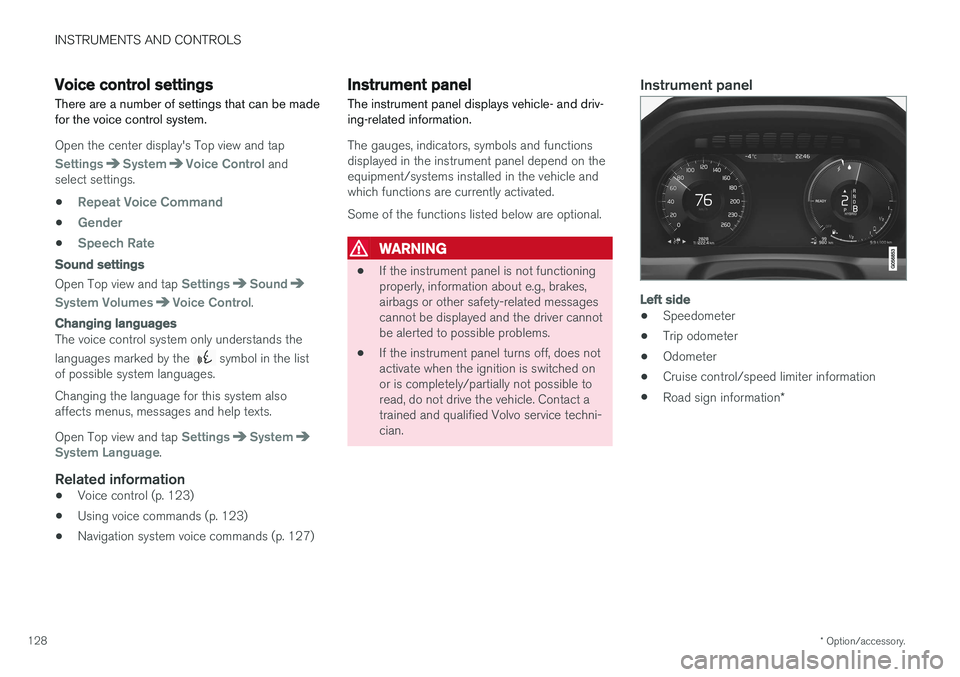
Instrument panel
The instrument panel displays vehicle- and driv- ing-related information.
The gauges, indicators, symbols and functions displayed in the instrument panel depend on theequipment/systems installed in the vehicle andwhich functions are currently activated. Some of the functions listed below are optional.
WARNING
• If the instrument panel is not functioning properly, information about e.g., brakes,airbags or other safety-related messagescannot be displayed and the driver cannotbe alerted to possible problems.
• If the instrument panel turns off, does notactivate when the ignition is switched onor is completely/partially not possible toread, do not drive the vehicle. Contact atrained and qualified Volvo service techni-cian.
Instrument panel
Left side
• Speedometer
• Trip odometer
• Odometer
• Cruise control/speed limiter information
• Road sign information
*
Page 152 of 580
INSTRUMENTS AND CONTROLS
* Option/accessory.
150
Brake lights The brake lights illuminate automatically when the brakes are applied.
In addition to illuminating when the brake pedal is depressed, the brake lights also illuminate whenone of the driver support systems (e.g., adaptivecruise control, City Safety or collision warning)slow the vehicle.
Related information
• Adaptive Cruise Control (ACC)
* (p. 277)
• City Safety
™ (p. 312)
• Emergency brake lights (p. 366)
Hazard warning flashers
The hazard warning flashers should be used to indicate that the vehicle has become a traffichazard.
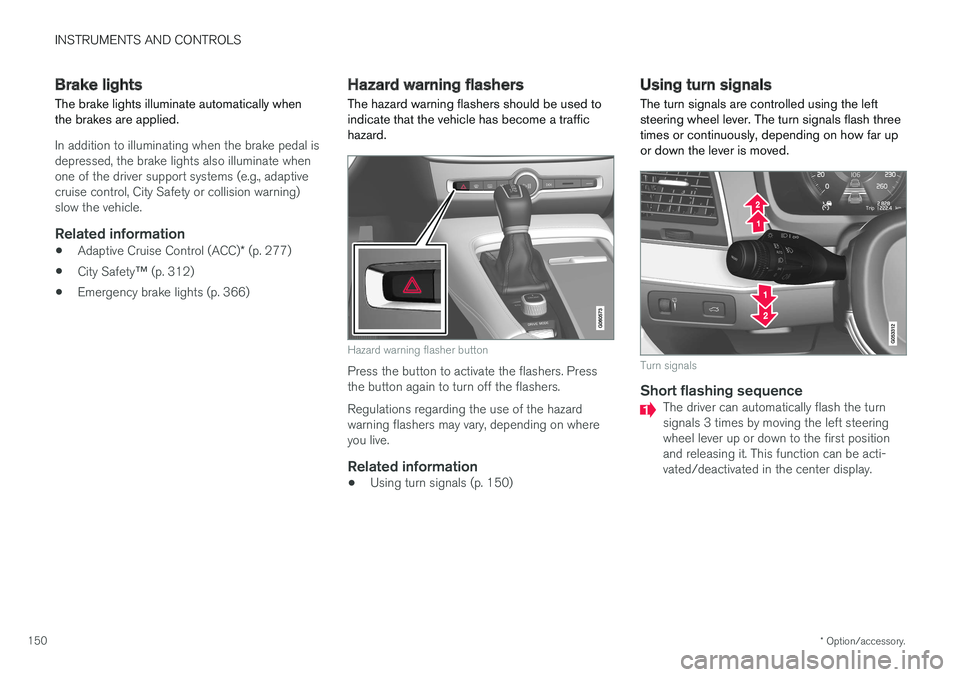
Hazard warning flasher button
Press the button to activate the flashers. Press the button again to turn off the flashers. Regulations regarding the use of the hazard warning flashers may vary, depending on whereyou live.
Related information
• Using turn signals (p. 150)
Using turn signals
The turn signals are controlled using the left steering wheel lever. The turn signals flash threetimes or continuously, depending on how far upor down the lever is moved.
Turn signals
Short flashing sequenceThe driver can automatically flash the turn signals 3 times by moving the left steeringwheel lever up or down to the first positionand releasing it. This function can be acti-vated/deactivated in the center display.
Page 166 of 580
INSTRUMENTS AND CONTROLS
* Option/accessory.
164
Steering wheel The steering wheel has controls for the horn, certain optional driver support systems, menus/messages and paddles for manually shifting gears *.
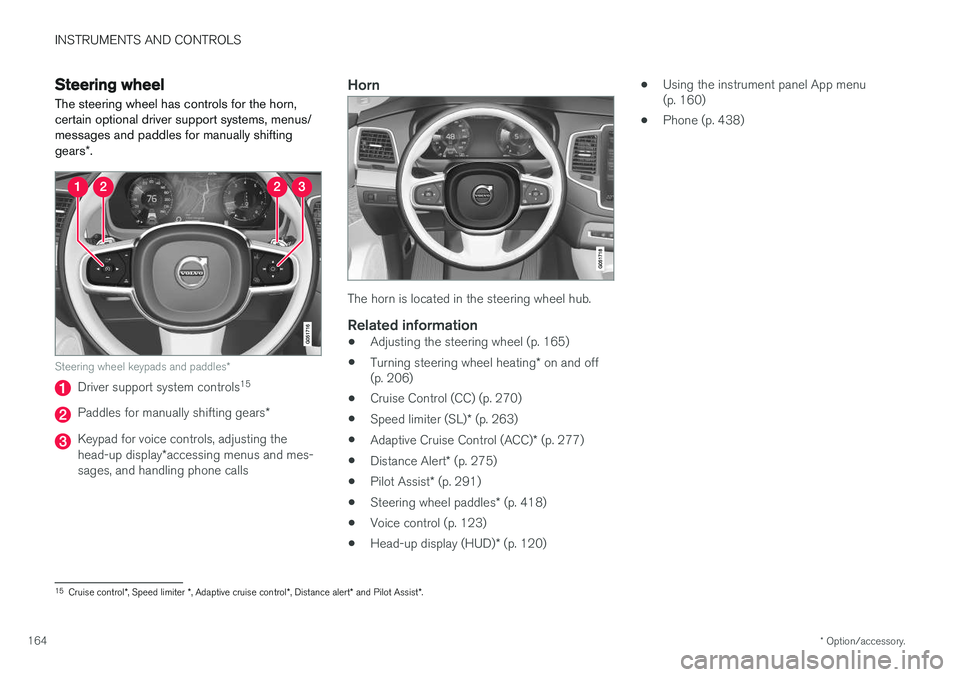
Steering wheel keypads and paddles *
Driver support system controls15
Paddles for manually shifting gears
*
Keypad for voice controls, adjusting the head-up display*accessing menus and mes-
sages, and handling phone calls
Horn
The horn is located in the steering wheel hub.
Related information
• Adjusting the steering wheel (p. 165)
• Turning steering wheel heating
* on and off
(p. 206)
• Cruise Control (CC) (p. 270)
• Speed limiter (SL)
* (p. 263)
• Adaptive Cruise Control (ACC)
* (p. 277)
• Distance Alert
* (p. 275)
• Pilot Assist
* (p. 291)
• Steering wheel paddles
* (p. 418)
• Voice control (p. 123)
• Head-up display (HUD)
* (p. 120) •
Using the instrument panel App menu (p. 160)
• Phone (p. 438)
15
Cruise control *, Speed limiter *, Adaptive cruise control *, Distance alert * and Pilot Assist *.
Page 240 of 580
LOCKS AND ALARM
* Option/accessory.
238
Red Key *
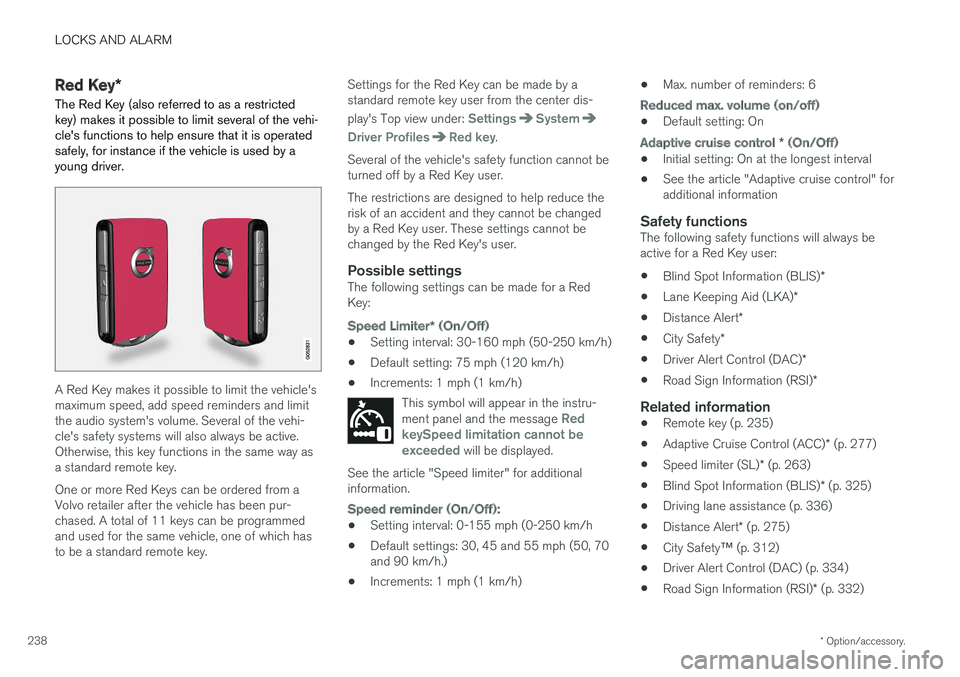
The Red Key (also referred to as a restricted key) makes it possible to limit several of the vehi-cle's functions to help ensure that it is operatedsafely, for instance if the vehicle is used by ayoung driver.
A Red Key makes it possible to limit the vehicle's maximum speed, add speed reminders and limitthe audio system's volume. Several of the vehi-cle's safety systems will also always be active.Otherwise, this key functions in the same way asa standard remote key. One or more Red Keys can be ordered from a Volvo retailer after the vehicle has been pur-chased. A total of 11 keys can be programmedand used for the same vehicle, one of which hasto be a standard remote key. Settings for the Red Key can be made by astandard remote key user from the center dis- play's Top view under:
SettingsSystem
Driver ProfilesRed key.
Several of the vehicle's safety function cannot be turned off by a Red Key user. The restrictions are designed to help reduce the risk of an accident and they cannot be changedby a Red Key user. These settings cannot bechanged by the Red Key's user.
Possible settingsThe following settings can be made for a RedKey:
Speed Limiter * (On/Off)
• Setting interval: 30-160 mph (50-250 km/h)
• Default setting: 75 mph (120 km/h)
• Increments: 1 mph (1 km/h)
This symbol will appear in the instru- ment panel and the message
Red
keySpeed limitation cannot be exceeded
will be displayed.
See the article "Speed limiter" for additional information.
Speed reminder (On/Off):
• Setting interval: 0-155 mph (0-250 km/h
• Default settings: 30, 45 and 55 mph (50, 70 and 90 km/h.)
• Increments: 1 mph (1 km/h) •
Max. number of reminders: 6
Reduced max. volume (on/off)
•Default setting: On
Adaptive cruise control
* (On/Off)
• Initial setting: On at the longest interval
• See the article "Adaptive cruise control" for additional information
Safety functionsThe following safety functions will always beactive for a Red Key user: •
Blind Spot Information (BLIS)
*
• Lane Keeping Aid (LKA)
*
• Distance Alert
*
• City Safety
*
• Driver Alert Control (DAC)
*
• Road Sign Information (RSI)
*
Related information
•Remote key (p. 235)
• Adaptive Cruise Control (ACC)
* (p. 277)
• Speed limiter (SL)
* (p. 263)
• Blind Spot Information (BLIS)
* (p. 325)
• Driving lane assistance (p. 336)
• Distance Alert
* (p. 275)
• City Safety
™ (p. 312)
• Driver Alert Control (DAC) (p. 334)
• Road Sign Information (RSI)
* (p. 332)
Page 260 of 580
DRIVER SUPPORT
* Option/accessory.
258
Driver support systems
The vehicle is equipped with a number of driver support systems that help provide the driver withactive/passive support.
Some of these systems are standard while others are optional and they are designed to e.g., helpthe driver maintain a set speed or a set distanceto a vehicle ahead, or warn the driver of a poten-tial collision situation and in certain cases applythe brakes if necessary. Certain optional systemscan also assist in various parking situations.
Related information
• Adjustable steering force
* (p. 258)
• Electronic Stability Control (ESC) (p. 259)
• Roll stability control (RSC) (p. 263)
• Speed limiter (SL)
* (p. 263)
• Distance Alert
* (p. 275)
• Cruise Control (CC) (p. 270)
• Adaptive Cruise Control (ACC)
* (p. 277)
• Pilot Assist
* (p. 291)
• Driver support system radar sensor (p. 304)
• Driver support system camera (p. 308)
• City Safety
™ (p. 312)
• Blind Spot Information (BLIS)
* (p. 325)
• Cross Traffic Alert (CTA)
* (p. 327)
• Road Sign Information (RSI)
* (p. 332) •
Driver Alert Control (DAC) (p. 334)
• Driving lane assistance (p. 336)
• Run-off Mitigation (p. 341)
• Park Assist
* (p. 344)
• Park Assist Camera (PAC)
* (p. 348)
• Park Assist Pilot (PAP)
* (p. 354)
Adjustable steering force *
Steering force increases with the speed of the vehicle to give the driver an enhanced sense ofcontrol and stability. At low speed the vehicle iseasier to steer in order to facilitate parking, etc.
Changing the steering force levelTo change the level of steering force, see theinformation under the heading "individual" in arti-cle "Drive modes" for additional information. On models not equipped with the drive mode control in the center console, the selection ismade in the center display's Top view under:
SettingsMy CarDrive ModesSteering force
NOTE
•This steering force level menu function cannot be accessed when the vehicle isin motion.
• In certain situations, the power steeringfunction may become too hot and mustbe temporarily cooled. During cooling,power steering effect will be reduced andmore force may be necessary to turn thesteering wheel and a message will bedisplayed in the instrument panel.
Page 272 of 580
DRIVER SUPPORT
* Option/accessory.
270
Cruise Control (CC)
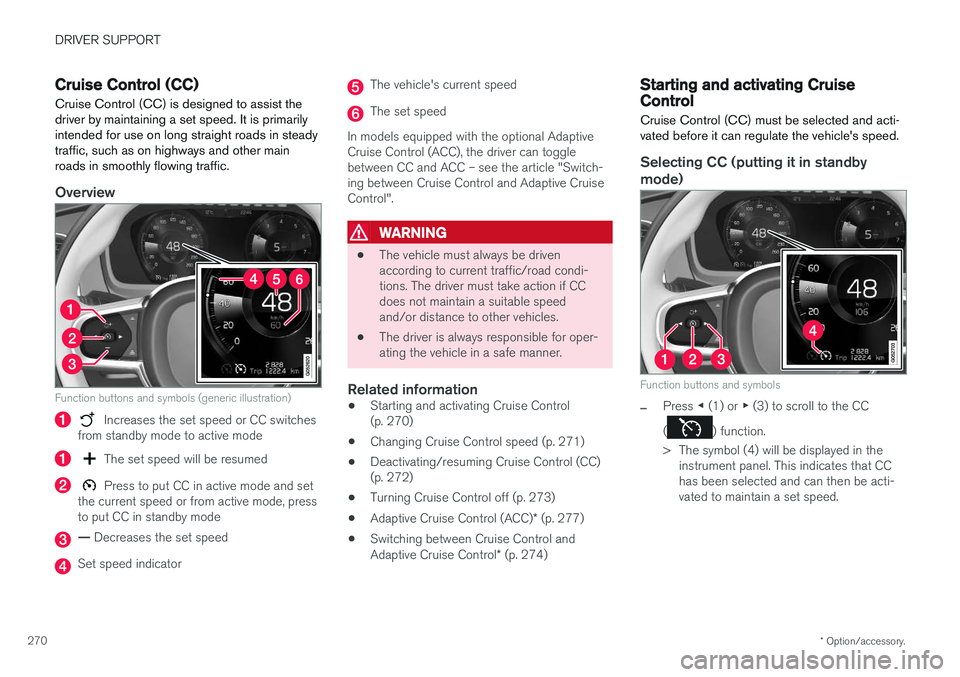
Cruise Control (CC) is designed to assist the driver by maintaining a set speed. It is primarilyintended for use on long straight roads in steadytraffic, such as on highways and other mainroads in smoothly flowing traffic.
Overview
Function buttons and symbols (generic illustration)
Increases the set speed or CC switches
from standby mode to active mode
The set speed will be resumed
Press to put CC in active mode and set
the current speed or from active mode, press to put CC in standby mode
— Decreases the set speed
Set speed indicator
The vehicle's current speed
The set speed
In models equipped with the optional Adaptive Cruise Control (ACC), the driver can togglebetween CC and ACC – see the article "Switch-ing between Cruise Control and Adaptive CruiseControl".
WARNING
• The vehicle must always be driven according to current traffic/road condi-tions. The driver must take action if CCdoes not maintain a suitable speedand/or distance to other vehicles.
• The driver is always responsible for oper-ating the vehicle in a safe manner.
Related information
•Starting and activating Cruise Control(p. 270)
• Changing Cruise Control speed (p. 271)
• Deactivating/resuming Cruise Control (CC)(p. 272)
• Turning Cruise Control off (p. 273)
• Adaptive Cruise Control (ACC)
* (p. 277)
• Switching between Cruise Control and Adaptive Cruise Control
* (p. 274)
Starting and activating Cruise Control
Cruise Control (CC) must be selected and acti- vated before it can regulate the vehicle's speed.
Selecting CC (putting it in standby
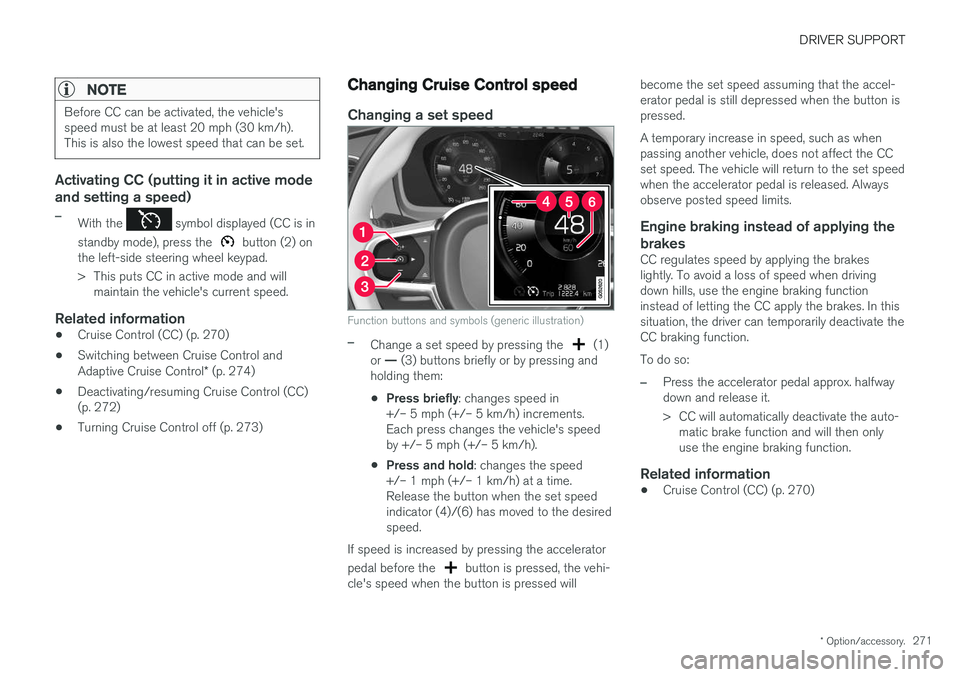
mode)
Function buttons and symbols
–Press ◀ (1) or ▶ (3) to scroll to the CC
(
) function.
> The symbol (4) will be displayed in the instrument panel. This indicates that CC has been selected and can then be acti-vated to maintain a set speed.
Page 273 of 580
DRIVER SUPPORT
* Option/accessory.271
NOTE
Before CC can be activated, the vehicle's speed must be at least 20 mph (30 km/h).This is also the lowest speed that can be set.
Activating CC (putting it in active mode and setting a speed)
–With the symbol displayed (CC is in
standby mode), press the
button (2) on
the left-side steering wheel keypad.
> This puts CC in active mode and will maintain the vehicle's current speed.
Related information
• Cruise Control (CC) (p. 270)
• Switching between Cruise Control and Adaptive Cruise Control
* (p. 274)
• Deactivating/resuming Cruise Control (CC) (p. 272)
• Turning Cruise Control off (p. 273)
Changing Cruise Control speed
Changing a set speed
Function buttons and symbols (generic illustration)
–Change a set speed by pressing the (1)
or — (3) buttons briefly or by pressing and
holding them:
• Press briefly
: changes speed in
+/– 5 mph (+/– 5 km/h) increments. Each press changes the vehicle's speedby +/– 5 mph (+/– 5 km/h).
• Press and hold
: changes the speed
+/– 1 mph (+/– 1 km/h) at a time.Release the button when the set speedindicator (4)/(6) has moved to the desiredspeed.
If speed is increased by pressing the accelerator pedal before the
button is pressed, the vehi-
cle's speed when the button is pressed will become the set speed assuming that the accel- erator pedal is still depressed when the button ispressed. A temporary increase in speed, such as when passing another vehicle, does not affect the CCset speed. The vehicle will return to the set speedwhen the accelerator pedal is released. Alwaysobserve posted speed limits.
Engine braking instead of applying the
brakes
CC regulates speed by applying the brakeslightly. To avoid a loss of speed when drivingdown hills, use the engine braking functioninstead of letting the CC apply the brakes. In thissituation, the driver can temporarily deactivate theCC braking function. To do so:
–Press the accelerator pedal approx. halfway down and release it.
> CC will automatically deactivate the auto- matic brake function and will then only use the engine braking function.
Related information
• Cruise Control (CC) (p. 270)