high beam VOLVO XC90 T8 2017 Owner´s Manual
[x] Cancel search | Manufacturer: VOLVO, Model Year: 2017, Model line: XC90 T8, Model: VOLVO XC90 T8 2017Pages: 580, PDF Size: 10.37 MB
Page 5 of 580
3
Top tether anchors91
Integrated booster cushion *
92
Raising the integrated booster cushion *
93
Stowing the integrated booster cushion *
95
INSTRUMENTS AND CONTROLS
Instruments and controls
98
Trip computer 99
Displaying trip computer information 100
Displaying trip statistics 102
HomeLink ®
Wireless Control System *102
Programming the HomeLink ®
Wire-
less Control System * 103
Adjusting the power door mirrors 106
Laminated panoramic roof *
108
Operating the laminated panoramic roof *
109
Power windows 111
Operating the power windows 111
Rearview mirror 112
Using sun curtains *
113
Settings view 113
Categories in Settings view 114
Changing system settings in Set- tings view 116
Changing settings in apps 117
Resetting the settings view 117
Resetting user data when the vehiclechanges owners 118
Ambient temperature sensor 118
Clock 119
Head-up display (HUD) *
120
Voice control
123
Using voice commands 123
Voice control for cell phones 124
Voice control for radio and media 125
Climate system voice commands 126
Navigation system voice commands 127
Voice control settings 128
Instrument panel 128
Instrument panel settings 130
Indicator symbols in the instrument panel 131
Hybrid-related information in the instrument panel 133
Instrument panel licenses 135
Warning symbols in the instrument panel 140
Compass 141
Calibrating the compass 142
Lighting panel and controls 143
Parking lights 145
Daytime Running Lights (DRL) 145
Low beam headlights 146
High and low beam headlights 147
Active Bending Lights *
148
Rear fog lights (certain models only) 149
Brake lights 150
Hazard warning flashers 150
Page 12 of 580
10
WHEELS AND TIRES
Tires472
Tire sidewall designations 474
Wheel (rim) designations 475
Tire terminology 476
Tire direction of rotation 477
Tread wear indicator 477
Loading specifications 478
Uniform Tire Quality Grading 479
Snow tires and chains 479
Checking tire inflation pressure 480
Changing tires 481
Tools 482
Jack 482
Wheel bolts 483
Removing a wheel 483
Installing a wheel 485
Tire Pressure Monitoring System (TPMS) 485
Checking tire inflation pressure 487
Reinflating tires equipped with the Tire Pressure Monitoring System (TPMS) 488
Calibrating the Tire PressureMonitoring System (TPMS) 489
Tire sealing system 490
Using the tire sealing system 492
Inflating a tire with the tire sealing system compressor495
MAINTENANCE AND SERVICING
Volvo's service program
498
System updates 500
Remote updates 501
Vehicle status 501
Booking service and repairs 502
Wi-Fi connection to a workshop 504
Climate system service 505
Start battery 506
Hybrid battery 508
Battery symbols 509
Fuses 509
Replacing fuses 510
Fuses in the engine compartment 511
Fuses in the passenger compartment 516
Fuses in the cargo compartment 520
Replacing bulbs 524
Removing the rectangular headlight cover 526
Replacing low beam headlight bulbs 527
Replacing High Beam headlight bulbs 528
Replacing front turn signal bulbs 528
Replacing front parking light bulbs 529
Bulb specifications 530
Hoisting the vehicle 531
Opening and closing the hood 533
Page 23 of 580
INTRODUCTION
* Option/accessory.21
Owner's manual and the environment
The wood pulp in Volvo's printed owner's infor- mation comes from FSC ®
(Forest Stewardship
Council ®
) certified forests and other responsible
sources.
FSC ®
The symbol above indicates that the wood pulp is FSC
®
certified.
Related information
• Volvo and the environment (p. 20)
IntelliSafe
—driver support
IntelliSafe is Volvo's philosophy regarding vehi- cle safety. It encompasses a number of systems,both standard and optional, that are designed tohelp make driving and traveling in a Volvo safer.
SupportSystems that help make driving safer are an inte- gral part of IntelliSafe. These include optional features such as Adaptive Cruise Control * that
helps maintain a set distance to a vehicle ahead,Park Assist Pilot *, which assists in parking the
vehicle, Cross Traffic Alert *, Blind Spot
Information *, etc.
Accident preventionSystems such as City Safety are designed to automatically apply the brakes in situations inwhich the driver does not have time to react. Lane Keeping Aid * alerts the driver if the vehicle
inadvertently crosses a lane's/road's side marker line.
ProtectionThe vehicle is equipped with e.g., seat belt pre-tensioners that pull the seat belts taut in criticalsituations when there is a collision risk andnumerous airbags designed to help provide cush-ioning if certain types of collisions should occur.
Related information
• Adaptive Cruise Control (ACC)
* (p. 277)
• Park Assist Pilot (PAP)
* (p. 354) •
High and low beam headlights (p. 147)
• Cross Traffic Alert (CTA)
* (p. 327)
• Blind Spot Information (BLIS)
* (p. 325)
• City Safety
™ (p. 312)
• Driving lane assistance (p. 336)
• Airbag system (p. 69)
• Roll stability control (RSC) (p. 263)
• Seat belts (p. 64)
• General safety information (p. 60)
Page 100 of 580
INSTRUMENTS AND CONTROLS
* Option/accessory.
98
Instruments and controls
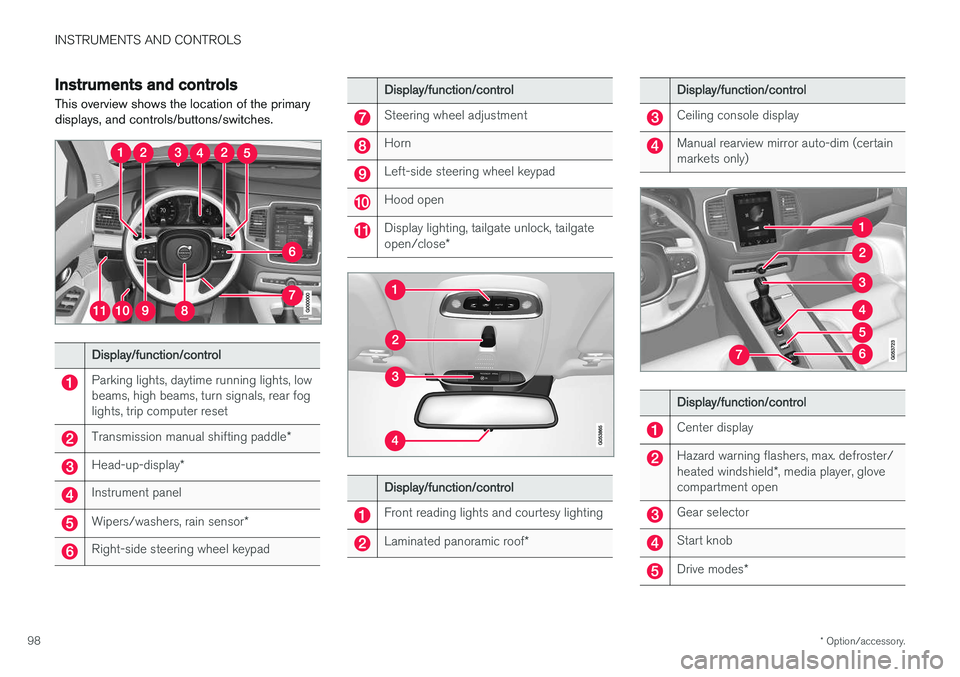
This overview shows the location of the primary displays, and controls/buttons/switches.
Display/function/control
Parking lights, daytime running lights, low beams, high beams, turn signals, rear foglights, trip computer reset
Transmission manual shifting paddle *
Head-up-display*
Instrument panel
Wipers/washers, rain sensor *
Right-side steering wheel keypad
Display/function/control
Steering wheel adjustment
Horn
Left-side steering wheel keypad
Hood open
Display lighting, tailgate unlock, tailgate open/close*
Display/function/control
Front reading lights and courtesy lighting
Laminated panoramic roof *
Display/function/control
Ceiling console display
Manual rearview mirror auto-dim (certain markets only)
Display/function/control
Center display
Hazard warning flashers, max. defroster/ heated windshield*, media player, glove
compartment open
Gear selector
Start knob
Drive modes *
Page 133 of 580
INSTRUMENTS AND CONTROLS
}}
131
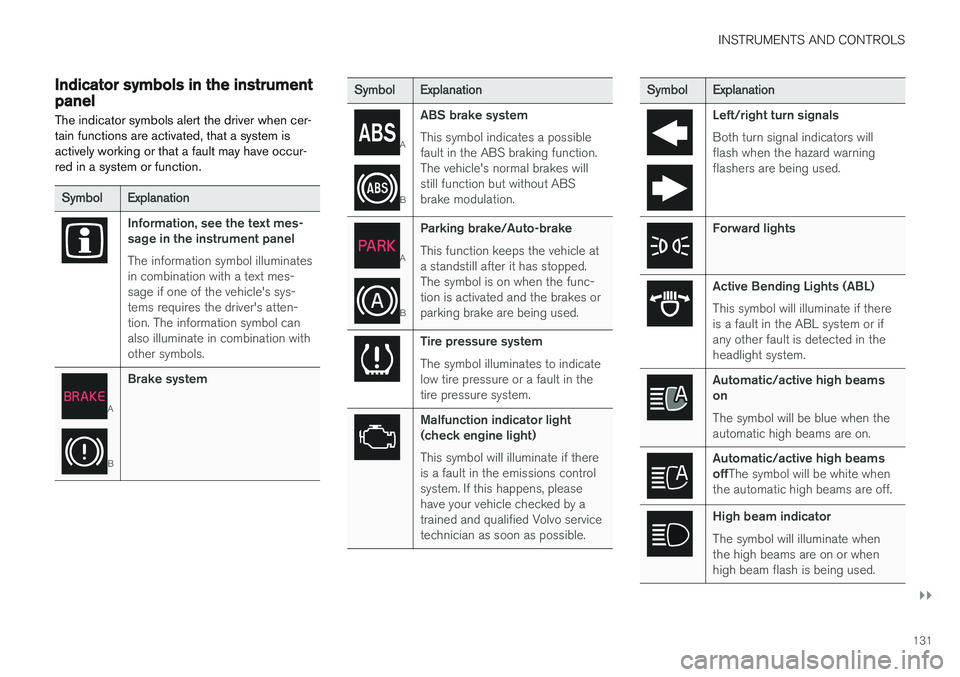
Indicator symbols in the instrument panelThe indicator symbols alert the driver when cer- tain functions are activated, that a system isactively working or that a fault may have occur-red in a system or function.
Symbol Explanation
Information, see the text mes- sage in the instrument panel The information symbol illuminates in combination with a text mes-sage if one of the vehicle's sys-tems requires the driver's atten-tion. The information symbol canalso illuminate in combination withother symbols.
A
BBrake system
Symbol
Explanation
A
BABS brake system This symbol indicates a possible fault in the ABS braking function.The vehicle's normal brakes willstill function but without ABSbrake modulation.
A
B
Parking brake/Auto-brake This function keeps the vehicle at a standstill after it has stopped.The symbol is on when the func-tion is activated and the brakes orparking brake are being used.
Tire pressure system The symbol illuminates to indicate low tire pressure or a fault in thetire pressure system.
Malfunction indicator light (check engine light) This symbol will illuminate if there is a fault in the emissions controlsystem. If this happens, pleasehave your vehicle checked by atrained and qualified Volvo servicetechnician as soon as possible.
Symbol
Explanation
Left/right turn signals Both turn signal indicators will flash when the hazard warningflashers are being used.
Forward lights
Active Bending Lights (ABL) This symbol will illuminate if there is a fault in the ABL system or ifany other fault is detected in theheadlight system.
Automatic/active high beams on The symbol will be blue when the automatic high beams are on.
Automatic/active high beams offThe symbol will be white when
the automatic high beams are off.
High beam indicator The symbol will illuminate when the high beams are on or whenhigh beam flash is being used.
Page 134 of 580
||
INSTRUMENTS AND CONTROLS
132
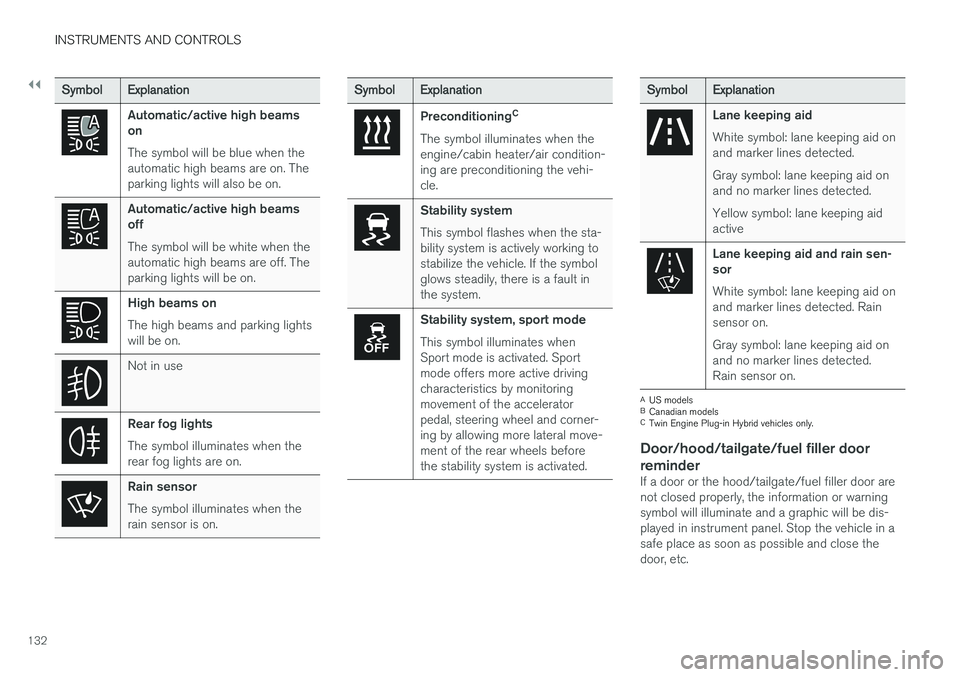
SymbolExplanation
Automatic/active high beams on The symbol will be blue when the automatic high beams are on. Theparking lights will also be on.
Automatic/active high beams off The symbol will be white when the automatic high beams are off. Theparking lights will be on.
High beams on The high beams and parking lights will be on.
Not in use
Rear fog lights The symbol illuminates when the rear fog lights are on.
Rain sensor The symbol illuminates when the rain sensor is on.
SymbolExplanation
Preconditioning C
The symbol illuminates when the engine/cabin heater/air condition-ing are preconditioning the vehi-cle.
Stability system This symbol flashes when the sta- bility system is actively working tostabilize the vehicle. If the symbolglows steadily, there is a fault inthe system.
Stability system, sport mode This symbol illuminates when Sport mode is activated. Sportmode offers more active drivingcharacteristics by monitoringmovement of the acceleratorpedal, steering wheel and corner-ing by allowing more lateral move-ment of the rear wheels beforethe stability system is activated.
Symbol Explanation
Lane keeping aid White symbol: lane keeping aid on and marker lines detected. Gray symbol: lane keeping aid on and no marker lines detected. Yellow symbol: lane keeping aid active
Lane keeping aid and rain sen- sor White symbol: lane keeping aid on and marker lines detected. Rainsensor on. Gray symbol: lane keeping aid on and no marker lines detected.Rain sensor on.
A
US models
B Canadian models
C Twin Engine Plug-in Hybrid vehicles only.
Door/hood/tailgate/fuel filler door
reminder
If a door or the hood/tailgate/fuel filler door are not closed properly, the information or warningsymbol will illuminate and a graphic will be dis-played in instrument panel. Stop the vehicle in asafe place as soon as possible and close thedoor, etc.
Page 145 of 580
INSTRUMENTS AND CONTROLS
}}
143
8. Repeat the calibration procedure if neces-
sary.
Related information
• Defrosting windows and mirrors (p. 204)
• Compass (p. 141)
Lighting panel and controls
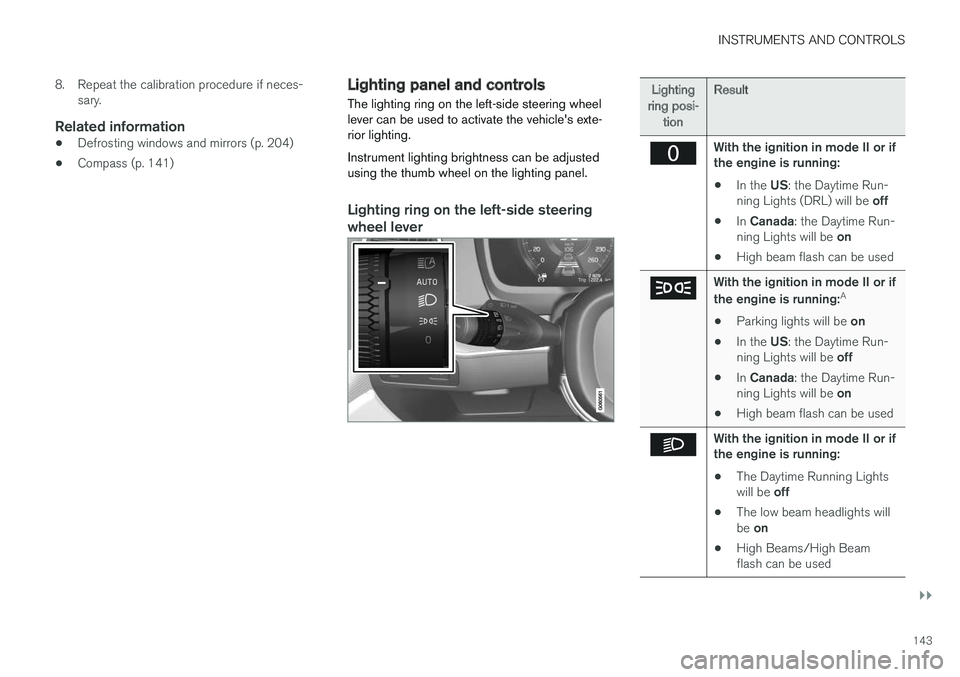
The lighting ring on the left-side steering wheel lever can be used to activate the vehicle's exte-rior lighting. Instrument lighting brightness can be adjusted using the thumb wheel on the lighting panel.
Lighting ring on the left-side steering
wheel lever
Lighting
ring posi- tion Result
With the ignition in mode II or if the engine is running:
• In the
US: the Daytime Run-
ning Lights (DRL) will be off
• In
Canada : the Daytime Run-
ning Lights will be on
• High beam flash can be used
With the ignition in mode II or if the engine is running: A
• Parking lights will be
on
• In the
US: the Daytime Run-
ning Lights will be off
• In
Canada : the Daytime Run-
ning Lights will be on
• High beam flash can be used
With the ignition in mode II or if the engine is running:
• The Daytime Running Lights will be
off
• The low beam headlights willbe
on
• High Beams/High Beam flash can be used
Page 146 of 580
||
INSTRUMENTS AND CONTROLS
144
Lighting
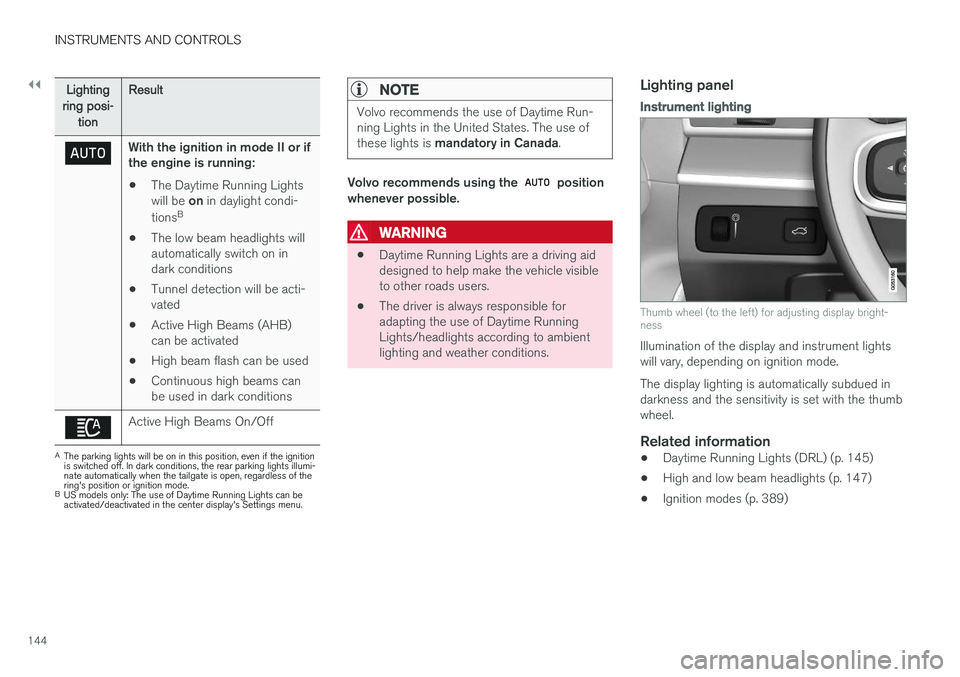
ring posi- tion Result
With the ignition in mode II or if the engine is running:
• The Daytime Running Lights will be
on in daylight condi-
tions B
• The low beam headlights will automatically switch on indark conditions
• Tunnel detection will be acti-vated
• Active High Beams (AHB)can be activated
• High beam flash can be used
• Continuous high beams canbe used in dark conditions
Active High Beams On/Off
A
The parking lights will be on in this position, even if the ignition is switched off. In dark conditions, the rear parking lights illumi-nate automatically when the tailgate is open, regardless of thering's position or ignition mode.
B US models only: The use of Daytime Running Lights can beactivated/deactivated in the center display's Settings menu.
NOTE
Volvo recommends the use of Daytime Run- ning Lights in the United States. The use of these lights is mandatory in Canada .
Volvo recommends using the position
whenever possible.
WARNING
• Daytime Running Lights are a driving aid designed to help make the vehicle visibleto other roads users.
• The driver is always responsible foradapting the use of Daytime RunningLights/headlights according to ambientlighting and weather conditions.
Lighting panel
Instrument lighting
Thumb wheel (to the left) for adjusting display bright- ness
Illumination of the display and instrument lights will vary, depending on ignition mode. The display lighting is automatically subdued in darkness and the sensitivity is set with the thumbwheel.
Related information
• Daytime Running Lights (DRL) (p. 145)
• High and low beam headlights (p. 147)
• Ignition modes (p. 389)
Page 149 of 580
INSTRUMENTS AND CONTROLS
}}
147
High and low beam headlights
If the ignition is in mode II or when the engine is started, the low beams are activated automati- cally if the lighting ring is in position
. In
dark conditions, the low beams will also be on if the lighting ring is in the
position.
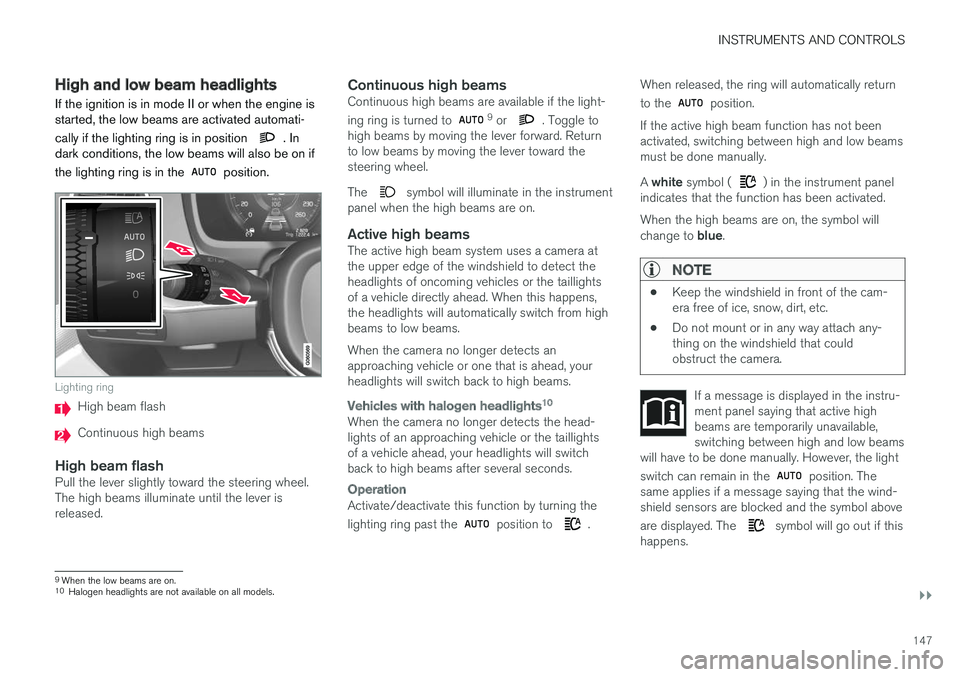
Lighting ring
High beam flash
Continuous high beams
High beam flashPull the lever slightly toward the steering wheel. The high beams illuminate until the lever isreleased.
Continuous high beamsContinuous high beams are available if the light- ing ring is turned to 9 or . Toggle to
high beams by moving the lever forward. Return to low beams by moving the lever toward thesteering wheel. The
symbol will illuminate in the instrument
panel when the high beams are on.
Active high beamsThe active high beam system uses a camera at the upper edge of the windshield to detect theheadlights of oncoming vehicles or the taillightsof a vehicle directly ahead. When this happens,the headlights will automatically switch from highbeams to low beams. When the camera no longer detects an approaching vehicle or one that is ahead, yourheadlights will switch back to high beams.
Vehicles with halogen headlights 10
When the camera no longer detects the head- lights of an approaching vehicle or the taillightsof a vehicle ahead, your headlights will switchback to high beams after several seconds.
Operation
Activate/deactivate this function by turning the lighting ring past the
position to .When released, the ring will automatically return to the
position.
If the active high beam function has not been activated, switching between high and low beamsmust be done manually. A white symbol (
) in the instrument panel
indicates that the function has been activated. When the high beams are on, the symbol will change to blue.
NOTE
•Keep the windshield in front of the cam- era free of ice, snow, dirt, etc.
• Do not mount or in any way attach any-thing on the windshield that couldobstruct the camera.
If a message is displayed in the instru- ment panel saying that active highbeams are temporarily unavailable,switching between high and low beams
will have to be done manually. However, the light switch can remain in the
position. The
same applies if a message saying that the wind- shield sensors are blocked and the symbol above are displayed. The
symbol will go out if this
happens.
9 When the low beams are on.10
Halogen headlights are not available on all models.
Page 150 of 580
||
INSTRUMENTS AND CONTROLS
* Option/accessory.
148 Active high beams may be temporarily unavailable (e.g., in heavy fog or rain). When the systembecomes active again or if the sensors in thewindshield are no longer obscured, the messages will disappear and the
symbol will illumi-
nate.
WARNING
• Automatic high beams are a driving aid designed to help provide the best possi-ble headlight illumination in good drivingconditions.
• The use of aftermarket or non-Volvoglass can have an adverse effect on theautomatic high beam function.
• The driver is always responsible for man-ually toggling between high and lowbeams when this is required by traffic orweather conditions.
CAUTION
In the following situations, it may be neces- sary to switch between high and low beamsmanually:
• In heavy fog or rain
• In blowing snow or slush
• In bright moonlight
• In freezing rain
• In areas with dim street lighting
• When oncoming vehicles have dim frontlighting
• If there are pedestrians on or near theroad
• If there are reflective objects, such assigns, near the road
• When oncoming vehicles' lights areobscured by e.g., fences, bushes, etc.
• When there are vehicles on connectingroads
• At the top of hills or in dips in the road
• In sharp curves
Related information
•
City Safety
™ troubleshooting (p. 318)
• Lighting panel and controls (p. 143)
Active Bending Lights
*
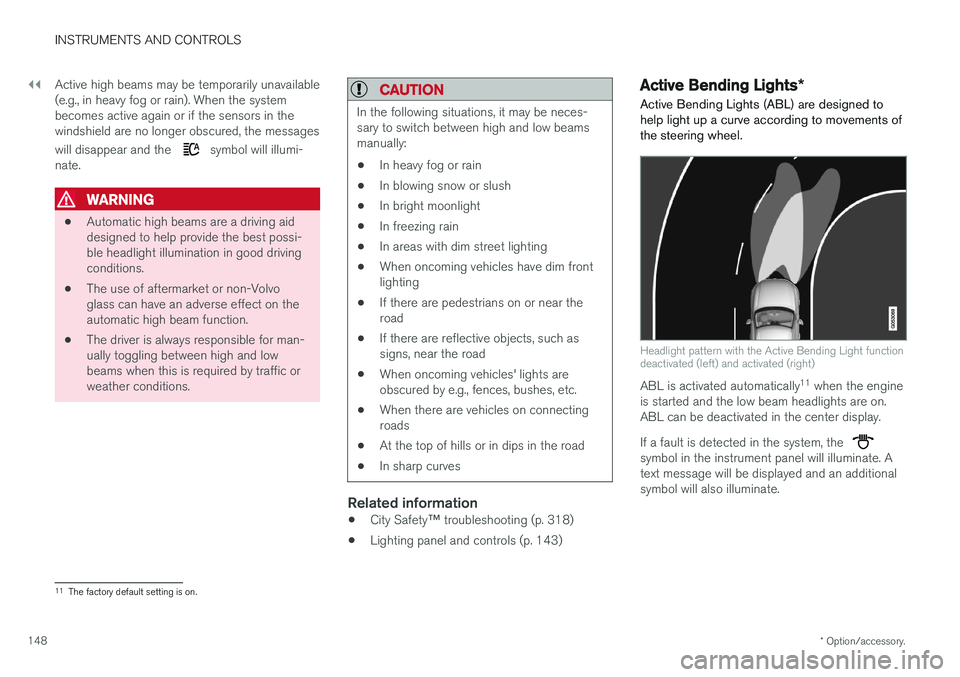
Active Bending Lights (ABL) are designed to help light up a curve according to movements ofthe steering wheel.
Headlight pattern with the Active Bending Light function deactivated (left) and activated (right)
ABL is activated automatically 11
when the engine
is started and the low beam headlights are on. ABL can be deactivated in the center display. If a fault is detected in the system, the
symbol in the instrument panel will illuminate. A text message will be displayed and an additionalsymbol will also illuminate.
11 The factory default setting is on.