parking sensors VOLVO XC90 T8 2017 Owner´s Manual
[x] Cancel search | Manufacturer: VOLVO, Model Year: 2017, Model line: XC90 T8, Model: VOLVO XC90 T8 2017Pages: 580, PDF Size: 10.37 MB
Page 6 of 580
4
Using turn signals150
Passenger compartment lighting 151
Home safe lighting 154
Approach lighting 154
Messages in the instrument panel and center display 154
Handling messages in the instru-ment panel and center display 156
Handling messages stored from theinstrument panel and center display 157
Instrument panel App menu 159
Using the instrument panel App menu 160
Using the windshield wipers 160
Activating/deactivating the rain sensor 161
Windshield and headlight washers 162
Tailgate window wiper and washer 163
Steering wheel 164
Adjusting the steering wheel 165
Seats 165
Manually operated front seats 166
Power front seats *
167
Adjusting power front seats *
167
Adjusting the passenger's seat from the driver's seat * 168
Using the power seat memory function *
168
Multifunctional front seats *
169
Adjusting function settings in the multifunctional front seats *170
Rear seats 173
Adjusting the second row head restraints 173
Moving the second row seats for- ward/rearward 175
Adjusting the second row backrest tilt 175
Folding the second row backrests 176
Getting into and out of the third rowof seats 178
Folding the third row backrests 178
Driver profiles 179
Selecting a driver profile 180
Editing a driver profile 180
Linking a remote key to a driver profile 181
Importing/exporting a driver profilefrom/to a USB flash drive 182
CLIMATE
Climate control system
186
Perceived temperature 186
Climate system sensors 187
Parking climate (preconditioning) 187
Activating/deactivating the parking climate timer 189
Activating/deactivating the climate comfort retaining function *189
Preconditioning timer 190
Setting the parking climate (precon- ditioning) timer 190
Starting and stopping preconditioning 192
Preconditioning symbols and messages 193
Air quality 194
Clean Zone Interior Package (CZIP) *
195
Interior Air Quality System (IAQS) *
195
Passenger compartment air filter 196
Automatic climate control 196
Climate system controls 197
Climate system controls in the centerdisplay 197
Rear climate system controls on thetunnel console 199
Setting the blower speed 199
Setting the temperature 201
Turning recirculation on and off 203
Page 188 of 580
CLIMATE
186
Climate control systemThe vehicle is equipped with Electronic Climate Control (ECC) that cools, heats, dehumidifiesand filters the air in the passenger compartment.
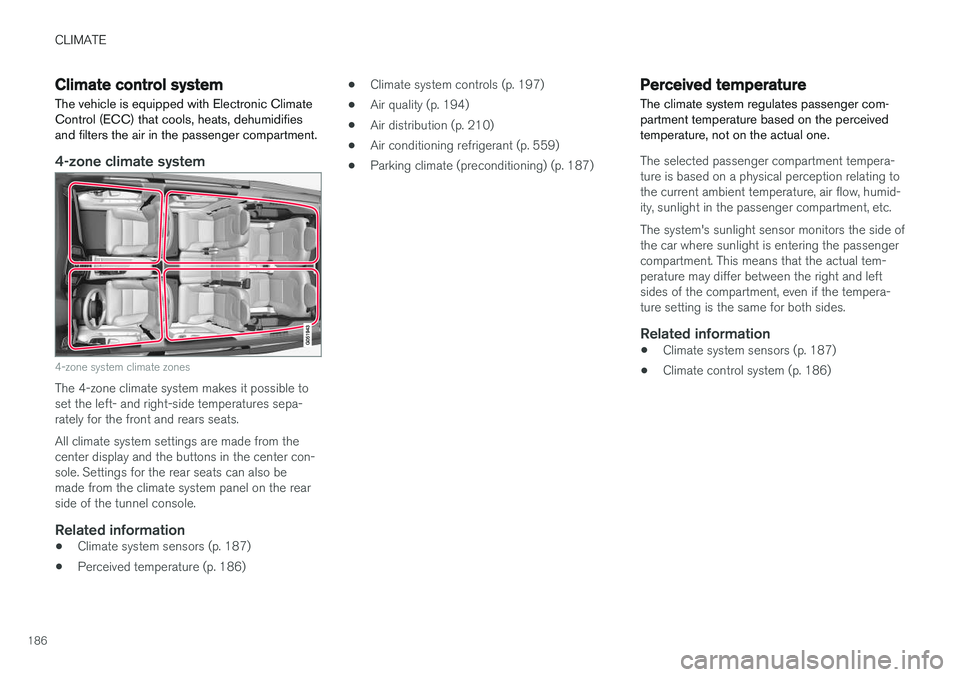
4-zone climate system
4-zone system climate zones
The 4-zone climate system makes it possible to set the left- and right-side temperatures sepa-rately for the front and rears seats. All climate system settings are made from the center display and the buttons in the center con-sole. Settings for the rear seats can also bemade from the climate system panel on the rearside of the tunnel console.
Related information
• Climate system sensors (p. 187)
• Perceived temperature (p. 186) •
Climate system controls (p. 197)
• Air quality (p. 194)
• Air distribution (p. 210)
• Air conditioning refrigerant (p. 559)
• Parking climate (preconditioning) (p. 187)
Perceived temperature
The climate system regulates passenger com- partment temperature based on the perceivedtemperature, not on the actual one.
The selected passenger compartment tempera- ture is based on a physical perception relating tothe current ambient temperature, air flow, humid-ity, sunlight in the passenger compartment, etc. The system's sunlight sensor monitors the side of the car where sunlight is entering the passengercompartment. This means that the actual tem-perature may differ between the right and leftsides of the compartment, even if the tempera-ture setting is the same for both sides.
Related information
• Climate system sensors (p. 187)
• Climate control system (p. 186)
Page 189 of 580
CLIMATE
}}
* Option/accessory.187
Climate system sensors The climate system's sensors help regulate the passenger compartment temperature, humiditylevel, etc.
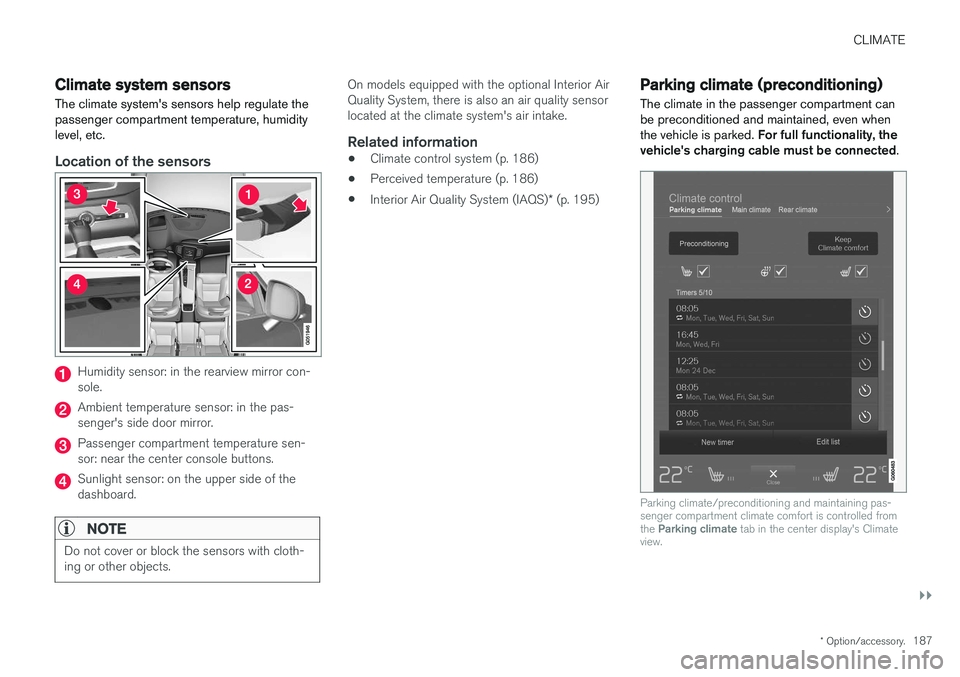
Location of the sensors
Humidity sensor: in the rearview mirror con- sole.
Ambient temperature sensor: in the pas- senger's side door mirror.
Passenger compartment temperature sen- sor: near the center console buttons.
Sunlight sensor: on the upper side of the dashboard.
NOTE
Do not cover or block the sensors with cloth- ing or other objects.
On models equipped with the optional Interior Air Quality System, there is also an air quality sensorlocated at the climate system's air intake.
Related information
•Climate control system (p. 186)
• Perceived temperature (p. 186)
• Interior Air Quality System (IAQS)
* (p. 195)
Parking climate (preconditioning)
The climate in the passenger compartment can be preconditioned and maintained, even whenthe vehicle is parked. For full functionality, the
vehicle's charging cable must be connected .
Parking climate/preconditioning and maintaining pas- senger compartment climate comfort is controlled from the Parking climate tab in the center display's Climate
view.
Page 323 of 580
DRIVER SUPPORT
}}
321
Camera and radar sensor's field of vision
The camera and radar sensor have limited fields of vision. In some situations they may detect avehicle, large animal, pedestrian or cyclist laterthan expected or not detect them at all. Other vehicles that are dirty may be detected later than others and in dark conditions, motorcy-cles may be detected late or not at all. If a text message is displayed in the instrument panel indicates that the camera or radar sensorare blocked, it may be difficult for City Safety todetect a vehicle, pedestrian or cyclist and thesystem's functionality may be reduced.
WARNING
Text messages may not be displayed in all sit- uations in which the camera and/or radarsensor are blocked. It is therefore essential tokeep the windshield in front the camera/radarsensor clean and free from snow, ice, etc. Camera and radar sensor components should only be serviced or replaced by a trained andqualified Volvo service technician.
Action by the driver
Backing up
City Safety is temporarily deactivated while the vehicle is backing up.
Low speed
City Safety is not activated at very low speeds (under approx. 3 mph (4 km/h). This means thatthe system will not be triggered if your vehicleapproaches a vehicle ahead at very low speed,such as when parking.
Active driver
Action by the driver always has priority. For this reason, City Safety may not react or react laterthan expected in situations in which the driver isactively operating the vehicle, even if a collision isimminent. This is also done to help eliminateexcessive warnings.
Other limitations
City Safety uses the vehicle's camera and radar sensor, which have certain general limitations.See the articles "Camera limitations" and "Radarsensor limitations" for additional information.
WARNING
•
Warnings and braking may be delayed or not occur at all if traffic, weather or otherconditions prevent the camera and/orradar sensor from detecting pedestrians,cyclists, large animals or other vehiclescorrectly.
• Other vehicles can only be detected indarkness if their headlights and taillightsare clearly visible.
• The sensors have a limited range forpedestrians and cyclists. The systemfunctions best at relative speeds up to30 mph (50 km/h). For stationary orslow-moving vehicles, the system func-tions best at speeds up to approx.43 mph (70 km/h).
• If there is a risk of colliding with a largeanimal, City Safety can reduce the vehi-cle's speed by up to 9 mph (15 km/h).Warnings and braking are most effectiveat speeds above 43 mph (70 km/h) andless effective at lower speeds.
Page 329 of 580
DRIVER SUPPORT
}}
* Option/accessory.327
Blind Spot Information (BLIS) *
limitations
Blind Spot Information functionality may be reduced in certain situations.
• Dirt, ice and snow on the sensors may reduce functionality and prevent the systemfrom providing warnings.
• Do not attach any objects, tape, decals, etc.,on the surface of the sensors.
• BLIS is deactivated if a trailer is attached tothe vehicle's electrical system.
Maintenance
The BLIS/CTA 5
sensors are located on the
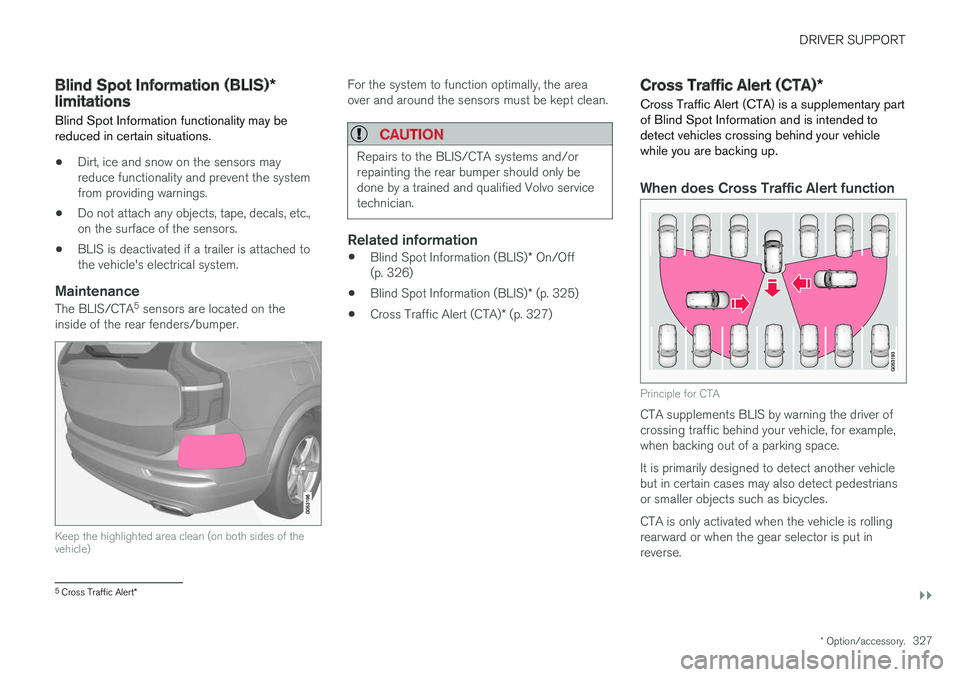
inside of the rear fenders/bumper.
Keep the highlighted area clean (on both sides of the vehicle)
For the system to function optimally, the area over and around the sensors must be kept clean.
CAUTION
Repairs to the BLIS/CTA systems and/or repainting the rear bumper should only bedone by a trained and qualified Volvo servicetechnician.
Related information
• Blind Spot Information (BLIS)
* On/Off
(p. 326)
• Blind Spot Information (BLIS)
* (p. 325)
• Cross Traffic Alert (CTA)
* (p. 327)
Cross Traffic Alert (CTA) *
Cross Traffic Alert (CTA) is a supplementary part of Blind Spot Information and is intended todetect vehicles crossing behind your vehiclewhile you are backing up.
When does Cross Traffic Alert function
Principle for CTA
CTA supplements BLIS by warning the driver of crossing traffic behind your vehicle, for example,when backing out of a parking space. It is primarily designed to detect another vehicle but in certain cases may also detect pedestriansor smaller objects such as bicycles. CTA is only activated when the vehicle is rolling rearward or when the gear selector is put inreverse.
5 Cross Traffic Alert *
Page 331 of 580
DRIVER SUPPORT
}}
* Option/accessory.329
WARNING
•BLIS and CTA are information systems, NOT warning or safety systems and donot function in all situations.
• BLIS and CTA do not eliminate the needfor you to visually confirm the conditionsaround you, and the need for you to turnyour head and shoulders to make surethat you can safely change lanes or backup.
• As the driver, you have full responsibilityfor changing lanes/backing up in a safemanner.
Related information
•
Cross Traffic Alert (CTA)
* (p. 327)
• Blind Spot Information (BLIS)
* On/Off
(p. 326)
Cross Traffic Alert (CTA) * limitations
CTA functionality may be reduced in certain sit- uations.
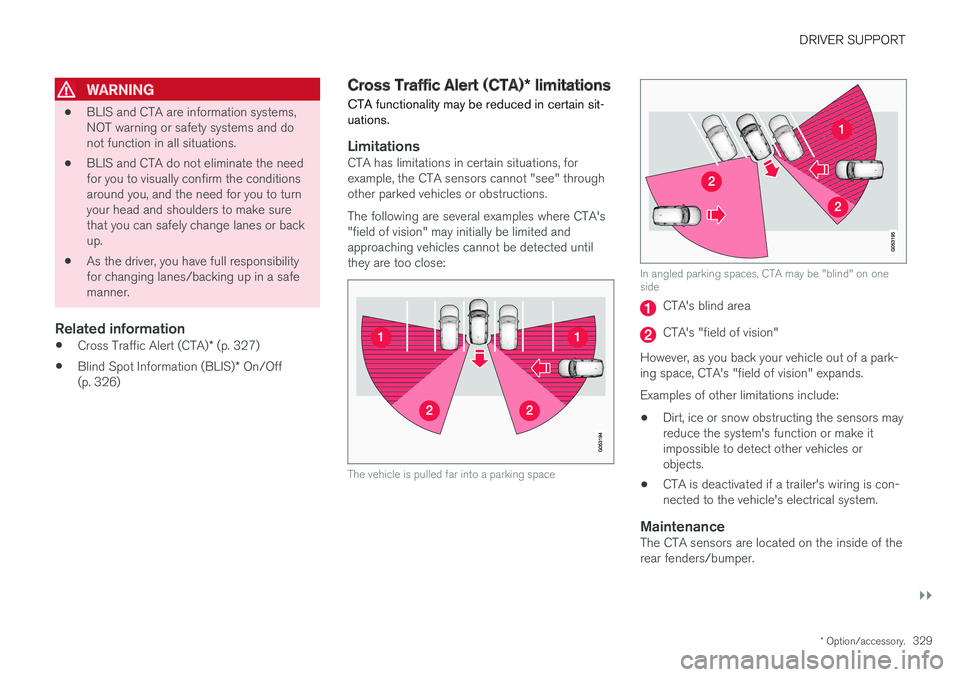
LimitationsCTA has limitations in certain situations, for example, the CTA sensors cannot "see" throughother parked vehicles or obstructions. The following are several examples where CTA's "field of vision" may initially be limited andapproaching vehicles cannot be detected untilthey are too close:
The vehicle is pulled far into a parking space
In angled parking spaces, CTA may be "blind" on one side
CTA's blind area
CTA's "field of vision"
However, as you back your vehicle out of a park- ing space, CTA's "field of vision" expands. Examples of other limitations include:
• Dirt, ice or snow obstructing the sensors may reduce the system's function or make itimpossible to detect other vehicles orobjects.
• CTA is deactivated if a trailer's wiring is con-nected to the vehicle's electrical system.
MaintenanceThe CTA sensors are located on the inside of therear fenders/bumper.
Page 346 of 580
DRIVER SUPPORT
* Option/accessory.
344
Park Assist *
The Park Assist system is designed to assist you
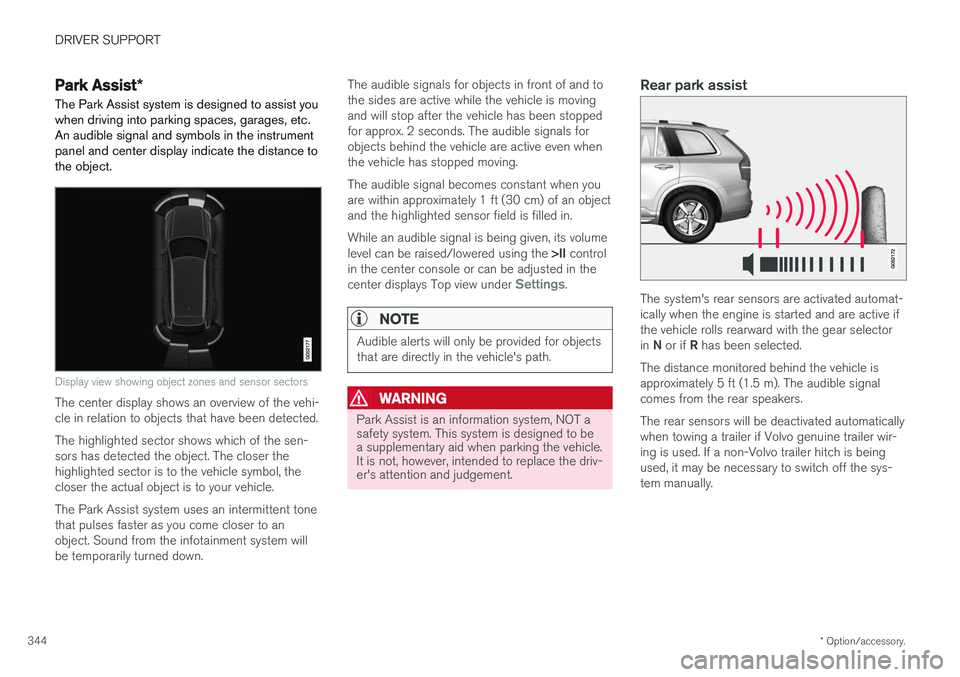
when driving into parking spaces, garages, etc. An audible signal and symbols in the instrumentpanel and center display indicate the distance tothe object.
Display view showing object zones and sensor sectors
The center display shows an overview of the vehi- cle in relation to objects that have been detected. The highlighted sector shows which of the sen- sors has detected the object. The closer thehighlighted sector is to the vehicle symbol, thecloser the actual object is to your vehicle. The Park Assist system uses an intermittent tone that pulses faster as you come closer to anobject. Sound from the infotainment system willbe temporarily turned down. The audible signals for objects in front of and tothe sides are active while the vehicle is movingand will stop after the vehicle has been stoppedfor approx. 2 seconds. The audible signals forobjects behind the vehicle are active even whenthe vehicle has stopped moving. The audible signal becomes constant when you are within approximately 1 ft (30 cm) of an objectand the highlighted sensor field is filled in. While an audible signal is being given, its volume level can be raised/lowered using the
>II control
in the center console or can be adjusted in the center displays Top view under
Settings.
NOTE
Audible alerts will only be provided for objects that are directly in the vehicle's path.
WARNING
Park Assist is an information system, NOT a safety system. This system is designed to bea supplementary aid when parking the vehicle.It is not, however, intended to replace the driv-er's attention and judgement.
Rear park assist
The system's rear sensors are activated automat- ically when the engine is started and are active ifthe vehicle rolls rearward with the gear selector in N or if R has been selected.
The distance monitored behind the vehicle is approximately 5 ft (1.5 m). The audible signalcomes from the rear speakers. The rear sensors will be deactivated automatically when towing a trailer if Volvo genuine trailer wir-ing is used. If a non-Volvo trailer hitch is beingused, it may be necessary to switch off the sys-tem manually.
Page 347 of 580
DRIVER SUPPORT
* Option/accessory.345
Side park assist
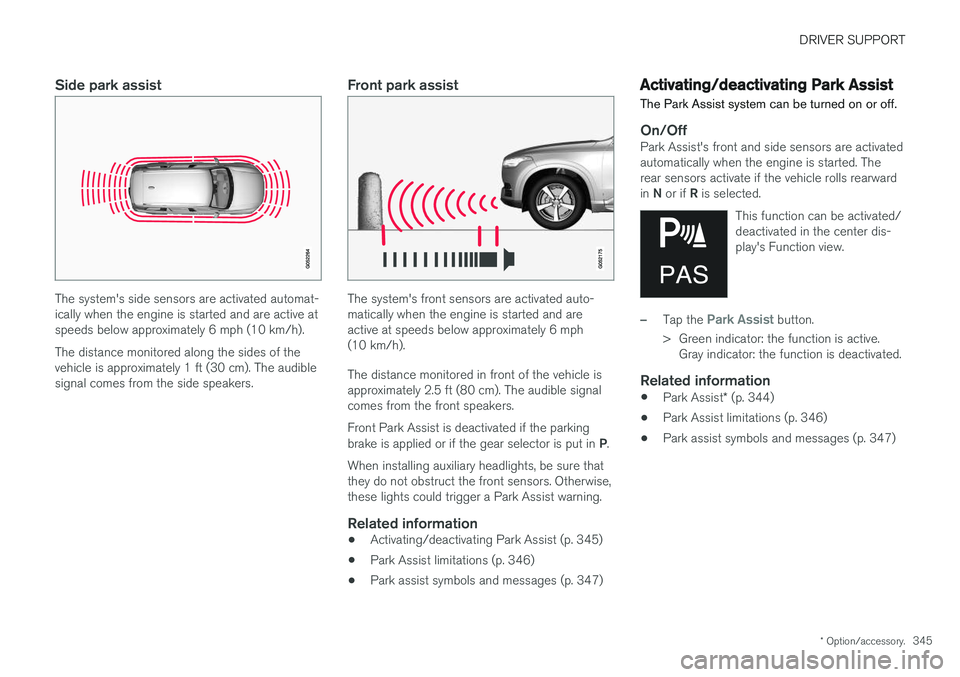
The system's side sensors are activated automat- ically when the engine is started and are active atspeeds below approximately 6 mph (10 km/h). The distance monitored along the sides of the vehicle is approximately 1 ft (30 cm). The audiblesignal comes from the side speakers.
Front park assist
The system's front sensors are activated auto- matically when the engine is started and areactive at speeds below approximately 6 mph(10 km/h). The distance monitored in front of the vehicle is approximately 2.5 ft (80 cm). The audible signalcomes from the front speakers. Front Park Assist is deactivated if the parking brake is applied or if the gear selector is put in P.
When installing auxiliary headlights, be sure that they do not obstruct the front sensors. Otherwise,these lights could trigger a Park Assist warning.
Related information
• Activating/deactivating Park Assist (p. 345)
• Park Assist limitations (p. 346)
• Park assist symbols and messages (p. 347)
Activating/deactivating Park Assist
The Park Assist system can be turned on or off.
On/OffPark Assist's front and side sensors are activated automatically when the engine is started. Therear sensors activate if the vehicle rolls rearward in N or if R is selected.
This function can be activated/ deactivated in the center dis-play's Function view.
–Tap the Park Assist button.
> Green indicator: the function is active. Gray indicator: the function is deactivated.
Related information
• Park Assist
* (p. 344)
• Park Assist limitations (p. 346)
• Park assist symbols and messages (p. 347)
Page 360 of 580
||
DRIVER SUPPORT
* Option/accessory.
358 adjusted by driving slightly forward and backing up. 1.
Put the gear selector in D, wait until the
steering wheel has turned and drive forward slowly.
2. Stop the vehicle when you are instructed by PAP to do so.
3. Put the gear selector in R, back up slowly
and stop when you are instructed by PAP todo so.
When the parking procedure is finished (this willbe indicated by a text message and a graphicimage), PAP switches off automatically. If neces-sary, the driver may need to make minor adjust-ments to ensure that the vehicle is parked cor-rectly.
CAUTION
The warning distance is shorter when PAP is using the sensors than when Park Assist isusing them.
Leaving a parking spaceThis function can only be used for a vehicle that has been par-
allel parked and is activated in
the center display's Function view.
1. Tap the Park out button in the center display's
Function view. 2. Use the turn signal to indicate the direction in which the vehicle should leave the parking space. 3. Follow the instructions provided in the center display. The procedure is the same as when park-ing the vehicle. The steering wheel may turn back slightly when the function is completed and the driver mayhave to turn the back before leaving the parkingspace. If PAP determines that the driver can leave the parking space without assistance, the functionwill deactivate before the vehicle is completelyout of the space.
Related information
• Park Assist Pilot (PAP)
* (p. 354)
• Park Assist Pilot (PAP)
* limitations (p. 358)
• Park Assist Pilot (PAP)
* symbols and mes-
sages (p. 360)
Park Assist Pilot (PAP) * limitations
The PAP function may be limited in certain situa- tions.
The PAP parking sequence is cancelledA parking sequence will be cancelled:
• if the vehicle is driven too fast: above approx. 4 mph (7 km/h)
• if the driver taps
Cancel in the center display
• if the driver moves the steering wheel with sufficient force.
• if the anti-lock brakes or Electronic StabilityControl are activated (e.g., if a wheel beginsto spin or lose traction)
In such cases, a text message will explain whythe parking sequence was cancelled.
NOTE
• PAP will not function correctly if its sen- sors are obstructed by dirt, snow, etc.
• In certain situations, PAP may not be ableto measure a parking space. This couldbe due to external sources of sound (e.g.,a vehicle's horn, tires on wet asphalt,pneumatic brakes, noise from a motorcy-cle's exhaust, etc.) emitting ultrasoundusing approximately the same frequen-cies as PAP.
Page 361 of 580
DRIVER SUPPORT
* Option/accessory.359
Points to keep in mindPAP is a parking aid only and the driver should always be prepared to take control and cancel aparking sequence. This can be due to one ormore of the following factors:
• PAP's function is based on the way that thevehicles are parked behind and in front ofyour parking space. If they are, for example,parked too close to the curb, there is a riskthat your vehicle's tires or wheel rims couldbe damaged by the curb during the parkingprocedure.
• PAP is intended to provide parking assis-tance on straight streets, not sections ofstreet with curved or irregular curbs. Be surethat your vehicle is parallel to the curb whenPAP measures the parking space.
• PAP may not be able to provide parkingassistance on narrow streets due to lack ofspace to maneuver the vehicle. In situationslike this, it may help to drive between1.5-5.0 ft (0.5-1.5 m) from the side of theroad where the parking space is located.
• Use only approved tires with the correct infla-tion pressure because this affects PAP'scapacity to provide parking assistance.Changing to a different approved tire sizemay affect PAP's parameters. Consult atrained and qualified Volvo service technician. •
Heavy rain or snow may inhibit PAP'scapacity to correctly measure a parkingspace.
• Do not use PAP when using snow chainsand/or a temporary spare tire.
• Do not use PAP if there are any objects pro-truding from the vehicle.
WARNING
•
The front end of your vehicle may turn out toward oncoming traffic during the park-ing procedure.
• Objects located above the parking sen-sors' field of vision are not included whenPAP measures a parking space. For thisreason, PAP may turn into the parkingspace too soon. Avoid parking spaces ofthis type.
• The driver is always responsible for deter-mining if PAP has selected a suitableparking space.
Maintenance
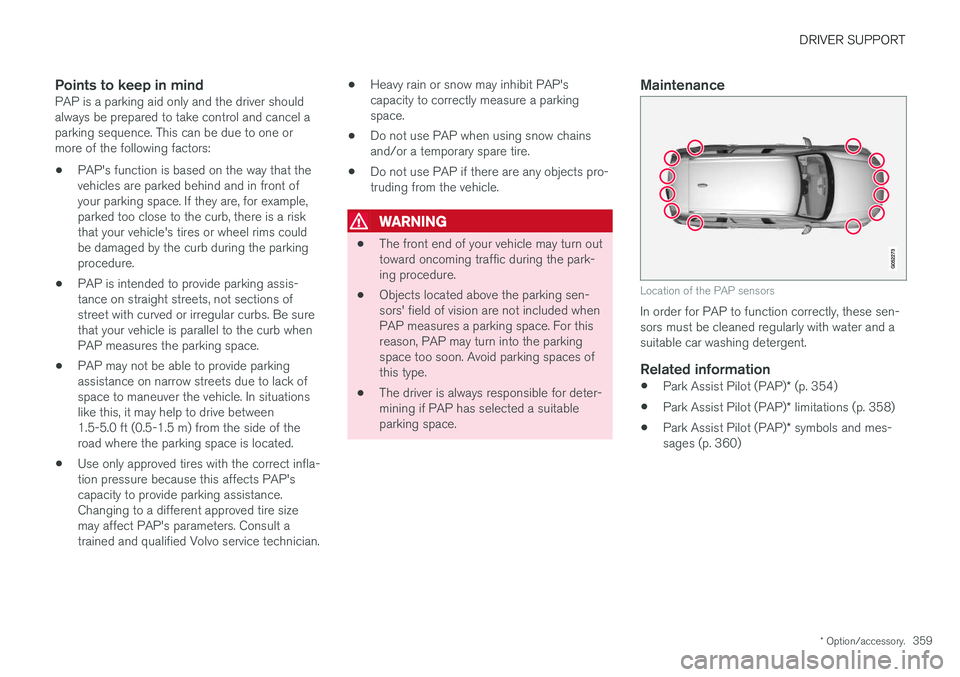
Location of the PAP sensors
In order for PAP to function correctly, these sen- sors must be cleaned regularly with water and asuitable car washing detergent.
Related information
•
Park Assist Pilot (PAP)
* (p. 354)
• Park Assist Pilot (PAP)
* limitations (p. 358)
• Park Assist Pilot (PAP)
* symbols and mes-
sages (p. 360)