towing VOLVO XC90 T8 2017 Owner´s Manual
[x] Cancel search | Manufacturer: VOLVO, Model Year: 2017, Model line: XC90 T8, Model: VOLVO XC90 T8 2017Pages: 580, PDF Size: 10.37 MB
Page 5 of 580
3
Top tether anchors91
Integrated booster cushion *
92
Raising the integrated booster cushion *
93
Stowing the integrated booster cushion *
95
INSTRUMENTS AND CONTROLS
Instruments and controls
98
Trip computer 99
Displaying trip computer information 100
Displaying trip statistics 102
HomeLink ®
Wireless Control System *102
Programming the HomeLink ®
Wire-
less Control System * 103
Adjusting the power door mirrors 106
Laminated panoramic roof *
108
Operating the laminated panoramic roof *
109
Power windows 111
Operating the power windows 111
Rearview mirror 112
Using sun curtains *
113
Settings view 113
Categories in Settings view 114
Changing system settings in Set- tings view 116
Changing settings in apps 117
Resetting the settings view 117
Resetting user data when the vehiclechanges owners 118
Ambient temperature sensor 118
Clock 119
Head-up display (HUD) *
120
Voice control
123
Using voice commands 123
Voice control for cell phones 124
Voice control for radio and media 125
Climate system voice commands 126
Navigation system voice commands 127
Voice control settings 128
Instrument panel 128
Instrument panel settings 130
Indicator symbols in the instrument panel 131
Hybrid-related information in the instrument panel 133
Instrument panel licenses 135
Warning symbols in the instrument panel 140
Compass 141
Calibrating the compass 142
Lighting panel and controls 143
Parking lights 145
Daytime Running Lights (DRL) 145
Low beam headlights 146
High and low beam headlights 147
Active Bending Lights *
148
Rear fog lights (certain models only) 149
Brake lights 150
Hazard warning flashers 150
Page 10 of 580
8
STARTING AND DRIVING
Starting and driving362
Brakes 362
Brake functions 364
Auto-hold brake function 365
Brake assist system 365
Braking effect after a collision 366
Emergency brake lights 366
Hill Descent Control (HDC) 366
Low Speed Control (LSC) 367
Hill Start Assist 368
Parking brake 369
Using the parking brake 369
Parking brake malfunctions 371
Before a long distance trip 372
Driving economically 372
Driving through standing water 374
Overheating the engine and transmission 375
Winter driving 376
Towing eyelet 376
Towing recommendations 377
Fuel 378
Octane rating 379
Opening/closing the fuel filler door 380
Emission controls 381
Jump starting382
Driving with a trailer 384
Detachable trailer hitch *
387
Trailer Stability Assist (TSA) 388
Ignition modes 389
Battery drain 390
Starting the engine 390
Turning the engine off 393
Driving systems 393
Hybrid battery charging cable 394
Hybrid charging cable circuit breaker 396
Hybrid-related symbols and messages 397
Preparations for charging the hybrid battery 399
Stopping hybrid battery charging 400
Initiating hybrid battery charging 401
Charging the hybrid battery 403
Hybrid battery charge status 404
Charger status indicators 406
Hybrid battery charging current 407
Long-term storage of a vehicle witha hybrid battery 408
Using the electric motor in city driving 408
Maintaining/increasing the hybridbattery's charge while driving 410
Drive modes
411
Automatic transmission 414
Shiftlock 415
Gear shift indicator 415
Gear selector positions 416
Steering wheel paddles *
418
All Wheel Drive (AWD) 419
Leveling control * and suspension
419
Page 81 of 580
SAFETY
}}
79
4.
When
Vehicle start System check, wait is
no longer displayed, try to start the vehicle again.
WARNING
If the message Safety mode See Owner's
manual is still displayed, the vehicle should
not be driven and must be towed (lifted onto a flatbed tow truck. The vehicle may never betowed with the wheels on the ground). Con-cealed faults may make the vehicle difficult tocontrol.
Moving the vehicle after safety mode has been set
If the message Normal mode The vehicle is
now in normal mode is displayed, the vehicle
may be moved carefully from its present position if, for example, it is blocking traffic. It should, however, not be moved farther than is absolutely necessary.
WARNING
After Safety mode has been set, the vehicle
should not be driven or towed (pulled on the ground by another vehicle). It must be trans-ported on a flatbed tow truck to a trained andqualified Volvo service technician for inspec-tion/repairs.
Related information
• Safety mode (p. 78)
• Towing recommendations (p. 377)
Child safety
Children should always be seated safely when traveling in the vehicle.
General informationVolvo recommends the proper use of restraint systems for all occupants including children.Remember that, regardless of age and size, achild should always be properly restrained in avehicle. Your vehicle is also equipped with ISOFIX/ LATCH attachments, which make it more conven-ient to install child seats. Some restraint systems for children are designed to be secured in the vehicle by lap belts or thelap portion of a lap-shoulder belt. Such childrestraint systems can help protect children invehicles in the event of an accident only if theyare used properly. However, children could beendangered in a crash if the child restraints arenot properly secured in the vehicle. Failure to fol-low the installation instructions for your childrestraint can result in your child striking the vehi-cle's interior in a sudden stop. Holding a child in your arms is NOT a suitable substitute for a child restraint system. In an acci-dent, a child held in a person's arms can becrushed between the vehicle's interior and anunrestrained person. The child could also beinjured by striking the interior, or by being ejectedfrom the vehicle during a sudden maneuver or
Page 97 of 580
SAFETY
}}
* Option/accessory.95
Stowing the integrated booster cushion*
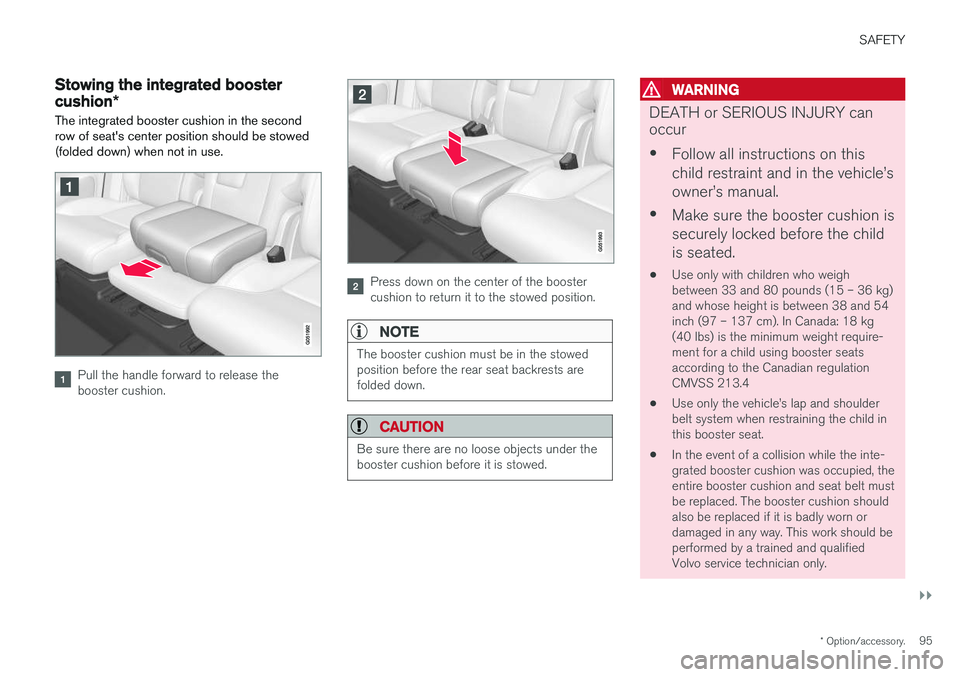
The integrated booster cushion in the second row of seat's center position should be stowed(folded down) when not in use.
Pull the handle forward to release the booster cushion.
Press down on the center of the booster cushion to return it to the stowed position.
NOTE
The booster cushion must be in the stowed position before the rear seat backrests arefolded down.
CAUTION
Be sure there are no loose objects under the booster cushion before it is stowed.
WARNING
DEATH or SERIOUS INJURY can occur • Follow all instructions on this child restraint and in the vehicle
Page 261 of 580
DRIVER SUPPORT
}}
* Option/accessory.259
Related information
•Driver support systems (p. 258)
• Drive modes (p. 411)
Electronic Stability Control (ESC)
Electronic Stability Control (ESC) helps reduce wheel spin, counteract skidding and to generallyhelp improve directional stability.
A pulsating sound will be audi- ble when the system is activelyoperating and is normal. Accel-eration may also be slightlyslower than normal.
WARNING
ESC is a supplementary aid and cannot deal with all situations or road conditions. The driver is always responsible for operating the vehicle in a safe manner in accordancewith current traffic regulations.
ESC consists of the following functions: • Traction control
• Spin control
• Active Yaw Control
• Engine Drag Control
• Trailer Stability Assist
Traction controlThis function is designed to help reduce wheel spin by transferring power from a drive wheel that begins to lose traction to the wheel on the oppo-site side of the vehicle (on the same axle).
Spin controlThis function is designed to help prevent thedrive wheels from spinning while the vehicle isaccelerating.
Active Yaw ControlAt low speeds, this function helps maintain direc-tional stability by braking one or more of thewheels if the vehicle shows a tendency to skid orslide laterally.
Engine Drag Control EDCEDC helps keep the engine running if the wheelsshow a tendency to lock, e.g., when shifting downin the manual shifting mode or while using theengine's braking function on a slippery surface. Ifthe wheels were to lock, the vehicle wouldbecome more difficult to steer.
Trailer Stability Assist
*1TSA helps stabilize a vehicle that is towing atrailer when the vehicle and trailer have begun tosway. This system is automatically deactivated if the driver selects
Sport mode.
1
This function is included if the vehicle is equipped with a Volvo original trailer hitch.
Page 294 of 580
||
DRIVER SUPPORT
292sensor, the system may apply the brakes in your vehicle suddenly or not at all. Pilot Assist is designed to follow a vehicle ahead in the same traffic lane at a preset time intervalset by the driver. If the radar sensor does notdetect a vehicle ahead, the vehicle will insteadmaintain the speed set by the driver. This will alsobe the case if a vehicle ahead accelerates andexceeds the set speed.
• Pilot Assist can follow another vehicle from astandstill up to a speed of approx. 125 mph(200 km/h)
• Pilot Assist can provide steering assistancefrom very low speeds up to approx. 87 mph(140 km/h).
Never exceed posted speed limits.
WARNING
• Pilot Assist is not a collision avoidance system. The driver must react if the sys-tem does not detect another vehicle.
• Pilot Assist does not react to people, ani-mals, stationary objects, small vehicles(such as bicycles and motorcycles), lowtrailers and slow moving, parked orapproaching vehicles.
• Do not use Pilot Assist in demandingdriving conditions such as city driving orother heavy traffic situations, in areas withintersections, in slippery conditions, whenthere is a great deal of water or slush onthe road, during heavy rain or snow, inpoor visibility, on winding roads, on high-way on- or off-ramps or if the vehicle istowing a trailer, boat, etc.
NOTE
•Pilot Assist maintenance should only be carried out by a trained and qualifiedVolvo service technician.
• Pilot Assist regulates your vehicle'sspeed using the accelerator pedal andthe brakes. Please be aware that theremay be a faint sound from the brakeswhen the system is using them.
Pilot Assist overview
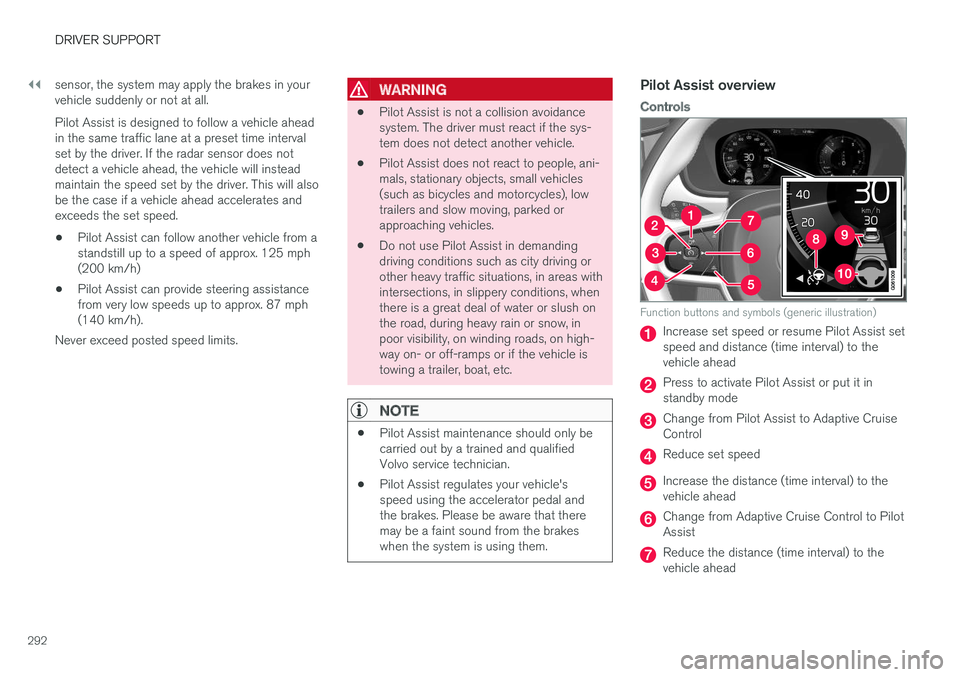
Controls
Function buttons and symbols (generic illustration)
Increase set speed or resume Pilot Assist set speed and distance (time interval) to thevehicle ahead
Press to activate Pilot Assist or put it in standby mode
Change from Pilot Assist to Adaptive Cruise Control
Reduce set speed
Increase the distance (time interval) to the vehicle ahead
Change from Adaptive Cruise Control to Pilot Assist
Reduce the distance (time interval) to the vehicle ahead
Page 304 of 580
||
DRIVER SUPPORT
* Option/accessory.
302
WARNING
Pilot Assist is not a collision avoidance sys- tem. The driver is always responsible forsteering or applying the brakes if the systemdoes not detect another vehicle. Do not use Pilot Assist in demanding driving conditions such as city driving or other heavytraffic situations, in slippery conditions, whenthere is a great deal of water or slush on theroad, during heavy rain or snow, in poor visibil-ity, on winding roads or on highway on- or off-ramps. In certain situations, it may be difficult for Pilot Assist to assist the driver correctly or to deac-tivate automatically. In such cases, it is advisa-ble not to use Pilot Assist. Examples of suchsituations may be:
• the lane's side market lines are missing, badly faded or cross each other.
• the division of lanes is not clear, e.g.,when a line divides or merges withanother, at exits or if there are many roadsigns/markers.
• there are edges or other lines on or nearthe lane, e.g., curbs, cracks, repairedareas, sharp shadows, etc.
• the lane is narrow or winding.
• the lane is at the top of a hill, on anuneven road surface or over a bump.
•bad weather conditions (rain, snow, fog, slush, poor visibility, backlighting, etc).
The driver should also be aware that Pilot Assist has the following limitations: • High curbs, barriers and temporary obsta- cles (cones, barriers etc) may not bedetected or could be detected incorrectlyas side marker lines, which may create arisk of collision. The driver must ensure asafe distance to these obstacles.
• The camera or radar sensor may not beable to detect objects if there are pot-holes or if there are stationary objectspartially or completely blocking the road.
• Pilot Assist does not "see" pedestrians,animals, etc.
• Pilot Assist's steering capacity is limitedand may not always be able to help thedriver keep the vehicle in the lane.
The driver can always take action to override PilotAssist.
Steep roads and/or heavy loadsPilot Assist is primarily intended for use on rela-tively level roads. The function may not be able tomaintain the correct time interval to the vehicleahead on when driving down steep hills. Thedriver should be attentive and prepared to applythe brakes in these situations. Do not use Pilot Assist when the vehicle is trans-porting a heavy load or if it is towing a trailer.
Additional information
•
The Off Road drive mode cannot be
selected if Pilot Assist is activated.
• Pilot Assist uses the vehicle's camera and radar sensor, which have certain general limi-tations. See the articles "Camera limitations"and "Radar sensor limitations" for additionalinformation.
Related information
•
Pilot Assist
* (p. 291)
• Starting and activating Pilot Assist (p. 294)
• Changing Pilot Assist speed (p. 296)
• Setting a Pilot Assist time interval (p. 297)
• Changing target vehicles and automaticbraking with Pilot Assist (p. 300)
• Deactivating/resuming Pilot Assist (p. 298)
• Passing Assistance with Adaptive CruiseControl or Pilot Assist (p. 285)
• Pilot Assist symbols and messages (p. 303)
• Radar sensor limitations (p. 305)
• Camera limitations (p. 309)
Page 346 of 580
DRIVER SUPPORT
* Option/accessory.
344
Park Assist *
The Park Assist system is designed to assist you
when driving into parking spaces, garages, etc. An audible signal and symbols in the instrumentpanel and center display indicate the distance tothe object.
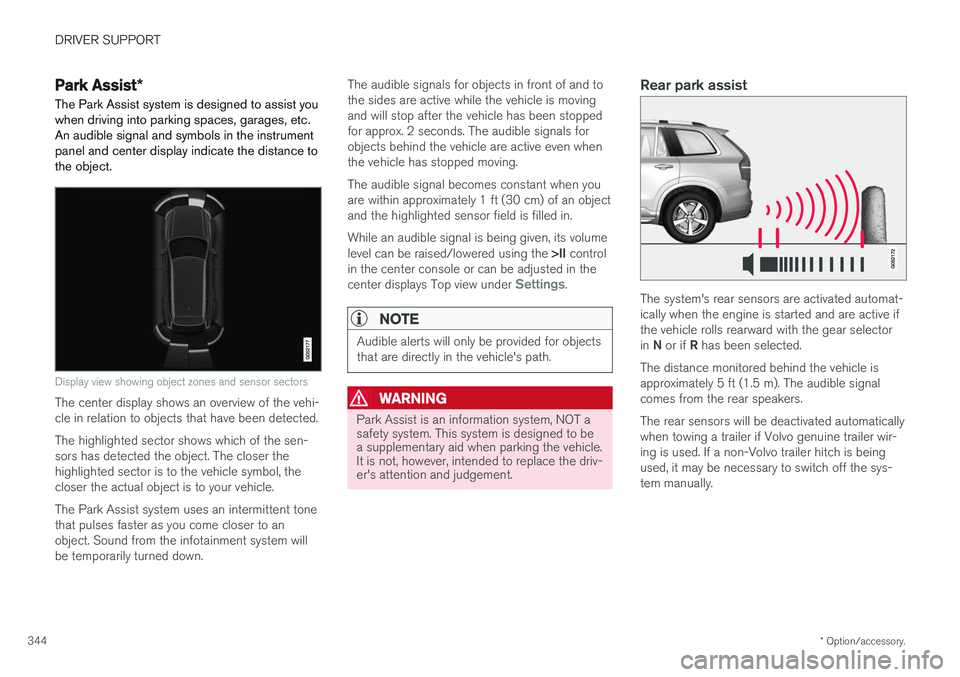
Display view showing object zones and sensor sectors
The center display shows an overview of the vehi- cle in relation to objects that have been detected. The highlighted sector shows which of the sen- sors has detected the object. The closer thehighlighted sector is to the vehicle symbol, thecloser the actual object is to your vehicle. The Park Assist system uses an intermittent tone that pulses faster as you come closer to anobject. Sound from the infotainment system willbe temporarily turned down. The audible signals for objects in front of and tothe sides are active while the vehicle is movingand will stop after the vehicle has been stoppedfor approx. 2 seconds. The audible signals forobjects behind the vehicle are active even whenthe vehicle has stopped moving. The audible signal becomes constant when you are within approximately 1 ft (30 cm) of an objectand the highlighted sensor field is filled in. While an audible signal is being given, its volume level can be raised/lowered using the
>II control
in the center console or can be adjusted in the center displays Top view under
Settings.
NOTE
Audible alerts will only be provided for objects that are directly in the vehicle's path.
WARNING
Park Assist is an information system, NOT a safety system. This system is designed to bea supplementary aid when parking the vehicle.It is not, however, intended to replace the driv-er's attention and judgement.
Rear park assist
The system's rear sensors are activated automat- ically when the engine is started and are active ifthe vehicle rolls rearward with the gear selector in N or if R has been selected.
The distance monitored behind the vehicle is approximately 5 ft (1.5 m). The audible signalcomes from the rear speakers. The rear sensors will be deactivated automatically when towing a trailer if Volvo genuine trailer wir-ing is used. If a non-Volvo trailer hitch is beingused, it may be necessary to switch off the sys-tem manually.
Page 357 of 580
DRIVER SUPPORT
}}
* Option/accessory.355
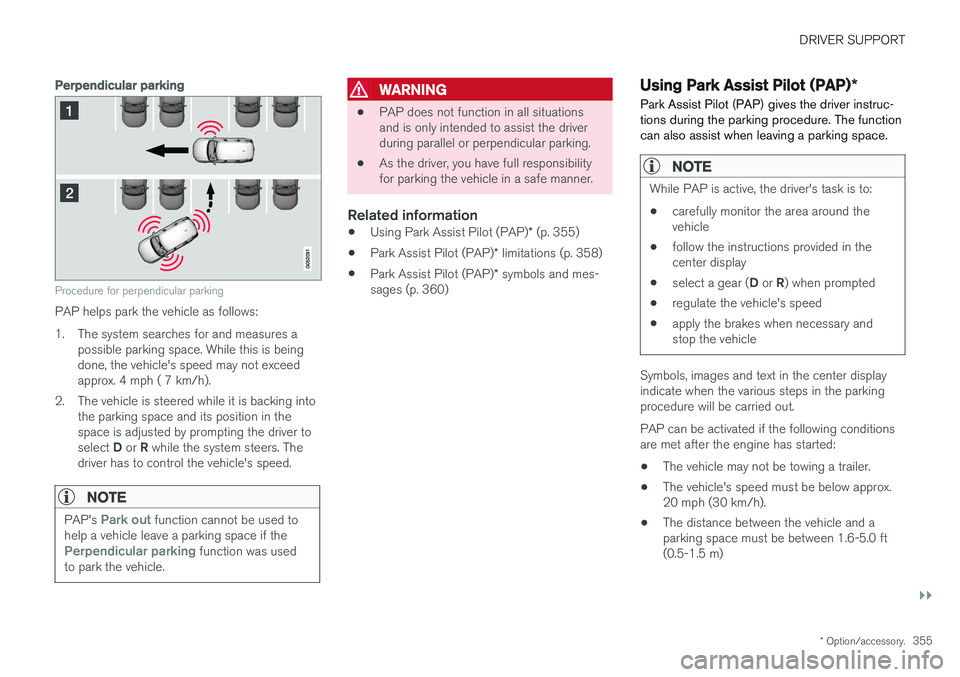
Perpendicular parking
Procedure for perpendicular parking
PAP helps park the vehicle as follows:
1. The system searches for and measures a
possible parking space. While this is being done, the vehicle's speed may not exceedapprox. 4 mph ( 7 km/h).
2. The vehicle is steered while it is backing into the parking space and its position in thespace is adjusted by prompting the driver to select D or R while the system steers. The
driver has to control the vehicle's speed.
NOTE
PAP's Park out function cannot be used to
help a vehicle leave a parking space if the
Perpendicular parking function was used
to park the vehicle.
WARNING
• PAP does not function in all situations and is only intended to assist the driverduring parallel or perpendicular parking.
• As the driver, you have full responsibilityfor parking the vehicle in a safe manner.
Related information
•
Using Park Assist Pilot (PAP)
* (p. 355)
• Park Assist Pilot (PAP)
* limitations (p. 358)
• Park Assist Pilot (PAP)
* symbols and mes-
sages (p. 360)
Using Park Assist Pilot (PAP) *
Park Assist Pilot (PAP) gives the driver instruc- tions during the parking procedure. The functioncan also assist when leaving a parking space.
NOTE
While PAP is active, the driver's task is to:
• carefully monitor the area around the vehicle
• follow the instructions provided in thecenter display
• select a gear (
D or R) when prompted
• regulate the vehicle's speed
• apply the brakes when necessary andstop the vehicle
Symbols, images and text in the center display indicate when the various steps in the parkingprocedure will be carried out. PAP can be activated if the following conditions are met after the engine has started:
• The vehicle may not be towing a trailer.
• The vehicle's speed must be below approx.20 mph (30 km/h).
• The distance between the vehicle and aparking space must be between 1.6-5.0 ft(0.5-1.5 m)
Page 369 of 580
STARTING AND DRIVING
}}
367
HDC is activated along with Low Speed Control (LSC), which together make driving on slipperysurfaces at low speeds easier. When HDC and LSC are activated, this changes the response from the accelerator pedal andengine.
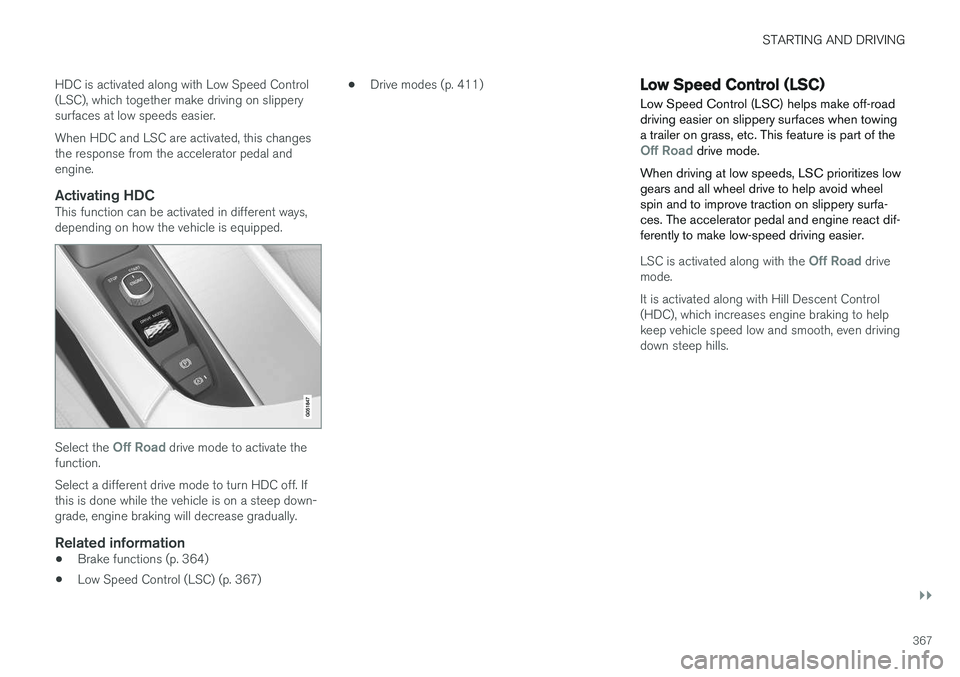
Activating HDCThis function can be activated in different ways,depending on how the vehicle is equipped.
Select the Off Road drive mode to activate the
function. Select a different drive mode to turn HDC off. If this is done while the vehicle is on a steep down-grade, engine braking will decrease gradually.
Related information
• Brake functions (p. 364)
• Low Speed Control (LSC) (p. 367) •
Drive modes (p. 411)
Low Speed Control (LSC) Low Speed Control (LSC) helps make off-road driving easier on slippery surfaces when towinga trailer on grass, etc. This feature is part of the
Off Road drive mode.
When driving at low speeds, LSC prioritizes low gears and all wheel drive to help avoid wheelspin and to improve traction on slippery surfa-ces. The accelerator pedal and engine react dif-ferently to make low-speed driving easier.
LSC is activated along with the Off Road drive
mode. It is activated along with Hill Descent Control (HDC), which increases engine braking to helpkeep vehicle speed low and smooth, even drivingdown steep hills.