traction control VOLVO XC90 T8 2017 Owner´s Manual
[x] Cancel search | Manufacturer: VOLVO, Model Year: 2017, Model line: XC90 T8, Model: VOLVO XC90 T8 2017Pages: 580, PDF Size: 10.37 MB
Page 31 of 580
INTRODUCTION
}}
29
WARNING
The driver is always responsible for operating the vehicle in a safe manner and adhering tocurrent laws and traffic regulations. It is also important that the vehicle be oper- ated, maintained and serviced according toVolvo's recommendations/instructions in theowner's manual.
Changing the language used in the vehicle's center display
Changing languages in the center display could mean that some of the owner's information provi-ded may not comply with national or local stat-utes and regulations. Changing to a languagethat you do not understand may also make it diffi-cult to change back to the original language.
Related information
•Owner's manual in mobile devices (p. 25)
• Navigating in the digital owner's manual(p. 56)
• On-board digital owner's manual (p. 55)
• Navigating in the digital owner's manual(p. 56)
• Using the owner's manual (p. 53)
• Additional information about your vehicle(p. 14)
Driver distraction
Please keep the following warnings in mind when operating/servicing your vehicle.
A driver has a responsibility to do everything pos- sible to ensure his or her own safety and thesafety of passengers in the vehicle and otherssharing the roadway. Avoiding distractions is partof that responsibility. Driver distraction results from driver activities that are not directly related to controlling the vehiclein the driving environment. Your new Volvo is, orcan be, equipped with many feature-rich enter-tainment and communication systems. Theseinclude hands-free cellular telephones, navigationsystems, and multipurpose audio systems. Youmay also own other portable electronic devicesfor your own convenience. When used properlyand safely, they enrich the driving experience.Improperly used, any of these could cause a dis-traction. For all of these systems, we want to provide the following warning that reflects the strong Volvoconcern for your safety. Never use these devicesor any feature of your vehicle in a way that dis-tracts you from the task of driving safely. Distrac-tion can lead to a serious accident. In addition tothis general warning, we offer the following guid-ance regarding specific newer features that maybe found in your vehicle:
WARNING
• Never use a hand-held cellular telephone while driving. Some jurisdictions prohibitcellular telephone use by a driver whilethe vehicle is moving.
• If your vehicle is equipped with a naviga-tion system, set and make changes toyour travel itinerary only with the vehicleparked.
• Never program your audio system whilethe vehicle is moving. Program radio pre-sets with the vehicle parked, and use yourprogrammed presets to make radio usequicker and simpler.
• Never use portable computers or per-sonal digital assistants while the vehicleis moving.
Accessory installation
•We strongly recommend that Volvo ownersinstall only genuine, Volvo-approved acces-sories, and that accessory installations beperformed only by a trained and qualifiedVolvo service technician.
• Genuine Volvo accessories are tested toensure compatibility with the performance,safety, and emission systems in your vehicle.Additionally, a trained and qualified Volvoservice technician knows where accessoriesmay and may not be safely installed in yourVolvo. In all cases, please consult a trained
Page 261 of 580
DRIVER SUPPORT
}}
* Option/accessory.259
Related information
•Driver support systems (p. 258)
• Drive modes (p. 411)
Electronic Stability Control (ESC)
Electronic Stability Control (ESC) helps reduce wheel spin, counteract skidding and to generallyhelp improve directional stability.
A pulsating sound will be audi- ble when the system is activelyoperating and is normal. Accel-eration may also be slightlyslower than normal.
WARNING
ESC is a supplementary aid and cannot deal with all situations or road conditions. The driver is always responsible for operating the vehicle in a safe manner in accordancewith current traffic regulations.
ESC consists of the following functions: • Traction control
• Spin control
• Active Yaw Control
• Engine Drag Control
• Trailer Stability Assist
Traction controlThis function is designed to help reduce wheel spin by transferring power from a drive wheel that begins to lose traction to the wheel on the oppo-site side of the vehicle (on the same axle).
Spin controlThis function is designed to help prevent thedrive wheels from spinning while the vehicle isaccelerating.
Active Yaw ControlAt low speeds, this function helps maintain direc-tional stability by braking one or more of thewheels if the vehicle shows a tendency to skid orslide laterally.
Engine Drag Control EDCEDC helps keep the engine running if the wheelsshow a tendency to lock, e.g., when shifting downin the manual shifting mode or while using theengine's braking function on a slippery surface. Ifthe wheels were to lock, the vehicle wouldbecome more difficult to steer.
Trailer Stability Assist
*1TSA helps stabilize a vehicle that is towing atrailer when the vehicle and trailer have begun tosway. This system is automatically deactivated if the driver selects
Sport mode.
1
This function is included if the vehicle is equipped with a Volvo original trailer hitch.
Page 274 of 580
DRIVER SUPPORT
272
Deactivating/resuming Cruise Control (CC) Cruise Control (CC) can be temporarily deacti- vated and put in standby mode.
Deactivating and putting CC in standbymode
To temporarily deactivate and put Cruise Control in standby mode:
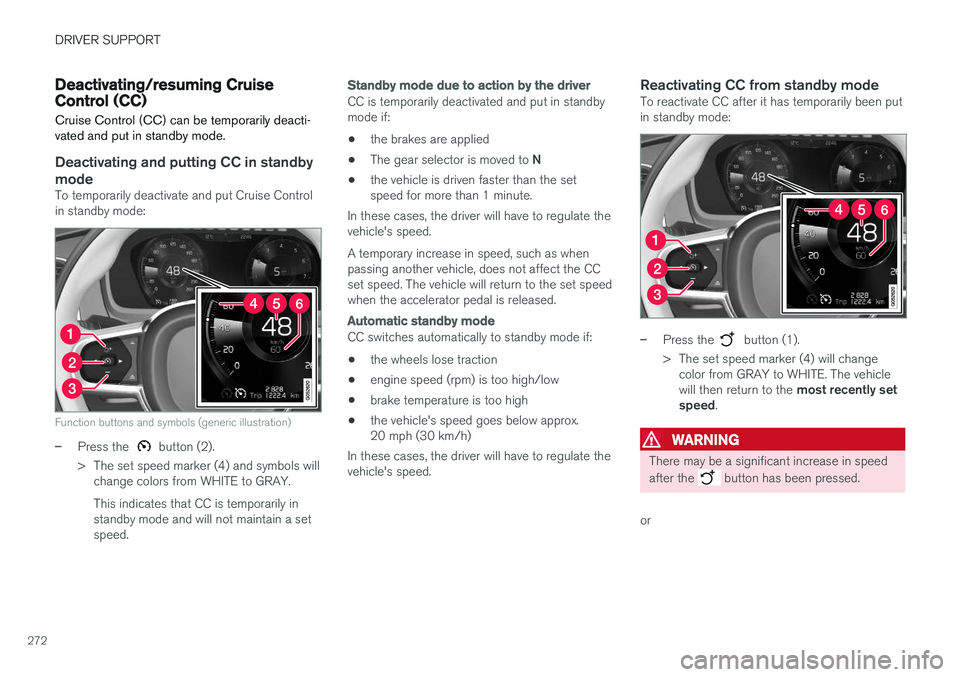
Function buttons and symbols (generic illustration)
–Press the button (2).
> The set speed marker (4) and symbols will change colors from WHITE to GRAY. This indicates that CC is temporarily in standby mode and will not maintain a setspeed.
Standby mode due to action by the driver
CC is temporarily deactivated and put in standby mode if:
• the brakes are applied
• The gear selector is moved to
N
• the vehicle is driven faster than the setspeed for more than 1 minute.
In these cases, the driver will have to regulate thevehicle's speed. A temporary increase in speed, such as when passing another vehicle, does not affect the CCset speed. The vehicle will return to the set speedwhen the accelerator pedal is released.
Automatic standby mode
CC switches automatically to standby mode if:
• the wheels lose traction
• engine speed (rpm) is too high/low
• brake temperature is too high
• the vehicle's speed goes below approx. 20 mph (30 km/h)
In these cases, the driver will have to regulate thevehicle's speed.
Reactivating CC from standby modeTo reactivate CC after it has temporarily been putin standby mode:
–Press the button (1).
> The set speed marker (4) will change color from GRAY to WHITE. The vehicle will then return to the most recently set
speed .
WARNING
There may be a significant increase in speed after the
button has been pressed.
or
Page 284 of 580
||
DRIVER SUPPORT
* Option/accessory.
282
WARNING
When ACC is in standby mode, the driver has to control the vehicle's speed and distance toa vehicle ahead. When ACC is in standby mode, the driver will be alerted if the distance to the vehicle aheadis too short by the Distance Alert function.See the article "Distance Alert" for additionalinformation.
Standby mode due to action by the driver
ACC is temporarily deactivated and put in standby mode if:
• the brakes are applied
• The gear selector is moved to
N
• the vehicle is driven faster than the setspeed for more than 1 minute.
In these cases, the driver will have to regulate thevehicle's speed. A temporary increase in speed, such as when passing another vehicle, does not affect the ACCset speed. The vehicle will return to the set speedwhen the accelerator pedal is released.
Automatic standby mode
ACC interacts with other systems, such as Electronic Stability Control. If any of these othersystems are not functioning properly, ACC willturn off automatically.
WARNING
If this happens, the driver will be alerted by an audible signal and a message in the instru-ment panel. The driver will have to adapt thevehicle's speed, apply the brakes when nec-essary and keep a safe distance to the vehicleahead.
ACC switches automatically to standby mode if: • the vehicle's speed goes below approx. 3 mph (5 km/h) and ACC cannot determineif the vehicle ahead is stationary or is anobject such as a speed bump, etc
• the vehicle's speed goes below approx.3 mph (5 km/h) and the vehicle aheadchanges lanes or turns so that ACC nolonger has a target vehicle to follow
• the driver opens the door
• the driver unbuckles the seat belt
• the engine speed (rpm) is too high/low
• the wheels lose traction
• the brake temperature is too high
• the parking brake is applied
• the stability system's
ESC Sport Mode is
activated
• the
Off Road drive mode is selected
• The radar sensor is covered by e.g., wet snow or if heavy rain interferes with radar waves
Reactivating ACC from standby mode
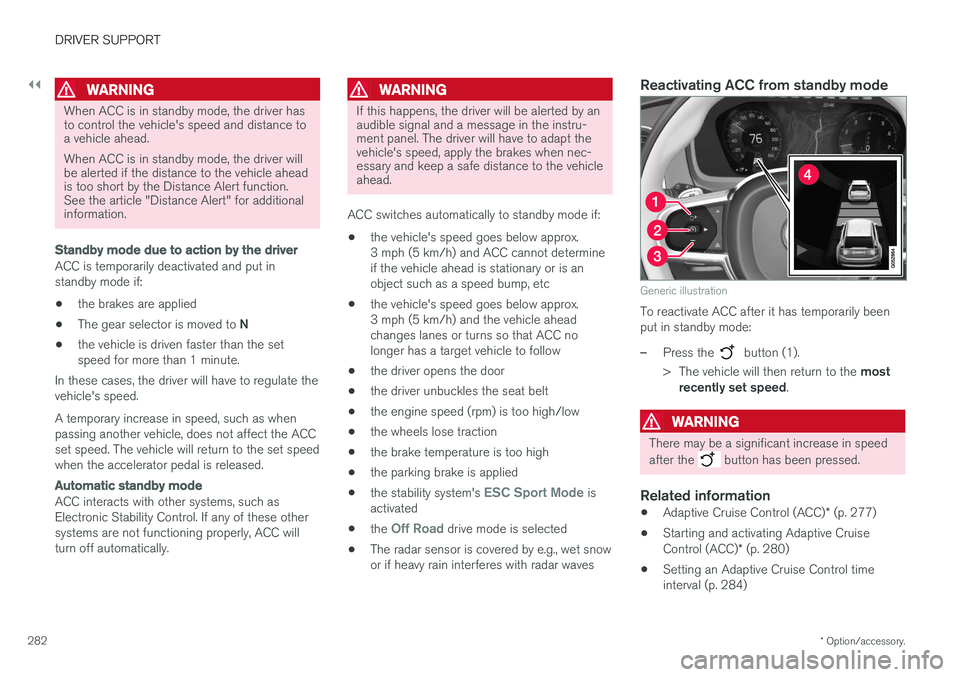
Generic illustration
To reactivate ACC after it has temporarily been put in standby mode:
–Press the button (1).
> The vehicle will then return to the most
recently set speed .
WARNING
There may be a significant increase in speed after the
button has been pressed.
Related information
•Adaptive Cruise Control (ACC)
* (p. 277)
• Starting and activating Adaptive Cruise Control (ACC)
* (p. 280)
• Setting an Adaptive Cruise Control time interval (p. 284)
Page 301 of 580
DRIVER SUPPORT
}}
* Option/accessory.299
In standby mode, the driver will have to regulate the vehicle's speed and the distance to the vehi-cle ahead. When Pilot Assist is in standby mode and your vehicle comes too close to another vehicle, thedriver will be alerted by the Distance Alert func-tion.
Standby mode due to action by the driver
Pilot Assist is temporarily deactivated and put in standby mode if:
• the brakes are applied
• The gear selector is moved to
N
• the turn signals are used for more than1 minute
• the vehicle is driven faster than the setspeed for more than 1 minute.
A temporary increase in speed, such as whenpassing another vehicle, does not affect the PilotAssist set speed. The vehicle will return to the setspeed when the accelerator pedal is released. When the turn signals are used, Pilot Assist's steering function will be temporarily deactivated.When this is no longer the case, the steeringfunction will reactivate if the traffic lane's sidemarker lines can still be detected.
Automatic standby mode
Pilot Assist interacts with other systems, such as Electronic Stability Control. If any of these other systems are not functioning properly, Pilot Assistwill automatically be deactivated.
WARNING
If this happens, the driver will be alerted by an audible signal and a message in the instru-ment panel. The driver will have to adapt thevehicle's speed, apply the brakes when nec-essary and keep a safe distance to the vehicleahead.
Pilot Assist switches automatically to standby mode if: • the vehicle's speed is below approx. 3 mph(5 km/h) and Pilot Assist cannot determine ifa vehicle ahead is a stationary vehicle or anobject.
• the vehicle's speed is below approx. 3 mph(5 km/h) and the vehicle ahead turns so thatPilot Assist no longer has a vehicle to follow(target vehicle).
• the driver's hands are not on the steeringwheel
• the driver's door is opened
• the driver unbuckles the seat belt
• engine speed (rpm) is too high/low
• the wheels lose traction
• brake temperature is too high
• the parking brake is set •
The camera lens/radar sensor is covered bye.g., snow or if heavy rain interferes withradar wavesReactivating Pilot Assist from standby
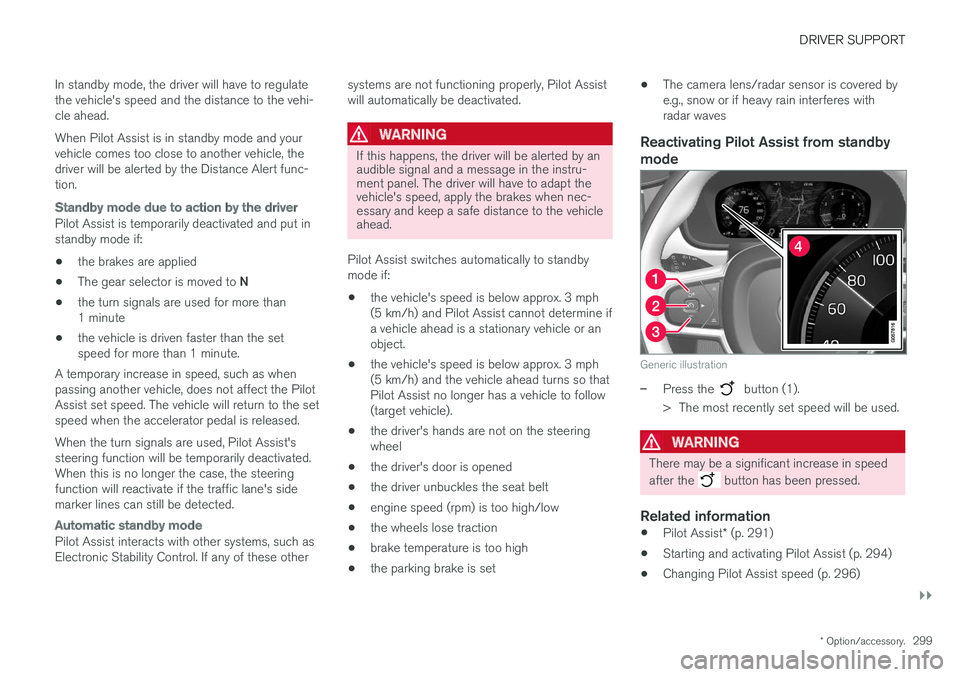
mode
Generic illustration
–Press the button (1).
> The most recently set speed will be used.
WARNING
There may be a significant increase in speed after the
button has been pressed.
Related information
• Pilot Assist
* (p. 291)
• Starting and activating Pilot Assist (p. 294)
• Changing Pilot Assist speed (p. 296)
Page 336 of 580
DRIVER SUPPORT
* Option/accessory.
334
Road Sign Information (RSI) *
limitations
The RSI function may be limited in certain situa- tions.
RSI may have difficulty reading signs that are:
• Faded
• Located in a curve
• Twisted or damaged
• Positioned high above the road
• Obstructed (by bushes, etc.)
• Partially covered by snow, ice, etc.
• If the digital maps used by the Sensus Navigation system
* are not up-to-date or do
not contain speed information 6
.
The camera used by RSI has certain limitations. See the article "Camera limitations" for additionalinformation.
NOTE
RSI may perceive certain types of bicycle holders (with wiring attached to the trailerelectrical socket) as a trailer, which may resultin faulty speed limit information to the driver.
Related information
• Road Sign Information (RSI)
* (p. 332)
• Road Sign Information (RSI)
* operation
(p. 332)
• Camera limitations (p. 309)
Driver Alert Control (DAC)
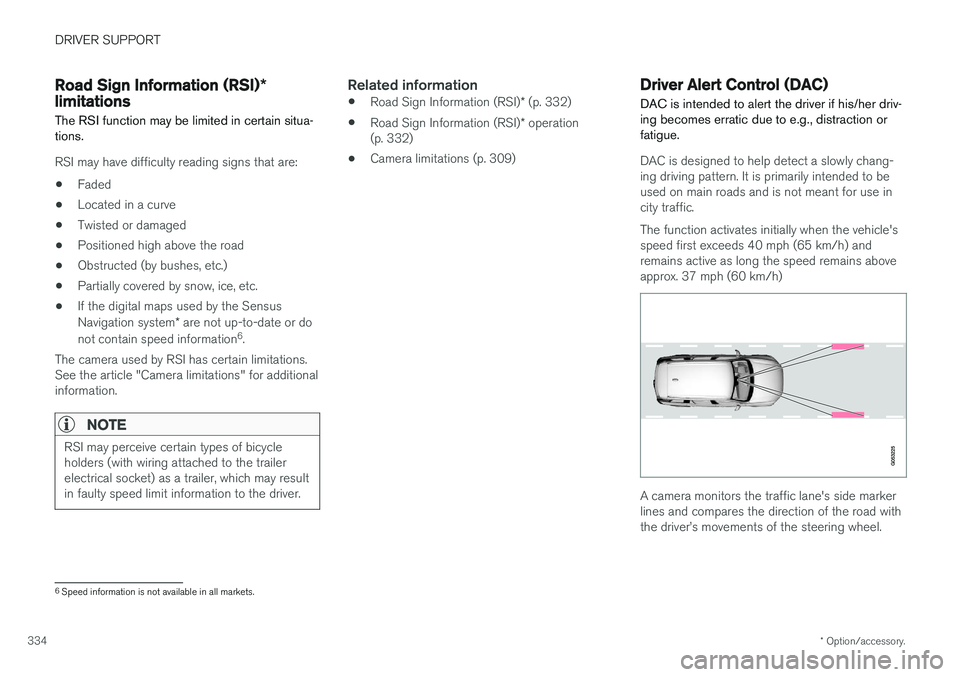
DAC is intended to alert the driver if his/her driv- ing becomes erratic due to e.g., distraction orfatigue.
DAC is designed to help detect a slowly chang- ing driving pattern. It is primarily intended to be used on main roads and is not meant for use incity traffic. The function activates initially when the vehicle's speed first exceeds 40 mph (65 km/h) andremains active as long the speed remains aboveapprox. 37 mph (60 km/h)
A camera monitors the traffic lane's side marker lines and compares the direction of the road withthe driver
Page 360 of 580
||
DRIVER SUPPORT
* Option/accessory.
358 adjusted by driving slightly forward and backing up. 1.
Put the gear selector in D, wait until the
steering wheel has turned and drive forward slowly.
2. Stop the vehicle when you are instructed by PAP to do so.
3. Put the gear selector in R, back up slowly
and stop when you are instructed by PAP todo so.
When the parking procedure is finished (this willbe indicated by a text message and a graphicimage), PAP switches off automatically. If neces-sary, the driver may need to make minor adjust-ments to ensure that the vehicle is parked cor-rectly.
CAUTION
The warning distance is shorter when PAP is using the sensors than when Park Assist isusing them.
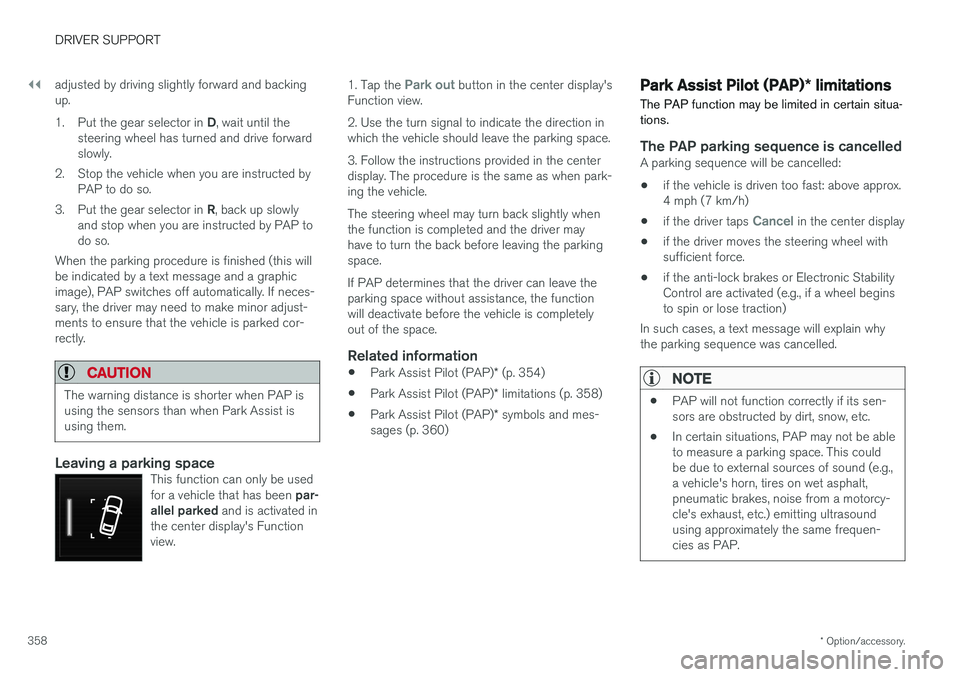
Leaving a parking spaceThis function can only be used for a vehicle that has been par-
allel parked and is activated in
the center display's Function view.
1. Tap the Park out button in the center display's
Function view. 2. Use the turn signal to indicate the direction in which the vehicle should leave the parking space. 3. Follow the instructions provided in the center display. The procedure is the same as when park-ing the vehicle. The steering wheel may turn back slightly when the function is completed and the driver mayhave to turn the back before leaving the parkingspace. If PAP determines that the driver can leave the parking space without assistance, the functionwill deactivate before the vehicle is completelyout of the space.
Related information
• Park Assist Pilot (PAP)
* (p. 354)
• Park Assist Pilot (PAP)
* limitations (p. 358)
• Park Assist Pilot (PAP)
* symbols and mes-
sages (p. 360)
Park Assist Pilot (PAP) * limitations
The PAP function may be limited in certain situa- tions.
The PAP parking sequence is cancelledA parking sequence will be cancelled:
• if the vehicle is driven too fast: above approx. 4 mph (7 km/h)
• if the driver taps
Cancel in the center display
• if the driver moves the steering wheel with sufficient force.
• if the anti-lock brakes or Electronic StabilityControl are activated (e.g., if a wheel beginsto spin or lose traction)
In such cases, a text message will explain whythe parking sequence was cancelled.
NOTE
• PAP will not function correctly if its sen- sors are obstructed by dirt, snow, etc.
• In certain situations, PAP may not be ableto measure a parking space. This couldbe due to external sources of sound (e.g.,a vehicle's horn, tires on wet asphalt,pneumatic brakes, noise from a motorcy-cle's exhaust, etc.) emitting ultrasoundusing approximately the same frequen-cies as PAP.
Page 369 of 580
STARTING AND DRIVING
}}
367
HDC is activated along with Low Speed Control (LSC), which together make driving on slipperysurfaces at low speeds easier. When HDC and LSC are activated, this changes the response from the accelerator pedal andengine.
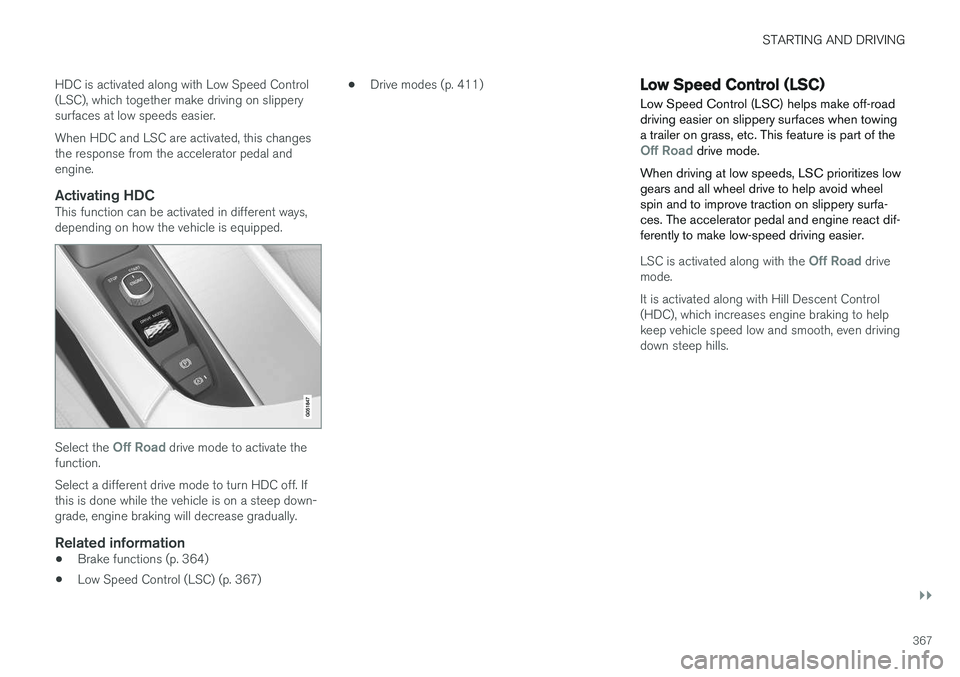
Activating HDCThis function can be activated in different ways,depending on how the vehicle is equipped.
Select the Off Road drive mode to activate the
function. Select a different drive mode to turn HDC off. If this is done while the vehicle is on a steep down-grade, engine braking will decrease gradually.
Related information
• Brake functions (p. 364)
• Low Speed Control (LSC) (p. 367) •
Drive modes (p. 411)
Low Speed Control (LSC) Low Speed Control (LSC) helps make off-road driving easier on slippery surfaces when towinga trailer on grass, etc. This feature is part of the
Off Road drive mode.
When driving at low speeds, LSC prioritizes low gears and all wheel drive to help avoid wheelspin and to improve traction on slippery surfa-ces. The accelerator pedal and engine react dif-ferently to make low-speed driving easier.
LSC is activated along with the Off Road drive
mode. It is activated along with Hill Descent Control (HDC), which increases engine braking to helpkeep vehicle speed low and smooth, even drivingdown steep hills.
Page 415 of 580
STARTING AND DRIVING
}}
413
•
If the vehicle's speed goes above approx. 78 mph (125 km/h)
• If the driver wants more response than theelectric motor alone can provide
• If factors such as cold weather, etc., affectthe system or components
ECO climate
In the Pure drive mode, ECO climate in the pas-
senger compartment is activated automatically to help reduce energy consumption.
NOTE
When the Pure drive mode is activated, set-
tings for certain climate system/electricity- consuming functions are reduced. Some ofthese settings can be reset manually but fullfunctionality will only be restored by leaving the
Pure drive mode or by adapting the set-
tings in the Individual drive mode to full cli-
mate system functionality.
If condensation forms on the windows, tap the max. defroster button, which will function nor-mally.
OFF ROAD
This mode helps maximize the vehicle's capacity to traverse difficult terrain or poor roads. In OFF ROAD, ground clearance is maximized, the steering is light, All Wheel Drive and HillDescent Control are activated and a compass will be displayed between the speedometer and tach-ometer in the instrument panel. This drive mode can only be activated at low speeds (the permissible speed range will beshown on the speedometer). At higher speeds,OFF ROAD mode will be cancelled and AWD willbe activated.
CAUTION
OFF ROAD drive mode may not be used if the vehicle is towing a trailer without an elec-trical connection. This could result in damageto the pneumatic suspension system's bel-lows.
NOTE
•
This mode is not intended for normal street driving.
• Due to the increased ground clearance, ifthe OFF ROAD mode was selected whenthe engine was switched off, the suspen-sion will lower when the engine is restar-ted.
AWD
This mode offers improved traction on slippery surfaces by using four-wheel drive. It also helpsincrease directional stability at higher speeds, forexample when towing a trailer. In this mode, both the electric motor and the gas-oline engine are utilized, which results in higherfuel consumption. In the other drive modes, the vehicle automati- cally adapts the need for all-wheel drive accord-ing to the road surface and may activate the elec-tric motor or start the gasoline engine asrequired.
POWER
Power mode is intended for sportier, more active
driving. This mode maximizes the combined effects of the electric motor and the gasoline engine andprovides power to all four wheels. Response topressure on the accelerator pedal is more imme-diate and the transmission shifts up at higherrpm. Steering response is also more immediate,the suspension is stiffer and lower ground clear-ance reduces body roll when cornering. In this mode, both the electric motor and the gas- oline engine are utilized, which results in higherfuel consumption.
Page 421 of 580
STARTING AND DRIVING
}}
* Option/accessory.419
All Wheel Drive (AWD) 4
Your Volvo can be equipped with All Wheel Drive, which means that power is distributedautomatically between the front and rear wheels.
The electric motor that powers the rear wheels enables electronic all wheel drive functionality. Under normal driving conditions, most of the engine's power is directed to the front wheels.However, if there is any tendency for the frontwheels to spin, an electronically controlled cou-pling distributes power to the wheels that havethe best traction. AWD reacts differently, depending on the drive mode selected.
Related information
• Drive modes (p. 411)
• Low Speed Control (LSC) (p. 367)
Leveling control
* and suspension
The leveling control system adjusts the suspen- sion and shock absorbers automatically to helpprovide good comfort and control while driving.Leveling can also be controlled manually tomake loading or getting in and out of the vehicleeasier.
Pneumatic suspension and shock absorbers
This system is linked to the selected drive mode and is adapted to the vehicle's speed. The pneu-matic suspension reduces the vehicle's groundclearance at higher speeds to reduce wind resis-tance and increase stability. The shock absorbersare normally set to provide the best possiblecomfort and are adjusted continuously accordingto the road surface, acceleration, braking andcornering.
The instrument panel will indicate when the sus- pension level is being adjusted. The level cannot be adjusted if one of the side doors or the hood is open.
Suspension settings
Easy entry
The vehicle can be lowered to entering and exit- ing easier. In the center display's Top view:1. Tap
Settings.
2. Tap
My CarSuspension .
3. Select
Easy Entry and Exit Suspension
Control.
> When the vehicle is parked and the engine is turned off, the level is lowered. Level adjustment will stop if a side door isopened and will resume after a slightdelay when the door has been closed.When the engine is started and the vehi-cle begins to move, the level will be raisedto the height set by the selected drivemode.
If a door has been opened and closed, there maybe a slight delay before the leveling function willresume.
4 Standard equipment on certain models.