steering VOLVO XC90 T8 2018 Owner´s Manual
[x] Cancel search | Manufacturer: VOLVO, Model Year: 2018, Model line: XC90 T8, Model: VOLVO XC90 T8 2018Pages: 686, PDF Size: 11.51 MB
Page 379 of 686
DRIVER SUPPORT
}}
* Option/accessory.377
NOTE
The function uses the vehicle's camera unit, which has some general limitations – see thesection "Camera unit limitations".
NOTE
The function uses the vehicle's radar unit, which has some general limitations – see thesection "Radar unit limitations".
Related information
•Steering assistance at risk of collision (p. 372)
• Speed-dependent steering wheel resistance(p. 272)
Steering assistance during collision
risks from behind
*
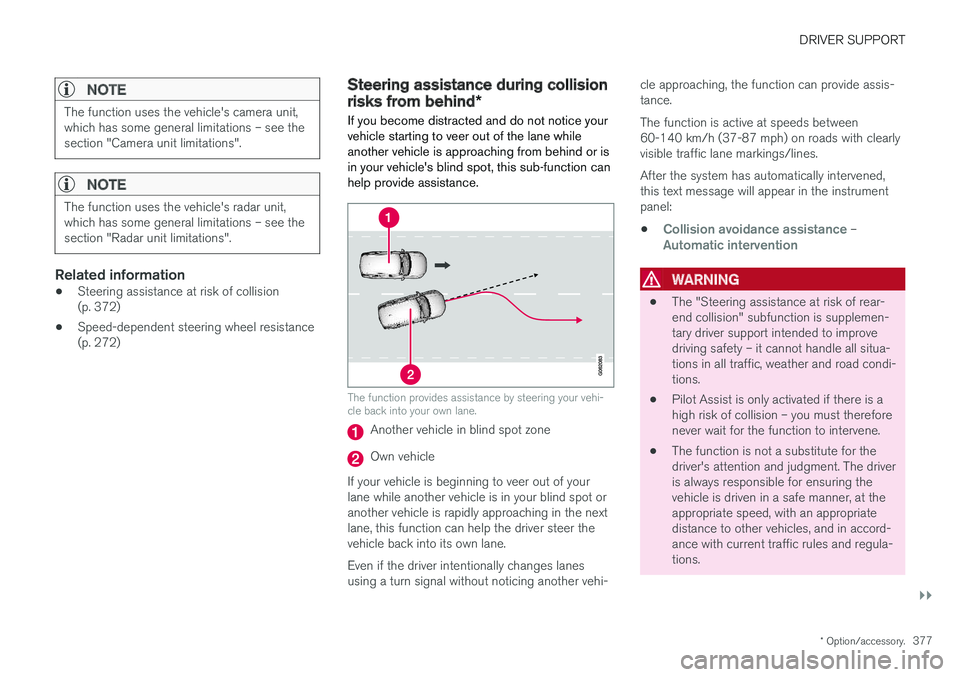
If you become distracted and do not notice your vehicle starting to veer out of the lane whileanother vehicle is approaching from behind or isin your vehicle's blind spot, this sub-function canhelp provide assistance.
The function provides assistance by steering your vehi- cle back into your own lane.
Another vehicle in blind spot zone
Own vehicle
If your vehicle is beginning to veer out of your lane while another vehicle is in your blind spot oranother vehicle is rapidly approaching in the next lane, this function can help the driver steer the vehicle back into its own lane. Even if the driver intentionally changes lanes using a turn signal without noticing another vehi- cle approaching, the function can provide assis-tance. The function is active at speeds between 60-140 km/h (37-87 mph) on roads with clearlyvisible traffic lane markings/lines. After the system has automatically intervened, this text message will appear in the instrumentpanel:
•
Collision avoidance assistance –Automatic intervention
WARNING
• The "Steering assistance at risk of rear- end collision" subfunction is supplemen-tary driver support intended to improvedriving safety – it cannot handle all situa-tions in all traffic, weather and road condi-tions.
• Pilot Assist is only activated if there is ahigh risk of collision – you must thereforenever wait for the function to intervene.
• The function is not a substitute for thedriver's attention and judgment. The driveris always responsible for ensuring thevehicle is driven in a safe manner, at theappropriate speed, with an appropriatedistance to other vehicles, and in accord-ance with current traffic rules and regula-tions.
Page 380 of 686
||
DRIVER SUPPORT
* Option/accessory.
378
Related information
• Steering assistance at risk of collision (p. 372)
Activating/deactivating Steeringassistance during collision risks
from behind
*
The driver can choose to have this function On
or Off .
To switch it off:
1. Select
SettingsMy CarIntelliSafe in
the center display's Top view.
2. Deselect
Collision avoidance assistance.
> The function will be deactivated.
NOTE
When the Collision avoidance assistancefunction is deactivated, all subfunctions of the following are deactivated: • Steering assistance at risk of run-off
• Steering assistance at risk of head-on collision
• Steering assistance during collision risks from behind
*
Although it is possible to deactivate the func- tion, the driver is advised to keep it activatedsince it can help improve driving safety inmost cases.
Related information
• Steering assistance at risk of collision (p. 372)
Limitations of steering assistanceduring collision risks from behind The function may have limited functionality in certain situations and not intervene, e.g.:
•
for smaller vehicles such as motorcycles
• if more than half of your vehicle has moved into the adjacent lane
• on roads/lanes with indistinct or no side lanemarkings
• outside the speed range 60-140 km/h(37-87 mph)
• when the power steering works at reducedpower - e.g. during cooling due to overheat-ing (see section "Speed-dependent steeringforce").
Functionality may also be reduced in other situa-tions, such as: • road work
• winter driving conditions
• narrow roads
• poor road surfaces
• a very sporty driving style
• bad weather with reduced visibility.
In these demanding driving conditions, the func-tion may not be able to properly assist the driver.In these situations, it is recommended that it isturned off.
Page 381 of 686
DRIVER SUPPORT
379
NOTE
The function uses the vehicle's camera unit, which has some general limitations – see thesection "Camera unit limitations".
NOTE
The function uses the vehicle's radar unit, which has some general limitations – see thesection "Radar unit limitations".
In addition to the camera and radar sensor, the function also uses the vehicle's rearward-facingradar, which has certain general limitations thedriver should be aware of. See additional informa-tion in the section "BLIS limitations".
Related information
•Steering assistance at risk of collision(p. 372)
• Speed-dependent steering wheel resistance(p. 272)
Page 382 of 686
DRIVER SUPPORT
380
Symbols and messages for steeringassistance during collision risks A number of symbols and messages related to the function may be displayed in the instrumentpanel.
Some examples of symbols and messages are shown in the table below.
SymbolMessageMeaning
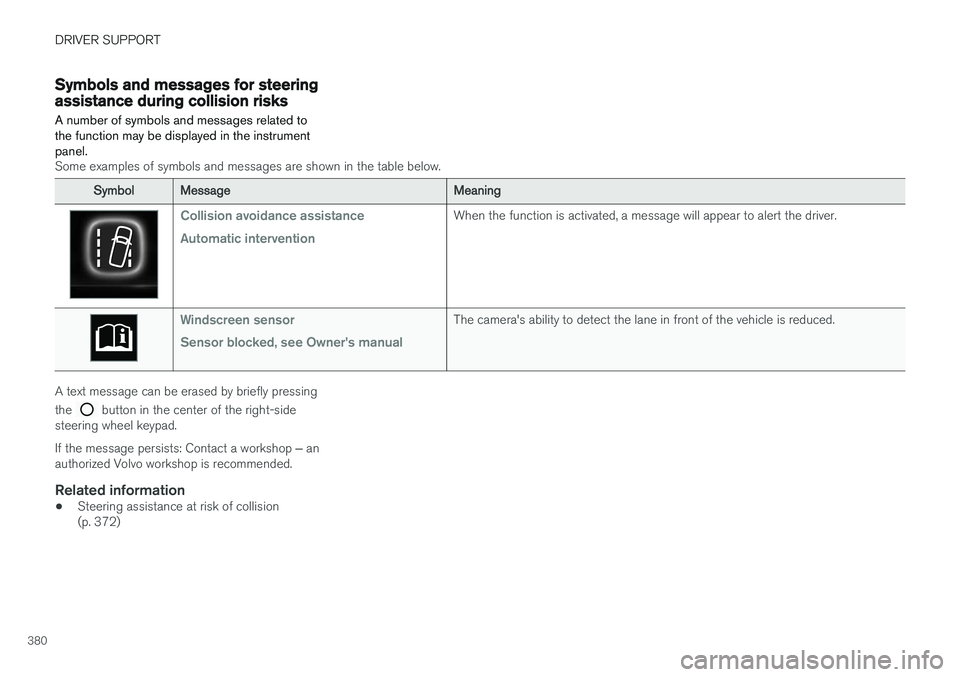
Collision avoidance assistance Automatic interventionWhen the function is activated, a message will appear to alert the driver.
Windscreen sensor Sensor blocked, see Owner's manualThe camera's ability to detect the lane in front of the vehicle is reduced.
A text message can be erased by briefly pressing the
button in the center of the right-side
steering wheel keypad. If the message persists: Contact a workshop ‒ an
authorized Volvo workshop is recommended.
Related information
• Steering assistance at risk of collision (p. 372)
Page 387 of 686
DRIVER SUPPORT
* Option/accessory.385
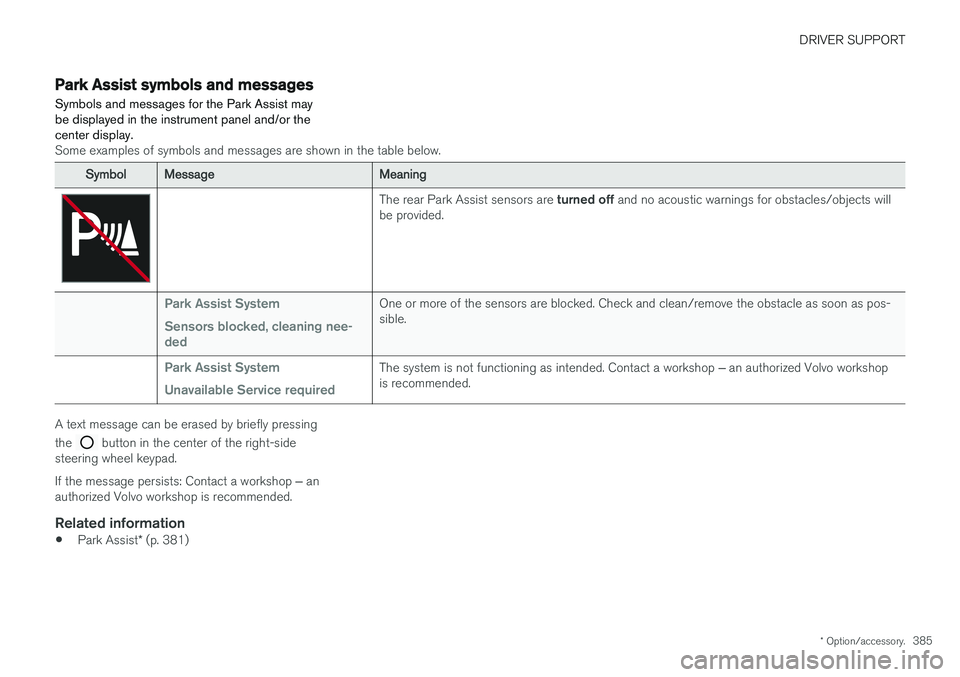
Park Assist symbols and messages
Symbols and messages for the Park Assist may be displayed in the instrument panel and/or thecenter display.
Some examples of symbols and messages are shown in the table below.
SymbolMessageMeaning
The rear Park Assist sensors are turned off and no acoustic warnings for obstacles/objects will
be provided.
Park Assist System Sensors blocked, cleaning nee- dedOne or more of the sensors are blocked. Check and clean/remove the obstacle as soon as pos- sible.
Park Assist System Unavailable Service requiredThe system is not functioning as intended. Contact a workshop ‒ an authorized Volvo workshop
is recommended.
A text message can be erased by briefly pressing the
button in the center of the right-side
steering wheel keypad. If the message persists: Contact a workshop ‒ an
authorized Volvo workshop is recommended.
Related information
• Park Assist
* (p. 381)
Page 390 of 686
||
DRIVER SUPPORT
* Option/accessory.
388
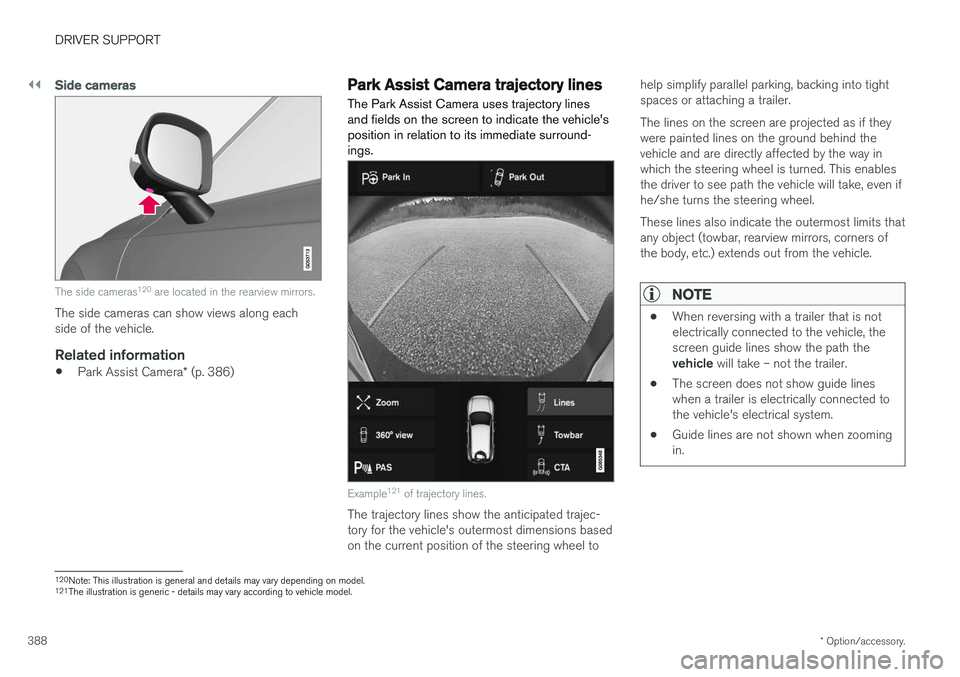
Side cameras
The side cameras 120
are located in the rearview mirrors.
The side cameras can show views along each side of the vehicle.
Related information
• Park Assist Camera
* (p. 386)
Park Assist Camera trajectory lines
The Park Assist Camera uses trajectory lines and fields on the screen to indicate the vehicle'sposition in relation to its immediate surround-ings.
Example 121
of trajectory lines.
The trajectory lines show the anticipated trajec- tory for the vehicle's outermost dimensions basedon the current position of the steering wheel to help simplify parallel parking, backing into tightspaces or attaching a trailer. The lines on the screen are projected as if they were painted lines on the ground behind thevehicle and are directly affected by the way inwhich the steering wheel is turned. This enablesthe driver to see path the vehicle will take, even ifhe/she turns the steering wheel. These lines also indicate the outermost limits that any object (towbar, rearview mirrors, corners ofthe body, etc.) extends out from the vehicle.
NOTE
•
When reversing with a trailer that is not electrically connected to the vehicle, thescreen guide lines show the path the vehicle
will take – not the trailer.
• The screen does not show guide lines when a trailer is electrically connected tothe vehicle's electrical system.
• Guide lines are not shown when zoomingin.
120
Note: This illustration is general and details may vary depending on model.
121 The illustration is generic - details may vary according to vehicle model.
Page 391 of 686
DRIVER SUPPORT
}}
* Option/accessory.389
CAUTION
•Bear in mind that when the rearward camera view is selected, the screen onlyshows the area behind the vehicle – payattention to the sides and front of thevehicle when steering while reversing.
• The same applies to the reverse – payattention to what is happening with therear parts of the vehicle when the frontcamera view is selected.
• Note that the guide lines show the
short-
est path – pay extra attention to ensure
that the vehicle sides do not come incontact with/travel over anything whensteering while driving forward or that thevehicle front moves toward/over anythingwhen steering while reversing.
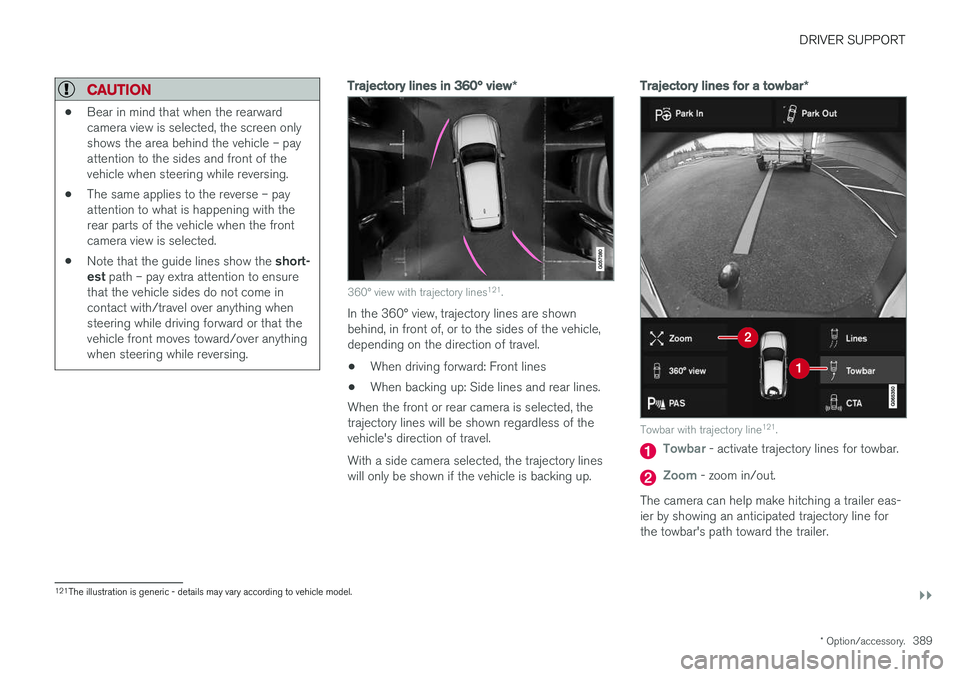
Trajectory lines in 360° view *
360° view with trajectory lines121
.
In the 360° view, trajectory lines are shown behind, in front of, or to the sides of the vehicle,depending on the direction of travel.
• When driving forward: Front lines
• When backing up: Side lines and rear lines.
When the front or rear camera is selected, thetrajectory lines will be shown regardless of thevehicle's direction of travel. With a side camera selected, the trajectory lines will only be shown if the vehicle is backing up.
Trajectory lines for a towbar *
Towbar with trajectory line121
.
Towbar - activate trajectory lines for towbar.
Zoom - zoom in/out.
The camera can help make hitching a trailer eas- ier by showing an anticipated trajectory line for the towbar's path toward the trailer.
121 The illustration is generic - details may vary according to vehicle model.
Page 396 of 686
DRIVER SUPPORT
* Option/accessory.
394
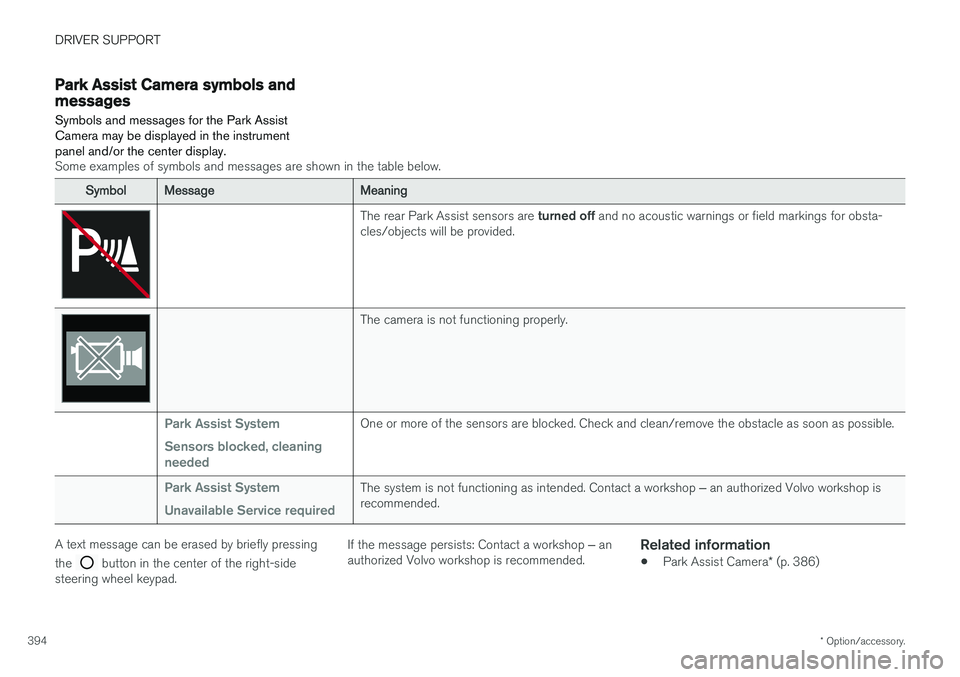
Park Assist Camera symbols andmessages
Symbols and messages for the Park Assist Camera may be displayed in the instrumentpanel and/or the center display.
Some examples of symbols and messages are shown in the table below.
SymbolMessageMeaning
The rear Park Assist sensors are turned off and no acoustic warnings or field markings for obsta-
cles/objects will be provided.
The camera is not functioning properly.
Park Assist System Sensors blocked, cleaning neededOne or more of the sensors are blocked. Check and clean/remove the obstacle as soon as possible.
Park Assist System Unavailable Service requiredThe system is not functioning as intended. Contact a workshop ‒ an authorized Volvo workshop is
recommended.
A text message can be erased by briefly pressing the
button in the center of the right-side
steering wheel keypad. If the message persists: Contact a workshop
‒ an
authorized Volvo workshop is recommended.
Related information
• Park Assist Camera
* (p. 386)
Page 400 of 686
||
DRIVER SUPPORT
398
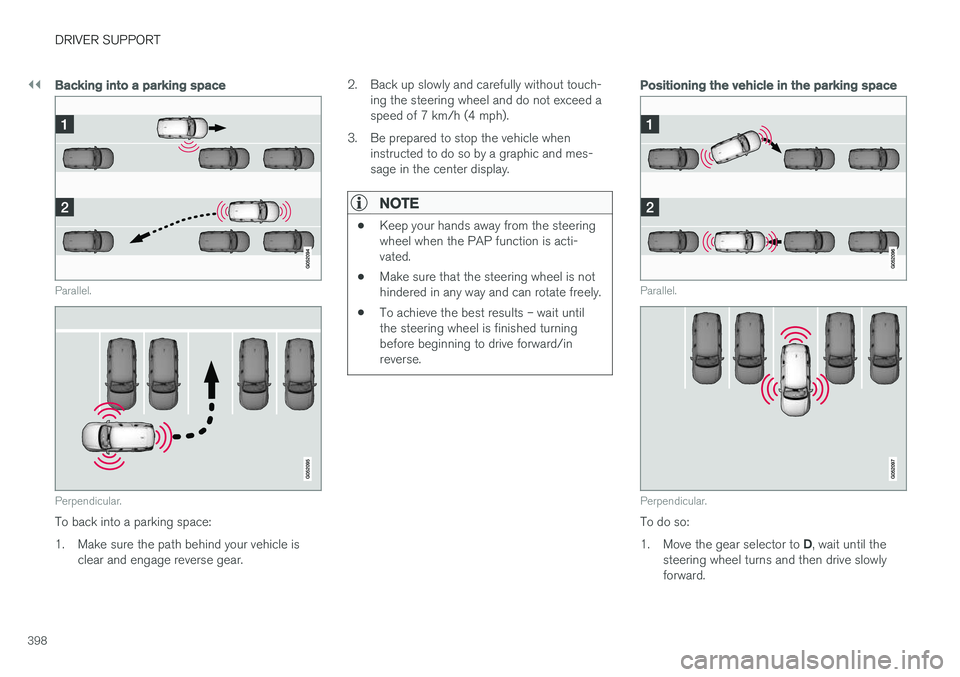
Backing into a parking space
Parallel.
Perpendicular.
To back into a parking space:
1. Make sure the path behind your vehicle isclear and engage reverse gear. 2. Back up slowly and carefully without touch-
ing the steering wheel and do not exceed a speed of 7 km/h (4 mph).
3. Be prepared to stop the vehicle when instructed to do so by a graphic and mes-sage in the center display.
NOTE
• Keep your hands away from the steering wheel when the PAP function is acti-vated.
• Make sure that the steering wheel is nothindered in any way and can rotate freely.
• To achieve the best results – wait untilthe steering wheel is finished turningbefore beginning to drive forward/inreverse.
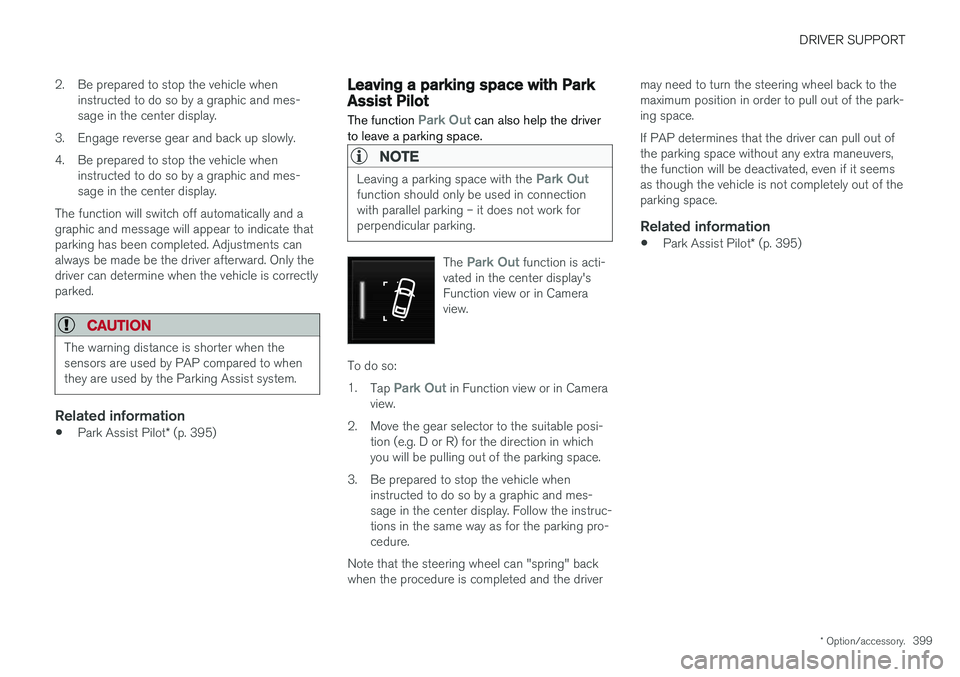
Positioning the vehicle in the parking space
Parallel.
Perpendicular.
To do so: 1.
Move the gear selector to D, wait until the
steering wheel turns and then drive slowly forward.
Page 401 of 686
DRIVER SUPPORT
* Option/accessory.399
2. Be prepared to stop the vehicle when
instructed to do so by a graphic and mes- sage in the center display.
3. Engage reverse gear and back up slowly.
4. Be prepared to stop the vehicle when instructed to do so by a graphic and mes- sage in the center display.
The function will switch off automatically and agraphic and message will appear to indicate thatparking has been completed. Adjustments canalways be made be the driver afterward. Only thedriver can determine when the vehicle is correctlyparked.
CAUTION
The warning distance is shorter when the sensors are used by PAP compared to whenthey are used by the Parking Assist system.
Related information
• Park Assist Pilot
* (p. 395)
Leaving a parking space with ParkAssist Pilot
The function
Park Out can also help the driver
to leave a parking space.
NOTE
Leaving a parking space with the Park Outfunction should only be used in connection with parallel parking – it does not work forperpendicular parking.
The Park Out function is acti-
vated in the center display's Function view or in Cameraview.
To do so: 1. Tap
Park Out in Function view or in Camera
view.
2. Move the gear selector to the suitable posi- tion (e.g. D or R) for the direction in which you will be pulling out of the parking space.
3. Be prepared to stop the vehicle when instructed to do so by a graphic and mes-sage in the center display. Follow the instruc-tions in the same way as for the parking pro-cedure.
Note that the steering wheel can "spring" backwhen the procedure is completed and the driver may need to turn the steering wheel back to themaximum position in order to pull out of the park-ing space. If PAP determines that the driver can pull out of the parking space without any extra maneuvers,the function will be deactivated, even if it seemsas though the vehicle is not completely out of theparking space.
Related information
•
Park Assist Pilot
* (p. 395)