brake sensor VOLVO XC90 T8 2018 Owner´s Manual
[x] Cancel search | Manufacturer: VOLVO, Model Year: 2018, Model line: XC90 T8, Model: VOLVO XC90 T8 2018Pages: 686, PDF Size: 11.51 MB
Page 326 of 686
||
DRIVER SUPPORT
* Option/accessory.
324
The driver is responsible for ensuring that the vehicle maintains a suitable distancefrom such obstacles.
• The camera and radar sensors do nothave the capacity to detect all oncomingobjects and obstacles in traffic environ-ments, e.g. potholes, stationary obstaclesor objects that completely or partiallyblock the route.
• Pilot Assist does not "see" pedestrians,animals, etc.
• The recommended steering input is lim-ited in force, which means that it cannotalways help the driver to steer and keepthe vehicle within the lane.
• Pilot Assist is switched off if the powersteering is working with reduced power -e.g. during cooling due to overheating(see section "Speed-dependent steeringforce").
The driver can always correct or adjust steeringassistance provided by Pilot Assist by turning thesteering wheel to the desired position.
Steep roads and/or heavy loadsPilot Assist is primarily intended to be driven onflat roads. The function may not be able to main-tain the correct time interval to the vehicle aheadwhen driving down steep hills. The driver should be extra attentive and prepared to apply thebrakes.
• Do not use Pilot Assist if the vehicle is carry-ing a heavy load or towing a trailer.
NOTE
Pilot Assist cannot be activated if a trailer, bike carrier or similar is connected to thevehicle electrical system.
Other limitations
•
The Off Road drive mode cannot be
selected when Pilot Assist is activated.
NOTE
The function uses the vehicle's camera unit, which has some general limitations – see thesection "Camera unit limitations".
NOTE
The function uses the vehicle's radar unit, which has some general limitations – see thesection "Radar unit limitations".
Related information
• Pilot Assist (p. 311)
• Speed-dependent steering wheel resistance (p. 272)
Pilot Assist
* symbols and messages
A number of symbols and messages relating to Pilot Assist may be displayed in the instrument panel and/or the head-up display *.
Page 337 of 686
DRIVER SUPPORT
}}
335
Recommended maintenance for thecamera/radar sensor
In order for the camera/radar sensor to function properly, the area of the windshield in front of theunit must be kept free of dirt, ice, snow, etc. andshould be washed regularly with water and carwashing detergent.
NOTE
Dirt, ice and snow covering the camera and radar unit reduce their function and can makemeasurement impossible. It could cause functions to be reduced, deac- tivated completely or produce an incorrectfunction response.
Related information
•Camera (p. 331)
City Safety
™
City Safety can alert the driver with light, sound and pulsations in the brake pedal to help thedriver detect pedestrians, cyclists, large animalsand vehicles that appear suddenly – the vehiclewill then attempt to automatically brake if thedriver does not act within a reasonable amountof time.
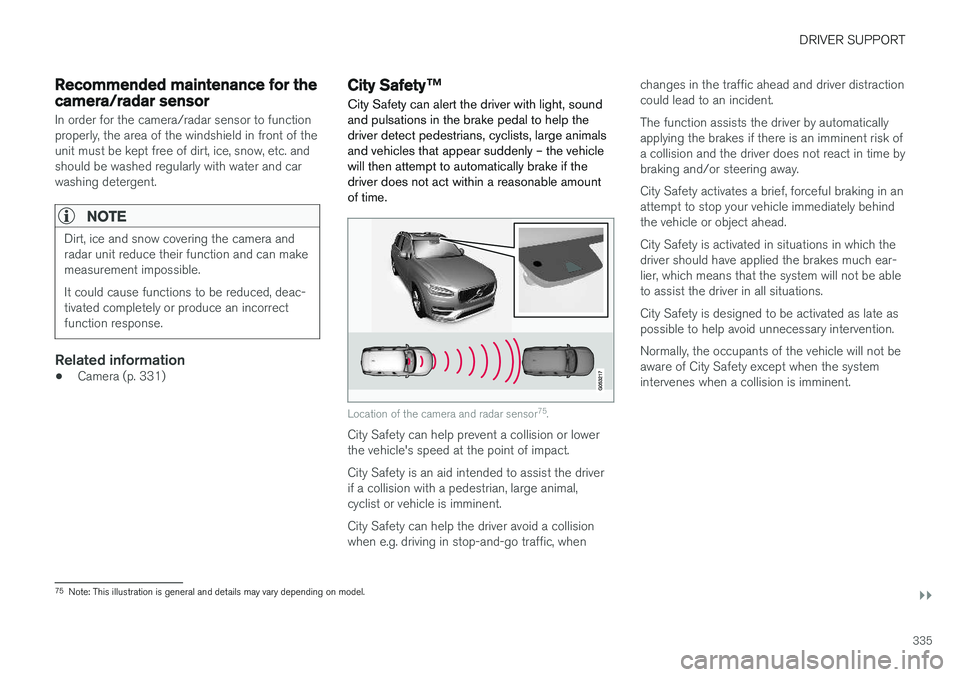
Location of the camera and radar sensor 75
.
City Safety can help prevent a collision or lower the vehicle's speed at the point of impact. City Safety is an aid intended to assist the driver if a collision with a pedestrian, large animal,cyclist or vehicle is imminent. City Safety can help the driver avoid a collision when e.g. driving in stop-and-go traffic, when changes in the traffic ahead and driver distractioncould lead to an incident. The function assists the driver by automatically applying the brakes if there is an imminent risk ofa collision and the driver does not react in time bybraking and/or steering away. City Safety activates a brief, forceful braking in an attempt to stop your vehicle immediately behindthe vehicle or object ahead. City Safety is activated in situations in which the driver should have applied the brakes much ear-lier, which means that the system will not be ableto assist the driver in all situations. City Safety is designed to be activated as late as possible to help avoid unnecessary intervention. Normally, the occupants of the vehicle will not be aware of City Safety except when the systemintervenes when a collision is imminent.
75
Note: This illustration is general and details may vary depending on model.
Page 339 of 686
DRIVER SUPPORT
}}
337
Large animals
If there is a risk of colliding with a large animal, City Safety can help reduce your vehicle's speedby up to 15 km/h (9 mph). The braking function for large animals is primarily intended to mitigate the force of a collision athigher speeds. Braking is most effective atspeeds above 70 km/h (43 mph) and less effec-tive at lower speeds.
City Safety sub-functions
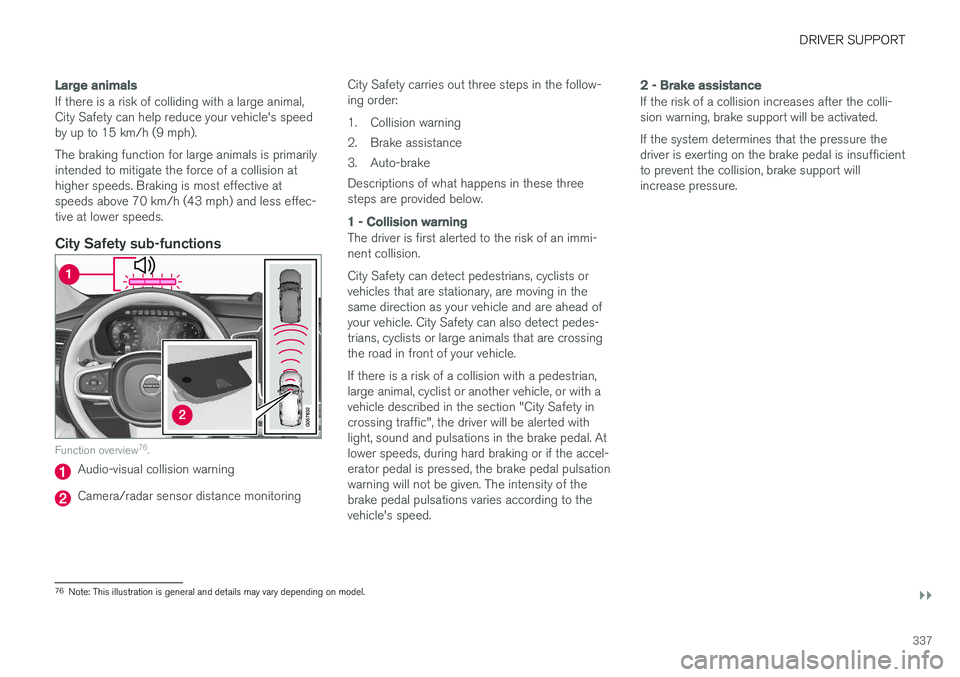
Function overview76
.
Audio-visual collision warning
Camera/radar sensor distance monitoring City Safety carries out three steps in the follow- ing order:
1. Collision warning
2. Brake assistance
3. Auto-brakeDescriptions of what happens in these three steps are provided below.
1 - Collision warning
The driver is first alerted to the risk of an immi- nent collision. City Safety can detect pedestrians, cyclists or vehicles that are stationary, are moving in thesame direction as your vehicle and are ahead ofyour vehicle. City Safety can also detect pedes-trians, cyclists or large animals that are crossingthe road in front of your vehicle. If there is a risk of a collision with a pedestrian, large animal, cyclist or another vehicle, or with avehicle described in the section "City Safety incrossing traffic", the driver will be alerted withlight, sound and pulsations in the brake pedal. Atlower speeds, during hard braking or if the accel-erator pedal is pressed, the brake pedal pulsationwarning will not be given. The intensity of thebrake pedal pulsations varies according to thevehicle's speed.
2 - Brake assistance
If the risk of a collision increases after the colli- sion warning, brake support will be activated. If the system determines that the pressure the driver is exerting on the brake pedal is insufficientto prevent the collision, brake support willincrease pressure.
76
Note: This illustration is general and details may vary depending on model.
Page 347 of 686
DRIVER SUPPORT
345
Other limitations
WARNING
•Warnings and brake interventions can be triggered late or not at all if the traffic sit-uation or external influences prevent thecamera and radar unit from properlydetecting pedestrians, cyclists, large ani-mals or vehicles ahead of the vehicle.
• To be able to detect vehicles at night, itsfront and rear lights must work and illumi-nate clearly.
• The camera and radar unit have a limitedrange for pedestrians and cyclists – thesystem can provide effective warningsand brake interventions if the relativespeed is lower than 50 km/h (30 mph).For stationary or slow-moving vehicles,warnings and brake interventions areeffective at vehicle speeds of up to70 km/h (43 mph). Speed reduction forlarge animals is less than 15 km/h(9 mph) and can be achieved at vehiclespeeds over 70 km/h (43 mph). At lowerspeeds, the warning and brake interven-tion for large animals is less effective.
• Warnings for stationary or slow-movingvehicles and large animals can be disen-gaged due to darkness or poor visibility.
• Warnings and brake interventions for pedestrians and cyclists are disengagedat vehicle speeds over 80 km/h(50 mph).
• Do not place, affix or mount anything onthe inside or outside of the windshield, orin front of or around the camera andradar unit – this could disrupt camera-based functions.
• Objects, snow, ice or dirt in the area ofthe camera sensor can reduce the func-tion, disengage it completely or give animproper function response.
NOTE
The function uses the vehicle's camera unit, which has some general limitations – see thesection "Camera unit limitations".
NOTE
The function uses the vehicle's radar unit, which has some general limitations – see thesection "Radar unit limitations".
Market limitationsCity Safety is not available in all countries. If City Safety is not shown in the center display's
Settings menu, your vehicle is not equipped with
this function. In the center display's Top view, tap:
•
SettingsMy CarIntelliSafe
Related information
• City Safety
™ (p. 335)
Page 384 of 686
DRIVER SUPPORT
382
Park Assist front, rear and sides
Park Assist has different parameters depending on which part of the vehicle is approaching anobstacle.
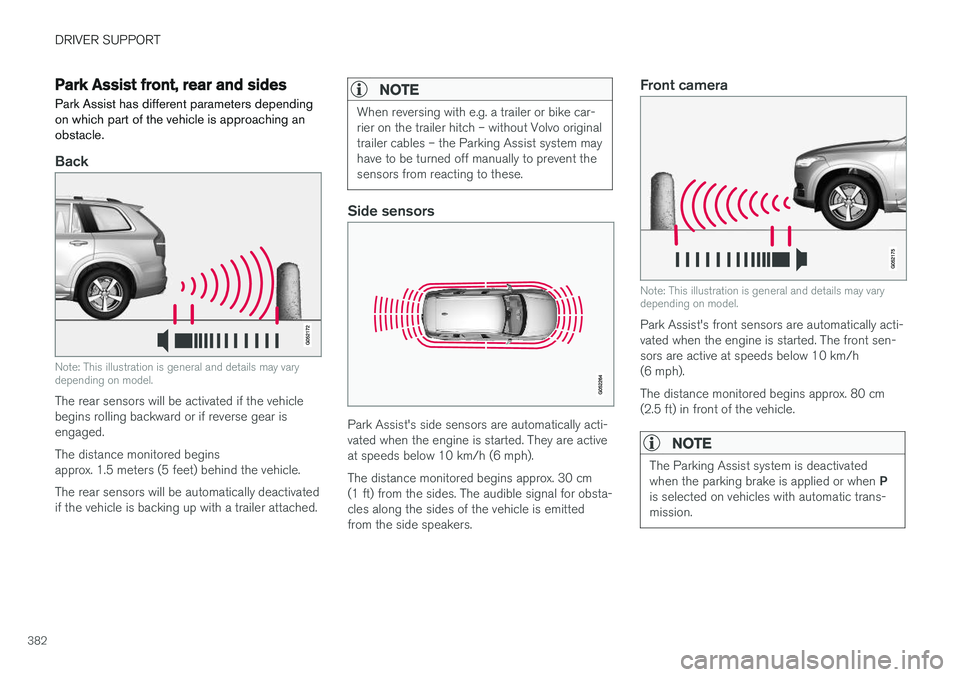
Back
Note: This illustration is general and details may vary depending on model.
The rear sensors will be activated if the vehicle begins rolling backward or if reverse gear isengaged. The distance monitored begins approx. 1.5 meters (5 feet) behind the vehicle. The rear sensors will be automatically deactivated if the vehicle is backing up with a trailer attached.
NOTE
When reversing with e.g. a trailer or bike car- rier on the trailer hitch – without Volvo originaltrailer cables – the Parking Assist system mayhave to be turned off manually to prevent thesensors from reacting to these.
Side sensors
Park Assist's side sensors are automatically acti- vated when the engine is started. They are activeat speeds below 10 km/h (6 mph). The distance monitored begins approx. 30 cm (1 ft) from the sides. The audible signal for obsta-cles along the sides of the vehicle is emittedfrom the side speakers.
Front camera
Note: This illustration is general and details may vary depending on model.
Park Assist's front sensors are automatically acti- vated when the engine is started. The front sen-sors are active at speeds below 10 km/h(6 mph). The distance monitored begins approx. 80 cm (2.5 ft) in front of the vehicle.
NOTE
The Parking Assist system is deactivated when the parking brake is applied or when P
is selected on vehicles with automatic trans- mission.
Page 386 of 686
||
DRIVER SUPPORT
* Option/accessory.
384
CAUTION
Objects such as chains, thin and glossy poles or low obstacles may end up in the "signalshadow" and then go temporarily undetectedby the sensors – the pulsating tone may thenunexpectedly stop instead of becoming aconstant tone as expected. The sensors cannot detect high objects, such as protruding ramps.
• In such situations, pay extra attention andmaneuver/drive the vehicle very slowly orstop the current parking maneuver –there may be a high risk of damage tothe vehicle or other objects since infor-mation from the sensors is not alwaysreliable in such situations.
CAUTION
In some circumstances, the Park Assist Sys- tem may produce false warnings due to exter-nal sound sources with the same ultrasonicfrequencies as those the system works with. Examples of such sources are horns, wet tires on asphalt, pneumatic brakes, exhaust noisefrom motorcycles, etc.
NOTE
When a trailer hitch is configured with the vehicle electrical system, the trailer hitch pro-trusion is included when the function meas-ures the distance to objects behind the vehi-cle.
Related information
•
Park Assist
* (p. 381)
Recommended maintenance forPark Assist
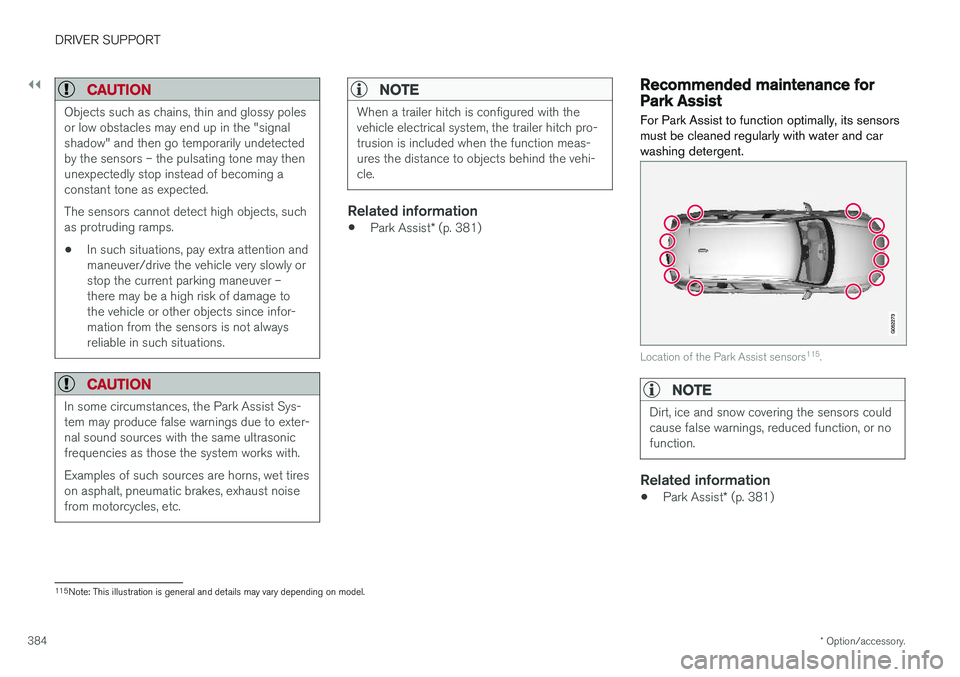
For Park Assist to function optimally, its sensors must be cleaned regularly with water and carwashing detergent.
Location of the Park Assist sensors 115
.
NOTE
Dirt, ice and snow covering the sensors could cause false warnings, reduced function, or nofunction.
Related information
• Park Assist
* (p. 381)
115
Note: This illustration is general and details may vary depending on model.
Page 402 of 686
DRIVER SUPPORT
* Option/accessory.
400
Park Assist Pilot * limitations
Park Assist Pilot PAP 127
may not be able to
detect all conditions in all situations and func- tionality may therefore be limited.WARNING
• The PAP function is supplementary driver support intended to facilitate driving andhelp make it safer – it cannot handle allsituations in all traffic, weather and roadconditions.
• Pay particular attention to people andanimals near the vehicle.
• Bear in mind that the front end of thevehicle may swing out towards oncomingtraffic during the parking maneuver.
• Objects situated higher than the detec-tion area of the sensors are not includedwhen the parking maneuver is calculated,which could cause PAP to swing into theparking space too early. Such parkingspaces should be avoided for this reason.
• PAP is not a substitute for the driver'sattention and judgment. The driver isalways responsible for ensuring the vehi-cle is driven in a safe manner, at theappropriate speed, with an appropriatedistance to other vehicles, and in accord-ance with current traffic rules and regula-tions.
The driver should be aware of the following limi-tations for Park Assist Pilot:
The parking sequence is cancelledA parking sequence will be cancelled if:
• the driver moves the steering wheel
• the vehicle's speed exceeds 7 km/h (4 mph)
• the driver taps
Cancel in the center display
• when the anti-lock brakes or the Electronic stability control are engaged - e.g. when awheel loses grip on a slippery road
• when the power steering works at reduced power - e.g. during cooling due to overheat- ing (see section "Speed-dependent steeringforce").
A message in the center display will explain whythe parking sequence was cancelled.
CAUTION
Under certain circumstances, PAP may not be able to find parking spaces – one reason maybe that the sensors are disrupted by externalsound sources that emit the same ultrasonicfrequencies that the system works with. Examples of such sources include horns, wet tires on asphalt, pneumatic brakes, exhaustnoise from motorcycles, etc.
127 Park Assist Pilot
Page 432 of 686
||
STARTING AND DRIVING
430augment braking. This is indicated in the instru- ment panel with the pointer down in the red area.
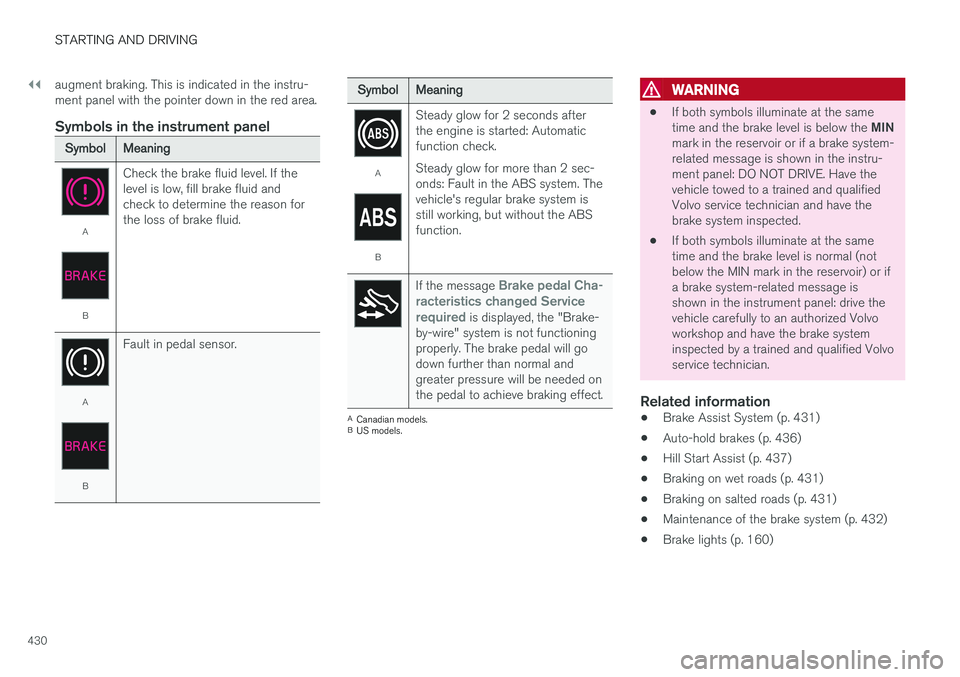
Symbols in the instrument panel
SymbolMeaning
A
B
Check the brake fluid level. If the level is low, fill brake fluid andcheck to determine the reason forthe loss of brake fluid.
A
BFault in pedal sensor.
SymbolMeaning
A
BSteady glow for 2 seconds after the engine is started: Automaticfunction check. Steady glow for more than 2 sec- onds: Fault in the ABS system. Thevehicle's regular brake system isstill working, but without the ABSfunction.
If the message Brake pedal Cha-
racteristics changed Service required
is displayed, the "Brake-
by-wire" system is not functioning properly. The brake pedal will godown further than normal andgreater pressure will be needed onthe pedal to achieve braking effect.
A Canadian models.
B US models.
WARNING
• If both symbols illuminate at the same time and the brake level is below the
MIN
mark in the reservoir or if a brake system- related message is shown in the instru-ment panel: DO NOT DRIVE. Have thevehicle towed to a trained and qualifiedVolvo service technician and have thebrake system inspected.
• If both symbols illuminate at the sametime and the brake level is normal (notbelow the MIN mark in the reservoir) or ifa brake system-related message isshown in the instrument panel: drive thevehicle carefully to an authorized Volvoworkshop and have the brake systeminspected by a trained and qualified Volvoservice technician.
Related information
• Brake Assist System (p. 431)
• Auto-hold brakes (p. 436)
• Hill Start Assist (p. 437)
• Braking on wet roads (p. 431)
• Braking on salted roads (p. 431)
• Maintenance of the brake system (p. 432)
• Brake lights (p. 160)
Page 626 of 686
||
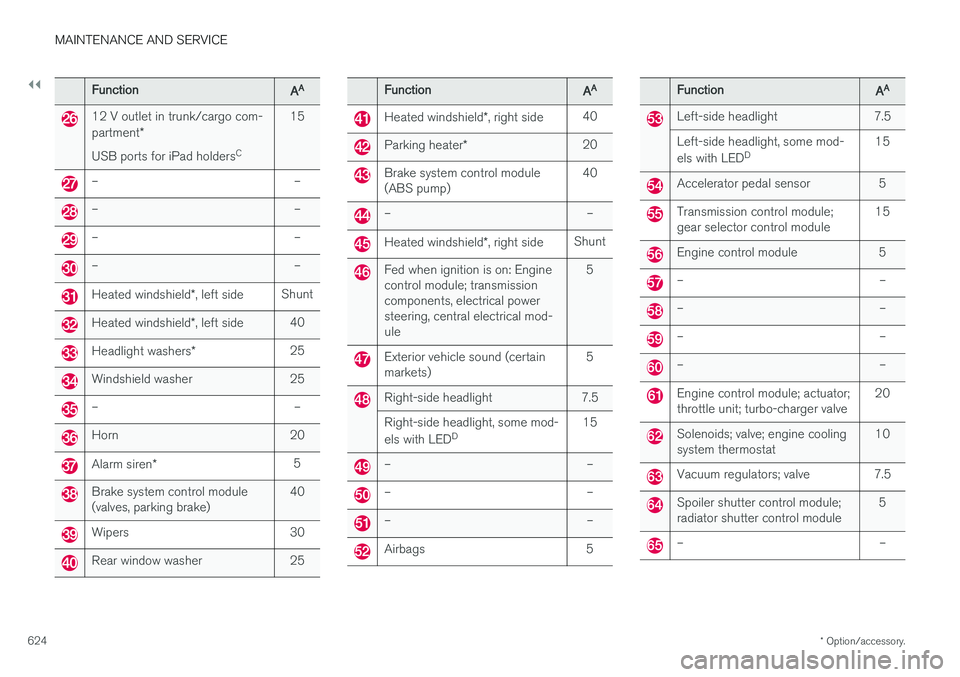
MAINTENANCE AND SERVICE
* Option/accessory.
624
FunctionAA
12 V outlet in trunk/cargo com- partment *
USB ports for iPad holders C15
– –
– –
– –
– –
Heated windshield
*, left side Shunt
Heated windshield
*, left side 40
Headlight washers
*25
Windshield washer 25
– –
Horn 20
Alarm siren
* 5
Brake system control module (valves, parking brake) 40
Wipers 30
Rear window washer 25
FunctionAA
Heated windshield
*, right side 40
Parking heater
* 20
Brake system control module (ABS pump) 40
– –
Heated windshield
*, right side Shunt
Fed when ignition is on: Engine control module; transmissioncomponents, electrical powersteering, central electrical mod-ule 5
Exterior vehicle sound (certain markets)
5
Right-side headlight 7.5 Right-side headlight, some mod- els with LED
D 15
– –
– –
– –
Airbags 5
FunctionAA
Left-side headlight 7.5 Left-side headlight, some mod- els with LED
D 15
Accelerator pedal sensor 5
Transmission control module; gear selector control module 15
Engine control module 5
– –
– –
– –
– –
Engine control module; actuator; throttle unit; turbo-charger valve20
Solenoids; valve; engine cooling system thermostat10
Vacuum regulators; valve 7.5
Spoiler shutter control module; radiator shutter control module 5
– –
Page 629 of 686
MAINTENANCE AND SERVICE
}}
* Option/accessory.627
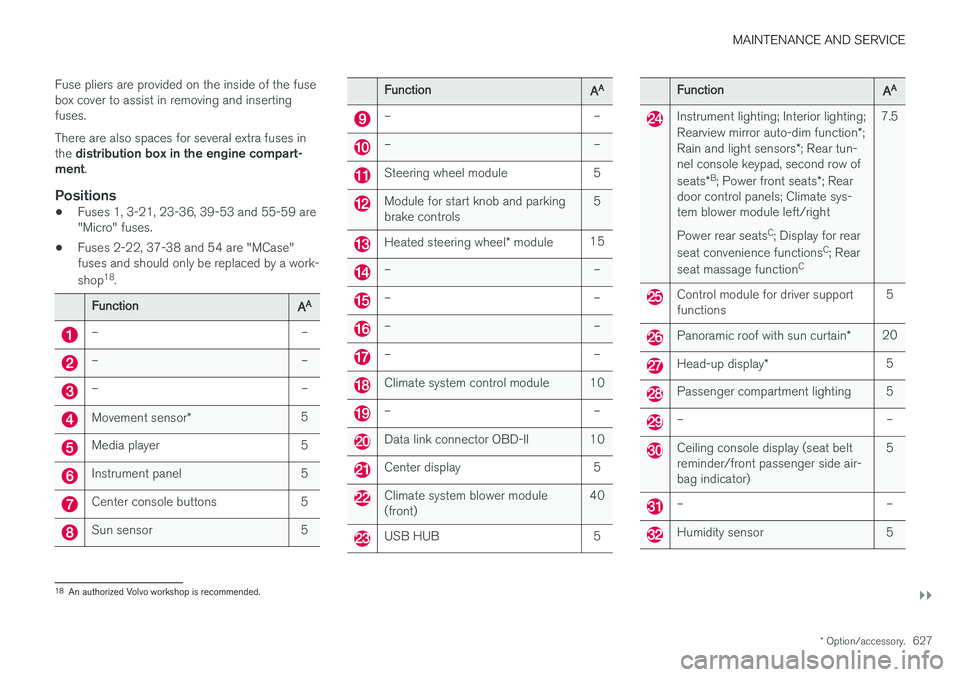
Fuse pliers are provided on the inside of the fuse box cover to assist in removing and insertingfuses. There are also spaces for several extra fuses in the
distribution box in the engine compart-
ment .
Positions
•Fuses 1, 3-21, 23-36, 39-53 and 55-59 are "Micro" fuses.
• Fuses 2-22, 37-38 and 54 are "MCase"fuses and should only be replaced by a work- shop 18
.
FunctionAA
– –
– –
– –
Movement sensor * 5
Media player 5
Instrument panel 5
Center console buttons 5
Sun sensor 5
FunctionAA
– –
– –
Steering wheel module 5
Module for start knob and parking brake controls 5
Heated steering wheel
* module 15
– –
– –
– –
– –
Climate system control module 10
– –
Data link connector OBD-II 10
Center display 5
Climate system blower module (front) 40
USB HUB 5
FunctionAA
Instrument lighting; Interior lighting; Rearview mirror auto-dim function
*;
Rain and light sensors *; Rear tun-
nel console keypad, second row of seats *B
; Power front seats *; Rear
door control panels; Climate sys- tem blower module left/right Power rear seats C
; Display for rear
seat convenience functions C
; Rear
seat massage function C7.5
Control module for driver support functions
5
Panoramic roof with sun curtain
*20
Head-up display
* 5
Passenger compartment lighting 5
– –
Ceiling console display (seat belt reminder/front passenger side air-bag indicator) 5
– –
Humidity sensor 5
18
An authorized Volvo workshop is recommended.