phone VOLVO XC90 T8 2018 Owner´s Manual
[x] Cancel search | Manufacturer: VOLVO, Model Year: 2018, Model line: XC90 T8, Model: VOLVO XC90 T8 2018Pages: 686, PDF Size: 11.51 MB
Page 47 of 686
SAFETY
}}
45
You can also obtain other information about motor vehicle safety from http://www.safercar.gov, where you can alsoenter your vehicle's VIN (Vehicle Identi-fication Number) to see if it has anyopen recalls. Volvo strongly recommends that if your vehicle is covered under a service cam-paign, safety or emission recall or simi-lar action, it should be completed assoon as possible. Please check withyour local retailer or Volvo Car USA,LLC if your vehicle is covered underthese conditions. NHTSA can be reached at:Internet:http://www.nhtsa.govTelephone:1-888-DASH-2-DOT (1-888-327-4236).
Reporting safety defects in CanadaIf you believe your vehicle has a defect that could cause a crash or could cause injury or death, youshould immediately inform Transport Canada inaddition to notifying Volvo Car Canada Ltd.
Transport Canada can be contacted at:
1-800-333-0510 Teletypewriter (TTY): 613 990-4500Fax: 1-819-994-3372Mailing Address: Transport Canada - Road Safety, 80 rue Noël, Gatineau, (Quebec) J8Z 0A1
Related information
•
Safety (p. 42)
• Occupant safety (p. 43)
• Recall information (p. 45)
• Viewing the Vehicle Identification Number(VIN) (p. 38)
Recall information
On our website, select the "Own" tab on the upper left side of the screen and click the head-ing "Recall Information" on the right side of thescreen. Enter your Vehicle Identification Number(VIN) for your vehicle (found at the base of thewindshield). If your vehicle has any open Recalls,they will be displayed on this page. You can also enter the Vehicle Identification Number in the search field on the NationalHighway Traffic Safety Administration's (NHTSA)website at: www.nhtsa.gov.
Volvo customers in Canada
For any questions regarding open recalls for your vehicle, please contact your authorized Volvoretailer. If your retailer is unable to answer yourquestions, please contact Volvo Customer Rela-tions at 800-663-8255, Monday through Friday,8:30 A.M. to 5:00 P.M. EST or volvocars.com/ca.You may also write us at: Volvo Car Canada Ltd.Customer Care Centre9130 Leslie Street, Suite 101Richmond Hill, Ontario L4B 0B9www.tc.gc.ca
Page 87 of 686
DISPLAYS AND VOICE CONTROL
85
Left sideIn the centerRight side
– Media player Distance to discharged battery
– Navigation system map Current fuel consumption
– PhoneApp menu (activated using steering wheel keypad)
– Voice Control –
– CompassA
–
ADepends on selected drive mode.
B Total distance.
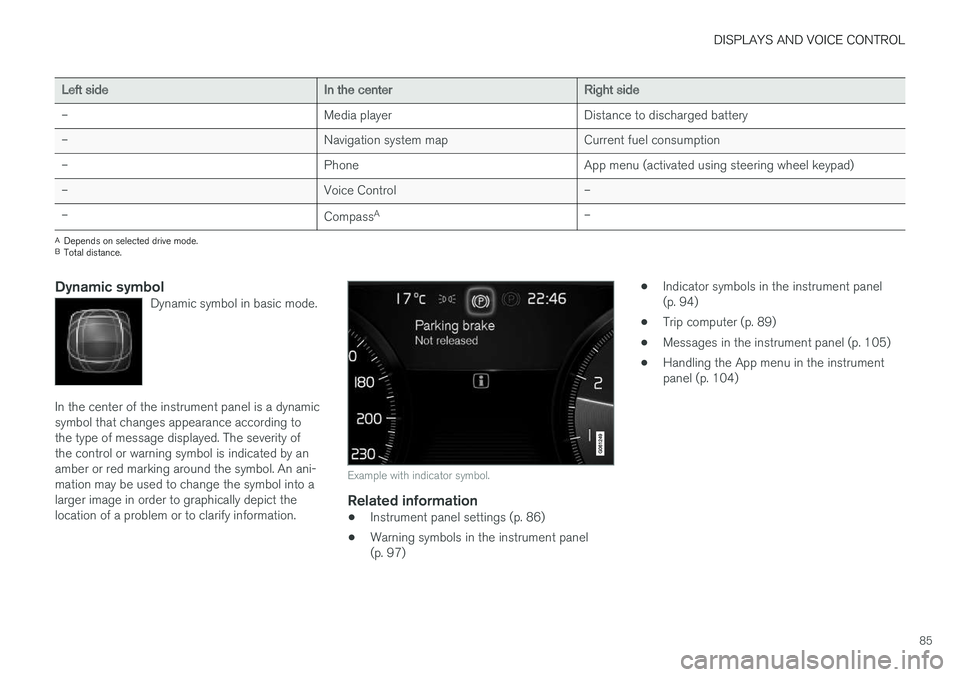
Dynamic symbolDynamic symbol in basic mode.
In the center of the instrument panel is a dynamic symbol that changes appearance according tothe type of message displayed. The severity ofthe control or warning symbol is indicated by anamber or red marking around the symbol. An ani-mation may be used to change the symbol into alarger image in order to graphically depict thelocation of a problem or to clarify information.
Example with indicator symbol.
Related information
• Instrument panel settings (p. 86)
• Warning symbols in the instrument panel (p. 97) •
Indicator symbols in the instrument panel(p. 94)
• Trip computer (p. 89)
• Messages in the instrument panel (p. 105)
• Handling the App menu in the instrumentpanel (p. 104)
Page 88 of 686
DISPLAYS AND VOICE CONTROL
* Option/accessory.
86
Instrument panel settings
Display settings for the instrument panel can be set in the instrument panel's app menu and inthe center display's Settings menu.
Settings in instrument panel's app menu
The app menu can be used to set what informa- tion will be displayed in the instrument panel:
• trip computer
• media player
• phone
• navigation system
*.
Center display settings
Selecting type of information
1.
Tap Settings in the center display's Top
view.
2. Tap
My CarDisplaysDriver Display
Information.
3. Select a background:
•
Show no information in the background
•Show information for current playing media
•Show navigation even if no route is set.
Select theme
1. Tap Settings in the center display's Top
view.
2. Tap
My CarDisplaysDisplay
Themes
3. Select a theme (appearance) for the instru- ment panel:
•
Glass
•Minimalistic
•Performance
•Chrome Rings.
Select language
1. Tap Settings in the center display's Top
view.
2. Tap
SystemSystem Languages and
Units
System Language to select lan-
guage.
> A change made here will affect the lan- guage in all displays.
The settings are personal and saved automati- cally in the active driver profile.
Related information
• Instrument panel (p. 84)
• Handling the App menu in the instrumentpanel (p. 104)
• Changing settings in the center display(p. 134)
Fuel gauge
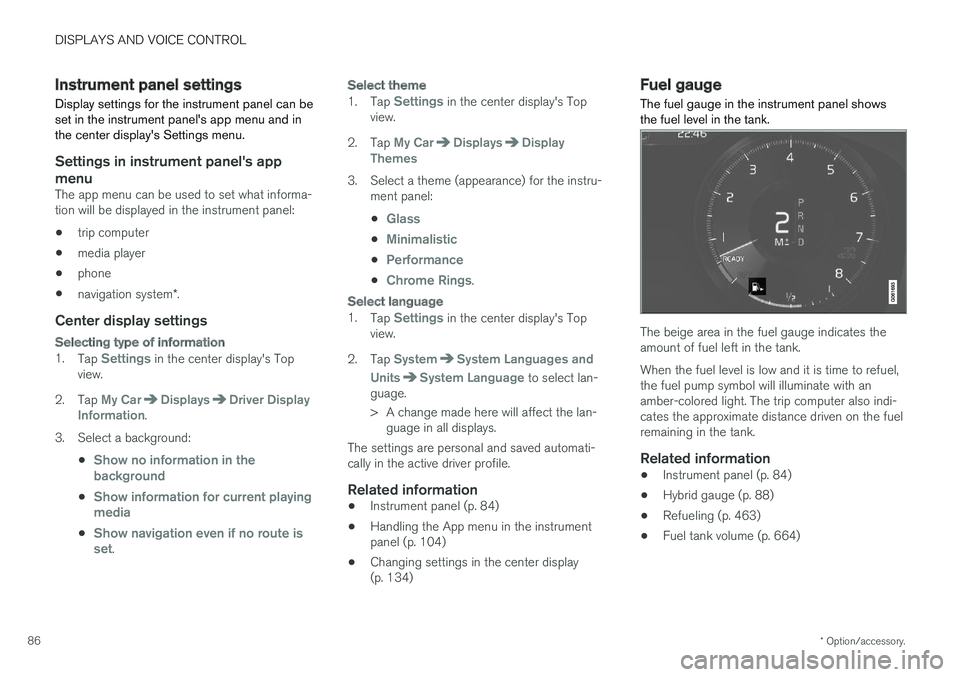
The fuel gauge in the instrument panel shows the fuel level in the tank.
The beige area in the fuel gauge indicates the amount of fuel left in the tank. When the fuel level is low and it is time to refuel, the fuel pump symbol will illuminate with anamber-colored light. The trip computer also indi-cates the approximate distance driven on the fuelremaining in the tank.
Related information
• Instrument panel (p. 84)
• Hybrid gauge (p. 88)
• Refueling (p. 463)
• Fuel tank volume (p. 664)
Page 106 of 686
||
DISPLAYS AND VOICE CONTROL
104
AppFunctions
Trip com- puter Select a trip odometer, changeinstrument panel display set-tings, etc.
Media player Select active source for media player.
Phone Call a contact from the call list.
Navigation Guide to destination, etc.
Related information
• Instrument panel (p. 84)
• Center display overview (p. 109)
• Handling the App menu in the instrument panel (p. 104)
Handling the App menu in theinstrument panel
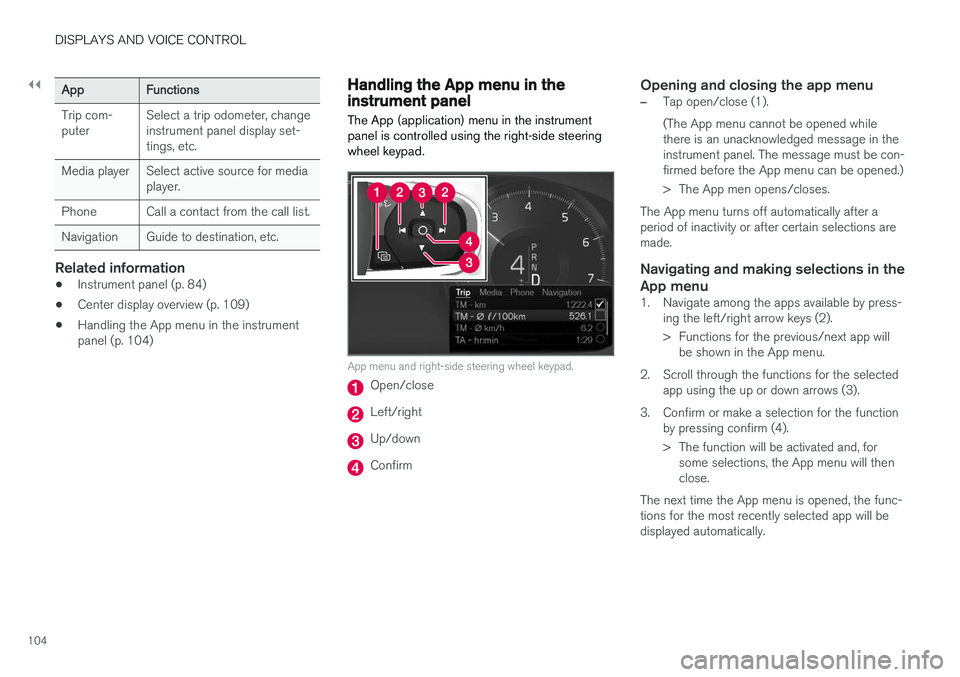
The App (application) menu in the instrument panel is controlled using the right-side steeringwheel keypad.
App menu and right-side steering wheel keypad.
Open/close
Left/right
Up/down
Confirm
Opening and closing the app menu
–Tap open/close (1). (The App menu cannot be opened while there is an unacknowledged message in theinstrument panel. The message must be con-firmed before the App menu can be opened.)
> The App men opens/closes.
The App menu turns off automatically after a period of inactivity or after certain selections aremade.
Navigating and making selections in the
App menu
1. Navigate among the apps available by press- ing the left/right arrow keys (2).
> Functions for the previous/next app willbe shown in the App menu.
2. Scroll through the functions for the selected app using the up or down arrows (3).
3. Confirm or make a selection for the function by pressing confirm (4).
> The function will be activated and, forsome selections, the App menu will then close.
The next time the App menu is opened, the func-tions for the most recently selected app will bedisplayed automatically.
Page 109 of 686
DISPLAYS AND VOICE CONTROL
}}
107
Handling messages saved from theinstrument panel
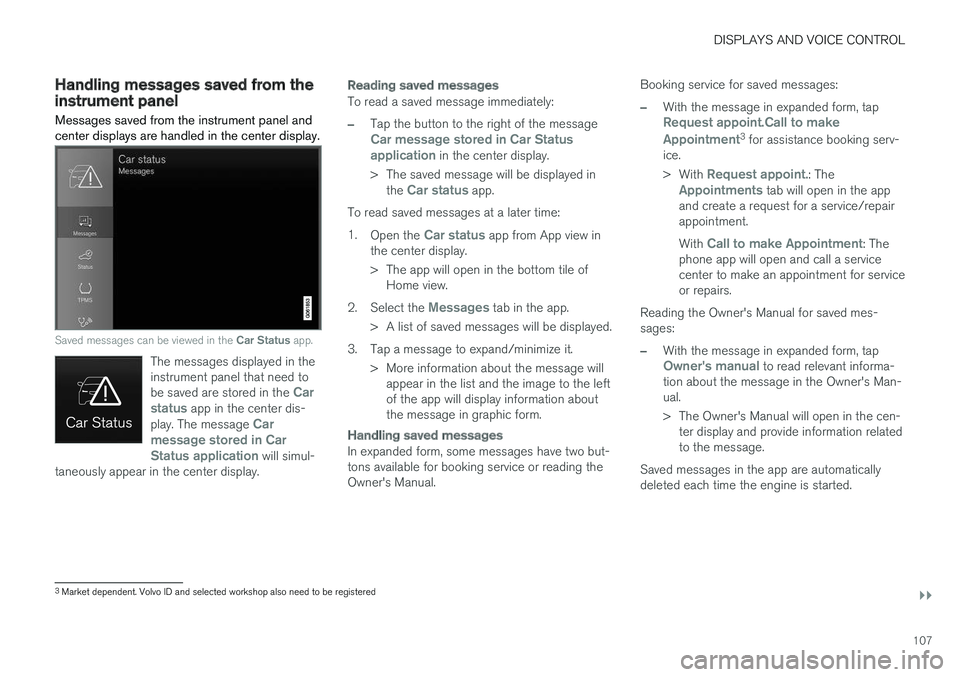
Messages saved from the instrument panel and center displays are handled in the center display.
Saved messages can be viewed in the Car Status app.
The messages displayed in the instrument panel that need to be saved are stored in the
Car
status app in the center dis-
play. The message Car
message stored in Car Status application
will simul-
taneously appear in the center display.
Reading saved messages
To read a saved message immediately:
–Tap the button to the right of the messageCar message stored in Car Status application in the center display.
> The saved message will be displayed in the
Car status app.
To read saved messages at a later time: 1. Open the
Car status app from App view in
the center display.
> The app will open in the bottom tile of Home view.
2. Select the
Messages tab in the app.
> A list of saved messages will be displayed.
3. Tap a message to expand/minimize it. > More information about the message willappear in the list and the image to the left of the app will display information aboutthe message in graphic form.
Handling saved messages
In expanded form, some messages have two but- tons available for booking service or reading theOwner's Manual. Booking service for saved messages:
–With the message in expanded form, tapRequest appoint.Call to make Appointment3
for assistance booking serv-
ice. > With
Request appoint.: TheAppointments tab will open in the app
and create a request for a service/repair appointment. With
Call to make Appointment: The
phone app will open and call a service center to make an appointment for serviceor repairs.
Reading the Owner's Manual for saved mes-sages:
–With the message in expanded form, tapOwner's manual to read relevant informa-
tion about the message in the Owner's Man- ual.
> The Owner's Manual will open in the cen- ter display and provide information related to the message.
Saved messages in the app are automaticallydeleted each time the engine is started.
3 Market dependent. Volvo ID and selected workshop also need to be registered
Page 113 of 686
DISPLAYS AND VOICE CONTROL
* Option/accessory.111
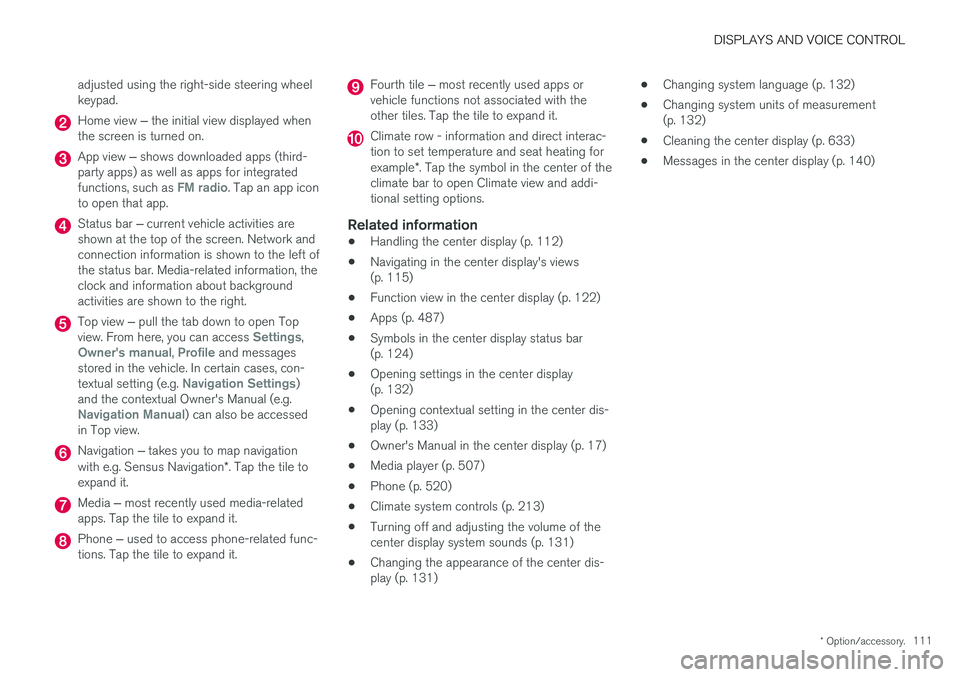
adjusted using the right-side steering wheel keypad.
Home view
‒ the initial view displayed when
the screen is turned on.
App view ‒ shows downloaded apps (third-
party apps) as well as apps for integrated functions, such as
FM radio. Tap an app icon
to open that app.
Status bar ‒ current vehicle activities are
shown at the top of the screen. Network and connection information is shown to the left ofthe status bar. Media-related information, theclock and information about backgroundactivities are shown to the right.
Top view ‒ pull the tab down to open Top
view. From here, you can access Settings,Owner's manual, Profile and messages
stored in the vehicle. In certain cases, con- textual setting (e.g.
Navigation Settings)
and the contextual Owner's Manual (e.g.
Navigation Manual) can also be accessed
in Top view.
Navigation ‒ takes you to map navigation
with e.g. Sensus Navigation *. Tap the tile to
expand it.
Media ‒ most recently used media-related
apps. Tap the tile to expand it.
Phone ‒ used to access phone-related func-
tions. Tap the tile to expand it.
Fourth tile ‒ most recently used apps or
vehicle functions not associated with the other tiles. Tap the tile to expand it.
Climate row - information and direct interac- tion to set temperature and seat heating for example *. Tap the symbol in the center of the
climate bar to open Climate view and addi- tional setting options.
Related information
• Handling the center display (p. 112)
• Navigating in the center display's views(p. 115)
• Function view in the center display (p. 122)
• Apps (p. 487)
• Symbols in the center display status bar(p. 124)
• Opening settings in the center display(p. 132)
• Opening contextual setting in the center dis-play (p. 133)
• Owner's Manual in the center display (p. 17)
• Media player (p. 507)
• Phone (p. 520)
• Climate system controls (p. 213)
• Turning off and adjusting the volume of thecenter display system sounds (p. 131)
• Changing the appearance of the center dis-play (p. 131) •
Changing system language (p. 132)
• Changing system units of measurement(p. 132)
• Cleaning the center display (p. 633)
• Messages in the center display (p. 140)
Page 117 of 686
DISPLAYS AND VOICE CONTROL
}}
* Option/accessory.115
Activating and deactivating thecenter display
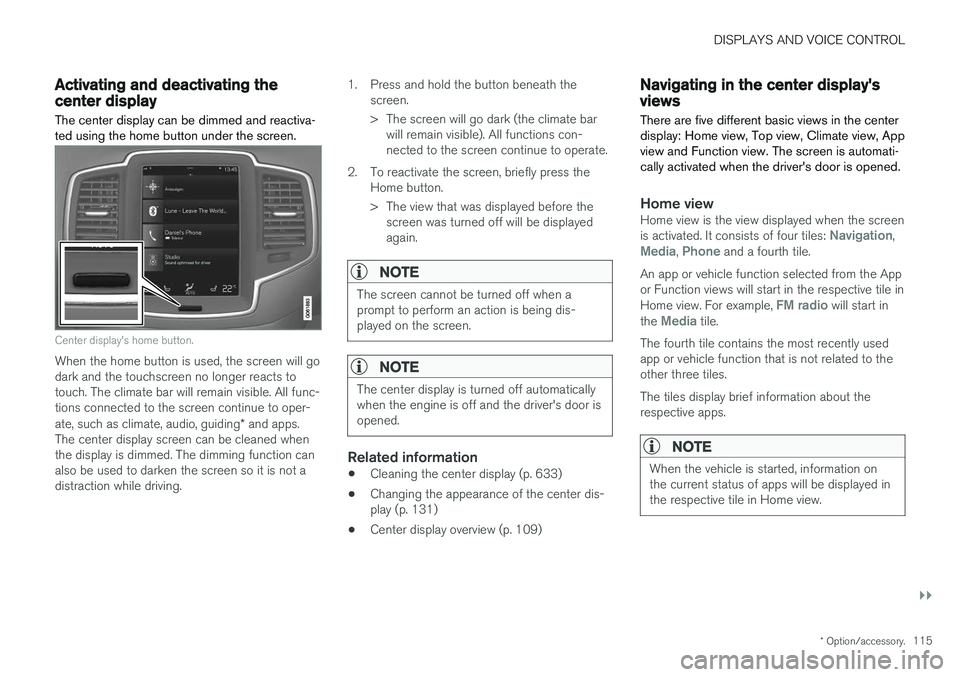
The center display can be dimmed and reactiva- ted using the home button under the screen.
Center display's home button.
When the home button is used, the screen will go dark and the touchscreen no longer reacts totouch. The climate bar will remain visible. All func-tions connected to the screen continue to oper- ate, such as climate, audio, guiding * and apps.
The center display screen can be cleaned when the display is dimmed. The dimming function can also be used to darken the screen so it is not adistraction while driving. 1. Press and hold the button beneath the
screen.
> The screen will go dark (the climate barwill remain visible). All functions con- nected to the screen continue to operate.
2. To reactivate the screen, briefly press the Home button.
> The view that was displayed before thescreen was turned off will be displayed again.
NOTE
The screen cannot be turned off when a prompt to perform an action is being dis-played on the screen.
NOTE
The center display is turned off automatically when the engine is off and the driver's door isopened.
Related information
• Cleaning the center display (p. 633)
• Changing the appearance of the center dis- play (p. 131)
• Center display overview (p. 109)
Navigating in the center display'sviews
There are five different basic views in the center display: Home view, Top view, Climate view, Appview and Function view. The screen is automati-cally activated when the driver's door is opened.
Home viewHome view is the view displayed when the screen is activated. It consists of four tiles: Navigation,Media, Phone and a fourth tile.
An app or vehicle function selected from the App or Function views will start in the respective tile in Home view. For example,
FM radio will start in
the Media tile.
The fourth tile contains the most recently used app or vehicle function that is not related to theother three tiles. The tiles display brief information about the respective apps.
NOTE
When the vehicle is started, information on the current status of apps will be displayed inthe respective tile in Home view.
Page 121 of 686
DISPLAYS AND VOICE CONTROL
}}
119
Handling tiles in the center display Home view consists of four tiles:
Navigation,Media, Phone and a fourth tile. These views
can be expanded.
Page 123 of 686
DISPLAYS AND VOICE CONTROL
121
Expanding a tile:
–For tiles Navigation, Media and Phone:
Tap the screen anywhere in the tile. When a tile is expanded, the extra tile in the homeview is temporarily forced away. The othertwo tiles will be minimized and only showcertain information. When the extra tile istapped, the other three tiles are minimizedand only certain information is displayed. Expanded view provides access to the basic functions of the respective apps.
Closing an expanded tile:
–The tile can be closed in three different ways:
• Tap the top section of the expanded tile.
• Tap another tile (it will then be opened inexpanded mode instead).
• Press briefly on the Home button underthe center display.
Opening or closing a tile in full-screen mode
The fourth tile 6
and tile for Navigation can be
opened in full-screen mode to show additional information and possible settings. When a tile is opened in full-screen mode, no information from the other tiles is displayed. In expanded mode, open theapp in full-screen mode. Tapthe symbol.
To return to expanded mode, tap the symbol or press theHome button under the screen.
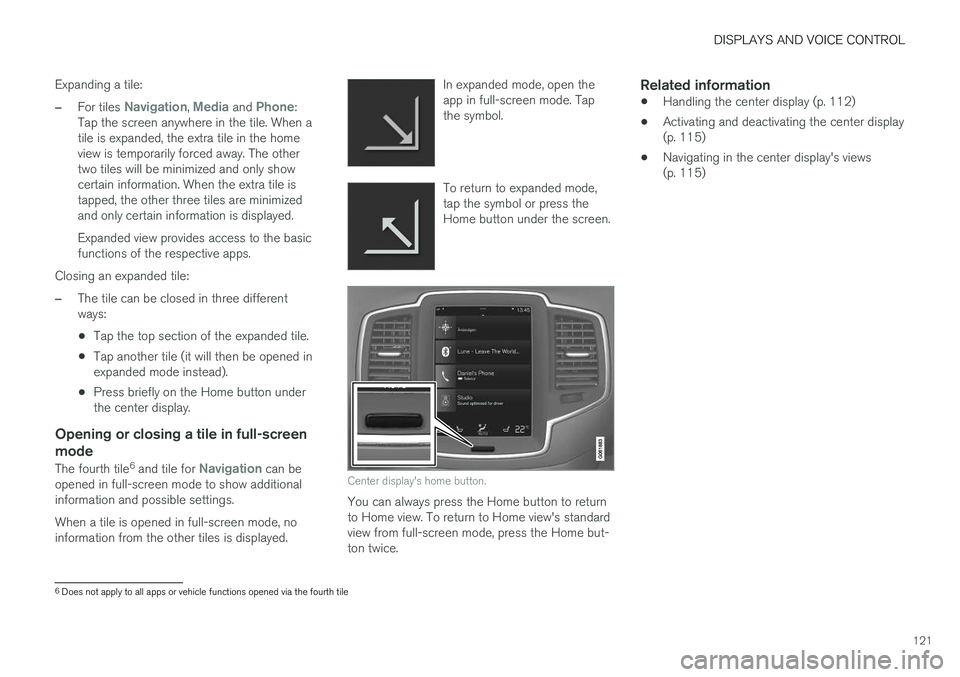
Center display's home button.
You can always press the Home button to return to Home view. To return to Home view's standardview from full-screen mode, press the Home but-ton twice.
Related information
•
Handling the center display (p. 112)
• Activating and deactivating the center display(p. 115)
• Navigating in the center display's views(p. 115)
6
Does not apply to all apps or vehicle functions opened via the fourth tile
Page 126 of 686
DISPLAYS AND VOICE CONTROL
124
Moving apps and buttons in thecenter display
The apps and buttons for vehicle functions can be moved and organized in the App and Func-tion views.
1. Swipe from right to left 8
to access App view
or swipe from left to right 8
to access Func-
tion view.
2. Press and hold an app or button. > The app or button will change size andbecome slightly transparent. It can then be moved.
3. Drag the app or button to an available posi- tion in the view.
A maximum of 48 rows can be used to positionapps or buttons. To move an app or button out-side the visible view, drag it to the bottom of theview. New rows will be added and the app or but-ton can be placed in one of these. Apps or buttons placed below the view's normal display will not be visible on the screen. Swipe the screen to scroll up or down in the view to display information outside the view.
NOTE
Hide the apps that are rarely or never used by moving them far down, outside of the visibleview. This makes it easier to find the appsused more frequently.
NOTE
Apps and vehicle function buttons cannot be situated at spots already in use.
Related information
• Function view in the center display (p. 122)
• Apps (p. 487)
• Handling the center display (p. 112)
Symbols in the center display statusbar
Overview of symbols displayed in the center dis- play status bar.
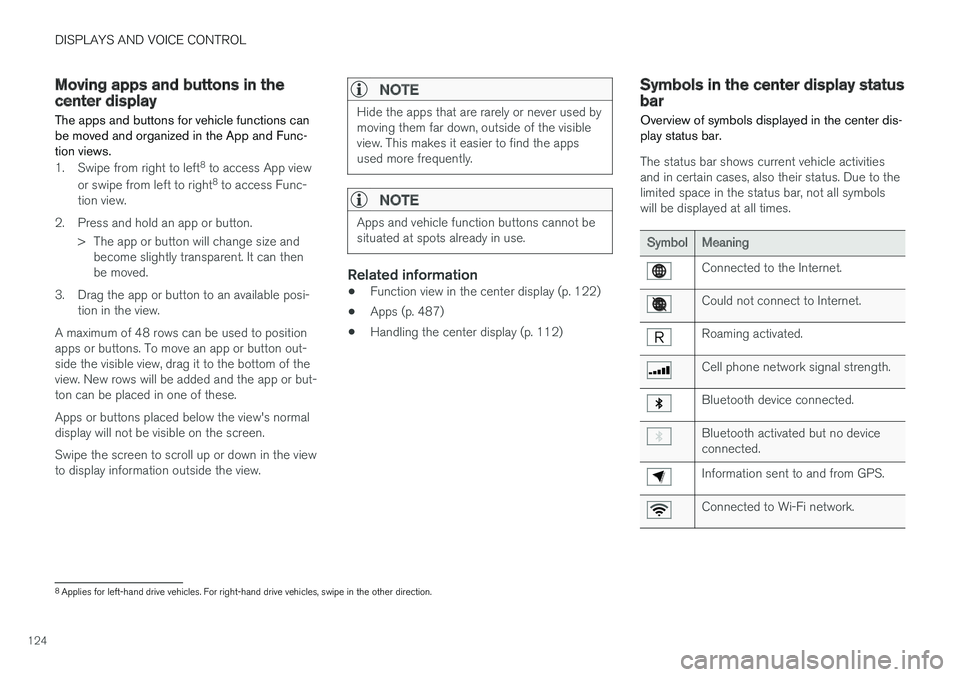
The status bar shows current vehicle activities and in certain cases, also their status. Due to thelimited space in the status bar, not all symbolswill be displayed at all times.
SymbolMeaning
Connected to the Internet.
Could not connect to Internet.
Roaming activated.
Cell phone network signal strength.
Bluetooth device connected.
Bluetooth activated but no device connected.
Information sent to and from GPS.
Connected to Wi-Fi network.
8 Applies for left-hand drive vehicles. For right-hand drive vehicles, swipe in the other direction.