washer fluid VOLVO XC90 T8 2018 Owner´s Manual
[x] Cancel search | Manufacturer: VOLVO, Model Year: 2018, Model line: XC90 T8, Model: VOLVO XC90 T8 2018Pages: 686, PDF Size: 11.51 MB
Page 635 of 686
MAINTENANCE AND SERVICE
}}
633
Cleaning the interiorOnly use cleaning agents and car care products recommended by Volvo. Clean regularly andtreat stains immediately for best results. It isimportant to vacuum before using a cleaningagent.
CAUTION
• Some colored clothing (for example, dark jeans and suede garments) may stain theupholstery. If this occurs, it is important toclean and treat these parts of the uphols-tery as soon as possible.
• Never use strong solvents such aswasher fluid, gasoline, mineral spirit orconcentrated alcohol to clean the interioras this can damage the upholstery aswell as other interior materials.
• Never spray cleaning agent directly ontocomponents that have electrical buttonsand controls. Wipe instead with a dampcloth with cleaning agent.
• Sharp objects and Velcro can damagethe car's textile upholstery.
Related information
• Cleaning the center display (p. 633)
• Cleaning fabric upholstery and ceiling liner (p. 635)
• Cleaning the seat belt (p. 635) •
Cleaning floor mats and inlay mats (p. 635)
• Cleaning leather upholstery (p. 636)
• Cleaning the leather steering wheel(p. 637)
• Cleaning interior plastic, metal and wood sur-faces (p. 638)
Cleaning the center display
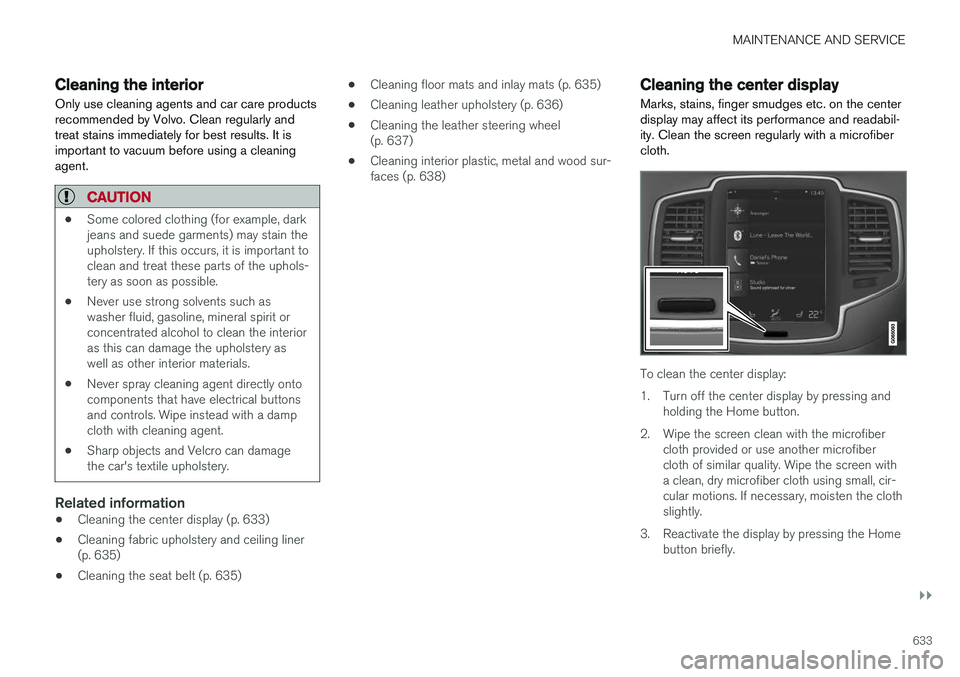
Marks, stains, finger smudges etc. on the center display may affect its performance and readabil-ity. Clean the screen regularly with a microfibercloth.
To clean the center display:
1. Turn off the center display by pressing and holding the Home button.
2. Wipe the screen clean with the microfiber cloth provided or use another microfiber cloth of similar quality. Wipe the screen witha clean, dry microfiber cloth using small, cir-cular motions. If necessary, moisten the clothslightly.
3. Reactivate the display by pressing the Home button briefly.
Page 649 of 686
MAINTENANCE AND SERVICE
}}
647
It is important to use the right color.
Related information
•
Paintwork (p. 645)
• Touching up minor paint damage (p. 645)
Changing rear window wipers
The wiper blades help remove water from the windshield and rear window. Along with thewasher fluid, they clean the glass and helpimprove visibility while driving. The windshieldand rear window wiper blades can be replaced.
Changing rear window wipers
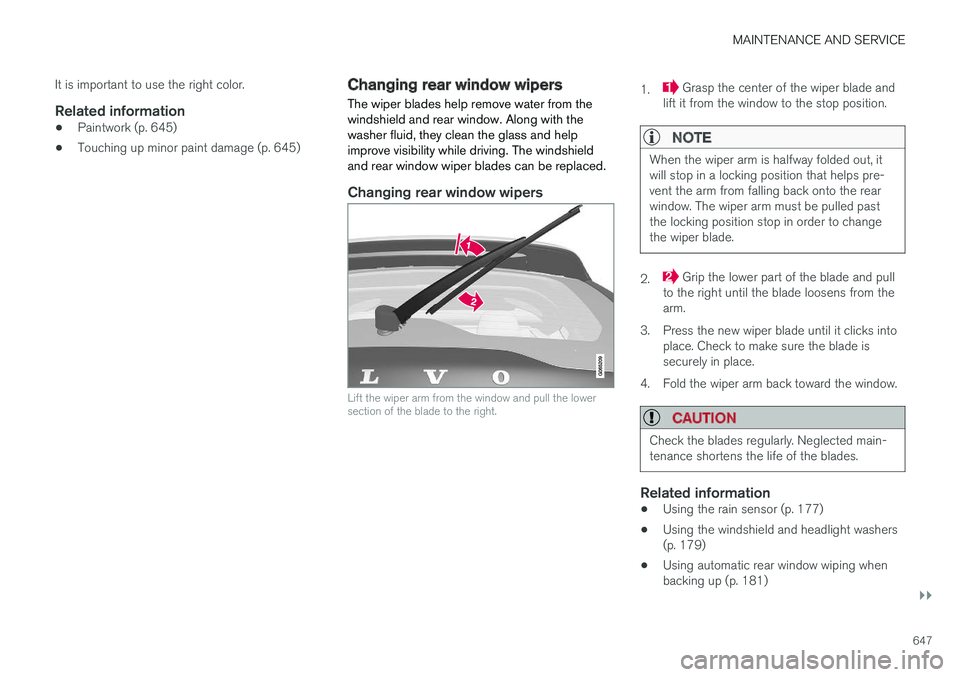
Lift the wiper arm from the window and pull the lower section of the blade to the right.
1. Grasp the center of the wiper blade and
lift it from the window to the stop position.
NOTE
When the wiper arm is halfway folded out, it will stop in a locking position that helps pre-vent the arm from falling back onto the rearwindow. The wiper arm must be pulled pastthe locking position stop in order to changethe wiper blade.
2. Grip the lower part of the blade and pull
to the right until the blade loosens from the arm.
3. Press the new wiper blade until it clicks into place. Check to make sure the blade issecurely in place.
4. Fold the wiper arm back toward the window.
CAUTION
Check the blades regularly. Neglected main- tenance shortens the life of the blades.
Related information
• Using the rain sensor (p. 177)
• Using the windshield and headlight washers (p. 179)
• Using automatic rear window wiping whenbacking up (p. 181)
Page 650 of 686
MAINTENANCE AND SERVICE
* Option/accessory.
648 •
Heated windshield washer nozzles
* (p. 177)
• Using the rain sensor's memory function (p. 178)
• Using the rear window wiper/washer(p. 180)
• Filling washer fluid (p. 650)
• Windshield wipers in the service position(p. 649)
• Replacing windshield wiper blades (p. 648)
• Using the windshield wipers (p. 176)
Replacing windshield wiper blades
The wiper blades help remove water from the windshield and rear window. Along with thewasher fluid, they clean the glass and helpimprove visibility while driving. The windshieldand rear window wiper blades can be replaced.
Replacing wiper blades
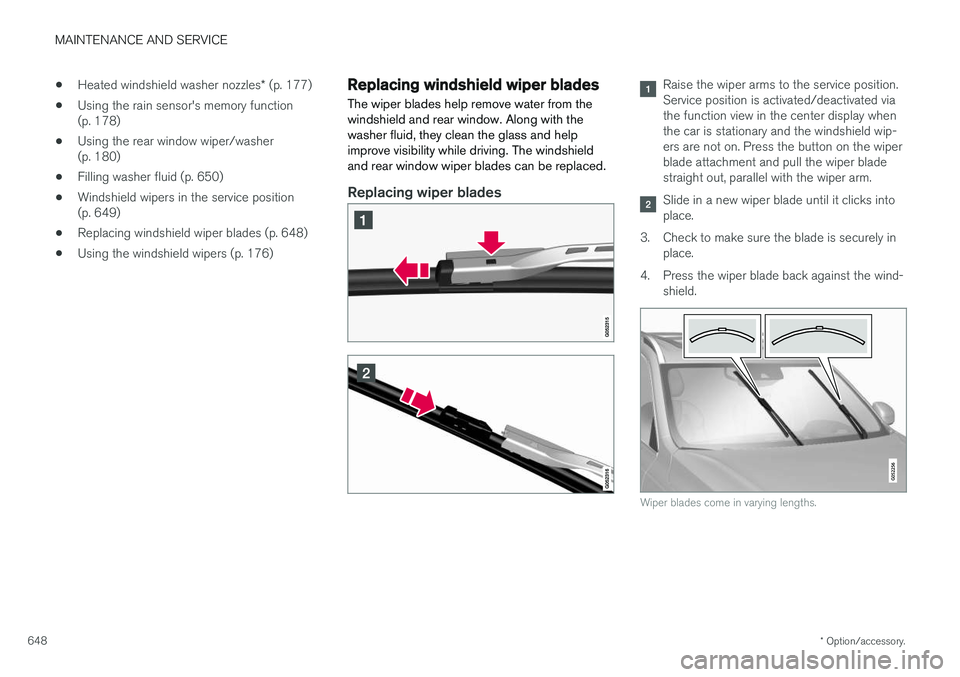
Raise the wiper arms to the service position. Service position is activated/deactivated viathe function view in the center display whenthe car is stationary and the windshield wip-ers are not on. Press the button on the wiperblade attachment and pull the wiper bladestraight out, parallel with the wiper arm.
Slide in a new wiper blade until it clicks into place.
3. Check to make sure the blade is securely in place.
4. Press the wiper blade back against the wind- shield.
Wiper blades come in varying lengths.
Page 651 of 686
MAINTENANCE AND SERVICE
}}
* Option/accessory.649
NOTE
The wiper blades are different lengths. The blade on the driver's side is longer than theone on the passenger side.
Related information
•Using the rain sensor (p. 177)
• Using the windshield and headlight washers (p. 179)
• Using automatic rear window wiping whenbacking up (p. 181)
• Heated windshield washer nozzles
* (p. 177)
• Using the rain sensor's memory function(p. 178)
• Using the rear window wiper/washer(p. 180)
• Filling washer fluid (p. 650)
• Windshield wipers in the service position(p. 649)
• Changing rear window wipers (p. 647)
• Using the windshield wipers (p. 176)
Windshield wipers in the serviceposition
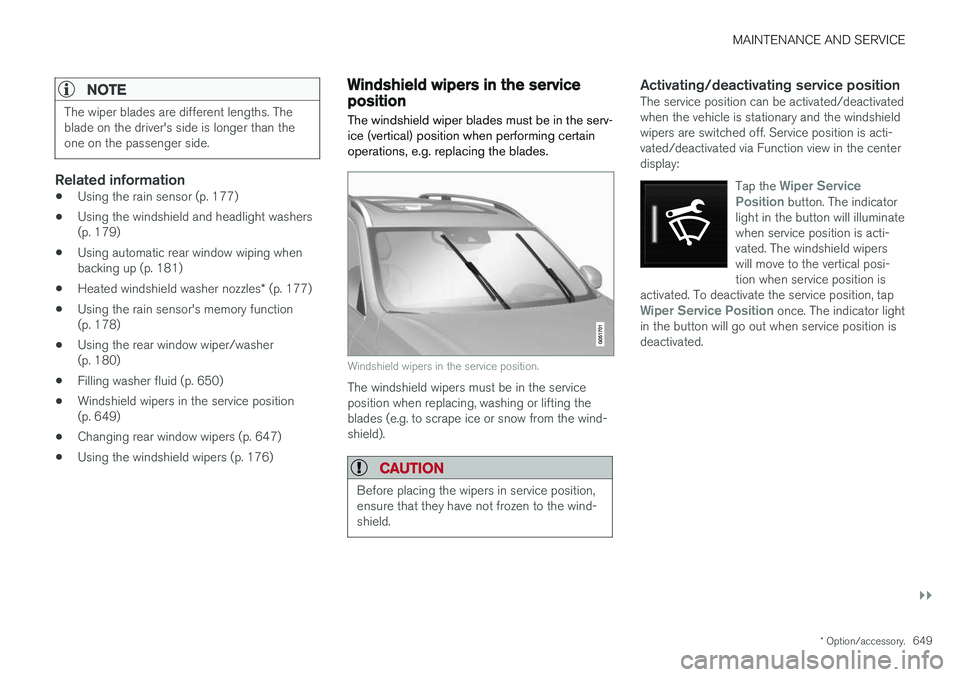
The windshield wiper blades must be in the serv- ice (vertical) position when performing certainoperations, e.g. replacing the blades.
Windshield wipers in the service position.
The windshield wipers must be in the service position when replacing, washing or lifting theblades (e.g. to scrape ice or snow from the wind-shield).
CAUTION
Before placing the wipers in service position, ensure that they have not frozen to the wind-shield.
Activating/deactivating service positionThe service position can be activated/deactivated when the vehicle is stationary and the windshieldwipers are switched off. Service position is acti-vated/deactivated via Function view in the centerdisplay:
Tap the
Wiper Service
Position button. The indicator
light in the button will illuminate when service position is acti-vated. The windshield wiperswill move to the vertical posi-tion when service position is
activated. To deactivate the service position, tap
Wiper Service Position once. The indicator light
in the button will go out when service position is deactivated.
Page 652 of 686
||
MAINTENANCE AND SERVICE
* Option/accessory.
650 The wiper blades will also move out of service position if:
• The windshield wipers are turned on.
• The windshield washers are turned on.
• The rain sensor is activated.
• The vehicle begins moving.
CAUTION
If the wiper arms in service position are raised from the windshield, they must be folded backagainst the windscreen before activating wip-ing, washing or rain sensor as well as beforedeparture. This is to prevent scratching thepaint on the hood.
Related information
• Using the rain sensor (p. 177)
• Using the windshield and headlight washers (p. 179)
• Using automatic rear window wiping whenbacking up (p. 181)
• Heated windshield washer nozzles
* (p. 177)
• Using the rain sensor's memory function(p. 178)
• Using the rear window wiper/washer(p. 180)
• Filling washer fluid (p. 650)
• Replacing windshield wiper blades (p. 648) •
Changing rear window wipers (p. 647)
• Using the windshield wipers (p. 176)
Filling washer fluid
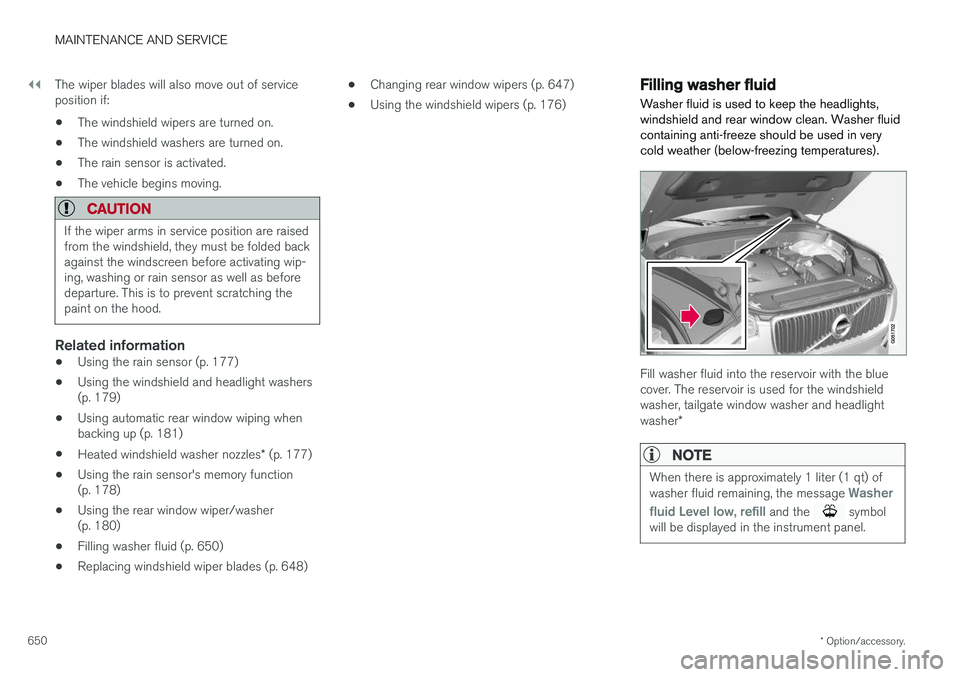
Washer fluid is used to keep the headlights, windshield and rear window clean. Washer fluidcontaining anti-freeze should be used in verycold weather (below-freezing temperatures).
Fill washer fluid into the reservoir with the blue cover. The reservoir is used for the windshieldwasher, tailgate window washer and headlight washer *
NOTE
When there is approximately 1 liter (1 qt) of washer fluid remaining, the message Washer
fluid
Level low, refill and the symbol
will be displayed in the instrument panel.
Page 653 of 686
MAINTENANCE AND SERVICE
* Option/accessory.651
Recommended grade:
Washer fluid recom-
mended by Volvo, with frost protection during cold weather and temperatures below the freez-ing point.
CAUTION
Use Volvo's original washer fluid or an equiva- lent fluid with the recommended pH valuebetween 6 and 8, diluted as recommended,e.g. in a 1:1 solution with pH-neutral water.
CAUTION
Use washer fluid with anti-freeze when tem- peratures are below the freezing point to helpkeep the pump, reservoir and hoses fromfreezing.
Volume:
• Vehicles
with headlight washing: 5.5 liters
(5.8 qts).
• Vehicles
without headlight washing: 3.5 lit-
ers (3.7 qts).
Related information
• Using the rain sensor (p. 177)
• Using the windshield and headlight washers (p. 179)
• Using automatic rear window wiping whenbacking up (p. 181) •
Heated windshield washer nozzles
* (p. 177)
• Using the rain sensor's memory function(p. 178)
• Using the rear window wiper/washer(p. 180)
• Windshield wipers in the service position(p. 649)
• Replacing windshield wiper blades (p. 648)
• Changing rear window wipers (p. 647)
• Using the windshield wipers (p. 176)
Page 682 of 686
INDEX
680Vehicle key bat. low 244 Vehicle modem
connecting vehicle to Internet 532
settings 533
Vehicle recovery 477
Vehicle status 602 inflation pressure 562
Vehicle upholstery 633, 635, 636, 637, 638
Vehicle weight 659
Ventilation 207, 208, 209 Seats 217
Video 512, 514 settings 513
Voice control 145 climate 203
phone 147
radio and media 148
settings 148
VOL mark 550
Volvo ID 26 create and register 27
W
Warning light Adaptive Cruise Control 298
stability and traction control system 274
Warning lights airbags SRS 97
alternator does not charge 97
brake system error 97
low oil pressure 97
parking brake applied 97
seat belt reminder 97
starter battery not charging 97
WARNING 97
Warning sound parking brake 435
warning symbols 97 Warning symbols safety 42
Warranties 598Washer Headlights 179
rear window 180, 181
washer fluid, filling 650
Windshield 179
Washer fluid 650
Washer nozzles, heated 177
Waxing 639
Weights Curb weight 659
Wheel bolts 565 locking 565
Wheels cleaning 644
mounting 568
removal 566
Snow chains 571
Wheels and tires Load index and speed symbol 554
Whiplash protection 46
Whiplash Protection System 46
WHIPS (Whiplash Protection System) 46 Wi-Fi connecting vehicle to Internet 531
delete network 535 sharing Internet connection, tethering,
hotspot 533
technology and security 535
Window sun shade 169
Windows and glass 166 Windshield heating 222
projected image 142, 144
Windshield washing 179