air condition VOLVO XC90 T8 2018 Owner´s Manual
[x] Cancel search | Manufacturer: VOLVO, Model Year: 2018, Model line: XC90 T8, Model: VOLVO XC90 T8 2018Pages: 686, PDF Size: 11.51 MB
Page 234 of 686
||
CLIMATE CONTROL
* Option/accessory.
232
NOTE
Preconditioning is only available when the car is connected to an electrical outlet. A charg-ing post that is not always active, for examplebecause of a timer, can cause loss of functionfor preconditioning. If the car is not connected to an electrical socket it is still possible in a warm climate toachieve brief cooling of the passenger com-partment by direct starting preconditioning.
NOTE
The vehicle doors and windows should be closed during preconditioning of the passen-ger compartment.
Starting from app *
A device with the Volvo On Call * app can be used
to start preconditioning or check settings. Pre- conditioning heats or cools the passenger com-partment (using the vehicle's air conditioning) toa comfortable temperature. The passenger compartment can also be precon- ditioned using the Engine Remote Start (ERS) 3
function using the Volvo On Call * app.
Related information
• Parking climate (p. 230)
• Preconditioning (p. 230)
• Preconditioning timer settings (p. 232)
Preconditioning timer settings
The timer can be set to finish preconditioning at a predetermined time.
The timer can store up to 8 preset times for:
• A time on a particular date
• A time on one or more days of the week, with or without the repeat function.
NOTE
Preconditioning is only available when the car is connected to an electrical outlet. A charg-ing post that is not always active, for examplebecause of a timer, can cause loss of functionfor preconditioning. If the car is not connected to an electrical socket it is still possible in a warm climate toachieve brief cooling of the passenger com-partment by direct starting preconditioning.
Related information
• Preconditioning (p. 230)
• Adding and editing timer setting for precon- ditioning (p. 233)
• Activating and deactivating preconditioningtimer settings (p. 233)
• Deleting preconditioning timer settings(p. 234)
3
Certain markets only.
Page 236 of 686
CLIMATE CONTROL
234
Deleting preconditioning timersettings
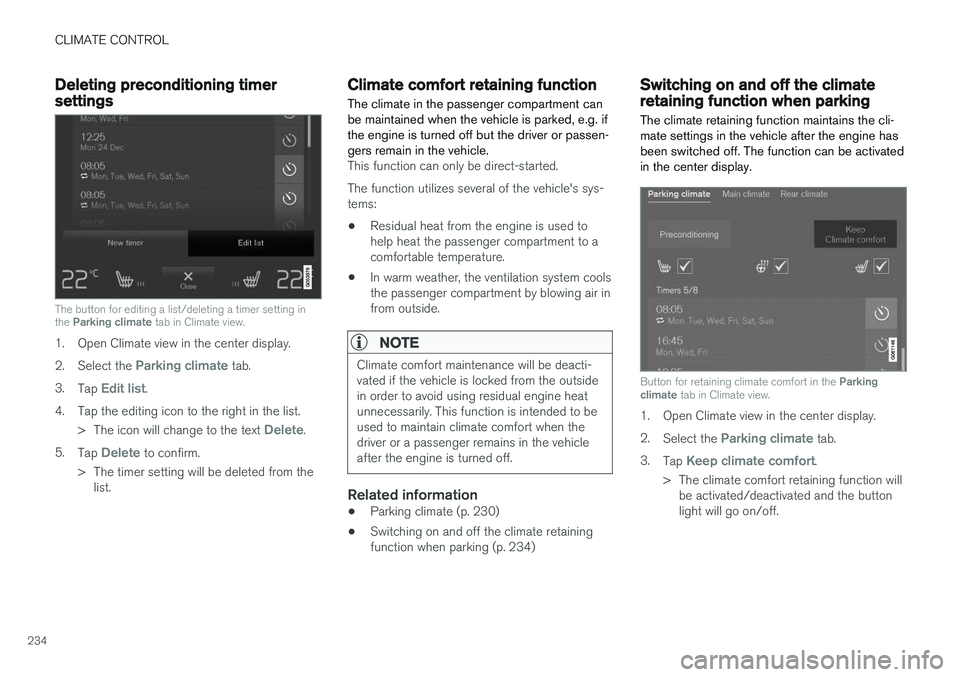
The button for editing a list/deleting a timer setting in the Parking climate tab in Climate view.
1. Open Climate view in the center display. 2.
Select the
Parking climate tab.
3. Tap
Edit list.
4. Tap the editing icon to the right in the list. >The icon will change to the text
Delete.
5. Tap
Delete to confirm.
> The timer setting will be deleted from the list.
Climate comfort retaining function
The climate in the passenger compartment can be maintained when the vehicle is parked, e.g. ifthe engine is turned off but the driver or passen-gers remain in the vehicle.
This function can only be direct-started. The function utilizes several of the vehicle's sys- tems:
• Residual heat from the engine is used tohelp heat the passenger compartment to acomfortable temperature.
• In warm weather, the ventilation system coolsthe passenger compartment by blowing air infrom outside.
NOTE
Climate comfort maintenance will be deacti- vated if the vehicle is locked from the outsidein order to avoid using residual engine heatunnecessarily. This function is intended to beused to maintain climate comfort when thedriver or a passenger remains in the vehicleafter the engine is turned off.
Related information
• Parking climate (p. 230)
• Switching on and off the climate retaining function when parking (p. 234)
Switching on and off the climateretaining function when parking
The climate retaining function maintains the cli- mate settings in the vehicle after the engine hasbeen switched off. The function can be activatedin the center display.
Button for retaining climate comfort in the Parking
climate tab in Climate view.
1. Open Climate view in the center display. 2.
Select the
Parking climate tab.
3. Tap
Keep climate comfort.
> The climate comfort retaining function will be activated/deactivated and the button light will go on/off.
Page 276 of 686
DRIVER SUPPORT
* Option/accessory.
274
Electronic Stability Control
The Electronic Stability Control (ESC 2
) function
helps the driver avoid skidding and improves the vehicle's directional stability.
This symbol will be displayed in the instrument panel when theESC system is intervening. When the ESC has intervened to apply the brakes, a pulsingsound may be heard and the
vehicle may accelerate more slowly than expec-ted when the accelerator pedal is depressed.
The ESC system consists of the following sub- functions: • Stability control 3
• Spin control and active yaw control
• Engine drag control
• Trailer Stability Assist
WARNING
•The Electronic Stability Control system ESC is supplementary driver supportintended to facilitate driving and make itsafer – it cannot handle all situations inall traffic, weather and road conditions.
• ESC is not a substitute for the driver'sattention and judgment. The driver isalways responsible for ensuring the vehi-cle is driven in a safe manner, at theappropriate speed, with an appropriatedistance to other vehicles, and in accord-ance with current traffic rules and regula-tions.
Stability control 3This function helps control the driving and brak-ing force of each individual wheel in an attemptto stabilize the vehicle.
Spin control and active yaw controlThis function is active at low speeds and brakesthe wheels that are spinning to transfer additionalpower from wheels that are not spinning. This function also helps prevent the wheels from spinning while the vehicle is accelerating.
Engine drag control
Engine drag control (EDC
4
) helps prevent inad-
vertent wheel lock, e.g. after downshifting orusing engine braking when driving at low speedson a slippery surface. Inadvertent wheel lock while driving could impair the driver's ability to steer the vehicle.
Trailer Stability Assist *5
Trailer Stability Assist (TSA
6
) is designed to help
stabilize a vehicle that is towing a trailer if thevehicle and trailer have begun to sway. For moreinformation, see "Trailer Stability Assist".
NOTE
The TSA function is deactivated if ESC Sport
Mode is activated.
Related information
• Electronic Stability Control Sport mode (p. 275)
• Activating/deactivating Sport mode in Elec-tronic Stability Control (p. 275)
1
Roll Stability Control
2 Electronic Stability Control
3 Also called traction control.
4 Engine Drag Control
5Trailer Stability Assist is included if the vehicle is equipped with a Volvo original towbar.6
Trailer Stability Assist
Page 325 of 686
DRIVER SUPPORT
}}}}
323
Deactivation of the Auto-hold brake function
In certain situations, Auto-hold will be deactivated when the vehicle is at a standstill and Pilot Assistwill go into standby mode. This means that thebrakes will be released and the vehicle couldbegin to roll. The driver must actively apply thebrakes to keep the vehicle stationary. This can occur if:
• the driver depresses the brake pedal
• the parking brake is applied
• the gear selector is moved to the
P, N or R
positions
• the driver puts Pilot Assist in standby mode.
Auto Activate Parking BrakeIn certain situations, the parking brake will be applied to keep the vehicle at a standstill. This occurs if Pilot Assist is keeping the vehicle stationary using the brakes and:
• the driver opens the door or unbuckleshis/her seat belt
• Pilot Assist has kept the vehicle at a stand-still for more than approx. 5 minutes
• the brakes overheat
• the driver switches off the engine manually.
Related information
•Pilot Assist (p. 311)
Pilot Assist limitations
Pilot Assist functionality may be reduced in cer- tain situations.
Pilot Assist is a driver support function designed to simplify driving and assist the driver in manysituations. However, the driver is always responsi-ble for maintaining a suitable distance to vehiclesor objects around it and ensuring that the vehicleis correctly positioned in the traffic lane.
WARNING
In some situations, Pilot Assist may have trou- ble helping the driver properly or may bedeactivated automatically – we advise againstusing Pilot Assist in such cases. Examples ofsuch situations include:
• the lane markings are worn, missing or cross each other.
• lane division is unclear, for example, whenthe lanes divide or merge or at exits orwhen there are multiple sets of markings.
• edges or other lines than lane markingsare present on or near the road, e.g.curbs, joints or repairs to the road sur-face, edges of barriers, roadside edges orstrong shadows.
• the lane is narrow or winding.
• the lane contains ridges or holes.
• weather conditions are poor, e.g. rain,snow or fog or slush or reduced visibilitywith poor light conditions, backlighting,wet road surface, etc.
The driver should also note that Pilot Assist has the following limitations: • High curbs, roadside barriers, temporary obstacles (traffic cones, safety barriers,etc.) are not detected. Alternatively, theymay be detected incorrectly as lane mark-ings, with a subsequent risk of contactbetween the vehicle and such obstacles.
Page 334 of 686
DRIVER SUPPORT
332
Camera limitations
The camera used by several of the driver support functions has certain limitations, which alsoaffect the functions using the camera.
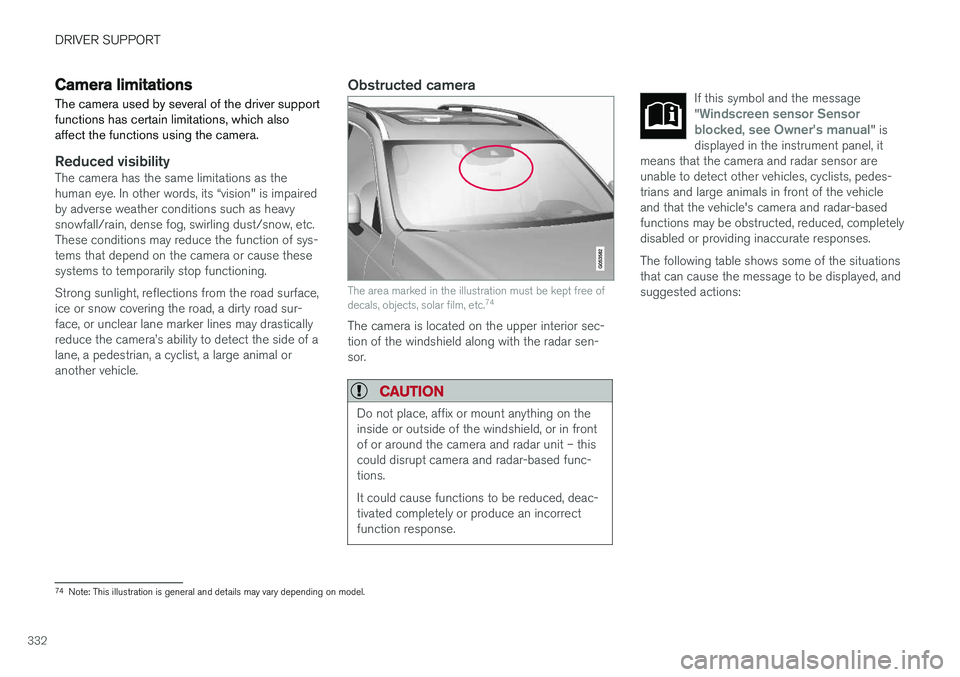
Reduced visibilityThe camera has the same limitations as the human eye. In other words, its “vision" is impairedby adverse weather conditions such as heavysnowfall/rain, dense fog, swirling dust/snow, etc.These conditions may reduce the function of sys-tems that depend on the camera or cause thesesystems to temporarily stop functioning. Strong sunlight, reflections from the road surface, ice or snow covering the road, a dirty road sur- face, or unclear lane marker lines may drastically reduce the camera
Page 335 of 686
DRIVER SUPPORT
}}}}
333
CauseAction
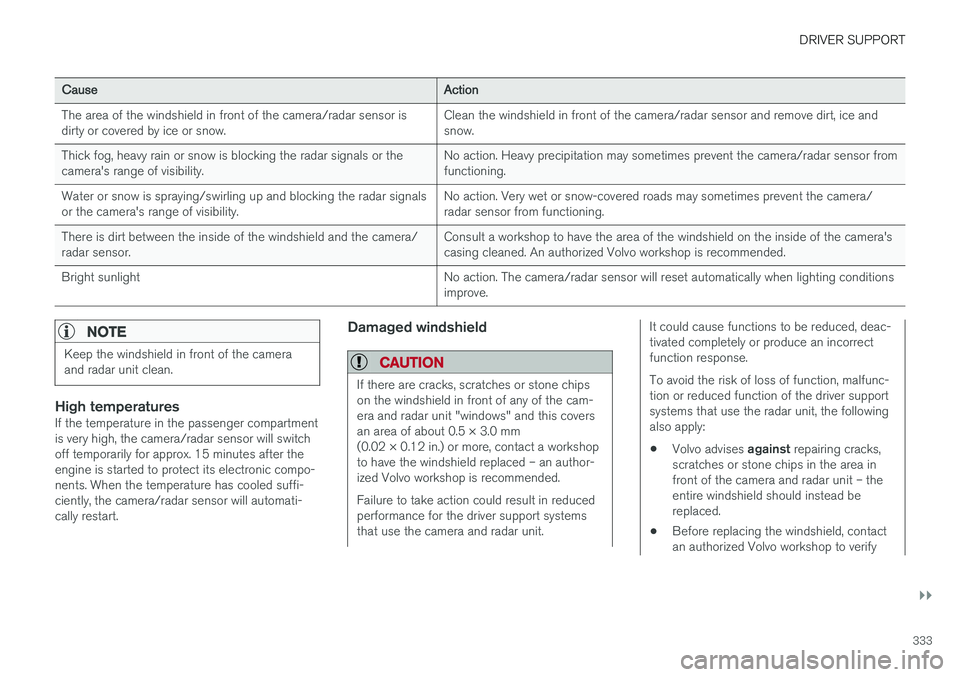
The area of the windshield in front of the camera/radar sensor is dirty or covered by ice or snow. Clean the windshield in front of the camera/radar sensor and remove dirt, ice andsnow.
Thick fog, heavy rain or snow is blocking the radar signals or thecamera's range of visibility. No action. Heavy precipitation may sometimes prevent the camera/radar sensor fromfunctioning.
Water or snow is spraying/swirling up and blocking the radar signalsor the camera's range of visibility. No action. Very wet or snow-covered roads may sometimes prevent the camera/radar sensor from functioning.
There is dirt between the inside of the windshield and the camera/radar sensor. Consult a workshop to have the area of the windshield on the inside of the camera'scasing cleaned. An authorized Volvo workshop is recommended.
Bright sunlight No action. The camera/radar sensor will reset automatically when lighting conditionsimprove.
NOTE
Keep the windshield in front of the camera and radar unit clean.
High temperaturesIf the temperature in the passenger compartment is very high, the camera/radar sensor will switchoff temporarily for approx. 15 minutes after theengine is started to protect its electronic compo-nents. When the temperature has cooled suffi-ciently, the camera/radar sensor will automati-cally restart.
Damaged windshield
CAUTION
If there are cracks, scratches or stone chips on the windshield in front of any of the cam-era and radar unit "windows" and this coversan area of about 0.5 × 3.0 mm(0.02 × 0.12 in.) or more, contact a workshopto have the windshield replaced – an author-ized Volvo workshop is recommended. Failure to take action could result in reduced performance for the driver support systemsthat use the camera and radar unit.
It could cause functions to be reduced, deac- tivated completely or produce an incorrectfunction response. To avoid the risk of loss of function, malfunc- tion or reduced function of the driver supportsystems that use the radar unit, the followingalso apply:
• Volvo advises
against repairing cracks,
scratches or stone chips in the area infront of the camera and radar unit – theentire windshield should instead bereplaced.
• Before replacing the windshield, contactan authorized Volvo workshop to verify
Page 394 of 686
||
DRIVER SUPPORT
* Option/accessory.
392
Blind sectors
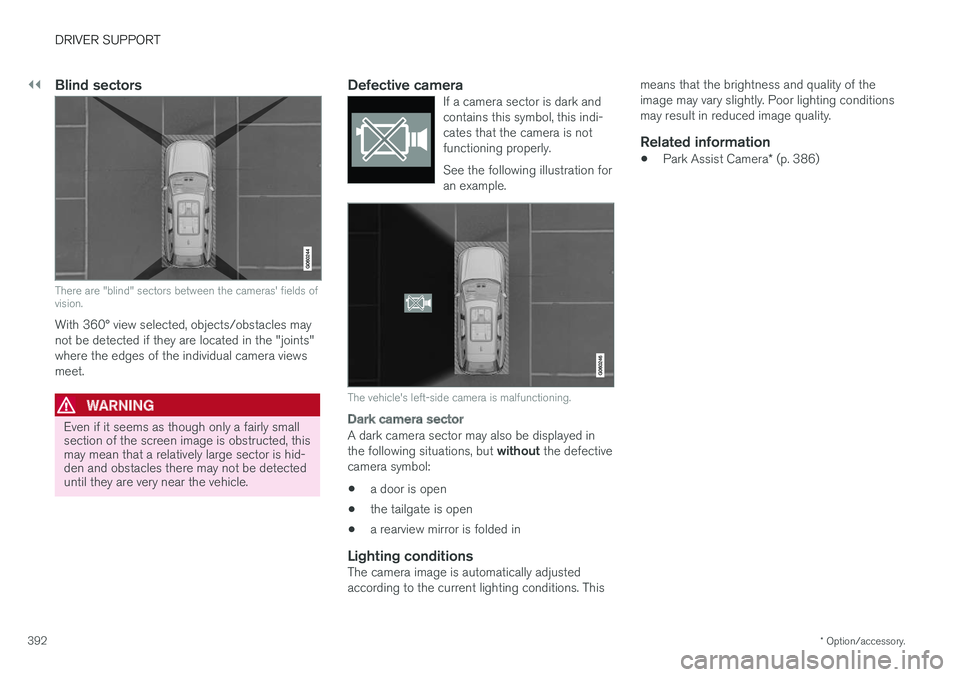
There are "blind" sectors between the cameras' fields of vision.
With 360° view selected, objects/obstacles may not be detected if they are located in the "joints"where the edges of the individual camera viewsmeet.
WARNING
Even if it seems as though only a fairly small section of the screen image is obstructed, thismay mean that a relatively large sector is hid-den and obstacles there may not be detecteduntil they are very near the vehicle.
Defective cameraIf a camera sector is dark and contains this symbol, this indi-cates that the camera is notfunctioning properly. See the following illustration for an example.
The vehicle's left-side camera is malfunctioning.
Dark camera sector
A dark camera sector may also be displayed in the following situations, but without the defective
camera symbol:
• a door is open
• the tailgate is open
• a rearview mirror is folded in
Lighting conditionsThe camera image is automatically adjusted according to the current lighting conditions. This means that the brightness and quality of theimage may vary slightly. Poor lighting conditionsmay result in reduced image quality.
Related information
•
Park Assist Camera
* (p. 386)
Page 414 of 686
||
HYBRID INFORMATION
412
CAUTION
Make sure the charging socket's protective cover is positioned so it does not damage thepaint (in e.g., windy conditions).
Perform the following steps in reverse to close the charger door.
NOTE
Since the hatch is locked during driving, the vehicle must be unlocked again to be able toopen the hatch.
Related information
•Initiating hybrid battery charging (p. 412)
• Stopping hybrid battery charging (p. 418)
• Charging the hybrid battery (p. 407)
Initiating hybrid battery charging
The hybrid battery is charged by connecting a charging cable between the vehicle and a120/240 V outlet (alternating current). Only use the charging cable supplied with the car or a replacement cable recommended byVolvo.
CAUTION
Never connect the charging cable if there is a risk of a thunderstorm or there is lightning.
WARNING
• The charging cable must be grounded when in use. It is equipped with a cordwith a grounding conductor and agrounding plug. The plug must beinserted into an appropriate outlet that isproperly installed and grounded inaccordance with all local codes and ordi-nances and is not damaged in any way.
• Children should be supervised when inthe vicinity of the charging cable when itis plugged in.
• High voltage is present in your electricmeter housing and power distributionservice panel. Contact with high voltagecan cause death or serious personalinjury.
• Do not use the charging cable if it isdamaged in any way. A damaged or mal-functioning charging cable may only berepaired by a workshop – a authorizedVolvo workshop is recommended.
• Always position the charging cable sothat it will not be driven over, stepped on,tripped over or otherwise damaged, orcause personal injury.
Page 445 of 686
STARTING AND DRIVING
}}
443
All Wheel Drive (AWD)All-wheel drive, All Wheel Drive (AWD), also called four-wheel drive, means that power is dis-tributed to all four wheels, which improves trac-tion.
The electric motor that powers the rear wheels enables electronic all-wheel drive functionality. To achieve the best traction, power is automati- cally directed to the wheels that have the bestgrip. The system continuously calculates theneed for torque to the rear wheels, and canimmediately redistribute up to half of the engine'storque to the rear wheels. All-wheel drive also has a stabilizing effect at higher speeds. In normal driving conditions, mostof the engine's power is directed to the frontwheels. When the vehicle is stationary, all-wheeldrive is always activated in preparation for maxi-mum traction during acceleration. All-wheel drive reacts differently depending on which drive mode is selected.
Related information
• Drive modes (p. 445)
• Low Speed Control (p. 453)
• Transmission (p. 438)
Drive systems
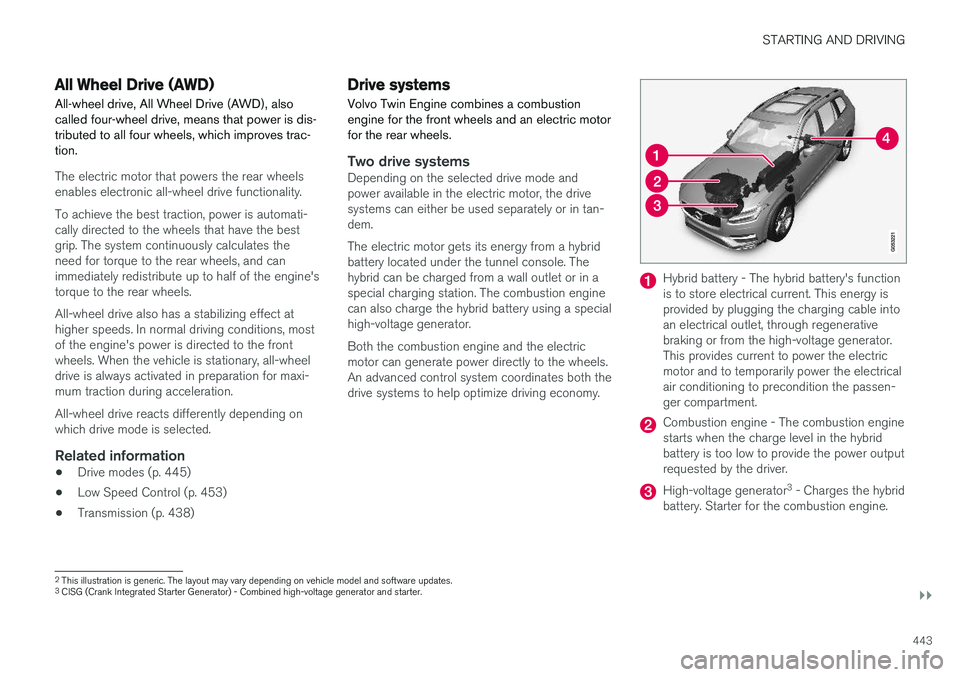
Volvo Twin Engine combines a combustion engine for the front wheels and an electric motorfor the rear wheels.
Two drive systemsDepending on the selected drive mode and power available in the electric motor, the drivesystems can either be used separately or in tan-dem. The electric motor gets its energy from a hybrid battery located under the tunnel console. Thehybrid can be charged from a wall outlet or in a special charging station. The combustion engine can also charge the hybrid battery using a special high-voltage generator. Both the combustion engine and the electric motor can generate power directly to the wheels.An advanced control system coordinates both thedrive systems to help optimize driving economy.
Hybrid battery - The hybrid battery's function is to store electrical current. This energy isprovided by plugging the charging cable intoan electrical outlet, through regenerativebraking or from the high-voltage generator.This provides current to power the electricmotor and to temporarily power the electricalair conditioning to precondition the passen-ger compartment.
Combustion engine - The combustion engine starts when the charge level in the hybridbattery is too low to provide the power outputrequested by the driver.
High-voltage generator 3
- Charges the hybrid
battery. Starter for the combustion engine.
2 This illustration is generic. The layout may vary depending on vehicle model and software updates.
3 CISG (Crank Integrated Starter Generator) - Combined high-voltage generator and starter.
Page 447 of 686
STARTING AND DRIVING
}}
* Option/accessory.445
Drive modes
Drive modes affect the vehicle's driving charac- teristics in different ways to enhance and sim-plify the driving experience in certain types of sit-uations.
Drive modes enable easy access to the vehicle's many functions and settings in different drivingsituations. The following systems are adapted tohelp optimize driving characteristics in each drivemode: • Steering
• Engine/transmission/all-wheel drive
• Brakes
• Pneumatic suspension
* and shock absorbers
• Instrument panel
• Climate control settings
Select the drive mode that is best suited to the current driving conditions. Keep in mind that notall drive modes are available in all situations.
Available drive modes
WARNING
Keep in mind that the vehicle does not emit any engine noise when using the electricmotor and may therefore be difficult to detectfor children, pedestrians, cyclists or animals.This is particularly true at low speeds, e.g. inparking lots.
WARNING
Do not leave the vehicle in an unventilated area with a drive mode activated and the com-bustion engine switched off. The engine willstart automatically if the charge level in thehybrid battery is low and the resulting exhaustgases can be very harmful to people and ani-mals.
HYBRID
• This is the default mode in which the electric motor and combustion engine work together.
The vehicle starts in Hybrid mode. The control system uses both the electric motor and the gas-oline engine - separately or in tandem - and cal-culates optimal utilization with regard to perform-ance, fuel consumption and comfort. At highspeeds, ground clearance is automatically low- ered 4
to reduce air resistance. Driving capacity on
the electric motor alone is determined by factors such as the hybrid battery's charge level, the need for heat/cooling in the passenger compart-ment, etc. If there is sufficient charge in the battery, it is possible to drive solely on electric power. Whenthe accelerator pedal is pressed, only the electricmotor will be activated until the battery reaches acertain charge level. Above this level, the currentin the battery cannot supply the power requestedby the accelerator pedal and the combustionengine will start. When the hybrid battery's charge level is low, the combustion engine will start more frequently tosave the remaining current in the battery. Chargethe hybrid battery from a 120-240 volt outlet using a charging cable, or activate
Charge in
Function view to reset the option of only using the electric motor. This drive mode is designed for low energy con- sumption with an optimized mix between theelectric motor and gasoline engine, without com-promising on climate comfort or driving experi-ence. When faster acceleration is requested bythe driver, the electric driveline will be utilized tohelp provide maximum additional power. Thevehicle also monitors the driving conditions andautomatically engages all-wheel drive if neces-sary. All-wheel drive and extra electric power arealways available regardless of the battery'scharging status.
4 For vehicles with pneumatic suspension.