remote control VOLVO XC90 T8 2018 Owner´s Manual
[x] Cancel search | Manufacturer: VOLVO, Model Year: 2018, Model line: XC90 T8, Model: VOLVO XC90 T8 2018Pages: 686, PDF Size: 11.51 MB
Page 262 of 686
||
KEY, LOCKS AND ALARM
2602. Press the button on the driver's door control
panel. >The message
Rear child lock Activatedwill be shown in the instrument panel and the indicator light will illuminate to showthat the child safety locks are activated.
When the electric child safety locks are activated:
• the rear windows can only be opened usingthe driver's door control panel
• the rear doors cannot be opened from theinside.
To deactivate the child safety locks:
–Press the button on the driver's door control panel. > The message
Rear child lock
Deactivated will be shown in the instru-
ment panel and the indicator light will go out to show that the child safety locks aredeactivated.
When the engine is turned off, the current settingwill be saved. If the locks were activated whenthe engine was turned off, they will remain acti-vated the next time the engine is started.
SymbolMessageMeaning
Rear child lock Acti-
vatedThe child safety locks are acti-vated.
Rear child lock Deacti-
vatedThe child safety locks are deacti-vated.
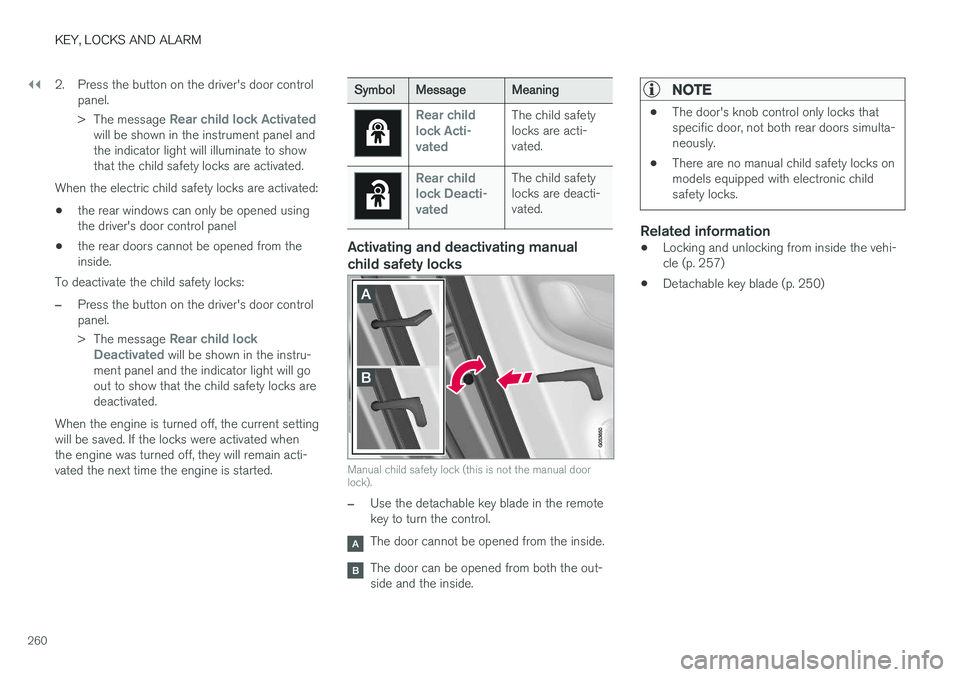
Activating and deactivating manual child safety locks
Manual child safety lock (this is not the manual door lock).
–Use the detachable key blade in the remote key to turn the control.
The door cannot be opened from the inside.
The door can be opened from both the out- side and the inside.
NOTE
• The door's knob control only locks that specific door, not both rear doors simulta-neously.
• There are no manual child safety locks onmodels equipped with electronic childsafety locks.
Related information
•Locking and unlocking from inside the vehi- cle (p. 257)
• Detachable key blade (p. 250)
Page 426 of 686
STARTING AND DRIVING
* Option/accessory.
424
Starting the vehicle
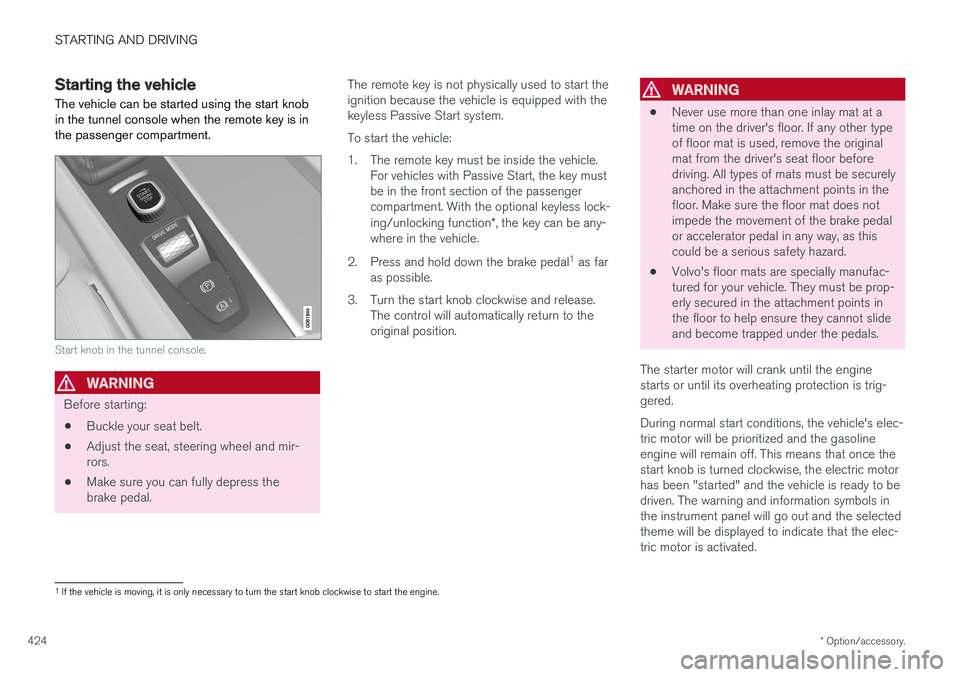
The vehicle can be started using the start knob in the tunnel console when the remote key is inthe passenger compartment.
Start knob in the tunnel console.
WARNING
Before starting:
• Buckle your seat belt.
• Adjust the seat, steering wheel and mir- rors.
• Make sure you can fully depress thebrake pedal. The remote key is not physically used to start theignition because the vehicle is equipped with thekeyless Passive Start system. To start the vehicle:
1. The remote key must be inside the vehicle.
For vehicles with Passive Start, the key must be in the front section of the passengercompartment. With the optional keyless lock- ing/unlocking function *, the key can be any-
where in the vehicle.
2. Press and hold down the brake pedal 1
as far
as possible.
3. Turn the start knob clockwise and release. The control will automatically return to the original position.
WARNING
• Never use more than one inlay mat at a time on the driver's floor. If any other typeof floor mat is used, remove the originalmat from the driver's seat floor beforedriving. All types of mats must be securelyanchored in the attachment points in thefloor. Make sure the floor mat does notimpede the movement of the brake pedalor accelerator pedal in any way, as thiscould be a serious safety hazard.
• Volvo's floor mats are specially manufac-tured for your vehicle. They must be prop-erly secured in the attachment points inthe floor to help ensure they cannot slideand become trapped under the pedals.
The starter motor will crank until the enginestarts or until its overheating protection is trig-gered. During normal start conditions, the vehicle's elec- tric motor will be prioritized and the gasolineengine will remain off. This means that once thestart knob is turned clockwise, the electric motorhas been "started" and the vehicle is ready to bedriven. The warning and information symbols inthe instrument panel will go out and the selectedtheme will be displayed to indicate that the elec-tric motor is activated.
1 If the vehicle is moving, it is only necessary to turn the start knob clockwise to start the engine.
Page 427 of 686
STARTING AND DRIVING
}}
425
In some situations, such as in cold weather or if the hybrid battery's charge level is too low, thegasoline engine will start instead. The vehicle should not be started with the charg- ing cable connected. However, if the cable can-not be pulled out or if the vehicle incorrectlydetects a cable that is not connected, the vehiclecan be started using an override procedure:
1. Press the brake pedal and turn the start
knob clockwise.
2.
Charge cable Remove before start will
appear in the instrument panel.
3. Turn the start knob clockwise again. 4.
Removed? Turn and hold start knob 7swill appear. Turn the knob clockwise and hold it for 7 seconds to start the vehicle.
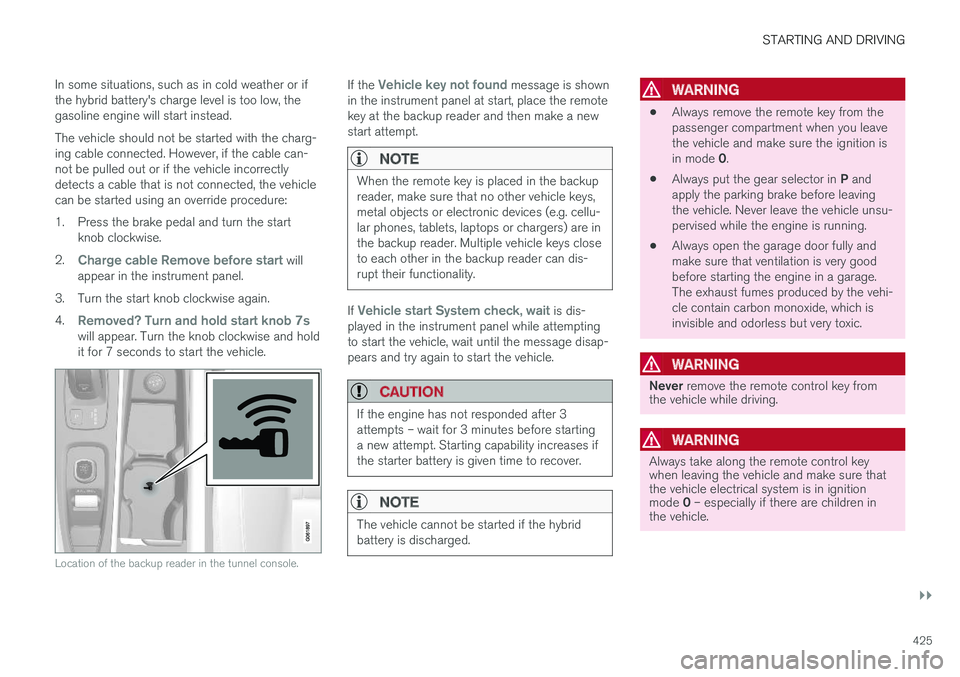
Location of the backup reader in the tunnel console.
If the Vehicle key not found message is shown
in the instrument panel at start, place the remote key at the backup reader and then make a newstart attempt.
NOTE
When the remote key is placed in the backup reader, make sure that no other vehicle keys,metal objects or electronic devices (e.g. cellu-lar phones, tablets, laptops or chargers) are inthe backup reader. Multiple vehicle keys closeto each other in the backup reader can dis-rupt their functionality.
If Vehicle start System check, wait is dis-
played in the instrument panel while attempting to start the vehicle, wait until the message disap-pears and try again to start the vehicle.
CAUTION
If the engine has not responded after 3 attempts – wait for 3 minutes before startinga new attempt. Starting capability increases ifthe starter battery is given time to recover.
NOTE
The vehicle cannot be started if the hybrid battery is discharged.
WARNING
• Always remove the remote key from the passenger compartment when you leavethe vehicle and make sure the ignition is in mode
0.
• Always put the gear selector in
P and
apply the parking brake before leaving the vehicle. Never leave the vehicle unsu-pervised while the engine is running.
• Always open the garage door fully andmake sure that ventilation is very goodbefore starting the engine in a garage.The exhaust fumes produced by the vehi-cle contain carbon monoxide, which isinvisible and odorless but very toxic.
WARNING
Never
remove the remote control key from
the vehicle while driving.
WARNING
Always take along the remote control key when leaving the vehicle and make sure thatthe vehicle electrical system is in ignition mode 0 – especially if there are children in
the vehicle.
Page 430 of 686
||
STARTING AND DRIVING
428
ModeFunctions
II •The headlights illuminate.
• Warning/indicator lights illumi- nate for 5 seconds.
• A number of other systems areactivated. However, seat and rearwindow heating can only be acti-vated when the engine is running.
This ignition mode uses a lot ofcurrent from the battery andshould be avoided whenever pos-sible!
A Also activated when the door is opened.
Related information
• Starting the vehicle (p. 424)
• Adjusting the steering wheel (p. 199)
• Jump starting using another battery (p. 469)
• Selecting ignition mode (p. 428)
Selecting ignition mode
The vehicle's ignition can be put in various modes (levels) to make different functions availa-ble.
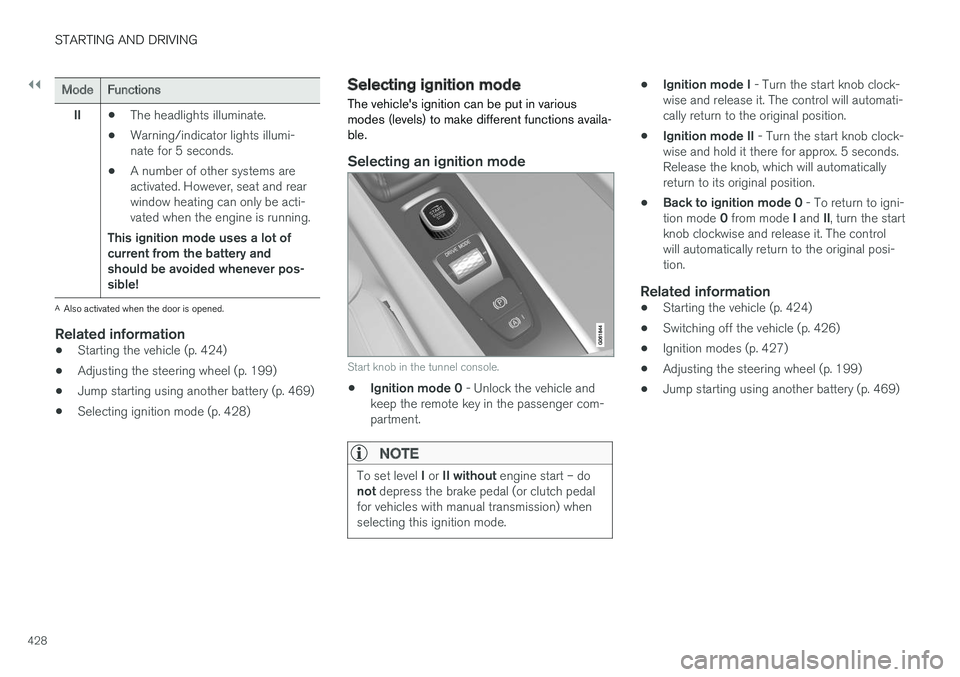
Selecting an ignition mode
Start knob in the tunnel console.
• Ignition mode 0
- Unlock the vehicle and
keep the remote key in the passenger com- partment.
NOTE
To set level I or II without engine start – do
not depress the brake pedal (or clutch pedal
for vehicles with manual transmission) when selecting this ignition mode.
• Ignition mode I
- Turn the start knob clock-
wise and release it. The control will automati- cally return to the original position.
• Ignition mode II
- Turn the start knob clock-
wise and hold it there for approx. 5 seconds.Release the knob, which will automaticallyreturn to its original position.
• Back to ignition mode 0
- To return to igni-
tion mode 0 from mode I and II, turn the start
knob clockwise and release it. The controlwill automatically return to the original posi-tion.
Related information
• Starting the vehicle (p. 424)
• Switching off the vehicle (p. 426)
• Ignition modes (p. 427)
• Adjusting the steering wheel (p. 199)
• Jump starting using another battery (p. 469)
Page 480 of 686
||
STARTING AND DRIVING
* Option/accessory.
478
WARNING
No person or object should be behind the tow truck when the vehicle is lifted onto the bedof the truck.
Related information
• Attaching and removing the towing eyelet (p. 476)
HomeLink®
*10
HomeLink ®
11
is a programmable remote control,
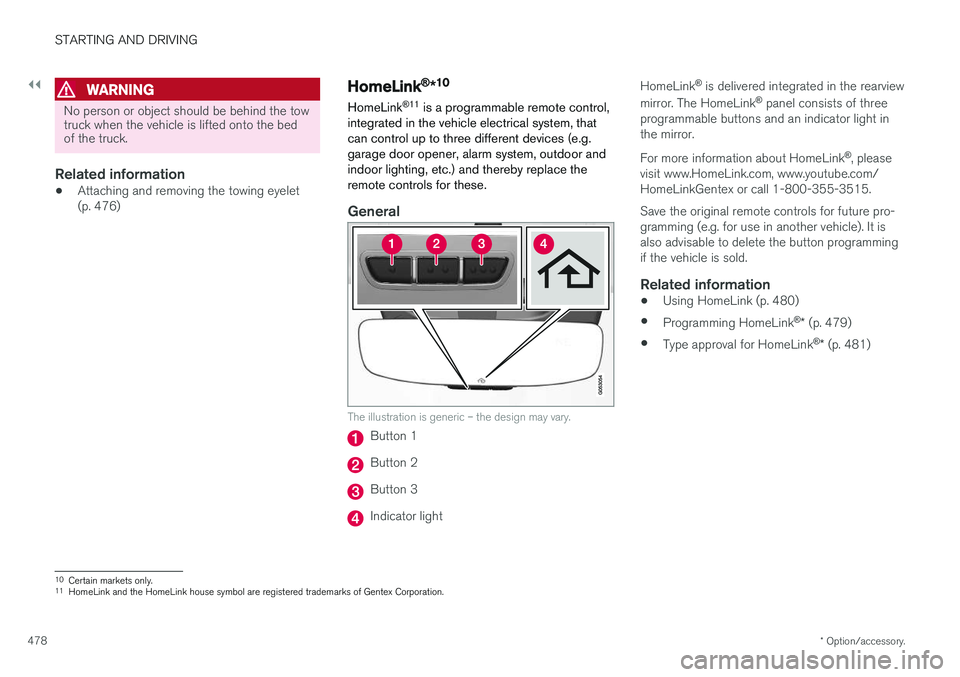
integrated in the vehicle electrical system, that can control up to three different devices (e.g.garage door opener, alarm system, outdoor andindoor lighting, etc.) and thereby replace theremote controls for these.
General
The illustration is generic – the design may vary.
Button 1
Button 2
Button 3
Indicator light HomeLink
®
is delivered integrated in the rearview
mirror. The HomeLink ®
panel consists of three
programmable buttons and an indicator light in the mirror. For more information about HomeLink ®
, please
visit www.HomeLink.com, www.youtube.com/ HomeLinkGentex or call 1-800-355-3515. Save the original remote controls for future pro- gramming (e.g. for use in another vehicle). It isalso advisable to delete the button programmingif the vehicle is sold.
Related information
• Using HomeLink (p. 480)
• Programming HomeLink ®
* (p. 479)
• Type approval for HomeLink ®
* (p. 481)
10
Certain markets only.
11 HomeLink and the HomeLink house symbol are registered trademarks of Gentex Corporation.
Page 481 of 686
STARTING AND DRIVING
}}
* Option/accessory.479
Programming HomeLink®
*12
Follow these instructions to program HomeLink ®
, reset all programming, or program
individual buttons.
NOTE
In some vehicles, the ignition must be on or in the "accessory position" before HomeLink ®
can be programmed or used. It can be a good idea to put new batteries in the remote con- trol being replaced by HomeLink ®
for faster
programming and better radio signal trans-mission. The HomeLink ®
buttons should be
reset before programming.
WARNING
While HomeLink ®
is being programmed, the
garage door or gate being programmed may be activated. Make sure that no one is nearthe door or gate during programming. Whenprogramming a garage door opener, it isadvised to park outside of the garage. 1.
Point the remote control at the HomeLink ®
button to be programmed and hold it about 2-8 cm (1-3 inches) from the button. Do not obstruct the HomeLink ®
indicator light.
Note: Some remote controls are more effec-
tive at programming HomeLink ®
from a dis-
tance of about 15-20 cm (6-12 inches). Try moving the remote control closer or furtheraway if you are experiencing any difficultiesprogramming.
2. Press and hold both the remote control but- ton and the HomeLink ®
button to be pro-
grammed.
3. Do not release the buttons until the indicator light has stopped flashing slowly (about oncea second) and either flashes quickly (about10 times a second) or glows steadily. >Steady glow: Indication that program-
ming is complete. Press the programmed button twice to activate. Flashing quickly: The device being pro-
grammed with HomeLink ®
may have a
security function that requires an extra step. Try pressing the programmed buttontwice to see whether the programmingworks. Otherwise, continue with the fol-lowing steps.
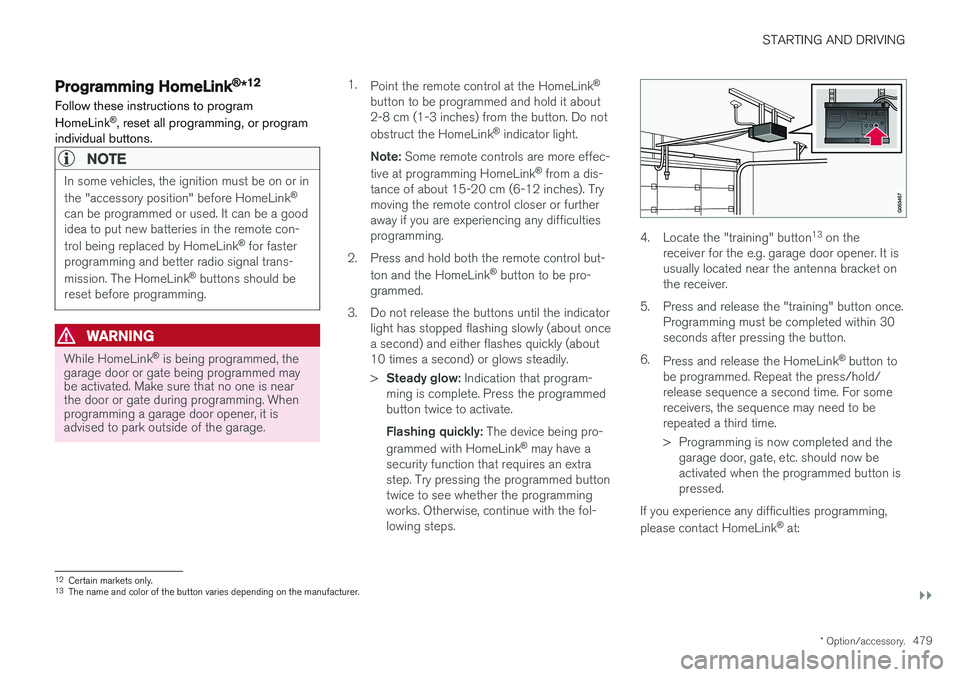
4. Locate the "training" button 13
on the
receiver for the e.g. garage door opener. It is usually located near the antenna bracket onthe receiver.
5. Press and release the "training" button once. Programming must be completed within 30seconds after pressing the button.
6. Press and release the HomeLink ®
button to
be programmed. Repeat the press/hold/release sequence a second time. For somereceivers, the sequence may need to berepeated a third time.
> Programming is now completed and the garage door, gate, etc. should now be activated when the programmed button ispressed.
If you experience any difficulties programming, please contact HomeLink ®
at:
12 Certain markets only.
13 The name and color of the button varies depending on the manufacturer.
Page 482 of 686
||
STARTING AND DRIVING
* Option/accessory.
480 www.HomeLink.com, www.youtube.com/ HomeLinkGentex or call 1-800-355-3515.
Programming individual buttons
To program an individual HomeLink
®
button:
1. Press and hold the desired button for about 20 seconds.
2. When the indicator light on HomeLink ®
starts flashing slowly, it is possible to pro-gram as usual. Note: If the button you are reprogramming
does not program with a new device, it will return to the previously saved programming.
Resetting the HomeLink ®
buttons
It is only possible to reset all HomeLink ®
buttons
at once. It is not possible to reset individual but-tons. Individual buttons can only be reprogram-med.
–Press and hold the outer buttons (1 and 3) on HomeLink ®
for about 10 seconds.
> When the indicator light goes from a steady glow to flashing, the buttons have been reset and are ready for reprogram-ming.
Related information
• Using HomeLink (p. 480)
• HomeLink ®
* (p. 478)
• Type approval for HomeLink ®
* (p. 481)
Using HomeLink
Once HomeLink ®
is programmed, it can be
used instead of the separate remote controls.
Press and hold the programming button. The garage door, gate, alarm system, etc. will be acti-vated (this may take several seconds). If the but-ton is held down for more than 20 seconds,reprogramming will begin. The indicator light willglow steadily or flash when the button has beenpressed. The original remote controls may be used concurrently with HomeLink ®
if desired.
NOTE
If the ignition is off, HomeLink ®
works for
30 minutes after the driver's door has been opened.
WARNING
• If you use HomeLink ®
to open a garage
door or gate, be sure no one is near the gate or door while it is in motion.
• Do not use HomeLink ®
with any garage
door opener that lacks safety stop andreverse features as required by US fed-eral safety standards (this includes anygarage door opener model manufacturedbefore April 1, 1982). A garage door thatcannot detect an object - signaling thedoor to stop and reverse - does not meetcurrent U.S. federal safety standards. Formore information, contact HomeLink at:www.homelink.com.
Related information
• HomeLink ®
* (p. 478)
• Programming HomeLink ®
* (p. 479)
• Type approval for HomeLink ®
* (p. 481)
Page 522 of 686
AUDIO, MEDIA AND INTERNET
* Option/accessory.
520
Tips for using Android Auto *
Here are some useful tips for when you use Android Auto.
• Ensure that your apps are updated.
• When starting the car, wait until the center display has started, connect the phone andthen open Android Auto from the app view.
• In the event of problems with Android Auto,disconnect your Android phone from theUSB port and then reconnect via USB. Oth-erwise, try closing the app on the phone andthen restarting the app.
• When a phone is connected to Android Autoit is still possible to playback media viaBluetooth to another media player. TheBluetooth function is on when Android Autois used.
Related information
•
Android Auto
* (p. 518)
Phone
A phone equipped with Bluetooth can be wire- lessly connected to the vehicle's integratedhands-free system.
The audio and media system offers hands-free functionality for remotely controlling a number ofthe phone's features. The phone's integratedcontrols can also be used, even when it is con-nected to the vehicle. When the phone has been paired and connected to the vehicle, it can be used as an Internet con-nection or to make or receive calls, send orreceive text messages or wirelessly play music.
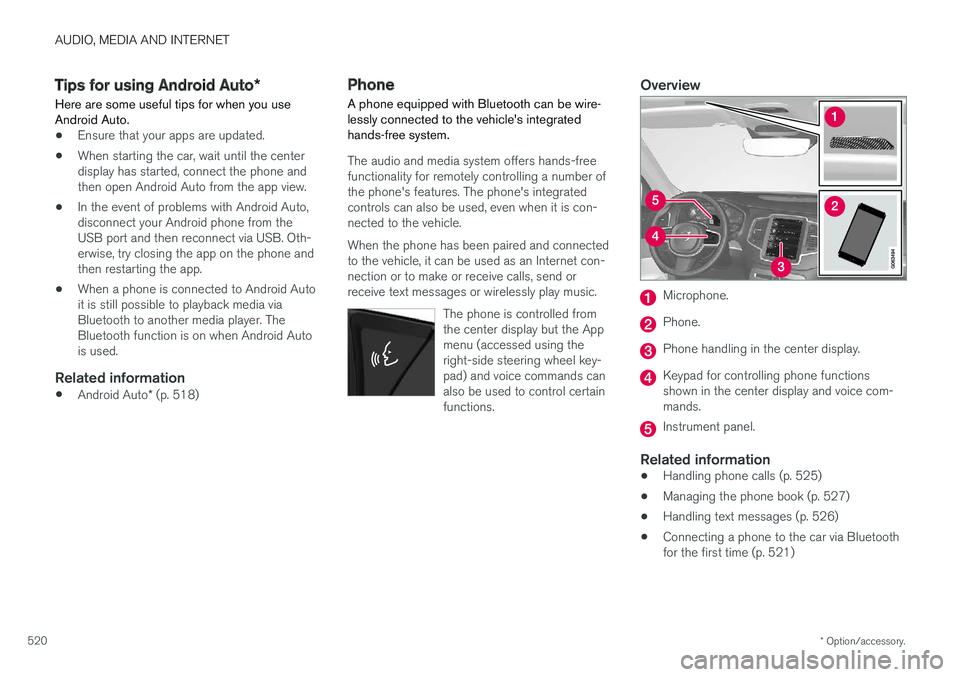
The phone is controlled fromthe center display but the Appmenu (accessed using theright-side steering wheel key-pad) and voice commands canalso be used to control certainfunctions.
Overview
Microphone.
Phone.
Phone handling in the center display.
Keypad for controlling phone functions shown in the center display and voice com-mands.
Instrument panel.
Related information
•Handling phone calls (p. 525)
• Managing the phone book (p. 527)
• Handling text messages (p. 526)
• Connecting a phone to the car via Bluetooth for the first time (p. 521)
Page 582 of 686
LOADING, STORAGE AND PASSENGER COMPARTMENT
* Option/accessory.
580
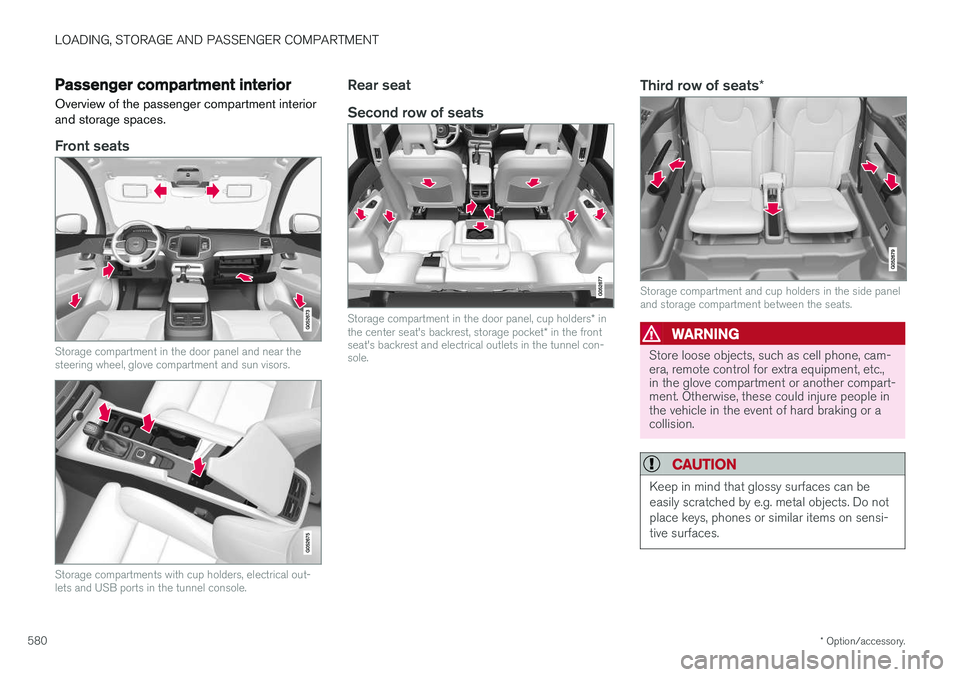
Passenger compartment interior
Overview of the passenger compartment interior and storage spaces.
Front seats
Storage compartment in the door panel and near the steering wheel, glove compartment and sun visors.
Storage compartments with cup holders, electrical out- lets and USB ports in the tunnel console.
Rear seat Second row of seats
Storage compartment in the door panel, cup holders * in
the center seat's backrest, storage pocket * in the front
seat's backrest and electrical outlets in the tunnel con- sole.
Third row of seats *
Storage compartment and cup holders in the side panel and storage compartment between the seats.
WARNING
Store loose objects, such as cell phone, cam- era, remote control for extra equipment, etc.,in the glove compartment or another compart-ment. Otherwise, these could injure people inthe vehicle in the event of hard braking or acollision.
CAUTION
Keep in mind that glossy surfaces can be easily scratched by e.g. metal objects. Do notplace keys, phones or similar items on sensi-tive surfaces.
Page 583 of 686
LOADING, STORAGE AND PASSENGER COMPARTMENT
* Option/accessory.581
Related information
•Electrical outlets (p. 582)
• Using the glove compartment (p. 585)
• Sun visors (p. 586)
• Tunnel console (p. 581)
• Connecting a device via the USB port (p. 514)
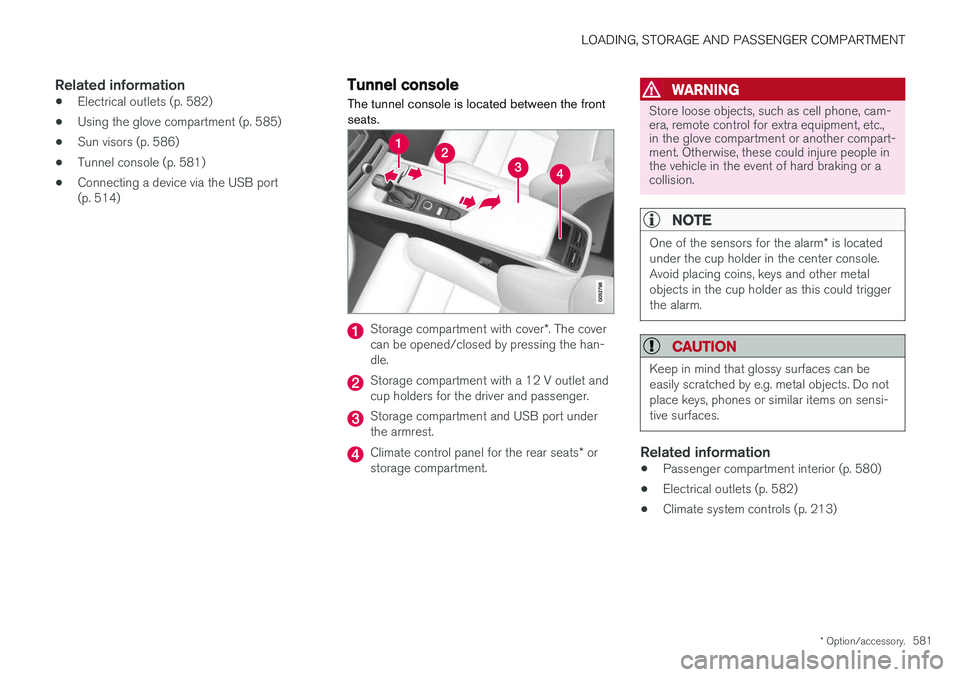
Tunnel console The tunnel console is located between the front seats.
Storage compartment with cover
*. The cover
can be opened/closed by pressing the han- dle.
Storage compartment with a 12 V outlet and cup holders for the driver and passenger.
Storage compartment and USB port under the armrest.
Climate control panel for the rear seats * or
storage compartment.
WARNING
Store loose objects, such as cell phone, cam- era, remote control for extra equipment, etc.,in the glove compartment or another compart-ment. Otherwise, these could injure people inthe vehicle in the event of hard braking or acollision.
NOTE
One of the sensors for the alarm * is located
under the cup holder in the center console. Avoid placing coins, keys and other metalobjects in the cup holder as this could triggerthe alarm.
CAUTION
Keep in mind that glossy surfaces can be easily scratched by e.g. metal objects. Do notplace keys, phones or similar items on sensi-tive surfaces.
Related information
• Passenger compartment interior (p. 580)
• Electrical outlets (p. 582)
• Climate system controls (p. 213)