radio VOLVO XC90 T8 2018 Owner´s Manual
[x] Cancel search | Manufacturer: VOLVO, Model Year: 2018, Model line: XC90 T8, Model: VOLVO XC90 T8 2018Pages: 686, PDF Size: 11.51 MB
Page 501 of 686
AUDIO, MEDIA AND INTERNET
}}
* Option/accessory.499
Using SiriusXM® Satellite radio *
SiriusXM ®
Satellite radio offers several features
for finding and listening to music, news, sporting events, etc. being broadcast on satellite radiostations.
SiriusXM ®
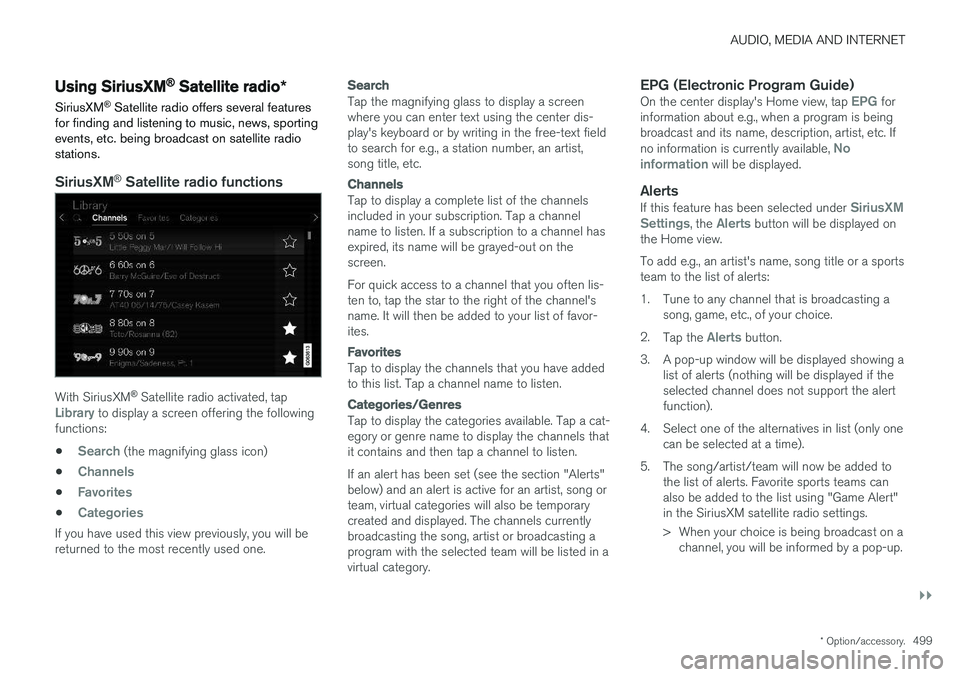
Satellite radio functions
With SiriusXM ®
Satellite radio activated, tapLibrary to display a screen offering the following
functions: •
Search (the magnifying glass icon)
•
Channels
•Favorites
•Categories
If you have used this view previously, you will be returned to the most recently used one.
Search
Tap the magnifying glass to display a screen where you can enter text using the center dis-play's keyboard or by writing in the free-text fieldto search for e.g., a station number, an artist,song title, etc.
Channels
Tap to display a complete list of the channels included in your subscription. Tap a channelname to listen. If a subscription to a channel hasexpired, its name will be grayed-out on thescreen. For quick access to a channel that you often lis- ten to, tap the star to the right of the channel'sname. It will then be added to your list of favor-ites.
Favorites
Tap to display the channels that you have added to this list. Tap a channel name to listen.
Categories/Genres
Tap to display the categories available. Tap a cat- egory or genre name to display the channels thatit contains and then tap a channel to listen. If an alert has been set (see the section "Alerts" below) and an alert is active for an artist, song orteam, virtual categories will also be temporarycreated and displayed. The channels currentlybroadcasting the song, artist or broadcasting aprogram with the selected team will be listed in avirtual category.
EPG (Electronic Program Guide)On the center display's Home view, tap EPG for
information about e.g., when a program is being broadcast and its name, description, artist, etc. If no information is currently available,
No
information will be displayed.
AlertsIf this feature has been selected under SiriusXM
Settings, the Alerts button will be displayed on
the Home view. To add e.g., an artist's name, song title or a sports team to the list of alerts:
1. Tune to any channel that is broadcasting a song, game, etc., of your choice.
2. Tap the
Alerts button.
3. A pop-up window will be displayed showing a list of alerts (nothing will be displayed if the selected channel does not support the alertfunction).
4. Select one of the alternatives in list (only one can be selected at a time).
5. The song/artist/team will now be added to the list of alerts. Favorite sports teams canalso be added to the list using "Game Alert"in the SiriusXM satellite radio settings.
> When your choice is being broadcast on achannel, you will be informed by a pop-up.
Page 502 of 686
||
AUDIO, MEDIA AND INTERNET
* Option/accessory.
500
iTunes taggingFrom the center display's Top view, tap SiriusXM
Settings. Tap the iTunes Tagging menu. Tap
the iTunes Tagging box to activate/deactivate
this function and tap Close to return to Home
view. Tap Tags List to display a list of all tagged
songs. If the function is activated, the
iTunes tag button
will be displayed in Home view. If a song is played that you would like to buy in the iTunes store, tapthis button while the song is playing to tag it. If a song with
iTunes Tagging information is availa-
ble, the button will be selectable. Tap the button to tag the song. If you would like to buy a taggedsong via iTunes, Tap the iTunes tag button. To buy a song in iTunes, begin by connecting an iPhone/iPod/iPad to the USB port in the tunnelconsole. The iTunes tagging list will automaticallybe transferred to the device and removed fromthe list in the vehicle. If the device is connectedwhen a song is tagged, the data will automaticallybe saved in the device. To purchase the song,consult the iTunes support page.
Related information
• SiriusXM ®
Satellite radio * (p. 498)
• Entering characters, letters and words byhand in the center display (p. 129)
• Settings for SiriusXM ®
Satellite radio *
(p. 500) •
Settings for SiriusXM ®
Satellite radio *
(p. 500)
• Connecting a device via the USB port(p. 514)
Settings for SiriusXM® Satellite
radio
*
There are numerous settings that can be made to enhance your SiriusXM ®
Satellite radio listen-
ing experience.
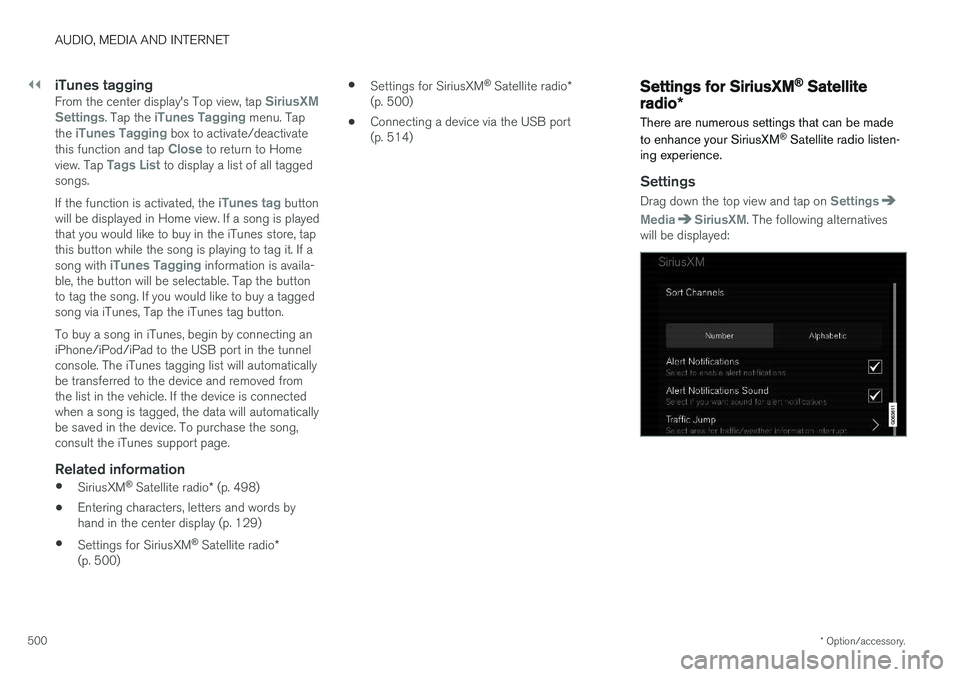
Settings
Drag down the top view and tap on Settings
MediaSiriusXM. The following alternatives
will be displayed:
Page 503 of 686
AUDIO, MEDIA AND INTERNET
* Option/accessory.501
Traffic Jump
Tap to display a list of cities from which you can choose to get traffic/weather information (or
Traffic jump off to deactivate the feature). Tap
to select a city (JUMP will be displayed on the
Home screen next to Library). Tap Back to
return to the list of settings or Close to return to
the Home screen. From the Home screen, tap
JUMP to activate the
function. When traffic/weather information is available from the selected city, the radio willautomatically tune to the channel providing theinformation. When the information/announce-ment is finished, the radio will automaticallyreturn to the channel that you were previously lis-tening to. During an announcement, tap
JUMP to interrupt
the message and return to the station that you were currently listening to.
Alert Notifications
Tap the box to activate/deactivate. When acti- vated, you will be notified if a song, artist, etc. thatyou have selected is playing. You will be asked ifyou want to listen.
Alert Notifications Sound
Opt to receive an audible alert when one of your selected choices is being played.
Sort Channels
Select how to sort your channels list.
iTunes Tagging
Tap to display a menu with the options: iTunes
Tagging and Tags List. With this feature acti-
vated, songs can be tagged for later purchase from the iTunes store.
Game Alerts
Tap to display a list of sports. Tap a sport to display a list of teams and tap a box on the right side of the screen to select ateam as a favorite. An alert will then be providedwhen information about the team is being broad-cast. Tap
Confirm below the list to return to the list of
sports. Tap
Back to return to the list of settings orClose to return to the main screen.
Unsubscribed Services
If you have a SiriusXM ®
Satellite radio subscrip-
tion, any channels not included in the subscrip- tion will be listed here. Call SiriusXM ™ to sub-
scribe. The phone number will be shown on the screen. If a cell phone is paired and connected tothe vehicle, tap the phone number to make thecall.
Skipped Stations
Tap to display a list of channels that you would like to skip (hide). Hide channels from the chan-nel list by tapping the boxes to the right of thescreen. Skipped (hidden) channels will not beshown in the channel list. However, a channel previously selected as a favorite will still be dis-played in the list of favorites, even it has beenadded to the skip list.
Skipped Categories
Tap to display a list of categories. Tap a category to skip (hide) it. It will not be displayed in the listof categories.
Related information
•
SiriusXM ®
Satellite radio * (p. 498)
• Using SiriusXM ®
Satellite radio * (p. 499)
Page 504 of 686
AUDIO, MEDIA AND INTERNET
* Option/accessory.
502
SiriusXM Travel Link®
*
SiriusXM Travel Link is a feature offered by
SiriusXM ®
Satellite radio * that can provide infor-
mation about e.g., weather forecasts, weather alerts, service stations, sports, etc. in the vicinityof the vehicle.
Starting SiriusXM Travel Link
NOTE
SiriusXM Travel Link services are only availa- ble in vehicles equipped with the SensusNavigation system.
From the center display's App view, tap Travel
Link to activate the feature. A disclaimer text will
be displayed. Tap OK to display a list of SiriusXM
Travel Link services: •
Alerts
•Fuel
•Sports
•Weather
•Favorites
In order to use one or more of these services, the user has to subscribe to the ones desired. To subscribe to a SiriusXM Travel Link service:
1. Open the center display's Top view.2. Tap
Settings. 3.
Press
SiriusXM Travel Link andSubscription Status.
> To subscribe, call the phone number listed on the screen.
Any services not subscribed will be grayed out and contain the text
Service not subscribed.
When the services have been activated (subscri- bed), tap the one of your choice to start it. The following applies for all of the
SiriusXM
Travel Link services:
• Pressing the
Back button will take you back
to the previous screen
• Pressing the
Close button will take you to
the SiriusXM Travel Link home screen.
NOTE
If the Close button is used to return to theSiriusXM Travel Link home screen, the fol-
lowing applies (the Weather service is used
here as an example):
• If you have already used the
Weatherfunction, tapping Weather again in theSiriusXM Travel Link home screen
before using any other SiriusXM
Travel Link service will return you to the
point where you left the Weather service.
• If another
SiriusXM Travel Link service
is used (e.g., Fuel, Sports, etc.) before
you return to the Weather service, you
will be returned to the default Weatherview (in this case, Local).
The same principle applies to all of the
SiriusXM Travel Link services.
FavoritesMany SiriusXM Travel Link selections can be saved for easy access as favorites by tapping the"star" icon next to the selection where applicable. To display a list of your favorites, tap the
Favorites application in the SiriusXM Travel Link
home screen.
Related information
• SiriusXM ®
Satellite radio * (p. 498)
• SiriusXM Travel Link ®
* - Fuel (p. 505)
Page 509 of 686
AUDIO, MEDIA AND INTERNET
* Option/accessory.507
4. Tap one of the divisions to display:
•
In progress: play-by-play information
about a match/game/tournament cur- rently in progress. Continue tapping todisplay. In the detailed view, you can alsoselect a radio station that is currentlybroadcasting an ongoing sporting event
•
Headlines for MLB: Tap to display brief
headline information
•
Scheduled: schedules for coming
matches, games, etc.
•
Scores: match/game results
The same principle applies to all sports.
Related information
• SiriusXM Travel Link ®
* (p. 502)
• SiriusXM Travel Link ®
* - Notifications
(p. 504)
• SiriusXM Travel Link ®
* - Fuel (p. 505)
• SiriusXM Travel Link ®
* - Weather (p. 503)
Media player
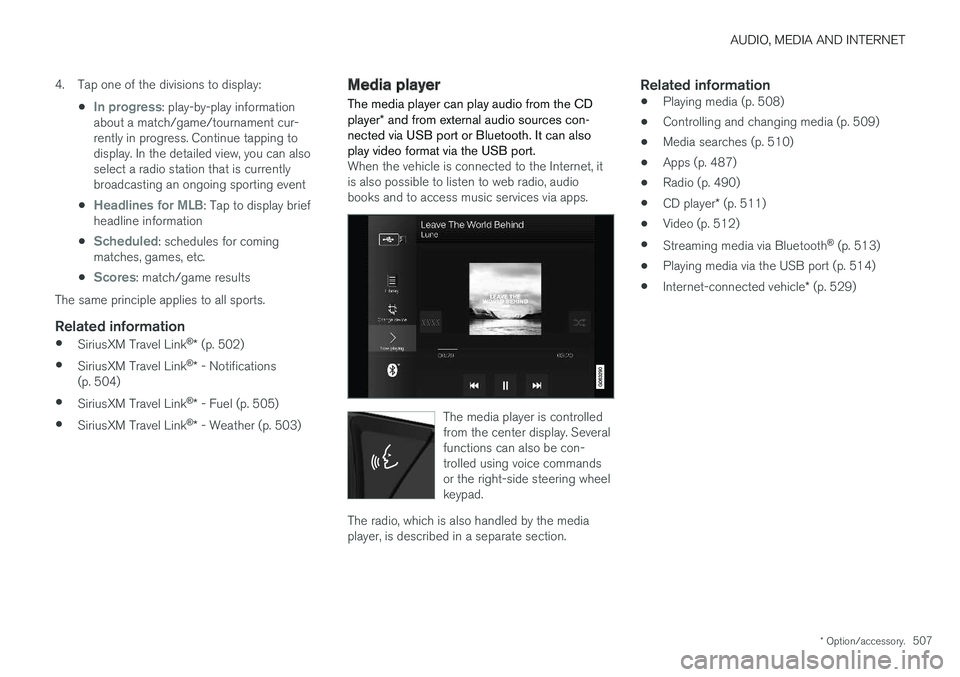
The media player can play audio from the CD player * and from external audio sources con-
nected via USB port or Bluetooth. It can also play video format via the USB port.
When the vehicle is connected to the Internet, it is also possible to listen to web radio, audiobooks and to access music services via apps.
The media player is controlled from the center display. Severalfunctions can also be con-trolled using voice commandsor the right-side steering wheelkeypad.
The radio, which is also handled by the media player, is described in a separate section.
Related information
• Playing media (p. 508)
• Controlling and changing media (p. 509)
• Media searches (p. 510)
• Apps (p. 487)
• Radio (p. 490)
• CD player
* (p. 511)
• Video (p. 512)
• Streaming media via Bluetooth ®
(p. 513)
• Playing media via the USB port (p. 514)
• Internet-connected vehicle
* (p. 529)
Page 510 of 686
AUDIO, MEDIA AND INTERNET
* Option/accessory.
508
Playing media The media player is controlled from the center display. Several other functions can also be con-trolled using the right-side steering wheel key-pad or by using voice commands. The radio can also be controlled in the media player. See the section describing the radio.
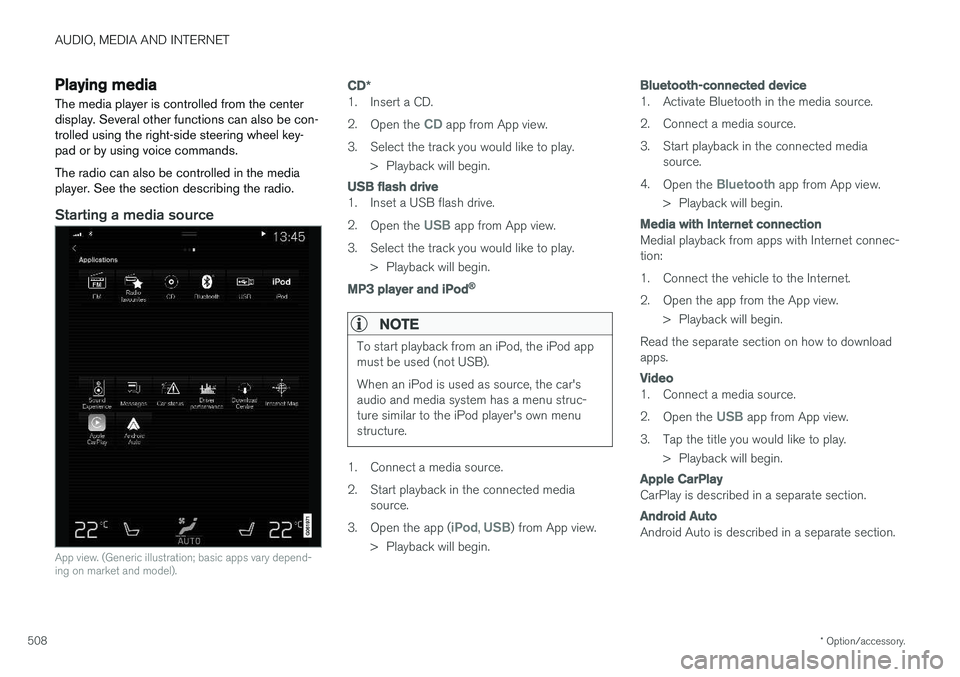
Starting a media source
App view. (Generic illustration; basic apps vary depend- ing on market and model).
CD *
1. Insert a CD. 2.
Open the
CD app from App view.
3. Select the track you would like to play. > Playback will begin.
USB flash drive
1. Inset a USB flash drive. 2.Open the
USB app from App view.
3. Select the track you would like to play. > Playback will begin.
MP3 player and iPod®
NOTE
To start playback from an iPod, the iPod app must be used (not USB). When an iPod is used as source, the car's audio and media system has a menu struc-ture similar to the iPod player's own menustructure.
1. Connect a media source.
2. Start playback in the connected mediasource.
3. Open the app (
iPod, USB) from App view.
> Playback will begin.
Bluetooth-connected device
1. Activate Bluetooth in the media source.
2. Connect a media source.
3. Start playback in the connected media source.
4. Open the
Bluetooth app from App view.
> Playback will begin.
Media with Internet connection
Medial playback from apps with Internet connec- tion:
1. Connect the vehicle to the Internet.
2. Open the app from the App view. > Playback will begin.
Read the separate section on how to download apps.
Video
1. Connect a media source. 2. Open the
USB app from App view.
3. Tap the title you would like to play. > Playback will begin.
Apple CarPlay
CarPlay is described in a separate section.
Android Auto
Android Auto is described in a separate section.
Page 511 of 686
AUDIO, MEDIA AND INTERNET
}}
* Option/accessory.509
Related information
•Handling the App menu in the instrument panel (p. 104)
• Radio (p. 490)
• Controlling and changing media (p. 509)
• Connecting a device via the USB port(p. 514)
• Connecting a device via Bluetooth ®
(p. 513)
• Download apps (p. 488)
• Internet-connected vehicle
* (p. 529)
• Video (p. 512)
• Apple ®
CarPlay ®
* (p. 515)
• Android Auto
* (p. 518)
• Voice control for radio and media (p. 148)
• Compatible file formats for media (p. 536)
Controlling and changing media
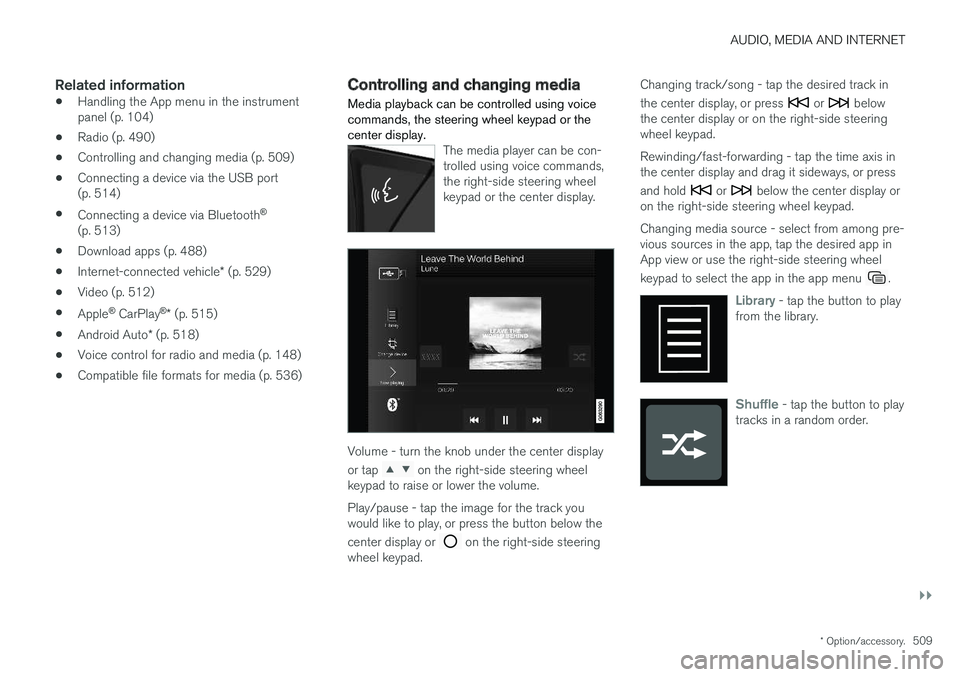
Media playback can be controlled using voice commands, the steering wheel keypad or thecenter display.
The media player can be con- trolled using voice commands,the right-side steering wheelkeypad or the center display.
Volume - turn the knob under the center display or tap
on the right-side steering wheel
keypad to raise or lower the volume. Play/pause - tap the image for the track you would like to play, or press the button below the center display or
on the right-side steering
wheel keypad. Changing track/song - tap the desired track in the center display, or press
or below
the center display or on the right-side steering wheel keypad. Rewinding/fast-forwarding - tap the time axis in the center display and drag it sideways, or press and hold
or below the center display or
on the right-side steering wheel keypad. Changing media source - select from among pre- vious sources in the app, tap the desired app inApp view or use the right-side steering wheel keypad to select the app in the app menu
.
Library - tap the button to play
from the library.
Shuffle - tap the button to play
tracks in a random order.
Page 512 of 686
||
AUDIO, MEDIA AND INTERNET
* Option/accessory.
510
Similar - tap the button to use
Gracenote to search for similar music on the USB device andcreate a playlist from the musicfound. The playlist can containup to 50 tracks.
Change device - tap the but-
ton to toggle between USB devices when more than one isconnected.
Related information
• Media player (p. 507)
• Media searches (p. 510)
• Sound settings (p. 486)
• Apps (p. 487)
• Gracenote ®
(p. 511)
• Voice control for radio and media (p. 148)
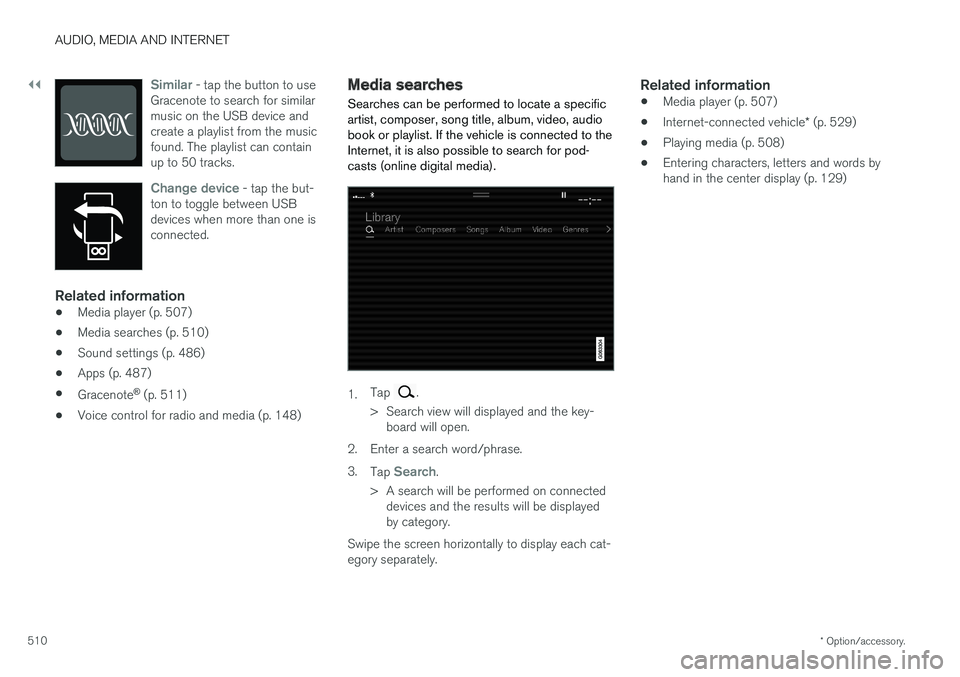
Media searches
Searches can be performed to locate a specific artist, composer, song title, album, video, audiobook or playlist. If the vehicle is connected to theInternet, it is also possible to search for pod-casts (online digital media).
1. Tap .
> Search view will displayed and the key- board will open.
2. Enter a search word/phrase. 3. Tap
Search.
> A search will be performed on connected devices and the results will be displayed by category.
Swipe the screen horizontally to display each cat-egory separately.
Related information
• Media player (p. 507)
• Internet-connected vehicle
* (p. 529)
• Playing media (p. 508)
• Entering characters, letters and words byhand in the center display (p. 129)
Page 513 of 686
AUDIO, MEDIA AND INTERNET
* Option/accessory.511
Gracenote®
Gracenote identifies artists, albums, tracks and any associated images that can be displayedduring playback.
Gracenote MusicID ®
is a standard for music rec-
ognition. 1. Tap
Settings in the Top view.
2. Tap
MediaGracenote ®.
3. Choose settings for Gracenote data:
•
Gracenote ®
Online Search - search
Gracenote's online database for currently playing media.
•
Gracenote ® Multiple Results - select how
Gracenote data should be displayed if there are multiple search results.
1 - the file's original data will be used. 2 - Gracenote data will be used.3 - Gracenote or original data can be selected.
•
None - no result will be displayed.
Updating GracenoteThe contents of the Gracenote database are con- tinuously updated. For optimal functionality,update to the latest version. Seesupport.volvocars.com for information and down-loads.
Related information
• Playing media (p. 508)
• License agreement for audio and media(p. 539)
CD player
*
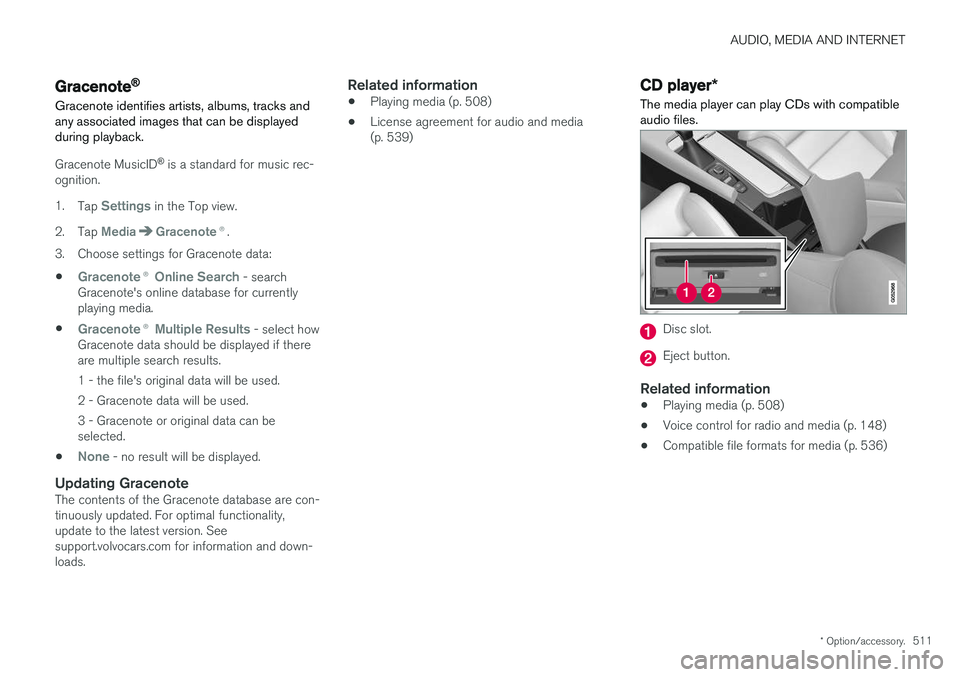
The media player can play CDs with compatible audio files.
Disc slot.
Eject button.
Related information
• Playing media (p. 508)
• Voice control for radio and media (p. 148)
• Compatible file formats for media (p. 536)
Page 531 of 686
AUDIO, MEDIA AND INTERNET
}}
* Option/accessory.529
Settings for Bluetooth devices
Settings for Bluetooth-connected devices.
1. Tap Settings in the Top view.
2. Tap
CommunicationBluetooth
Devices and select settings:
•
Add device - start the procedure for pairing
a new device.
•
Previously paired devices - list con-
nected/paired devices.
•
Remove device - remove a connected
device.
•
Allowed services for this device - select
what the device will be used for: making calls, sending/receiving messages, stream-ing media, Internet connection.
•
Internet connection connect the vehicle to
the Internet using the device's Bluetooth connection.
Bluetooth ®
declaration of conformityUSA FCC CAUTION Changes or modifications not expressly approved by the party responsible for compliance couldvoid the user's authority to operate the equip-ment. This transmitter must not be co-located oroperated in conjunction with any other antennaor transmitter. Canada This device complies with Industry Canada license-exempt RSS standard(s). Operation issubject to the following two conditions: (1) this device may not cause interference, and(2) this device must accept any interference, including interference that may cause undesiredoperation of the device.
Related information
•
Phone (p. 520)
• Phone settings (p. 528)
• Internet-connected vehicle
* (p. 529)
• Connecting a phone to the car via Bluetoothfor the first time (p. 521)
Internet-connected vehicle
*
When the vehicle is connected to the Internet, it is possible to use web radio and music servicesvia apps, download software and contact retail-ers from the vehicle.
The vehicle can be connected to the Internet using Bluetooth, Wi-Fi or the vehicle's integratedmodem.