warning VOLVO XC90 T8 2018 Owner´s Manual
[x] Cancel search | Manufacturer: VOLVO, Model Year: 2018, Model line: XC90 T8, Model: VOLVO XC90 T8 2018Pages: 686, PDF Size: 11.51 MB
Page 81 of 686
SAFETY
* Option/accessory.79
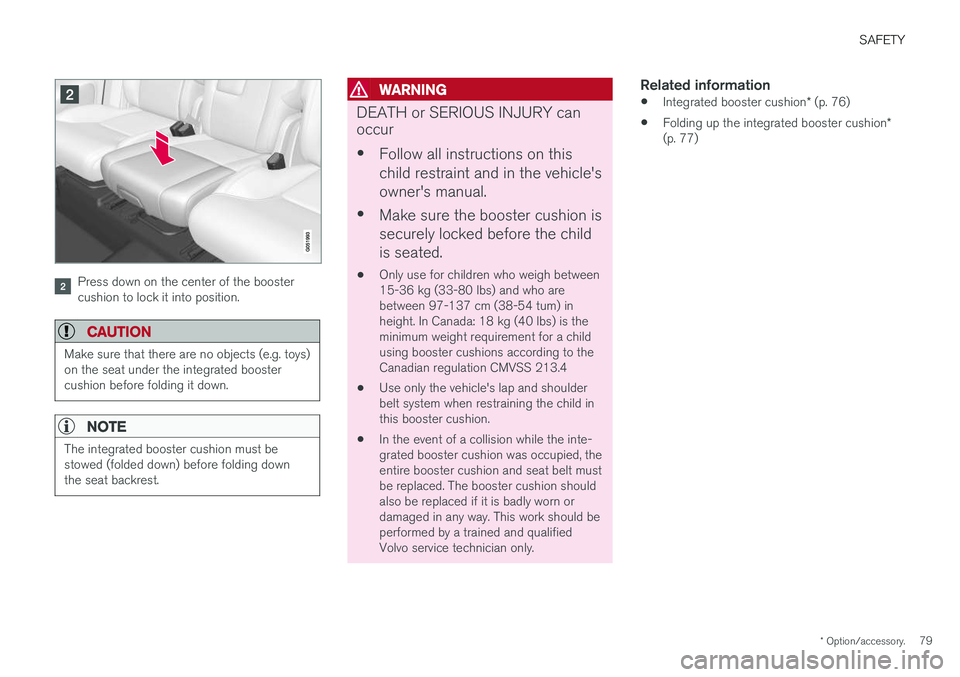
Press down on the center of the booster cushion to lock it into position.
CAUTION
Make sure that there are no objects (e.g. toys) on the seat under the integrated boostercushion before folding it down.
NOTE
The integrated booster cushion must be stowed (folded down) before folding downthe seat backrest.
WARNING
DEATH or SERIOUS INJURY can occur •
Follow all instructions on this child restraint and in the vehicle'sowner's manual.
• Make sure the booster cushion issecurely locked before the childis seated.
• Only use for children who weigh between 15-36 kg (33-80 lbs) and who arebetween 97-137 cm (38-54 tum) inheight. In Canada: 18 kg (40 lbs) is theminimum weight requirement for a childusing booster cushions according to theCanadian regulation CMVSS 213.4
• Use only the vehicle's lap and shoulderbelt system when restraining the child inthis booster cushion.
• In the event of a collision while the inte-grated booster cushion was occupied, theentire booster cushion and seat belt mustbe replaced. The booster cushion shouldalso be replaced if it is badly worn ordamaged in any way. This work should beperformed by a trained and qualifiedVolvo service technician only.
Related information
•
Integrated booster cushion
* (p. 76)
• Folding up the integrated booster cushion
*
(p. 77)
Page 84 of 686
DISPLAYS AND VOICE CONTROL
* Option/accessory.
82
Instruments and controls in left-hand drive vehicles
The overviews show the location of the vehicle's
displays and controls.
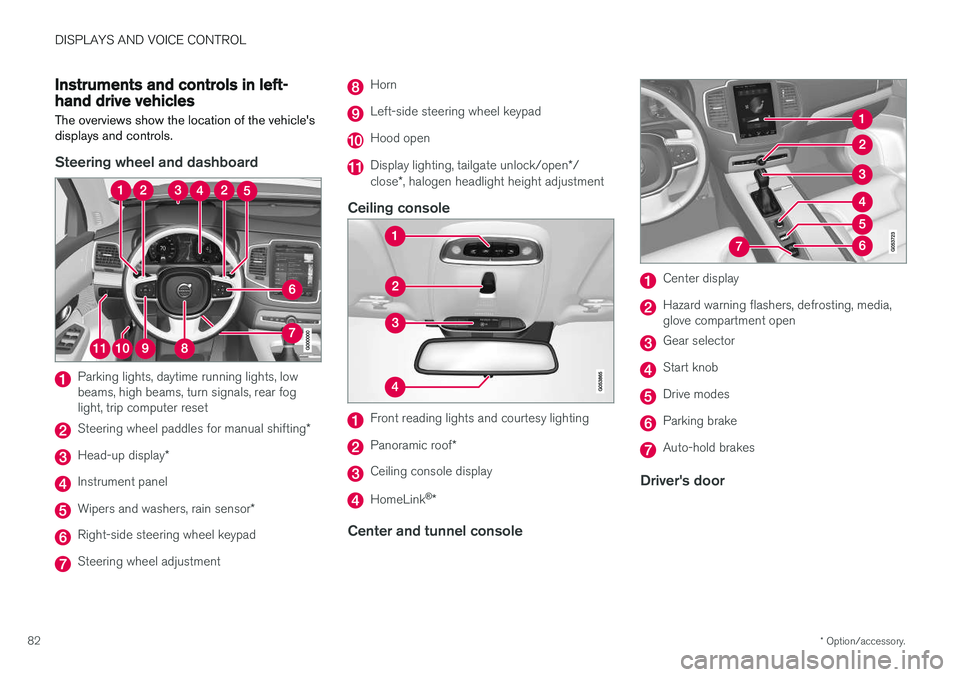
Steering wheel and dashboard
Parking lights, daytime running lights, low beams, high beams, turn signals, rear foglight, trip computer reset
Steering wheel paddles for manual shifting *
Head-up display*
Instrument panel
Wipers and washers, rain sensor *
Right-side steering wheel keypad
Steering wheel adjustment
Horn
Left-side steering wheel keypad
Hood open
Display lighting, tailgate unlock/open */
close *, halogen headlight height adjustment
Ceiling console
Front reading lights and courtesy lighting
Panoramic roof *
Ceiling console display
HomeLink®
*
Center and tunnel console
Center display
Hazard warning flashers, defrosting, media, glove compartment open
Gear selector
Start knob
Drive modes
Parking brake
Auto-hold brakes
Driver's door
Page 86 of 686
DISPLAYS AND VOICE CONTROL
* Option/accessory.
84
Instrument panel
The instrument panel displays information rela- ted to the vehicle and driving.
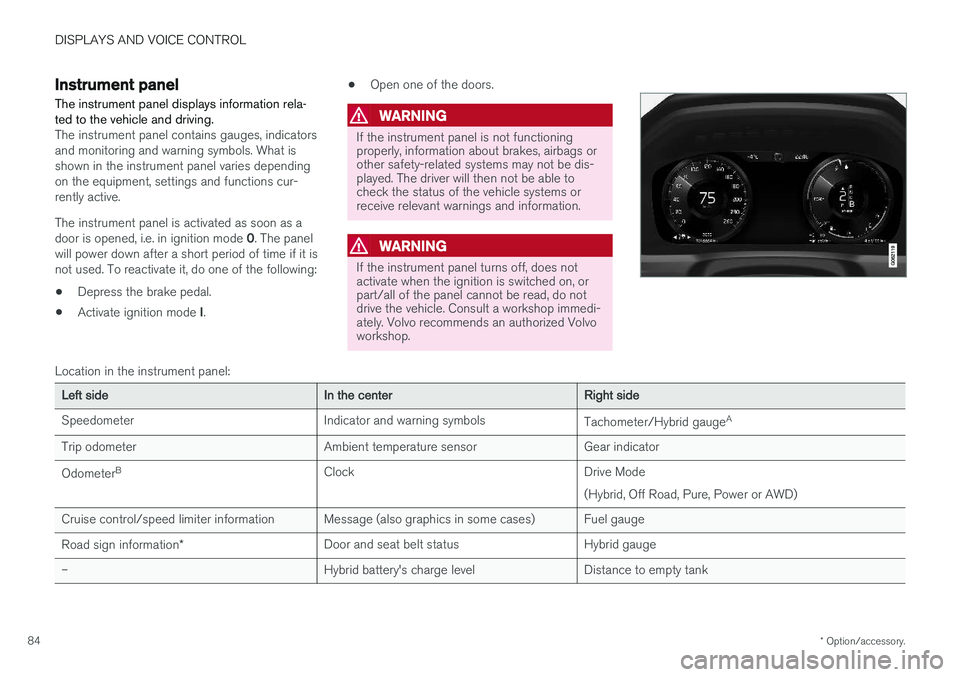
The instrument panel contains gauges, indicators and monitoring and warning symbols. What isshown in the instrument panel varies dependingon the equipment, settings and functions cur-rently active. The instrument panel is activated as soon as a door is opened, i.e. in ignition mode 0. The panel
will power down after a short period of time if it is not used. To reactivate it, do one of the following:
• Depress the brake pedal.
• Activate ignition mode
I. •
Open one of the doors.
WARNING
If the instrument panel is not functioning properly, information about brakes, airbags orother safety-related systems may not be dis-played. The driver will then not be able tocheck the status of the vehicle systems orreceive relevant warnings and information.
WARNING
If the instrument panel turns off, does not activate when the ignition is switched on, orpart/all of the panel cannot be read, do notdrive the vehicle. Consult a workshop immedi-ately. Volvo recommends an authorized Volvoworkshop.
Location in the instrument panel:
Left sideIn the centerRight side
Speedometer Indicator and warning symbols Tachometer/Hybrid gaugeA
Trip odometer Ambient temperature sensor Gear indicator Odometer B
Clock Drive Mode
(Hybrid, Off Road, Pure, Power or AWD)
Cruise control/speed limiter information Message (also graphics in some cases) Fuel gauge Road sign information * Door and seat belt status Hybrid gauge
– Hybrid battery's charge level Distance to empty tank
Page 87 of 686
DISPLAYS AND VOICE CONTROL
85
Left sideIn the centerRight side
– Media player Distance to discharged battery
– Navigation system map Current fuel consumption
– PhoneApp menu (activated using steering wheel keypad)
– Voice Control –
– CompassA
–
ADepends on selected drive mode.
B Total distance.
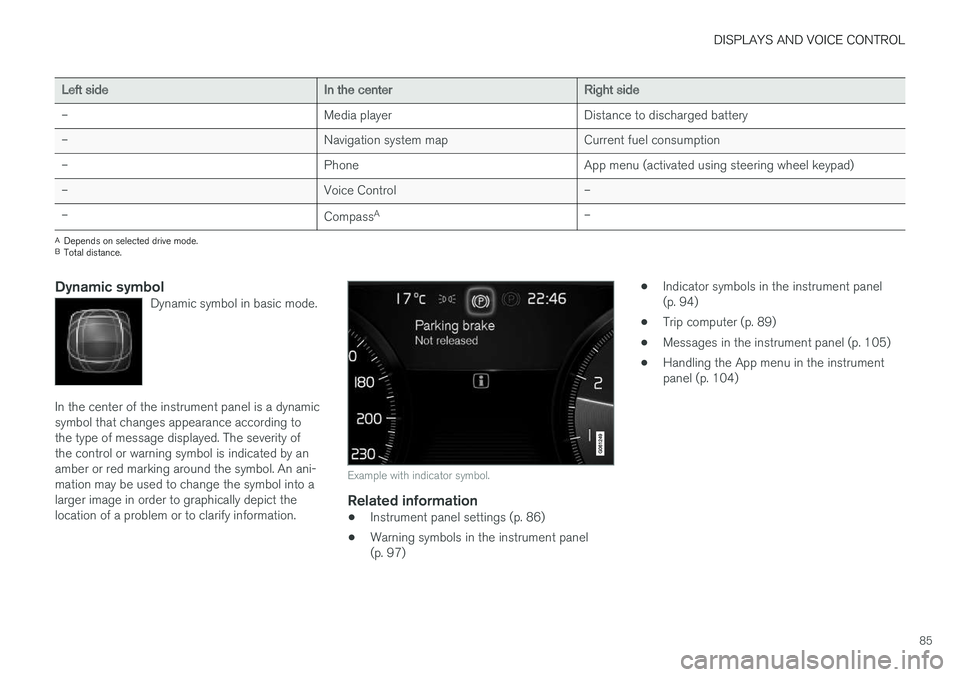
Dynamic symbolDynamic symbol in basic mode.
In the center of the instrument panel is a dynamic symbol that changes appearance according tothe type of message displayed. The severity ofthe control or warning symbol is indicated by anamber or red marking around the symbol. An ani-mation may be used to change the symbol into alarger image in order to graphically depict thelocation of a problem or to clarify information.
Example with indicator symbol.
Related information
• Instrument panel settings (p. 86)
• Warning symbols in the instrument panel (p. 97) •
Indicator symbols in the instrument panel(p. 94)
• Trip computer (p. 89)
• Messages in the instrument panel (p. 105)
• Handling the App menu in the instrumentpanel (p. 104)
Page 96 of 686
DISPLAYS AND VOICE CONTROL
94
Ambient temperature sensor
The ambient temperature is shown in the instru- ment panel.
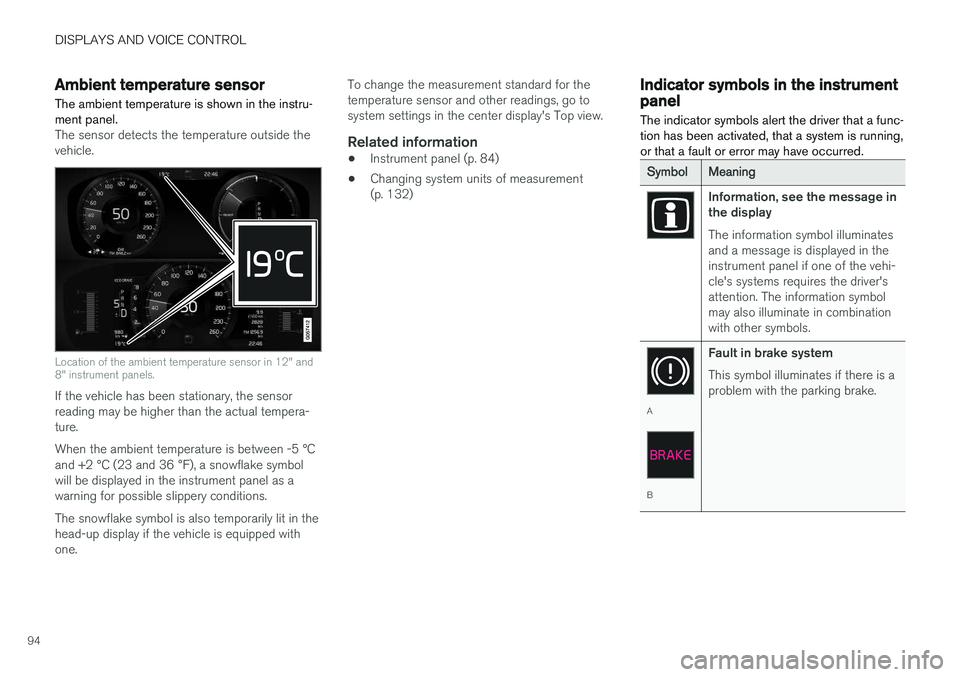
The sensor detects the temperature outside the vehicle.
Location of the ambient temperature sensor in 12" and 8" instrument panels.
If the vehicle has been stationary, the sensor reading may be higher than the actual tempera-ture. When the ambient temperature is between -5 °C and +2 °C (23 and 36 °F), a snowflake symbol
will be displayed in the instrument panel as a warning for possible slippery conditions. The snowflake symbol is also temporarily lit in the head-up display if the vehicle is equipped withone. To change the measurement standard for thetemperature sensor and other readings, go tosystem settings in the center display's Top view.
Related information
•
Instrument panel (p. 84)
• Changing system units of measurement(p. 132)
Indicator symbols in the instrumentpanel
The indicator symbols alert the driver that a func- tion has been activated, that a system is running,or that a fault or error may have occurred.
SymbolMeaning
Information, see the message in the display The information symbol illuminates and a message is displayed in theinstrument panel if one of the vehi-cle's systems requires the driver'sattention. The information symbolmay also illuminate in combinationwith other symbols.
A
B Fault in brake system This symbol illuminates if there is a problem with the parking brake.
Page 98 of 686
||
DISPLAYS AND VOICE CONTROL
96
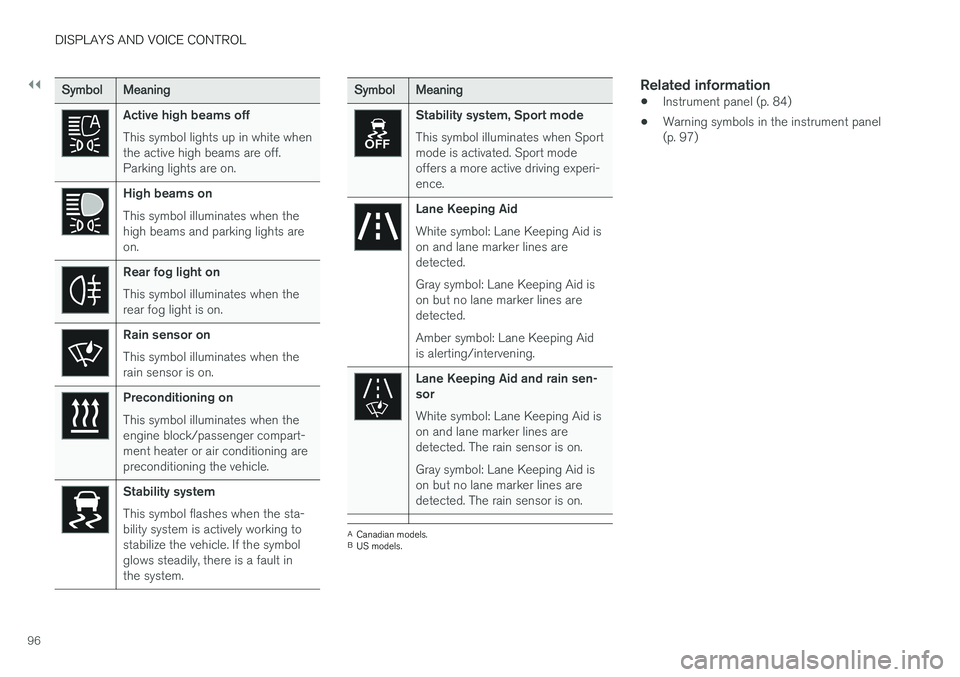
SymbolMeaning
Active high beams off This symbol lights up in white when the active high beams are off.Parking lights are on.
High beams on This symbol illuminates when the high beams and parking lights areon.
Rear fog light on This symbol illuminates when the rear fog light is on.
Rain sensor on This symbol illuminates when the rain sensor is on.
Preconditioning on This symbol illuminates when the engine block/passenger compart-ment heater or air conditioning arepreconditioning the vehicle.
Stability system This symbol flashes when the sta- bility system is actively working tostabilize the vehicle. If the symbolglows steadily, there is a fault inthe system.
SymbolMeaning
Stability system, Sport mode This symbol illuminates when Sport mode is activated. Sport modeoffers a more active driving experi-ence.
Lane Keeping Aid White symbol: Lane Keeping Aid is on and lane marker lines aredetected. Gray symbol: Lane Keeping Aid is on but no lane marker lines aredetected. Amber symbol: Lane Keeping Aid is alerting/intervening.
Lane Keeping Aid and rain sen- sor White symbol: Lane Keeping Aid is on and lane marker lines aredetected. The rain sensor is on. Gray symbol: Lane Keeping Aid is on but no lane marker lines aredetected. The rain sensor is on.
ACanadian models.
B US models.
Related information
• Instrument panel (p. 84)
• Warning symbols in the instrument panel (p. 97)
Page 99 of 686
DISPLAYS AND VOICE CONTROL
97
Warning symbols in the instrumentpanelThe warning symbols alert the driver that an important function is activated or that a seriousfault or error has occurred.
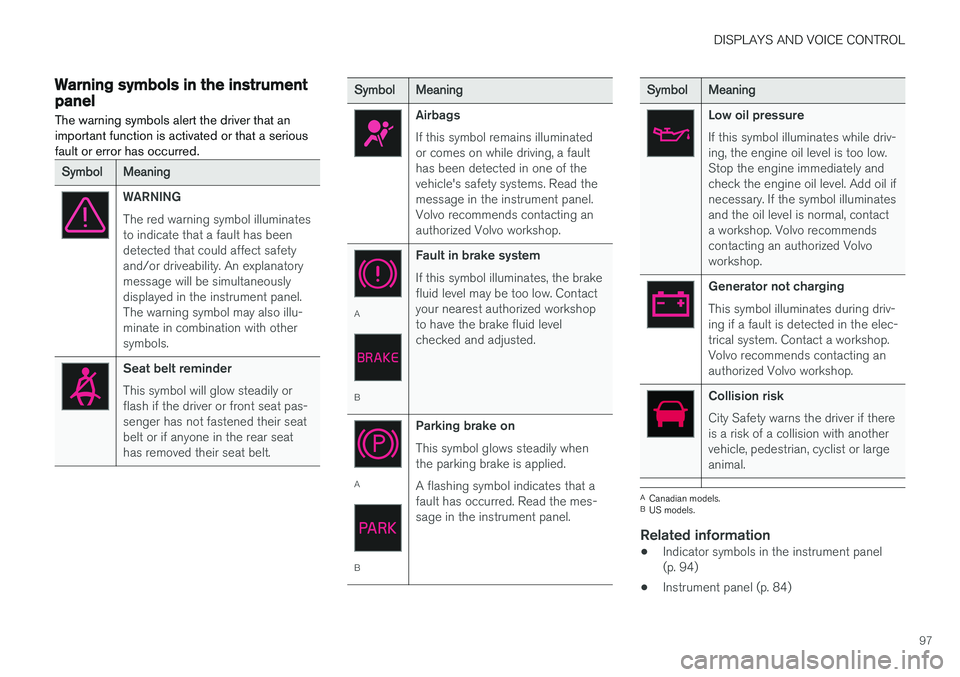
SymbolMeaning
WARNING The red warning symbol illuminates to indicate that a fault has beendetected that could affect safetyand/or driveability. An explanatorymessage will be simultaneouslydisplayed in the instrument panel.The warning symbol may also illu-minate in combination with othersymbols.
Seat belt reminder This symbol will glow steadily or flash if the driver or front seat pas-senger has not fastened their seatbelt or if anyone in the rear seathas removed their seat belt.
SymbolMeaning
Airbags If this symbol remains illuminated or comes on while driving, a faulthas been detected in one of thevehicle's safety systems. Read themessage in the instrument panel.Volvo recommends contacting anauthorized Volvo workshop.
A
B Fault in brake system If this symbol illuminates, the brake fluid level may be too low. Contactyour nearest authorized workshopto have the brake fluid levelchecked and adjusted.
A
BParking brake on This symbol glows steadily when the parking brake is applied. A flashing symbol indicates that a fault has occurred. Read the mes-sage in the instrument panel.
SymbolMeaning
Low oil pressure If this symbol illuminates while driv- ing, the engine oil level is too low.Stop the engine immediately andcheck the engine oil level. Add oil ifnecessary. If the symbol illuminatesand the oil level is normal, contacta workshop. Volvo recommendscontacting an authorized Volvoworkshop.
Generator not charging This symbol illuminates during driv- ing if a fault is detected in the elec-trical system. Contact a workshop.Volvo recommends contacting anauthorized Volvo workshop.
Collision risk City Safety warns the driver if there is a risk of a collision with anothervehicle, pedestrian, cyclist or largeanimal.
A
Canadian models.
B US models.
Related information
• Indicator symbols in the instrument panel (p. 94)
• Instrument panel (p. 84)
Page 125 of 686
DISPLAYS AND VOICE CONTROL
123
Button modes
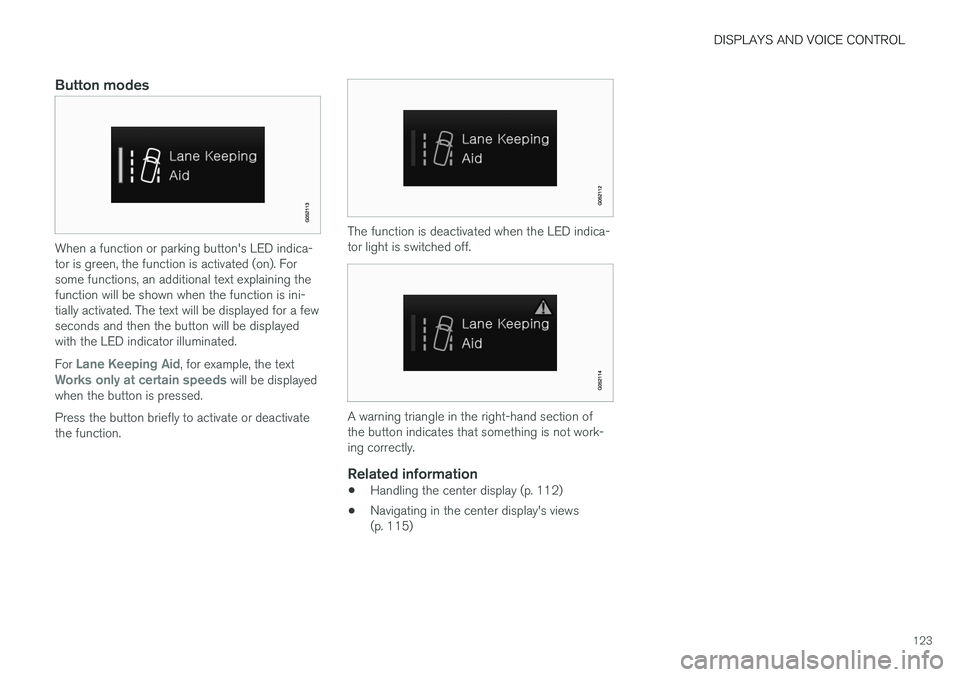
When a function or parking button's LED indica- tor is green, the function is activated (on). Forsome functions, an additional text explaining thefunction will be shown when the function is ini-tially activated. The text will be displayed for a fewseconds and then the button will be displayedwith the LED indicator illuminated. For
Lane Keeping Aid, for example, the textWorks only at certain speeds will be displayed
when the button is pressed. Press the button briefly to activate or deactivate the function.
The function is deactivated when the LED indica- tor light is switched off.
A warning triangle in the right-hand section of the button indicates that something is not work-ing correctly.
Related information
• Handling the center display (p. 112)
• Navigating in the center display's views (p. 115)
Page 144 of 686
DISPLAYS AND VOICE CONTROL
* Option/accessory.
142
Handling messages saved from thecenter display
Messages saved from the instrument panel and center displays are handled in the center display.
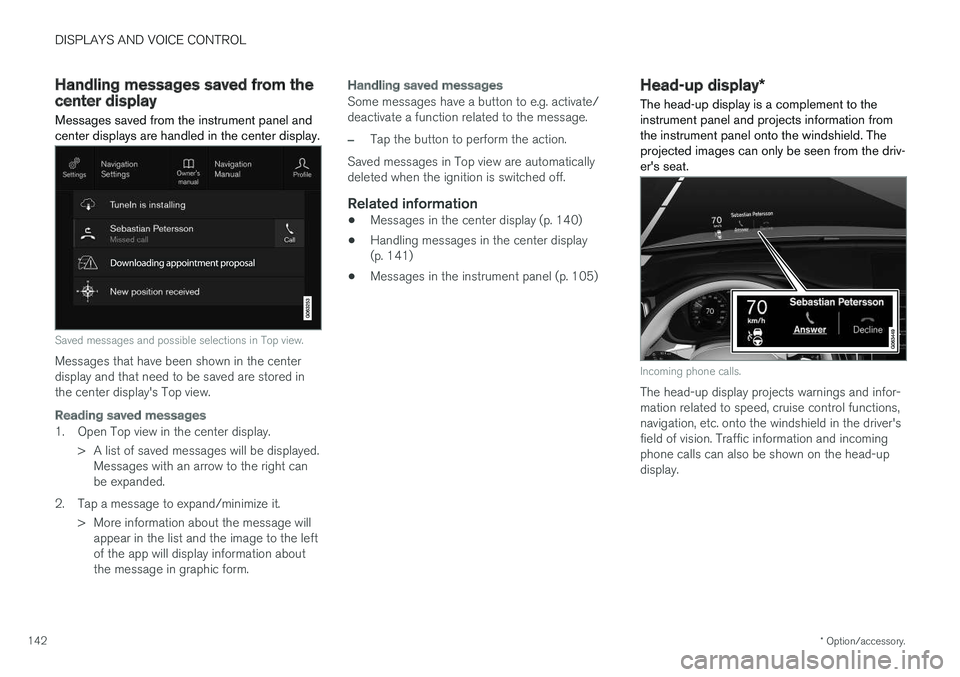
Saved messages and possible selections in Top view.
Messages that have been shown in the center display and that need to be saved are stored inthe center display's Top view.
Reading saved messages
1. Open Top view in the center display.
> A list of saved messages will be displayed.Messages with an arrow to the right can be expanded.
2. Tap a message to expand/minimize it. > More information about the message willappear in the list and the image to the leftof the app will display information aboutthe message in graphic form.
Handling saved messages
Some messages have a button to e.g. activate/ deactivate a function related to the message.
–Tap the button to perform the action.
Saved messages in Top view are automatically deleted when the ignition is switched off.
Related information
• Messages in the center display (p. 140)
• Handling messages in the center display(p. 141)
• Messages in the instrument panel (p. 105)
Head-up display
*
The head-up display is a complement to the instrument panel and projects information fromthe instrument panel onto the windshield. Theprojected images can only be seen from the driv-er's seat.
Incoming phone calls.
The head-up display projects warnings and infor- mation related to speed, cruise control functions,navigation, etc. onto the windshield in the driver'sfield of vision. Traffic information and incomingphone calls can also be shown on the head-updisplay.
Page 145 of 686
DISPLAYS AND VOICE CONTROL
* Option/accessory.143
NOTE
The driver's ability to see information in the head-up display may be impeded by:
• the use of polarizing sunglasses
• a driving posture in which the driver is notcentered in the seat
• objects on the display unit's glass cover
• unfavorable lighting conditions.
CAUTION
The information is projected from a display unit located in the dashboard. To help preventdamage to the display unit's glass cover, donot place any objects on the glass and pre-vent objects from falling onto it.
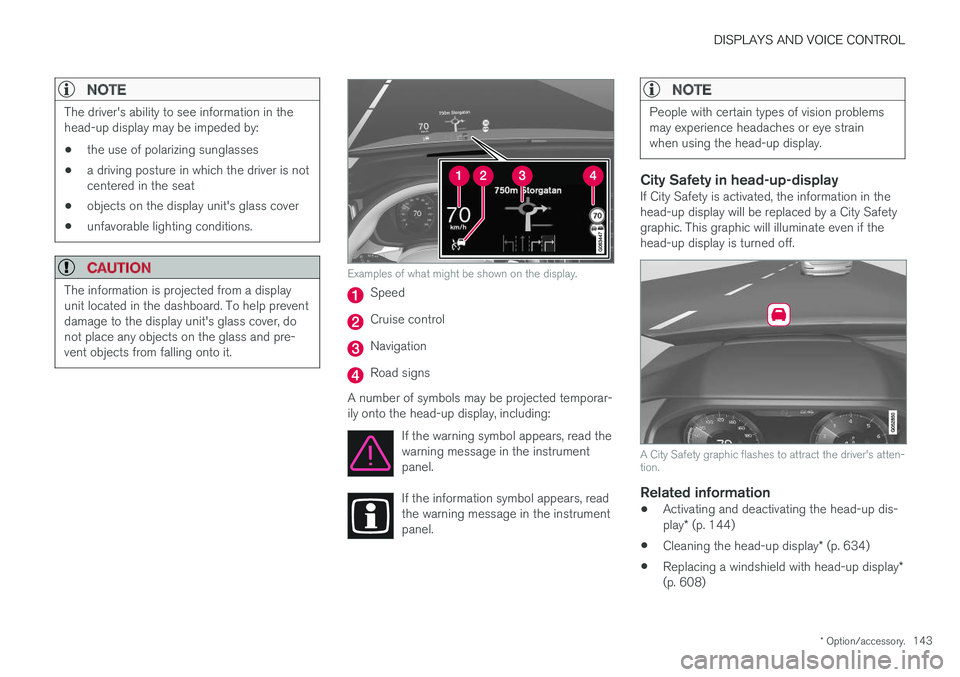
Examples of what might be shown on the display.
Speed
Cruise control
Navigation
Road signs
A number of symbols may be projected temporar- ily onto the head-up display, including: If the warning symbol appears, read thewarning message in the instrumentpanel.
If the information symbol appears, read the warning message in the instrumentpanel.
NOTE
People with certain types of vision problems may experience headaches or eye strainwhen using the head-up display.
City Safety in head-up-displayIf City Safety is activated, the information in the head-up display will be replaced by a City Safety graphic. This graphic will illuminate even if the head-up display is turned off.
A City Safety graphic flashes to attract the driver's atten- tion.
Related information
•Activating and deactivating the head-up dis- play
* (p. 144)
• Cleaning the head-up display
* (p. 634)
• Replacing a windshield with head-up display
*
(p. 608)