ESP VOLVO XC90 T8 2018 Owner´s Manual
[x] Cancel search | Manufacturer: VOLVO, Model Year: 2018, Model line: XC90 T8, Model: VOLVO XC90 T8 2018Pages: 686, PDF Size: 11.51 MB
Page 355 of 686
DRIVER SUPPORT
* Option/accessory.353
Cross Traffic Alert *
CTA 86
is a supplementary driver support system
to BLIS 87
that is intended to help the driver
detect vehicles crossing behind the vehicle while backing up.
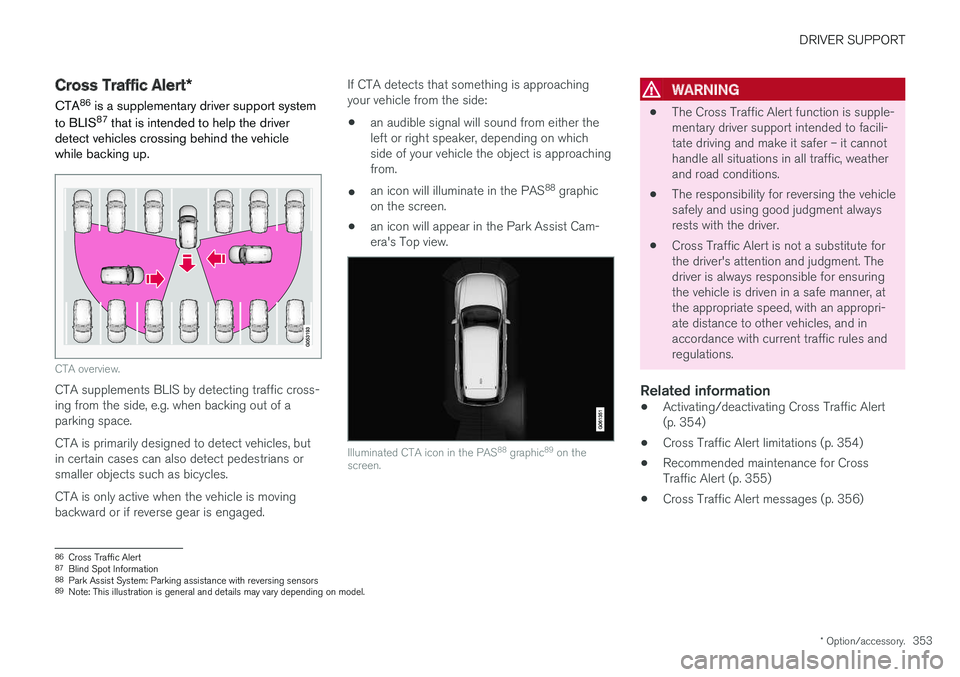
CTA overview.
CTA supplements BLIS by detecting traffic cross- ing from the side, e.g. when backing out of aparking space. CTA is primarily designed to detect vehicles, but in certain cases can also detect pedestrians orsmaller objects such as bicycles. CTA is only active when the vehicle is moving backward or if reverse gear is engaged. If CTA detects that something is approachingyour vehicle from the side:
• an audible signal will sound from either theleft or right speaker, depending on whichside of your vehicle the object is approachingfrom.
• an icon will illuminate in the PAS 88
graphic
on the screen.
• an icon will appear in the Park Assist Cam-era's Top view.
Illuminated CTA icon in the PAS 88
graphic 89
on the
screen.
WARNING
• The Cross Traffic Alert function is supple- mentary driver support intended to facili-tate driving and make it safer – it cannothandle all situations in all traffic, weatherand road conditions.
• The responsibility for reversing the vehiclesafely and using good judgment alwaysrests with the driver.
• Cross Traffic Alert is not a substitute forthe driver's attention and judgment. Thedriver is always responsible for ensuringthe vehicle is driven in a safe manner, atthe appropriate speed, with an appropri-ate distance to other vehicles, and inaccordance with current traffic rules andregulations.
Related information
•
Activating/deactivating Cross Traffic Alert(p. 354)
• Cross Traffic Alert limitations (p. 354)
• Recommended maintenance for CrossTraffic Alert (p. 355)
• Cross Traffic Alert messages (p. 356)
86
Cross Traffic Alert
87 Blind Spot Information
88 Park Assist System: Parking assistance with reversing sensors
89 Note: This illustration is general and details may vary depending on model.
Page 359 of 686
DRIVER SUPPORT
* Option/accessory.357
Road Sign Information *
The Road Sign Information (RSI 95
) function noti-
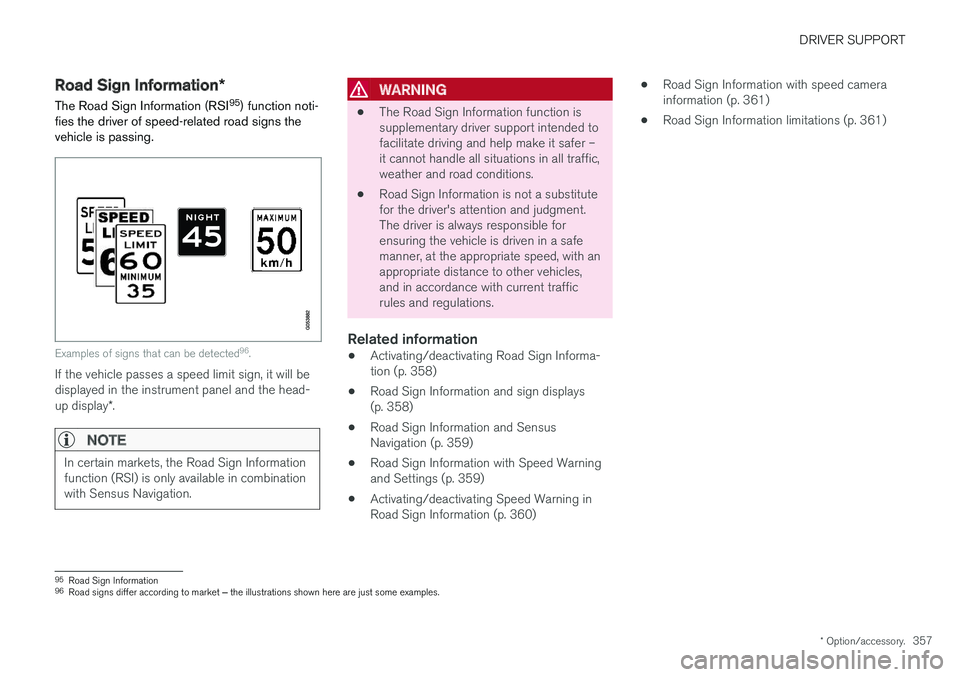
fies the driver of speed-related road signs the vehicle is passing.
Examples of signs that can be detected 96
.
If the vehicle passes a speed limit sign, it will be displayed in the instrument panel and the head- up display *.
NOTE
In certain markets, the Road Sign Information function (RSI) is only available in combinationwith Sensus Navigation.
WARNING
• The Road Sign Information function is supplementary driver support intended tofacilitate driving and help make it safer –it cannot handle all situations in all traffic,weather and road conditions.
• Road Sign Information is not a substitutefor the driver's attention and judgment.The driver is always responsible forensuring the vehicle is driven in a safemanner, at the appropriate speed, with anappropriate distance to other vehicles,and in accordance with current trafficrules and regulations.
Related information
•Activating/deactivating Road Sign Informa-tion (p. 358)
• Road Sign Information and sign displays(p. 358)
• Road Sign Information and SensusNavigation (p. 359)
• Road Sign Information with Speed Warningand Settings (p. 359)
• Activating/deactivating Speed Warning inRoad Sign Information (p. 360) •
Road Sign Information with speed camerainformation (p. 361)
• Road Sign Information limitations (p. 361)
95
Road Sign Information
96 Road signs differ according to market ‒ the illustrations shown here are just some examples.
Page 363 of 686
DRIVER SUPPORT
}}
* Option/accessory.361
Road Sign Information with speedcamera information
Vehicles equipped with RSI 102
and Sensus
Navigation * can provide information on upcom-
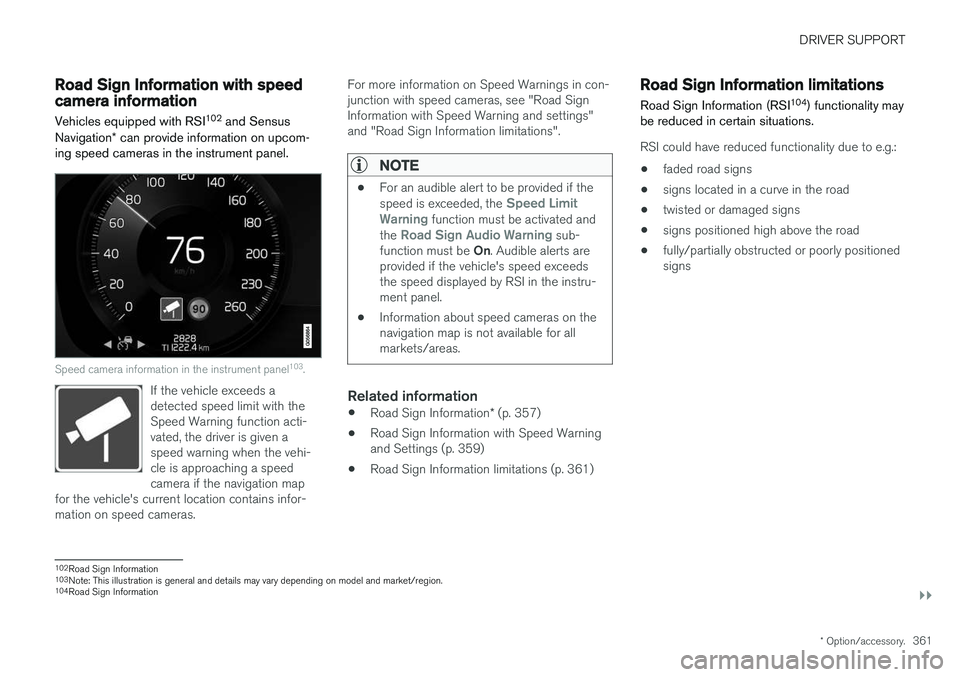
ing speed cameras in the instrument panel.
Speed camera information in the instrument panel 103
.
If the vehicle exceeds a detected speed limit with theSpeed Warning function acti-vated, the driver is given aspeed warning when the vehi-cle is approaching a speedcamera if the navigation map
for the vehicle's current location contains infor-mation on speed cameras.
For more information on Speed Warnings in con- junction with speed cameras, see "Road SignInformation with Speed Warning and settings"and "Road Sign Information limitations".
NOTE
• For an audible alert to be provided if the speed is exceeded, the Speed Limit
Warning function must be activated and
the Road Sign Audio Warning sub-
function must be On. Audible alerts are
provided if the vehicle's speed exceeds the speed displayed by RSI in the instru-ment panel.
• Information about speed cameras on thenavigation map is not available for allmarkets/areas.
Related information
•
Road Sign Information
* (p. 357)
• Road Sign Information with Speed Warning and Settings (p. 359)
• Road Sign Information limitations (p. 361)
Road Sign Information limitations
Road Sign Information (RSI 104
) functionality may
be reduced in certain situations.
RSI could have reduced functionality due to e.g.:
• faded road signs
• signs located in a curve in the road
• twisted or damaged signs
• signs positioned high above the road
• fully/partially obstructed or poorly positioned signs
102
Road Sign Information
103 Note: This illustration is general and details may vary depending on model and market/region.
104 Road Sign Information
Page 365 of 686
DRIVER SUPPORT
363
The warnings will be repeated after a short time if driving behavior does not improve.
WARNING
•
The Driver Alert Control function is sup- plementary driver support intended tofacilitate driving and help make it safer –it cannot handle all situations in all traffic,weather and road conditions.
• Driver Alert Control must not be used toextend a period of driving. The drivershould plan in breaks at regular intervalsand make sure they are well rested.
• Driver Alert Control is not a substitute forthe driver's attention and judgment. Thedriver is always responsible for ensuringthe vehicle is driven in a safe manner, atthe appropriate speed, with an appropri-ate distance to other vehicles, and inaccordance with current traffic rules andregulations.
WARNING
An alarm from Driver Alert Control should be taken very seriously since a sleepy driver isoften not aware of their own condition. If the alarm sounds or you feel fatigued:
• Stop the vehicle safely as soon as possi- ble and rest.
Studies have shown that it is just as danger- ous to drive while tired as it is to drive underthe influence of alcohol or other stimulants.
Related information
• Activating/deactivating Driver Alert Control (p. 363)
• Selecting guidance to a rest area if theDriver Alert Control warning has been given(p. 364)
• Driver Alert Control limitations (p. 364)
Activating/deactivating Driver AlertControl
The Driver Alert Control (DAC) function can be activated/deactivated.
On/OffTo change DAC settings: 1. Tap
Settings in the center display's Top
view.
2. Select
My CarIntelliSafeDriver Alert
Control.
3. Select/deselect
Alertness Warning to acti-
vate/deactivate DAC.
Related information
• Driver Alert Control (p. 362)
Page 366 of 686
DRIVER SUPPORT
364
Selecting guidance to a rest area ifthe Driver Alert Control warning hasbeen givenThe
Rest Stop Guidance function can be
switched on or off.
When the guide is activated, it will automatically display suggestions for a suitable place to take abreak if the DAC warning is given. To select
Rest Stop Guidance:
1. Tap
Settings in the center display's Top
view.
2. Select
My CarIntelliSafeDriver Alert
Control.
3. Select/deselect
Rest Stop Guidance to
activate/deactivate the function.
Related information
• Driver Alert Control (p. 362)
Driver Alert Control limitations
Driver Alert Control (DAC) functionality may be reduced in certain situations.
In certain situations, the system may provide a warning even if it has not detected a change indriving behavior, e.g.:
• in strong crosswinds
• on grooved road surfaces.
WARNING
In certain cases, driving behavior might not be affected despite the driver's fatigue – whenusing the Pilot Assist function – resulting inthe driver not getting a warning from DAC. It is therefore very important to always stop and take a break at the slightest sign of fati-gue, regardless of whether the DAC functionhas issued a warning or not.
NOTE
The function uses the vehicle's camera unit, which has some general limitations – see thesection "Camera unit limitations".
Related information
• Driver Alert Control (p. 362)
Lane Keeping Aid
Lane Keeping Aid (LKA 107
) is designed to
actively steer the vehicle on freeways, highways and other major roads to help the driver reducethe risk of the vehicle unintentionally veering outof the lane.
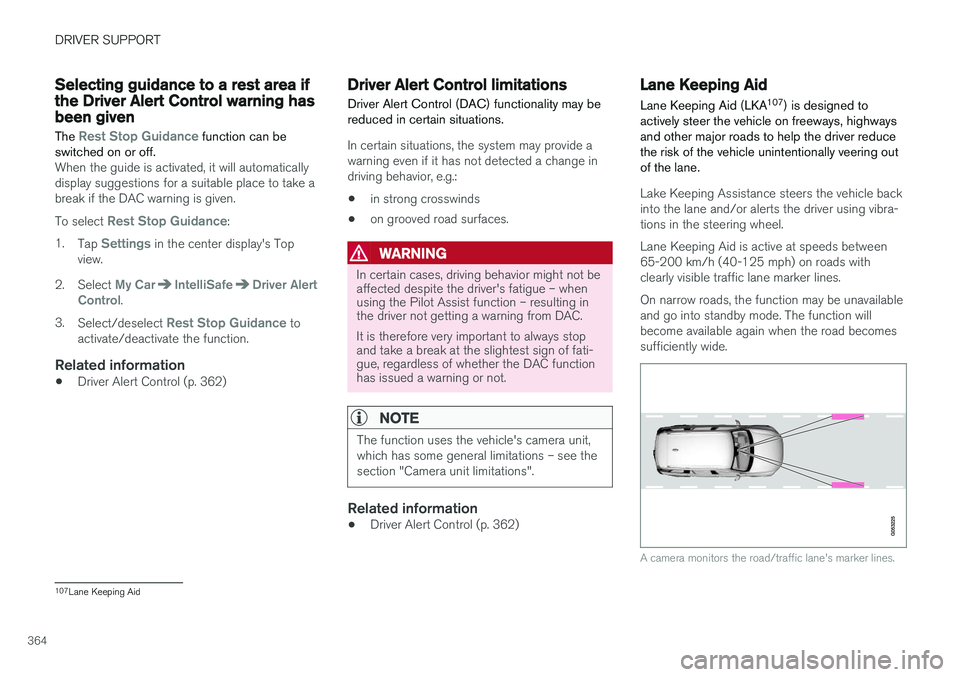
Lake Keeping Assistance steers the vehicle back into the lane and/or alerts the driver using vibra-tions in the steering wheel. Lane Keeping Aid is active at speeds between 65-200 km/h (40-125 mph) on roads withclearly visible traffic lane marker lines. On narrow roads, the function may be unavailable and go into standby mode. The function willbecome available again when the road becomessufficiently wide.
A camera monitors the road/traffic lane's marker lines.
107 Lane Keeping Aid
Page 367 of 686
DRIVER SUPPORT
}}
365
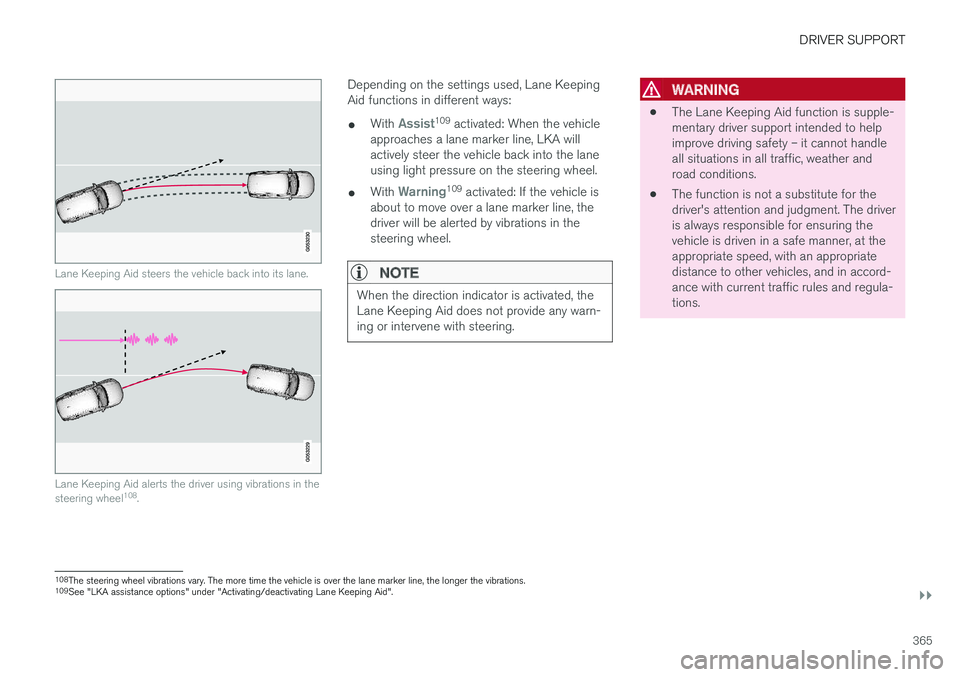
Lane Keeping Aid steers the vehicle back into its lane.
Lane Keeping Aid alerts the driver using vibrations in the steering wheel108
.
Depending on the settings used, Lane Keeping Aid functions in different ways:
• With
Assist109
activated: When the vehicle
approaches a lane marker line, LKA will actively steer the vehicle back into the laneusing light pressure on the steering wheel.
• With
Warning109
activated: If the vehicle is
about to move over a lane marker line, the driver will be alerted by vibrations in thesteering wheel.
NOTE
When the direction indicator is activated, the Lane Keeping Aid does not provide any warn-ing or intervene with steering.
WARNING
• The Lane Keeping Aid function is supple- mentary driver support intended to helpimprove driving safety – it cannot handleall situations in all traffic, weather androad conditions.
• The function is not a substitute for thedriver's attention and judgment. The driveris always responsible for ensuring thevehicle is driven in a safe manner, at theappropriate speed, with an appropriatedistance to other vehicles, and in accord-ance with current traffic rules and regula-tions.
108
The steering wheel vibrations vary. The more time the vehicle is over the lane marker line, the longer the vibrations.
109 See "LKA assistance options" under "Activating/deactivating Lane Keeping Aid".
Page 375 of 686
DRIVER SUPPORT
}}
373
Run-Off Mitigation with steeringassistance
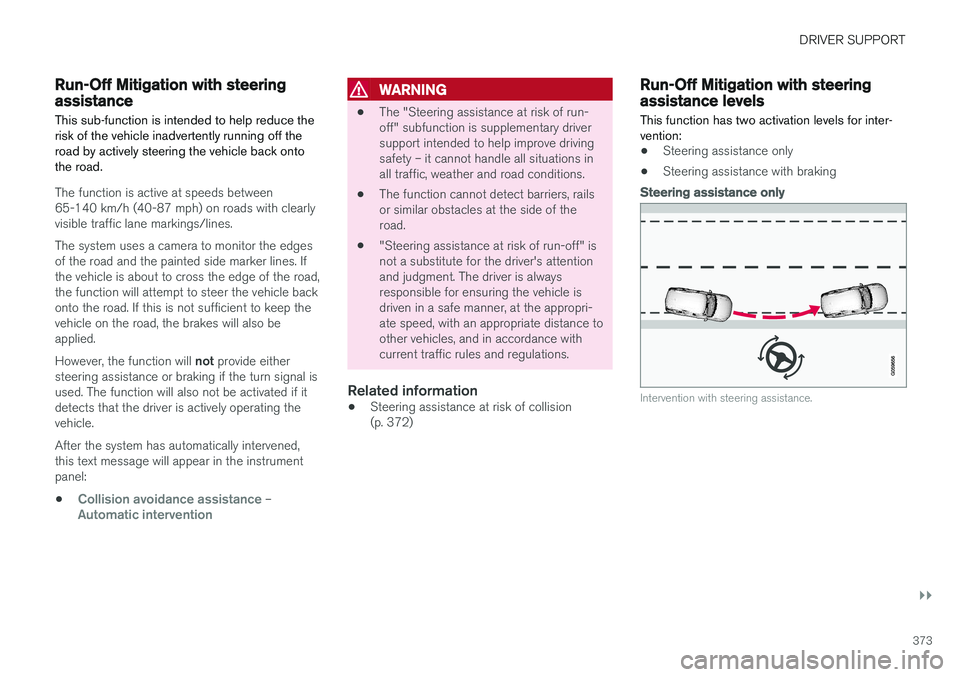
This sub-function is intended to help reduce the risk of the vehicle inadvertently running off theroad by actively steering the vehicle back ontothe road.
The function is active at speeds between 65-140 km/h (40-87 mph) on roads with clearlyvisible traffic lane markings/lines. The system uses a camera to monitor the edges of the road and the painted side marker lines. Ifthe vehicle is about to cross the edge of the road, the function will attempt to steer the vehicle back onto the road. If this is not sufficient to keep the vehicle on the road, the brakes will also be applied. However, the function will not provide either
steering assistance or braking if the turn signal is used. The function will also not be activated if it detects that the driver is actively operating thevehicle. After the system has automatically intervened, this text message will appear in the instrumentpanel:
•
Collision avoidance assistance –Automatic intervention
WARNING
• The "Steering assistance at risk of run- off" subfunction is supplementary driversupport intended to help improve drivingsafety – it cannot handle all situations inall traffic, weather and road conditions.
• The function cannot detect barriers, railsor similar obstacles at the side of theroad.
• "Steering assistance at risk of run-off" isnot a substitute for the driver's attentionand judgment. The driver is alwaysresponsible for ensuring the vehicle isdriven in a safe manner, at the appropri-ate speed, with an appropriate distance toother vehicles, and in accordance withcurrent traffic rules and regulations.
Related information
•
Steering assistance at risk of collision(p. 372)
Run-Off Mitigation with steeringassistance levels This function has two activation levels for inter- vention:
•Steering assistance only
• Steering assistance with braking
Steering assistance only
Intervention with steering assistance.
Page 377 of 686
DRIVER SUPPORT
}}
375
NOTE
The function uses the vehicle's radar unit, which has some general limitations – see thesection "Radar unit limitations".
Related information
•Steering assistance at risk of collision (p. 372)
• Speed-dependent steering wheel resistance(p. 272)
Steering assistance during collisionrisks from oncoming traffic
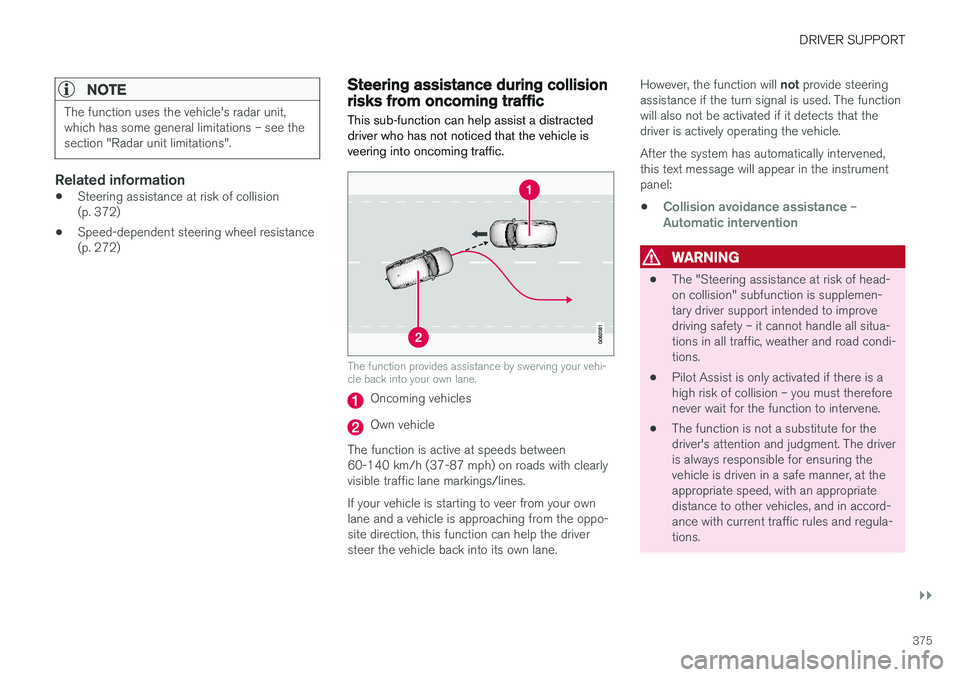
This sub-function can help assist a distracted driver who has not noticed that the vehicle isveering into oncoming traffic.
The function provides assistance by swerving your vehi- cle back into your own lane.
Oncoming vehicles
Own vehicle
The function is active at speeds between 60-140 km/h (37-87 mph) on roads with clearlyvisible traffic lane markings/lines. If your vehicle is starting to veer from your own lane and a vehicle is approaching from the oppo- site direction, this function can help the driversteer the vehicle back into its own lane. However, the function will
not provide steering
assistance if the turn signal is used. The functionwill also not be activated if it detects that thedriver is actively operating the vehicle. After the system has automatically intervened, this text message will appear in the instrumentpanel:
•
Collision avoidance assistance –Automatic intervention
WARNING
• The "Steering assistance at risk of head- on collision" subfunction is supplemen-tary driver support intended to improvedriving safety – it cannot handle all situa-tions in all traffic, weather and road condi-tions.
• Pilot Assist is only activated if there is ahigh risk of collision – you must thereforenever wait for the function to intervene.
• The function is not a substitute for thedriver's attention and judgment. The driveris always responsible for ensuring thevehicle is driven in a safe manner, at theappropriate speed, with an appropriatedistance to other vehicles, and in accord-ance with current traffic rules and regula-tions.
Page 379 of 686
DRIVER SUPPORT
}}
* Option/accessory.377
NOTE
The function uses the vehicle's camera unit, which has some general limitations – see thesection "Camera unit limitations".
NOTE
The function uses the vehicle's radar unit, which has some general limitations – see thesection "Radar unit limitations".
Related information
•Steering assistance at risk of collision (p. 372)
• Speed-dependent steering wheel resistance(p. 272)
Steering assistance during collision
risks from behind
*
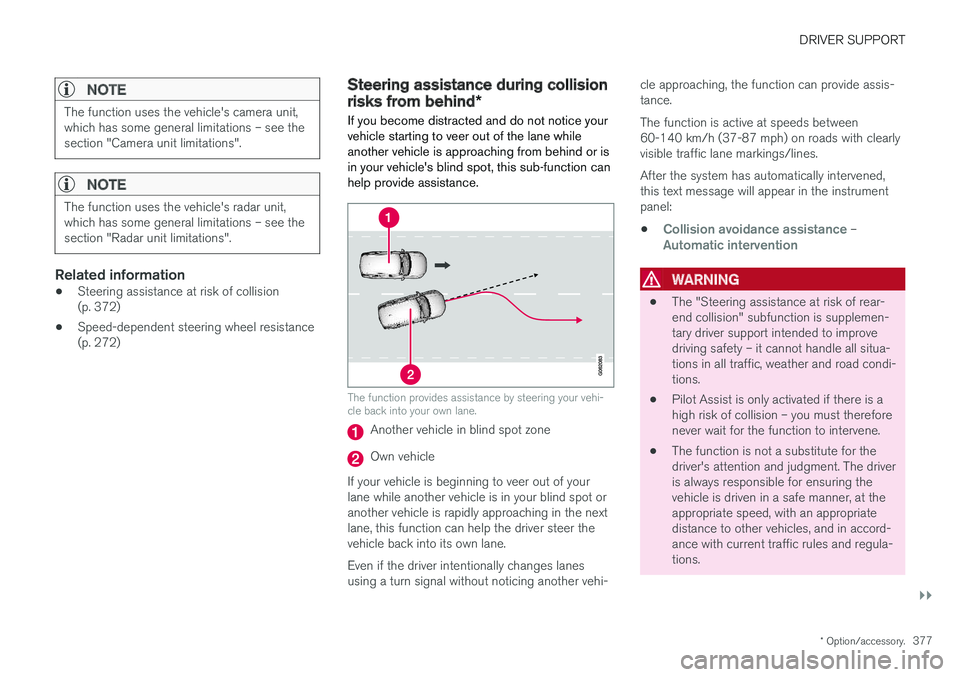
If you become distracted and do not notice your vehicle starting to veer out of the lane whileanother vehicle is approaching from behind or isin your vehicle's blind spot, this sub-function canhelp provide assistance.
The function provides assistance by steering your vehi- cle back into your own lane.
Another vehicle in blind spot zone
Own vehicle
If your vehicle is beginning to veer out of your lane while another vehicle is in your blind spot oranother vehicle is rapidly approaching in the next lane, this function can help the driver steer the vehicle back into its own lane. Even if the driver intentionally changes lanes using a turn signal without noticing another vehi- cle approaching, the function can provide assis-tance. The function is active at speeds between 60-140 km/h (37-87 mph) on roads with clearlyvisible traffic lane markings/lines. After the system has automatically intervened, this text message will appear in the instrumentpanel:
•
Collision avoidance assistance –Automatic intervention
WARNING
• The "Steering assistance at risk of rear- end collision" subfunction is supplemen-tary driver support intended to improvedriving safety – it cannot handle all situa-tions in all traffic, weather and road condi-tions.
• Pilot Assist is only activated if there is ahigh risk of collision – you must thereforenever wait for the function to intervene.
• The function is not a substitute for thedriver's attention and judgment. The driveris always responsible for ensuring thevehicle is driven in a safe manner, at theappropriate speed, with an appropriatedistance to other vehicles, and in accord-ance with current traffic rules and regula-tions.
Page 383 of 686
DRIVER SUPPORT
* Option/accessory.381
Park Assist*
The Park Assist function can help the driver
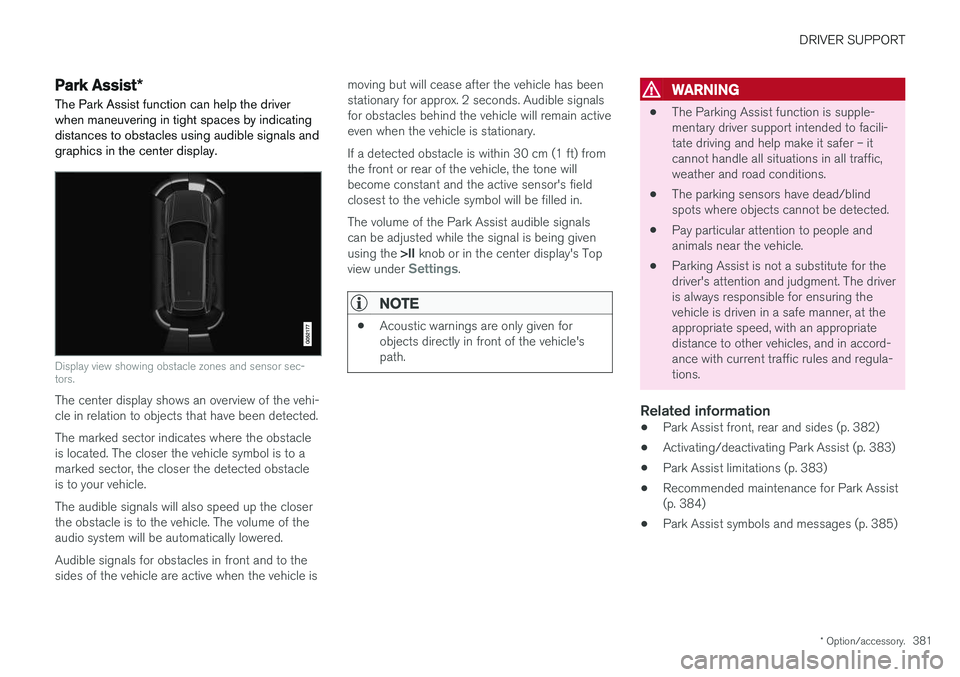
when maneuvering in tight spaces by indicating distances to obstacles using audible signals andgraphics in the center display.
Display view showing obstacle zones and sensor sec- tors.
The center display shows an overview of the vehi- cle in relation to objects that have been detected. The marked sector indicates where the obstacle is located. The closer the vehicle symbol is to amarked sector, the closer the detected obstacleis to your vehicle. The audible signals will also speed up the closer the obstacle is to the vehicle. The volume of theaudio system will be automatically lowered. Audible signals for obstacles in front and to the sides of the vehicle are active when the vehicle is moving but will cease after the vehicle has beenstationary for approx. 2 seconds. Audible signalsfor obstacles behind the vehicle will remain activeeven when the vehicle is stationary. If a detected obstacle is within 30 cm (1 ft) from the front or rear of the vehicle, the tone willbecome constant and the active sensor's fieldclosest to the vehicle symbol will be filled in. The volume of the Park Assist audible signals can be adjusted while the signal is being given using the
>II knob or in the center display's Top
view under
Settings.
NOTE
• Acoustic warnings are only given for objects directly in front of the vehicle'spath.
WARNING
•The Parking Assist function is supple- mentary driver support intended to facili-tate driving and help make it safer – itcannot handle all situations in all traffic,weather and road conditions.
• The parking sensors have dead/blindspots where objects cannot be detected.
• Pay particular attention to people andanimals near the vehicle.
• Parking Assist is not a substitute for thedriver's attention and judgment. The driveris always responsible for ensuring thevehicle is driven in a safe manner, at theappropriate speed, with an appropriatedistance to other vehicles, and in accord-ance with current traffic rules and regula-tions.
Related information
•Park Assist front, rear and sides (p. 382)
• Activating/deactivating Park Assist (p. 383)
• Park Assist limitations (p. 383)
• Recommended maintenance for Park Assist(p. 384)
• Park Assist symbols and messages (p. 385)