lock VOLVO XC90 T8 2018 Owner´s Manual
[x] Cancel search | Manufacturer: VOLVO, Model Year: 2018, Model line: XC90 T8, Model: VOLVO XC90 T8 2018Pages: 686, PDF Size: 11.51 MB
Page 199 of 686
SEATS AND STEERING WHEEL
* Option/accessory.197
WARNING
•Adjust the seat and ensure it locks into position before driving. Use caution whenadjusting the seat. Uncontrolled or care-less adjustments could lead to injury.
• Long objects must always be securelytied down to help prevent injury or dam-age in the event of sudden braking.
• Always turn off the engine and apply theparking brake when loading or unloadingthe vehicle.
• Put the gear selector in
P to help prevent
the gear selector from being inadvertentlymoved.
Related information
• Folding the second row backrests (p. 192)
• Adjusting the second row head restraints(p. 194)
• Moving the second row seats forward/rear- ward
* (p. 195)
• Getting into and out of the third row ofseats
* (p. 197)
• Folding the third row backrests
* (p. 198)
Getting into and out of the third row
of seats *
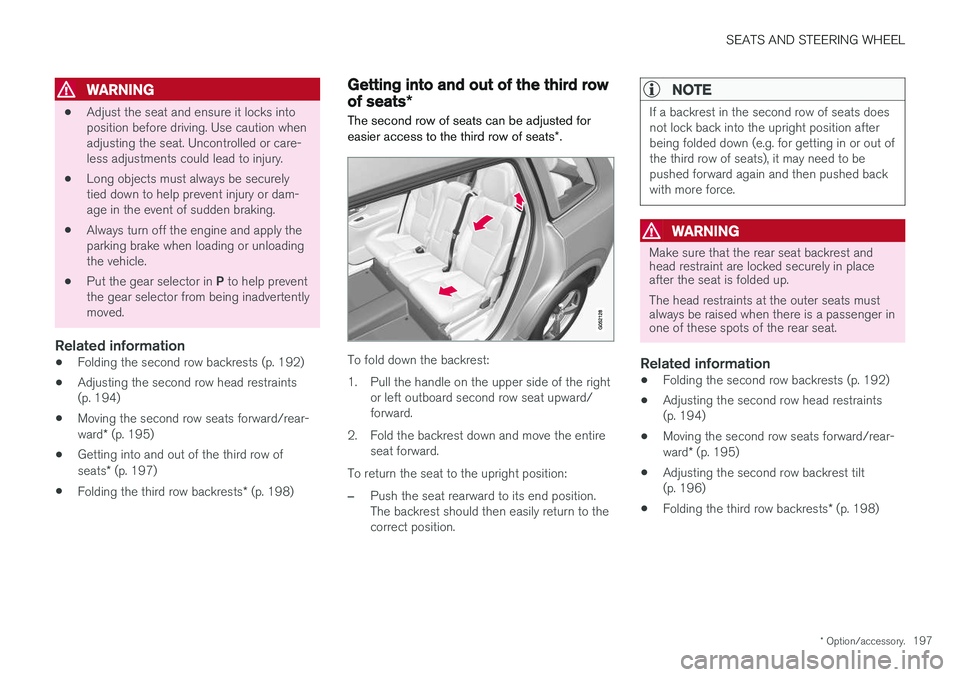
The second row of seats can be adjusted for easier access to the third row of seats *.
To fold down the backrest:
1. Pull the handle on the upper side of the right
or left outboard second row seat upward/ forward.
2. Fold the backrest down and move the entire seat forward.
To return the seat to the upright position:
–Push the seat rearward to its end position. The backrest should then easily return to thecorrect position.
NOTE
If a backrest in the second row of seats does not lock back into the upright position afterbeing folded down (e.g. for getting in or out ofthe third row of seats), it may need to bepushed forward again and then pushed backwith more force.
WARNING
Make sure that the rear seat backrest and head restraint are locked securely in placeafter the seat is folded up. The head restraints at the outer seats must always be raised when there is a passenger inone of these spots of the rear seat.
Related information
• Folding the second row backrests (p. 192)
• Adjusting the second row head restraints (p. 194)
• Moving the second row seats forward/rear- ward
* (p. 195)
• Adjusting the second row backrest tilt (p. 196)
• Folding the third row backrests
* (p. 198)
Page 200 of 686
SEATS AND STEERING WHEEL
* Option/accessory.
198
Folding the third row backrests *
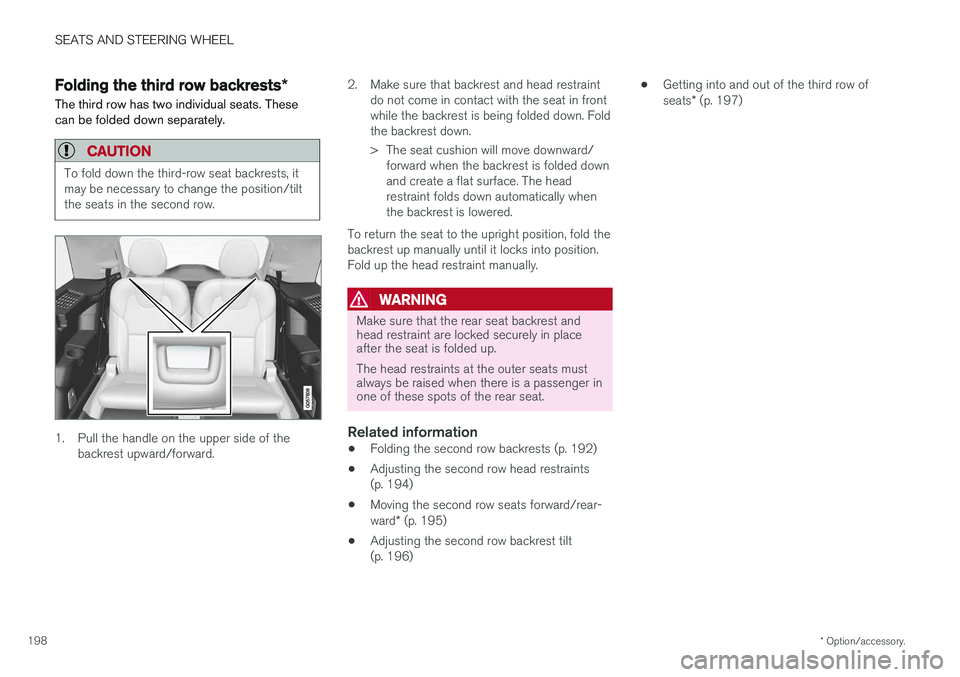
The third row has two individual seats. These can be folded down separately.
CAUTION
To fold down the third-row seat backrests, it may be necessary to change the position/tiltthe seats in the second row.
1. Pull the handle on the upper side of the backrest upward/forward. 2. Make sure that backrest and head restraint
do not come in contact with the seat in front while the backrest is being folded down. Foldthe backrest down.
> The seat cushion will move downward/forward when the backrest is folded down and create a flat surface. The headrestraint folds down automatically whenthe backrest is lowered.
To return the seat to the upright position, fold thebackrest up manually until it locks into position.Fold up the head restraint manually.
WARNING
Make sure that the rear seat backrest and head restraint are locked securely in placeafter the seat is folded up. The head restraints at the outer seats must always be raised when there is a passenger inone of these spots of the rear seat.
Related information
• Folding the second row backrests (p. 192)
• Adjusting the second row head restraints (p. 194)
• Moving the second row seats forward/rear- ward
* (p. 195)
• Adjusting the second row backrest tilt (p. 196) •
Getting into and out of the third row of seats
* (p. 197)
Page 201 of 686
SEATS AND STEERING WHEEL
}}
* Option/accessory.199
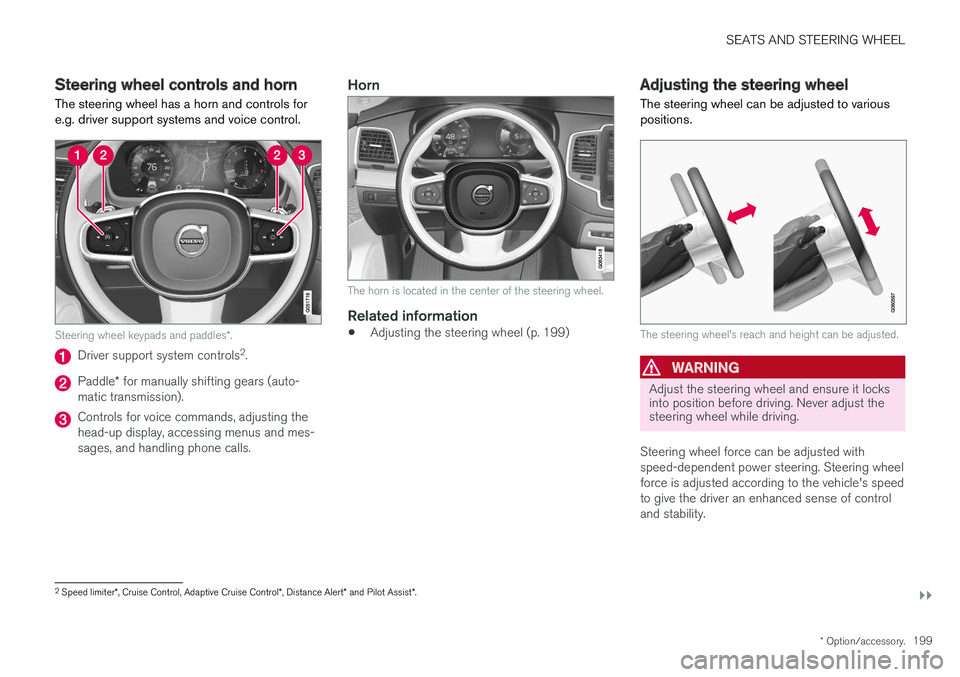
Steering wheel controls and horn The steering wheel has a horn and controls for e.g. driver support systems and voice control.
Steering wheel keypads and paddles *.
Driver support system controls 2
.
Paddle * for manually shifting gears (auto-
matic transmission).
Controls for voice commands, adjusting the head-up display, accessing menus and mes-sages, and handling phone calls.
Horn
The horn is located in the center of the steering wheel.
Related information
• Adjusting the steering wheel (p. 199)
Adjusting the steering wheel
The steering wheel can be adjusted to various positions.
The steering wheel's reach and height can be adjusted.
WARNING
Adjust the steering wheel and ensure it locks into position before driving. Never adjust thesteering wheel while driving.
Steering wheel force can be adjusted with speed-dependent power steering. Steering wheelforce is adjusted according to the vehicle's speedto give the driver an enhanced sense of controland stability.
2 Speed limiter *, Cruise Control, Adaptive Cruise Control *, Distance Alert * and Pilot Assist *.
Page 202 of 686
||
SEATS AND STEERING WHEEL
200
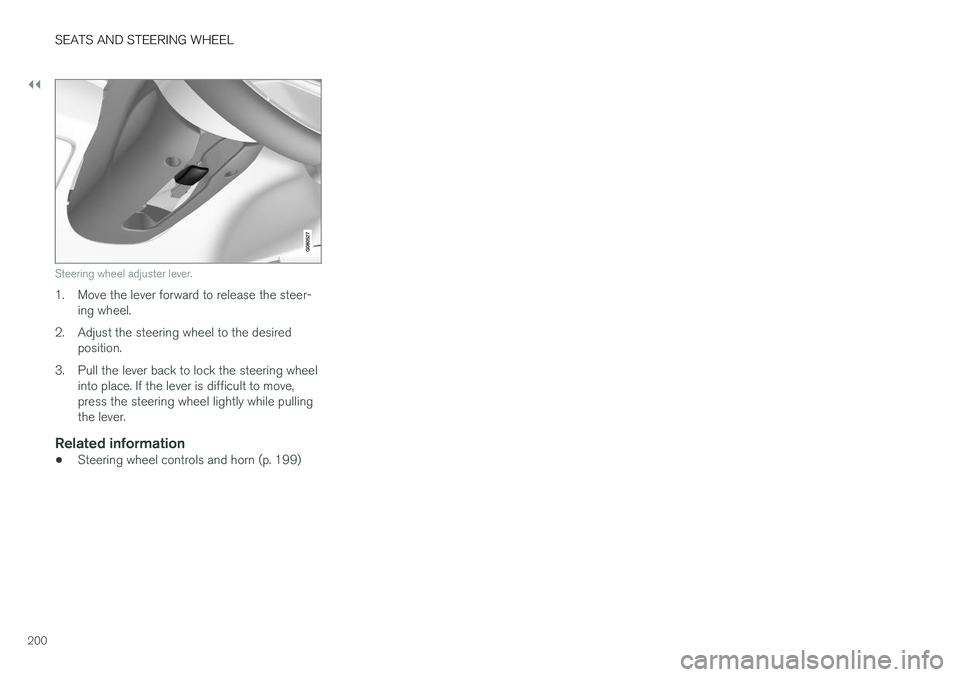
Steering wheel adjuster lever.
1. Move the lever forward to release the steer-ing wheel.
2. Adjust the steering wheel to the desired position.
3. Pull the lever back to lock the steering wheel into place. If the lever is difficult to move, press the steering wheel lightly while pullingthe lever.
Related information
• Steering wheel controls and horn (p. 199)
Page 204 of 686
CLIMATE CONTROL
* Option/accessory.
202
Climate
The vehicle is equipped with electronic climate control. The climate system cools, heats anddehumidifies the air in the passenger compart-ment.
All of the climate system functions are controlled from the center display and the buttons on thecenter console. Certain rear seat functions can also be controlled from the climate controls * on the rear of the tun-
nel console.
Related information
• Climate zones (p. 202)
• Climate control sensors (p. 202)
• Perceived temperature (p. 203)
• Climate control system voice commands (p. 203)
• Parking climate (p. 230)
• Air quality (p. 204)
• Air distribution (p. 207)
• Climate system controls (p. 213)
Climate zones
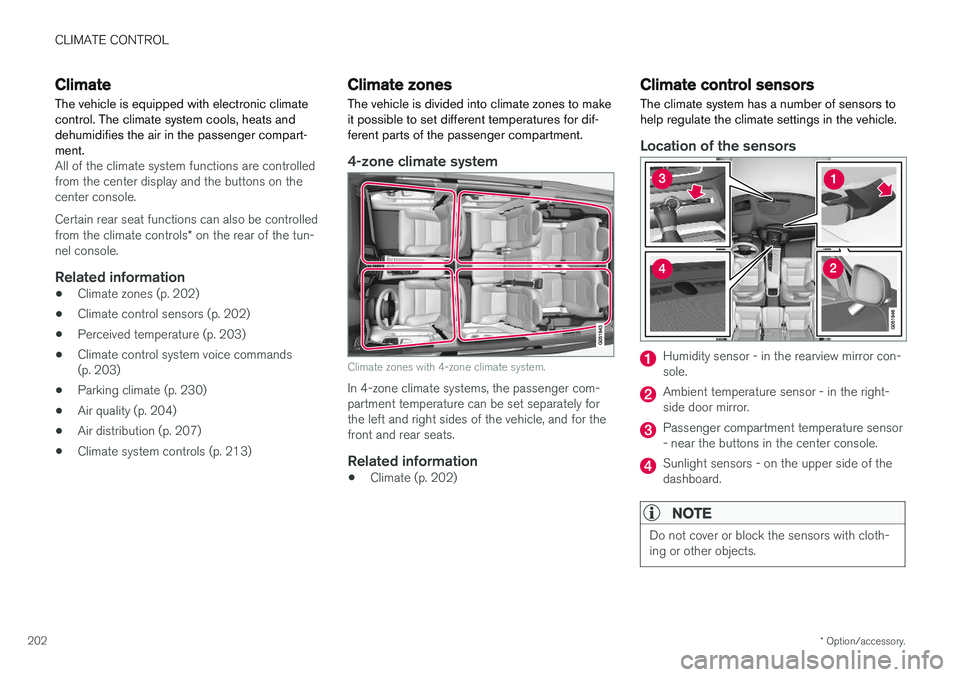
The vehicle is divided into climate zones to make it possible to set different temperatures for dif-ferent parts of the passenger compartment.
4-zone climate system
Climate zones with 4-zone climate system.
In 4-zone climate systems, the passenger com- partment temperature can be set separately forthe left and right sides of the vehicle, and for thefront and rear seats.
Related information
• Climate (p. 202)
Climate control sensors
The climate system has a number of sensors to help regulate the climate settings in the vehicle.
Location of the sensors
Humidity sensor - in the rearview mirror con- sole.
Ambient temperature sensor - in the right- side door mirror.
Passenger compartment temperature sensor - near the buttons in the center console.
Sunlight sensors - on the upper side of the dashboard.
NOTE
Do not cover or block the sensors with cloth- ing or other objects.
Page 208 of 686
CLIMATE CONTROL
* Option/accessory.
206
Clean Zone Interior Package *
Clean Zone Interior Package (CZIP) is a series of modifications that filters even more allergy andasthma-inducing substances from the passengercompartment.
CZIP includes the following:
• An enhanced function that starts the blower when the vehicle is unlocked using theremote key. The blower will then fill the pas-senger compartment with fresh air. The func-tion starts when required and switches offautomatically after a period of time or whenone of the passenger compartment doors isopened. The amount of time the blower runsgradually decreases due to reduced need upuntil the vehicle is 4 years old.
• The fully automatic Interior Air QualitySystem (IAQS).
Related information
•Air quality (p. 204)
• Clean Zone
* (p. 205)
• Interior Air Quality System
* (p. 206)
• Passenger compartment air filter (p. 207)
Interior Air Quality System
*
Interior Air Quality System (IAQS) is a fully auto- matic air quality system that removes gases andparticles to reduce odors and contaminants inthe passenger compartment.
IAQS is part of the Clean Zone Interior Package (CZIP) and removes air contaminants such asparticles, hydrocarbons, nitric oxides and ground-level ozone. If the system's air quality sensors detect contami- nants in the outside air, the air intake closes andair recirculation is activated.
NOTE
To ensure optimal air quality in the passenger compartment, the air quality sensor shouldalways be engaged. Recirculation is limited in cold weather to pre- vent fogging. In the event of fogging, use the defroster functions for the windshield, side windowsand rear window.
Related information
• Activating and deactivating the air quality sensor
* (p. 207)
• Air quality (p. 204)
• Clean Zone
* (p. 205)
• Clean Zone Interior Package
* (p. 206) •
Passenger compartment air filter (p. 207)
Page 217 of 686
CLIMATE CONTROL
}}
* Option/accessory.215
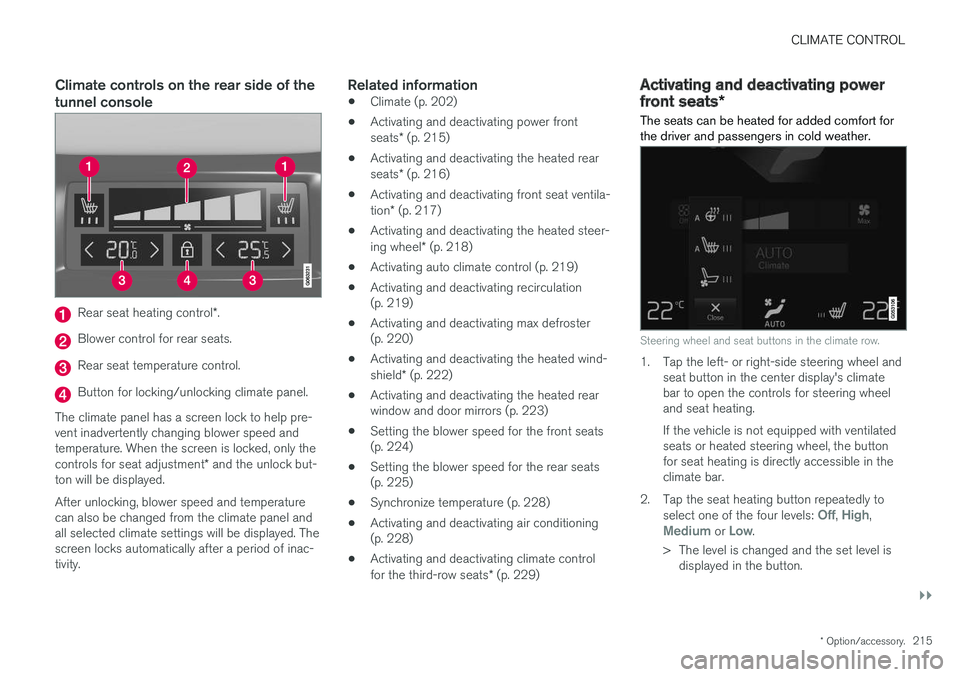
Climate controls on the rear side of the tunnel console
Rear seat heating control *.
Blower control for rear seats.
Rear seat temperature control.
Button for locking/unlocking climate panel.
The climate panel has a screen lock to help pre- vent inadvertently changing blower speed andtemperature. When the screen is locked, only the controls for seat adjustment * and the unlock but-
ton will be displayed. After unlocking, blower speed and temperature can also be changed from the climate panel andall selected climate settings will be displayed. Thescreen locks automatically after a period of inac-tivity.
Related information
• Climate (p. 202)
• Activating and deactivating power front seats
* (p. 215)
• Activating and deactivating the heated rearseats
* (p. 216)
• Activating and deactivating front seat ventila-tion
* (p. 217)
• Activating and deactivating the heated steer-ing wheel
* (p. 218)
• Activating auto climate control (p. 219)
• Activating and deactivating recirculation (p. 219)
• Activating and deactivating max defroster(p. 220)
• Activating and deactivating the heated wind- shield
* (p. 222)
• Activating and deactivating the heated rear window and door mirrors (p. 223)
• Setting the blower speed for the front seats(p. 224)
• Setting the blower speed for the rear seats(p. 225)
• Synchronize temperature (p. 228)
• Activating and deactivating air conditioning(p. 228)
• Activating and deactivating climate control for the third-row seats
* (p. 229)
Activating and deactivating power
front seats *
The seats can be heated for added comfort for the driver and passengers in cold weather.
Steering wheel and seat buttons in the climate row.
1. Tap the left- or right-side steering wheel and seat button in the center display's climate bar to open the controls for steering wheeland seat heating. If the vehicle is not equipped with ventilated seats or heated steering wheel, the buttonfor seat heating is directly accessible in theclimate bar.
2. Tap the seat heating button repeatedly to select one of the four levels:
Off, High,Medium or Low.
> The level is changed and the set level is displayed in the button.
Page 227 of 686
CLIMATE CONTROL
}}
* Option/accessory.225
Setting the blower speed for therear seats
The blower can be set to several different auto- matically controlled speeds for the rear seat.
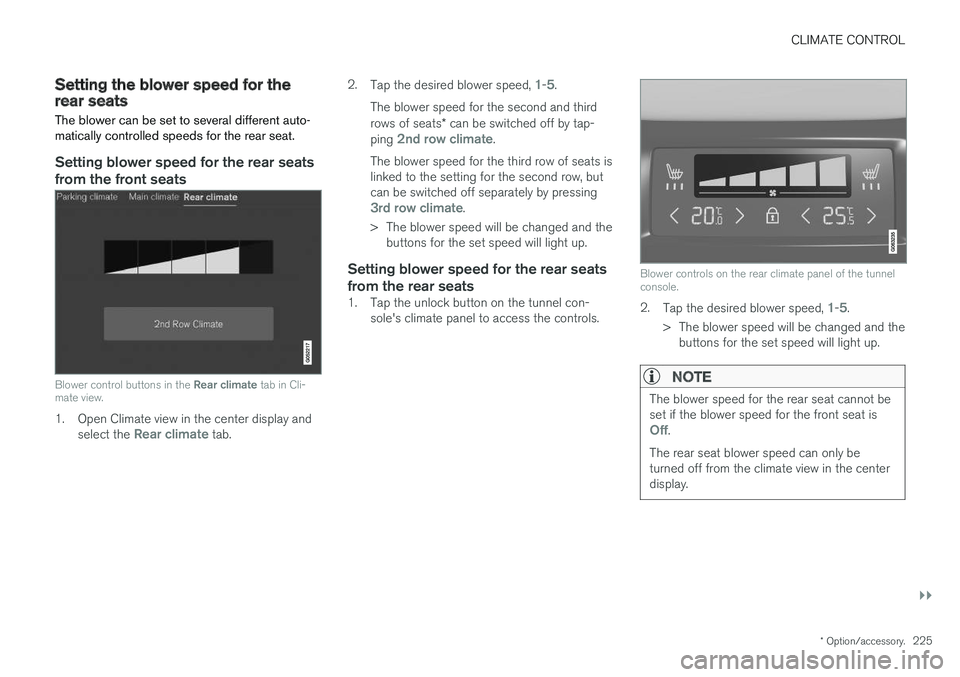
Setting blower speed for the rear seats from the front seats
Blower control buttons in the Rear climate tab in Cli-
mate view.
1. Open Climate view in the center display and
select the Rear climate tab. 2.
Tap the desired blower speed,
1-5.
The blower speed for the second and third rows of seats * can be switched off by tap-
ping
2nd row climate.
The blower speed for the third row of seats is linked to the setting for the second row, butcan be switched off separately by pressing
3rd row climate.
> The blower speed will be changed and the buttons for the set speed will light up.
Setting blower speed for the rear seats from the rear seats
1. Tap the unlock button on the tunnel con- sole's climate panel to access the controls.
Blower controls on the rear climate panel of the tunnel console.
2.Tap the desired blower speed, 1-5.
> The blower speed will be changed and the buttons for the set speed will light up.
NOTE
The blower speed for the rear seat cannot be set if the blower speed for the front seat is
Off.
The rear seat blower speed can only be turned off from the climate view in the centerdisplay.
Page 229 of 686
CLIMATE CONTROL
227
Setting the temperature for the rearseats
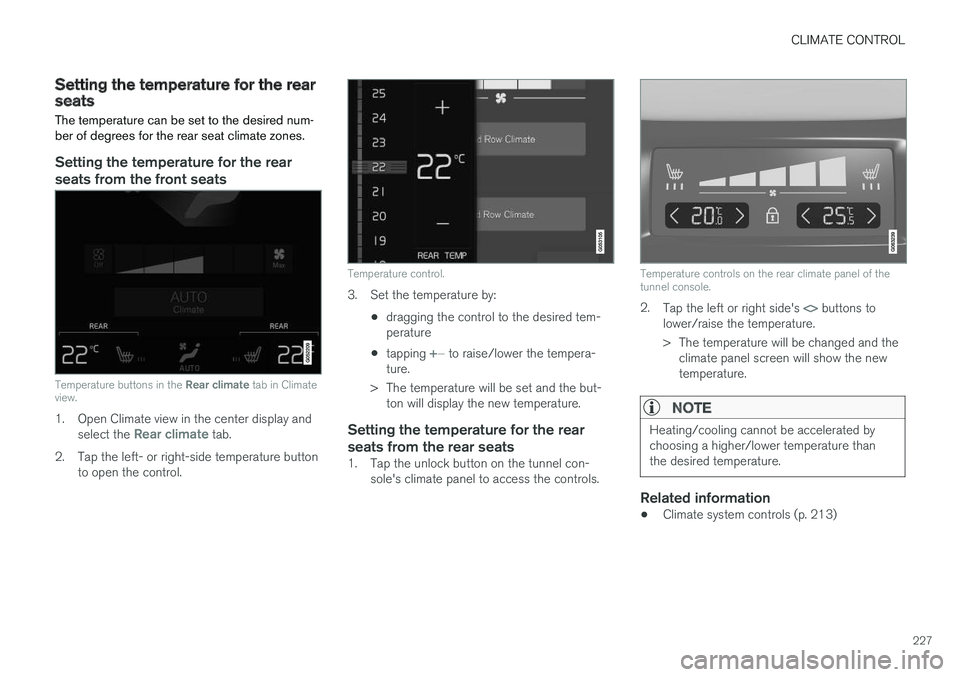
The temperature can be set to the desired num- ber of degrees for the rear seat climate zones.
Setting the temperature for the rear seats from the front seats
Temperature buttons in the Rear climate tab in Climate
view.
1. Open Climate view in the center display and
select the Rear climate tab.
2. Tap the left- or right-side temperature button to open the control.
Temperature control.
3. Set the temperature by:
•dragging the control to the desired tem- perature
• tapping
+
− to raise/lower the tempera-
ture.
> The temperature will be set and the but- ton will display the new temperature.
Setting the temperature for the rear seats from the rear seats
1. Tap the unlock button on the tunnel con- sole's climate panel to access the controls.
Temperature controls on the rear climate panel of the tunnel console.
2.Tap the left or right side's <> buttons to
lower/raise the temperature.
> The temperature will be changed and the climate panel screen will show the new temperature.
NOTE
Heating/cooling cannot be accelerated by choosing a higher/lower temperature thanthe desired temperature.
Related information
• Climate system controls (p. 213)
Page 235 of 686
CLIMATE CONTROL
233
Adding and editing timer setting forpreconditioningThe preconditioning timer can store up to 8 pre- set timer settings.
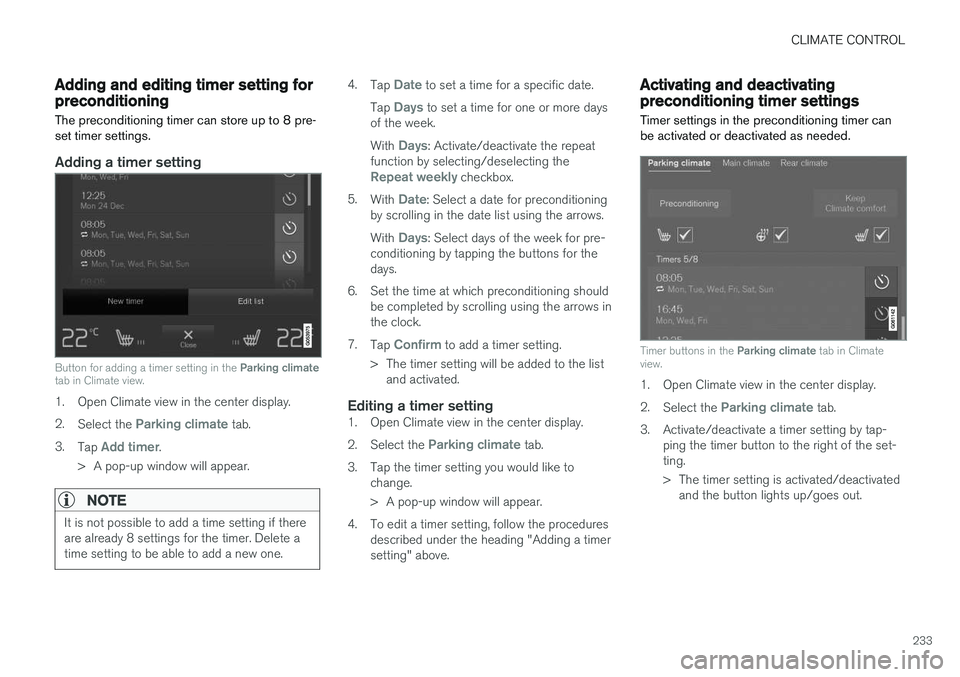
Adding a timer setting
Button for adding a timer setting in the Parking climate
tab in Climate view.
1. Open Climate view in the center display. 2. Select the
Parking climate tab.
3. Tap
Add timer.
> A pop-up window will appear.
NOTE
It is not possible to add a time setting if there are already 8 settings for the timer. Delete atime setting to be able to add a new one.
4. Tap Date to set a time for a specific date.
Tap
Days to set a time for one or more days
of the week. With
Days: Activate/deactivate the repeat
function by selecting/deselecting the
Repeat weekly checkbox.
5. With
Date: Select a date for preconditioning
by scrolling in the date list using the arrows. With
Days: Select days of the week for pre-
conditioning by tapping the buttons for the days.
6. Set the time at which preconditioning should be completed by scrolling using the arrows inthe clock.
7. Tap
Confirm to add a timer setting.
> The timer setting will be added to the list and activated.
Editing a timer setting1. Open Climate view in the center display. 2. Select the
Parking climate tab.
3. Tap the timer setting you would like to change.
> A pop-up window will appear.
4. To edit a timer setting, follow the procedures described under the heading "Adding a timer setting" above.
Activating and deactivatingpreconditioning timer settings
Timer settings in the preconditioning timer can be activated or deactivated as needed.
Timer buttons in the Parking climate tab in Climate
view.
1. Open Climate view in the center display. 2. Select the
Parking climate tab.
3. Activate/deactivate a timer setting by tap- ping the timer button to the right of the set- ting.
> The timer setting is activated/deactivatedand the button lights up/goes out.