wheel VOLVO XC90 T8 2018 Owner´s Manual
[x] Cancel search | Manufacturer: VOLVO, Model Year: 2018, Model line: XC90 T8, Model: VOLVO XC90 T8 2018Pages: 686, PDF Size: 11.51 MB
Page 215 of 686
CLIMATE CONTROL
}}
* Option/accessory.213
Climate system controls
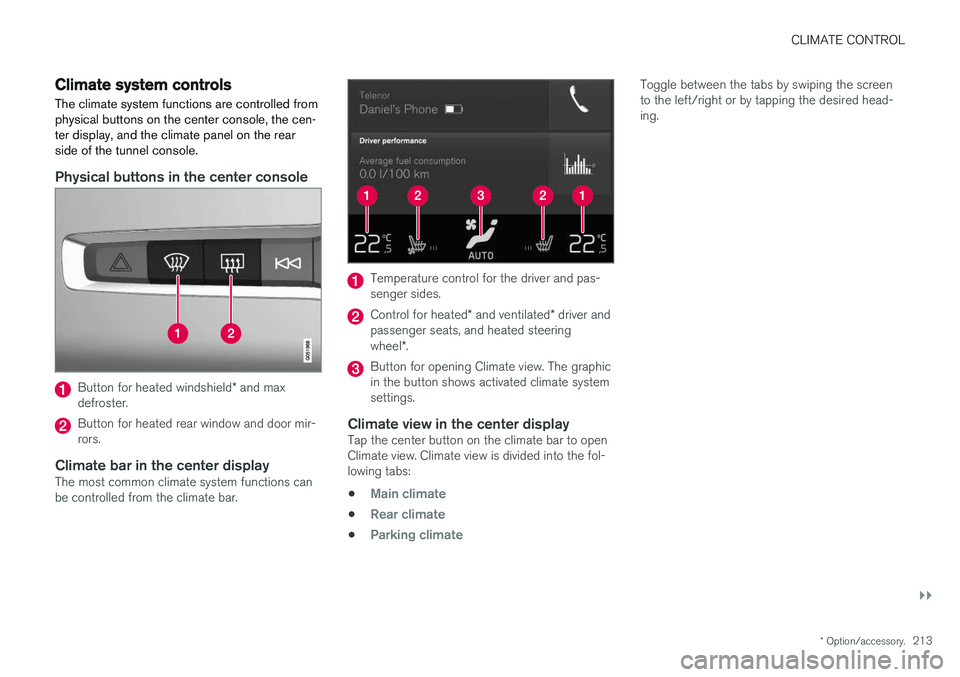
The climate system functions are controlled from physical buttons on the center console, the cen-ter display, and the climate panel on the rearside of the tunnel console.
Physical buttons in the center console
Button for heated windshield * and max
defroster.
Button for heated rear window and door mir- rors.
Climate bar in the center displayThe most common climate system functions canbe controlled from the climate bar.
Temperature control for the driver and pas- senger sides.
Control for heated * and ventilated * driver and
passenger seats, and heated steering wheel *.
Button for opening Climate view. The graphic in the button shows activated climate systemsettings.
Climate view in the center displayTap the center button on the climate bar to openClimate view. Climate view is divided into the fol-lowing tabs:
•
Main climate
•Rear climate
•Parking climate
Toggle between the tabs by swiping the screen to the left/right or by tapping the desired head-ing.
Page 217 of 686
CLIMATE CONTROL
}}
* Option/accessory.215
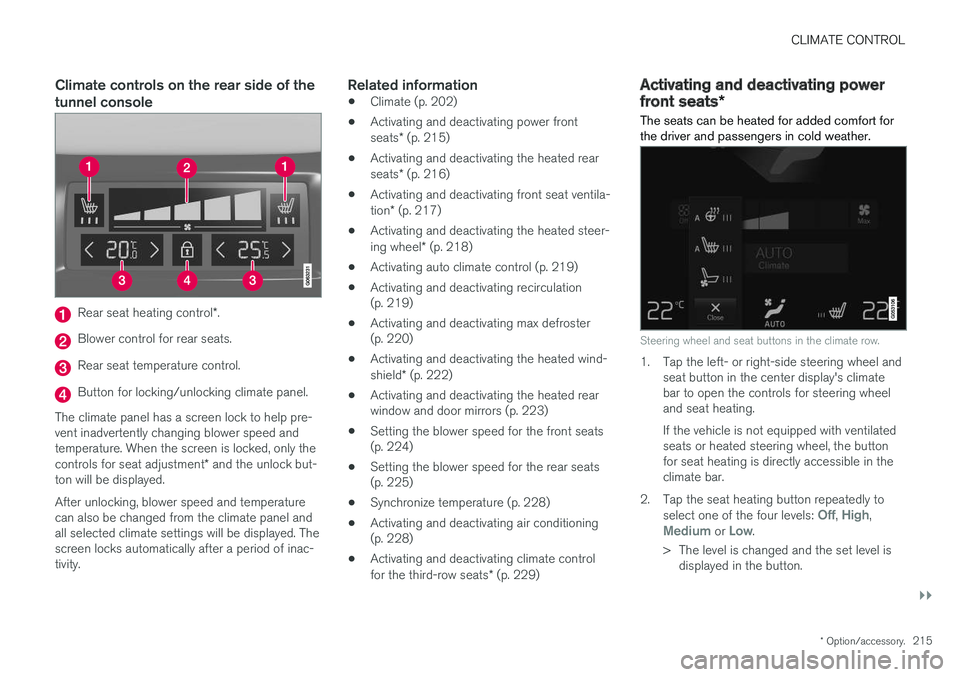
Climate controls on the rear side of the tunnel console
Rear seat heating control *.
Blower control for rear seats.
Rear seat temperature control.
Button for locking/unlocking climate panel.
The climate panel has a screen lock to help pre- vent inadvertently changing blower speed andtemperature. When the screen is locked, only the controls for seat adjustment * and the unlock but-
ton will be displayed. After unlocking, blower speed and temperature can also be changed from the climate panel andall selected climate settings will be displayed. Thescreen locks automatically after a period of inac-tivity.
Related information
• Climate (p. 202)
• Activating and deactivating power front seats
* (p. 215)
• Activating and deactivating the heated rearseats
* (p. 216)
• Activating and deactivating front seat ventila-tion
* (p. 217)
• Activating and deactivating the heated steer-ing wheel
* (p. 218)
• Activating auto climate control (p. 219)
• Activating and deactivating recirculation (p. 219)
• Activating and deactivating max defroster(p. 220)
• Activating and deactivating the heated wind- shield
* (p. 222)
• Activating and deactivating the heated rear window and door mirrors (p. 223)
• Setting the blower speed for the front seats(p. 224)
• Setting the blower speed for the rear seats(p. 225)
• Synchronize temperature (p. 228)
• Activating and deactivating air conditioning(p. 228)
• Activating and deactivating climate control for the third-row seats
* (p. 229)
Activating and deactivating power
front seats *
The seats can be heated for added comfort for the driver and passengers in cold weather.
Steering wheel and seat buttons in the climate row.
1. Tap the left- or right-side steering wheel and seat button in the center display's climate bar to open the controls for steering wheeland seat heating. If the vehicle is not equipped with ventilated seats or heated steering wheel, the buttonfor seat heating is directly accessible in theclimate bar.
2. Tap the seat heating button repeatedly to select one of the four levels:
Off, High,Medium or Low.
> The level is changed and the set level is displayed in the button.
Page 219 of 686
CLIMATE CONTROL
* Option/accessory.217
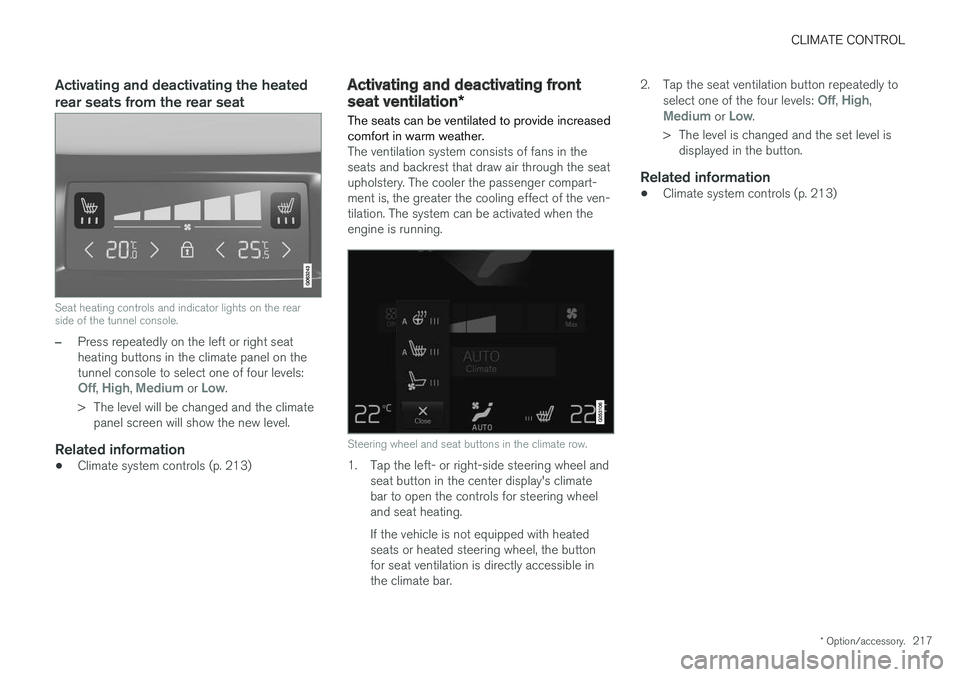
Activating and deactivating the heated rear seats from the rear seat
Seat heating controls and indicator lights on the rear side of the tunnel console.
–Press repeatedly on the left or right seat heating buttons in the climate panel on thetunnel console to select one of four levels:
Off, High, Medium or Low.
> The level will be changed and the climate panel screen will show the new level.
Related information
• Climate system controls (p. 213)
Activating and deactivating front
seat ventilation
*
The seats can be ventilated to provide increased comfort in warm weather.
The ventilation system consists of fans in the seats and backrest that draw air through the seatupholstery. The cooler the passenger compart-ment is, the greater the cooling effect of the ven-tilation. The system can be activated when theengine is running.
Steering wheel and seat buttons in the climate row.
1. Tap the left- or right-side steering wheel and seat button in the center display's climate bar to open the controls for steering wheeland seat heating. If the vehicle is not equipped with heated seats or heated steering wheel, the buttonfor seat ventilation is directly accessible inthe climate bar. 2. Tap the seat ventilation button repeatedly to
select one of the four levels:
Off, High,Medium or Low.
> The level is changed and the set level is displayed in the button.
Related information
• Climate system controls (p. 213)
Page 220 of 686
CLIMATE CONTROL
* Option/accessory.
218
Activating and deactivating the
heated steering wheel *
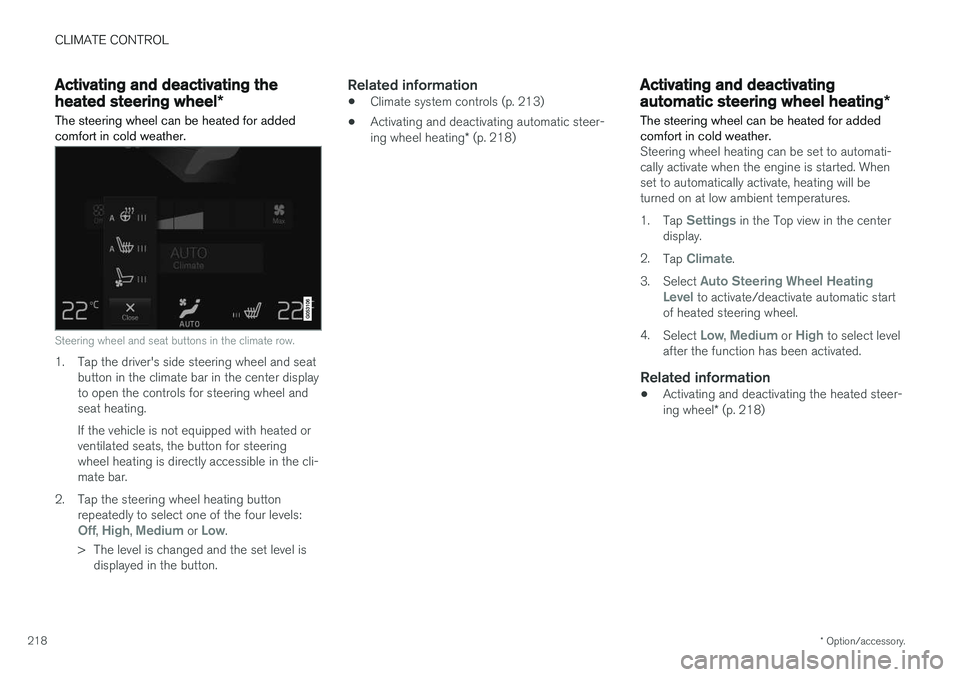
The steering wheel can be heated for added comfort in cold weather.
Steering wheel and seat buttons in the climate row.
1. Tap the driver's side steering wheel and seat button in the climate bar in the center display to open the controls for steering wheel andseat heating. If the vehicle is not equipped with heated or ventilated seats, the button for steeringwheel heating is directly accessible in the cli-mate bar.
2. Tap the steering wheel heating button repeatedly to select one of the four levels:
Off, High, Medium or Low.
> The level is changed and the set level is displayed in the button.
Related information
• Climate system controls (p. 213)
• Activating and deactivating automatic steer- ing wheel heating
* (p. 218)
Activating and deactivating
automatic steering wheel heating *
The steering wheel can be heated for added comfort in cold weather.
Steering wheel heating can be set to automati- cally activate when the engine is started. Whenset to automatically activate, heating will beturned on at low ambient temperatures. 1. Tap
Settings in the Top view in the center
display.
2. Tap
Climate.
3. Select
Auto Steering Wheel Heating
Level to activate/deactivate automatic start
of heated steering wheel.
4. Select
Low, Medium or High to select level
after the function has been activated.
Related information
• Activating and deactivating the heated steer- ing wheel
* (p. 218)
Page 232 of 686
CLIMATE CONTROL
* Option/accessory.
230
Parking climate
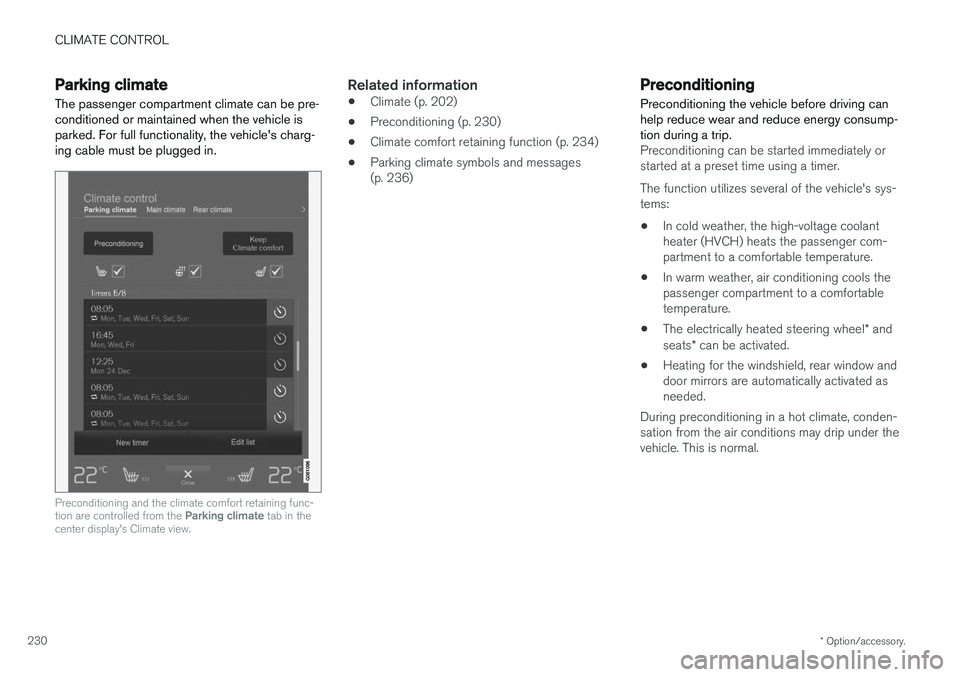
The passenger compartment climate can be pre- conditioned or maintained when the vehicle isparked. For full functionality, the vehicle's charg-ing cable must be plugged in.
Preconditioning and the climate comfort retaining func- tion are controlled from the Parking climate tab in the
center display's Climate view.
Related information
• Climate (p. 202)
• Preconditioning (p. 230)
• Climate comfort retaining function (p. 234)
• Parking climate symbols and messages (p. 236)
Preconditioning
Preconditioning the vehicle before driving can help reduce wear and reduce energy consump-tion during a trip.
Preconditioning can be started immediately or started at a preset time using a timer. The function utilizes several of the vehicle's sys- tems:
• In cold weather, the high-voltage coolantheater (HVCH) heats the passenger com-partment to a comfortable temperature.
• In warm weather, air conditioning cools thepassenger compartment to a comfortabletemperature.
• The electrically heated steering wheel
* and
seats * can be activated.
• Heating for the windshield, rear window anddoor mirrors are automatically activated asneeded.
During preconditioning in a hot climate, conden-sation from the air conditions may drip under thevehicle. This is normal.
Page 233 of 686
CLIMATE CONTROL
}}
231
NOTE
Preconditioning is only available when the car is connected to an electrical outlet. A charg-ing post that is not always active, for examplebecause of a timer, can cause loss of functionfor preconditioning. If the car is not connected to an electrical socket it is still possible in a warm climate toachieve brief cooling of the passenger com-partment by direct starting preconditioning.
NOTE
During preconditioning of the passenger compartment, the vehicle works to reach acomfortable temperature and not the tem-perature set in the climate system.
Related information
•Parking climate (p. 230)
• Starting and stopping preconditioning (p. 231)
• Preconditioning timer settings (p. 232)
Starting and stoppingpreconditioning
Preconditioning heats or cools the passenger compartment before driving. Preconditioningcan be started in the center display or from acellular phone.
Starting/stopping from the center display
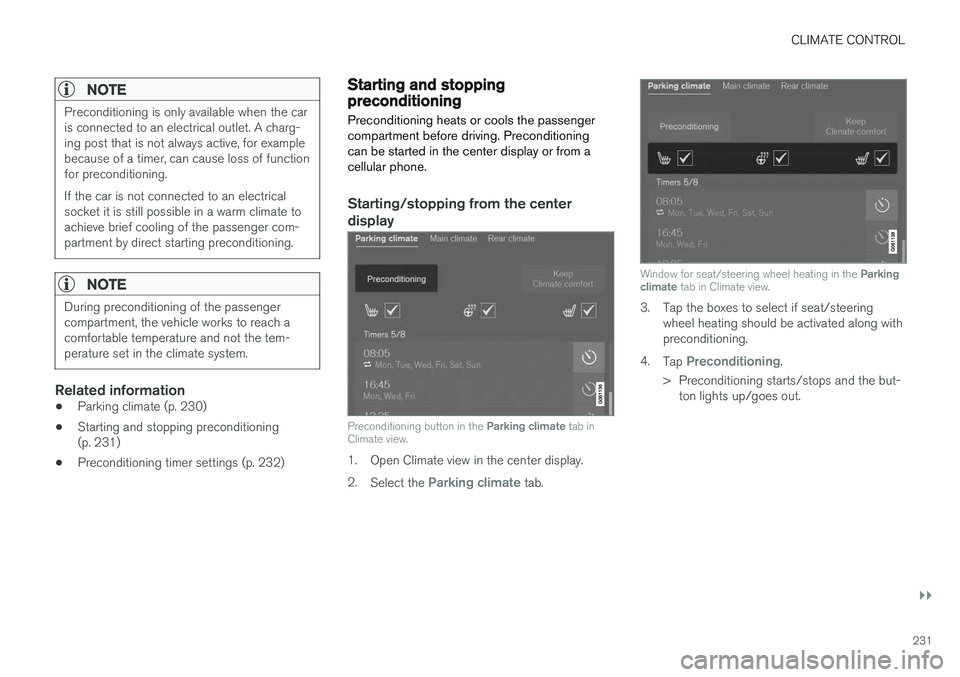
Preconditioning button in the Parking climate tab in
Climate view.
1. Open Climate view in the center display. 2. Select the
Parking climate tab.
Window for seat/steering wheel heating in the Parking
climate tab in Climate view.
3. Tap the boxes to select if seat/steering
wheel heating should be activated along with preconditioning.
4. Tap
Preconditioning.
> Preconditioning starts/stops and the but- ton lights up/goes out.
Page 246 of 686
||
KEY, LOCKS AND ALARM
* Option/accessory.
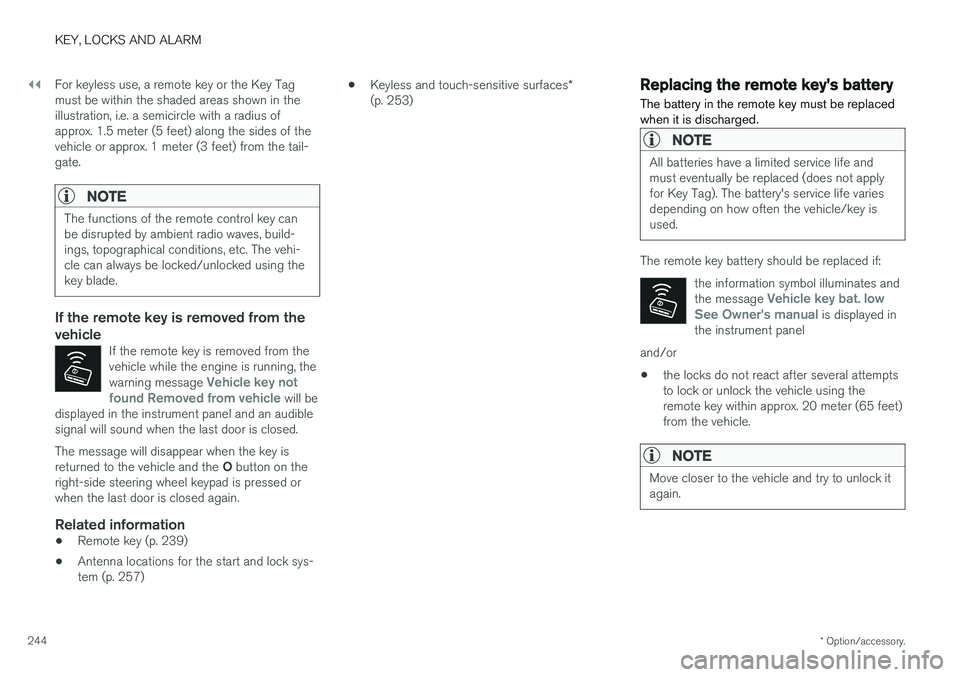
244 For keyless use, a remote key or the Key Tag must be within the shaded areas shown in theillustration, i.e. a semicircle with a radius ofapprox. 1.5 meter (5 feet) along the sides of thevehicle or approx. 1 meter (3 feet) from the tail-gate.
NOTE
The functions of the remote control key can be disrupted by ambient radio waves, build-ings, topographical conditions, etc. The vehi-cle can always be locked/unlocked using thekey blade.
If the remote key is removed from the vehicle
If the remote key is removed from the vehicle while the engine is running, the warning message
Vehicle key not
found Removed from vehicle will be
displayed in the instrument panel and an audible signal will sound when the last door is closed.
The message will disappear when the key is returned to the vehicle and the O button on the
right-side steering wheel keypad is pressed or when the last door is closed again.
Related information
• Remote key (p. 239)
• Antenna locations for the start and lock sys-tem (p. 257) •
Keyless and touch-sensitive surfaces
*
(p. 253)
Replacing the remote key's battery
The battery in the remote key must be replaced when it is discharged.
NOTE
All batteries have a limited service life and must eventually be replaced (does not applyfor Key Tag). The battery's service life variesdepending on how often the vehicle/key isused.
The remote key battery should be replaced if:
the information symbol illuminates and the message
Vehicle key bat. low
See Owner's manual is displayed in
the instrument panel
and/or
• the locks do not react after several attempts to lock or unlock the vehicle using theremote key within approx. 20 meter (65 feet)from the vehicle.
NOTE
Move closer to the vehicle and try to unlock it again.
Page 274 of 686
DRIVER SUPPORT
* Option/accessory.
272
Driver support systems
The vehicle is equipped with a number of driver support systems that can provide the driver withactive or passive assistance in various situations.
The system can, for example, help the driver maintain a set speed or a set time interval to thevehicle ahead, help prevent a collision by warningthe driver and applying the brakes, or assist thedriver while parking. Some of the systems are standard and others are options. This also varies from market to market.
Related information
• Speed-dependent steering wheel resistance(p. 272)
• Electronic Stability Control (p. 274)
• Stability system Roll Stability Control(p. 273)
• Rear Collision Warning (p. 347)
• Speed limiter (p. 278)
• Cruise control (p. 286)
• Distance Alert
* (p. 291)
• Adaptive Cruise Control
* (p. 295)
• Pilot Assist (p. 311)
• Radar sensor (p. 326)
• Camera (p. 331)
• City Safety
™ (p. 335)
• BLIS
* (p. 348) •
Cross Traffic Alert
* (p. 353)
• Road Sign Information
* (p. 357)
• Driver Alert Control (p. 362)
• Lane Keeping Aid (p. 364)
• Steering assistance at risk of collision(p. 372)
• Park Assist
* (p. 381)
• Park Assist Camera
* (p. 386)
• Park Assist Pilot
* (p. 395)
Speed-dependent steering wheelresistance
Speed-dependent power steering increases the steering wheel resistance in pace with the vehi-cle's speed to give the driver an enhanced feel-ing of control and stability.
Steering may feel stiffer on highways. When parking and at low speeds, it will be easier tomove the steering wheel.
NOTE
In some situations, the power steering may become too hot and require temporary cool-ing – during such time the power steering willwork at reduced output and the steeringwheel may feel more difficult to move. In parallel with the temporarily reduced steer- ing assistance, the driver display shows amessage as well as a STEERING WHEELsymbol.
Page 275 of 686
DRIVER SUPPORT
* Option/accessory.273
WARNING
While the power steering is working at reduced power, the driver support functionswith steering assistance are not available. In such a situation, the driver display shows the
Power steering failure or Power
Steering Assist Temporarily Reduced
message, combined with a STEERING WHEEL symbol.
Changing the level of steering wheel resistance *
To change the level of steering wheel resistance, see the description of the INDIVIDUAL optionunder "Available drive modes" in the "Drivemodes" section. On models not equipped with drive mode con- trols and the INDIVIDUAL option, steering wheelresistance can instead be set in the center dis-play's Top view under:
SettingsMy CarDrive ModesSteering force
Steering wheel resistance settings cannot be accessed when turning at speeds above10 km/h (6 mph).
Related information
•Drive modes (p. 445)
• Pilot Assist (p. 311) •
Lane Keeping Aid (p. 364)
• Steering assistance at risk of collision(p. 372)
• Park Assist Pilot
* (p. 395)
Stability system Roll StabilityControl
The Roll Stability Control (RSC 1
) system helps
minimize the risk of a rollover in the event of e.g. a sudden evasive maneuver or if the vehiclebegins to skid.
The RSC system monitors the lateral angle at which the vehicle is leaning and registers anychanges. Using this information, the system cal-culates the likelihood of a rollover. If there is animminent risk of a rollover, Electronic StabilityControl is activated, engine torque is reduced andbrakes are applied to one or more of the wheelsuntil the vehicle has regained stability.
WARNING
The vehicle
Page 276 of 686
DRIVER SUPPORT
* Option/accessory.
274
Electronic Stability Control
The Electronic Stability Control (ESC 2
) function
helps the driver avoid skidding and improves the vehicle's directional stability.
This symbol will be displayed in the instrument panel when theESC system is intervening. When the ESC has intervened to apply the brakes, a pulsingsound may be heard and the
vehicle may accelerate more slowly than expec-ted when the accelerator pedal is depressed.
The ESC system consists of the following sub- functions: • Stability control 3
• Spin control and active yaw control
• Engine drag control
• Trailer Stability Assist
WARNING
•The Electronic Stability Control system ESC is supplementary driver supportintended to facilitate driving and make itsafer – it cannot handle all situations inall traffic, weather and road conditions.
• ESC is not a substitute for the driver'sattention and judgment. The driver isalways responsible for ensuring the vehi-cle is driven in a safe manner, at theappropriate speed, with an appropriatedistance to other vehicles, and in accord-ance with current traffic rules and regula-tions.
Stability control 3This function helps control the driving and brak-ing force of each individual wheel in an attemptto stabilize the vehicle.
Spin control and active yaw controlThis function is active at low speeds and brakesthe wheels that are spinning to transfer additionalpower from wheels that are not spinning. This function also helps prevent the wheels from spinning while the vehicle is accelerating.
Engine drag control
Engine drag control (EDC
4
) helps prevent inad-
vertent wheel lock, e.g. after downshifting orusing engine braking when driving at low speedson a slippery surface. Inadvertent wheel lock while driving could impair the driver's ability to steer the vehicle.
Trailer Stability Assist *5
Trailer Stability Assist (TSA
6
) is designed to help
stabilize a vehicle that is towing a trailer if thevehicle and trailer have begun to sway. For moreinformation, see "Trailer Stability Assist".
NOTE
The TSA function is deactivated if ESC Sport
Mode is activated.
Related information
• Electronic Stability Control Sport mode (p. 275)
• Activating/deactivating Sport mode in Elec-tronic Stability Control (p. 275)
1
Roll Stability Control
2 Electronic Stability Control
3 Also called traction control.
4 Engine Drag Control
5Trailer Stability Assist is included if the vehicle is equipped with a Volvo original towbar.6
Trailer Stability Assist