service VOLVO XC90 T8 2018 Owner´s Manual
[x] Cancel search | Manufacturer: VOLVO, Model Year: 2018, Model line: XC90 T8, Model: VOLVO XC90 T8 2018Pages: 686, PDF Size: 11.51 MB
Page 517 of 686
AUDIO, MEDIA AND INTERNET
}}
* Option/accessory.515
Apple® CarPlay®
*
With CarPlay, you can listen to music, make phone calls, get driving instructions, send/receive messages and use Siri, all while remain-ing focused on driving.
CarPlay works with select Apple devices. If the car doesnot already support CarPlay,this can be retrofitted. Contacta Volvo retailer to installCarPlay.
Information about supported apps and compati- ble phones is available on the Apple website:www.apple.com/ios/carplay/. Using apps that arenot compatible with CarPlay could cause the con-nection between iPhone and the vehicle to belost. Please note that Volvo is not responsible forthe content of CarPlay. When using map navigation via CarPlay, guidance will only be shown on the center display and notin the instrument panel or head-up display. CarPlay apps can be controlled from the center display, a phone or with the right-side steeringwheel keypad (for certain functions). The appscan also be voice-controlled using Siri. Press and hold the
button on the steering wheel to
start voice control with Siri. Press briefly to acti- vate the vehicle's own voice control system. If Siri cuts off too soon, press and hold the
6
but-
ton on the steering wheel.
By using Apple CarPlay you acknowledge the following: Apple CarPlay is a serviceprovided by Apple Inc. under its terms andconditions. Volvo Cars is thus notresponsible for Apple CarPlay or itsfeatures/applications. When using AppleCarPlay, certain information from your car(including its position) is transferred to youriPhone. In relation to Volvo Cars, you arefully responsible for your and any othersperson
Page 520 of 686
AUDIO, MEDIA AND INTERNET
* Option/accessory.
518
Android Auto *
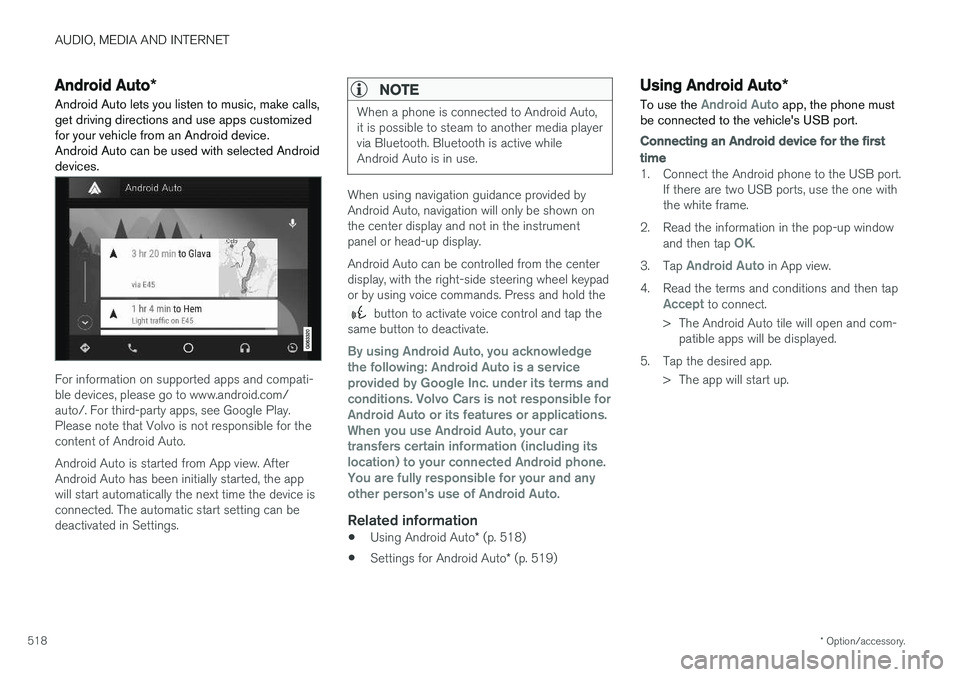
Android Auto lets you listen to music, make calls, get driving directions and use apps customizedfor your vehicle from an Android device.Android Auto can be used with selected Androiddevices.
For information on supported apps and compati- ble devices, please go to www.android.com/auto/. For third-party apps, see Google Play.Please note that Volvo is not responsible for thecontent of Android Auto. Android Auto is started from App view. After Android Auto has been initially started, the appwill start automatically the next time the device isconnected. The automatic start setting can bedeactivated in Settings.
NOTE
When a phone is connected to Android Auto, it is possible to steam to another media playervia Bluetooth. Bluetooth is active whileAndroid Auto is in use.
When using navigation guidance provided by Android Auto, navigation will only be shown onthe center display and not in the instrumentpanel or head-up display. Android Auto can be controlled from the center display, with the right-side steering wheel keypador by using voice commands. Press and hold the
button to activate voice control and tap the
same button to deactivate.
By using Android Auto, you acknowledge the following: Android Auto is a serviceprovided by Google Inc. under its terms andconditions. Volvo Cars is not responsible forAndroid Auto or its features or applications.When you use Android Auto, your cartransfers certain information (including itslocation) to your connected Android phone.You are fully responsible for your and anyother person
Page 531 of 686
AUDIO, MEDIA AND INTERNET
}}
* Option/accessory.529
Settings for Bluetooth devices
Settings for Bluetooth-connected devices.
1. Tap Settings in the Top view.
2. Tap
CommunicationBluetooth
Devices and select settings:
•
Add device - start the procedure for pairing
a new device.
•
Previously paired devices - list con-
nected/paired devices.
•
Remove device - remove a connected
device.
•
Allowed services for this device - select
what the device will be used for: making calls, sending/receiving messages, stream-ing media, Internet connection.
•
Internet connection connect the vehicle to
the Internet using the device's Bluetooth connection.
Bluetooth ®
declaration of conformityUSA FCC CAUTION Changes or modifications not expressly approved by the party responsible for compliance couldvoid the user's authority to operate the equip-ment. This transmitter must not be co-located oroperated in conjunction with any other antennaor transmitter. Canada This device complies with Industry Canada license-exempt RSS standard(s). Operation issubject to the following two conditions: (1) this device may not cause interference, and(2) this device must accept any interference, including interference that may cause undesiredoperation of the device.
Related information
•
Phone (p. 520)
• Phone settings (p. 528)
• Internet-connected vehicle
* (p. 529)
• Connecting a phone to the car via Bluetoothfor the first time (p. 521)
Internet-connected vehicle
*
When the vehicle is connected to the Internet, it is possible to use web radio and music servicesvia apps, download software and contact retail-ers from the vehicle.
The vehicle can be connected to the Internet using Bluetooth, Wi-Fi or the vehicle's integratedmodem.
Page 532 of 686
||
AUDIO, MEDIA AND INTERNET
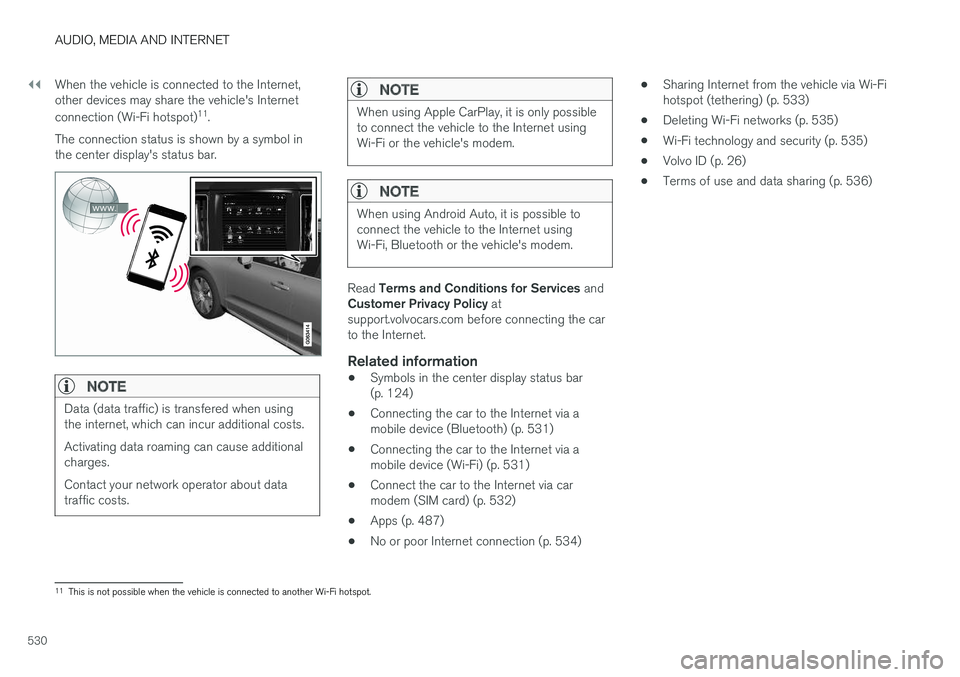
530When the vehicle is connected to the Internet, other devices may share the vehicle's Internet connection (Wi-Fi hotspot)
11
.
The connection status is shown by a symbol in the center display's status bar.
NOTE
Data (data traffic) is transfered when using the internet, which can incur additional costs. Activating data roaming can cause additional charges. Contact your network operator about data traffic costs.
NOTE
When using Apple CarPlay, it is only possible to connect the vehicle to the Internet usingWi-Fi or the vehicle's modem.
NOTE
When using Android Auto, it is possible to connect the vehicle to the Internet usingWi-Fi, Bluetooth or the vehicle's modem.
Read Terms and Conditions for Services and
Customer Privacy Policy at
support.volvocars.com before connecting the car to the Internet.
Related information
• Symbols in the center display status bar(p. 124)
• Connecting the car to the Internet via amobile device (Bluetooth) (p. 531)
• Connecting the car to the Internet via amobile device (Wi-Fi) (p. 531)
• Connect the car to the Internet via carmodem (SIM card) (p. 532)
• Apps (p. 487)
• No or poor Internet connection (p. 534) •
Sharing Internet from the vehicle via Wi-Fihotspot (tethering) (p. 533)
• Deleting Wi-Fi networks (p. 535)
• Wi-Fi technology and security (p. 535)
• Volvo ID (p. 26)
• Terms of use and data sharing (p. 536)
11
This is not possible when the vehicle is connected to another Wi-Fi hotspot.
Page 533 of 686
AUDIO, MEDIA AND INTERNET
}}
* Option/accessory.531
Connecting the car to the Internetvia a mobile device (Bluetooth)
Establish an Internet connection using Bluetooth and tethering from a phone and get access tomultiple connected services in your vehicle.
The phone and the network service provider must support Internet sharing (tethering) and the sub-scription must include data transfer.
1. To connect the vehicle to the Internet via a Bluetooth-connected phone, the phone must first be paired with the vehicle via Bluetooth.Ensure that the personal hotspot (portable/personal hotspot) is activated in your phone.
2. If the phone has been connected via Blue- tooth previously, tap
Settings in the center
display's Top view.
3. In the center display: Tap
Communication
Bluetooth Devices.
4. Mark the window for
Bluetooth Internet
connection under the heading Internet
connection.
> Your vehicle is now connected to the Internet via your Bluetooth-connected phone.
NOTE
When using Apple CarPlay, it is only possible to connect the vehicle to the Internet usingWi-Fi or the vehicle's modem.
Related information
• Internet-connected vehicle
* (p. 529)
• Connect the car to the Internet via car modem (SIM card) (p. 532)
• Connecting a phone to the car via Bluetoothfor the first time (p. 521)
• Connecting the car to the Internet via amobile device (Wi-Fi) (p. 531)
• Apple ®
CarPlay ®
* (p. 515)
• No or poor Internet connection (p. 534)
• Settings for Bluetooth devices (p. 529)
Connecting the car to the Internetvia a mobile device (Wi-Fi)
Establish an Internet connection via Wi-Fi tether- ing from a phone and get access to multipleconnected services in your vehicle.
The phone and the network service provider must support Internet sharing (tethering) and the sub-scription must include data transfer.
1. Activate Internet sharing (personal hotspot) in the phone.
2. Tap
Settings in the Top view.
3. Proceed to
CommunicationWi-Fi.
4. Activate/deactivate by tapping to check/ uncheck the Wi-Fi box.
5. Tap the name of the network you would like to connect.
6. Enter the network password.
7. If a different connection was used previously, confirm the connection change.
> The vehicle will connect to the network.
Please note that certain cellular phones will disa- ble Internet sharing (tethering) when the connec-
Page 534 of 686
||
AUDIO, MEDIA AND INTERNET
* Option/accessory.
532 tion to the vehicle has been broken, e.g. when the phone has been removed from the vehicle. Thephone's tethering function will then need to bereactivated the next time the phone's hotspot isused to connect to the Internet. When a phone is connected to the vehicle, it will be saved for future use. When the maximumnumber of 50 connected phones has beenreached, the first will be deleted. To display a listof saved networks or to manually delete saved networks, tap
SettingsCommunication
Wi-FiSaved networks.
Technical and security requirements for Wi-Fi connection are described in a separate section.
Related information
• Internet-connected vehicle
* (p. 529)
• Deleting Wi-Fi networks (p. 535)
• No or poor Internet connection (p. 534)
• Wi-Fi technology and security (p. 535)
Connect the car to the Internet viacar modem (SIM card) For vehicles equipped with Volvo On Call, it is possible to establish an Internet connection viathe vehicle modem and a personal SIM card (P-SIM).
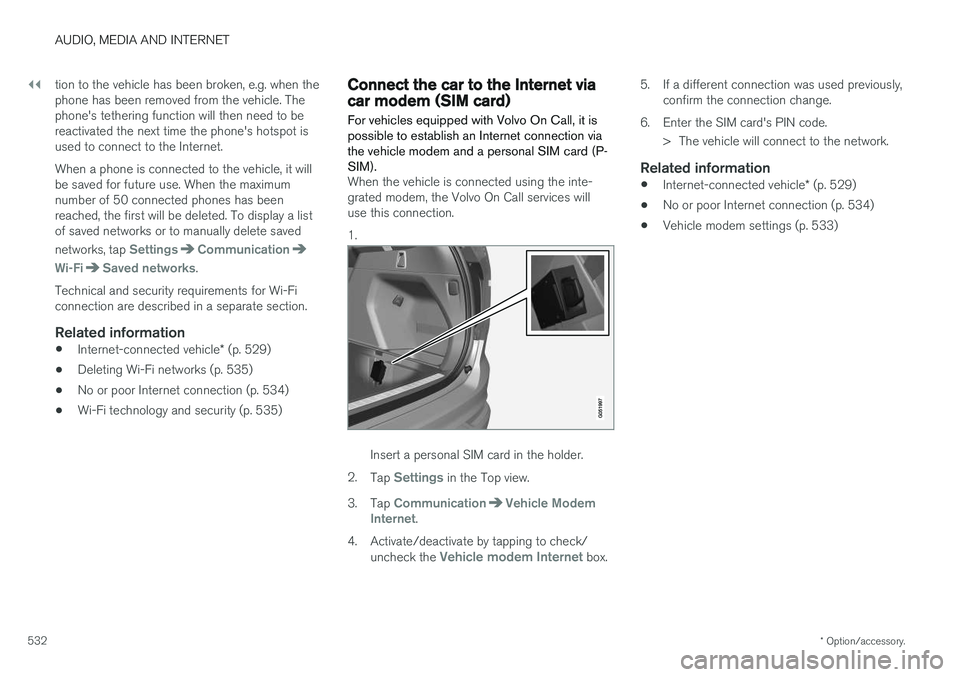
When the vehicle is connected using the inte- grated modem, the Volvo On Call services willuse this connection. 1.
Insert a personal SIM card in the holder.
2. Tap
Settings in the Top view.
3. Tap
CommunicationVehicle Modem
Internet.
4. Activate/deactivate by tapping to check/ uncheck the
Vehicle modem Internet box. 5. If a different connection was used previously,
confirm the connection change.
6. Enter the SIM card's PIN code. > The vehicle will connect to the network.
Related information
• Internet-connected vehicle
* (p. 529)
• No or poor Internet connection (p. 534)
• Vehicle modem settings (p. 533)
Page 535 of 686
AUDIO, MEDIA AND INTERNET
}}
533
Vehicle modem settings
Your vehicle is equipped with a modem that can be used to connect the vehicle to the Internet. Itis also possible to share this Internet connectionover Wi-Fi.
1. Tap Settings in the Top view.
2. Tap
CommunicationVehicle Modem
Internet and select settings:
•
Vehicle modem Internet - select this to
use the vehicle's modem to connect to the Internet.
•
Data usage - tap Reset to reset the coun-
ter for the amount of data received and sent.
•
Network Select carrier
- select a service provider
manually or automatically.
Data roaming - if the box is checked, the
vehicle modem will attempt to connect to the Internet when the vehicle is outside its homenetwork (e.g. if you are in another country).Please note that this could entail additionalcharges. Consult with your service providerfor data roaming terms under your contract.
•
SIM card PIN Change PIN
- a maximum of 4 digits can be
entered.
Disable PIN - select whether a PIN code
will be required to access the SIM card. •
Send request code - used to e.g. download
or check the balance remaining on a prepaid phone card. This function is specific to yourservice provider.
Related information
• Connect the car to the Internet via carmodem (SIM card) (p. 532)
• No or poor Internet connection (p. 534)
Sharing Internet from the vehicle viaWi-Fi hotspot (tethering)
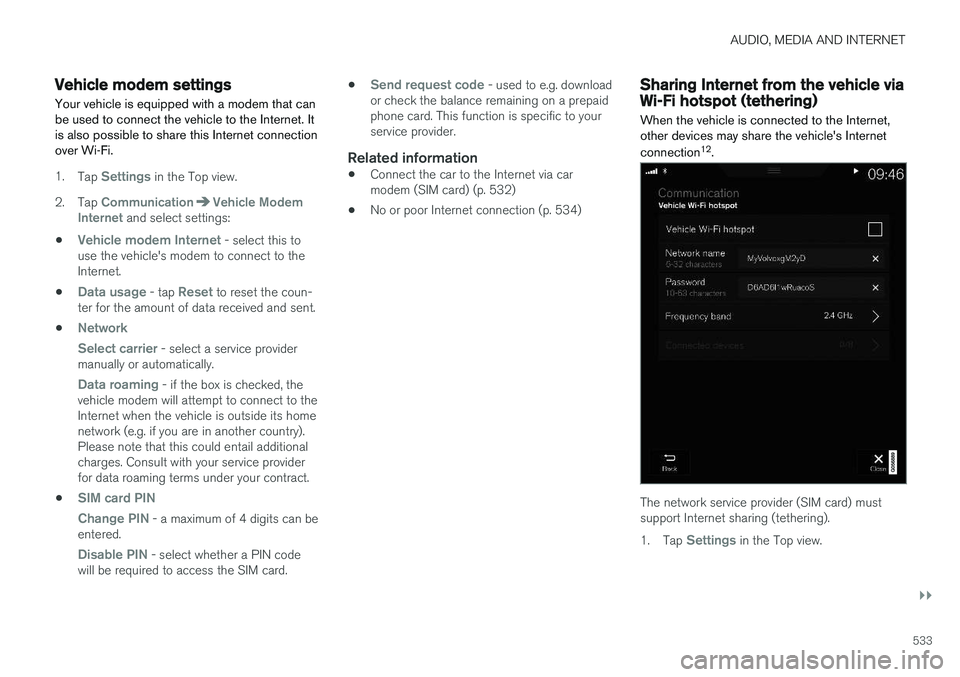
When the vehicle is connected to the Internet, other devices may share the vehicle's Internet connection 12
.
The network service provider (SIM card) must support Internet sharing (tethering). 1. Tap
Settings in the Top view.
Page 536 of 686
||
AUDIO, MEDIA AND INTERNET
* Option/accessory.
534 2. Tap
CommunicationVehicle Wi-Fi
Hotspot.
3. Tap
Network name to assign a name to the
hotspot.
4. Tap
Password and create a password. This
password can then be used to connect other devices to this hotspot.
5. Tap
Frequency band and select a fre-
quency for the hotspot to use to transmit data. Please note that selecting a frequencyis not possible on all markets.
6. Activate/deactivate by tapping to check/ uncheck the
Vehicle Wi-Fi Hotspot box.
7. If Wi-Fi was previously used to connect to the Internet, confirm the change of connec- tions.
> It is now possible for external devices toconnect to the vehicle's Wi-Fi hotspot.
NOTE
Activation of Wi-Fi hotspot can cause addi- tional charges from your network operator. Contact your network operator about data traffic costs.
The connection status is shown by a symbol in the center display's status bar. Tap
Connected devices to see a list of cur-
rently connected devices.
Related information
• Symbols in the center display status bar (p. 124)
• Internet-connected vehicle
* (p. 529)
• No or poor Internet connection (p. 534)
No or poor Internet connection Factors affecting the Internet connection.
The amount of data transmitted depends on the services or apps currently in use in the vehicle.Streaming music, for example, involves the trans-mission of a large amount of data, and thisrequires a good connection and a strong signal.
Phone to vehicleInternet connection speed may vary dependingon the location of the cellular phone in the vehi-cle. Move the phone closer to the center displayto increase signal strength. Make sure that noth-ing is between the phone and center display thatcould be blocking the signal.
Phone to network operatorThe speed of the mobile network varies depend-ing on the coverage in the vehicle's current loca-tion. Coverage may be poorer in e.g. tunnels,mountainous areas, deep valleys or indoors. Con-nection speed is also dependent on the subscrip-tion you have with your service provider.
NOTE
If you experience any problems with data traf- fic, contact your network service provider.
12
This does not apply when the vehicle is connected to the Internet via Wi-Fi.
Page 538 of 686
AUDIO, MEDIA AND INTERNET
536
Terms of use and data sharing The first time certain services and apps are started, a pop-up window with the heading
Terms and conditions and Data sharing may
open.
The aim is to inform the user about Volvo's terms of use and data sharing policy. By accepting datasharing, the user accepts that certain informationwill be sent from the vehicle. This is required forcertain services and apps to work with full func-tionality. Data sharing can be set from the center display's Settings menu.
Related information
• Activating and deactivating data sharing(p. 536)
Activating and deactivating datasharing
Data sharing for relevant services and apps can be set via the Settings menu in the center dis-play.
1. Tap Settings in the Top view in the center
display.
2. Tap
SystemPrivacy and data.
3. Select
Data sharing to enable or disable
data sharing.
4. When data sharing is enabled, settings for individual services and apps in the list below can be changed.
When data sharing is disabled, the previous set-tings for individual services and apps are savedand restored when data sharing is enabled again.
Related information
• Terms of use and data sharing (p. 536)
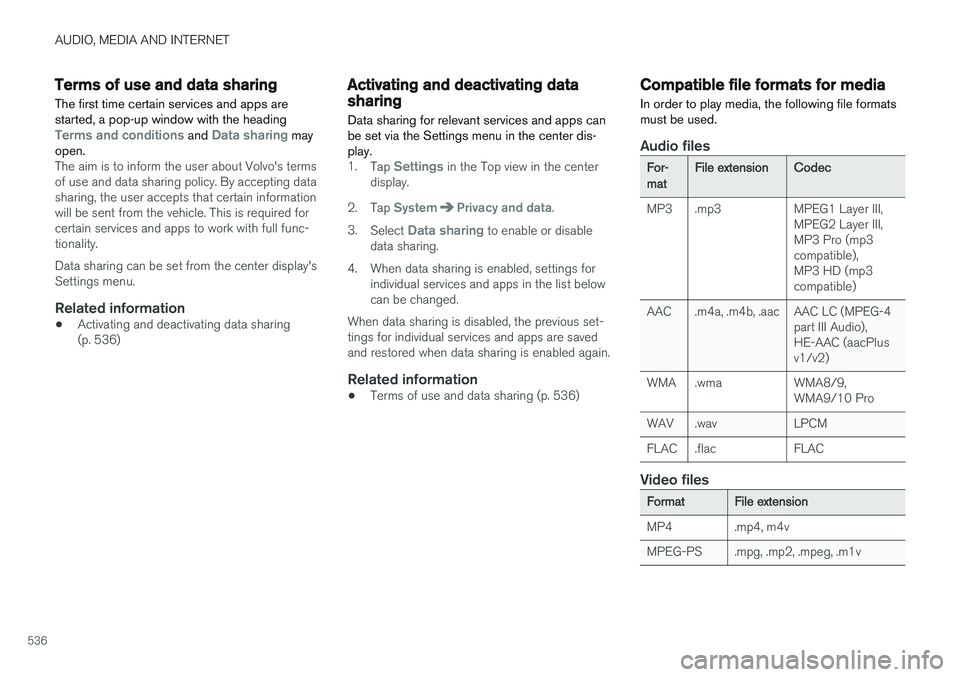
Compatible file formats for media
In order to play media, the following file formats must be used.
Audio files
For-matFile extensionCodec
MP3 .mp3 MPEG1 Layer III, MPEG2 Layer III, MP3 Pro (mp3compatible),MP3 HD (mp3compatible)
AAC .m4a, .m4b, .aac AAC LC (MPEG-4 part III Audio),HE-AAC (aacPlusv1/v2)
WMA .wma WMA8/9, WMA9/10 Pro
WAV .wav LPCM
FLAC .flac FLAC
Video files
FormatFile extension
MP4 .mp4, m4v
MPEG-PS .mpg, .mp2, .mpeg, .m1v
Page 542 of 686
||
AUDIO, MEDIA AND INTERNET
540Portions of the content are copyright
© of
Gracenote or its providers. Gracenote, the Gracenote logo and logotype, "Powered by Gracenote" and Gracenote MusicIDare either registered trademarks of Gracenote,Inc. in the United States and/or other countries.
Gracenote ® End User License Agreement
This application or device contains software from Gracenote, Inc. in Emeryville, California, UnitedStates ("Gracenote"). The software from Grace-note (the “Gracenote Software”) enables thisapplication to perform disc and/or file identifica-tion and obtain music-related information, includ-ing name, artist, track, and title information(“Gracenote Data”) from online servers or embed-ded databases (collectively “Gracenote Servers”)and to perform other functions. You may useGracenote Data only by means of the intendedEnd-User functions of this application or device. You agree that you will use Gracenote Data, the Gracenote Software, and Gracenote Servers foryour own personal non-commercial use only. Youagree not to assign, copy, transfer or transmit theGracenote Software or any Gracenote Data toany third party. YOU AGREE NOT TO USE OREXPLOIT GRACENOTE DATA, THE GRACE-NOTE SOFTWARE, OR GRACENOTE SERVERS,EXCEPT AS EXPRESSLY PERMITTED HEREIN. You agree that your non-exclusive license to use the Gracenote Data, the Gracenote Software, andGracenote Servers will terminate if you violate these restrictions. If your license terminates, youagree to cease any and all use of the GracenoteData, the Gracenote Software, and GracenoteServers. Gracenote reserves all rights in allGracenote Data, all Gracenote Software, and allGracenote Servers, including all ownership rights.Under no circumstances will Gracenote becomeliable for any payment to you for any informationthat you provide. You agree that Gracenote, Inc.may enforce its rights under this Agreementagainst you directly in its own name. The Gracenote service uses a unique identifier to track queries for statistical purposes. The pur-pose of a randomly assigned numeric identifier isto allow the Gracenote service to count querieswithout knowing anything about who you are. Formore information, see the web page for theGracenote Privacy Policy for the Gracenote serv-ice. The Gracenote Software and each item of Grace- note Data are licensed to you “AS IS.” Gracenotemakes no representations or warranties, expressor implied, regarding the accuracy of any Grace-note Data from in the Gracenote Servers. Grace-note reserves the right to delete data from theGracenote Servers or to change data categoriesfor any cause that Gracenote deems sufficient.No warranty is made that the Gracenote Softwareor Gracenote Servers are error-free or that func-tioning of Gracenote Software or GracenoteServers will be uninterrupted. Gracenote is notobligated to provide you with new enhanced or
additional data types or categories that Grace-note may provide in the future and is free to dis-continue its services at any time. GRACENOTE DISCLAIMS ALL WARRANTIES EXPRESS OR IMPLIED, INCLUDING, BUT NOTLIMITED TO, IMPLIED WARRANTIES OF MER-CHANTABILITY, FITNESS FOR A PARTICULARPURPOSE, TITLE, AND NON-INFRINGEMENT.GRACENOTE DOES NOT WARRANT THERESULTS THAT WILL BE OBTAINED BY YOURUSE OF THE GRACENOTE SOFTWARE ORANY GRACENOTE SERVER. IN NO CASE WILLGRACENOTE BE LIABLE FOR ANY CONSE-QUENTIAL OR INCIDENTAL DAMAGES ORFOR ANY LOST PROFITS OR LOST REVENUES. ©
Gracenote, Inc. 2009
Sensus software
This software uses parts of sources from clib2 and Prex Embedded Real-time OS - Source(Copyright (c) 1982, 1986, 1991, 1993, 1994),and Quercus Robusta (Copyright (c) 1990,1993), The Regents of the University ofCalifornia. All or some portions are derived frommaterial licensed to the University of California byAmerican Telephone and Telegraph Co. or UnixSystem Laboratories, Inc. and are reproducedherein with the permission of UNIX SystemLaboratories, Inc. Redistribution and use insource and binary forms, with or withoutmodification, are permitted provided that thefollowing conditions are met: Redistributions of