brake fluid VOLVO XC90 T8 2018 Owner´s Manual
[x] Cancel search | Manufacturer: VOLVO, Model Year: 2018, Model line: XC90 T8, Model: VOLVO XC90 T8 2018Pages: 686, PDF Size: 11.51 MB
Page 16 of 686
14
Touching up minor paint damage645
Color codes 646
Changing rear window wipers 647
Replacing windshield wiper blades 648
Windshield wipers in the service position 649
Filling washer fluid 650
SPECIFICATIONS
Type designations654
Dimensions 657
Weights 659
Towing capacity and tongue weight 660
Engine specifications 661
Engine oil specifications 662
Coolant specifications 663
Transmission fluid specifications 663
Brake fluid specifications 663
Fuel tank volume 664
Air conditioning specifications 664
Approved tire pressure 665
INDEX
Index 667
Page 99 of 686
DISPLAYS AND VOICE CONTROL
97
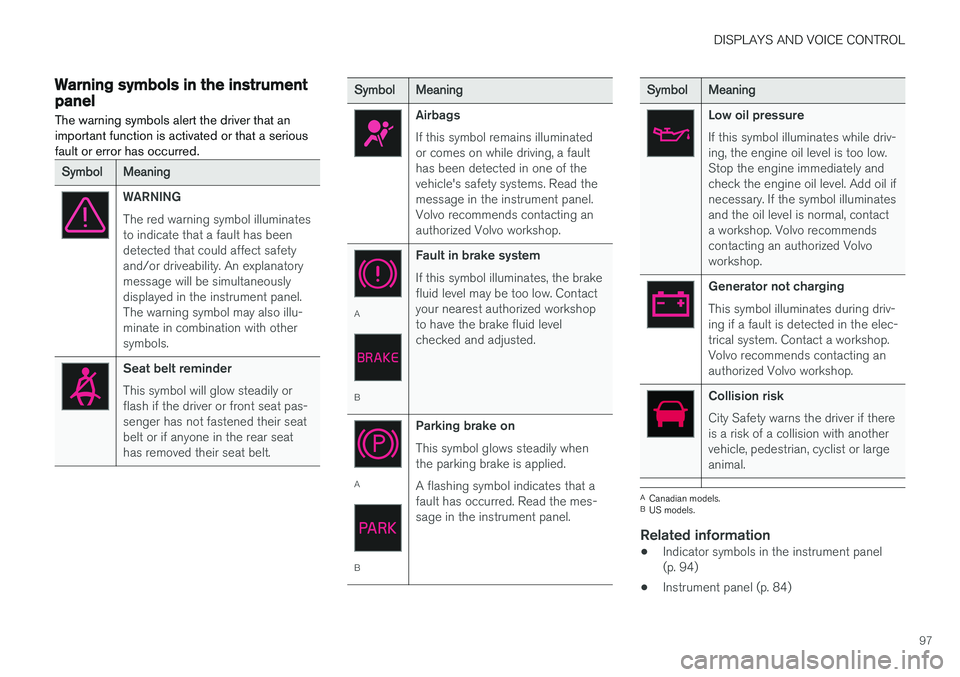
Warning symbols in the instrumentpanelThe warning symbols alert the driver that an important function is activated or that a seriousfault or error has occurred.
SymbolMeaning
WARNING The red warning symbol illuminates to indicate that a fault has beendetected that could affect safetyand/or driveability. An explanatorymessage will be simultaneouslydisplayed in the instrument panel.The warning symbol may also illu-minate in combination with othersymbols.
Seat belt reminder This symbol will glow steadily or flash if the driver or front seat pas-senger has not fastened their seatbelt or if anyone in the rear seathas removed their seat belt.
SymbolMeaning
Airbags If this symbol remains illuminated or comes on while driving, a faulthas been detected in one of thevehicle's safety systems. Read themessage in the instrument panel.Volvo recommends contacting anauthorized Volvo workshop.
A
B Fault in brake system If this symbol illuminates, the brake fluid level may be too low. Contactyour nearest authorized workshopto have the brake fluid levelchecked and adjusted.
A
BParking brake on This symbol glows steadily when the parking brake is applied. A flashing symbol indicates that a fault has occurred. Read the mes-sage in the instrument panel.
SymbolMeaning
Low oil pressure If this symbol illuminates while driv- ing, the engine oil level is too low.Stop the engine immediately andcheck the engine oil level. Add oil ifnecessary. If the symbol illuminatesand the oil level is normal, contacta workshop. Volvo recommendscontacting an authorized Volvoworkshop.
Generator not charging This symbol illuminates during driv- ing if a fault is detected in the elec-trical system. Contact a workshop.Volvo recommends contacting anauthorized Volvo workshop.
Collision risk City Safety warns the driver if there is a risk of a collision with anothervehicle, pedestrian, cyclist or largeanimal.
A
Canadian models.
B US models.
Related information
• Indicator symbols in the instrument panel (p. 94)
• Instrument panel (p. 84)
Page 432 of 686
||
STARTING AND DRIVING
430augment braking. This is indicated in the instru- ment panel with the pointer down in the red area.
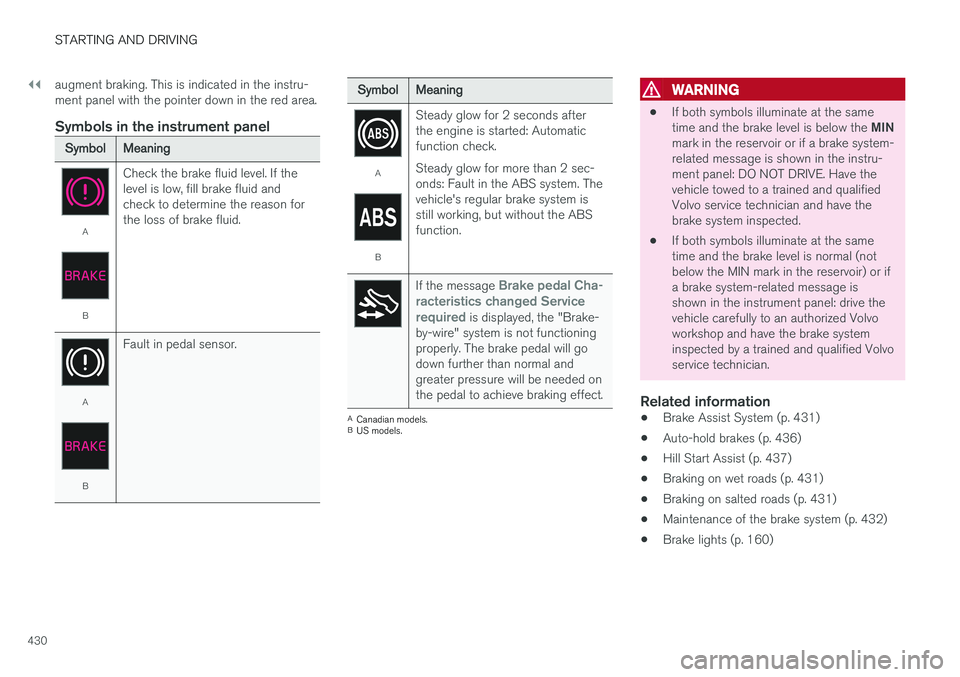
Symbols in the instrument panel
SymbolMeaning
A
B
Check the brake fluid level. If the level is low, fill brake fluid andcheck to determine the reason forthe loss of brake fluid.
A
BFault in pedal sensor.
SymbolMeaning
A
BSteady glow for 2 seconds after the engine is started: Automaticfunction check. Steady glow for more than 2 sec- onds: Fault in the ABS system. Thevehicle's regular brake system isstill working, but without the ABSfunction.
If the message Brake pedal Cha-
racteristics changed Service required
is displayed, the "Brake-
by-wire" system is not functioning properly. The brake pedal will godown further than normal andgreater pressure will be needed onthe pedal to achieve braking effect.
A Canadian models.
B US models.
WARNING
• If both symbols illuminate at the same time and the brake level is below the
MIN
mark in the reservoir or if a brake system- related message is shown in the instru-ment panel: DO NOT DRIVE. Have thevehicle towed to a trained and qualifiedVolvo service technician and have thebrake system inspected.
• If both symbols illuminate at the sametime and the brake level is normal (notbelow the MIN mark in the reservoir) or ifa brake system-related message isshown in the instrument panel: drive thevehicle carefully to an authorized Volvoworkshop and have the brake systeminspected by a trained and qualified Volvoservice technician.
Related information
• Brake Assist System (p. 431)
• Auto-hold brakes (p. 436)
• Hill Start Assist (p. 437)
• Braking on wet roads (p. 431)
• Braking on salted roads (p. 431)
• Maintenance of the brake system (p. 432)
• Brake lights (p. 160)
Page 462 of 686
||
STARTING AND DRIVING
460
Charge
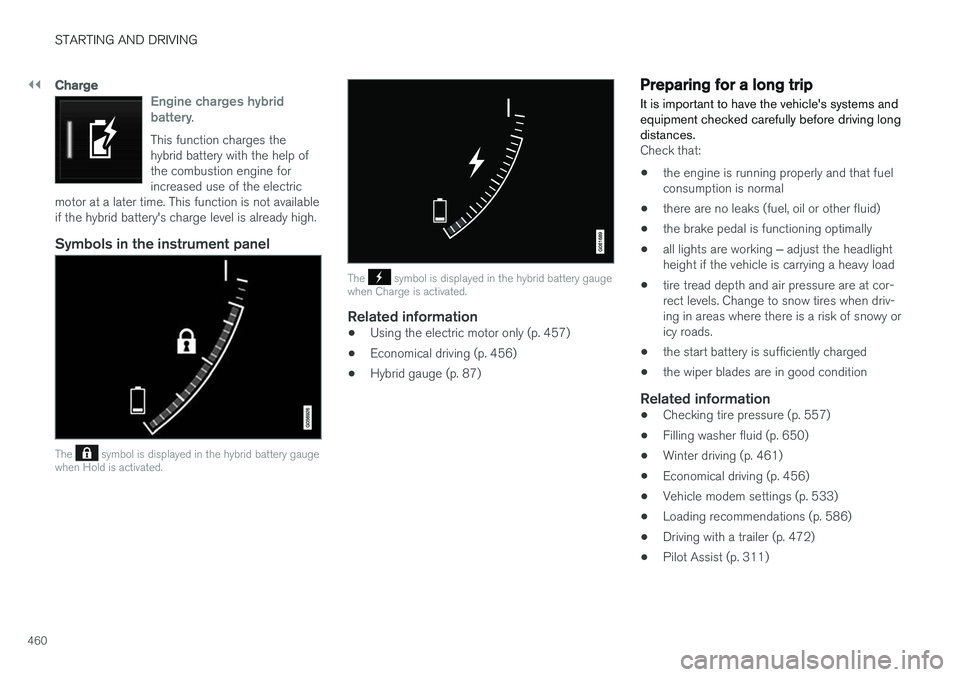
Engine charges hybrid battery.
This function charges the hybrid battery with the help ofthe combustion engine forincreased use of the electric
motor at a later time. This function is not availableif the hybrid battery's charge level is already high.
Symbols in the instrument panel
The symbol is displayed in the hybrid battery gauge
when Hold is activated.
The symbol is displayed in the hybrid battery gauge
when Charge is activated.
Related information
• Using the electric motor only (p. 457)
• Economical driving (p. 456)
• Hybrid gauge (p. 87)
Preparing for a long trip
It is important to have the vehicle's systems and equipment checked carefully before driving longdistances.
Check that:
• the engine is running properly and that fuel consumption is normal
• there are no leaks (fuel, oil or other fluid)
• the brake pedal is functioning optimally
• all lights are working
‒ adjust the headlight
height if the vehicle is carrying a heavy load
• tire tread depth and air pressure are at cor-rect levels. Change to snow tires when driv-ing in areas where there is a risk of snowy oricy roads.
• the start battery is sufficiently charged
• the wiper blades are in good condition
Related information
• Checking tire pressure (p. 557)
• Filling washer fluid (p. 650)
• Winter driving (p. 461)
• Economical driving (p. 456)
• Vehicle modem settings (p. 533)
• Loading recommendations (p. 586)
• Driving with a trailer (p. 472)
• Pilot Assist (p. 311)
Page 602 of 686
||
MAINTENANCE AND SERVICE
600
Monthly:
•Check cold tire pressure in all tires. Inspect the tires for wear.
• Check that engine coolant and other fluidlevels are between the indicated "min" and"max" markings.
• Clean interior glass surfaces with a glasscleaner and soft paper towels.
• Wipe driver information displays with a softcloth.
• Visually inspect battery terminals for corro-sion. Corrosion may indicate a loose terminalconnector, or a battery near the end of itsuseful service life. Consult your Volvo retailerfor additional information.
As needed:
Wash the car, including the undercarriage, to reduce wear that can be caused by a buildup ofdirt, and corrosion that can be caused by salt res-idues. Clean leaves and twigs from air intake vents at the base of the windshield, and from other placeswhere they may collect.
NOTE
Complete service information for qualified technicians is available online for purchase orsubscription at www.volvotechinfo.com.
Related information
•Vehicle status (p. 602)
• Scheduling service and repairs (p. 603)
• Connecting equipment to the vehicle's data link connector (p. 36)
• Technician certification (p. 37)
• Climate control system service (p. 608)
• Maintenance of the brake system (p. 432)
• Engine compartment overview (p. 609)
Data transfer between vehicle andworkshop over Wi-Fi
Volvo workshops have a designated Wi-Fi net- work for secure data transfer between your vehi-cle and the workshop. Your visit to the workshopwill be easier and more effective when diagnos-tics information and software can be transferredover the workshop's network.
When you arrive at the workshop, your technician can connect your vehicle to the workshop's Wi-Finetwork to perform troubleshooting and down-load software. For this type of communication,the vehicle only connects to the workshop's net-work. The vehicle can only be connected to thedesignated workshop networks, not to any othernetwork, e.g. your home network.
Manual connection to workshop Wi-FiManual connection is usually performed by aservice technician. Because the technician usesthe buttons on your remote key to connect thevehicle, it is important that you bring a key withbuttons when taking the vehicle in to a workshop.Pressing the lock button on the remote key threetimes will connect the vehicle to the workshop'sWi-Fi network. When the car is connected to a Wi-Fi network, the
symbol appears in the center display.
Page 611 of 686
MAINTENANCE AND SERVICE
609
Engine compartment overview
This overview shows some service-related com- ponents.
Some of the components included in the vehi- cle's electric drive system are located in theengine compartment. Exercise caution whenaccessing the engine compartment and onlytouch what is required for normal maintenance.
WARNING
Orange wiring may only be handled by quali- fied personnel.
WARNING
Several components in the vehicle work with high voltage that can be hazardous in case ofan incorrect procedure.
• Do not touch anything that is not clearly described in this Owner's Manual.
• Be careful when checking/filling fluids inthe engine compartment.
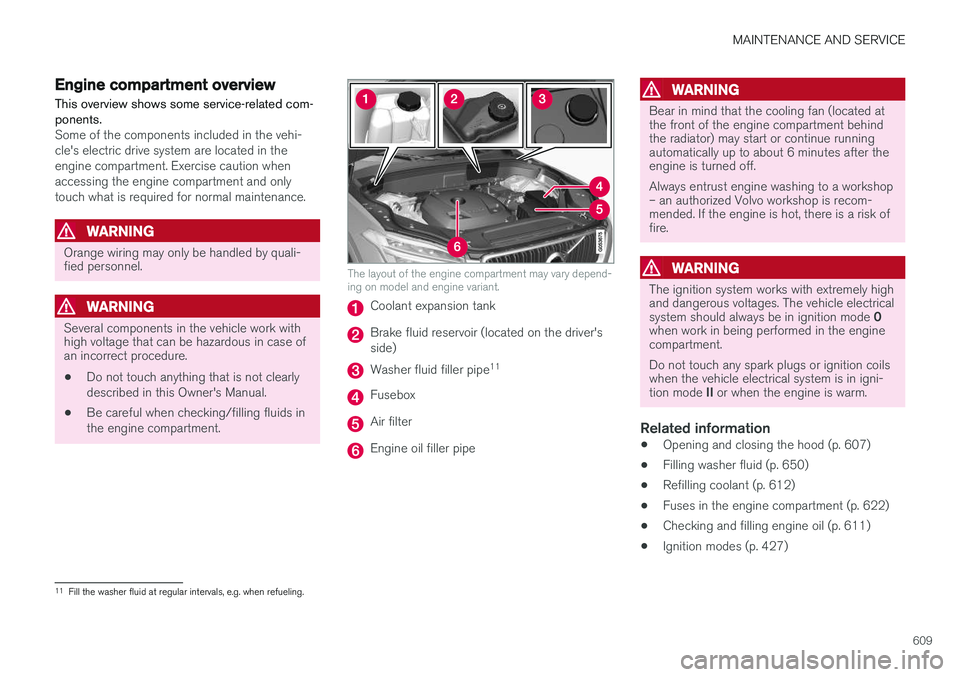
The layout of the engine compartment may vary depend- ing on model and engine variant.
Coolant expansion tank
Brake fluid reservoir (located on the driver's side)
Washer fluid filler pipe 11
Fusebox
Air filter
Engine oil filler pipe
WARNING
Bear in mind that the cooling fan (located at the front of the engine compartment behindthe radiator) may start or continue runningautomatically up to about 6 minutes after theengine is turned off. Always entrust engine washing to a workshop – an authorized Volvo workshop is recom-mended. If the engine is hot, there is a risk offire.
WARNING
The ignition system works with extremely high and dangerous voltages. The vehicle electrical system should always be in ignition mode
0
when work in being performed in the engine compartment. Do not touch any spark plugs or ignition coils when the vehicle electrical system is in igni- tion mode II or when the engine is warm.
Related information
• Opening and closing the hood (p. 607)
• Filling washer fluid (p. 650)
• Refilling coolant (p. 612)
• Fuses in the engine compartment (p. 622)
• Checking and filling engine oil (p. 611)
• Ignition modes (p. 427)
11
Fill the washer fluid at regular intervals, e.g. when refueling.
Page 665 of 686
SPECIFICATIONS
663
Coolant specifications
Recommended grade: Volvo-recommended
coolant diluted with 50% water. See package. Consult a Volvo retailer if you have any ques-tions. Do not mix different types of antifreeze as this could pose a health risk.
Related information
• Refilling coolant (p. 612)
Transmission fluid specifications
Under normal driving conditions, the transmis- sion fluid will not need to be changed during itsservice life. However, it may need to be changedif the vehicle is driven frequently in adverse driv-ing conditions.
Automatic transmission
Prescribed transmission fluid: AW1
Brake fluid specifications The medium in the hydraulic brake system is called brake fluid and is used to transfer brakingforce from e.g. pressure on the brake pedal via amaster brake cylinder to one or more slave cylin-ders, which in turn act on a mechanical brake.
Recommended grade:
Volvo Original Dot 4
class 6 or equivalent.
NOTE
Changing or filling brake fluid should be entrusted to an authorized Volvo workshop.
Related information
• Engine compartment overview (p. 609)
Page 669 of 686
INDEX
667
1, 2, 3 ...
4WD 443
A
ABSanti-lock brakes 429
AC (Air conditioning) 228
ACC - Adaptive Cruise Control 295, 298, 299, 300, 301, 302, 304, 305, 306, 307, 309
Accessories and extra equipment 35 installation 36
Accessory installation warning 36
Active Bending Lights 159
Adapting driving characteristics 272, 445
Adaptive Cruise Control 295, 298, 299, 300, 301, 302, 304, 305, 306, 307, 309
change cruise control functionality 307
function 295
manage speed 299, 300
pass 304, 305
radar sensor 326
set time interval 301, 302
troubleshooting 307
Adjusting the steering wheel 199
Airbag 52 activation/deactivation 56
driver's side 53
passenger side 53, 56
Air bag, see Airbag 52
Air conditioning 228Air conditioning, fluid volume and grade 664
Air distribution 207 air vents 207, 209
changing 208
defrosting 220
recirculation 219
table showing options 210
Air quality 204, 206 allergy and asthma 206
passenger compartment filter 207
Air recirculation 219
Alarm 268 deactivating 269
Allergy and asthma-inducing substances 206
All Wheel Drive, AWD 443
All Wheel Drive (AWD) 443
All Wheel Drive (four-wheel drive) 443
Android Auto 518, 520 Antenna location 257Apple CarPlay 515, 517
Approach lighting 161
Apps 487
Assistance at risk of collision 372, 373, 374, 375, 376, 377, 378, 380
Audio and media 486Audio system HD digital radio 497 SiriusXM ® Satellite radio 498, 499, 500
Auto-climate 219
Auto hold 436
Auto-hold brakes 436 activate and deactivate 436
after collision 437
Automatic car wash 641
Automatic high beam 157
Automatic locking 261
Automatic relocking 241, 254
Automatic Speed Limiter 282, 284, 285
Automatic transmission 439 kickdown 442
oil 663
Trailer 472
INDEX
Page 670 of 686
INDEX
668
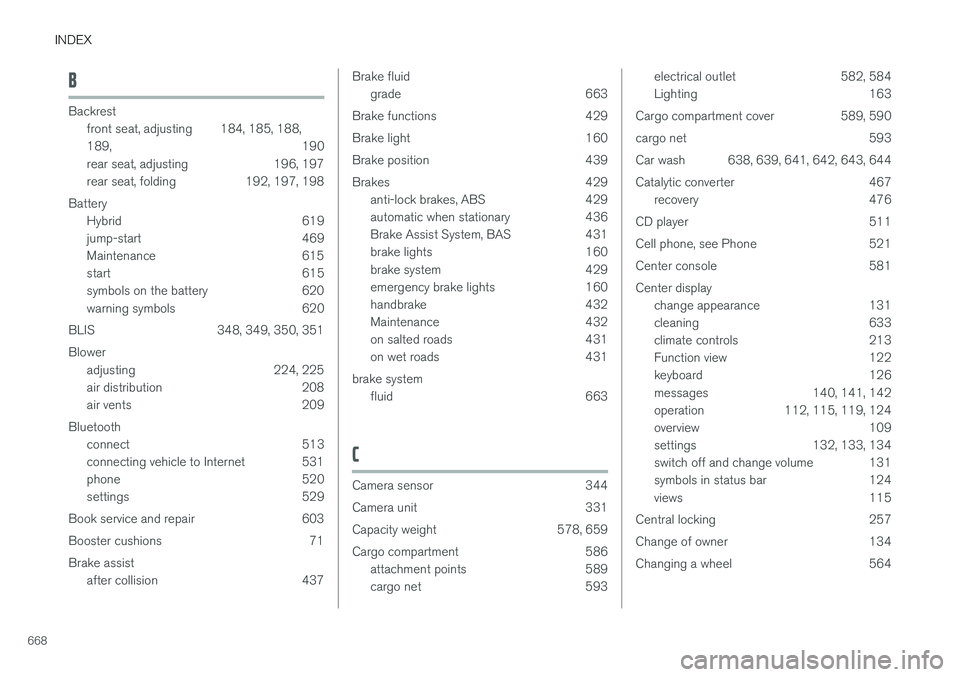
B
Backrestfront seat, adjusting 184, 185, 188, 189 , 190
rear seat, adjusting 196, 197
rear seat, folding 192, 197, 198
Battery Hybrid 619
jump-start 469
Maintenance 615
start 615
symbols on the battery 620
warning symbols 620
BLIS 348, 349, 350, 351 Blower adjusting 224, 225
air distribution 208
air vents 209
Bluetooth connect 513
connecting vehicle to Internet 531
phone 520
settings 529
Book service and repair 603
Booster cushions 71 Brake assist after collision 437
Brake fluid
grade 663
Brake functions 429
Brake light 160
Brake position 439
Brakes 429 anti-lock brakes, ABS 429
automatic when stationary 436
Brake Assist System, BAS 431
brake lights 160
brake system 429
emergency brake lights 160
handbrake 432
Maintenance 432
on salted roads 431
on wet roads 431
brake system fluid 663
C
Camera sensor 344
Camera unit 331
Capacity weight 578, 659
Cargo compartment 586 attachment points 589
cargo net 593
electrical outlet 582, 584
Lighting 163
Cargo compartment cover 589, 590
cargo net 593
Car wash 638, 639, 641, 642, 643, 644
Catalytic converter 467 recovery 476
CD player 511
Cell phone, see Phone 521
Center console 581Center display change appearance 131
cleaning 633
climate controls 213
Function view 122
keyboard 126
messages 140, 141, 142
operation 112, 115, 119, 124
overview 109
settings 132, 133, 134
switch off and change volume 131
symbols in status bar 124
views 115
Central locking 257
Change of owner 134
Changing a wheel 564
Page 673 of 686
INDEX
671
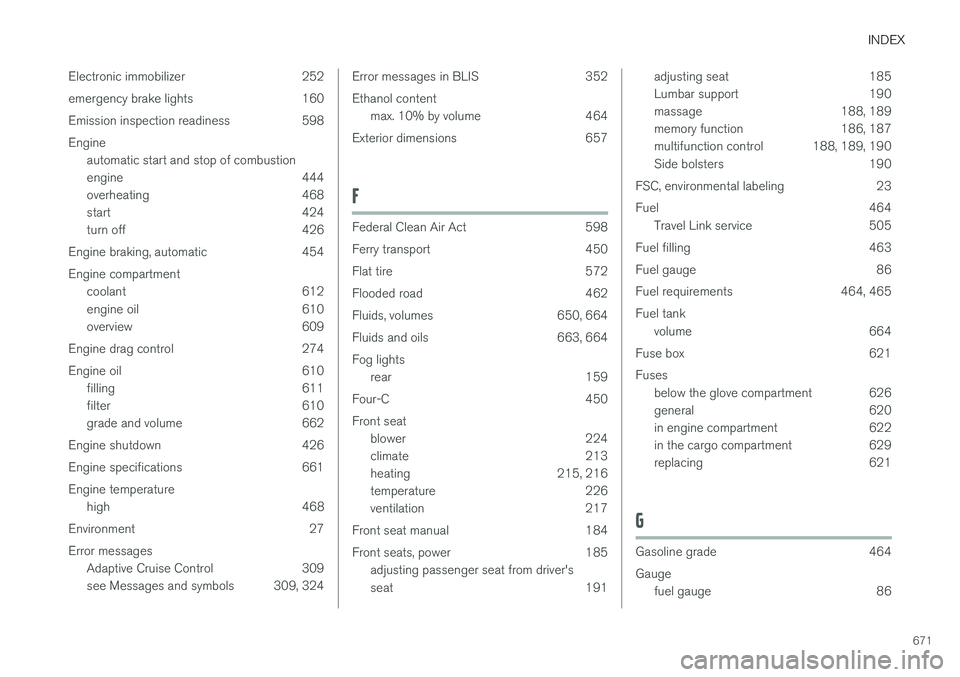
Electronic immobilizer 252
emergency brake lights 160
Emission inspection readiness 598Engine
automatic start and stop of combustion
engine 444
overheating 468
start 424
turn off 426
Engine braking, automatic 454 Engine compartment coolant 612
engine oil 610
overview 609
Engine drag control 274
Engine oil 610 filling 611
filter 610
grade and volume 662
Engine shutdown 426
Engine specifications 661Engine temperature high 468
Environment 27 Error messages Adaptive Cruise Control 309
see Messages and symbols 309, 324
Error messages in BLIS 352 Ethanol content
max. 10% by volume 464
Exterior dimensions 657
F
Federal Clean Air Act 598
Ferry transport 450
Flat tire 572
Flooded road 462
Fluids, volumes 650, 664
Fluids and oils 663, 664Fog lights rear 159
Four-C 450 Front seat blower 224
climate 213
heating 215, 216
temperature 226
ventilation 217
Front seat manual 184
Front seats, power 185 adjusting passenger seat from driver's
seat 191
adjusting seat 185
Lumbar support 190
massage 188, 189
memory function 186, 187
multifunction control 188, 189, 190
Side bolsters 190
FSC, environmental labeling 23
Fuel 464 Travel Link service 505
Fuel filling 463
Fuel gauge 86
Fuel requirements 464, 465 Fuel tank volume 664
Fuse box 621Fuses below the glove compartment 626
general 620
in engine compartment 622
in the cargo compartment 629
replacing 621
G
Gasoline grade 464 Gauge
fuel gauge 86