clock VOLVO XC90 T8 2018 Owner´s Manual
[x] Cancel search | Manufacturer: VOLVO, Model Year: 2018, Model line: XC90 T8, Model: VOLVO XC90 T8 2018Pages: 686, PDF Size: 11.51 MB
Page 86 of 686
DISPLAYS AND VOICE CONTROL
* Option/accessory.
84
Instrument panel
The instrument panel displays information rela- ted to the vehicle and driving.
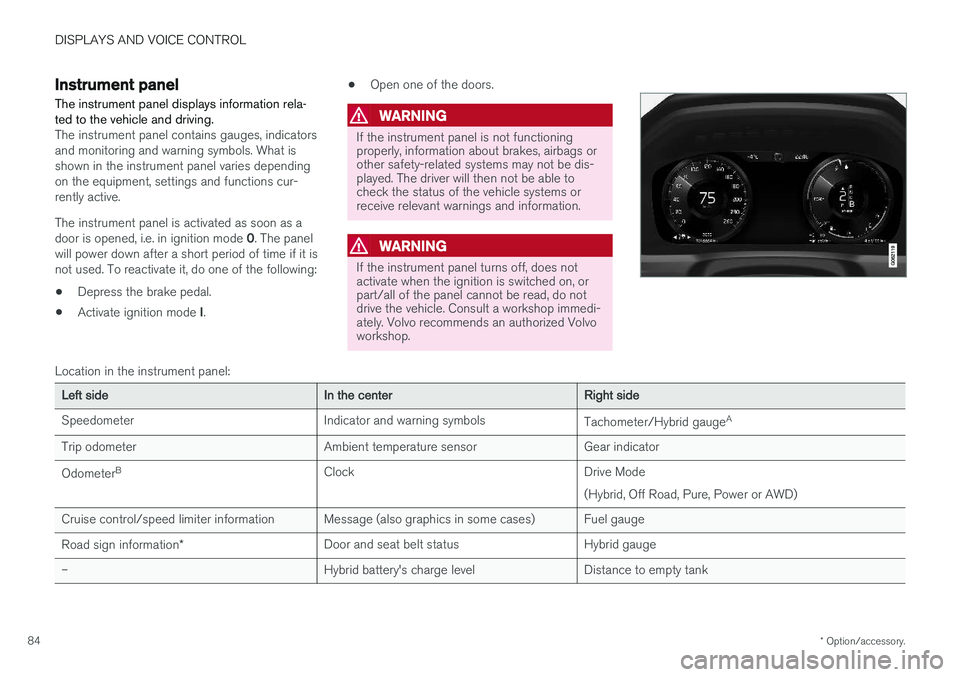
The instrument panel contains gauges, indicators and monitoring and warning symbols. What isshown in the instrument panel varies dependingon the equipment, settings and functions cur-rently active. The instrument panel is activated as soon as a door is opened, i.e. in ignition mode 0. The panel
will power down after a short period of time if it is not used. To reactivate it, do one of the following:
• Depress the brake pedal.
• Activate ignition mode
I. •
Open one of the doors.
WARNING
If the instrument panel is not functioning properly, information about brakes, airbags orother safety-related systems may not be dis-played. The driver will then not be able tocheck the status of the vehicle systems orreceive relevant warnings and information.
WARNING
If the instrument panel turns off, does not activate when the ignition is switched on, orpart/all of the panel cannot be read, do notdrive the vehicle. Consult a workshop immedi-ately. Volvo recommends an authorized Volvoworkshop.
Location in the instrument panel:
Left sideIn the centerRight side
Speedometer Indicator and warning symbols Tachometer/Hybrid gaugeA
Trip odometer Ambient temperature sensor Gear indicator Odometer B
Clock Drive Mode
(Hybrid, Off Road, Pure, Power or AWD)
Cruise control/speed limiter information Message (also graphics in some cases) Fuel gauge Road sign information * Door and seat belt status Hybrid gauge
– Hybrid battery's charge level Distance to empty tank
Page 95 of 686
DISPLAYS AND VOICE CONTROL
93
Related information
•Displaying trip statistics in the center display (p. 92)
• Trip computer (p. 89)
• Resetting the trip odometer (p. 91)
Date and time
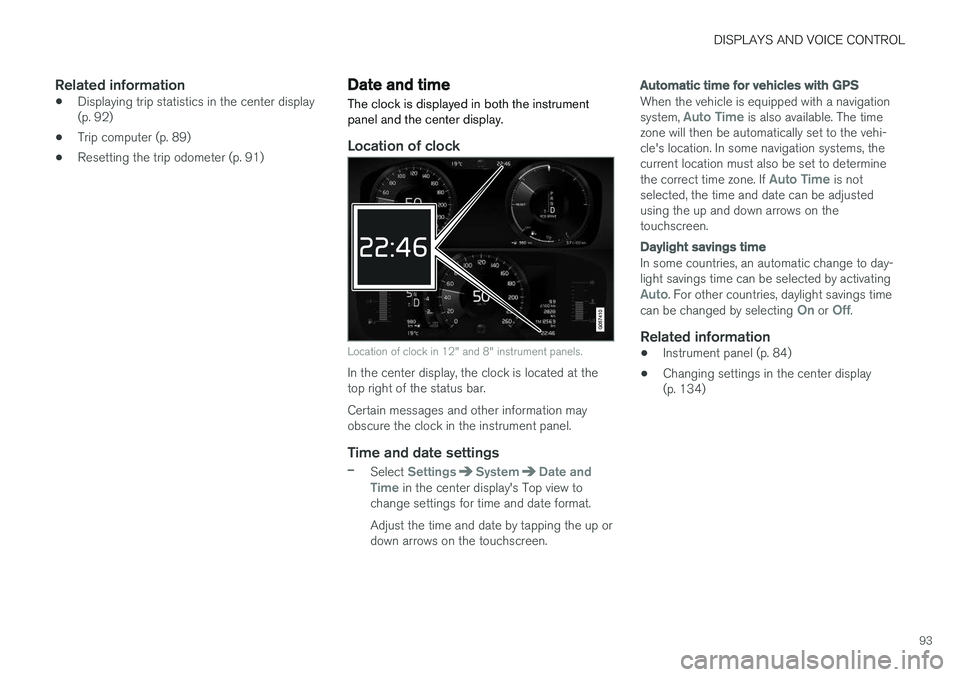
The clock is displayed in both the instrument panel and the center display.
Location of clock
Location of clock in 12" and 8" instrument panels.
In the center display, the clock is located at the top right of the status bar. Certain messages and other information may obscure the clock in the instrument panel.
Time and date settings
–Select SettingsSystemDate and
Time in the center display's Top view to
change settings for time and date format. Adjust the time and date by tapping the up or down arrows on the touchscreen.
Automatic time for vehicles with GPS
When the vehicle is equipped with a navigation system, Auto Time is also available. The time
zone will then be automatically set to the vehi- cle's location. In some navigation systems, thecurrent location must also be set to determine the correct time zone. If
Auto Time is not
selected, the time and date can be adjusted using the up and down arrows on thetouchscreen.
Daylight savings time
In some countries, an automatic change to day- light savings time can be selected by activating
Auto. For other countries, daylight savings time
can be changed by selecting On or Off.
Related information
• Instrument panel (p. 84)
• Changing settings in the center display (p. 134)
Page 113 of 686
DISPLAYS AND VOICE CONTROL
* Option/accessory.111
adjusted using the right-side steering wheel keypad.
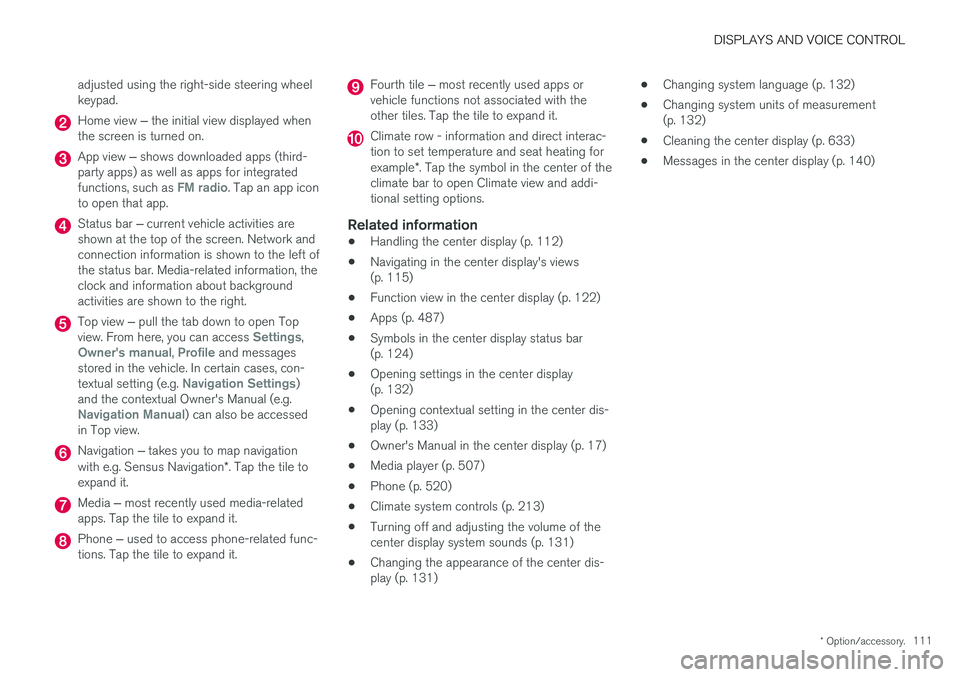
Home view
‒ the initial view displayed when
the screen is turned on.
App view ‒ shows downloaded apps (third-
party apps) as well as apps for integrated functions, such as
FM radio. Tap an app icon
to open that app.
Status bar ‒ current vehicle activities are
shown at the top of the screen. Network and connection information is shown to the left ofthe status bar. Media-related information, theclock and information about backgroundactivities are shown to the right.
Top view ‒ pull the tab down to open Top
view. From here, you can access Settings,Owner's manual, Profile and messages
stored in the vehicle. In certain cases, con- textual setting (e.g.
Navigation Settings)
and the contextual Owner's Manual (e.g.
Navigation Manual) can also be accessed
in Top view.
Navigation ‒ takes you to map navigation
with e.g. Sensus Navigation *. Tap the tile to
expand it.
Media ‒ most recently used media-related
apps. Tap the tile to expand it.
Phone ‒ used to access phone-related func-
tions. Tap the tile to expand it.
Fourth tile ‒ most recently used apps or
vehicle functions not associated with the other tiles. Tap the tile to expand it.
Climate row - information and direct interac- tion to set temperature and seat heating for example *. Tap the symbol in the center of the
climate bar to open Climate view and addi- tional setting options.
Related information
• Handling the center display (p. 112)
• Navigating in the center display's views(p. 115)
• Function view in the center display (p. 122)
• Apps (p. 487)
• Symbols in the center display status bar(p. 124)
• Opening settings in the center display(p. 132)
• Opening contextual setting in the center dis-play (p. 133)
• Owner's Manual in the center display (p. 17)
• Media player (p. 507)
• Phone (p. 520)
• Climate system controls (p. 213)
• Turning off and adjusting the volume of thecenter display system sounds (p. 131)
• Changing the appearance of the center dis-play (p. 131) •
Changing system language (p. 132)
• Changing system units of measurement(p. 132)
• Cleaning the center display (p. 633)
• Messages in the center display (p. 140)
Page 118 of 686
||
DISPLAYS AND VOICE CONTROL
* Option/accessory.
116
NOTE
In Home view's standard mode – short press on the Home button. An animation describingaccess to the various views is shown on thescreen.
NOTE
When the vehicle is moving:
• Certain functions (e.g. using the center display's keyboard) may be deactivated.
• Certain texts (e.g. those generated byapps) will be shortened to three rows. Tap the
Read out button to have the
entire message read aloud.
• The message will be shortened to one row. Tap the
Read out button to have
the entire message read aloud.
Status barCurrent vehicle activities are shown at the top of the screen in the status bar. Network and con-nection information is shown to the left of thestatus bar. Media-related information, the clockand information about background activities areshown to the right.
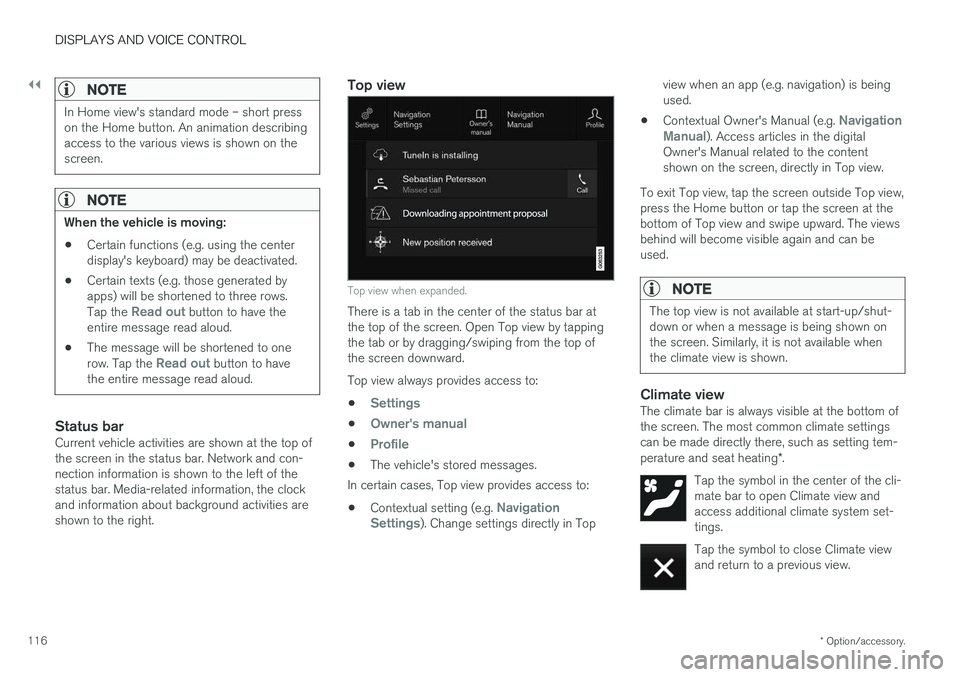
Top view
Top view when expanded.
There is a tab in the center of the status bar at the top of the screen. Open Top view by tappingthe tab or by dragging/swiping from the top ofthe screen downward. Top view always provides access to:
•
Settings
•Owner's manual
•Profile
• The vehicle's stored messages.
In certain cases, Top view provides access to:
• Contextual setting (e.g.
Navigation
Settings). Change settings directly in Top view when an app (e.g. navigation) is being used.
• Contextual Owner's Manual (e.g.
Navigation
Manual). Access articles in the digital
Owner's Manual related to the content shown on the screen, directly in Top view.
To exit Top view, tap the screen outside Top view,press the Home button or tap the screen at thebottom of Top view and swipe upward. The viewsbehind will become visible again and can beused.
NOTE
The top view is not available at start-up/shut- down or when a message is being shown onthe screen. Similarly, it is not available whenthe climate view is shown.
Climate viewThe climate bar is always visible at the bottom of the screen. The most common climate settingscan be made directly there, such as setting tem- perature and seat heating *.
Tap the symbol in the center of the cli- mate bar to open Climate view andaccess additional climate system set-tings.
Tap the symbol to close Climate view and return to a previous view.
Page 127 of 686
DISPLAYS AND VOICE CONTROL
125
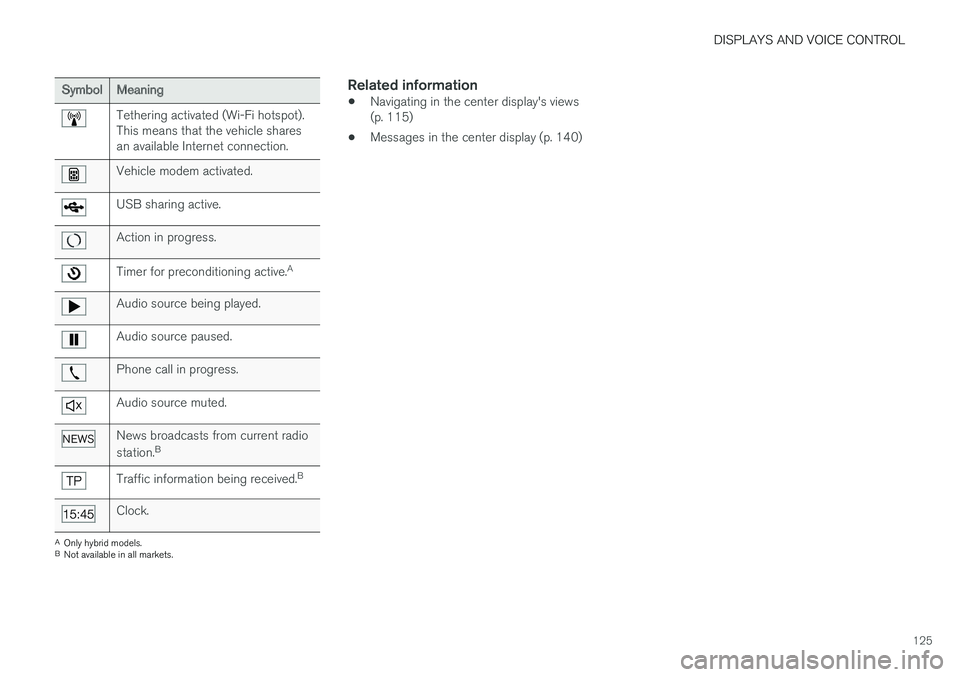
SymbolMeaning
Tethering activated (Wi-Fi hotspot). This means that the vehicle sharesan available Internet connection.
Vehicle modem activated.
USB sharing active.
Action in progress.
Timer for preconditioning active.A
Audio source being played.
Audio source paused.
Phone call in progress.
Audio source muted.
News broadcasts from current radio station.B
Traffic information being received. B
Clock.
A
Only hybrid models.
B Not available in all markets.
Related information
• Navigating in the center display's views (p. 115)
• Messages in the center display (p. 140)
Page 147 of 686
DISPLAYS AND VOICE CONTROL
}}
* Option/accessory.145
Lowering position
Confirm
The brightness of the graphic is automatically adapted to the light conditions in its background.Brightness is also affected by adjustments to thebrightness of the other displays in the vehicle. The height position can be stored in the front power seat's * memory function.
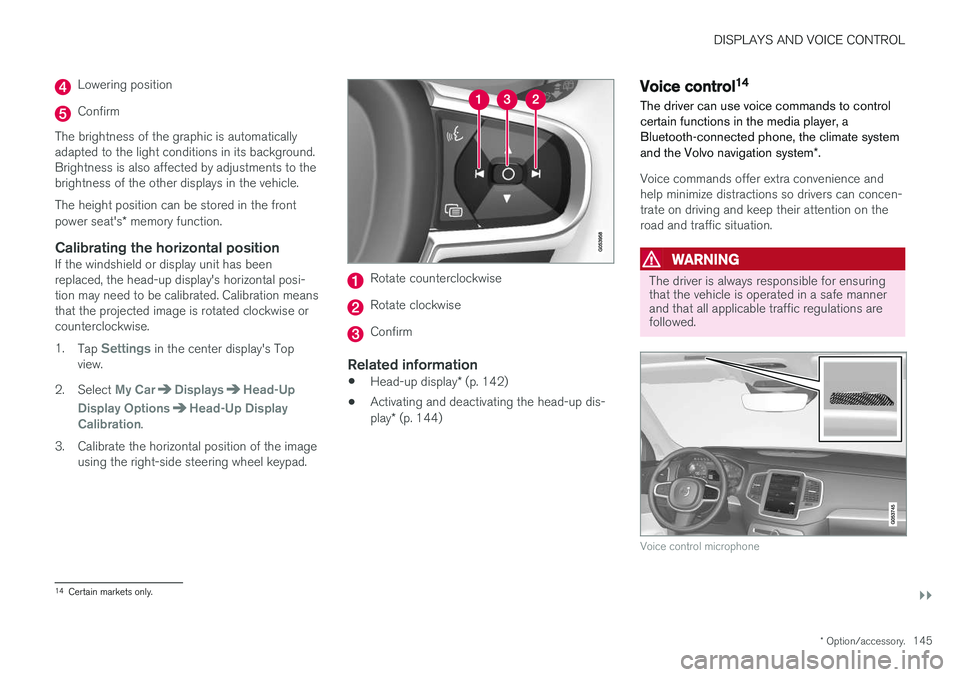
Calibrating the horizontal positionIf the windshield or display unit has been replaced, the head-up display's horizontal posi-tion may need to be calibrated. Calibration meansthat the projected image is rotated clockwise orcounterclockwise. 1.
Tap
Settings in the center display's Top
view.
2. Select
My CarDisplaysHead-Up
Display Options
Head-Up Display
Calibration.
3. Calibrate the horizontal position of the image using the right-side steering wheel keypad.
Rotate counterclockwise
Rotate clockwise
Confirm
Related information
• Head-up display
* (p. 142)
• Activating and deactivating the head-up dis- play
* (p. 144)
Voice control14
The driver can use voice commands to control certain functions in the media player, aBluetooth-connected phone, the climate system and the Volvo navigation system *.
Voice commands offer extra convenience and help minimize distractions so drivers can concen-trate on driving and keep their attention on theroad and traffic situation.
WARNING
The driver is always responsible for ensuring that the vehicle is operated in a safe mannerand that all applicable traffic regulations arefollowed.
Voice control microphone
14
Certain markets only.
Page 162 of 686
||
LIGHTING
160The rear fog light turns off automatically when the start knob is turned clockwise to turn off theignition or when the lighting ring is turned to the
or position.
NOTE
Regulations concerning rear fog light use vary from country to country.
Related information
•
Lighting panel and controls (p. 152)
• Ignition modes (p. 427)
Brake lights The brake lights are automatically illuminated when braking.
The brake lights illuminate when the brake pedal is depressed. They also illuminate when thebrakes are automatically applied by one of thedriver support systems.
Related information
•
Emergency brake lights (p. 160)
• Brake functions (p. 429)
Emergency brake lights
The emergency brake lights are activated to warn following vehicles of hard braking. This function causes an additional taillight on each side of the vehicle to illuminate.
The emergency brake lights are activated in the event of hard braking or if the ABS system isactivated and the vehicle is traveling at a highspeed. After the driver decelerates to a low speed and then releases the brake, the brake lights resumetheir normal brightness.
Related information
• Brake lights (p. 160)
• Brakes (p. 429)
• Hazard warning flashers (p. 161)
Page 235 of 686
CLIMATE CONTROL
233
Adding and editing timer setting forpreconditioningThe preconditioning timer can store up to 8 pre- set timer settings.
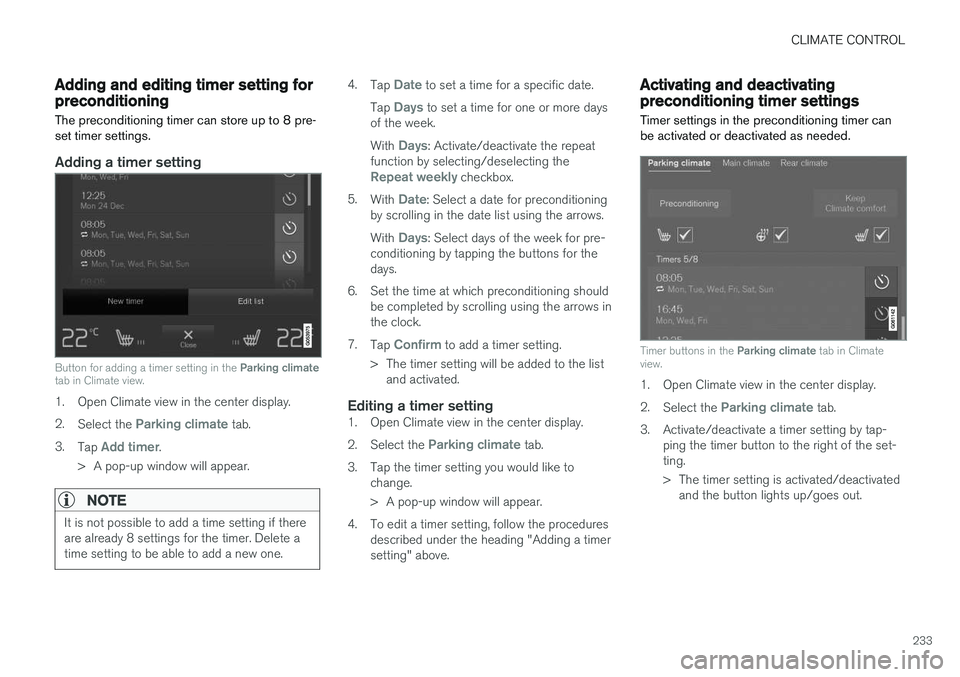
Adding a timer setting
Button for adding a timer setting in the Parking climate
tab in Climate view.
1. Open Climate view in the center display. 2. Select the
Parking climate tab.
3. Tap
Add timer.
> A pop-up window will appear.
NOTE
It is not possible to add a time setting if there are already 8 settings for the timer. Delete atime setting to be able to add a new one.
4. Tap Date to set a time for a specific date.
Tap
Days to set a time for one or more days
of the week. With
Days: Activate/deactivate the repeat
function by selecting/deselecting the
Repeat weekly checkbox.
5. With
Date: Select a date for preconditioning
by scrolling in the date list using the arrows. With
Days: Select days of the week for pre-
conditioning by tapping the buttons for the days.
6. Set the time at which preconditioning should be completed by scrolling using the arrows inthe clock.
7. Tap
Confirm to add a timer setting.
> The timer setting will be added to the list and activated.
Editing a timer setting1. Open Climate view in the center display. 2. Select the
Parking climate tab.
3. Tap the timer setting you would like to change.
> A pop-up window will appear.
4. To edit a timer setting, follow the procedures described under the heading "Adding a timer setting" above.
Activating and deactivatingpreconditioning timer settings
Timer settings in the preconditioning timer can be activated or deactivated as needed.
Timer buttons in the Parking climate tab in Climate
view.
1. Open Climate view in the center display. 2. Select the
Parking climate tab.
3. Activate/deactivate a timer setting by tap- ping the timer button to the right of the set- ting.
> The timer setting is activated/deactivatedand the button lights up/goes out.
Page 248 of 686
||
KEY, LOCKS AND ALARM
246
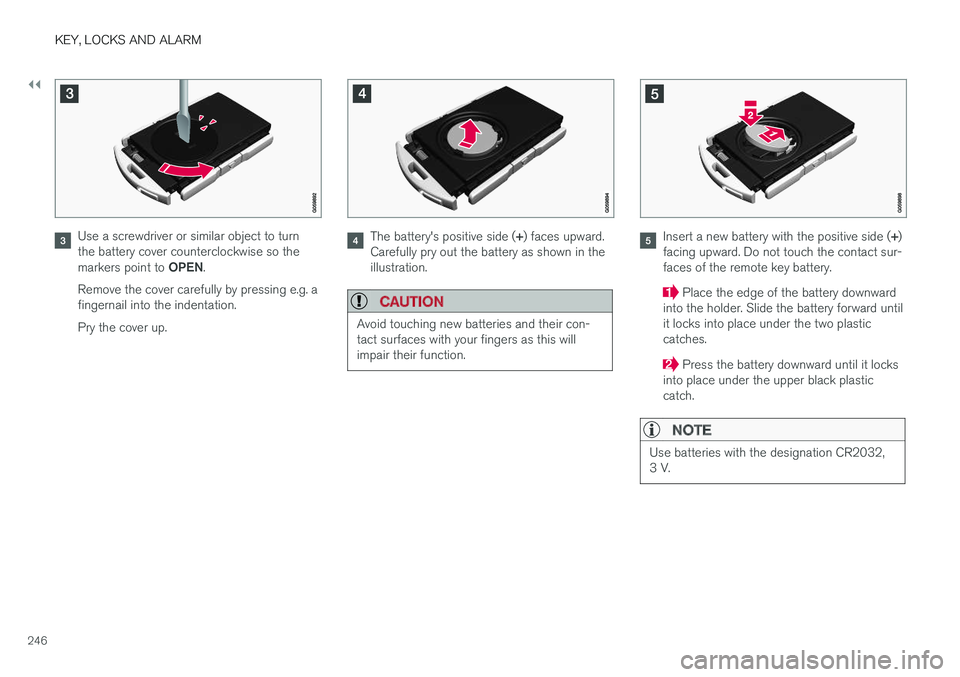
Use a screwdriver or similar object to turn the battery cover counterclockwise so the markers point to OPEN.
Remove the cover carefully by pressing e.g. a fingernail into the indentation. Pry the cover up.The battery's positive side ( +) faces upward.
Carefully pry out the battery as shown in the illustration.
CAUTION
Avoid touching new batteries and their con- tact surfaces with your fingers as this willimpair their function.
Insert a new battery with the positive side ( +)
facing upward. Do not touch the contact sur- faces of the remote key battery.
Place the edge of the battery downward
into the holder. Slide the battery forward until it locks into place under the two plasticcatches.
Press the battery downward until it locks
into place under the upper black plastic catch.
NOTE
Use batteries with the designation CR2032, 3 V.
Page 249 of 686
KEY, LOCKS AND ALARM
247
NOTE
Volvo recommends that batteries used in the remote control key satisfy UN Manual of Testand Criteria, Part III, sub-section 38.3. Thefactory installed batteries and batteriesreplaced by an authorized Volvo workshopsatisfy the above criterion.
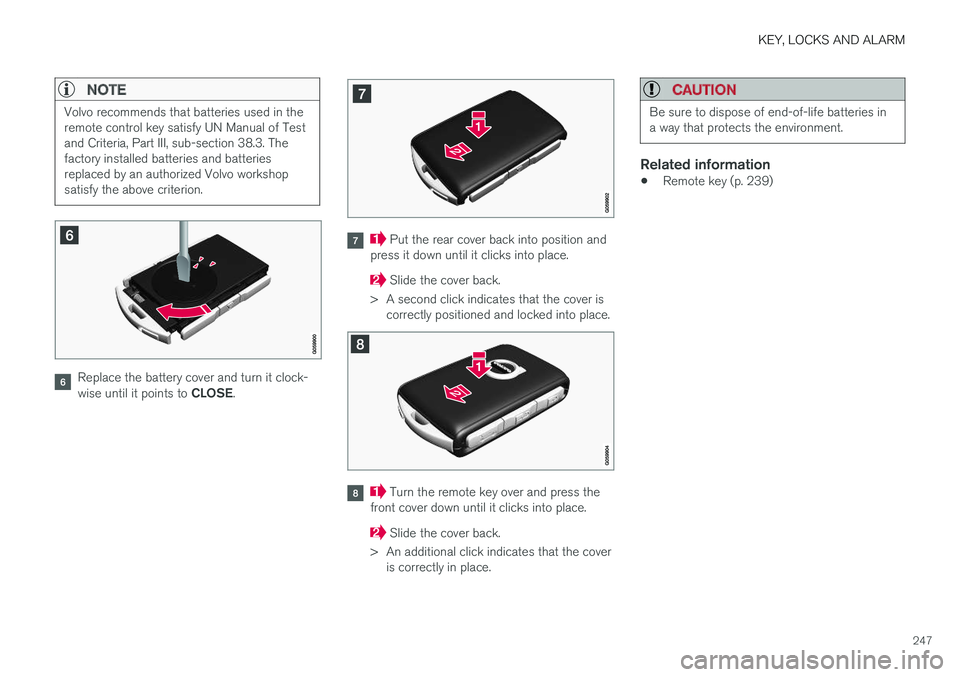
Replace the battery cover and turn it clock- wise until it points to CLOSE.
Put the rear cover back into position and
press it down until it clicks into place.
Slide the cover back.
> A second click indicates that the cover is correctly positioned and locked into place.
Turn the remote key over and press the
front cover down until it clicks into place.
Slide the cover back.
> An additional click indicates that the cover is correctly in place.
CAUTION
Be sure to dispose of end-of-life batteries in a way that protects the environment.
Related information
• Remote key (p. 239)