audio VOLVO XC90 TWIN ENGINE 2018 User Guide
[x] Cancel search | Manufacturer: VOLVO, Model Year: 2018, Model line: XC90 TWIN ENGINE, Model: VOLVO XC90 TWIN ENGINE 2018Pages: 686, PDF Size: 17 MB
Page 339 of 686

DRIVER SUPPORT
}}
337
Large animals
If there is a risk of colliding with a large animal,
City Safety can help reduce your vehicle's speed
by up to 15 km/h (9 mph).
The braking function for large animals is primarily
intended to mitigate the force of a collision at
higher speeds. Braking is most effective at
speeds above 70 km/h (43 mph) and less effec-
tive at lower speeds.
City Safety sub-functions Function overview
76
. Audio-visual collision warning
Camera/radar sensor distance monitoring City Safety carries out three steps in the follow-
ing order:
1.
Collision warning
2. Brake assistance
3. Auto-brake
Descriptions of what happens in these three
steps are provided below.
1 - Collision warning
The driver is first alerted to the risk of an immi-
nent collision.
City Safety can detect pedestrians, cyclists or
vehicles that are stationary, are moving in the
same direction as your vehicle and are ahead of
your vehicle. City Safety can also detect pedes-
trians, cyclists or large animals that are crossing
the road in front of your vehicle.
If there is a risk of a collision with a pedestrian,
large animal, cyclist or another vehicle, or with a
vehicle described in the section "City Safety in
crossing traffic", the driver will be alerted with
light, sound and pulsations in the brake pedal. At
lower speeds, during hard braking or if the accel-
erator pedal is pressed, the brake pedal pulsation
warning will not be given. The intensity of the
brake pedal pulsations varies according to the
vehicle's speed.
2 - Brake assistance
If the risk of a collision increases after the colli-
sion warning, brake support will be activated.
If the system determines that the pressure the
driver is exerting on the brake pedal is insufficient
to prevent the collision, brake support will
increase pressure. 76
Note: This illustration is general and details may vary depending on mod\
el.
Page 362 of 686
||DRIVER SUPPORT
* Option/accessory.
360
Settings
Adjusting the Speed Warning limit
The driver can adjust the settings to be alerted at
a higher speed than the posted speed limit.
To adjust the Speed Warning limit:
1. Select Settings My Car IntelliSafe
Road Sign Information
in the center
display's Top view.
2. Mark Speed Limit Warning.
>
The function is activated and a speed limit
selector is displayed.
3. Tap the up/down arrows on the screen to adjust the speed at which the Speed Warn-
ing will be given.
Please note that the set warn-
ing limit will not be used when
a speed camera symbol is dis-
played in the instrument panel.
Audible alert On/Off
An audible alert can also be given along with the
Speed Warning.
To adjust the audible alert settings:
1. Select Settings My Car IntelliSafe
Road Sign Information
in the center
display's Top view. 2.
Select/deselect Road Sign Audio Warning
to activate/deactivate the audible alert.
When
Road Sign Audio Warning is activated,
the driver will also be alerted if the vehicle is
approaching a one-way/"no-entry" road or
entrance.
Related information
• Road Sign Information* (p. 357) Activating/deactivating Speed
Warning in Road Sign Information
To activate the
Speed Limit Warning sub-func-
tion:
1.
Select Settings My Car IntelliSafe
Road Sign Information
in the center
display's Top view.
2. Mark Speed Limit Warning.
>
The function is activated and a speed limit
selector is displayed.
(see description for "selecting speed
limit" in section "Road Sign Information
with Speed warning and Settings")
Related information
• Road Sign Information* (p. 357)
• Road Sign Information with Speed Warning
and Settings (p. 359)
Page 363 of 686
DRIVER SUPPORT
}}
* Option/accessory. 361
Road Sign Information with speed
camera information
Vehicles equipped with RSI 102
and Sensus
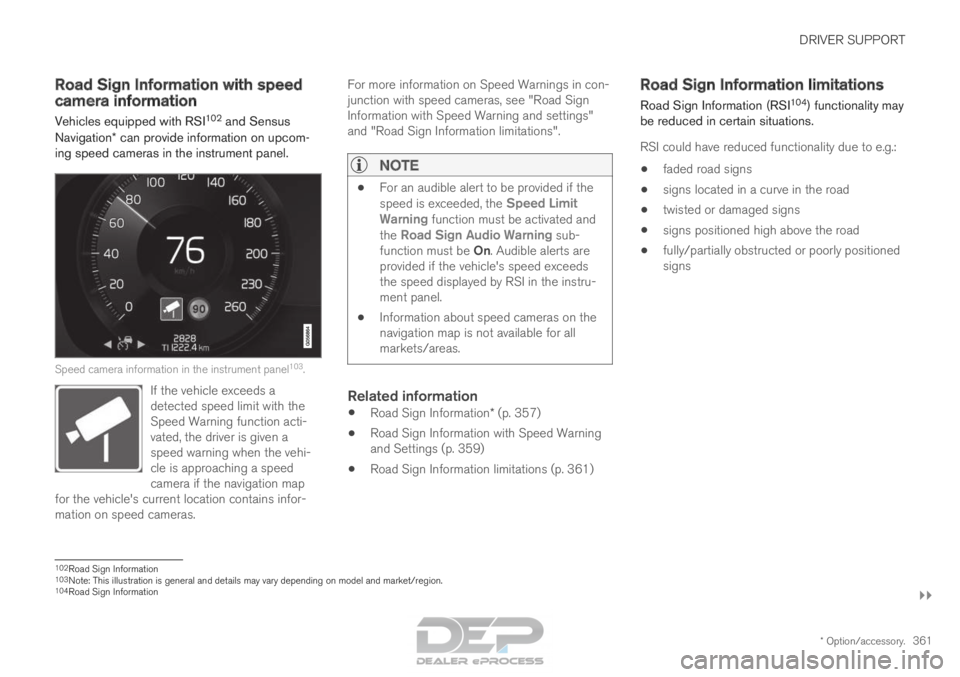
Navigation* can provide information on upcom-
ing speed cameras in the instrument panel. Speed camera information in the instrument panel
103
.
If the vehicle exceeds a
detected speed limit with the
Speed Warning function acti-
vated, the driver is given a
speed warning when the vehi-
cle is approaching a speed
camera if the navigation map
for the vehicle's current location contains infor-
mation on speed cameras. For more information on Speed Warnings in con-
junction with speed cameras, see "Road Sign
Information with Speed Warning and settings"
and "Road Sign Information limitations".
NOTE
•
For an audible alert to be provided if the
speed is exceeded, the
Speed Limit
Warning function must be activated and
the Road Sign Audio Warning sub- function must be On. Audible alerts are
provided if the vehicle's speed exceeds
the speed displayed by RSI in the instru-
ment panel.
• Information about speed cameras on the
navigation map is not available for all
markets/areas.
Related information
•
Road Sign Information* (p. 357)
• Road Sign Information with Speed Warning
and Settings (p. 359)
• Road Sign Information limitations (p. 361) Road Sign Information limitations
Road Sign Information (RSI 104
) functionality may
be reduced in certain situations.
RSI could have reduced functionality due to e.g.:
• faded road signs
• signs located in a curve in the road
• twisted or damaged signs
• signs positioned high above the road
• fully/partially obstructed or poorly positioned
signs 102
Road Sign Information
103 Note: This illustration is general and details may vary depending on mod\
el and market/region.
104 Road Sign Information
Page 383 of 686
DRIVER SUPPORT
* Option/accessory.381
Park Assist*
The Park Assist function can help the driver
when maneuvering in tight spaces by indicating
distances to obstacles using audible signals and
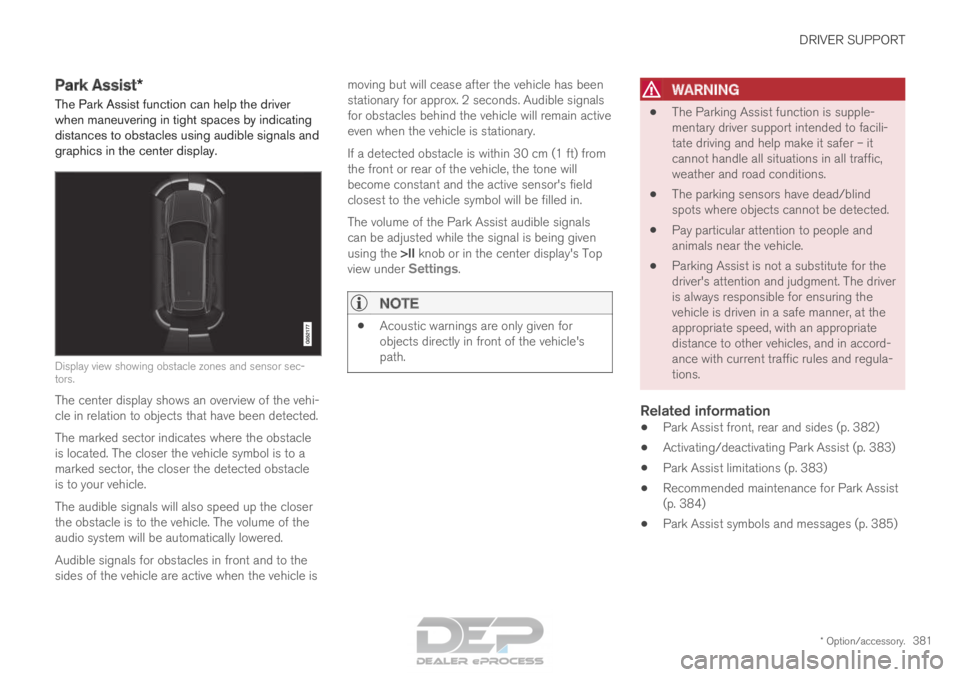
graphics in the center display. Display view showing obstacle zones and sensor sec-
tors.
The center display shows an overview of the vehi-
cle in relation to objects that have been detected.
The marked sector indicates where the obstacle
is located. The closer the vehicle symbol is to a
marked sector, the closer the detected obstacle
is to your vehicle.
The audible signals will also speed up the closer
the obstacle is to the vehicle. The volume of the
audio system will be automatically lowered.
Audible signals for obstacles in front and to the
sides of the vehicle are active when the vehicle is moving but will cease after the vehicle has been
stationary for approx. 2 seconds. Audible signals
for obstacles behind the vehicle will remain active
even when the vehicle is stationary.
If a detected obstacle is within 30 cm (1 ft) from
the front or rear of the vehicle, the tone will
become constant and the active sensor's field
closest to the vehicle symbol will be filled in.
The volume of the Park Assist audible signals
can be adjusted while the signal is being given
using the >II knob or in the center display's Top
view under Settings.
NOTE •
Acoustic warnings are only given for
objects directly in front of the vehicle's
path.
WARNING •
The Parking Assist function is supple-
mentary driver support intended to facili-
tate driving and help make it safer – it
cannot handle all situations in all traffic,
weather and road conditions.
• The parking sensors have dead/blind
spots where objects cannot be detected.
• Pay particular attention to people and
animals near the vehicle.
• Parking Assist is not a substitute for the
driver's attention and judgment. The driver
is always responsible for ensuring the
vehicle is driven in a safe manner, at the
appropriate speed, with an appropriate
distance to other vehicles, and in accord-
ance with current traffic rules and regula-
tions.
Related information
•Park Assist front, rear and sides (p. 382)
• Activating/deactivating Park Assist (p. 383)
• Park Assist limitations (p. 383)
• Recommended maintenance for Park Assist
(p. 384)
• Park Assist symbols and messages (p. 385)
Page 471 of 686
STARTING AND DRIVING
}}
469
Battery drain
The electrical functions in the vehicle drain the
battery to varying degrees. Avoid using ignition
mode II when the engine is switched off. Use
ignition mode I instead, as this uses less electri-
cal current.
Note that certain accessories may also drain
power from the electrical system. Do not use
functions that use a lot of electrical current when
the engine is turned off. Examples of such func-
tions are: • blower
• headlights
• windshield wipers
• audio system (especially at high volume).
If the starter battery voltage is low, a message is
shown in the driver display. The vehicle's energy-
saving function will then turn off or reduce certain
functions, such as the blower and/or the audio
system.
– Charge the battery by starting the engine
and let it run for at least 15 minutes (driving
charges the battery faster than letting the
engine idle).
Related information
• Start battery (p. 615)
• Ignition modes (p. 427) Jump starting using another battery
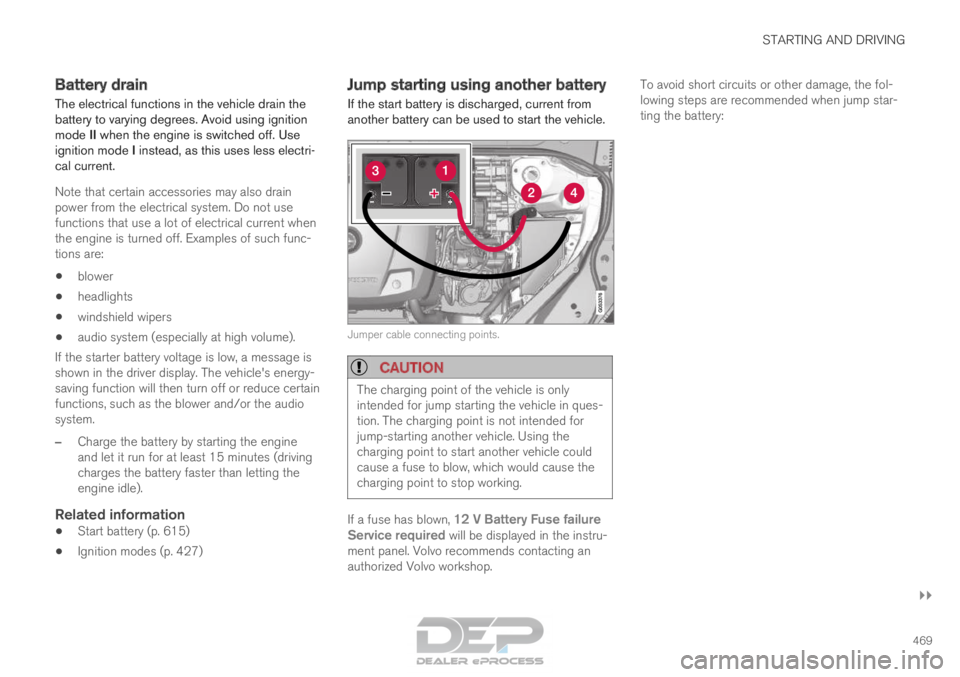
If the start battery is discharged, current from
another battery can be used to start the vehicle. Jumper cable connecting points.
CAUTION
The charging point of the vehicle is only
intended for jump starting the vehicle in ques-
tion. The charging point is not intended for
jump-starting another vehicle. Using the
charging point to start another vehicle could
cause a fuse to blow, which would cause the
charging point to stop working.
If a fuse has blown, 12 V Battery Fuse failure
Service required will be displayed in the instru-
ment panel. Volvo recommends contacting an
authorized Volvo workshop. To avoid short circuits or other damage, the fol-
lowing steps are recommended when jump star-
ting the battery:
Page 488 of 686
AUDIO, MEDIA AND INTERNET
* Option/accessory.
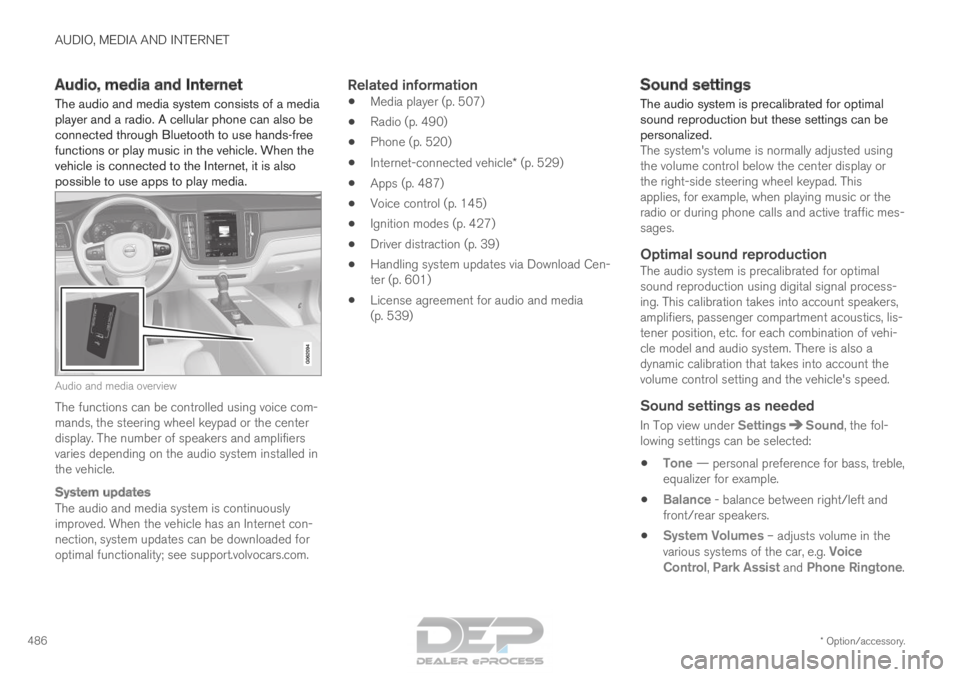
486 Audio, media and Internet
The audio and media system consists of a media
player and a radio. A cellular phone can also be
connected through Bluetooth to use hands-free
functions or play music in the vehicle. When the
vehicle is connected to the Internet, it is also
possible to use apps to play media. Audio and media overview
The functions can be controlled using voice com-
mands, the steering wheel keypad or the center
display. The number of speakers and amplifiers
varies depending on the audio system installed in
the vehicle.
System updates
The audio and media system is continuously
improved. When the vehicle has an Internet con-
nection, system updates can be downloaded for
optimal functionality; see support.volvocars.com.
Related information
•
Media player (p. 507)
• Radio (p. 490)
• Phone (p. 520)
• Internet-connected vehicle* (p. 529)
• Apps (p. 487)
• Voice control (p. 145)
• Ignition modes (p. 427)
• Driver distraction (p. 39)
• Handling system updates via Download Cen-
ter (p. 601)
• License agreement for audio and media
(p. 539) Sound settings
The audio system is precalibrated for optimal
sound reproduction but these settings can be
personalized.
The system's volume is normally adjusted using
the volume control below the center display or
the right-side steering wheel keypad. This
applies, for example, when playing music or the
radio or during phone calls and active traffic mes-
sages.
Optimal sound reproductionThe audio system is precalibrated for optimal
sound reproduction using digital signal process-
ing. This calibration takes into account speakers,
amplifiers, passenger compartment acoustics, lis-
tener position, etc. for each combination of vehi-
cle model and audio system. There is also a
dynamic calibration that takes into account the
volume control setting and the vehicle's speed.
Sound settings as needed
In Top view under Settings Sound, the fol-
lowing settings can be selected:
• Tone — personal preference for bass, treble,
equalizer for example.
• Balance - balance between right/left and
front/rear speakers.
• System Volumes – adjusts volume in the
various systems of the car, e.g.
Voice
Control, Park Assist and Phone Ringtone.
Page 489 of 686

AUDIO, MEDIA AND INTERNET
}}
* Option/accessory. 487
Sound experience*Recreate the acoustics from the Gothenburg Concert
Hall.
Sound Experience is opened from the center
display's app view and gives access to further
audio settings. The following settings are possi-
ble:
• Studio - the sound can be optimized for
Driver, All and Rear.
• Individual stage - surround sound mode
with settings for intensity and enclosure.
• Concert hall - reproduces the acoustics of
Gothenburg's Concert Hall
Active noise suppression*Some vehicles are equipped with an active noise
suppression function that reduces engine noise
in the passenger compartment using the audio
system. Microphones in the ceiling liner detect distracting noise and the audio system sends out
a counteracting sound to help reduce the unwan-
ted noise.
Microphones in the ceiling lining.
NOTE
Do not cover the vehicle microphones.
Related information
•
Media player (p. 507)
• Voice control settings (p. 148)
• Phone settings (p. 528)
• Audio, media and Internet (p. 486)
• Internet-connected vehicle* (p. 529) Apps
The App view contains applications (apps) that
provide access to certain vehicle services.
Page 490 of 686
||AUDIO, MEDIA AND INTERNET
* Option/accessory.
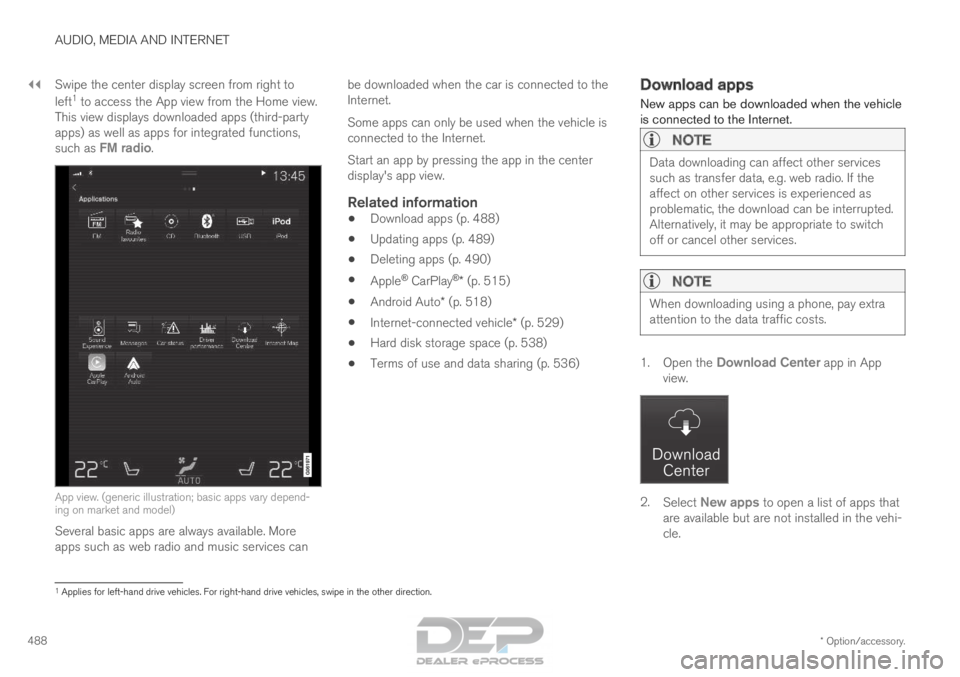
488 Swipe the center display screen from right to
left
1
to access the App view from the Home view.
This view displays downloaded apps (third-party
apps) as well as apps for integrated functions,
such as FM radio. App view. (generic illustration; basic apps vary depend-
ing on market and model)
Several basic apps are always available. More
apps such as web radio and music services can be downloaded when the car is connected to the
Internet.
Some apps can only be used when the vehicle is
connected to the Internet.
Start an app by pressing the app in the center
display's app view.
Related information
•
Download apps (p. 488)
• Updating apps (p. 489)
• Deleting apps (p. 490)
• Apple ®
CarPlay ®
* (p. 515)
• Android Auto* (p. 518)
• Internet-connected vehicle* (p. 529)
• Hard disk storage space (p. 538)
• Terms of use and data sharing (p. 536) Download apps
New apps can be downloaded when the vehicle
is connected to the Internet.
NOTE Data downloading can affect other services
such as transfer data, e.g. web radio. If the
affect on other services is experienced as
problematic, the download can be interrupted.
Alternatively, it may be appropriate to switch
off or cancel other services.
NOTE
When downloading using a phone, pay extra
attention to the data traffic costs.
1.
Open the Download Center app in App
view. 2.
Select New apps to open a list of apps that
are available but are not installed in the vehi-
cle. 1
Applies for left-hand drive vehicles. For right-hand drive vehicles, swi\
pe in the other direction.
Page 491 of 686

AUDIO, MEDIA AND INTERNET
* Option/accessory.489
3. Tap on the row for an app in order to expand
in the list and get more information about the
app.
4. Select Install to start the download and
installation of the app.
>
The current status of the download and
installation will be shown.
If a download cannot be started immedi-
ately, a message will be displayed. The
app will remain in the list and it will be
possible to reattempt downloading.
Canceling a download
– Tap Abort to cancel a download in progress.
Note that only a download can be cancelled. An
installation cannot be cancelled once it has
begun.
Related information
• Apps (p. 487)
• Updating apps (p. 489)
• Deleting apps (p. 490)
• Internet-connected vehicle* (p. 529)
• Handling system updates via Download Cen-
ter (p. 601)
• Hard disk storage space (p. 538) Updating apps
Apps can be updated when the vehicle is con-
nected to the Internet.
NOTE Data downloading can affect other services
such as transfer data, e.g. web radio. If the
affect on other services is experienced as
problematic, the download can be interrupted.
Alternatively, it may be appropriate to switch
off or cancel other services.
NOTE
When downloading using a phone, pay extra
attention to the data traffic costs.
If an app is being used while an update is in pro-
gress, it will be restarted to complete the update.
Update all
1.
Open the Download Center app in App
view. 2.
Select Install all.
>
The update will begin.
Update certain apps
1. Open the Download Center app in App
view.
2. Select Application updates to open a list
of all available updates.
3. Find the desired app and select Install.
>
The update will begin.
Related information
• Apps (p. 487)
• Download apps (p. 488)
• Deleting apps (p. 490)
• Handling system updates via Download Cen-
ter (p. 601)
• Internet-connected vehicle* (p. 529)
Page 492 of 686

AUDIO, MEDIA AND INTERNET
* Option/accessory.
490 Deleting apps
When the vehicle is connected to the Internet, it
is possible to uninstall apps. If the app is being used, it must be closed before
it can be uninstalled.
1. Open the Download Center app in App
view. 2.
Select Application updates to open a list
of all installed apps.
3. Find the desired app and select Uninstall to
begin uninstalling the app.
>
When the app has been uninstalled, it will
be removed from the list.
Related information
• Apps (p. 487)
• Download apps (p. 488)
• Updating apps (p. 489)
• Handling system updates via Download Cen-
ter (p. 601)
• Internet-connected vehicle* (p. 529) Radio
The radio can receive broadcasting from the FM
waveband with HD Radio™ Technology and
SiriusXM
®
Satellite radio *. When the vehicle has
an Internet connection, it is also possible to lis-
ten to web radio. The radio can be controlled
using voice commands, the
right-side steering wheel key-
pad or the center display.
Related information
•
Starting the radio (p. 491)
• Changing waveband and radio station
(p. 491)
• Storing radio favorites (p. 493)
• Radio settings (p. 493) •
RBDS (p. 494)
• HD Radio™ (p. 494)
• SiriusXM ®
Satellite radio* (p. 498)
• Internet-connected vehicle* (p. 529)
• Voice control for radio and media (p. 148)
• Media player (p. 507)